• Regeln für den Video-Bereich:

    In den Börsenbereich gehören nur Angebote die bereits den Allgemeinen Regeln entsprechen.

    Einteilung

    - Folgende Formate gehören in die angegeben Bereiche:
    - Filme: Encodierte Filme von BluRay, DVD, R5, TV, Screener sowie Telesyncs im Format DivX, XviD und x264.
    - DVD: Filme im Format DVD5, DVD9 und HD2DVD.
    - HD: Encodierte Filme mit der Auflösung 720p oder darüber von BluRay, DVD, R5, TV, Screener sowie Telesyncs im Format x264.
    - 3D: Encodierte Filme von BluRay, die in einem 3D Format vorliegen. Dies gilt auch für Dokus, Animation usw.
    - Serien: Cartoon/Zeichentrick, Anime, Tutorials, Dokumentationen, Konzerte/Musik, Sonstiges sind demnach in die entsprechenden Bereiche einzuordnen, auch wenn sie beispielsweise im High Definition-Format oder als DVD5/DVD9/HD2DVD vorliegen. Ausnahme 3D.
    - Bereich Englisch: Englische Releases gehören immer in diesen Bereich.
    - Bereich Talk: Der Bereich, in dem über die Releases diskutiert werden kann, darf, soll und erwünscht ist.


    Angebot/Beitrag erstellen

    - Ein Beitrag darf erst dann erstellt werden, wenn der Upload bei mindestens einem OCH komplett ist. Platzhalter sind untersagt.
    - Bei einem Scenerelease hat der Threadtitel ausschließlich aus dem originalen, unveränderten Releasenamen zu bestehen. Es dürfen keine Veränderungen wie z.B. Sterne, kleine Buchstaben o.ä. vorgenommen werden. Ausnahme Serienbörse:
    - Bei einem Sammelthread für eine Staffel entfällt aus dem Releasename natürlich der Name der Folge. Beispiel: Die Simpsons S21 German DVDRip XviD - ITG
    - Dementsprechend sind also u.a. verboten: Erweiterungen wie "Tipp", "empfehlenswert", "only", "reup", usw. / jegliche andere Zusatzinformation oder Ergänzung, welche nicht in obiger Beschreibung zu finden ist.

    Aufbau des Angebots und Threadtitel

    Der Titel nach folgendem Muster erstellt zu werden. <Name> [3D] [Staffel] [German] <Jahr> <Tonspur> [DL] [Auflösung] <Quelle> <Codec> - <Group>
    Beispiel: The Dark Knight German 2008 AC3 DVDRip XviD - iND
    Beispiel: The Dark Knight 2008 DTS DL BDRip x264 - iND
    Beispiel: The Dark Knight 2008 AC3 DL BDRip XviD - iND
    Beispiel: The Dark Knight German 2008 AC3 720p BluRay x264 iND
    Beispiel: The Dark Knight 2008 DTS DL 1080p BluRay x264 iND
    Beispiel: Die Simpsons S01 German AC3 DVDRip XviD iND
    Beispiel: Die Simpsons S20 German AC3 720p BluRay x264 iND
    Beispiel: Sword Art Online II Ger Sub 2014 AAC 1080p WEBRip x264 - peppermint
    Entsprechend sind also u.a. verboten: Sonderzeichen wie Klammern, Sterne, Ausrufezeichen, Unterstriche, Anführungszeichen / Erweiterungen wie "Tipp", "empfehlenswert", "only", "reup", usw. / jegliche andere Zusatzinformation oder Ergänzung, welche nicht in obiger Beschreibung zu finden ist
    Ausnahmen hiervon können in den Bereichen geregelt sein.

    Die Beiträge sollen wie folgt aufgebaut werden:
    Überschrift entspricht dem Threadtitel
    Cover
    kurze Inhaltsbeschreibung
    Format, Größe, Dauer sind gut lesbar für Downloader außerhalb des Spoilers zu vermerken
    Nfo sind immer Anzugeben und selbige immer im Spoiler in Textform.
    Sind keine Nfo vorhanden z.B. Eigenpublikationen, sind im Spoiler folgende Dateiinformationen zusätzlich anzugeben :
    Quelle
    Video (Auflösung und Bitrate)
    Ton (Sprache, Format und Bitrate der einzelnen Spuren)
    Untertitel (sofern vorhanden)
    Hosterangabe in Textform außerhalb eines Spoiler mit allen enthaltenen Hostern.
    Bei SD kann auf diese zusätzlichen Dateiinformationen verzichtet werden.

    Alle benötigten Passwörter sind, sofern vorhanden, in Textform im Angebot anzugeben.
    Spoiler im Spoiler mit Kommentaren :"Schon Bedankt?" sind unerwünscht.


    Releases

    - Sind Retail-Release verfügbar, sind alle anderen Variationen untersagt. Ausnahmen: Alle deutschen Retail-Release sind CUT, in diesem Fall sind dubbed UNCUT-Release zulässig.
    - Im Serien-Bereich gilt speziell: Wenn ein Retail vor Abschluss einer laufenden Staffel erscheint, darf diese Staffel noch zu Ende gebracht werden.62
    - Gleiche Releases sind unbedingt zusammenzufassen. Das bedeutet, es ist zwingend erforderlich, vor dem Erstellen eines Themas per Suchfunktion zu überprüfen, ob bereits ein Beitrag mit demselben Release besteht. Ist dies der Fall, ist der bereits vorhandene Beitrag zu verwenden.
    - P2P und Scene Releases dürfen nicht verändert oder gar unter einem iND Tag eingestellt werden.


    Support, Diskussionen und Suche

    - Supportanfragen sind entweder per PN oder im Bereich Talk zu stellen.
    - Diskussionen und Bewertungen sind im Talk Bereich zu führen. Fragen an die Uploader haben ausschließlich via PN zu erfolgen, und sind in den Angeboten untersagt.
    - Anfragen zu Upload-Wünschen sind nur im Bereich Suche Video erlaubt. Antworten dürfen nur auf Angebote von MyBoerse.bz verlinkt werden.


    Verbote

    - Untersagt sind mehrere Formate in einem einzigen Angebotsthread, wie beispielsweise das gleichzeitige Anbieten von DivX/XviD, 720p und 1080p in einem Thread. Pro Format, Release und Auflösung ist ein eigener Thread zu eröffnen.
    - Grundsätzlich ebenso verboten sind Dupes. Uploader haben sich an geeigneter Stelle darüber zu informieren, ob es sich bei einem Release um ein Dupe handelt.
    - Gefakte, nur teilweise lauffähige oder unvollständige Angebote sind untersagt. Dies gilt auch für eigene Publikationen, die augenscheinlich nicht selbst von z.B. einer DVD gerippt wurden. Laufende Serien, bei denen noch nicht alle Folgen verfügbar sind, dürfen erstellt und regelmäßig geupdatet werden.
    - Untersagt sind Angebote, welche nur und ausschließlich in einer anderen Sprache als deutsch oder englisch vorliegen. Ausnahmen sind VORHER mit den Moderatoren zu klären.


    Verstoß gegen die Regeln

    - Angebote oder Beiträge, die gegen die Forenregeln verstoßen, sind über den "Melden"-Button im Beitrag zu melden.
  • Bitte registriere dich zunächst um Beiträge zu verfassen und externe Links aufzurufen.

*** Bestes IPTV *** bester Preis *** gratis Test ***


Mastering Visual Studio Code (2026)

AgentofHeart

MyBoerse.bz Pro Member

b2590cf161d064eee5b99f99246bbbaa.jpg

Mastering Visual Studio Code (2026)
2026-01-06
MP4 | Video: h264, 1920x1080 | Audio: AAC, 44.1 KHz
Language: English (US) | Size: 3.98 GB | Duration: 9h 0m​

Boost your productivity with Visual Studio Code, the best code editor of the moment!

What you'll learn
Install and configure VSCode for your specific operating system
Explore the UI of VSCode and quickly learn how to customize it for your needs
Design state of the art projects and lint, refactor and debug your program all within your IDE
VSCode advanced debugging techniques for JS, Python, Java, C++
Analyze big codebases easily with VSCode
Develop remotely with SSH directly inside your IDE
Develop inside a Docker container
VSCode extensions for frameworks (React, Vue, Angular)
Source control inside the code editor and basic and intermediate Git commands. Authenticate VSCode for all source control operations.
Markdown, JSDoc, SQL, YML - edit them with powerfull syntax highlight
Python in VSCode
Java in VSCode
C++ in VSCode
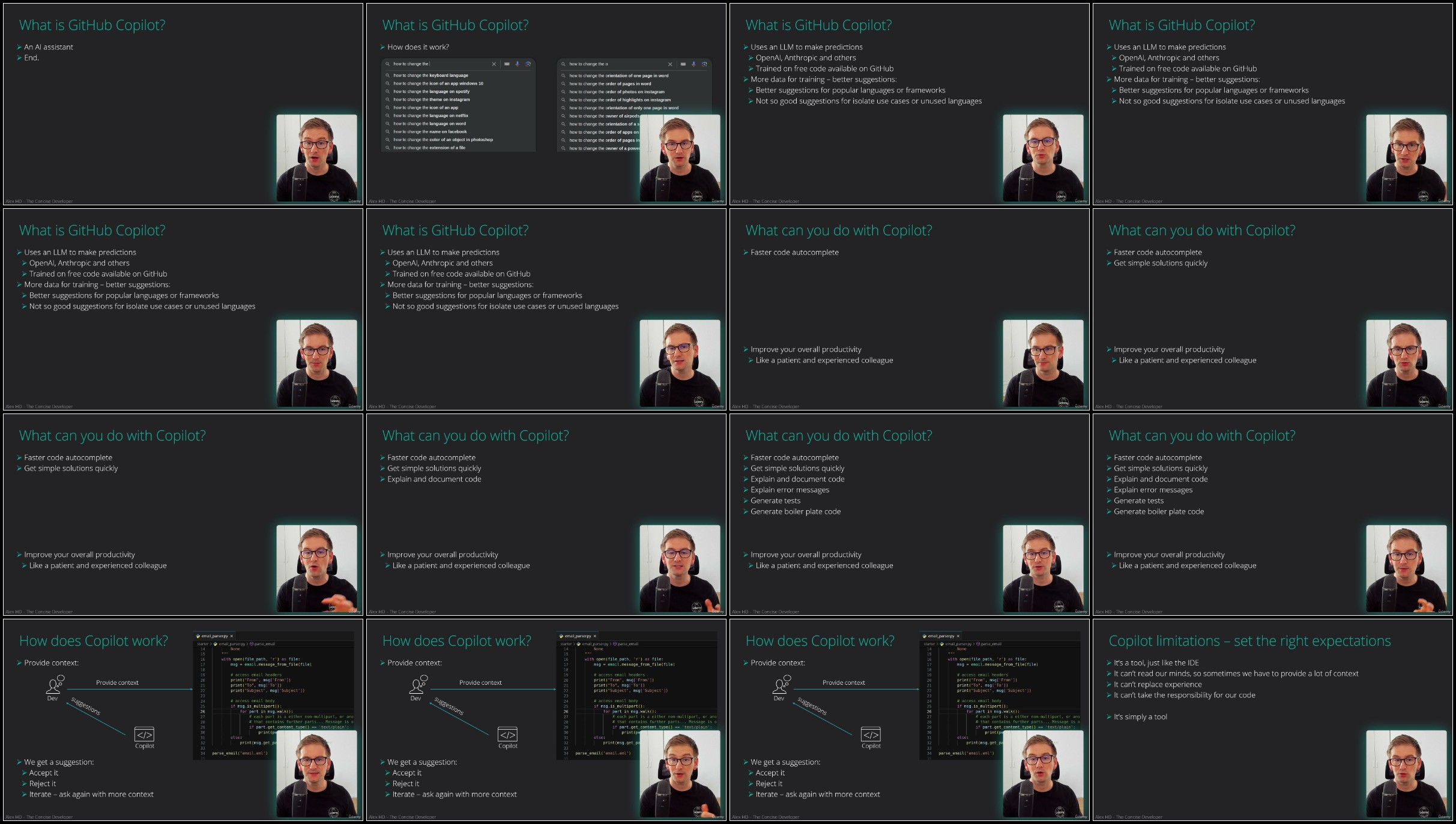
GitHub Copilot inside VSCode

Requirements
Basic coding skills

Description
In just a few years, Visual Studio Code became the number 1 tool any programmer should use. Even if you need a simple code editor, or a complex IDE, with rich features like refactoring, linting or debugger, VSCode is the tool you need. Why use one tool for your HTML and CSS, one for your back-end development and another one for course control, when you can have everything you need in one single, fast and beautiful program: Visual Studio Code.Welcome to my Mastering Visual Studio Code course, where you will learn everything you need about this awesome tool!VSCode features and topics covered:Installation and first stepsVisual and functional setupEasily handle Visual Studio Code extensionsGeneral programming topics:Debugging RefactoringCode snippetsFile formatting and commentsUse Visual Studio Code for JavaScript and TypeScript programming.Debug NodeJs and Browser apps.Use Visual Studio Code for Python or Java programming.Learn about the most popular VSCode extensions and even build and test your own extension.Use Remote capabilities of VSCode inside VMs and Docker.Learn Source and version control with Visual Studio Code and GitHub. Learn about Basic Git commands and VSCode authentication for remote pushing.Learn about advanced Visual Studio Code features like profiles or multi-cursor.Course features list:Installation and setupVSCode interface guideCommand palette, key shortcuts, multi-cursorVSCode extensionsAdvanced debugging techniquesUse VSCode for web development: HTML, CSS and JSConnect from VSCode with remote SSHUse Docker and develop inside a containerUnderstand Markdown and JSDocVSCode for Python developmentCreate Java projects with VSCodeUse VS Code for C++ and C#Build a VSCode extension with a data service using TypeScriptMaster great extensions, like live share, Git lens, Code Runner, Remote Development and many moreVisual Studio Code tips and tricksHistory of VSCodeYou can practice VS Code with your own JavaScript/TypeScript project, or use the one provided by the instructor. The objective here is to help you understand deeply how VSCode works and how you can use it.This course stands out with many advantages and highlights:Demanded topic - Visual Studio Code is the number one development tool of the momentDownloadable resources - all files used in the course are available for downloadUpdated content - completely updated for 2024 Concise content with respect for your time - most of the typing and idle times are cut. The course focuses on explanationsBeyond the basics structure: Visual Studio Code has great and up to date documentation. This course doesn't just walk you through it, instead it focuses on the difficult or weird parts, where you actually need guidanceExperienced and programming active instructor: a great teacher never looses touch with the industry. This is especially true for software development, where the industry is so dynamic. This helps the instructor stay up to date with the best coding guidelines and present you the challenging parts, not the "hello world"Great visuals - dark background, big font, 1080p resolution. Video optimized even for mobile devices.Certificate of completionEnroll and unlock the key to great productivity, no matter what technology you develop!

Who this course is for:
Web programmers and designers who want to use the best code editor, Experienced Python, Java or C++ programmers who want to switch to VSCode, IT professionals that need assistance with their text files (markdown, YML, JSON)

For More Courses Visit & Bookmark Your Preferred Language Blog
From Here: - - - - - - - -


Ub2ekkPO_o.jpg


727960186_yxusj-3zpq2cbe7096.jpg

Mastering Visual Studio Code (2026)
2026-01-06
MP4 | Video: h264, 1920x1080 | Audio: AAC, 44.1 KHz
Language: English (US) | Size: 3.98 GB | Duration: 9h 0m​

Boost your productivity with Visual Studio Code, the best code editor of the moment!

What you'll learn
Install and configure VSCode for your specific operating system
Explore the UI of VSCode and quickly learn how to customize it for your needs
Design state of the art projects and lint, refactor and debug your program all within your IDE
VSCode advanced debugging techniques for JS, Python, Java, C++
Analyze big codebases easily with VSCode
Develop remotely with SSH directly inside your IDE
Develop inside a Docker container
VSCode extensions for frameworks (React, Vue, Angular)
Source control inside the code editor and basic and intermediate Git commands. Authenticate VSCode for all source control operations.
Markdown, JSDoc, SQL, YML - edit them with powerfull syntax highlight
Python in VSCode
Java in VSCode
C++ in VSCode
GitHub Copilot inside VSCode

Requirements
Basic coding skills

Description
In just a few years, Visual Studio Code became the number 1 tool any programmer should use. Even if you need a simple code editor, or a complex IDE, with rich features like refactoring, linting or debugger, VSCode is the tool you need. Why use one tool for your HTML and CSS, one for your back-end development and another one for course control, when you can have everything you need in one single, fast and beautiful program: Visual Studio Code.Welcome to my Mastering Visual Studio Code course, where you will learn everything you need about this awesome tool!VSCode features and topics covered:Installation and first stepsVisual and functional setupEasily handle Visual Studio Code extensionsGeneral programming topics:Debugging RefactoringCode snippetsFile formatting and commentsUse Visual Studio Code for JavaScript and TypeScript programming.Debug NodeJs and Browser apps.Use Visual Studio Code for Python or Java programming.Learn about the most popular VSCode extensions and even build and test your own extension.Use Remote capabilities of VSCode inside VMs and Docker.Learn Source and version control with Visual Studio Code and GitHub. Learn about Basic Git commands and VSCode authentication for remote pushing.Learn about advanced Visual Studio Code features like profiles or multi-cursor.Course features list:Installation and setupVSCode interface guideCommand palette, key shortcuts, multi-cursorVSCode extensionsAdvanced debugging techniquesUse VSCode for web development: HTML, CSS and JSConnect from VSCode with remote SSHUse Docker and develop inside a containerUnderstand Markdown and JSDocVSCode for Python developmentCreate Java projects with VSCodeUse VS Code for C++ and C#Build a VSCode extension with a data service using TypeScriptMaster great extensions, like live share, Git lens, Code Runner, Remote Development and many moreVisual Studio Code tips and tricksHistory of VSCodeYou can practice VS Code with your own JavaScript/TypeScript project, or use the one provided by the instructor. The objective here is to help you understand deeply how VSCode works and how you can use it.This course stands out with many advantages and highlights:Demanded topic - Visual Studio Code is the number one development tool of the momentDownloadable resources - all files used in the course are available for downloadUpdated content - completely updated for 2024 Concise content with respect for your time - most of the typing and idle times are cut. The course focuses on explanationsBeyond the basics structure: Visual Studio Code has great and up to date documentation. This course doesn't just walk you through it, instead it focuses on the difficult or weird parts, where you actually need guidanceExperienced and programming active instructor: a great teacher never looses touch with the industry. This is especially true for software development, where the industry is so dynamic. This helps the instructor stay up to date with the best coding guidelines and present you the challenging parts, not the "hello world"Great visuals - dark background, big font, 1080p resolution. Video optimized even for mobile devices.Certificate of completionEnroll and unlock the key to great productivity, no matter what technology you develop!

Who this course is for:
Web programmers and designers who want to use the best code editor, Experienced Python, Java or C++ programmers who want to switch to VSCode, IT professionals that need assistance with their text files (markdown, YML, JSON)

For More Courses Visit & Bookmark Your Preferred Language Blog
From Here: - - - - - - - -


727960246_yxusj-1lc6j2kv8v85.jpg

zdXKsqss_o.jpg


RapidGator
-MiMiR.part1.rar
-MiMiR.part2.rar
-MiMiR.part3.rar
-MiMiR.part4.rar
-MiMiR.part5.rar
NitroFlare
-MiMiR.part1.rar
-MiMiR.part2.rar
-MiMiR.part3.rar
-MiMiR.part4.rar
-MiMiR.part5.rar
UsersDrive
-MiMiR.part1.rar
-MiMiR.part2.rar
-MiMiR.part3.rar
-MiMiR.part4.rar
-MiMiR.part5.rar
 
Zurück
Oben Unten