




Last updated 7/2022
MP4 | Video: h264, 1280x720 | Audio: AAC, 44.1 KHz
Language: English | Size: 8.55 GB | Duration: 8h 28m
Learn Animation, 3D Modeling, Rig Texture, Render Car Animations in Blender and Build Your Game in Unreal Engine & Unity
What you'll learn
Build Realistic & Cinematic 3D Environments
Make Awesome & Exciting Vehicle Drifting Animations
Export City Maps into your Scene in Blender (With Textures!!)
Learn Scale Matching of Real References (10th Street Bridge)
Create Realistic PBR Materials using Procedural Texturing
Learn the Secrets of Achieving Photorealistic Lighting in your Scenes
Add Camera Cinematic Shots: Helicopter - Pursuit - Standby
Master Car Rigging in Blender (Free Addons)
Use Greenscreen Backgrounds to Make your Renders look Awesome
Learn Rendering & Production of Short Animation Projects
Texture Painting: Customize Your Car Paint & Add Flames Decals
Smoke & Fire Fluid Simulation: Add Nitro Boosting Speed
Learn Environment Optimization for Game Design
Bake Textures the Right Way for Game Design
Add Car Controller: Drive Your Own Car in Unity
Learn to Import Assets from Blender to Unity
Build & Play Your Game on your Own Android Mobile Phone
Learn Unity 3D: Release your Game and Play it on your PC
Requirements
Just the basics of using Blender (I'm willing to help you with anything)
Blender (totally free) & your time
Description
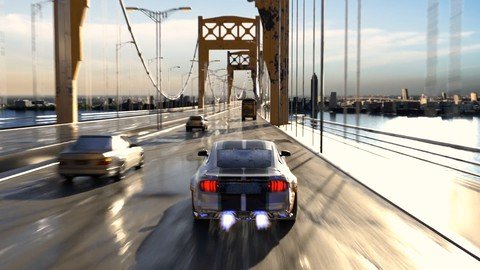
[NEW UPDATES] - Game Design & Development: Build Your Own Game on PC and Play using Unreal Engine & Unity 3DIn part II of this course, we will jump into Game Design, learn Unity & Unreal Engine and Build our own game. You will:Learn Environment Optimization for Game DesignBake Textures the Right Way for Game DesignSet Car Controller: Drive Your Own Car in Unity & Unreal EngineLearn to Import Assets from Blender to Unity & Unreal EngineBuild & Play Your Game on your Own Android Mobile PhoneLearn Unity 3D: Release your Game and Play it on your PCLIVE*SUPPORT IS*INCLUDED!! Even if you are absolute beginner in Blender.. I'm willing to help you directly to overcome any challenge you face Build Awesome Bridge Environment in BlenderWe will Build the 10th Street Bridge based on real references. You will learn all the modeling techniques: Proportional Editing, Modifiers like Array, Bevel, Subdivision to create realistic environments in Blender 2.9Learn Realistic Scale Matching of Real ReferencesAdvanced Modeling Tips & TricksImprove Your Texturing Skills: Well Explained, Flexible and Easy to Apply TipsYou will learn the basics for Creating Realistic textures in Blender using Procedural Texturing.. We will create Wet Asphalt with water puddles on it, Rust Metal. Also we will learn UV Mapping and how to assign those textures to the BridgeAsphaltGrunge & RustOcean (Scale)Make Realistic Ocean Water MaterialBuild Realistic Asphalt MaterialMake Realistic Grunge & Rust Material[NEW]: Add Greenscreen in Your Blender SceneYou will learn how implement green screen to overlay it on any background image you choose. This gives us much more flexibility in controlling our scene[NEW]: Create Realistic City Maps & Add it to your Blender SceneThis will helps populating the scene by adding much more details to it. It's a great method to make your animation looks legit and engagingMaster Vehicle Rigging in BlenderLearn Advanced Vehicle Rigging Techniques
 riftingRealistic Brake & SuspensionBurnout StartNormal Vehicles TrafficPassing other VehiclesAchieve Photorealistic Lighting in BlenderWe will cover the principles for Achieving Photorealistic Lighting in Blender. Environment Lighting is one of the most important aspects of CGI.. We will learn it & apply it in our Bridge sceneHollywood Cinematic Shots: Animate Realistic Vehicle MovementsYou will Learn how to Rig Vehicles (using Free CarRig Plugin) & We will Make a Short Film Animation 'BURNOUT'The 4 Conditions to an Excellent Car RigGenerate Rig for the Mercedes CarApply Car Suspension on Rough Roads for Maximum RealismRegular Traffic CirculationAvoid Obstacle AnimationBurnout Start AnimationRealistic Camera Movements - Within / Back / Front / HelicopterI will Help You Achieve This Final Result.. Even If You Are a Complete BeginnerLive Mentoring: I'm offering Free live assistance to help you with any challenge you face along the way.. We will be using Zoom to contactYou also have 30 days money back guarantee.. get them anytime you want
Overview
Section 1: Modeling - Build the 10th Street Bridge Scene
Lecture 1 Matching the Scale of the Bridge
Lecture 2 Modeling Bridge Supporting Columns
Lecture 3 Why Bevel Modifier is not Working & How to Fix it
Lecture 4 Modeling Bridge Fenses
Lecture 5 Modeling the Wires of the Bridge
Lecture 6 Modeling Streeet Poles
Lecture 7 Use Curve to Adjust the Shape of Bridge
Lecture 8 Modeling - Add Landscapes
Section 2: Texturing - Learn Realistic Procedural Texturing in Blender 2.9
Lecture 9 Make Realistic Asphalt
Lecture 10 Create Bricks Material
Lecture 11 Make Realistic Rust (Yellow)
Lecture 12 Add Realistic Ocean Shader
Section 3: Build a Realistic City in Blender
Lecture 13 Learn How to Build a Realistic City in Blender
Section 4: Lighting & Compositing - Finishing the Bridge Scene
Lecture 14 Set the Lighting & Finalize our Bridge Scene
Lecture 15 Let's Add an HDRI Map
Lecture 16 Camera Depth of Field
Lecture 17 Lighting & Compositing - Achieve the Final Render
Section 5: Realistic Vehicle Rigging in Blender
Lecture 18 The 4 Conditions to an Excellent Car Rig
Lecture 19 Generate Rig for the Mercedes Car Model
Section 6: Car Animation: Learn Vehicle Movements Simulation
Lecture 20 Animate Car Suspension for Maximum Realism
Lecture 21 Car Suspension on Rough Roads
Lecture 22 Avoid Obstacle Car Animation
Lecture 23 Burnout Acceleration Start
Lecture 24 Make Regular Traffic Circulation
Section 7: Cinematic Camera Animation
Lecture 25 Standby Car Camera Animation
Lecture 26 Helicopter View Camera Animation
Lecture 27 Car Pursuit Camera Animation
Section 8: Movie Production: Making the Short Film Animation
Lecture 28 Add Greenscreen Background to your Render & Use Motion Blur
Lecture 29 Production of Final Animation with Customized Background (Compositing)
Lecture 30 Faster Rendering Optimization: Reduce 93% of the Rendering Time
Lecture 31 Finalize Animation Project
Section 9: Bonus: Texture Painting & Gameplay Animation & Fluid Simulation
Lecture 32 Advanced Car Texturing Painting - Add Flame Decals
Lecture 33 Gameplay Car Animation (NFS)
Lecture 34 Fluid Simulation: Add Nitro Speed Boosting to Car Exhaust
Section 10: Optimize Bridge Environment for Game Design
Lecture 35 Optimize Environment For Game Design
Lecture 36 Bake Textures The Right Way - Ocean Shader
Lecture 37 Bake Bridge Textures The Right Way
Section 11: Unity 3D - Let's Build Our First Game
Lecture 38 Install Unity & Create Game Project
Lecture 39 Export Bridge Environment into Unity & Assign Textures
Lecture 40 Set Car Controller: Drive Your Own Vehicle
Lecture 41 How to Replace and Drive Different Vehicles
Lecture 42 Unity Lighting Improvement: Add HDRI Map in Unity
Lecture 43 Import Assets into Unity: Add Landscapes
Lecture 44 Build & Play Your Game on PC
Lecture 45 Build Mobile Game App: Play Your Game on Your Phone
Section 12: Unreal Engine - Let's Build Our Car Chase Game
Lecture 46 Introduction to Unreal Engine
Lecture 47 Export Bridge Environment & Texture it in Unreal Engine
Lecture 48 Rig Vehicle for Unreal Engine
Lecture 49 Make Camera Orbit Around Vehicle - Player Controller
Lecture 50 Make Car Drivable in Unreal Engine - Part 1
Lecture 51 Make Car Drivable in Unreal Engine - Part 2
Lecture 52 Finalize Texturing Car in Unreal Engine
You Demand of Yourself Excellence in Skills,You are Looking for a Formula to Guide You toward Achieving Photorealism
Homepage
Recommend Download Link Hight Speed | Please Say Thanks Keep Topic Live
Links are Interchangeable - No Password - Single Extraction
