




Published 12/2022
MP4 | Video: h264, 1280x720 | Audio: AAC, 44.1 KHz
Language: English | Size: 1.15 GB | Duration: 0h 58m
With 10 Brushes and Paper Textures Document Included
What you'll learn
Learn to paint in a loose watercolour style
Learn to adjust Procreate brushes
Learn to apply over-all texture
Learn my workflow for use of layers and blending
Requirements
No prerequisite required; some procreate experience is an asset
Description
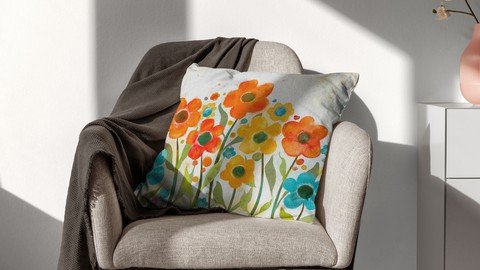
Have you had a chance to take my other Floral Procreate Classes, including Watercolour Floral Abstracts with Procreate? If you have, you've learned plenty about custom Procreate brushes, but I still have more for you!This new class, Loose and Bold Watercolor Floral in Procreate, will show you some of my illustration and watercolor painting methodology in Procreate, and ways to use brushes with wild abandon. In the class, I take you from start to finish in creating a full watercolor floral illustration, notably with a rough and loose technique. The star of the show is the use of brushes to create this loose and textural bold floral style.In this class, I want to show you how to create beautiful watercolor florals on your iPad using the app Procreate. You'll get the tools and understanding of how to paint any flower in a loose style! This class will greatly increase your observation skills and will help you develop your painting style. I'll even show you examples of how to fill in the floral compositions and add simple one-stroke leaves! The class is jam packed with tons of examples and tips, so what are you waiting for?In this class I'll walk you through:my step-by-step method for painting loose florals in Procreatetips for creating compositions for a varied and appealing final art piecemy workflow for use of layers and blendingadding seamless watercolour paper texturesthe addition of grunge elements to really sell this as an authentic pieceIf you've ever wondered if it was possible to replicate the look of a rough traditional floral watercolor on an iPad in Procreate, you've come to the right place. Ready to save on art supplies? Let's start creating your own beautiful watercolor florals in Procreate today.The key concepts I will include:review of my brush alterations and adjustmentsa look at Procreate brushes and their various idiosyncrasiesapproaches you can take in your creative workIn this class I will cover watercolor methods like layering, darkening, and adding small details. You will learn how to make abstract floral watercolor paintings with the addition of grunge details. I made a brush set with 11 brushes and I supply a watercolor texture paper that you can use as a texture overlay. It's everything you need to get started!Intro to Loose and Bold Watercolor Floral in ProcreateThis short intro will give you an overview of the class. I talk about the resources we will be using.Lesson 1: Overview and Document Set UpIn this lesson, I will give an overview of the document set-up, including importing the color palette which I provide. You will also receive an overview of the various paper textures and how to place them and add blending modes.Lesson 2: Rough Sketch and Painting PointersIn this lesson, I will break down the complete process of choosing what brushes to use as well as showing you how to do a super quick sketch of flower shapes. I show you several of the brushes from the resources package and explain the idiosyncrasies of each. Then we paint a few of the flowers and I explain the reasoning behind the choices I make.Lesson 3: Finishing Flowers and Starting LeavesIn this lesson, I will explain the settings and sizing of the brushes in relation to the look we are trying to achieve. I will show you some of the key techniques I use and explain every step of the way. By the end of the lesson, you will have the beginnings of a lovely layout with plenty of interest, and you will know how to use most of the brushes in the accompanying download. I will show you how to practice making leaf shapes with just one stroke.Lesson 4: Filling in All the LeavesIn this lesson, we start getting to the nitty gritty of the final artwork. I will be finalizing all the leaves and that will include creating a mask to get rid of unwanted details peeking through the flowers. We are one step closer to finalizing our design now.Lesson 5: Fill In Dots and Using the MopsAt this stage, we pull our layout together, and I will add the small details that make it work. I use the brushes as stamps to add fill-in dots to suggest additional flowers. We take a quick look at color adjustments and using the mop watercolor brush to bump up the colors in the big flowers. This is the last step before adding background details. This will show you just how versatile this technique can be and how valuable experimentation is in your development.Lesson 6: Background and Texture DetailingAdding all the finishing touches is the focus of this lesson. I will be adding all the background textures into the piece and then further enhancing all the foreground items with a combination of the color mop brushes as well as textures such as spatters.Lesson 7: Review and Completion Plus Mock UpsWe will conclude everything in this lesson. I show you a couple of quick mock-ups with the pattern and we end with a chat about next steps.Concepts covered:Concepts covered include but are not limited to Procreate floral watercolor design, Procreate Patterns with brushes, layering, transparency, Procreate brush stamps, Procreate canvas settings, watercolor brush settings, watercolor-specific issues, one-stroke leaf painting, Procreate snapping and guides, Procreate floral brush creation, the Brush Studio in Procreate, adjusting Procreate brushes, sizing of documents and brushes, compositions with brush stamps, adding texture with brushes, procreate brushes for adding other interesting details, workflow best practices, painting best practice, Procreate composites, techniques with paints and blending, and much more.You will get .· 52 minutes of direction from an instructor who has been in graphic design business and education for over 40 years· knowledge of multiple ways to solve each design challenge· an outline with links to further research· a list of helpful online sites to further your education into surface pattern design
Overview
Lecture 1 Overview and Document Set Up
Lecture 2 Overview and Document Set Up
Lecture 3 Rough Sketch and Painting Pointers
Lecture 4 Lesson 3 Finishing Flowers
Lecture 5 Filling in All the Leaves
Lecture 6 Fill In Dots and Using the Mops
Lecture 7 Fill In Dots and Using the Mops
Lecture 8 Background and Texture Detailing
Lecture 9 Review and Completion Plus Mock Ups
Procreate users wishing to broaden their horizons
Homepage
Recommend Download Link Hight Speed | Please Say Thanks Keep Topic Live
Links are Interchangeable - No Password - Single Extraction
