




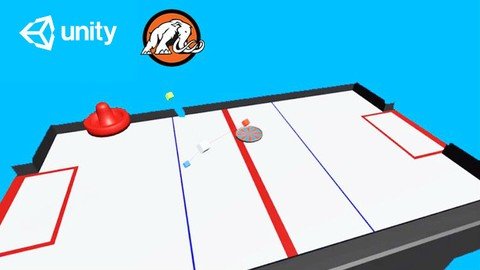
Learn To Code By Making An Air Hockey Game In Unity®!
Last updated 4/2018
MP4 | Video: h264, 1280x720 | Audio: AAC, 44.1 KHz
Language: English | Size: 1.14 GB | Duration: 6h 43m
Build an air hockey game to learn to code & make art in Blender. Ultimate guide for aspiring game developers!
What you'll learn
Build an air hockey game in Unity®.
Learn the fundamentals of game design.
Create artwork in Blender.
Code in C#.
Requirements
Unity® 2017.1.0f3 (for game set-up and coding)
Blender, a free program to make 3D models
This course was recorded on a Mac computer, but you can use a PC.
Description
This course was funded by a wildly successful Kickstarter.
Let's make an air hockey video game! Join Mammoth Interactive step-by-step in building a fully featured game from scratch. We show you how to make all the code and art for the game.
After purchasing this course, you'll be taken step-by-step through every process needed to do just that. Our two very talented instructors, Kevin Liao and Glauco Pires, explain everything from a basic, beginner level. That means*you don't need any prior coding or digital art experience to succeed here.
Glauco Pires will take you through the process of coding a game in Unity® from scratch. Kevin Liao will teach you how to create all the artistic elements you will need to complete the game. Kevin will teach this section of the course in Blender to make original 3D art.
The beauty of taking an online course like this is the ability to replay any of the lectures at any time. There is no time limit or final tests. You get to learn at your own pace with a practical model method of learning.
This course is project-based, so you will not be learning a bunch of useless coding practices.*We feel that project based training content is the best way to get from A to B. Taking this course means that you learn practical, employable skills immediately.
You can use the projects you build in this course to add to your LinkedIn profile. Give your portfolio fuel to take your career to the next level.
Learning how to code is a great way to jump in a new career or enhance your current career. Coding is the new math and learning how to code will propel you forward for any situation. Learn it today and get a head start for tomorrow. People who can master technology will rule the future.
You get full lifetime access to this course for a single one-time fee. Enroll today to join the Mammoth community!
Overview
Section 1: Introduction
Lecture 1 Introduction
Section 2: Introduction to Blender
Lecture 2 Intro and Setting Changes
Lecture 3 Camera Controls
Lecture 4 Emulated Numbpad Camera
Lecture 5 Basic Object Manipulation
Lecture 6 Frequently Used Tools
Lecture 7 Mirror Modifier
Section 3: Creating Art Assets (Blender Projects)
Lecture 8 Air Hockey Paddle
Lecture 9 Air Hockey Puck
Lecture 10 Air Hockey Table
Lecture 11 Asset Exporting
Section 4: Introduction to Unity Section 1
Lecture 12 Introduction
Lecture 13 Unity Editor
Lecture 14 Moving a Cube
Lecture 15 Materials
Lecture 16 Lights
Lecture 17 Particle system
Lecture 18 Applying Physics
Lecture 19 Asset Store
Section 5: Introduction to Unity Section 2 (Coding)
Lecture 20 Introduction
Lecture 21 Variables
Lecture 22 Methods
Lecture 23 If Blocks
Lecture 24 Loops
Section 6: Introduction to Unity Section 3 (Inputs)
Lecture 25 Introduction
Lecture 26 Key Presses
Lecture 27 Moving a Player
Lecture 28 Jumping
Lecture 29 Moving Forward
Lecture 30 Cycling Camera
Section 7: Introduction to Unity Section 4 (Prefabs)
Lecture 31 Introduction
Lecture 32 Introduction to Prefabs
Lecture 33 FAQ on Instantiating Objects
Lecture 34 Random Angles
Lecture 35 FAQ on Destroying Objects
Lecture 36 Explosion Effect
Lecture 37 Adding Explosion Effects
Section 8: Creating the Game (Unity Projects)
Lecture 38 Project Set Up
Lecture 39 Setting Up Physics
Lecture 40 Paddle Movement
Lecture 41 Game Bounds
Lecture 42 Bounciness
Lecture 43 Deceleration
Lecture 44 Collisions
Lecture 45 Scoring
Lecture 46 Player 2
Lecture 47 Interface
Lecture 48 Restarting the Game
Lecture 49 Sound Effects
Lecture 50 Challenge Time
Section 9: Resources
Lecture 51 ($1500 value!) Source Files
Lecture 52 Please leave us a rating!
Lecture 53 Bonus Lecture: Get 130 courses.
Complete beginners. No prior coding or digital art skills necessary.,People who want to make games.,Anyone who wants to learn Unity® or Blender.,Anyone who wants to learn game development.
Homepage
Recommend Download Link Hight Speed | Please Say Thanks Keep Topic Live
Links are Interchangeable - No Password - Single Extraction
Last updated 4/2018
MP4 | Video: h264, 1280x720 | Audio: AAC, 44.1 KHz
Language: English | Size: 1.14 GB | Duration: 6h 43m
Build an air hockey game to learn to code & make art in Blender. Ultimate guide for aspiring game developers!
What you'll learn
Build an air hockey game in Unity®.
Learn the fundamentals of game design.
Create artwork in Blender.
Code in C#.
Requirements
Unity® 2017.1.0f3 (for game set-up and coding)
Blender, a free program to make 3D models
This course was recorded on a Mac computer, but you can use a PC.
Description
This course was funded by a wildly successful Kickstarter.
Let's make an air hockey video game! Join Mammoth Interactive step-by-step in building a fully featured game from scratch. We show you how to make all the code and art for the game.
After purchasing this course, you'll be taken step-by-step through every process needed to do just that. Our two very talented instructors, Kevin Liao and Glauco Pires, explain everything from a basic, beginner level. That means*you don't need any prior coding or digital art experience to succeed here.
Glauco Pires will take you through the process of coding a game in Unity® from scratch. Kevin Liao will teach you how to create all the artistic elements you will need to complete the game. Kevin will teach this section of the course in Blender to make original 3D art.
The beauty of taking an online course like this is the ability to replay any of the lectures at any time. There is no time limit or final tests. You get to learn at your own pace with a practical model method of learning.
This course is project-based, so you will not be learning a bunch of useless coding practices.*We feel that project based training content is the best way to get from A to B. Taking this course means that you learn practical, employable skills immediately.
You can use the projects you build in this course to add to your LinkedIn profile. Give your portfolio fuel to take your career to the next level.
Learning how to code is a great way to jump in a new career or enhance your current career. Coding is the new math and learning how to code will propel you forward for any situation. Learn it today and get a head start for tomorrow. People who can master technology will rule the future.
You get full lifetime access to this course for a single one-time fee. Enroll today to join the Mammoth community!
Overview
Section 1: Introduction
Lecture 1 Introduction
Section 2: Introduction to Blender
Lecture 2 Intro and Setting Changes
Lecture 3 Camera Controls
Lecture 4 Emulated Numbpad Camera
Lecture 5 Basic Object Manipulation
Lecture 6 Frequently Used Tools
Lecture 7 Mirror Modifier
Section 3: Creating Art Assets (Blender Projects)
Lecture 8 Air Hockey Paddle
Lecture 9 Air Hockey Puck
Lecture 10 Air Hockey Table
Lecture 11 Asset Exporting
Section 4: Introduction to Unity Section 1
Lecture 12 Introduction
Lecture 13 Unity Editor
Lecture 14 Moving a Cube
Lecture 15 Materials
Lecture 16 Lights
Lecture 17 Particle system
Lecture 18 Applying Physics
Lecture 19 Asset Store
Section 5: Introduction to Unity Section 2 (Coding)
Lecture 20 Introduction
Lecture 21 Variables
Lecture 22 Methods
Lecture 23 If Blocks
Lecture 24 Loops
Section 6: Introduction to Unity Section 3 (Inputs)
Lecture 25 Introduction
Lecture 26 Key Presses
Lecture 27 Moving a Player
Lecture 28 Jumping
Lecture 29 Moving Forward
Lecture 30 Cycling Camera
Section 7: Introduction to Unity Section 4 (Prefabs)
Lecture 31 Introduction
Lecture 32 Introduction to Prefabs
Lecture 33 FAQ on Instantiating Objects
Lecture 34 Random Angles
Lecture 35 FAQ on Destroying Objects
Lecture 36 Explosion Effect
Lecture 37 Adding Explosion Effects
Section 8: Creating the Game (Unity Projects)
Lecture 38 Project Set Up
Lecture 39 Setting Up Physics
Lecture 40 Paddle Movement
Lecture 41 Game Bounds
Lecture 42 Bounciness
Lecture 43 Deceleration
Lecture 44 Collisions
Lecture 45 Scoring
Lecture 46 Player 2
Lecture 47 Interface
Lecture 48 Restarting the Game
Lecture 49 Sound Effects
Lecture 50 Challenge Time
Section 9: Resources
Lecture 51 ($1500 value!) Source Files
Lecture 52 Please leave us a rating!
Lecture 53 Bonus Lecture: Get 130 courses.
Complete beginners. No prior coding or digital art skills necessary.,People who want to make games.,Anyone who wants to learn Unity® or Blender.,Anyone who wants to learn game development.
Homepage
Recommend Download Link Hight Speed | Please Say Thanks Keep Topic Live
Links are Interchangeable - No Password - Single Extraction
