• Regeln für den Software-Bereich:


    Allgemeines:

    - In erster Linie sind unsere Boardregeln zu beachten, zu finden HIER.
    - Software zur Audiobearbeitung sollte ausschließlich im Unterforum "Audio" eingestellt werden.
    - Für Cracks, Keygens oder sonstige Freischaltungssoftware gibt es das Unterforum "Freischaltung".
    - Portable Software bitte im entsprechenden Unterforum "Portable Software" eintragen.
    - Diskussionen zur Installation und anderen Problemen mit der Software, bitte im enstprechenden Unterforum "Talk" führen.
    - Bei Unklarheiten und Fragen zu den Regeln bitte die Moderatoren kontaktieren.


    Angebot erstellen

    - Die Struktur des Threadtitels muss wie folgt umgesetzt werden: Herstellername - Softwarename - Versionsnummer
    - Unnötige Zusätze im Threadtitel wie "HOT", "NEW" oder Punkte zwischen den Wörtern sind nicht erlaubt.
    - Achtet darauf immer nur die Hauptversion und deren Updates in einem Thread zusammenfassen, konkretes Beispiel: SoftwareXY v3.12 gehört in den selben Thread mit SoftwareXY v3.13; SoftwareXY v.4.1 gehört in einen neuen eigenen Thread. Ausgenommen hiervon sind Sammelthreads und Dauerangebote.
    - Bei nicht bekannten Herstellern oder Angebote einer privaten Software, ist die Programmbezeichnung + Versionsnummer ausreichend.
    - Besondere Beachtung gilt für den ersten Beitrag eines Angebots. Dort muss eine kurze Beschreibung der Software in deutscher Sprache angegeben werden. Für offizielle Releases ist es Pflicht die NFO im Beitrag einzustellen(Spoiler, siehe nächster Punkt).
    - Weitere Informationen wie NFOs oder Changelogs, versteckt ihr bitte in einem Spoiler.


    Software Suche

    - Für Suchanfragen haben wir das Unterforum "Suche" erstellt.
    - Auch hier sollte vorher die Suchfunktion benutzt werden, um Doppelthreads vorzubeugen. Sollte es bereits eine Suchanfrage geben, könnt ihr den Thread gerne mit einem "Danke" pushen.


    Trojaner- und Virusalarm

    - Falls Euer Virenscanner bei einem Angebot Alarm schlägt, solltet ihr zunächst Ruhe bewahren. Viele Virenscanner erkennen Cracks/Keygens oft fälschlicherweise als Bedrohung.
    - Prüft die verdächtige Datei zuerst mit http://virustotal.com , sollte es sich hierbei wirklich um eine Bedrohung handeln, meldet den Beitrag und/oder wendet euch mit dem Bericht von VirusTotal.com an einen Moderator.


    Unerwünschte Angebote

    - Keylogger, Spionagetools, alles rund ums Thema Hacking/Cracking ist nicht erwünscht.
  • Bitte registriere dich zunächst um Beiträge zu verfassen und externe Links aufzurufen.

*** Bestes IPTV *** bester Preis *** gratis Test ***


Jerry YouTube Downloader Pro v7.5.7

jallyq

MyBoerse.bz Pro Member


nrd-AG3zjsx-O1c-ZMij-WTBju-WIer5-UPOQR.png

Jerry YouTube Downloader Pro v7.5.7
English | File size: 19.8 MB


YouTube Downloader Pro is an application that can help you find, download and convert videos from the popular video streaming service so you can enjoy them offline on various devices.

Enables you to search for videos and download them
First off, you should pay attention when installing the application, especially if you do not want to end up with shortcuts to Media Player on your desktop or file associations you do not need, as they are marked by default.

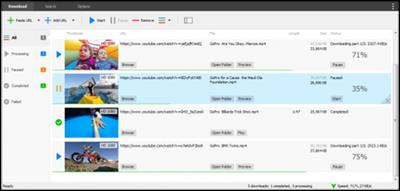
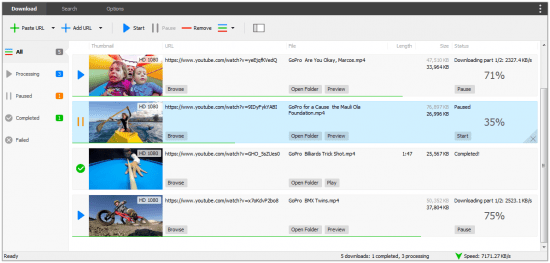
The program comes with a clean, well-organized and user-friendly interface that consists of three main tabs, the Download section, Search and Options. While the first two tabs are suggestive for their roles, you can set up the download folder, specify the download quality and access the converter from the Options tab.

It is necessary to mention that the interface also includes a small floating widget that you can move around anywhere on the screen and add the URL address of the clips you need to add them to the download queue. Although it can come in handy sometimes, it would have been useful if you could disable it.

Includes a handy converter function and supports numerous formats
You should know that the application works with a plethora of file formats, including but not limited to MP4, WEBM, FLV, 3GP and FLV. In the eventuality that you are working on an extensive playlist, then you have the option to download files as audio only or choose a file format based on additional criteria, such as frame rate, sample rate, preset or channels, for instance.

As previously mentioned, the utility enables you to convert videos to other formats, including HD quality, so that you can enjoy them on other gadgets, like your iPod, iPad, tablet or smartphone. Speaking of mobile devices, the tool lets you know the file formats that are supported by various smartphones on the market.

An all-in-one solution for managing videos
In the eventuality that you need to download videos so that you can enjoy offline or perhaps create a playlist for your iPod so you can listen to it while exercising or driving, then perhaps, YouTube Downloader Pro could lend you a hand.

Features :
While downloading, you can click the Preview button to play incomplete video and make sure that the content you are downloading is really the video of your choice.
YouTube Downloader Pro supports simultaneous downloads that allows you to download more than one video at the same time.
YouTube Downloader Pro can automatically optimize downloaded videos for any device, so you can watch them on your iPhone, iPad, Android phones, Android tablets, Xbox, Windows phone, PSP/PS4/PS3, Samsung Galaxy, etc.
You can directly drag and drop video link/URL from your browser to the Drop Box of YouTube Downloader Pro to start download. You don't even need to copy and paste video URL manually.

Whats new:
Updates: official site does not provide any info about changes in this version.

HOMEPAGE


6d69ce3aee1ac0cc3e7937ec31f415c5.png


Download Links

RapidGator

NitroFlare
 
Jerry YouTube Downloader Pro 7.7.2
Requirements:Windows XP/2003/Vista/Server 2008/7/8/Server 2016/10
Overview:
Jerry YouTube Downloader Pro is an application that can help you find, download and convert videos from the popular video streaming service so you can enjoy them offline on various devices.
Enables you to search for videos and download them
First off, you should pay attention when installing the application, especially if you do not want to end up with shortcuts to Media Player on your desktop or file associations you do not need, as they are marked by default.
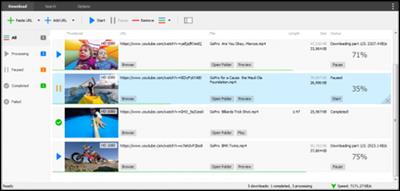
The program comes with a clean, well-organized and user-friendly interface that consists of three main tabs, the Download section, Search and Options. While the first two tabs are suggestive for their roles, you can set up the download folder, specify the download quality and access the converter from the Options tab.

pG5q3rp.png

Features:
Download videos from YouTube, Facebook, and hundreds of other video sites
Increase your download speeds by up to 500%
Download HD 1080p, HD 720p, 4K, 2K, and 3D videos from YouTube
Download multiple videos at a time
Pause and resume downloads
Preview videos while downloading
Download only audio stream if possible
Download whole playlist from YouTube
Convert downloaded videos to any format
YouTube to MP3 converter
Ready-made presets
iTunes compatible
Integrate with Internet Explorer and Firefox
Support drag-and-drop
Search online videos
Media Converter
Media Player

More Info:
Download Instructions:
24.4 MB
rar/zip archive


YT Downloader 7.1.2
Requirements:Windows 98/Me/NT/2000/XP/2003/Vista/Server 2008/7/8/Server 2016/10
Overview:
YT Downloader (ex YTD Youtube Downloader) is a simple and easy-to-use video download application. It helps you to download and convert videos from YouTube and hundreds of other video sites. YT Downloader increases your download speeds by up to 500%.

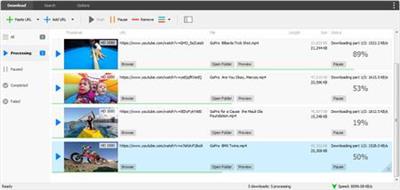
ICpZVqi.png

Features
YT Downloader is the easiest and the fastest way to download and convert videos from YouTube and other video sites.

Download videos from YouTube and hundreds of video sites
YT Downloader can download videos from YouTube, Facebook, Dailymotion, Vimeo, Metacafe, and hundreds of other video sites. After downloading your video files, you'll be able to watch them smoothly using any media player, even if you don't have internet access.

Accelerate your downloads
YT Downloader features an advanced download acceleration engine that lets you download videos 500% faster than normal speed.

Download 4K, 2K, HD 1080p and 720p videos from YouTube
You can also download 3D videos from YouTube if they are available.

YouTube to MP3
YT Downloader allows you to download only audio stream from YouTube, and save it as MP3. You don't need to download the entire video file. The audio stream is small, you can download it within seconds.

Download whole playlist from YouTube
Just enter a YouTube playlist ID, YT Downloader will download all or selected videos in the playlist from YouTube for you.

Support drag-and-drop
You can directly drag and drop video link from your browser to the drop box or program window to start a download. You don't even need to copy and paste video URL.

Download multiple videos at a time
YT Downloader supports simultaneous downloads. It allows you to download more than one video at same time and safe time.

Pause and resume downloads
You can pause, resume, or cancel your downloads if you need more connection to perform other important tasks.

Preview videos while downloading
While downloading, you can click the Preview button to play incomplete video and make sure the content you are downloading is really the content of your choice.

Video and audio converter
YT Downloader is also a powerful video/audio converter. It can convert local video/audio files to any format you wish so that they are playable everywhere.

Video to MP3
YT Downloader allows you to extract audio streams from videos and save them as mp3, wav, wma, ac3, ringtone, or other audio format.

Support all popular video and audio formats
YT Downloader allows you to save downloaded videos in any format for any device, so you can watch them smoothly on your PC, iPhone, iPad, Android phone, and other device.

Ready-made presets
YT Downloader provides ready-made presets for all video and audio formats. You can also custom output video/audio format settings.

iTunes compatible
Optionally, YT Downloader can add downloaded video/music to your iTunes library automatically, so you can easily synchronize your videos and music to your iPhone, iPad, iPod.

Media Player
YT Downloader includes a simple and easy-to-use media player. If your Windows Media Player cannot play your video/audio files, you may try our Media Player.

More Info:
Download Instructions:
19.11 MB
rar/zip archive
Language: English

 
JerrySoftware YouTube Downloader Pro 7.7.7
Requirements: Windows XP\Vista\7\8\10
Overview:
Jerry YouTube Downloader Pro is an application that can help you find, download and convert videos from the popular video streaming service so you can enjoy them offline on various devices.

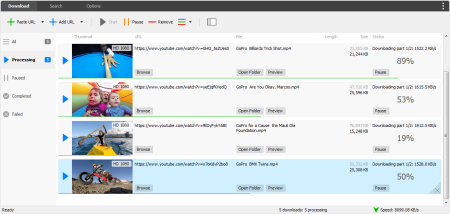
6EemY6V.jpg

Enables you to search for videos and download them
First off, you should pay attention when installing the application, especially if you do not want to end up with shortcuts to Media Player on your desktop or file associations you do not need, as they are marked by default.

The program comes with a clean, well-organized and user-friendly interface that consists of three main tabs, the Download section, Search and Options. While the first two tabs are suggestive for their roles, you can set up the download folder, specify the download quality and access the converter from the Options tab.

It is necessary to mention that the interface also includes a small floating widget that you can move around anywhere on the screen and add the URL address of the clips you need to add them to the download queue. Although it can come in handy sometimes, it would have been useful if you could disable it.

Includes a handy converter function and supports numerous formats
You should know that the application works with a plethora of file formats, including but not limited to MP4, WEBM, FLV, 3GP and FLV. In the eventuality that you are working on an extensive playlist, then you have the option to download files as audio only or choose a file format based on additional criteria, such as frame rate, sample rate, preset or channels, for instance.

As previously mentioned, the utility enables you to convert videos to other formats, including HD quality, so that you can enjoy them on other gadgets, like your iPod, iPad, tablet or smartphone. Speaking of mobile devices, the tool lets you know the file formats that are supported by various smartphones on the market.

An all-in-one solution for managing videos
In the eventuality that you need to download videos so that you can enjoy offline or perhaps create a playlist for your iPod so you can listen to it while exercising or driving, then perhaps, YouTube Downloader Pro could lend you a hand.

Featured :

Download videos from YouTube, Facebook, and hundreds of other video sites
Increase your download speeds by up to 500%
Download HD 1080p, HD 720p, 4K, 2K, and 3D videos from YouTube
Download multiple videos at a time
Pause and resume downloads
Preview videos while downloading
Download only audio stream if possible
Download whole playlist from YouTube
Convert downloaded videos to any format
YouTube to MP3 converter
Ready-made presets
iTunes compatible
Integrate with Internet Explorer and Firefox
Support drag-and-drop
Search online videos
Media Converter
Media Player

More Info:
Download Instructions:
20 Mb
rar/zip archive
Language: English


Jerry YouTube Downloader Pro v7.16.0


d91a0c344a069bdffccece1382257caf.jpeg


Jerry YouTube Downloader Pro v7.16.0 | 32 MB | Language: English


Homepage:


Größe: 32 MB
Sprache: English
Format: .rar / .exe
Medizin: Present
Plattform: Windows 11/10/8.1/8/7
Bit depth: 32bit 64bit


HOSTER:

K2s.cc (Keep2share)

Rapidgator.net

Nitroflare.com

Uploadgig.com


DOWNLOAD


Jerry YouTube Downloader Pro v7.16.2


ba9e62396b9f3a3985ece2805a100ac7.jpeg


Jerry YouTube Downloader Pro v7.16.2 | 32 MB | Language: English


Homepage:


Größe: 32 MB
Sprache: English
Format: .rar / .exe
Medizin: Present
Plattform: Windows 11/10/8.1/8/7/Vista/XP
Bit depth: 32bit 64bit


HOSTER:

K2s.cc (Keep2share)

Rapidgator.net

Nitroflare.com

Uploadgig.com


DOWNLOAD


Jerry YouTube Downloader Pro 7.16.2


20bd32d0493ef53b898475b1ca983eaf.png


Jerry YouTube Downloader Pro 7.16.2


Jerry YouTube Downloader Pro ist eine Anwendung, mit der Sie Videos vom beliebten Video-Streaming-Dienst finden, herunterladen und konvertieren können, damit Sie sie offline auf verschiedenen Geräten genießen können.


Sprache: English | Größe: 32 MB | Format: RAR, EXE | Plattform: Windows 7, 8/8.1, 10, 11 (32/64Bit)


Hoster:
UploadGig.com | RapidGator.net | DDownload.com


DOWNLOAD Links:


Jerry YouTube Downloader Pro v7.18.2


47b9421933c5c698dee5ecjlg.jpeg


Jerry YouTube Downloader Pro v7.18.2 | 33 MB | Language: English


Homepage:


Größe: 33 MB
Sprache: English
Format: .rar / .exe
Medizin: Present
Plattform: Windows 11/10/8.1/8/7/Vista/XP
Bit depth: 32bit 64bit


HOSTER:

K2s.cc (Keep2share)

Rapidgator.net

Nitroflare.com

Uploadgig.com


DOWNLOAD


Zurück
Oben Unten