



IOTransfer Pro v4.1.1.1547 Multilingual
File Size: 93.3 MB
Transfer apps, photos, music, videos, podcasts and ebooks to and from your iOS device, with this useful and intuitive application. If you own an iPhone, you probably know how difficult it is to transfer files between your device and a Windows PC. While Apple does provide you with software and a cloud service to help you out, many wish they had a simpler way to copy files to and from their iOS devices.
IOTransfer is an easy-to-use application that seeks to provide a solution. It enables you to transfer apps, photos, music, videos, podcasts and ebooks easily, without having to synchronize all your data or upload files online.
Sleek, modern interface that features a minimalistic UI
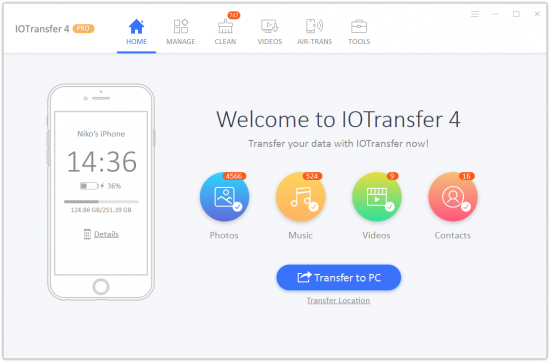
If you like applications that keep things simple, IOTransfer's visual design should be to your liking. There are no unnecessary interface elements, and its layout is clean and intuitive.
Mind you, some users might have preferred a brighter color theme, but, sadly, no alternatives are available.
Transfer files between your iOS device and PC easily
When launching IOTransfer for the fist time, the application should detect your iPhone immediately, provided it is connected to your PC and iTunes is installed on your system.
The program displays all the apps, photos, songs, videos, podcasts and ebooks stored on your device, and you can copy any of them on your computer.
Additionally, it is possible to copy data from local storage, and the process is very simple, as you only need to press the Import button and select the right files. If transferring photos, you can also specify which album they should be stored in.
If you're looking for a bit more features, you might be interested in the Beta version. Although prone to issues since still under development, the new build shows off some exciting features.
There's a built-in cleaner function which aims to help you remove useless files from your phone to free up more space and memory. Finally, you can look up your favorite videos on popular online services like Vimeo and YouTube, and even download them in case you want to enjoy them on your phone wherever you go.
Simple-to-use management utility for your iOS device
While IOTransfer, as its name suggests, is primarily designed to help you transfer files, it also allows you to search for specific items on your iOS device and delete unnecessary files.
Overall, this is a great program for iPhone, iPad or iPod owners who are looking for an easier way to transfer data between their devices and Windows computers. It is very easy to use and features a minimalistic, intuitive interface.
Whats New:
Optimized video download process to adapt to the changes of YouTube
Enhanced the stability of transferring data between PC and iPhone/iPad/iPod
Fixed known bugs
HOMEPAGE

Download Links
RapidGator
NitroFlare
