



• Regeln für den Software-Bereich:


    Allgemeines:

    - In erster Linie sind unsere Boardregeln zu beachten, zu finden HIER.
    - Software zur Audiobearbeitung sollte ausschließlich im Unterforum "Audio" eingestellt werden.
    - Für Cracks, Keygens oder sonstige Freischaltungssoftware gibt es das Unterforum "Freischaltung".
    - Portable Software bitte im entsprechenden Unterforum "Portable Software" eintragen.
    - Diskussionen zur Installation und anderen Problemen mit der Software, bitte im enstprechenden Unterforum "Talk" führen.
    - Bei Unklarheiten und Fragen zu den Regeln bitte die Moderatoren kontaktieren.


    Angebot erstellen

    - Die Struktur des Threadtitels muss wie folgt umgesetzt werden: Herstellername - Softwarename - Versionsnummer
    - Unnötige Zusätze im Threadtitel wie "HOT", "NEW" oder Punkte zwischen den Wörtern sind nicht erlaubt.
    - Achtet darauf immer nur die Hauptversion und deren Updates in einem Thread zusammenfassen, konkretes Beispiel: SoftwareXY v3.12 gehört in den selben Thread mit SoftwareXY v3.13; SoftwareXY v.4.1 gehört in einen neuen eigenen Thread. Ausgenommen hiervon sind Sammelthreads und Dauerangebote.
    - Bei nicht bekannten Herstellern oder Angebote einer privaten Software, ist die Programmbezeichnung + Versionsnummer ausreichend.
    - Besondere Beachtung gilt für den ersten Beitrag eines Angebots. Dort muss eine kurze Beschreibung der Software in deutscher Sprache angegeben werden. Für offizielle Releases ist es Pflicht die NFO im Beitrag einzustellen(Spoiler, siehe nächster Punkt).
    - Weitere Informationen wie NFOs oder Changelogs, versteckt ihr bitte in einem Spoiler.


    Software Suche

    - Für Suchanfragen haben wir das Unterforum "Suche" erstellt.
    - Auch hier sollte vorher die Suchfunktion benutzt werden, um Doppelthreads vorzubeugen. Sollte es bereits eine Suchanfrage geben, könnt ihr den Thread gerne mit einem "Danke" pushen.


    Trojaner- und Virusalarm

    - Falls Euer Virenscanner bei einem Angebot Alarm schlägt, solltet ihr zunächst Ruhe bewahren. Viele Virenscanner erkennen Cracks/Keygens oft fälschlicherweise als Bedrohung.
    - Prüft die verdächtige Datei zuerst mit http://virustotal.com , sollte es sich hierbei wirklich um eine Bedrohung handeln, meldet den Beitrag und/oder wendet euch mit dem Bericht von VirusTotal.com an einen Moderator.


    Unerwünschte Angebote

    - Keylogger, Spionagetools, alles rund ums Thema Hacking/Cracking ist nicht erwünscht.
  • Bitte registriere dich zunächst um Beiträge zu verfassen und externe Links aufzurufen.


Infinite Geometry 2.52

jallyq

MyBoerse.bz Pro Member


c718b8fa546539d8444f640eccfd2ca9.jpg


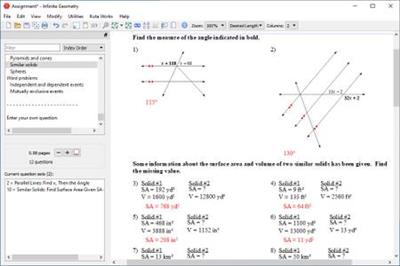
Infinite Geometry 2.52 | 25.3 Mb


Infinite Geometry covers all typical Geometry material, beginning with a review of important Algebra 1 concepts and going through transformations. There are over 85 topics in all, from multi-step equations to constructions. Suitable for any class with geometry content. Designed for all levels of learners, from remedial to advanced.

Unlimited Questions
Once you have created an assignment, you can regenerate all of its questions with a single click. The new questions will conform to the same parameters as the original questions, but they will be completely new. This feature is at the heart of our software and is what makes it so powerful: you choose the properties of the questions, not the questions themselves. When a question is replaced, you get a new one that is similar to the original question.

Easy Spacing
Respace the entire assignment to the desired length with one click. Easily give your students enough room to show their work by increasing the spacing. Or you can save paper by decreasing the spacing. Spacing can also be controlled manually.

Presentation Mode
Very useful as a teaching aid when used in combination with an LCD projector or other display system. One to four questions at a time are shown on the screen.

Use this feature while you teach. Prepare your examples with the software, and then use a projector to display the questions on the board. This saves time during planning and during the lesson, and it makes it very easy to present long questions or questions with graphs and diagrams.
With one question displayed, you can:
Change the zoom level - so students in the back can read it
Draw lines beside the question to help you organize your work if you solve the question
Jump to another question - useful while reviewing homework
Reveal the answer
Show / hide the question number and the directions.

Multiple-Version Printing
Print multiple versions of an assignment. You control how each new version is created: scramble the choices, scramble the questions, or make completely new questions. You can also save each new version after it is created.

System Requirements:
Windows 10, 8, 7, Vista, or XP with SP3
Screen resolution 1024x768 or higher
Internet access
100 MB disk space
Symbol font
Times New Roman font
Arial font

Download Links

RapidGator

NitroFlare

 
Zurück
Oben Unten