KAMAL
MyBoerse.bz Pro Member
IDM UltraCompare Professional 20.20.0.28 (x86/x64)
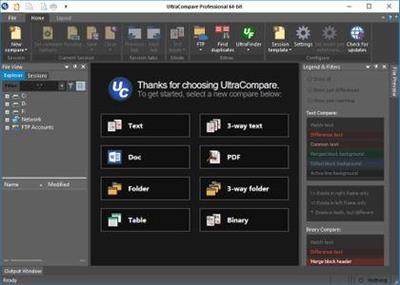
IDM UltraCompare Professional 20.20.0.28 (x86/x64) | 90 MB | Language: English
A complement to your file management suite, UltraCompare Professional is loaded with features to enable you to compare text files and folders, as well as zip files and jar archives. Text file compare features include binary and text compare of two or three text files at a time, with the ability to merge text differences between compared files.
Folder compare supports comparison of local/network directories (and subdirectories with recursive folder compare) and zip file compare as well, and like text/binary compare, you can merge differences between compared directories. With automatic integration with UltraEdit or UEStudio, UltraCompare Professional is a compare tool you should not be without!
Chances are if you're reading this you already use UltraEdit, but you probably don't have UltraCompare Professional yet. You may not realize how important such a text file compare tool is or how versatile it can be.
You may have even used UltraCompare Lite but are now finding that this lightweight comparison utility is not robust enough for your text editing purposes. UltraCompare Professional boasts a fuller text compare feature set with text file compare for two or three files AND includes folder compare for two to three folders. Of course, we've also included merge capabilities, ignore options, FTP support, and more. Compare the differences yourself between UltraCompare Lite and UltraCompare Professional.
If you are inspecting your file or code changes by hand you are losing precious time, accuracy and productivity. Compare and merge operations are the cornerstone of a differences tool, and we have placed many merge/post-merge features into UltraCompare so you can easily compare your differences and merge your selections with confidence and trust. Whether you are a lone developer or work as part of a team, how many times have you wanted to compare your text files or compare source code to modified versions, and merge your changes into the newer versions?
We all know to make backups - but what happens when something goes wrong and you need to compare your legacy backup with your current backup? Ever needed to compare SQL files between two databases? That's where a compare/merge/sync tool can help. Do you find yourself needing to compare FTP files? Use UltraCompare's integrated FTP/SFTP to download your text files from the remote server, perform compare/merge operations, then save your files back to the server.
How many times have all of us downloaded a software update or text file and wondered what's changed since the last release or version? Still not convinced? Look over our feature maps or our complete feature listing, or take a tour of the newest features. Finally, make sure to download your free trial today to start comparing and merging your files and folders. Don't forget: UltraEdit users can save big when bundling UltraCompare Professional with an upgrade of UltraEdit!
Operating System: Windows 7, 8/8.1, 10
Home Page -
DOWNLOAD LINKS:
IDM UltraCompare Professional 20.20.0.28 (x86/x64) | 90 MB | Language: English
A complement to your file management suite, UltraCompare Professional is loaded with features to enable you to compare text files and folders, as well as zip files and jar archives. Text file compare features include binary and text compare of two or three text files at a time, with the ability to merge text differences between compared files.
Folder compare supports comparison of local/network directories (and subdirectories with recursive folder compare) and zip file compare as well, and like text/binary compare, you can merge differences between compared directories. With automatic integration with UltraEdit or UEStudio, UltraCompare Professional is a compare tool you should not be without!
Chances are if you're reading this you already use UltraEdit, but you probably don't have UltraCompare Professional yet. You may not realize how important such a text file compare tool is or how versatile it can be.
You may have even used UltraCompare Lite but are now finding that this lightweight comparison utility is not robust enough for your text editing purposes. UltraCompare Professional boasts a fuller text compare feature set with text file compare for two or three files AND includes folder compare for two to three folders. Of course, we've also included merge capabilities, ignore options, FTP support, and more. Compare the differences yourself between UltraCompare Lite and UltraCompare Professional.
If you are inspecting your file or code changes by hand you are losing precious time, accuracy and productivity. Compare and merge operations are the cornerstone of a differences tool, and we have placed many merge/post-merge features into UltraCompare so you can easily compare your differences and merge your selections with confidence and trust. Whether you are a lone developer or work as part of a team, how many times have you wanted to compare your text files or compare source code to modified versions, and merge your changes into the newer versions?
We all know to make backups - but what happens when something goes wrong and you need to compare your legacy backup with your current backup? Ever needed to compare SQL files between two databases? That's where a compare/merge/sync tool can help. Do you find yourself needing to compare FTP files? Use UltraCompare's integrated FTP/SFTP to download your text files from the remote server, perform compare/merge operations, then save your files back to the server.
How many times have all of us downloaded a software update or text file and wondered what's changed since the last release or version? Still not convinced? Look over our feature maps or our complete feature listing, or take a tour of the newest features. Finally, make sure to download your free trial today to start comparing and merging your files and folders. Don't forget: UltraEdit users can save big when bundling UltraCompare Professional with an upgrade of UltraEdit!
Operating System: Windows 7, 8/8.1, 10
Home Page -
DOWNLOAD LINKS: