• Regeln für den Software-Bereich:


    Allgemeines:

    - In erster Linie sind unsere Boardregeln zu beachten, zu finden HIER.
    - Software zur Audiobearbeitung sollte ausschließlich im Unterforum "Audio" eingestellt werden.
    - Für Cracks, Keygens oder sonstige Freischaltungssoftware gibt es das Unterforum "Freischaltung".
    - Portable Software bitte im entsprechenden Unterforum "Portable Software" eintragen.
    - Diskussionen zur Installation und anderen Problemen mit der Software, bitte im enstprechenden Unterforum "Talk" führen.
    - Bei Unklarheiten und Fragen zu den Regeln bitte die Moderatoren kontaktieren.


    Angebot erstellen

    - Die Struktur des Threadtitels muss wie folgt umgesetzt werden: Herstellername - Softwarename - Versionsnummer
    - Unnötige Zusätze im Threadtitel wie "HOT", "NEW" oder Punkte zwischen den Wörtern sind nicht erlaubt.
    - Achtet darauf immer nur die Hauptversion und deren Updates in einem Thread zusammenfassen, konkretes Beispiel: SoftwareXY v3.12 gehört in den selben Thread mit SoftwareXY v3.13; SoftwareXY v.4.1 gehört in einen neuen eigenen Thread. Ausgenommen hiervon sind Sammelthreads und Dauerangebote.
    - Bei nicht bekannten Herstellern oder Angebote einer privaten Software, ist die Programmbezeichnung + Versionsnummer ausreichend.
    - Besondere Beachtung gilt für den ersten Beitrag eines Angebots. Dort muss eine kurze Beschreibung der Software in deutscher Sprache angegeben werden. Für offizielle Releases ist es Pflicht die NFO im Beitrag einzustellen(Spoiler, siehe nächster Punkt).
    - Weitere Informationen wie NFOs oder Changelogs, versteckt ihr bitte in einem Spoiler.


    Software Suche

    - Für Suchanfragen haben wir das Unterforum "Suche" erstellt.
    - Auch hier sollte vorher die Suchfunktion benutzt werden, um Doppelthreads vorzubeugen. Sollte es bereits eine Suchanfrage geben, könnt ihr den Thread gerne mit einem "Danke" pushen.


    Trojaner- und Virusalarm

    - Falls Euer Virenscanner bei einem Angebot Alarm schlägt, solltet ihr zunächst Ruhe bewahren. Viele Virenscanner erkennen Cracks/Keygens oft fälschlicherweise als Bedrohung.
    - Prüft die verdächtige Datei zuerst mit http://virustotal.com , sollte es sich hierbei wirklich um eine Bedrohung handeln, meldet den Beitrag und/oder wendet euch mit dem Bericht von VirusTotal.com an einen Moderator.


    Unerwünschte Angebote

    - Keylogger, Spionagetools, alles rund ums Thema Hacking/Cracking ist nicht erwünscht.
  • Bitte registriere dich zunächst um Beiträge zu verfassen und externe Links aufzurufen.

*** Bestes IPTV *** bester Preis *** gratis Test ***


IDimager Photo Supreme v5

masterking

MyBoerse.bz Pro Member
IDimager Photo Supreme 5.2.0.2570 Multilingual || Multi-Deutsch

qr9ypjlx.jpg


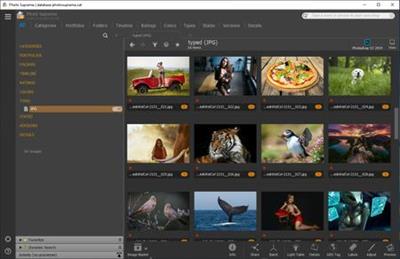
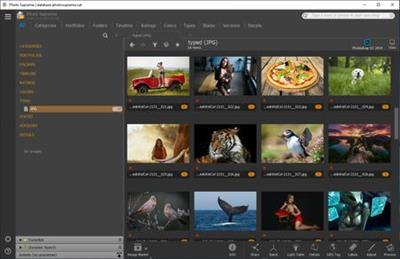
Photo Supreme ist ein interessantes Tool mit dem man seine Fotos mit Tags katalogisieren kann, damit man sie problemlos wiederfindet.

Falls man also riesige Mengen an Fotos auf seiner Festplatte angehäuft hat und Ewigkeiten suchen muss,
bis man das passende findet, dann kann kann einfach mit Hilfe der Photo Supreme Datenbank alle Bilder mit Labels versehen.
Anfangs lassen sich auch zuerst die Metadaten der Bilder importieren, was einiges vereinfacht.

Man kann Kategorien erstellen wie Freunde und Familie, Urlaubsorte, auch Ereignisse wie Geburtstage, und diese als Labels verwenden.

Man muss dann nur die Kategorie eingeben, damit man alle passenden Fotos sieht, alternativ kann man gezielt nach bestimmten Fotos suchen.
Falls man seine Fotos bereits mit einer anderen Anwendung wie Lightroom oder iMatch MediaPro verwaltet, kann man einfach deren Datenbanken importieren, damit die Arbeit nicht umsonst war.

Die Bilder lassen sich auch mit einfachen Tools bearbeiten, so kann man Bilder zuschneiden, ihre Größe verändern oder einen Rahmen hinzufügen. Auch hat man die Möglichkeit, sein Bildbearbeitungsprogramm der Wahl direkt von der Anwendung aus aufzurufen.

Zweifelsohne ist Photo Supreme ein ausgezeichnetes Programm um seine Fotos schnell und effektiv zu verwalten, um so ein virtuelles Album zu erstellen das man mit Freunden und Familienmitgliedern über Social Networks


FILEHOSTER:

Rapidgator

Alfafile


DOWNLOAD x86 || 52 MB || Format: exe


DOWNLOAD x64 || 55 MB || Format: exe



Photo Supreme 5.4.0.2783

e33714885b19dc090f6f60a0a6b0a8fa.jpg


If you have a lot of photos on your computer and you need to sort them all so that it’s convenient to navigate, then this program may come in handy as it is a good cataloger, you can download Photo Supreme below. After starting, you need to select the folder to import, it can also be a folder located on portable media, a camera, and so on. Then you can quickly navigate through folders and view your pictures, print them, edit, and so on.

License: ShareWare
Size: 107
OS: Windows

107.7 MB
rar archive

Download Link:
 
IDimager Photo Supreme 5.4.0.2834 Multilingual


4f1aff35ad35cfbd1861f1670a08b828.jpg


IDimager Photo Supreme 5.4.0.2834 Multilingual | 110 MB


Do you own a digital camera or do you have a large collection of images to manage? Then in no time finding that one image you're looking for becomes a chore. But Photo Supreme can change all that. Photo Supreme's integrated cataloging and management features will help you quickly find and work with your desired image.


Highlights
Advanced search capabilities
When looking for that one image, Photo Supreme will help you with deep text searches, tag searches, duplicate detection, similarity detection, dynamic search combinations and advanced filtering.

Limit access to those who need it
The Server Edition allows you to control who can access your Catalog. You control who can add or delete. You control who sees what in their screen.

Multi tab browsing
Photo Supreme brings tabbed browsing to your image archive. Take advantage of having multiple sets open at the same time.

Import & ingest images
Import your images in your Catalog the way you want. You can define naming conventions, apply metadata on import, version rules, and of course copy files.

Keyword tagging
Tagging your images has never been easier. GEO tagging, parent cascading, face tagging, and automatic metadata enrichment are just a few of many features.

Get organized
Organize your images in Portfolios and Collections.

Multi version control
Logically hold your pictures together so you can find them again more easily.

Features:
Advanced search capabilities
Multi tab browsing
Import & ingest images
Side-by-side comparison (up to 6 images)
Keyword tagging
Advanced GEO tagging
Image organization in portfolios
Duplicate detection
Share images with Flickr, Smugmug, Zenfolio, Google+ (former Picasaweb), FTP, EMail
Dual monitor support
Creative Commons support
Lossless image editing
Supports Darwin Core metadata
Dynamic collections
Face detection
Area tagging
Extensible metadata with custom field definitions
Take your previews with you while travelling
Color managed
Fully scriptable
English, German, French, Italian, and Dutch locale
Full HD, 2K, 4K, 5K, Retina screen resolutions supported

Operating System: Windows Vista or higher.

Home Page -


DOWNLOAD LINKS:


IDimager Photo Supreme 5.4.1.2935

1bwkPPo.jpg


Do you own a digital camera? Then in no time you will have thousands of images on your computer, and finding that one image you are looking for will become a chore. But Photo Supreme can change all that. Whether you have 1,000 or 500,000 images in your archive, Photo Supreme’s integrated photo cataloging and photo management features will help you quickly find and work with your desired image. Extremely powerful yet easy-to-use
From the ground up, Photo Supreme was developed with easy-of-use as the primary focus. We were able to pack most of the features requested by our user base into a user interface that is clean and efficient, yet extremely powerful.

Photo Supreme comes with every essential image management feature you’ll need to bring structure in your image archive. Assigning catalog labels, importing images to your computer, search features, etc. And once you have your images cataloged then you’ll be able to find that one image you need within seconds to then view, duplicate, email, share on your favorite photo site, upload it to your FTP server, or edit it in your favorite photo editor.

Integrates with your favorite tools
Photo Supreme makes integration with your favorite photo editing tools seaminglessly. At installation it will automatically find and add the most common used image editing tools to the user interface.

Simply select an image and click on the application icon to start editing your image.

Unparalleled Speed
Digital Asset Management software uses a catalog database and should be optimized to work with thousands of images in the database. We took this seriously and were able to get the speed up, there where it belongs. Searches will return results in just milliseconds.

Always take your images with you
With Photo Supreme you can store previews of your images inside the database. Then, even if your images are physically located on your network, they travel with you. The previews can be stored in the size that you prefer, from small to large ones, up to 1680 pixels

Open architecture
Right from the start, Photo Supreme was designed with an open cataloging architecture in mind. Because existing industry standards are used to store its data, you can extract your information at any time, even without our software. Should you ever decide to switch applications (although once you’ve tried Photo Supreme, you’ll never go back!), you won’t have to repeat the time consuming operation of re-cataloging your data. After all, it is YOUR data, not the application’s data!

Share with friends and family
Photo Supreme easily interfaces to public photo sharing sites like Facebook, Flickr, PicasaWeb, Zenfolio, or SmugMug. Resize or rename your images as you upload them to your on-line account without having to prepare them first. Also, add or remove your metadata, convert color space, or add your personal signature to your uploaded images.

Get started right away
If you already use some sort of image collection tool then Photo Supreme can help you get your existing data into Photo Supreme, saving you lots of time. There are import feature available for iPhoto™, Aperture™, Lightroom™ 3 and 4, iMatch™, and FotoTime™. At the same time, PSU is able to read and import meta-data that was written with XMP supporting tools, including Adobe products, Nikon software, iView™, MediaPro™.

Vocabularies
In addition there are import features to support market standard vocabularies, including David Rieck’s ControlledVocabulary™, UltraTAG™, Lightroom™-Keyword Files, or any other tool that supports exporting to Formatted Vocabulary Files.

Main Features & Highlights:
Advanced search capabilities
Multi Tab Browsing
Import/Ingest images
Side-by-Side comparison (up to 6 images)
Keyword tagging
Advanced GEO Tagging
Image organization in portfolios
Duplicate Detection
Share images with Flickr, Smugmug, Zenfolio, Picasaweb, FTP, EMail
Dual Monitor Support
Creative Commons support
Face Detection
Area Tagging
Extensible metadata with Custom Fields
Take your previews with you while travelling
Color Managed
Lossless Image Editing
Fully Scriptable
Available for Windows and MacOSX platform
Multi-User network/server version available for PostgreSQL and SQLServer (Server Edition)
English, German, French, Italian, Dutch, Portuguese, and Russian locale

107.6 MB
rar/zip archive

Download Link:
 
IDimager Photo Supreme v5.4.1.2960

adc848b3eb19efa9b8164cvkt1.jpg


IDimager Photo Supreme v5.4.1.2960

Größe: 110 MB
Sprache: Multi
Format: Exe
Plattform: Windows

Besitzen Sie eine Digitalkamera oder müssen Sie eine große Sammlung von Bildern verwalten? Dann wird es in kürzester Zeit zur Aufgabe, das gesuchte Bild zu finden. Aber Photo Supreme kann all das ändern. Mit den integrierten Katalogisierungs- und Verwaltungsfunktionen von Photo Supreme können Sie Ihr gewünschtes Bild schnell finden und damit arbeiten.

Erweiterte Suchfunktionen
Wenn Sie nach diesem einen Bild suchen, hilft Ihnen Photo Supreme bei der Tieftextsuche, der Tag-Suche, der Duplikaterkennung, der Ähnlichkeitserkennung, dynamischen Suchkombinationen und der erweiterten Filterung.

Uploaded.net
Oboom.com
Rapidgator.net

 
IDimager Photo Supreme 5.4.1.3001 Multilingual


0c0cecf399b562af148e688a3c16882a.jpeg


IDimager Photo Supreme 5.4.1.3001 Multilingual | 110 MB | Language: Multilanguage


Do you own a digital camera or do you have a large collection of images to manage? Then in no time finding that one image you're looking for becomes a chore. But Photo Supreme can change all that. Photo Supreme's integrated cataloging and management features will help you quickly find and work with your desired image.


Highlights:

Advanced search capabilities
When looking for that one image, Photo Supreme will help you with deep text searches, tag searches, duplicate detection, similarity detection, dynamic search combinations and advanced filtering.

Limit access to those who need it
The Server Edition allows you to control who can access your Catalog. You control who can add or delete. You control who sees what in their screen.

Multi tab browsing
Photo Supreme brings tabbed browsing to your image archive. Take advantage of having multiple sets open at the same time.

Import & ingest images
Import your images in your Catalog the way you want. You can define naming conventions, apply metadata on import, version rules, and of course copy files.

Keyword tagging
Tagging your images has never been easier. GEO tagging, parent cascading, face tagging, and automatic metadata enrichment are just a few of many features.

Get organized
Organize your images in Portfolios and Collections.

Multi version control
Logically hold your pictures together so you can find them again more easily.

Features:
Advanced search capabilities
Multi tab browsing
Import & ingest images
Side-by-side comparison (up to 6 images)
Keyword tagging
Advanced GEO tagging
Image organization in portfolios
Duplicate detection
Share images with Flickr, Smugmug, Zenfolio, Google+ (former Picasaweb), FTP, EMail
Dual monitor support
Creative Commons support
Lossless image editing
Supports Darwin Core metadata
Dynamic collections
Face detection
Area tagging
Extensible metadata with custom field definitions
Take your previews with you while travelling
Color managed
Fully scriptable

English, German, French, Italian, and Dutch locale
Full HD, 2K, 4K, 5K, Retina screen resolutions supported
Operating System: Windows Vista or higher.


Home Page -


DOWNLOAD LINKS:


IDimager Photo Supreme 5.4.1.3015 Multilingual


43a74e780927299c68482bf2d011b4db.jpeg


IDimager Photo Supreme 5.4.1.3015 Multilingual | 107 MB | Language: Multilanguage


Do you own a digital camera or do you have a large collection of images to manage? Then in no time finding that one image you're looking for becomes a chore. But Photo Supreme can change all that. Photo Supreme's integrated cataloging and management features will help you quickly find and work with your desired image.


Highlights:
Advanced search capabilities
When looking for that one image, Photo Supreme will help you with deep text searches, tag searches, duplicate detection, similarity detection, dynamic search combinations and advanced filtering.

Limit access to those who need it
The Server Edition allows you to control who can access your Catalog. You control who can add or delete. You control who sees what in their screen.

Multi tab browsing
Photo Supreme brings tabbed browsing to your image archive. Take advantage of having multiple sets open at the same time.

Import & ingest images
Import your images in your Catalog the way you want. You can define naming conventions, apply metadata on import, version rules, and of course copy files.

Keyword tagging
Tagging your images has never been easier. GEO tagging, parent cascading, face tagging, and automatic metadata enrichment are just a few of many features.

Get organized
Organize your images in Portfolios and Collections.

Multi version control
Logically hold your pictures together so you can find them again more easily.

Features:
Advanced search capabilities
Multi tab browsing
Import & ingest images
Side-by-side comparison (up to 6 images)
Keyword tagging
Advanced GEO tagging
Image organization in portfolios
Duplicate detection
Share images with Flickr, Smugmug, Zenfolio, Google+ (former Picasaweb), FTP, EMail
Dual monitor support
Creative Commons support
Lossless image editing
Supports Darwin Core metadata
Dynamic collections
Face detection
Area tagging
Extensible metadata with custom field definitions
Take your previews with you while travelling
Color managed
Fully scriptable

English, German, French, Italian, and Dutch locale
Full HD, 2K, 4K, 5K, Retina screen resolutions supported
Operating System: Windows Vista or higher


Home Page -


DOWNLOAD LINKS:


IDimager Photo Supreme 5.4.1.3019 Multilingual


175d0bfc96a9a0fff40f2f5f5c0afecc.jpeg


IDimager Photo Supreme 5.4.1.3019 Multilingual | 110 MB | Language: Multilanguage


Do you own a digital camera or do you have a large collection of images to manage? Then in no time finding that one image you're looking for becomes a chore. But Photo Supreme can change all that. Photo Supreme's integrated cataloging and management features will help you quickly find and work with your desired image.


Highlights:
Advanced search capabilities
When looking for that one image, Photo Supreme will help you with deep text searches, tag searches, duplicate detection, similarity detection, dynamic search combinations and advanced filtering.

Limit access to those who need it
The Server Edition allows you to control who can access your Catalog. You control who can add or delete. You control who sees what in their screen.

Multi tab browsing
Photo Supreme brings tabbed browsing to your image archive. Take advantage of having multiple sets open at the same time.

Import & ingest images
Import your images in your Catalog the way you want. You can define naming conventions, apply metadata on import, version rules, and of course copy files.

Keyword tagging
Tagging your images has never been easier. GEO tagging, parent cascading, face tagging, and automatic metadata enrichment are just a few of many features.

Get organized
Organize your images in Portfolios and Collections.

Multi version control
Logically hold your pictures together so you can find them again more easily.

Features:
Advanced search capabilities
Multi tab browsing
Import & ingest images
Side-by-side comparison (up to 6 images)
Keyword tagging
Advanced GEO tagging
Image organization in portfolios
Duplicate detection
Share images with Flickr, Smugmug, Zenfolio, Google+ (former Picasaweb), FTP, EMail
Dual monitor support
Creative Commons support
Lossless image editing
Supports Darwin Core metadata
Dynamic collections
Face detection
Area tagging
Extensible metadata with custom field definitions
Take your previews with you while travelling
Color managed
Fully scriptable
English, German, French, Italian, and Dutch locale
Full HD, 2K, 4K, 5K, Retina screen resolutions supported

Operating System: Windows Vista or higher.

Home Page -


DOWNLOAD LINKS:


IDimager Photo Supreme 5.4.1.3022 Multilingual


a9c841e3ed3270b740e57a46b79329f7.jpeg


IDimager Photo Supreme 5.4.1.3022 Multilingual | 110 MB | Language: Multilanguage


Do you own a digital camera or do you have a large collection of images to manage? Then in no time finding that one image you're looking for becomes a chore. But Photo Supreme can change all that. Photo Supreme's integrated cataloging and management features will help you quickly find and work with your desired image.


Highlights:
Advanced search capabilities
When looking for that one image, Photo Supreme will help you with deep text searches, tag searches, duplicate detection, similarity detection, dynamic search combinations and advanced filtering.

Limit access to those who need it
The Server Edition allows you to control who can access your Catalog. You control who can add or delete. You control who sees what in their screen.

Multi tab browsing
Photo Supreme brings tabbed browsing to your image archive. Take advantage of having multiple sets open at the same time.

Import & ingest images
Import your images in your Catalog the way you want. You can define naming conventions, apply metadata on import, version rules, and of course copy files.

Keyword tagging
Tagging your images has never been easier. GEO tagging, parent cascading, face tagging, and automatic metadata enrichment are just a few of many features.

Get organized
Organize your images in Portfolios and Collections.

Multi version control
Logically hold your pictures together so you can find them again more easily.
Features
Advanced search capabilities
Multi tab browsing
Import & ingest images
Side-by-side comparison (up to 6 images)
Keyword tagging
Advanced GEO tagging
Image organization in portfolios
Duplicate detection
Share images with Flickr, Smugmug, Zenfolio, Google+ (former Picasaweb), FTP, EMail
Dual monitor support
Creative Commons support
Lossless image editing
Supports Darwin Core metadata
Dynamic collections
Face detection
Area tagging
Extensible metadata with custom field definitions
Take your previews with you while travelling
Color managed
Fully scriptable
English, German, French, Italian, and Dutch locale
Full HD, 2K, 4K, 5K, Retina screen resolutions supported

Operating System: Windows Vista or higher.

Home Page -


DOWNLOAD LINKS:


IDimager Photo Supreme 5.5.0.3035 Multilingual


416092435161e22a9d8e68d7238f3598.jpeg


IDimager Photo Supreme 5.5.0.3035 Multilingual | 110 MB | Language: Multilanguage


Do you own a digital camera or do you have a large collection of images to manage? Then in no time finding that one image you're looking for becomes a chore. But Photo Supreme can change all that. Photo Supreme's integrated cataloging and management features will help you quickly find and work with your desired image.


Highlights:
Advanced search capabilities
When looking for that one image, Photo Supreme will help you with deep text searches, tag searches, duplicate detection, similarity detection, dynamic search combinations and advanced filtering.

Limit access to those who need it
The Server Edition allows you to control who can access your Catalog. You control who can add or delete. You control who sees what in their screen.

Multi tab browsing
Photo Supreme brings tabbed browsing to your image archive. Take advantage of having multiple sets open at the same time.

Import & ingest images
Import your images in your Catalog the way you want. You can define naming conventions, apply metadata on import, version rules, and of course copy files.

Keyword tagging
Tagging your images has never been easier. GEO tagging, parent cascading, face tagging, and automatic metadata enrichment are just a few of many features.

Get organized
Organize your images in Portfolios and Collections.

Multi version control
Logically hold your pictures together so you can find them again more easily.

Features:
Advanced search capabilities
Multi tab browsing
Import & ingest images
Side-by-side comparison (up to 6 images)
Keyword tagging
Advanced GEO tagging
Image organization in portfolios
Duplicate detection
Share images with Flickr, Smugmug, Zenfolio, Google+ (former Picasaweb), FTP, EMail
Dual monitor support
Creative Commons support
Lossless image editing
Supports Darwin Core metadata
Dynamic collections
Face detection
Area tagging
Extensible metadata with custom field definitions
Take your previews with you while travelling
Color managed
Fully scriptable

English, German, French, Italian, and Dutch locale
Full HD, 2K, 4K, 5K, Retina screen resolutions supported
Operating System: Windows Vista or higher


Home Page -


DOWNLOAD LINKS:


IDimager Photo Supreme v5.5.0.3052

th_6cjbrsxjvh77xxjqcuiqjs6.jpg


IDimager Photo Supreme v5.5.0.3052

Größe: 107 MB
Sprache: Multi
Format: Exe
Plattform: Windows

Besitzen Sie eine Digitalkamera? Dann haben Sie in kürzester Zeit Tausende von Bildern auf Ihrem Computer, und das Finden des gesuchten Bildes wird zur Pflicht. Aber Photo Supreme kann all das ändern. Unabhängig davon, ob Sie 1.000 oder 500.000 Bilder in Ihrem Archiv haben, helfen Ihnen die integrierten Fotokatalogisierungs- und Fotoverwaltungsfunktionen von Photo Supreme dabei, das gewünschte Bild schnell zu finden und damit zu arbeiten. Extrem leistungsstark und dennoch einfach zu bedienen
Von Grund auf wurde Photo Supreme mit Benutzerfreundlichkeit als Hauptfokus entwickelt. Wir konnten die meisten von unserer Benutzerbasis angeforderten Funktionen in eine Benutzeroberfläche packen, die sauber und effizient und dennoch äußerst leistungsfähig ist.

Uploaded.net
Oboom.com
Rapidgator.net

 
Zurück
Oben Unten