



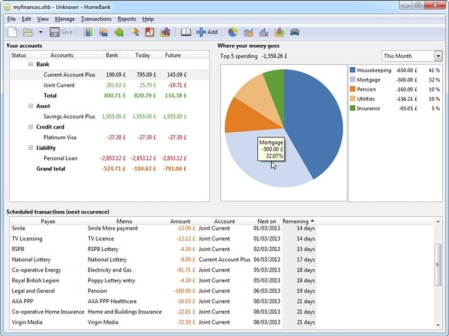
HomeBank 5.4.1
File Size : 17.4 Mb
HomeBank is a software application that helps you manage personal accounts and expenses.
The program is easy to use with the graphs and custom filters, which are designed to give you an overview on finances.Import & Export data
Import from many formats: Easily import your accounts from Quicken or Microsoft Money and many other financial management programs. Supported file formats include QIF, OFX, QFX, and CSV.
Duplicate detection: HomeBank will detect and identify the duplicate transactions and will enable you to choose what to do.
Export: Easily export your accounts to QIF format and various data parts to CSV format.
Analysis tools
Dynamic reports: Various reports will deliver the information you need at your fingertips using dynamic powerful reports with nice 2d charts.
Quick & easy: Easily adjust the report parameters with some presets, or get more fine results with filtering by every transaction fields.
Various reports: Repartition or reports, you will find one to analyze what you are looking for. Also, track the budget, or check the balance for any overdrawn, even knows your vehicle costs and fuel consumption.
Budget
Month / Annual budget: Set a budget to each category with the same amount or different amount per month.
View non-budget: Force the view of some categories into the budget report as well.
Import/Export: Import/export the budget into CSV files.
Beautiful charts: The charts available are bars, lines, and pie. The design was inspired from google analytics and you can change the x-factor dynamically and also the color scheme.
Transactions
Scheduled transactions: Easily turn any transaction into a repeating event (like those darn utility bills!).
Category split: Split the amount of a transaction into several categories.
Internal transfer: Easily transfer money between accounts which can be automated.
Quick seizure: Quickly transform any transaction to a template that simplifies the seizure of common transactions, or inherit from an existing transaction.
Multiple field edition: You can easily change every value for several transactions at once.
Small icons: Enjoy the icons for payment mode and transaction status, plus the additional pay mode field.
Tag field: Tag your transactions for another analysis axis.
Rd this: Put any transaction in a rd state to keep an eye on debt you have or people have to you
Categories & Payees
Automatic assignment: Define some rules and HomeBank will assign payees and/or categories for you.
Direct add: Add new categories and payees directly from the transaction register.
Auto-completion: Never get lost if you have thousand of payees or categories, HomeBank will find it with the first letters.
Download Links
RapidGator
Code:
NitroFlare
Code:
