• Regeln für den Video-Bereich:

    In den Börsenbereich gehören nur Angebote die bereits den Allgemeinen Regeln entsprechen.

    Einteilung

    - Folgende Formate gehören in die angegeben Bereiche:
    - Filme: Encodierte Filme von BluRay, DVD, R5, TV, Screener sowie Telesyncs im Format DivX, XviD und x264.
    - DVD: Filme im Format DVD5, DVD9 und HD2DVD.
    - HD: Encodierte Filme mit der Auflösung 720p oder darüber von BluRay, DVD, R5, TV, Screener sowie Telesyncs im Format x264.
    - 3D: Encodierte Filme von BluRay, die in einem 3D Format vorliegen. Dies gilt auch für Dokus, Animation usw.
    - Serien: Cartoon/Zeichentrick, Anime, Tutorials, Dokumentationen, Konzerte/Musik, Sonstiges sind demnach in die entsprechenden Bereiche einzuordnen, auch wenn sie beispielsweise im High Definition-Format oder als DVD5/DVD9/HD2DVD vorliegen. Ausnahme 3D.
    - Bereich Englisch: Englische Releases gehören immer in diesen Bereich.
    - Bereich Talk: Der Bereich, in dem über die Releases diskutiert werden kann, darf, soll und erwünscht ist.


    Angebot/Beitrag erstellen

    - Ein Beitrag darf erst dann erstellt werden, wenn der Upload bei mindestens einem OCH komplett ist. Platzhalter sind untersagt.
    - Bei einem Scenerelease hat der Threadtitel ausschließlich aus dem originalen, unveränderten Releasenamen zu bestehen. Es dürfen keine Veränderungen wie z.B. Sterne, kleine Buchstaben o.ä. vorgenommen werden. Ausnahme Serienbörse:
    - Bei einem Sammelthread für eine Staffel entfällt aus dem Releasename natürlich der Name der Folge. Beispiel: Die Simpsons S21 German DVDRip XviD - ITG
    - Dementsprechend sind also u.a. verboten: Erweiterungen wie "Tipp", "empfehlenswert", "only", "reup", usw. / jegliche andere Zusatzinformation oder Ergänzung, welche nicht in obiger Beschreibung zu finden ist.

    Aufbau des Angebots und Threadtitel

    Der Titel nach folgendem Muster erstellt zu werden. <Name> [3D] [Staffel] [German] <Jahr> <Tonspur> [DL] [Auflösung] <Quelle> <Codec> - <Group>
    Beispiel: The Dark Knight German 2008 AC3 DVDRip XviD - iND
    Beispiel: The Dark Knight 2008 DTS DL BDRip x264 - iND
    Beispiel: The Dark Knight 2008 AC3 DL BDRip XviD - iND
    Beispiel: The Dark Knight German 2008 AC3 720p BluRay x264 iND
    Beispiel: The Dark Knight 2008 DTS DL 1080p BluRay x264 iND
    Beispiel: Die Simpsons S01 German AC3 DVDRip XviD iND
    Beispiel: Die Simpsons S20 German AC3 720p BluRay x264 iND
    Beispiel: Sword Art Online II Ger Sub 2014 AAC 1080p WEBRip x264 - peppermint
    Entsprechend sind also u.a. verboten: Sonderzeichen wie Klammern, Sterne, Ausrufezeichen, Unterstriche, Anführungszeichen / Erweiterungen wie "Tipp", "empfehlenswert", "only", "reup", usw. / jegliche andere Zusatzinformation oder Ergänzung, welche nicht in obiger Beschreibung zu finden ist
    Ausnahmen hiervon können in den Bereichen geregelt sein.

    Die Beiträge sollen wie folgt aufgebaut werden:
    Überschrift entspricht dem Threadtitel
    Cover
    kurze Inhaltsbeschreibung
    Format, Größe, Dauer sind gut lesbar für Downloader außerhalb des Spoilers zu vermerken
    Nfo sind immer Anzugeben und selbige immer im Spoiler in Textform.
    Sind keine Nfo vorhanden z.B. Eigenpublikationen, sind im Spoiler folgende Dateiinformationen zusätzlich anzugeben :
    Quelle
    Video (Auflösung und Bitrate)
    Ton (Sprache, Format und Bitrate der einzelnen Spuren)
    Untertitel (sofern vorhanden)
    Hosterangabe in Textform außerhalb eines Spoiler mit allen enthaltenen Hostern.
    Bei SD kann auf diese zusätzlichen Dateiinformationen verzichtet werden.

    Alle benötigten Passwörter sind, sofern vorhanden, in Textform im Angebot anzugeben.
    Spoiler im Spoiler mit Kommentaren :"Schon Bedankt?" sind unerwünscht.


    Releases

    - Sind Retail-Release verfügbar, sind alle anderen Variationen untersagt. Ausnahmen: Alle deutschen Retail-Release sind CUT, in diesem Fall sind dubbed UNCUT-Release zulässig.
    - Im Serien-Bereich gilt speziell: Wenn ein Retail vor Abschluss einer laufenden Staffel erscheint, darf diese Staffel noch zu Ende gebracht werden.62
    - Gleiche Releases sind unbedingt zusammenzufassen. Das bedeutet, es ist zwingend erforderlich, vor dem Erstellen eines Themas per Suchfunktion zu überprüfen, ob bereits ein Beitrag mit demselben Release besteht. Ist dies der Fall, ist der bereits vorhandene Beitrag zu verwenden.
    - P2P und Scene Releases dürfen nicht verändert oder gar unter einem iND Tag eingestellt werden.


    Support, Diskussionen und Suche

    - Supportanfragen sind entweder per PN oder im Bereich Talk zu stellen.
    - Diskussionen und Bewertungen sind im Talk Bereich zu führen. Fragen an die Uploader haben ausschließlich via PN zu erfolgen, und sind in den Angeboten untersagt.
    - Anfragen zu Upload-Wünschen sind nur im Bereich Suche Video erlaubt. Antworten dürfen nur auf Angebote von MyBoerse.bz verlinkt werden.


    Verbote

    - Untersagt sind mehrere Formate in einem einzigen Angebotsthread, wie beispielsweise das gleichzeitige Anbieten von DivX/XviD, 720p und 1080p in einem Thread. Pro Format, Release und Auflösung ist ein eigener Thread zu eröffnen.
    - Grundsätzlich ebenso verboten sind Dupes. Uploader haben sich an geeigneter Stelle darüber zu informieren, ob es sich bei einem Release um ein Dupe handelt.
    - Gefakte, nur teilweise lauffähige oder unvollständige Angebote sind untersagt. Dies gilt auch für eigene Publikationen, die augenscheinlich nicht selbst von z.B. einer DVD gerippt wurden. Laufende Serien, bei denen noch nicht alle Folgen verfügbar sind, dürfen erstellt und regelmäßig geupdatet werden.
    - Untersagt sind Angebote, welche nur und ausschließlich in einer anderen Sprache als deutsch oder englisch vorliegen. Ausnahmen sind VORHER mit den Moderatoren zu klären.


    Verstoß gegen die Regeln

    - Angebote oder Beiträge, die gegen die Forenregeln verstoßen, sind über den "Melden"-Button im Beitrag zu melden.
  • Bitte registriere dich zunächst um Beiträge zu verfassen und externe Links aufzurufen.

++ Premium IPTV ++ 7000 Live Sender ++ UHD Qualität ++ Mediathek mit 18.000 Inhalten ++


VenneTV


Hands-On Data Engineering & Data Analysis with Azure Cloud

babymore87

MyBoerse.bz Pro Member
ae15373be08982004daf2d5f9f536fa2.webp

Free Download Hands-On Data Engineering & Data Analysis with Azure Cloud
Published 8/2026
Created by Step2C Education
MP4 | Video: h264, 1920x1080 | Audio: AAC, 44.1 KHz, 2 Ch
Level: Beginner | Genre: eLearning | Language: English | Duration: 62 Lectures ( 4h 6m ) | Size: 4.3 GB

From SQL & Python Fundamentals to Azure Data Engineering, Data Pipelines and Incremental Data Loads
What you'll learn
⚡ Understand the fundamentals of Data Analysis, Data Engineering, and Cloud Computing.
⚡ Learn SQL from beginner to intermediate level, including tables, data types, INSERT, SELECT, filtering, aggregate functions, GROUP BY, and HAVING.
⚡ Strengthen SQL skills through hands-on coding exercises and interactive role-play scenarios.
⚡ Use Python and Pandas for Data Analysis, including data exploration, missing-value handling, calculations, and data cleaning.
⚡ Work with Azure SQL Database, Azure Data Lake Storage (ADLS), and Azure Data Factory (ADF).
⚡ Build end-to-end Azure Data Factory pipelines to move data between different data sources and destinations.
⚡ Connect on-premises data sources to Azure using Self-hosted Integration Runtime.
⚡ Build dynamic and parameterized data pipelines for reusable data engineering solutions.
⚡ Understand and implement a metadata-driven data pipeline architecture.
⚡ Build full-load and incremental-load pipelines using watermark-based techniques.
Requirements
❗ No advanced Data Engineering or Azure experience is required. The course starts with the fundamentals.
❗ A basic understanding of computers and data will be helpful, but beginners are welcome.
❗ A stable internet connection is required to access the course content.
❗ You can watch the course using a laptop, desktop computer, smartphone, tablet, or supported TV/device.
❗ An Azure subscription is required only if you want to follow along and practice the hands-on demonstrations using the Azure Portal.
❗ A laptop or desktop computer is recommended if you plan to follow the SQL, Python, and Azure hands-on exercises.
Description
Welcome toHands-On Data Engineering & Data Analysis with Azure Cloud.
Data is at the center of modern businesses, but collecting data is only the beginning. Organizations need professionals who canstore, process, transform, analyze, and move data efficiently.
This course is designed to helpbeginner and intermediate learners build practical skills inData Analysis, SQL, Python, Cloud Computing, and Azure Data Engineering through hands-on learning.
We start from the fundamentals, so you don't need advanced Data Engineering or Azure knowledge to begin.
Start with Data Fundamentals
Before working with tools, you will build a strong understanding of important concepts such as
✨ Data, Databases, and DBMS
✨ Data Analysis
✨ Data Engineering
✨ Data Lifecycle
✨ Modern Data Platforms
✨ ETL vs ELT
✨ Structured and Semi-Structured Data
✨ Cloud Computing
These concepts will help you understand not onlyhow to use data technologies, but alsowhy and where they are used.
Learn SQL with Hands-On Practice
Next, you will learn SQL and relational database fundamentals.
You will work with SQL to
✨ Create databases and tables
✨ Understand SQL data types
✨ Insert single and multiple records
✨ Retrieve data using SELECT
✨ Rename result columns using aliases
✨ Filter data using WHERE
✨ Work with comparison operators
✨ Combine conditions using AND, OR, and NOT
✨ Filter using IN, LIKE, BETWEEN, and IS NULL
✨ Sort data using ORDER BY
✨ Use aggregate functions
✨ Summarize data using GROUP BY
✨ Filter aggregated results using HAVING
But this course goes beyond simply watching SQL demonstrations.
You will gethands-on coding exercises where you can write SQL yourself and test your understanding.
The course also includesinteractive role-play activities designed to help you think like a Data Analyst and Data Engineer while solving realistic business Requirements.
Python for Data Analysis
You will then explorePython and Pandas for Data Analysis.
You will learn how to
✨ Load and inspect datasets
✨ Understand rows, columns, and dataset structure
✨ Identify missing values
✨ Handle NULL values
✨ Use median and other calculations
✨ Handle missing values while considering categories
✨ Perform basic data calculations
✨ Work with string functions
✨ Clean and prepare data for analysis
This provides practical exposure to how Python can be used to explore and prepare real-world datasets.
Move to Microsoft Azure Cloud
Once the fundamentals are clear, we take our data engineering journey to the cloud.
You will learn how to work with important Azure data services including
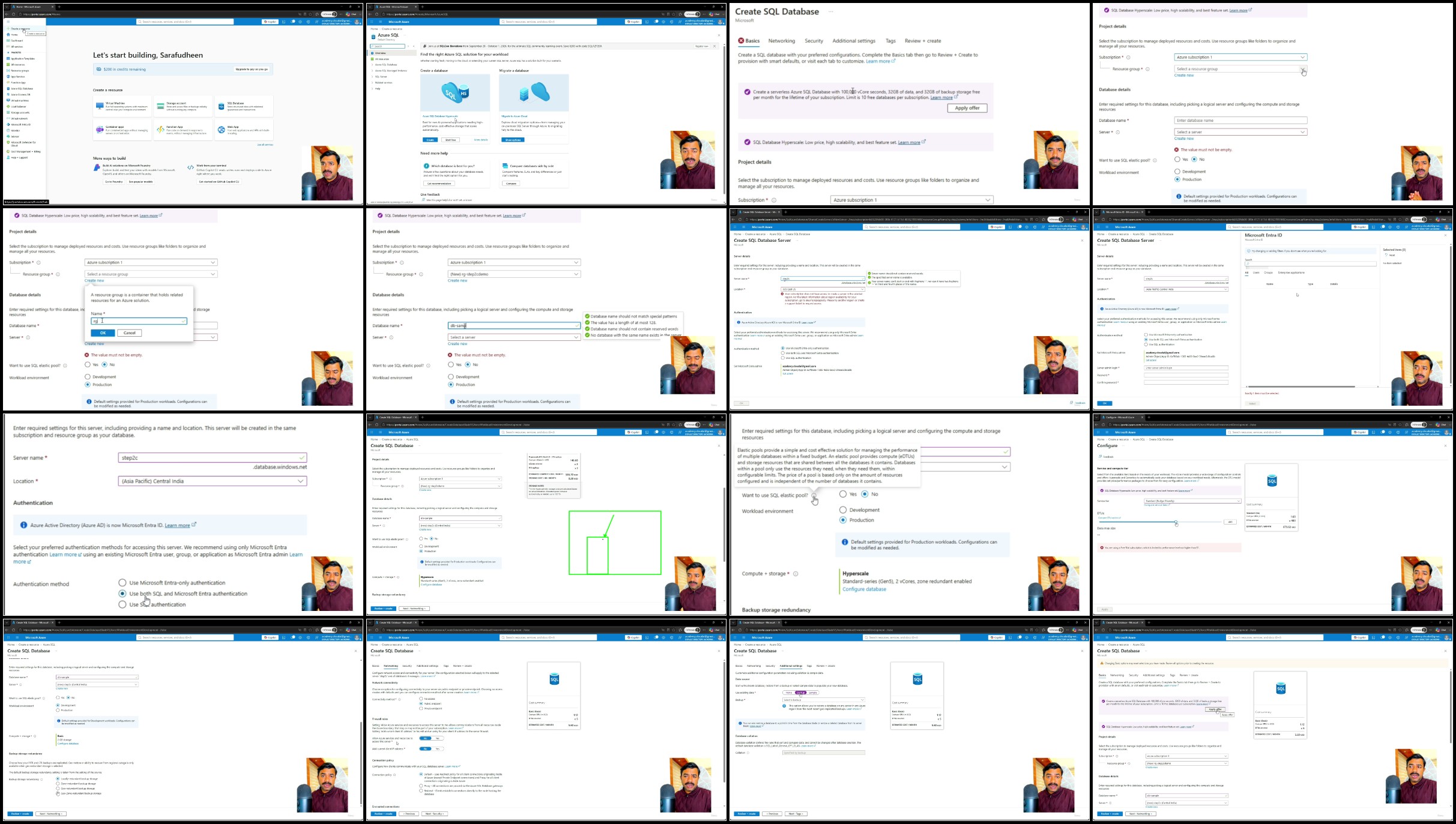
✨Azure SQL Database
✨Azure Data Lake Storage (ADLS)
✨Azure Data Factory (ADF)
You will create Azure resources and connect to Azure SQL using tools such as SQL Server Management Studio and Azure's query tools.
Build Azure Data Factory Pipelines
A major part of this course focuses on hands-on Data Engineering usingAzure Data Factory.
You will learn how to
✨ Create Azure Data Factory
✨ Understand the ADF interface
✨ Create Azure Data Lake Storage
✨ Create Linked Services and Datasets
✨ Connect source and destination systems
✨ Build data pipelines
✨ Copy data between systems
✨ Execute and validate pipelines
✨ Monitor pipeline executions
✨ Create triggers to automate pipeline executions
✨ Connect on-premises data using Self-hosted Integration Runtime
✨ Move data from on-premises systems to Azure
✨ Load multiple files
✨ Build dynamic and reusable pipelines
Build Metadata-Driven Data Pipelines
Instead of creating a separate pipeline for every table or dataset, you will learn how to design ametadata-driven architecture.
You will see how metadata and dynamic configurations can help create more reusable and scalable data pipelines.
Implement Incremental Data Loading
Finally, you will work with one of the most important concepts in practical Data Engineering:Incremental Loading.
You will learn how to
✨ Understand full load vs incremental load
✨ Work with watermark values
✨ Identify new or modified records
✨ Dynamically retrieve watermark values
✨ Load only required incremental data
✨ Update watermark values using stored procedures
✨ Validate incremental loads using different sets of data
Instead of reloading an entire dataset every time, you will understand how to design pipelines that processonly new or changed data.
Hands-On Learning Approach
The goal of this course is not just to introduce tools.
We follow a practical learning approach
Understand the Concept → Practice It → Build with It
By the end of the course, you will have a much clearer understanding of how data moves from source systems through processing and storage to become useful information for analytics-and how modern Azure Data Engineering solutions can be built to support that journey.
If you're ready to build practical skills inData Analysis and Azure Data Engineering, let's get started.
Who this course is for
⭐ Beginners who want to start learning Data Analysis, Data Engineering, SQL, Python, and Azure Cloud.
⭐ Aspiring Data Engineers who want practical experience building data pipelines and working with Azure data services.
⭐ Aspiring Data Analysts who want to strengthen their SQL and Python data-analysis skills.
⭐ Intermediate learners who already understand basic SQL or data concepts and want hands-on experience with Azure Data Engineering.
⭐ Students and recent graduates interested in building practical data and cloud skills.
⭐ Software developers and IT professionals who want to transition into Data Engineering or Data Analysis roles.
⭐ SQL developers and database professionals who want to understand modern cloud-based data engineering.
Homepage
Recommend Download Link Hight Speed | Please Say Thanks Keep Topic Live
No Password - Links are Interchangeable

 

4f9ee161b35dc438b7d64aee6e56c95f.jpg

Hands-On Data Engineering & Data Analysis with Azure Cloud
MP4 | Video: h264, 1920x1080 | Audio: AAC, 44.1 KHz, 2 Ch
Genre: eLearning | Language: English (US) | Duration: 4.5 h | Size: 4.29 GB​

Welcome to
Hands-On Data Engineering & Data Analysis with Azure Cloud
.
Data is at the center of modern businesses, but collecting data is only the beginning. Organizations need professionals who can
store, process, transform, analyze, and move data efficiently
.
This course is designed to help
beginner and intermediate learners
build practical skills in
Data Analysis, SQL, Python, Cloud Computing, and Azure Data Engineering
through hands-on learning.
We start from the fundamentals, so you don't need advanced Data Engineering or Azure knowledge to begin.
Start with Data Fundamentals
Before working with tools, you will build a strong understanding of important concepts such as:

Data, Databases, and DBMS

Data Analysis

Data Engineering

Data Lifecycle

Modern Data Platforms

ETL vs ELT

Structured and Semi-Structured Data

Cloud Computing
These concepts will help you understand not only
how
to use data technologies, but also
why and where
they are used.
Learn SQL with Hands-On Practice
Next, you will learn SQL and relational database fundamentals.
You will work with SQL to:

Create databases and tables

Understand SQL data types

Insert single and multiple records

Retrieve data using SELECT

Rename result columns using aliases

Filter data using WHERE

Work with comparison operators

Combine conditions using AND, OR, and NOT

Filter using IN, LIKE, BETWEEN, and IS NULL

Sort data using ORDER BY

Use aggregate functions

Summarize data using GROUP BY

Filter aggregated results using HAVING
But this course goes beyond simply watching SQL demonstrations.
You will get
hands-on coding exercises
where you can write SQL yourself and test your understanding.
The course also includes
interactive role-play activities
designed to help you think like a Data Analyst and Data Engineer while solving realistic business requirements.
Python for Data Analysis
You will then explore
Python and Pandas for Data Analysis
.
You will learn how to:

Load and inspect datasets

Understand rows, columns, and dataset structure

Identify missing values

Handle NULL values

Use median and other calculations

Handle missing values while considering categories

Perform basic data calculations

Work with string functions

Clean and prepare data for analysis
This provides practical exposure to how Python can be used to explore and prepare real-world datasets.
Move to Microsoft Azure Cloud
Once the fundamentals are clear, we take our data engineering journey to the cloud.
You will learn how to work with important Azure data services including:

Azure SQL Database

Azure Data Lake Storage (ADLS)

Azure Data Factory (ADF)
You will create Azure resources and connect to Azure SQL using tools such as SQL Server Management Studio and Azure's query tools.
Build Azure Data Factory Pipelines
A major part of this course focuses on hands-on Data Engineering using
Azure Data Factory
.
You will learn how to:

Create Azure Data Factory

Understand the ADF interface

Create Azure Data Lake Storage

Create Linked Services and Datasets

Connect source and destination systems

Build data pipelines

Copy data between systems

Execute and validate pipelines

Monitor pipeline executions

Create triggers to automate pipeline executions

Connect on-premises data using Self-hosted Integration Runtime

Move data from on-premises systems to Azure

Load multiple files

Build dynamic and reusable pipelines
Build Metadata-Driven Data Pipelines
Instead of creating a separate pipeline for every table or dataset, you will learn how to design a
metadata-driven architecture
.
You will see how metadata and dynamic configurations can help create more reusable and scalable data pipelines.
Implement Incremental Data Loading
Finally, you will work with one of the most important concepts in practical Data Engineering:
Incremental Loading
.
You will learn how to:

Understand full load vs incremental load

Work with watermark values

Identify new or modified records

Dynamically retrieve watermark values

Load only required incremental data

Update watermark values using stored procedures

Validate incremental loads using different sets of data
Instead of reloading an entire dataset every time, you will understand how to design pipelines that process
only new or changed data
.
Hands-On Learning Approach
The goal of this course is not just to introduce tools.
We follow a practical learning approach:
Understand the Concept → Practice It → Build with It
By the end of the course, you will have a much clearer understanding of how data moves from source systems through processing and storage to become useful information for analytics-and how modern Azure Data Engineering solutions can be built to support that journey.
If you're ready to build practical skills in
Data Analysis and Azure Data Engineering
, let's get started.


37-Create-an-Azure-SQL-Database.jpg

 
Zurück
Oben Unten