Free Download Glary Utilities Pro 6.50.0.54 Multilingual + Potable | 29.1/31.7 Mb
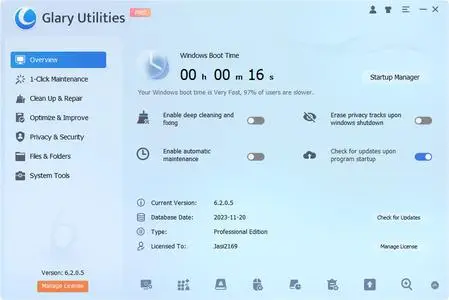
Glary Utilities is a Windows maintenance and optimization suite designed to help users manage system performance, remove unnecessary files, protect privacy, and maintain a clean computing environment. It combines more than 20 utilities in one application, covering routine maintenance tasks as well as specific tools for storage management, startup control, file recovery, and system cleanup.
The software provides a centralized approach to PC maintenance through its one-click maintenance function, which brings several commonly used operations together. Users can clean temporary data, remove browsing traces, check for certain system issues, and review performance-related settings without opening each utility individually.
Glary Utilities also includes individual tools for users who need more control over specific maintenance tasks. These utilities can help identify unnecessary startup entries, locate duplicate files, analyze disk space consumption, update installed software, and recover deleted data.
Software OverviewGlary Utilities brings together a collection of Windows maintenance tools intended to simplify everyday system administration. Its features address common issues such as accumulated temporary files, unnecessary startup applications, redundant data, privacy records, and storage usage.
The one-click maintenance feature provides a convenient starting point for routine cleanup. It combines several operations, including junk file removal, privacy cleanup, registry maintenance, and performance optimization. Users can also access individual utilities when they want to handle a particular maintenance task separately.
For storage management, the application offers tools to identify unnecessary files, inspect disk usage, and locate duplicate content. Additional utilities support file recovery and software update checks, making it useful for both regular PC maintenance and occasional troubleshooting.
Key Features
- One-click maintenance combines commonly used cleanup and optimization operations.
- Disk Cleanup identifies temporary files, obsolete installation data, logs, browser caches, and other removable content.
- Registry maintenance scans for certain registry errors and attempts to repair detected issues.
- Disk error detection helps identify and address disk corruption.
- Startup management allows users to review and disable unnecessary programs that launch with Windows.
- Software uninstallation helps remove applications that are no longer needed.
- Privacy cleanup removes browsing history, visited URLs, and other usage records.
- File deletion tools help permanently erase selected files to prevent ordinary recovery.
- Software update monitoring identifies available updates for installed applications.
- File recovery helps locate and restore accidentally deleted files.
- Disk Space Analyzer displays storage usage by file and folder size.
- Duplicate Files Finder locates redundant files that occupy additional disk space.
Why Choose Glary UtilitiesGlary Utilities is suitable for users who prefer having multiple PC maintenance functions available through a single application. Instead of relying on separate programs for cleanup, startup management, privacy protection, and storage analysis, users can access these tasks from one interface.
Its combination of automated maintenance and dedicated utilities accommodates different levels of experience. Beginners can use the one-click maintenance feature for routine tasks, while more experienced users can examine individual cleanup and optimization functions according to their needs.
The included disk analysis, duplicate detection, and file recovery tools also provide additional ways to manage storage and handle common file-related problems.
System Requirements
- Operating System: Windows 11, 10, 8.1, 8, 7, XP and Vista
Frequently Asked Questions
What is Glary Utilities used for?Glary Utilities is designed for Windows maintenance. It provides tools for removing unnecessary files, managing startup applications, cleaning privacy records, analyzing disk usage, and handling other routine system tasks.
Can Glary Utilities clean temporary files?Yes. Its Disk Cleanup utility can locate temporary files, obsolete installation files, logs, browser cache data, error reports, and other unnecessary content.
Does Glary Utilities include a file recovery tool?Yes. The application includes a recovery utility that can help find and restore accidentally deleted files, including files removed from the Recycle Bin. Recovery results may depend on whether the original storage space has been overwritten.
Can it identify duplicate files?Yes. Duplicate Files Finder scans for duplicate content, helping users identify redundant files and potentially reclaim occupied disk space.
Which Windows versions are supported?The supplied system information lists Windows 11, 10, 8.1, 8, 7, XP, and Vista.
Home Page
Product Information
- Software Name: Glary Utilities
- Version: 6.50.0.54
- Languages: Multilingual
- License type: Full Version + Portable
- File Size: 29.1/31.7 Mb
FileHost : RapidGator | FreeDL | DDownload | AlfaFile