




Last updated 2/2018
MP4 | Video: h264, 1280x720 | Audio: AAC, 44.1 KHz
Language: English | Size: 1.46 GB | Duration: 7h 27m
Learn to Create Environments for Game inside ZBrush, learn to paint in Substance Painter and import into Unity
What you'll learn
Have a Deeper understanding of Game design
Be able to create there own sets
Requirements
Pre-requisite ZBrush4 R8
Pre-requisite Substance Painter 2017
Pre-requisite Photoshop CC
Pre-requisite Unity (Its Free)
Not Essential Maya 2016
Not Essential Marmoset Toolbag 3
Description
I am excited to welcome you to this indepth course on modelling an environments for game.
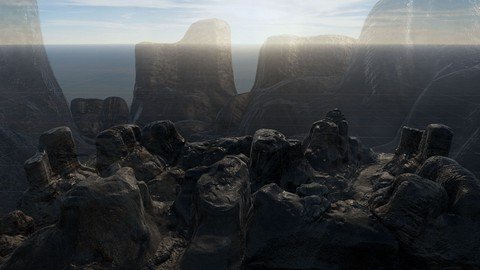
During this course we will explore many techniques for creating games environments*in this case a rocky terrain set, I will show you in detail how to model, map, paint and export your game ready*assets from ZBrush, along the way we will look at painting using substance painter and also how to export the new maps out of Substance, we will look at Maya and scaling as well as the GOZ feature of Zbrush, not only that but we will also take a look at marmoset as well the end goal is to bring these assets into Unity and create a game set.
So let me give you a break down of all the exciting stuff we are going to do together
Misc
Reference gatheringScale in MayaOverview
ZBrush
Set CreationGOZ from ZBrush to MayaTexturing as well as texturing from photoshopCreating tile-able texturesUV mappingCreating Low Poly ModelsExporting from ZBrush to SubstanceMulti map exporterWe will work on a Rock as well as a complete set
And More...
Maya
Getting the scale correct in Maya
We do not use Maya much in this course so its not a major requirement of the course*as sizing can be done inside Unity!
Substance Painter
Baking maps form Models created in ZBrushPainting our setCreating roughness and metallics in SubstanceLooking at the basic navigation and shelvesExporting from Substance
And More...
Marmoset Toolbag 3
We will use this to take a quick look at the textures we produce on a material
You do not require this program for the course
Unity
In the last part of the course we will imports all our assetsApply the materials to the setScale and arrange a quick set extensionAdd mist to the sceneAdd a skybox to the sceneAdd Colliders to our setAdd a FRP to the scene so we can look around in realtime
And More...
This course is a primer for my more detailed courses coming out soon and the course is here to give you a general understanding of Game Modelling with that in mind this course is targeted at Intermediate level modellers and can be considered a next step in your evolution as a game designer!
I really hope you enjoy the course and hope to see you soon.
Overview
Section 1: Game Envormental Course with ZBrush, Maya, Substance Painter, Marmoset and Unity
Lecture 1 ZBrush Game Design Course - Intro
Section 2: Game Design - Rock and Cliff Enviromental Course SIMPLE ROCK TUTORIAL 1
Lecture 2 ZBrush Game Design Course - Reference
Lecture 3 ZBrush Game Design Course - Setting scales and saving images for reference
Lecture 4 ZBrush Game Design Course - Looking at 1 metre cube export from Maya
Lecture 5 4ZBrush Game Design Course - Modelling our first rock
Lecture 6 ZBrush Game Design Course - Creating Lower Poly Rock
Lecture 7 ZBrush Game Design Course - Checking scaling and UV Unwrapping
Lecture 8 ZBrush Game Design Course - Texturing our Rock
Section 3: Game Design - Creation and Export Rock and Cliff Enviromental Course
Lecture 9 ZBrush Game Design Course - Driving detail from a texture
Lecture 10 ZBrush Game Design Course - Our first rock to Marmoset Toolbag 3
Lecture 11 ZBrush Game Design Course - Importing to Substance Painter
Section 4: Game Design - Rock and Cliff Enviromental Course SIMPLE ROCK TUTORIAL 2
Lecture 12 ZBrush Game Design Course - A look at tiling inside games
Lecture 13 ZBrush Game Design Course - Principals of creating a tile in Photoshop
Lecture 14 ZBrush Game Design Course - Online Textures
Lecture 15 ZBrush Game Design Course - Creating tileable textures inside ZBrush
Lecture 16 ZBrush Game Design Course - Quick Chat
Lecture 17 ZBrush Game Design Course - Rock 2 timelapse
Lecture 18 ZBrush Game Design Course - UV unwrapping rock 2
Lecture 19 ZBrush Game Design Course - Multimap exporter
Section 5: Game Design - Creation and Export Rock and Cliff Enviromental Course
Lecture 20 ZBrush Game Design Course - Terrain Blocking in
Lecture 21 ZBrush Game Design Course - Building detail and modifying
Lecture 22 ZBrush Game Design Course - Terrain Breakup
Lecture 23 ZBrush Game Design Course - Dyna-meshing our blocks and creating a new ground
Lecture 24 ZBrush Game Design Course - Terrain Block Cleanup 1
Lecture 25 ZBrush Game Design Course - Terrain Block Cleanup 2
Lecture 26 ZBrush Game Design Course - Low res terrain
Lecture 27 ZBrush Game Design Course - UV and exporting direct from ZBrush
Lecture 28 ZBrush Game Design Course - UV Unwrapping all tools into one UV texture map!
Lecture 29 ZBrush Game Design Course - Export to Substance using FBX exporter
Lecture 30 ZBrush Game Design Course - Importing to Substance as one Texture/UV Set!
Lecture 31 ZBrush Game Design Course - Another export import approach
Section 6: Game Design - Texturing our Terrain in Substance Painter
Lecture 32 ZBrush Game Design Course - Texturing in Substance Painter - Base Mesh
Lecture 33 ZBrush Game Design Course - Texturing in Substance Painter - Roughness/Spec P1
Lecture 34 ZBrush Game Design Course - Texturing in Substance Painter - Roughness/Spec P2
Lecture 35 ZBrush Game Design Course - Texturing in Substance Painter - Exporting Maps
Section 7: Game Design - Unity Set Up
Lecture 36 ZBrush Game Design Course - Set Up Unity
Lecture 37 ZBrush Game Design Course - Material set up
Lecture 38 ZBrush Game Design Course - Creating secondary maps for detail
Lecture 39 ZBrush Game Design Course - Adding colliders and First Person to the scene
Lecture 40 ZBrush Game Design Course - Adding a Skybox from the asset store
Lecture 41 ZBrush Game Design Course - Set Up Unity Adding Rocks
Lecture 42 ZBrush Game Design Course - Add mist using particle system
Lecture 43 Bonus Lecture
Intermediate 3D Designers/Modellers looking to extend there skills,Anyone who wants to learn how multiple programs help your workflow
Homepage
Recommend Download Link Hight Speed | Please Say Thanks Keep Topic Live
Links are Interchangeable - No Password - Single Extraction
