




Last updated 4/2020
MP4 | Video: h264, 1280x720 | Audio: AAC, 44.1 KHz
Language: English | Size: 3.20 GB | Duration: 12h 16m
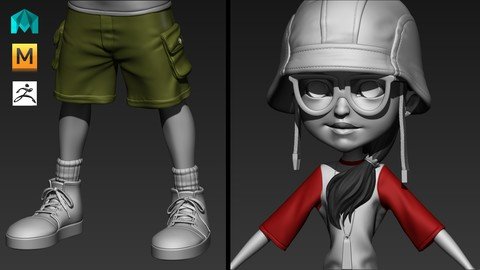
Step By Step Guide From Besh Mesh Creation to High Poly Sculpting Using Zbrush, Maya and Marvelous Designer
What you'll learn
Modeling Methods of Maya
Cloth Modeling Using Marvelous Designer
Sculpting Methods in Zbrush
Shoes Detailing in Zbrush
Many Production Tips and Tricks Through Out The Course
A Full Character Model From Start to Finish
Requirements
Basic computer knowledge and Interest to learn 3d modeling.
Description
Student reviews :Jibak says : One of the best online teaching courses on Character modeling. The course is superb because of the step by step detailing, completeness and 'No skips'. It starts with the very basics of Maya/ Zbrush/ MD and ultimately ends up in great detailing. The transition is very smooth and well organised. It improved my modeling skills a lot and also introduced me to new software like Zbrush & MD . Though I have not completed the course yet but it is amazing and worth buying. Thanks to Udemy and Mr. N. K. Jena for providing such a tutorial. Stevenf says : The instructor explains everything extremely well and detailed. I recommend this class for anyone interested in learning modeling.Edwin Gomez says : Great instruction! The material being delivered is top notch. I love the how the instructor takes the time to explain the tools and all of the little intricacies that are associated with that tool set. I am really enjoying his class and would highly recommend this course !Description :In this 12.5 hours of course Game artist Nalini Kanta Jena will teach you, how to create game character from scratch using Maya, Zbrush and Marvelous Designer.He describes every steps he takes, so even if you are a totally beginner, you can easily follow him.This course not only shows you step by step guide but also shows you an up to date production pipeline.He will start the course with Base mesh creation in Maya. then He will move to*Marvelous Designer to model clothes then Zbrush to create sculpting details.The goal of this course is to teach you the entire process of character sculpting and how different software such as Maya, Zbrush and Marvelous Designer work together to create your model.The course will cover these topics*Maya BasicsModeling methods in MayaMarvelous Designer BasicsModeling cloth in*Marvelous DesignerZbrush BasicsCharacter sculpting methods in ZbrushIntegration between Maya, Marvelous Designer and ZbrushMany tips and tricks in every lectureAfter completing this course you can model game characters with more confident and with clear knowledge of the pipeline. so if you want to be a Game artist then enroll to this class now and start learning today.If you are not satisfied with the course then you can refund it. There is a 30 days money back guarantee. So there is no reason to hesitate Enroll to the course and learn production level character sculpting now.
Overview
Section 1: Maya Strong Foundation
Lecture 1 Introduction
Lecture 2 Download Resource Files
Lecture 3 User Interface Elements
Lecture 4 Veiwport navigation
Lecture 5 Creating objects
Lecture 6 Selection methods
Lecture 7 Soft Selection and Symetry
Lecture 8 Move tool
Lecture 9 Scale tool
Lecture 10 Rotate tool
Lecture 11 Using Layers
Lecture 12 Hide and Show Objects
Lecture 13 Intro to outliner
Lecture 14 Pivot Point
Lecture 15 Duplicating Objects
Lecture 16 Group objects
Lecture 17 Freez Transformation
Lecture 18 Snaping Tools
Lecture 19 Hotbox
Lecture 20 Marking Menu
Lecture 21 Creating Costume Marking Menu
Section 2: Character Base Mesh Modeling In Maya
Lecture 22 Understanding The Concept Art
Lecture 23 Preparing Reference Image For Maya
Lecture 24 Creating Project Folder
Lecture 25 Setting Real World Scale
Lecture 26 Modeling The Torso
Lecture 27 Modeling The Hand
Lecture 28 Modeling Leg Base Mesh
Lecture 29 Modeling The Palm and Fingers
Lecture 30 Modeling The Eye Ball
Lecture 31 ModelingThe Eye Lid
Lecture 32 Modeling The Lip
Lecture 33 Modeling The Cheek
Lecture 34 Modeling The Nose
Lecture 35 Modeling The Skull Area
Lecture 36 Modeling The Neck
Lecture 37 Modeling Ear
Lecture 38 Attaching Head With Body
Lecture 39 Modeling Mouth Inside
Section 3: Accessories Base Mesh Modeling in Maya
Lecture 40 Shoe Base Blocking
Lecture 41 Modeling Shoe Lace
Lecture 42 Modeling Shoe Lace Knot
Lecture 43 Modeling Cap Base Mesh
Lecture 44 Modeling Cap Belt
Lecture 45 Modeling The Spec
Lecture 46 Modeling The Locket
Lecture 47 Modeling Sketboard Base
Lecture 48 Modeling Sketboard Wheels
Lecture 49 Modeling Wheel Conecter
Section 4: Cloth Modeling in Marvelous Designer
Lecture 50 MD Overview
Lecture 51 Display option of 3d garment window
Lecture 52 Creating Patterns Basics
Lecture 53 Creating T-shirt Pattern
Lecture 54 Creating Sleves for T-shirt
Lecture 55 Creating Patterns for Pant
Lecture 56 36-Exporting All Objects for Sculpting
Section 5: Zbrush Basics
Lecture 57 Zbrush Interface Overview
Lecture 58 Navigating the Canvas
Lecture 59 Sculpting Basics
Lecture 60 Masking for sculpting
Lecture 61 Show and Hide polygons
Section 6: Character Body Sculpting in Zbrush
Lecture 62 Importing OBJ Files Into Zbrush
Lecture 63 Head Blocking Sculpting
Lecture 64 Blocking the Nose and Lip
Lecture 65 Refining the Eyes
Lecture 66 Sculpting the Hand
Lecture 67 Refining the Hand Sculpting
Lecture 68 Sculpting the Leg
Lecture 69 Sculpting Ear
Lecture 70 Refining the Face
Lecture 71 More Refining on the Face
Lecture 72 Lip Surface Detailing
Lecture 73 Finger Detailing
Lecture 74 Skin Detailing
Section 7: Cloth Sculpting in Zbrush
Lecture 75 Using polygroups to split Meshes
Lecture 76 Using Dynamesh to Close Holes
Lecture 77 Projecting Details back
Lecture 78 Projecting Details Back into Pant
Lecture 79 Refining Folds on T-shirt
Lecture 80 Making Sleave holes
Lecture 81 Masking for Sleves
Lecture 82 Creating Seam line Using Group Loops
Lecture 83 Projecting Details Back to the Mesh
Lecture 84 Pant Basic Forms
Lecture 85 Pant Front Folds
Lecture 86 Extracting Pockets
Lecture 87 Pocket Refining
Lecture 88 Creating Pocket Seam Lines
Lecture 89 Creating Pocket Folds
Lecture 90 Creating Pocket Wrinkles
Lecture 91 Creating Pant Back Folds
Lecture 92 Craeting Pant Botton Using IMM Brush
Lecture 93 Creating Pant Center Seam
Lecture 94 Creating Pant Bottom Seam
Section 8: Shoe Sculpting in Zbrush
Lecture 95 Mirroring the Shoe
Lecture 96 Adjusting Shoe Laces
Lecture 97 Seam Line Mark
Lecture 98 Creating Lace Holes
Lecture 99 Shoe lace Detailing
Lecture 100 Shoe lace Knot Detailing
Lecture 101 Shoe Lace Impact Detailing
Lecture 102 Adding Stich Details
Lecture 103 Creating Texture for Sole
Lecture 104 Creating Sole Details
Lecture 105 Extracting Socks Base
Lecture 106 Socks Detailing
Section 9: Cap Sculpting in Zbrush
Lecture 107 Basic Forms of Cap
Lecture 108 Layering Details on Cap
Lecture 109 Adding Stiching to Cap
Lecture 110 Adding Memory Folds
Lecture 111 Strap Detailing
Lecture 112 Adjusting the Locket
Section 10: Hair Sculpting in Zbrush
Lecture 113 Making Hair Base
Lecture 114 Hair Detailing
Lecture 115 Adding Secondary Hair Clumps
Lecture 116 Modeling Hair Band
Section 11: Conclusion
Lecture 117 Bonus Lecture - What's Next?
anyone who wants to learn character sculpting for game.
Homepage
Recommend Download Link Hight Speed | Please Say Thanks Keep Topic Live
Links are Interchangeable - No Password - Single Extraction
