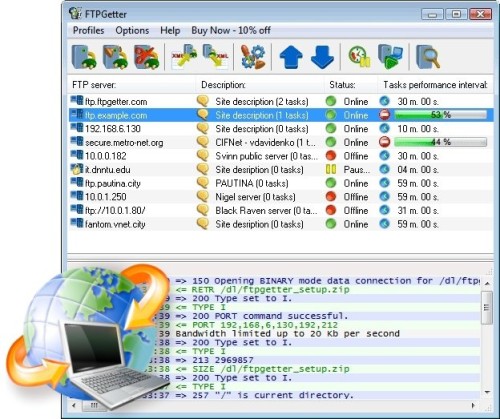
• Regeln für den Software-Bereich:


    Allgemeines:

    - In erster Linie sind unsere Boardregeln zu beachten, zu finden HIER.
    - Software zur Audiobearbeitung sollte ausschließlich im Unterforum "Audio" eingestellt werden.
    - Für Cracks, Keygens oder sonstige Freischaltungssoftware gibt es das Unterforum "Freischaltung".
    - Portable Software bitte im entsprechenden Unterforum "Portable Software" eintragen.
    - Diskussionen zur Installation und anderen Problemen mit der Software, bitte im enstprechenden Unterforum "Talk" führen.
    - Bei Unklarheiten und Fragen zu den Regeln bitte die Moderatoren kontaktieren.


    Angebot erstellen

    - Die Struktur des Threadtitels muss wie folgt umgesetzt werden: Herstellername - Softwarename - Versionsnummer
    - Unnötige Zusätze im Threadtitel wie "HOT", "NEW" oder Punkte zwischen den Wörtern sind nicht erlaubt.
    - Achtet darauf immer nur die Hauptversion und deren Updates in einem Thread zusammenfassen, konkretes Beispiel: SoftwareXY v3.12 gehört in den selben Thread mit SoftwareXY v3.13; SoftwareXY v.4.1 gehört in einen neuen eigenen Thread. Ausgenommen hiervon sind Sammelthreads und Dauerangebote.
    - Bei nicht bekannten Herstellern oder Angebote einer privaten Software, ist die Programmbezeichnung + Versionsnummer ausreichend.
    - Besondere Beachtung gilt für den ersten Beitrag eines Angebots. Dort muss eine kurze Beschreibung der Software in deutscher Sprache angegeben werden. Für offizielle Releases ist es Pflicht die NFO im Beitrag einzustellen(Spoiler, siehe nächster Punkt).
    - Weitere Informationen wie NFOs oder Changelogs, versteckt ihr bitte in einem Spoiler.


    Software Suche

    - Für Suchanfragen haben wir das Unterforum "Suche" erstellt.
    - Auch hier sollte vorher die Suchfunktion benutzt werden, um Doppelthreads vorzubeugen. Sollte es bereits eine Suchanfrage geben, könnt ihr den Thread gerne mit einem "Danke" pushen.


    Trojaner- und Virusalarm

    - Falls Euer Virenscanner bei einem Angebot Alarm schlägt, solltet ihr zunächst Ruhe bewahren. Viele Virenscanner erkennen Cracks/Keygens oft fälschlicherweise als Bedrohung.
    - Prüft die verdächtige Datei zuerst mit http://virustotal.com , sollte es sich hierbei wirklich um eine Bedrohung handeln, meldet den Beitrag und/oder wendet euch mit dem Bericht von VirusTotal.com an einen Moderator.


    Unerwünschte Angebote

    - Keylogger, Spionagetools, alles rund ums Thema Hacking/Cracking ist nicht erwünscht.
  • Bitte registriere dich zunächst um Beiträge zu verfassen und externe Links aufzurufen.

*** Bestes IPTV *** bester Preis *** gratis Test ***


FTPGetter Professional v5

finding_nimo

MyBoerse.bz Pro Member

FTPGetter Professional v5.97.0.237 Multilingual
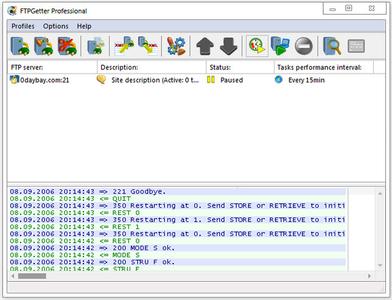

bb1ca7d64b0816a7998292b0cc843d96.jpeg


FTPGetter Professional v5.97.0.237 Multilingual | 22 MB | Language: Multilanguage


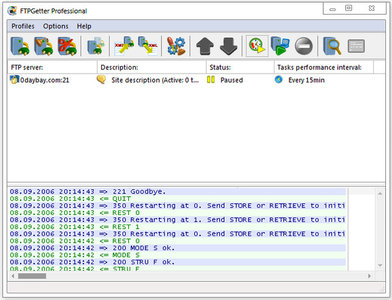
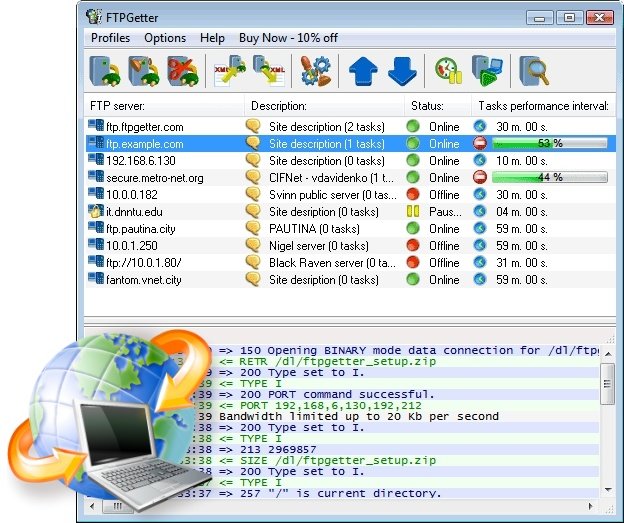
FTPGetter automates the uploading and downloading of files, allowing scheduling file transfers between your computer and remote FTP and SFTP servers. If you frequently access FTP/SFTP servers to synchronize files between the local and the remote PCs, to update Web sites or upload webcam photos, FTPGetter will save you a lot of time and efforts.


Automate your daily FTP/SFTP upload and download tasks
Save time on FTP/SFTP updates! Plan your uploads and automate the workflow. Schedule and automate file transfers with a centralized console. Let your computer move or synchronize information securely between home and office automatically according to the schedule!

Terminal Emulator
FTPGetter Professional comes with a built-in terminal emulator, allowing you to connect and execute commands on a remote server via the command-line environment. Thanks to its terminal emulator, FTPGetter Professional users can access a variety of servers requiring the use of a terminal, perform file operations, navigate directory structures, and execute remote commands easily.

Automatic Synchronization
Monitor changes between the local and the remote PC and keep information up-to-date by synchronizing the contents between the two computers. FTPGetter detects new and updated files automatically, and uploads or downloads the changes according to the schedule.

Using Shell Scripting
Shell scripting is a powerful tool allowing to save time when a complex task must be performed. A few lines of code can initiate the process that will only take a couple of minutes to execute, saving you hours of time of doing the same task with brute force. For example, a large number of files can be downloaded from a server in a straightforward way by reading all files and folders one by one, and downloading each file separately. This takes time. A lot of time. However, a single shell command can make the server consolidate all files and folders into a single compressed archive, making it a snap to download. FTPGetter 3 Professional fully supports shell scripting. Read the article to find out about the benefits of using shell commands.

Scheduled FTP/SFTP Uploads and Downloads
FTPGetter automates FTP and SFTP upload and download, scheduling FTP/SFTP transfers between remote server locations and your local or network workstation. Plan your workflow and set up your schedule just once, and FTPGetter will take away the routine! Pick convenient time, choose days of week, or select monthly dates to move your data, and FTPGetter will perform the transfers reliably and on-time. The available cron-style scheduler allows creating advanced programmable schedules.

File Masks and Batch Processing
Transfer multiple files between FTP/SFTP servers and the local PC by specifying file masks. No need to guess what the file name is going to be! You can easily set only the Office documents to update, or perform scheduled updates of all PHP or HTML files by simply specifying a set of file extensions.

Batch processing using the file name masks allows you to flexibly adjust the list of files to transfer. Combined with the built-in scheduler, the batch processing makes FTPGetter for a truly universal FTP/SFTP synchronization tool.

Before and After the Transfer
Automate FTP and SFTP transfers even further! FTPGetter can execute custom commands and entire scripts before and after the transfer. Allowing full automation of FTP/SFTP transfers, the tool can execute commands on local and remote PCs, and perform FTP commands, batch files, and scripts. The support of local and remote commands allows automatically compressing (tar+gzip), transferring, and unpacking a bunch of files and directories completely automatically.

SSH File Transfer Protocol and Proxy Server Support
Connect to an FTP server directly or through a FTP, SOCKS or HTTP proxy server. FTPGetter fully supports the secure SSL/TLS protocol, allowing safely transferring private and sensitive information over the Internet without compromising security. The SFTP (SSH File transfer protocol) support ensures complete security of all file transfers.

Work with any number of FTP and SFTP servers simultaneously and without delays. FTPGetter uses multithreaded processing to provide smooth multitasking experience.

Operating System: Windows 10, 8, 7, Windows Server 2012 R2, Server 2012, Server 2008, Server 2003, Vista, XP, Windows 2000

Home Page -


Größe: 22 MB
Sprache: Multilingual-Deutsch
Format: .rar / .exe
Plattform: Windows (32 Bit 64 Bit)


HOSTER:

K2s.cc (Keep2Share)

Rapidgator.net

Nitroflare.com

Uploadgig.com


DOWNLOAD



FTPGetter Professional v5.97.0.255 Multilingual


482fe1c5cde91236d7f47789a409f636.jpeg


FTPGetter Professional v5.97.0.255 Multilingual | 29 MB | Language: Multilanguage


Homepage:


Größe: 29 MB
Sprache: Multilingual-Deutsch
Format: .rar / .exe
Medizin: Present
Plattform: Windows 10/8.1/8/7
Bit depth: 32bit 64bit


HOSTER:

K2s.cc (Keep2share)

Rapidgator.net

Nitroflare.com

Uploadgig.com


DOWNLOAD



FTPGetter Professional 5.97.0.261 Multilingual

482fe1c5cde91236d7f47789a409f636.jpeg


FTPGetter Professional 5.97.0.261 Multilingual

Sparen Sie Zeit bei FTP/SFTP-Updates! Planen Sie Ihre Uploads und automatisieren Sie den Workflow. Planen und automatisieren Sie Dateiübertragungen mit einer zentralen Konsole. Lassen Sie Ihren Computer automatisch nach Zeitplan Informationen sicher zwischen Zuhause und Büro verschieben oder synchronisieren!


Language: Deutsch, Multi | File Size: 29.7 MB | Format: RAR, EXE | Platform: Windows®10 (x86/x64), Windows®8 (x86/x64), Windows®7 (x86/x64), Windows®Server 2019, Windows®Server 2016, Windows®Server 2012 R2, Windows®Server 2012, Windows®Server 2008, Windows®Server 2003 (32/64Bit)

Hoster:
RapidGator.net | Uploadgig.com

DOWNLOAD Links:


FTPGetter Professional v5.97.0.261 Multilingual


25fba374075f72bccc5989ea5baf3f00.jpeg


FTPGetter Professional v5.97.0.261 Multilingual | 29 MB | Language: Multilanguage


Homepage:


Größe: 39 MB
Sprache: Multilingual-Deutsch
Format: .rar / .exe
Medizin: Present
Plattform: Windows 11/10/8.1/8/7
Bit depth: 32bit 64bit


HOSTER:

K2s.cc (Keep2share)

Rapidgator.net

Nitroflare.com

Uploadgig.com


DOWNLOAD


FTPGetter Professional 5.97.0.285 Multilingual

482fe1c5cde91236d7f47789a409f636.jpeg


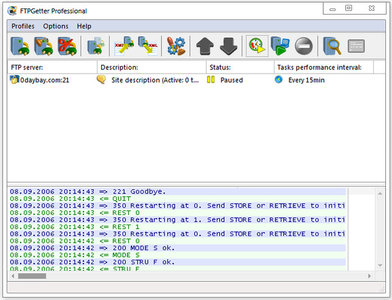
Save time on FTP/SFTP updates! Plan your uploads and automate the workflow. Schedule and automate file transfers with a centralized console. Let your computer move or synchronize information securely between home and office automatically according to the schedule!


Language: Deutsch, Multi

File Size: 29.7 MB

Format: RAR, EXE

Platform: Windows10 (x86/x64), Windows8 (x86/x64), Windows7 (x86/x64), WindowsServer 2019, WindowsServer 2016, WindowsServer 2012 R2, WindowsServer 2012, Windows Server 2008, Windows Server 2003


DOWNLOAD Links:

 
Vxpc.png


FTPGetter Professional 5.97.0.285 Multilingual


Save time on FTP/SFTP updates! Plan your uploads and automate the workflow. Schedule and automate file transfers with a centralized console. Let your computer move or synchronize information securely between home and office automatically according to the schedule!


Terminal Emulator
FTPGetter Professional comes with a built-in terminal emulator, allowing you to connect and execute commands on a remote server via the command-line environment. Thanks to its terminal emulator, FTPGetter Professional users can access a variety of servers requiring the use of a terminal, perform file operations, navigate directory structures, and execute remote commands easily.


Größe: 25.5 MB
Sprache: Multi/Deutsch
Format: RAR/EXE
Plattform: Windows 7/10/11
Hoster: Rapidgator.net


Download

 
FTPGetter Professional 5.97.0.287

Multilingual/Deutsch // Crack UZ1


49217446kl.png


Beschreibung:

Sparen Sie Zeit bei FTP/SFTP-Updates! Planen Sie Ihre Uploads und automatisieren Sie den Arbeitsablauf. Planen und automatisieren Sie Dateiübertragungen mit einer zentralen Konsole. Lassen Sie Ihren Computer Informationen automatisch und sicher zwischen Zuhause und Büro verschieben oder synchronisieren, je nach Zeitplan!

FTPGetter Professional verfügt über einen integrierten Terminalemulator, der es Ihnen ermöglicht, über die Befehlszeilen-Umgebung eine Verbindung zu einem Remote-Server herzustellen und dort Befehle auszuführen. Dank des Terminalemulators können Benutzer von FTPGetter Professional auf eine Vielzahl von Servern zugreifen, für die ein Terminal erforderlich ist, Dateivorgänge durchführen, in Verzeichnisstrukturen navigieren und problemlos Remote-Befehle ausführen.

_________________________________________________

Größe: 33 MB
Sprache: Multi/Deutsch
Format: RAR/EXE
Plattform: Windows 7/8/10/11 (32/64-bit)
Windows Server 2003+
Hoster: RapidGator|Ddownload|Katfile
________________________________________


FTPGetter Professional 5.97.0.291 Deutsch-Multilanguage

download.jpg


FTPGetter Professional 5.97.0.291 Deutsch-Multilanguage || Crack-UZ1 || 22.94 MB || Sprache: Deutsch-Multilanguage


Beschreibung:


Sprache: Deutsch und Multilanguage
File Size: 22.94 MB
Format: .Rar und .Exe
Plattform: Windows 11, 10, 8.1, 8, 7, Windows Server (32 und 64 Bit)
Passwort: Wird nicht benötigt
Hoster: nitroflare.com , ddownload.com , rapidgator.net

Mirrors sind untereinander kompatibel


Download Links


FTPGetter Professional 5.97.0.291 Multilingual

v1z5t-IFYjj67-Bo-G53-SOf-Ack88-R3x-VV87.jpg


Save time on FTP/SFTP updates! Plan your uploads and automate the workflow. Schedule and automate file transfers with a centralized console. Let your computer move or synchronize information securely between home and office automatically according to the schedule!


Language: Deutsch, Multi

File Size: 23.63 MB

Format: RAR, EXE

Platform: Windows10 (x86/x64), Windows8 (x86/x64), Windows7 (x86/x64), WindowsServer 2019, WindowsServer 2016, WindowsServer 2012 R2, WindowsServer 2012, Windows Server 2008, Windows Server 2003


DOWNLOAD Links:


FTPGetter Professional 5.97.0.295 Multilingual


c99d6e57f364f765f2f6500ce3a130ee.jpg


FTPGetter Professional 5.97.0.295 Multilingual


FTPGetter automatisiert das Hoch- und Herunterladen von Dateien und ermöglicht die Planung von Dateiübertragungen zwischen Ihrem Computer und entfernten FTP- und SFTP-Servern. Wenn Sie häufig auf FTP/SFTP-Server zugreifen, um Dateien zwischen dem lokalen und dem Remote-PC zu synchronisieren, Websites zu aktualisieren oder Webcam-Fotos hochzuladen, erspart Ihnen FTPGetter viel Zeit und Mühe.


Sprache: Deutsch, Multi | Größe: 23 MB | Format: RAR, EXE | Plattform: Windows 7, 8/8.1, 10, 11 (32/64Bit)


Hoster:
RapidGator.net | NitroFlare.com | DDownload.com


DOWNLOAD Links:


FTPGetter Professional 5.97.0.297 Deutsch-Multilanguage

download.jpg


FTPGetter Professional 5.97.0.297 Deutsch-Multilanguage || 25.51 MB || Sprache: Deutsch-Multilanguage


Beschreibung:


Sprache: Deutsch und Multilanguage
File Size: 25.51 MB
Format: .Rar und .Exe
Plattform: Windows 11, 10, 8.1, 8, 7, Windows Server (32 und 64 Bit)
Passwort: Wird nicht benötigt
Hoster: nitroflare.com , ddownload.com , rapidgator.net

Mirrors sind untereinander kompatibel


Zurück
Oben Unten