




From Ground Zero To Surpac Hero: For Surveyors & Geologists
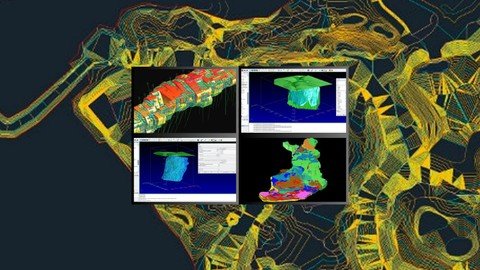
Transform from a Beginner to a Mining Pro with GEOVIA Surpac - Master Real-World Design, Stope Planning, and 3D Modeling
What you'll learn
Get Comfortable with Underground Mine Design Basics
Set Up Projects in GEOVIA Surpac Like a Pro
Design Stopes That Work in the Real World
Master Advanced Stope Slicing Techniques
Lay Out Underground Roads, Declines, and Access Paths
Build 3D Geological Models From Scratch
Calculate Volumes with Precision (No Stress)
Plan Real Mining Projects End-to-End Using Surpac
It's only for you to become surpac HERO
Requirements
No prior experience with GEOVIA Surpac required - We start from the basics and build up to advanced concepts.
Basic computer skills - If you know how to navigate files and use software, you're good to go!
Interest in mining, geology, or 3D modeling - A passion for learning is all you need.
Access to GEOVIA Surpac software - A trial or licensed version will let you follow along with hands-on exercises.
A computer with Windows OS - Surpac works best on a Windows-based system.
Description
Instructor: Prakalp BinzadeEmbark on a transformative journey from ground zero to Surpac hero with this comprehensive course designed specifically for surveyors, geologists, and mining professionals! Whether you're a complete beginner or looking to enhance your skills, this course will take you step-by-step through the essential concepts and advanced techniques of underground mine design using GEOVIA Surpac.What You'll Learn:Introduction to Underground Mine Design:Understand the fundamental concepts and terminology that shape the mining industry. Learn about mining methods, stope design, and the importance of planning in resource extraction.Setting Up for Success iscover how to set up your work environment, manage directories, and organize project files in GEOVIA Surpac, ensuring you have a solid foundation for your mining projects.Creating and Optimizing Stopesive into the stope design workflow, where you'll learn to digitize stope outlines, evaluate polygon designs, and create efficient layouts for maximum resource recovery.Advanced Stope Slicing Techniques:Master the art of stope slicing, including how to slice by elevation, define exclusions, and target specific tonnages, ensuring you get the most out of your mine designs.Building 3D Geological Models:Gain hands-on experience in constructing detailed 3D models from geological data. Learn how to visualize your models effectively, allowing for better project planning and communication.Road and Decline Design:Learn to create underground road outlines and access drives, ensuring smooth transportation routes within your mine. Understand the critical factors involved in decline design for optimal ore extraction.Calculating Volumes and Assessing Feasibility:Use GEOVIA Surpac tools to accurately calculate volumes of rock and assess the feasibility of your mining plans, giving you the confidence to present your designs effectively.Who This Course Is For:This course is tailored for surveyors and geologists who want to elevate their careers by mastering GEOVIA Surpac. It's ideal for those seeking a deeper understanding of underground mine design and the practical skills necessary for success in the mining industry.No prior experience is required-just a willingness to learn and grow! By the end of this course, you'll have the skills and confidence to tackle real-world mining projects, transforming you into a Surpac hero ready to make an impact in your field.Join us today and start your journey toward expertise in underground mine design with GEOVIA Surpac!
Overview
Section 1: Introduction to GEOVIA Surpac Essentials
Lecture 1 Introduction Overview
Lecture 2 Navigating the Surpac Interface
Lecture 3 Understanding Surpac File Types
Lecture 4 Working with Strings in Surpac
Lecture 5 Saving and Managing Files
Lecture 6 Customizing Your Workspace
Lecture 7 Layer Management Mastery
Lecture 8 Viewing Points and Segments
Lecture 9 Mastering Viewport Management
Lecture 10 Understanding Planes
Lecture 11 Attributes and Style Files
Lecture 12 Breaking, Joining, and Renaming
Lecture 13 File Tools Deep Dive
Lecture 14 Deleting and Reversing Points
Lecture 15 Calculating Cut and Fill & Boundary Strings
Lecture 16 Pit Design Techniques
Lecture 17 Triangulated Surfaces Creation
Lecture 18 Exporting Data to PDF
Lecture 19 Plotting with AutoPlot
Section 2: Mastering Solid Modeling in GEOVIA Surpac
Lecture 20 Overview of Solid Modules
Lecture 21 Introduction and Setup for Solid Modeling
Lecture 22 Creating Solids Using Different Methods PART 1
Lecture 23 Creating Solids Using Different Methods PART 2
Lecture 24 Triangulation with Solid Methods
Lecture 25 Multi-Segment Triangulation
Lecture 26 Segmenting Solids for Complex Models
Lecture 27 Intersecting Solids
Lecture 28 Creating Models with Underground Data
Lecture 29 Combining String Files for Solids
Lecture 30 Preparing and Finalizing Solid Models
Section 3: Masterclass in Block Modeling for Next-Gen Mining with GEOVIA Surpac
Lecture 31 Deep Dive into the Evolution of Block Modeling
Lecture 32 Pro-Level Block Modeling Framework Setup
Lecture 33 Building Cutting-Edge, Dynamic Attributes in Block Models
Lecture 34 Elite Resource and Grade Estimation Methods
Lecture 35 Automating and Auditing Block Model Attributes Like a Pro
Lecture 36 Advanced Boundary Management and Geological Constraints
Section 4: Mastering Advanced Geological Database Creation with GEOVIA Surpac
Lecture 37 Geological Data Concepts and Surpac Data Management
Lecture 38 Introduction to Geological Databases and File Types
Lecture 39 Customizing Toolbars and Menus for Enhanced Geological Modeling
Lecture 40 Importing Data and Visualizing Drill Holes with Dynamic Cylinder Displays
Lecture 41 Creating Digital Terrain Models (DTM) from Stope Height Data
Section 5: Expert-Level Underground Mine Design: Harnessing GEOVIA Surpac
Lecture 42 Comprehensive Overview of Underground Mine Design Modules
Lecture 43 Creating an Efficient Underground Plan
Lecture 44 Advanced Planning Techniques with Surpac: Full Tutorial
Section 6: ADVANCED UNDERGROUND DESIGN IN SURPAC USING MINSCAD
Lecture 45 Advanced Underground mine design overview
Lecture 46 Advanced Underground mine design introduction
Lecture 47 3D modeling tutorial
Lecture 48 3D modeling report
Section 7: Drill and Blast Techniques
Lecture 49 DRILL AND BLAST introduction
Lecture 50 DRILL AND BLAST overview
Lecture 51 How to Create Drill and Blast Patterns
Lecture 52 How to Create Drill and Blast Patterns Every Thing in one
Section 8: Underground 3D plans in surpac
Lecture 53 how to make underground 3D plans in surpac
Aspiring Mining Professionals and Engineers - Perfect for those looking to kickstart a career in underground mining and design.,Geologists and Surveyors - Gain hands-on experience with 3D geological modeling and advanced mining workflows.,Mining Students and Fresh Graduates - Bridge the gap between theory and real-world application with practical Surpac skills.,Industry Professionals Switching to GEOVIA Surpac - Ideal for professionals familiar with other mining software, looking to master Surpac.,Freelancers and Consultants in the Mining Sector - Learn how to create professional mining plans to boost your freelance projects.,Mining Enthusiasts and Self-learners - Even without prior experience, you'll enjoy building your skills from the ground up.
Say "Thank You"
rapidgator.net:
ddownload.com:
Published 10/2024
MP4 | Video: h264, 1920x1080 | Audio: AAC, 44.1 KHz
Language: English | Size: 3.79 GB | Duration: 7h 15m
MP4 | Video: h264, 1920x1080 | Audio: AAC, 44.1 KHz
Language: English | Size: 3.79 GB | Duration: 7h 15m
Transform from a Beginner to a Mining Pro with GEOVIA Surpac - Master Real-World Design, Stope Planning, and 3D Modeling
What you'll learn
Get Comfortable with Underground Mine Design Basics
Set Up Projects in GEOVIA Surpac Like a Pro
Design Stopes That Work in the Real World
Master Advanced Stope Slicing Techniques
Lay Out Underground Roads, Declines, and Access Paths
Build 3D Geological Models From Scratch
Calculate Volumes with Precision (No Stress)
Plan Real Mining Projects End-to-End Using Surpac
It's only for you to become surpac HERO
Requirements
No prior experience with GEOVIA Surpac required - We start from the basics and build up to advanced concepts.
Basic computer skills - If you know how to navigate files and use software, you're good to go!
Interest in mining, geology, or 3D modeling - A passion for learning is all you need.
Access to GEOVIA Surpac software - A trial or licensed version will let you follow along with hands-on exercises.
A computer with Windows OS - Surpac works best on a Windows-based system.
Description
Instructor: Prakalp BinzadeEmbark on a transformative journey from ground zero to Surpac hero with this comprehensive course designed specifically for surveyors, geologists, and mining professionals! Whether you're a complete beginner or looking to enhance your skills, this course will take you step-by-step through the essential concepts and advanced techniques of underground mine design using GEOVIA Surpac.What You'll Learn:Introduction to Underground Mine Design:Understand the fundamental concepts and terminology that shape the mining industry. Learn about mining methods, stope design, and the importance of planning in resource extraction.Setting Up for Success
iscover how to set up your work environment, manage directories, and organize project files in GEOVIA Surpac, ensuring you have a solid foundation for your mining projects.Creating and Optimizing Stopesive into the stope design workflow, where you'll learn to digitize stope outlines, evaluate polygon designs, and create efficient layouts for maximum resource recovery.Advanced Stope Slicing Techniques:Master the art of stope slicing, including how to slice by elevation, define exclusions, and target specific tonnages, ensuring you get the most out of your mine designs.Building 3D Geological Models:Gain hands-on experience in constructing detailed 3D models from geological data. Learn how to visualize your models effectively, allowing for better project planning and communication.Road and Decline Design:Learn to create underground road outlines and access drives, ensuring smooth transportation routes within your mine. Understand the critical factors involved in decline design for optimal ore extraction.Calculating Volumes and Assessing Feasibility:Use GEOVIA Surpac tools to accurately calculate volumes of rock and assess the feasibility of your mining plans, giving you the confidence to present your designs effectively.Who This Course Is For:This course is tailored for surveyors and geologists who want to elevate their careers by mastering GEOVIA Surpac. It's ideal for those seeking a deeper understanding of underground mine design and the practical skills necessary for success in the mining industry.No prior experience is required-just a willingness to learn and grow! By the end of this course, you'll have the skills and confidence to tackle real-world mining projects, transforming you into a Surpac hero ready to make an impact in your field.Join us today and start your journey toward expertise in underground mine design with GEOVIA Surpac!Overview
Section 1: Introduction to GEOVIA Surpac Essentials
Lecture 1 Introduction Overview
Lecture 2 Navigating the Surpac Interface
Lecture 3 Understanding Surpac File Types
Lecture 4 Working with Strings in Surpac
Lecture 5 Saving and Managing Files
Lecture 6 Customizing Your Workspace
Lecture 7 Layer Management Mastery
Lecture 8 Viewing Points and Segments
Lecture 9 Mastering Viewport Management
Lecture 10 Understanding Planes
Lecture 11 Attributes and Style Files
Lecture 12 Breaking, Joining, and Renaming
Lecture 13 File Tools Deep Dive
Lecture 14 Deleting and Reversing Points
Lecture 15 Calculating Cut and Fill & Boundary Strings
Lecture 16 Pit Design Techniques
Lecture 17 Triangulated Surfaces Creation
Lecture 18 Exporting Data to PDF
Lecture 19 Plotting with AutoPlot
Section 2: Mastering Solid Modeling in GEOVIA Surpac
Lecture 20 Overview of Solid Modules
Lecture 21 Introduction and Setup for Solid Modeling
Lecture 22 Creating Solids Using Different Methods PART 1
Lecture 23 Creating Solids Using Different Methods PART 2
Lecture 24 Triangulation with Solid Methods
Lecture 25 Multi-Segment Triangulation
Lecture 26 Segmenting Solids for Complex Models
Lecture 27 Intersecting Solids
Lecture 28 Creating Models with Underground Data
Lecture 29 Combining String Files for Solids
Lecture 30 Preparing and Finalizing Solid Models
Section 3: Masterclass in Block Modeling for Next-Gen Mining with GEOVIA Surpac
Lecture 31 Deep Dive into the Evolution of Block Modeling
Lecture 32 Pro-Level Block Modeling Framework Setup
Lecture 33 Building Cutting-Edge, Dynamic Attributes in Block Models
Lecture 34 Elite Resource and Grade Estimation Methods
Lecture 35 Automating and Auditing Block Model Attributes Like a Pro
Lecture 36 Advanced Boundary Management and Geological Constraints
Section 4: Mastering Advanced Geological Database Creation with GEOVIA Surpac
Lecture 37 Geological Data Concepts and Surpac Data Management
Lecture 38 Introduction to Geological Databases and File Types
Lecture 39 Customizing Toolbars and Menus for Enhanced Geological Modeling
Lecture 40 Importing Data and Visualizing Drill Holes with Dynamic Cylinder Displays
Lecture 41 Creating Digital Terrain Models (DTM) from Stope Height Data
Section 5: Expert-Level Underground Mine Design: Harnessing GEOVIA Surpac
Lecture 42 Comprehensive Overview of Underground Mine Design Modules
Lecture 43 Creating an Efficient Underground Plan
Lecture 44 Advanced Planning Techniques with Surpac: Full Tutorial
Section 6: ADVANCED UNDERGROUND DESIGN IN SURPAC USING MINSCAD
Lecture 45 Advanced Underground mine design overview
Lecture 46 Advanced Underground mine design introduction
Lecture 47 3D modeling tutorial
Lecture 48 3D modeling report
Section 7: Drill and Blast Techniques
Lecture 49 DRILL AND BLAST introduction
Lecture 50 DRILL AND BLAST overview
Lecture 51 How to Create Drill and Blast Patterns
Lecture 52 How to Create Drill and Blast Patterns Every Thing in one
Section 8: Underground 3D plans in surpac
Lecture 53 how to make underground 3D plans in surpac
Aspiring Mining Professionals and Engineers - Perfect for those looking to kickstart a career in underground mining and design.,Geologists and Surveyors - Gain hands-on experience with 3D geological modeling and advanced mining workflows.,Mining Students and Fresh Graduates - Bridge the gap between theory and real-world application with practical Surpac skills.,Industry Professionals Switching to GEOVIA Surpac - Ideal for professionals familiar with other mining software, looking to master Surpac.,Freelancers and Consultants in the Mining Sector - Learn how to create professional mining plans to boost your freelance projects.,Mining Enthusiasts and Self-learners - Even without prior experience, you'll enjoy building your skills from the ground up.
Screenshots
Say "Thank You"
rapidgator.net:
ddownload.com:
