




• Regeln für den Software-Bereich:


    Allgemeines:

    - In erster Linie sind unsere Boardregeln zu beachten, zu finden HIER.
    - Software zur Audiobearbeitung sollte ausschließlich im Unterforum "Audio" eingestellt werden.
    - Für Cracks, Keygens oder sonstige Freischaltungssoftware gibt es das Unterforum "Freischaltung".
    - Portable Software bitte im entsprechenden Unterforum "Portable Software" eintragen.
    - Diskussionen zur Installation und anderen Problemen mit der Software, bitte im enstprechenden Unterforum "Talk" führen.
    - Bei Unklarheiten und Fragen zu den Regeln bitte die Moderatoren kontaktieren.


    Angebot erstellen

    - Die Struktur des Threadtitels muss wie folgt umgesetzt werden: Herstellername - Softwarename - Versionsnummer
    - Unnötige Zusätze im Threadtitel wie "HOT", "NEW" oder Punkte zwischen den Wörtern sind nicht erlaubt.
    - Achtet darauf immer nur die Hauptversion und deren Updates in einem Thread zusammenfassen, konkretes Beispiel: SoftwareXY v3.12 gehört in den selben Thread mit SoftwareXY v3.13; SoftwareXY v.4.1 gehört in einen neuen eigenen Thread. Ausgenommen hiervon sind Sammelthreads und Dauerangebote.
    - Bei nicht bekannten Herstellern oder Angebote einer privaten Software, ist die Programmbezeichnung + Versionsnummer ausreichend.
    - Besondere Beachtung gilt für den ersten Beitrag eines Angebots. Dort muss eine kurze Beschreibung der Software in deutscher Sprache angegeben werden. Für offizielle Releases ist es Pflicht die NFO im Beitrag einzustellen(Spoiler, siehe nächster Punkt).
    - Weitere Informationen wie NFOs oder Changelogs, versteckt ihr bitte in einem Spoiler.


    Software Suche

    - Für Suchanfragen haben wir das Unterforum "Suche" erstellt.
    - Auch hier sollte vorher die Suchfunktion benutzt werden, um Doppelthreads vorzubeugen. Sollte es bereits eine Suchanfrage geben, könnt ihr den Thread gerne mit einem "Danke" pushen.


    Trojaner- und Virusalarm

    - Falls Euer Virenscanner bei einem Angebot Alarm schlägt, solltet ihr zunächst Ruhe bewahren. Viele Virenscanner erkennen Cracks/Keygens oft fälschlicherweise als Bedrohung.
    - Prüft die verdächtige Datei zuerst mit http://virustotal.com , sollte es sich hierbei wirklich um eine Bedrohung handeln, meldet den Beitrag und/oder wendet euch mit dem Bericht von VirusTotal.com an einen Moderator.


    Unerwünschte Angebote

    - Keylogger, Spionagetools, alles rund ums Thema Hacking/Cracking ist nicht erwünscht.
  • Bitte registriere dich zunächst um Beiträge zu verfassen und externe Links aufzurufen.

++ Premium IPTV ++ 7000 Live Sender ++ UHD Qualität ++ Mediathek mit 18.000 Inhalten ++


VenneTV


Folx GO+ v5

mikemike

MyBoerse.bz Pro Member
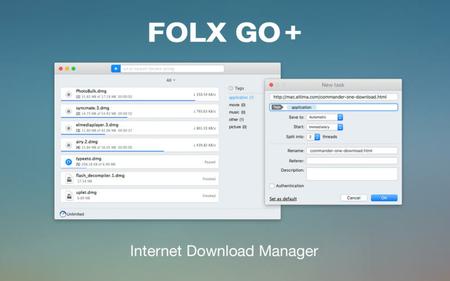
Folx GO+ 5.0

003dce10_mediumu3zpq.jpg


If you are looking for a powerful tool to manage and organize your downloads in a neat way Folx GO+ is just what you need.

* User friendly downloader with lots of cool options and modern Mac interface
* Folx GO+ is powered by a great feature to split downloads up to 10 threads. In this way the downloading speed will be increased dramatically.
* Downloads Scheduler - You are able to set a time that is most convenient to start/stop the downloads.
* Tagging system - For better search of downloaded data, assign one or more tags to each task. You can add tags during downloading progress or set them automatically.
* Smart Speed Control - Allows controlling download speed with an added possibility to schedule specific speed for certain time and dates.
* Integration to iTunes - All the downloaded data, whether it's music or video, will be automatically integrated to iTunes playlist.
* Save login and password

OS: MacOSX
Lang: Englisch
Size: 9,65 MB
Format: .dmg
Hoster: Uploaded
PW: mojado


Directload​
 
Zuletzt bearbeitet:
Folx GO+ 5.0

003dce10_mediumu3zpq.jpg


If you are looking for a powerful tool to manage and organize your downloads in a neat way Folx GO+ is just what you need.

* User friendly downloader with lots of cool options and modern Mac interface
* Folx GO+ is powered by a great feature to split downloads up to 10 threads. In this way the downloading speed will be increased dramatically.
* Downloads Scheduler - You are able to set a time that is most convenient to start/stop the downloads.
* Tagging system - For better search of downloaded data, assign one or more tags to each task. You can add tags during downloading progress or set them automatically.
* Smart Speed Control - Allows controlling download speed with an added possibility to schedule specific speed for certain time and dates.
* Integration to iTunes - All the downloaded data, whether it's music or video, will be automatically integrated to iTunes playlist.
* Save login and password

OS: MacOSX
Lang: Englisch
Size: 10,38 MB
Format: .dmg
Hoster: Uploaded
PW: mojado


Directload​
 
49691772wr.png


FolxGo 5.28

Details:
Format nach dem Entpacken: .dmg
Mac Plattform: Intel
Sprache: Englisch
Größe: 15 MB | Part/s: 1 Datei/en

Hoster: rapidgator / ddownload / nitro /
Beschreibung :


Wenn Sie auf der Suche nach einem leistungsstarken Tool sind, um Ihre Downloads übersichtlich
zu verwalten und zu organisieren, ist Folx GO+ genau das Richtige für Sie.

Mit Folx GO+ erhalten Sie Folgendes:

- Benutzerfreundlicher Downloader mit vielen coolen Optionen und
moderner Mac-Oberfläche
- Folx GO+ verfügt über eine großartige Funktion zum Aufteilen von Downloads
in bis zu 10 Threads. Auf diese Weise wird die Download-Geschwindigkeit drastisch erhöht.
- Zeitplaner für Downloads Sie können die Zeit festlegen, zu der Sie die Downloads starten oder stoppen möchten.
* Tagging-System - Um die heruntergeladenen Daten besser durchsuchen zu können,
können Sie jeder Aufgabe ein oder mehrere Tags zuweisen. Sie können Tags während
des Herunterladens hinzufügen oder sie automatisch setzen.
- Intelligente Geschwindigkeitskontrolle
Ermöglicht die Kontrolle der Download-Geschwindigkeit mit einer zusätzlichen Möglichkeit,
eine bestimmte Geschwindigkeit für bestimmte Zeiten und Daten zu planen.
- und viele andere nützliche Features

Kompatibilität: OS X 10.9 oder höher, 64-Bit-Prozessor

Download :


​
 
48468025hm.png


Folx GO+ 5.29


Format nach dem Entpacken: .dmg
Mac Plattform: Intel|Apple Silicon
Sprache: Englisch
Größe: 15 mb


~ Download links

If you are looking for a powerful tool to manage and organize your downloads in a neat way Folx GO+ is just what you need.

**With Folx GO+ you get the following:**

* User friendly downloader with lots of cool options and modern Mac interface
* Folx GO+ is powered by a great feature to split downloads up to 10 threads. In this way the downloading speed will be increased dramatically.
* Downloads Scheduler
You are able to set a time that is most convenient to start/stop the downloads.
* Tagging system
For better search of downloaded data, assign one or more tags to each task. You can add tags during downloading progress or set them automatically.
* Smart Speed Control
Allows controlling download speed with an added possibility to schedule specific speed for certain time and dates.
* Integration to iTunes
All the downloaded data, whether it's music or video, will be automatically integrated to iTunes playlist.
* Save login and password
When starting new downloads from websites requiring authentication, Folx can remember login and password for easier downloading in the future. Folx Go+ can also save passwords for FTP and HTTP websites.

Compatibility: OS X 10.9 or later
​
 
Zuletzt bearbeitet:
48468025hm.png


Folx GO+ 5.30

Format nach dem Entpacken: .dmg
Mac Plattform: Intel|Apple Silicon
Sprache: Englisch
Größe: 15 mb


~ Download links
Wenn Sie auf der Suche nach einem leistungsstarken Tool sind, um Ihre Downloads übersichtlich zu verwalten und zu organisieren, ist Folx GO+ genau das Richtige für Sie.

OS X 10.9+

​
 
48468025hm.png


Folx GO+ 5.31


Format nach dem Entpacken: .dmg
Mac Plattform: Intel|Apple Silicon
Sprache: Englisch|Deutsch
Größe: 20 mb


~ Download links
Wenn Sie ein leistungsfähiges Tool zur ordentlichen Verwaltung und Organisation Ihrer Downloads suchen ist Folx GO+ genau das was Sie brauchen.

* Benutzerfreundliches Download-Programm mit vielen hervorragenden Optionen und moderner Mac-Benutzerschnittstelle

Das hervorragende Feature von Folx GO+ ist die Möglichkeit Downloads in bis zu 10 Threads aufzuteilen. Damit erhöht sich die Downloadgeschwindigkeit dramatisch. Die Anwendung kann unterbrochene Downloads fortsetzen, kommt mit einstellbarer Downloadgeschwindigkeit und bietet verschiedene Möglichkeiten Download-Tasks zu starten.

Erfordert macOS 10.13 oder neuer.
​
 
Zurück
Oben Unten

