




Last updated 6/2020
MP4 | Video: h264, 1280x720 | Audio: AAC, 44.1 KHz
Language: English | Size: 42.94 GB | Duration: 53h 45m
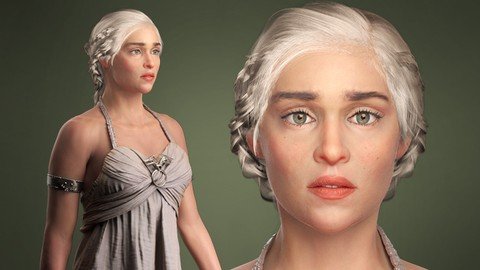
Realistic Character Sculpting & Modeling using Zbrush, Mari, Marvelous Designer, Maya & Photoshop
What you'll learn
Sculpt a female character from head to toe
Sculpt believable clothing
Full body UDIM workflow
Marvelous to Maya Retopology and UV creation
Industry techniques for hand-painting detailed textures
Variety of retopology methods for movie characters
Realistic skin shader, metal & cloth materials
Creating convincing CGI eyes
Making realistic hair with Xgen
High quality lighting and rendering using Arnold
Requirements
Before starting this course, you should have a basic understanding of Zbrush, Maya, and Photoshop. No knowledge of Wrap, Marvelous Designer and Mari is needed as I will teach you the basics of these programs.
Description
Corazon Bryant always had an artistic bone in her body. When she was only 2 years old, she would make detailed drawings on her mother's wall. Her mother loved the drawings so much, she decided to keep them. With the encouragement of her mother, she continued drawing and she only got better as time went by. When Corazon was in middle and high school, she earned money making portraits for her classmates and even for her teachers. She pursued a college degree in Media Arts & Animation and later worked for architectural and entertainment companies such as Camm Productions, ID DI Design, and PDT International. She also had an opportunity to do some freelance work for Mega Pickle Entertainment. While working as a 3D artist, she had a chance to teach 3D animation classes in an A+ school. This is when she found her true love - which is not only to talk about 3D endlessly but to also inspire greatness in young upcoming artists. Corazon is currently working on a new project called Victory 3D with fellow industry-experienced artists to provide an affordable and effective learning system that will make it easier for students to get a job in the 3D industry.Course InfoHave you been looking for a course that shows you how to make a realistic full body character, sculpt likeness, retopologize, unwrap, texture, and render all in one place? Then look no further. This course is for you. In this course, I will take you through the process of creating a beautiful female character and make it production-ready for films and animations.The main topics we will be covering are:-Sculpting a female character from head to toe -Sculpting believable clothing -Variety of retopology methods for movie characters -Full body UDIM workflow -Marvelous to Maya Retopology and UV creation -Industry techniques for painting detailed textures -Realistic skin shader, metal & cloth materials -Creating realistic hair in Xgen-High quality lighting and rendering using ArnoldBefore starting this course, you should have a basic understanding of Zbrush, Maya, and Photoshop. No knowledge of Wrap, Marvelous Designer and Mari is needed as I will teach you the basics of these programs.In this comprehensive course, we will begin by working on our female face and body using Zbrush. I will go over the major forms that you need to know to be able to produce a realistic female character. We will create details such as skin pores and tiny wrinkles to bring life to our character. We will learn about different ways of retopologizing our character, using automatic retopology and manual retopology using Wrap and Maya. We will generate our UV map for our character using the UDIM workflow. I will go over what UDIMs are, and why they are important when it comes to creating high resolution textures. You will learn how to simulate clothing using Marvelous Designer. We will then take our clothes in Maya to retopologize them to create a clean mesh, and then back into Zbrush to create major folds, minor folds, and memory folds. We will use Mari to hand paint our skin from scratch. I will show you exactly how to make different types of maps such as color map, specular map, and sss map step by step. We will create real world shaders such as silk, metal, and skin and we will go through the process of learning how to connect our maps properly. Then we move on to creating our hair using Zbrush and Maya. We will create our main hair using Fibermesh, then we go inside Maya to make Nhair for our braids that we will then use for our Xgen hair. We will create realistic eyebrows, eyelashes and peachfuzz all using one of the most powerful tools in Maya called Xgen. Last, I will show you how to create a nice clean render using Arnold and do some postwork in Photoshop to further enhance our image.By the end of this course, you will be able to create your own amazing female character that is fully ready for production.If you are ready to challenge yourself and get out of your comfort zone to be a great artist, then it's time for you to sign up for this course. There are no limitations on what you can be, have or do, as you are the master of your artistic journey. Make today the day that you take action, come and join this course at Victory3D.
Overview
Section 1: Introduction
Lecture 1 Introduction
Lecture 2 References
Section 2: Sculpting the Primary Forms & Accuracy Check
Lecture 3 Face Primary Forms 1
Lecture 4 Face Primary Forms 2
Lecture 5 Face Primary Forms 3
Lecture 6 Hair Place Holder
Lecture 7 Face Primary Forms 4
Lecture 8 Accuracy Check Front
Lecture 9 Accuracy Check Side
Lecture 10 Body Primary Forms 1
Lecture 11 Body Primary Forms 2
Lecture 12 Hands Primary Forms
Lecture 13 Feet Primary Forms
Lecture 14 Lips Primary Forms
Lecture 15 Fixing Primary Forms
Section 3: Retopo & Creating UDIMs
Lecture 16 Preparing for Retopo
Lecture 17 Retopo in Wrap
Lecture 18 Base Mesh Modifications
Lecture 19 UDIM Workflow
Lecture 20 Form Detail Projection
Section 4: Secondary Forms & Tertiary Details
Lecture 21 Face Secondary Forms 1
Lecture 22 Face Secondary Forms 2
Lecture 23 Body Secondary Forms
Lecture 24 Hands & Feet Secondary Forms
Lecture 25 Face Minor Details
Lecture 26 Breaking the Symmetry
Lecture 27 Lip Wrinkles & Noise
Lecture 28 Face Pores
Lecture 29 Face Wrinkles & Moles
Lecture 30 Neck Details
Lecture 31 Arm Details
Lecture 32 Hand Details 1
Lecture 33 Hand Details 2
Lecture 34 Form Tweaks
Section 5: Clothing Patterns, Retopo & UV Creation
Lecture 35 Intro to Marvelous Designer
Lecture 36 Creating Our Clothing Patterns
Lecture 37 Seaming & Simulating
Lecture 38 Front Dress Tweaks
Lecture 39 Dress Fabric Knot
Lecture 40 Export & Import the Dress
Lecture 41 Dress Tweaks
Lecture 42 Setting Up Our Dress in Maya
Lecture 43 Retopology Basics in Maya
Lecture 44 Retopologizing Our Dress
Lecture 45 Transferring Our UVs & Shape
Lecture 46 Add Thickness & Polish UVs
Section 6: Clothing & Accessories
Lecture 47 Sculpting Cloth 1
Lecture 48 Sculpting Cloth 2
Lecture 49 Sculpting Cloth 3
Lecture 50 Sculpting Cloth 4
Lecture 51 Sculpting Cloth 5
Lecture 52 Sculpting Cloth 6
Lecture 53 Creating the Dragon Ornament 1
Lecture 54 Creating the Dragon Ornament 2
Lecture 55 Dragon Teeth
Lecture 56 Dragon All
Lecture 57 Arm Bracelet Base
Lecture 58 Arm Bracelet Details
Lecture 59 Boots Base
Lecture 60 Boots Details
Lecture 61 Boots Strap
Lecture 62 Dragon Ornament Retopo
Lecture 63 Teeth Retopo & Unwrapping
Lecture 64 Arm Bracelet Unwrap
Lecture 65 Boots Retopo
Lecture 66 Boots Heels Retopo
Lecture 67 Boots Unwrap
Lecture 68 Polishing the Overall Sculpt
Lecture 69 Projecting the Other Accessories
Section 7: Fibermesh
Lecture 70 Preparing for Fibermesh
Lecture 71 Creating Our Fibermesh
Lecture 72 Creating Hairballs
Lecture 73 Styling Our Hair
Lecture 74 Adjusting Our Hair 1
Lecture 75 Adjusting Our Hair 2
Lecture 76 Hair Irregularity 1
Lecture 77 Hair Irregularity 2
Lecture 78 Hair Irregularity 3
Section 8: Posing & Creating Displacement Maps
Lecture 79 Posing
Lecture 80 Forms Fix
Lecture 81 Exporting Elements
Lecture 82 Real World Scale
Lecture 83 Exporting Displacement Maps
Lecture 84 Emblem Fix
Section 9: Creating Our Texture Maps
Lecture 85 Preparing for Painting
Lecture 86 Intro to Mari
Lecture 87 Color Map Creation 1
Lecture 88 Color Map Creation 2
Lecture 89 Color Map Creation 3
Lecture 90 Specular Map Creation
Lecture 91 SSS Map Creation
Lecture 92 Lights Setup
Lecture 93 Skin Shader
Section 10: Eye Creation
Lecture 94 Eye Modeling
Lecture 95 Unwrapping Our Eyes
Lecture 96 Detailing the Iris
Lecture 97 Sclera Material
Lecture 98 Iris Color Map
Lecture 99 Cornea Color & Displacement
Lecture 100 Setting Up Our Cornea
Lecture 101 Eye Tweaks
Lecture 102 Face Color Tweaks
Lecture 103 Tear Duct
Lecture 104 Caruncle
Section 11: Dress Setup, Materials & Teeth
Lecture 105 Dress Setup
Lecture 106 Silk Material
Lecture 107 Metal Material
Lecture 108 Extra Materials and Tweaks
Lecture 109 Teeth
Section 12: Hair Creation
Lecture 110 Hair Creation 1
Lecture 111 Backup Your Xgen
Lecture 112 Hair Creation 2
Lecture 113 Hair Creation 3
Lecture 114 Hair Creation 4
Lecture 115 Braids 1
Lecture 116 Braids 2
Lecture 117 Braids 3
Lecture 118 Eyebrows 1
Lecture 119 Eyebrows 2
Lecture 120 Eyebrows 3
Lecture 121 Eyebrows 4
Lecture 122 Lashes 1
Lecture 123 Lashes 2
Lecture 124 Lashes 3
Lecture 125 Peach Fuzz
Section 13: Rendering & Post-Work
Lecture 126 Rendering
Lecture 127 Enhancement
Anyone who wants to be a 3D character rockstar

Homepage
Recommend Download Link Hight Speed | Please Say Thanks Keep Topic Live
Links are Interchangeable - No Password - Single Extraction
