• Regeln für den Video-Bereich:

    In den Börsenbereich gehören nur Angebote die bereits den Allgemeinen Regeln entsprechen.

    Einteilung

    - Folgende Formate gehören in die angegeben Bereiche:
    - Filme: Encodierte Filme von BluRay, DVD, R5, TV, Screener sowie Telesyncs im Format DivX, XviD und x264.
    - DVD: Filme im Format DVD5, DVD9 und HD2DVD.
    - HD: Encodierte Filme mit der Auflösung 720p oder darüber von BluRay, DVD, R5, TV, Screener sowie Telesyncs im Format x264.
    - 3D: Encodierte Filme von BluRay, die in einem 3D Format vorliegen. Dies gilt auch für Dokus, Animation usw.
    - Serien: Cartoon/Zeichentrick, Anime, Tutorials, Dokumentationen, Konzerte/Musik, Sonstiges sind demnach in die entsprechenden Bereiche einzuordnen, auch wenn sie beispielsweise im High Definition-Format oder als DVD5/DVD9/HD2DVD vorliegen. Ausnahme 3D.
    - Bereich Englisch: Englische Releases gehören immer in diesen Bereich.
    - Bereich Talk: Der Bereich, in dem über die Releases diskutiert werden kann, darf, soll und erwünscht ist.


    Angebot/Beitrag erstellen

    - Ein Beitrag darf erst dann erstellt werden, wenn der Upload bei mindestens einem OCH komplett ist. Platzhalter sind untersagt.
    - Bei einem Scenerelease hat der Threadtitel ausschließlich aus dem originalen, unveränderten Releasenamen zu bestehen. Es dürfen keine Veränderungen wie z.B. Sterne, kleine Buchstaben o.ä. vorgenommen werden. Ausnahme Serienbörse:
    - Bei einem Sammelthread für eine Staffel entfällt aus dem Releasename natürlich der Name der Folge. Beispiel: Die Simpsons S21 German DVDRip XviD - ITG
    - Dementsprechend sind also u.a. verboten: Erweiterungen wie "Tipp", "empfehlenswert", "only", "reup", usw. / jegliche andere Zusatzinformation oder Ergänzung, welche nicht in obiger Beschreibung zu finden ist.

    Aufbau des Angebots und Threadtitel

    Der Titel nach folgendem Muster erstellt zu werden. <Name> [3D] [Staffel] [German] <Jahr> <Tonspur> [DL] [Auflösung] <Quelle> <Codec> - <Group>
    Beispiel: The Dark Knight German 2008 AC3 DVDRip XviD - iND
    Beispiel: The Dark Knight 2008 DTS DL BDRip x264 - iND
    Beispiel: The Dark Knight 2008 AC3 DL BDRip XviD - iND
    Beispiel: The Dark Knight German 2008 AC3 720p BluRay x264 iND
    Beispiel: The Dark Knight 2008 DTS DL 1080p BluRay x264 iND
    Beispiel: Die Simpsons S01 German AC3 DVDRip XviD iND
    Beispiel: Die Simpsons S20 German AC3 720p BluRay x264 iND
    Beispiel: Sword Art Online II Ger Sub 2014 AAC 1080p WEBRip x264 - peppermint
    Entsprechend sind also u.a. verboten: Sonderzeichen wie Klammern, Sterne, Ausrufezeichen, Unterstriche, Anführungszeichen / Erweiterungen wie "Tipp", "empfehlenswert", "only", "reup", usw. / jegliche andere Zusatzinformation oder Ergänzung, welche nicht in obiger Beschreibung zu finden ist
    Ausnahmen hiervon können in den Bereichen geregelt sein.

    Die Beiträge sollen wie folgt aufgebaut werden:
    Überschrift entspricht dem Threadtitel
    Cover
    kurze Inhaltsbeschreibung
    Format, Größe, Dauer sind gut lesbar für Downloader außerhalb des Spoilers zu vermerken
    Nfo sind immer Anzugeben und selbige immer im Spoiler in Textform.
    Sind keine Nfo vorhanden z.B. Eigenpublikationen, sind im Spoiler folgende Dateiinformationen zusätzlich anzugeben :
    Quelle
    Video (Auflösung und Bitrate)
    Ton (Sprache, Format und Bitrate der einzelnen Spuren)
    Untertitel (sofern vorhanden)
    Hosterangabe in Textform außerhalb eines Spoiler mit allen enthaltenen Hostern.
    Bei SD kann auf diese zusätzlichen Dateiinformationen verzichtet werden.

    Alle benötigten Passwörter sind, sofern vorhanden, in Textform im Angebot anzugeben.
    Spoiler im Spoiler mit Kommentaren :"Schon Bedankt?" sind unerwünscht.


    Releases

    - Sind Retail-Release verfügbar, sind alle anderen Variationen untersagt. Ausnahmen: Alle deutschen Retail-Release sind CUT, in diesem Fall sind dubbed UNCUT-Release zulässig.
    - Im Serien-Bereich gilt speziell: Wenn ein Retail vor Abschluss einer laufenden Staffel erscheint, darf diese Staffel noch zu Ende gebracht werden.62
    - Gleiche Releases sind unbedingt zusammenzufassen. Das bedeutet, es ist zwingend erforderlich, vor dem Erstellen eines Themas per Suchfunktion zu überprüfen, ob bereits ein Beitrag mit demselben Release besteht. Ist dies der Fall, ist der bereits vorhandene Beitrag zu verwenden.
    - P2P und Scene Releases dürfen nicht verändert oder gar unter einem iND Tag eingestellt werden.


    Support, Diskussionen und Suche

    - Supportanfragen sind entweder per PN oder im Bereich Talk zu stellen.
    - Diskussionen und Bewertungen sind im Talk Bereich zu führen. Fragen an die Uploader haben ausschließlich via PN zu erfolgen, und sind in den Angeboten untersagt.
    - Anfragen zu Upload-Wünschen sind nur im Bereich Suche Video erlaubt. Antworten dürfen nur auf Angebote von MyBoerse.bz verlinkt werden.


    Verbote

    - Untersagt sind mehrere Formate in einem einzigen Angebotsthread, wie beispielsweise das gleichzeitige Anbieten von DivX/XviD, 720p und 1080p in einem Thread. Pro Format, Release und Auflösung ist ein eigener Thread zu eröffnen.
    - Grundsätzlich ebenso verboten sind Dupes. Uploader haben sich an geeigneter Stelle darüber zu informieren, ob es sich bei einem Release um ein Dupe handelt.
    - Gefakte, nur teilweise lauffähige oder unvollständige Angebote sind untersagt. Dies gilt auch für eigene Publikationen, die augenscheinlich nicht selbst von z.B. einer DVD gerippt wurden. Laufende Serien, bei denen noch nicht alle Folgen verfügbar sind, dürfen erstellt und regelmäßig geupdatet werden.
    - Untersagt sind Angebote, welche nur und ausschließlich in einer anderen Sprache als deutsch oder englisch vorliegen. Ausnahmen sind VORHER mit den Moderatoren zu klären.


    Verstoß gegen die Regeln

    - Angebote oder Beiträge, die gegen die Forenregeln verstoßen, sind über den "Melden"-Button im Beitrag zu melden.
  • Bitte registriere dich zunächst um Beiträge zu verfassen und externe Links aufzurufen.

++ Premium IPTV ++ 7000 Live Sender ++ UHD Qualität ++ Mediathek mit 18.000 Inhalten ++


VenneTV


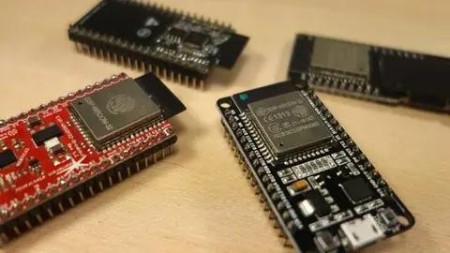
ESP32 Bootcamp: A Step By Step Practical Approach

gfxwap1

MyBoerse.bz Pro Member
f23378297c4bece4297236be3eebffd5.jpg

ESP32 Bootcamp: A Step By Step Practical Approach
MP4 | Video: h264, 1280x720 | Audio: AAC, 44.1 KHz, 2 Ch
Genre: eLearning | Language: English + .srt | Duration: 60 lectures (7h 10m) | Size: 2.38 GB​

From Zero To Professional in ESP32, Enter the Internet of Things world with this Bootcamp What you'll learn:
Introduction to IoT with ESP32
Program ESP32 without Coding
ESP32 and Arduino
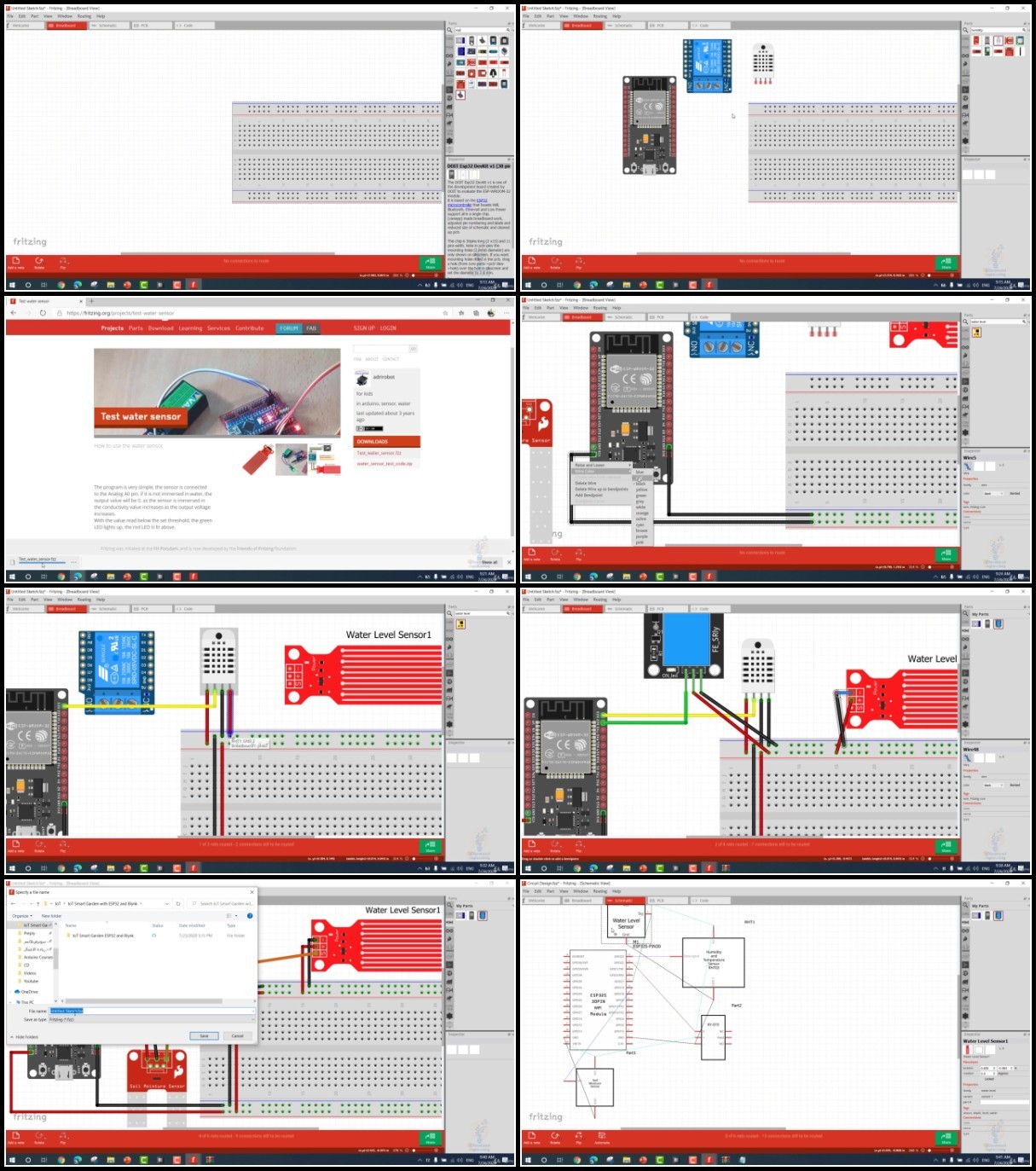
IoT Smart Garden with ESP32 and Blynk
ESP32 Databases Control and Display Anything Anywhere
ESP32 Web Server
ESP32 Email Alert Based on Sensors Reading

Requirements
Basic experience in Electronics
A Will to apply, not just watch

Description
From Zero To Professional in ESP32, Enter the Internet of Things world with this Bootcamp

In this ESP32 Bootcamp, you will learn in a Step-By-Step practical approach, this course will guide you through creating your first Internet-connected electronics project using a Wi-Fi enabled board, which is the famous ESP32.

You will learn the elaborate workflow of hardware and software that makes smart objects succeed through Basic Step-By-Step Practical examples of the most common things you want to build.

What you learn in this course:

A quick introduction to the Internet of Things World with ESP32.

How to write your very first code.

How to program this board without coding, if you are not a fan of coding, this will help you start making great projects without writing a single line of code.

How you can easily connect ESP32 and Arduino board together and make use Of the power of the Arduino hardware and how to implement this to exceed the number of inputs and outputs and your board.

A practical example, which is the smart garden Internet of Things ESP32 based project, and we will use the Blynk app to control this project.

ESP32 database control and how you can display anything anywhere.

Create a website and display different information from your ESP board

How to make a Web server using ESP32 and how you can easily get email alerts based on sensor reading using ESP32.

There are other surprises inside the scores, and I am sure that after taking this course you will gain a lot of knowledge and you can easily start coding your ESP board and make any project that comes to your mind.

We provide 24/7 support for our students, so if you have any questions, you can easily contact us using our profile here.

A Different IoT Power and Performance, Use ESP32 microcontroller to MAKE IoT projects to unleash your creativity

This is a complete bundle to get you started in IoT

IoT Internet of Things Crash Course: Step by step is a course specially created for Electronic Geeks & Engineers who want to take their Electronics and Microcontroller Projects to the next level, adding Wifi, Bluetooth connectivity and more processor power while maintaining battery life

ESP32 Email Alert Based on Sensors Reading: Send Emails using ESP32 and Arduino IDE coding easily and effectively and unleash the power of coding and ESP32 Hardware

ESP32 Web Server: Step by Step Course to create your very own standalone web server with ESP32 that controls output and display Data.

ESP32 + Databases to Control Anything Anywhere: Step by Step Course to help you create your first internet-connected electronics projects using ESP32 wifi breakout board

IoT Internet of Things Crash Course: Step by step is a course specially created for Electronic Geeks & Engineers who want to take their Electronics and Microcontroller Projects to the next level, adding Wifi, Bluetooth connectivity and more processor power while maintaining battery life <<<

Welcome to this course.

The course lesson will explain "How to work on ESP32 Board" by using C Language and the famous Arduino IDE development environment. This course will work best for you if your basic knowledge of Electronics and Arduino. You will learn how to interface the ESP32 Board with your Computer and Control it in no time.

ESP32 can be used in your Engineering projects, Industrial Projects, or IoT Home Automation related projects.

Why Learn ESP32?

If you an Engineering or Science student you might come across projects in which you want to control or monitor via internet, ESP32 with it's Robust Design, Ultra-Low Power Consumption, High Level of Integration and Hybrid Wi-Fi & Bluetooth Chip is the best fit to get started in Internet of Things World.

We will explore:

Digital Output: Blinking a LED

Digital Input: Reading a Touch Sensor

Analog Input: Reading a variable voltage from a potentiometer

Analog Output: Controlling a LED brightness

Analog Output: Controlling a Servo Position

Reading Temperature/Humidity Data with a Digital sensor

Connecting to the Internet and getting local time

Receiving data from a simple local web page, turning on/off a LED

Transmitting data to a simple local webPage

At the end of this course, you can create Innovative IoT Projects. The only thing that you need to do is THINKING, WIRING & CODING.

------------------

>>> ESP32 Email Alert Based on Sensors Reading: Send Emails using ESP32 and Arduino IDE coding easily and effectively and unleash the power of coding and ESP32 Hardware <<<

Welcome to this course.

The course lesson will explain "ESP32 Email Alert Based on Sensors Reading" by using Arduino IDE coding and Arduino Environment. This course will work best for you if your basic knowledge of Electronics and Arduino. You will learn how to interface the ESP32 with your Computer and Control it using Arduino IDE to read sensor data and send emails accordingly.

ESP32 can be used in your Engineering projects, Industrial Projects, or Home Automation related projects.

You'll learn how to:

Set up electronic circuits

Set up the Communication protocol on ESP32

Write basic applications for ESP32 in Arduino to control basics functions

Advanced Control sensors and email automation using ESP32

How to Integrate ESP32 sensors and switches

Why Learn ESP32?

If you an Engineering or Science student you might come across projects in which you want Physical interaction with your computer system & to display the operations on PC Screen

ESP32 is one of the cost-effective tools which you can create or purchase & starts programming to interact with physical elements with your logic & create results the way you want.

And using Arduino IDE, you can fully control the ESP32Board and the various process parameters like Motor Speed, LED ON/OFF Feedback, Temperature Signal.

At the end of this course, you can create Innovative Projects. The only thing that you need to do is THINKING, WIRING & CODING.

---------------------

>>> ESP32 Web Server: Step by Step Course to create your very own standalone web server with ESP32 that controls output and display Data. <<<

Welcome to this course.

The course lesson will explain "How to create a webserver" by using Arduino IDE Programming Environment. This course will work best for you if your basic knowledge of Electronics and Arduino. You could connect sensors to an Arduino and control everything using a simple webpage that you will create in this course.

You could also control a webserver that is mobile responsive and can be accessed with any device that has a browser on the local network and trigger devices such as Motors, LEDs, Relays, and more.

Why You Should Join this course?

Because ESP32 Board gives you much data control, you can basically control anything you can imagine using ESP32 Webserver

You'll learn how to:

Download

 

0423e02990668c9dfd266b2acc16be20.jpg

ESP32 Bootcamp: A Step By Step Practical Approach
Duration: 7h 10m | .MP4 1280x720, 30 fps(r) | AAC, 44100 Hz, 2ch | 2.74 GB
Genre: eLearning | Language: English​

From Zero To Professional in ESP32, Enter the Internet of Things world with this Bootcamp

What you'll learn
Introduction to IoT with ESP32
Program ESP32 without Coding
ESP32 and Arduino
IoT Smart Garden with ESP32 and Blynk
ESP32 Databases Control and Display Anything Anywhere
ESP32 Web Server
ESP32 Email Alert Based on Sensors Reading

Requirements
Basic experience in Electronics
A Will to apply, not just watch

Description
From Zero To Professional in ESP32, Enter the Internet of Things world with this Bootcamp

In this ESP32 Bootcamp, you will learn in a Step-By-Step practical approach, this course will guide you through creating your first Internet-connected electronics project using a Wi-Fi enabled board, which is the famous ESP32.

You will learn the elaborate workflow of hardware and software that makes smart objects succeed through Basic Step-By-Step Practical examples of the most common things you want to build.

What you learn in this course:

A quick introduction to the Internet of Things World with ESP32.

How to write your very first code.

How to program this board without coding, if you are not a fan of coding, this will help you start making great projects without writing a single line of code.

How you can easily connect ESP32 and Arduino board together and make use Of the power of the Arduino hardware and how to implement this to exceed the number of inputs and outputs and your board.

A practical example, which is the smart garden Internet of Things ESP32 based project, and we will use the Blynk app to control this project.

ESP32 database control and how you can display anything anywhere.

Create a website and display different information from your ESP board

How to make a Web server using ESP32 and how you can easily get email alerts based on sensor reading using ESP32.

There are other surprises inside the scores, and I am sure that after taking this course you will gain a lot of knowledge and you can easily start coding your ESP board and make any project that comes to your mind.

We provide 24/7 support for our students, so if you have any questions, you can easily contact us using our profile here.

A Different IoT Power and Performance, Use ESP32 microcontroller to MAKE IoT projects to unleash your creativity

This is a complete bundle to get you started in IoT

IoT Internet of Things Crash Course: Step by step is a course specially created for Electronic Geeks & Engineers who want to take their Electronics and Microcontroller Projects to the next level, adding Wifi, Bluetooth connectivity and more processor power while maintaining battery life

ESP32 Email Alert Based on Sensors Reading: Send Emails using ESP32 and Arduino IDE coding easily and effectively and unleash the power of coding and ESP32 Hardware

ESP32 Web Server: Step by Step Course to create your very own standalone web server with ESP32 that controls output and display Data.

ESP32 + Databases to Control Anything Anywhere: Step by Step Course to help you create your first internet-connected electronics projects using ESP32 wifi breakout board

IoT Internet of Things Crash Course: Step by step is a course specially created for Electronic Geeks & Engineers who want to take their Electronics and Microcontroller Projects to the next level, adding Wifi, Bluetooth connectivity and more processor power while maintaining battery life <<<

Welcome to this course.

The course lesson will explain "How to work on ESP32 Board" by using C Language and the famous Arduino IDE development environment. This course will work best for you if your basic knowledge of Electronics and Arduino. You will learn how to interface the ESP32 Board with your Computer and Control it in no time.

ESP32 can be used in your Engineering projects, Industrial Projects, or IoT Home Automation related projects.

Why Learn ESP32?

If you an Engineering or Science student you might come across projects in which you want to control or monitor via internet, ESP32 with it's Robust Design, Ultra-Low Power Consumption, High Level of Integration and Hybrid Wi-Fi & Bluetooth Chip is the best fit to get started in Internet of Things World.

We will explore:

Digital Output: Blinking a LED

Digital Input: Reading a Touch Sensor

Analog Input: Reading a variable voltage from a potentiometer

Analog Output: Controlling a LED brightness

Analog Output: Controlling a Servo Position

Reading Temperature/Humidity Data with a Digital sensor

Connecting to the Internet and getting local time

Receiving data from a simple local web page, turning on/off a LED

Transmitting data to a simple local webPage

At the end of this course, you can create Innovative IoT Projects. The only thing that you need to do is THINKING, WIRING & CODING.

>>> ESP32 Email Alert Based on Sensors Reading: Send Emails using ESP32 and Arduino IDE coding easily and effectively and unleash the power of coding and ESP32 Hardware <<<

Welcome to this course.

The course lesson will explain "ESP32 Email Alert Based on Sensors Reading" by using Arduino IDE coding and Arduino Environment. This course will work best for you if your basic knowledge of Electronics and Arduino. You will learn how to interface the ESP32 with your Computer and Control it using Arduino IDE to read sensor data and send emails accordingly.

ESP32 can be used in your Engineering projects, Industrial Projects, or Home Automation related projects.

You'll learn how to:

Set up electronic circuits

Set up the Communication protocol on ESP32

Write basic applications for ESP32 in Arduino to control basics functions

Advanced Control sensors and email automation using ESP32

How to Integrate ESP32 sensors and switches

Why Learn ESP32?

If you an Engineering or Science student you might come across projects in which you want Physical interaction with your computer system & to display the operations on PC Screen

ESP32 is one of the cost-effective tools which you can create or purchase & starts programming to interact with physical elements with your logic & create results the way you want.

And using Arduino IDE, you can fully control the ESP32Board and the various process parameters like Motor Speed, LED ON/OFF Feedback, Temperature Signal.

At the end of this course, you can create Innovative Projects. The only thing that you need to do is THINKING, WIRING & CODING.

>>> ESP32 Web Server: Step by Step Course to create your very own standalone web server with ESP32 that controls output and display Data. <<<

Welcome to this course.

The course lesson will explain "How to create a webserver" by using Arduino IDE Programming Environment. This course will work best for you if your basic knowledge of Electronics and Arduino. You could connect sensors to an Arduino and control everything using a simple webpage that you will create in this course.

You could also control a webserver that is mobile responsive and can be accessed with any device that has a browser on the local network and trigger devices such as Motors, LEDs, Relays, and more.

Why You Should Join this course?

Because ESP32 Board gives you much data control, you can basically control anything you can imagine using ESP32 Webserver

You'll learn how to:

Create A Simple ESP32 Web Server In Arduino IDE

ESP32 Operating Modes

Station (STA) Mode

Soft Access Point (AP) Mode

Wiring - Connecting Devices to ESP32

Concept Behind Controlling Things From ESP32 Web Server

ESP32 as HTTP Server using WiFi Access Point (AP) mode

Accessing the Web Server in AP mode

Detailed Code Explanation

ESP32 as HTTP Server using WiFi Station (STA) mode

Accessing the Web Server in STA mode

At the end of this course, you can create Innovative Projects. The only thing that you need to do is THINKING, WIRING & CODING.

>>> ESP32 + Databases to Control Anything Anywhere: Step by Step Course to help you create your first internet-connected electronics projects using ESP32 wifi breakout board. <<<

Welcome to this course.

The course lesson will explain "How to control stuff from all around the world" by using Arduino IDE Programming Environment. This course will work best for you if your basic knowledge of Electronics and Arduino. You could connect sensors to an Arduino and send the values to a database on the internet. Then you could enter a website that you will create in this course to see the values from anywhere in the world with an internet connection. You are no longer stuck controlling your devices locally.

You could also add boolean buttons on to your website and control stuff connected to the Arduino such as Motors, LEDs, Relays and more

Why You Should Join this course?

Because IoT and controlling devices via Internet are one of the top trending topics nowadays and ESP32 Board is one of the best boards that can help you achieve Internet control with tools that you already have.

You'll learn how to:

Create A Simple ESP32 HTTP Request In Arduino IDE

Get a FREE Hosting server and domain name

Create a PHP script to insert data into MySQL

Display data on a web page

Create MySQL database to store readings

Get Sensors Reading

At the end of this course, you can create Innovative Projects. The only thing that you need to do is THINKING, WIRING & CODING.

Who this course is for:
Anyone Interested in Entering the World of Internet of Things
Anyone Interested in Mastering ESP32
Anyone Interested in Making ESP32 Based Projects


hF8MRL15_o.jpg

 
Zurück
Oben Unten