• Regeln für den Video-Bereich:

    In den Börsenbereich gehören nur Angebote die bereits den Allgemeinen Regeln entsprechen.

    Einteilung

    - Folgende Formate gehören in die angegeben Bereiche:
    - Filme: Encodierte Filme von BluRay, DVD, R5, TV, Screener sowie Telesyncs im Format DivX, XviD und x264.
    - DVD: Filme im Format DVD5, DVD9 und HD2DVD.
    - HD: Encodierte Filme mit der Auflösung 720p oder darüber von BluRay, DVD, R5, TV, Screener sowie Telesyncs im Format x264.
    - 3D: Encodierte Filme von BluRay, die in einem 3D Format vorliegen. Dies gilt auch für Dokus, Animation usw.
    - Serien: Cartoon/Zeichentrick, Anime, Tutorials, Dokumentationen, Konzerte/Musik, Sonstiges sind demnach in die entsprechenden Bereiche einzuordnen, auch wenn sie beispielsweise im High Definition-Format oder als DVD5/DVD9/HD2DVD vorliegen. Ausnahme 3D.
    - Bereich Englisch: Englische Releases gehören immer in diesen Bereich.
    - Bereich Talk: Der Bereich, in dem über die Releases diskutiert werden kann, darf, soll und erwünscht ist.


    Angebot/Beitrag erstellen

    - Ein Beitrag darf erst dann erstellt werden, wenn der Upload bei mindestens einem OCH komplett ist. Platzhalter sind untersagt.
    - Bei einem Scenerelease hat der Threadtitel ausschließlich aus dem originalen, unveränderten Releasenamen zu bestehen. Es dürfen keine Veränderungen wie z.B. Sterne, kleine Buchstaben o.ä. vorgenommen werden. Ausnahme Serienbörse:
    - Bei einem Sammelthread für eine Staffel entfällt aus dem Releasename natürlich der Name der Folge. Beispiel: Die Simpsons S21 German DVDRip XviD - ITG
    - Dementsprechend sind also u.a. verboten: Erweiterungen wie "Tipp", "empfehlenswert", "only", "reup", usw. / jegliche andere Zusatzinformation oder Ergänzung, welche nicht in obiger Beschreibung zu finden ist.

    Aufbau des Angebots und Threadtitel

    Der Titel nach folgendem Muster erstellt zu werden. <Name> [3D] [Staffel] [German] <Jahr> <Tonspur> [DL] [Auflösung] <Quelle> <Codec> - <Group>
    Beispiel: The Dark Knight German 2008 AC3 DVDRip XviD - iND
    Beispiel: The Dark Knight 2008 DTS DL BDRip x264 - iND
    Beispiel: The Dark Knight 2008 AC3 DL BDRip XviD - iND
    Beispiel: The Dark Knight German 2008 AC3 720p BluRay x264 iND
    Beispiel: The Dark Knight 2008 DTS DL 1080p BluRay x264 iND
    Beispiel: Die Simpsons S01 German AC3 DVDRip XviD iND
    Beispiel: Die Simpsons S20 German AC3 720p BluRay x264 iND
    Beispiel: Sword Art Online II Ger Sub 2014 AAC 1080p WEBRip x264 - peppermint
    Entsprechend sind also u.a. verboten: Sonderzeichen wie Klammern, Sterne, Ausrufezeichen, Unterstriche, Anführungszeichen / Erweiterungen wie "Tipp", "empfehlenswert", "only", "reup", usw. / jegliche andere Zusatzinformation oder Ergänzung, welche nicht in obiger Beschreibung zu finden ist
    Ausnahmen hiervon können in den Bereichen geregelt sein.

    Die Beiträge sollen wie folgt aufgebaut werden:
    Überschrift entspricht dem Threadtitel
    Cover
    kurze Inhaltsbeschreibung
    Format, Größe, Dauer sind gut lesbar für Downloader außerhalb des Spoilers zu vermerken
    Nfo sind immer Anzugeben und selbige immer im Spoiler in Textform.
    Sind keine Nfo vorhanden z.B. Eigenpublikationen, sind im Spoiler folgende Dateiinformationen zusätzlich anzugeben :
    Quelle
    Video (Auflösung und Bitrate)
    Ton (Sprache, Format und Bitrate der einzelnen Spuren)
    Untertitel (sofern vorhanden)
    Hosterangabe in Textform außerhalb eines Spoiler mit allen enthaltenen Hostern.
    Bei SD kann auf diese zusätzlichen Dateiinformationen verzichtet werden.

    Alle benötigten Passwörter sind, sofern vorhanden, in Textform im Angebot anzugeben.
    Spoiler im Spoiler mit Kommentaren :"Schon Bedankt?" sind unerwünscht.


    Releases

    - Sind Retail-Release verfügbar, sind alle anderen Variationen untersagt. Ausnahmen: Alle deutschen Retail-Release sind CUT, in diesem Fall sind dubbed UNCUT-Release zulässig.
    - Im Serien-Bereich gilt speziell: Wenn ein Retail vor Abschluss einer laufenden Staffel erscheint, darf diese Staffel noch zu Ende gebracht werden.62
    - Gleiche Releases sind unbedingt zusammenzufassen. Das bedeutet, es ist zwingend erforderlich, vor dem Erstellen eines Themas per Suchfunktion zu überprüfen, ob bereits ein Beitrag mit demselben Release besteht. Ist dies der Fall, ist der bereits vorhandene Beitrag zu verwenden.
    - P2P und Scene Releases dürfen nicht verändert oder gar unter einem iND Tag eingestellt werden.


    Support, Diskussionen und Suche

    - Supportanfragen sind entweder per PN oder im Bereich Talk zu stellen.
    - Diskussionen und Bewertungen sind im Talk Bereich zu führen. Fragen an die Uploader haben ausschließlich via PN zu erfolgen, und sind in den Angeboten untersagt.
    - Anfragen zu Upload-Wünschen sind nur im Bereich Suche Video erlaubt. Antworten dürfen nur auf Angebote von MyBoerse.bz verlinkt werden.


    Verbote

    - Untersagt sind mehrere Formate in einem einzigen Angebotsthread, wie beispielsweise das gleichzeitige Anbieten von DivX/XviD, 720p und 1080p in einem Thread. Pro Format, Release und Auflösung ist ein eigener Thread zu eröffnen.
    - Grundsätzlich ebenso verboten sind Dupes. Uploader haben sich an geeigneter Stelle darüber zu informieren, ob es sich bei einem Release um ein Dupe handelt.
    - Gefakte, nur teilweise lauffähige oder unvollständige Angebote sind untersagt. Dies gilt auch für eigene Publikationen, die augenscheinlich nicht selbst von z.B. einer DVD gerippt wurden. Laufende Serien, bei denen noch nicht alle Folgen verfügbar sind, dürfen erstellt und regelmäßig geupdatet werden.
    - Untersagt sind Angebote, welche nur und ausschließlich in einer anderen Sprache als deutsch oder englisch vorliegen. Ausnahmen sind VORHER mit den Moderatoren zu klären.


    Verstoß gegen die Regeln

    - Angebote oder Beiträge, die gegen die Forenregeln verstoßen, sind über den "Melden"-Button im Beitrag zu melden.
  • Bitte registriere dich zunächst um Beiträge zu verfassen und externe Links aufzurufen.

*** Bestes IPTV *** bester Preis *** gratis Test ***


Englische Tutorials

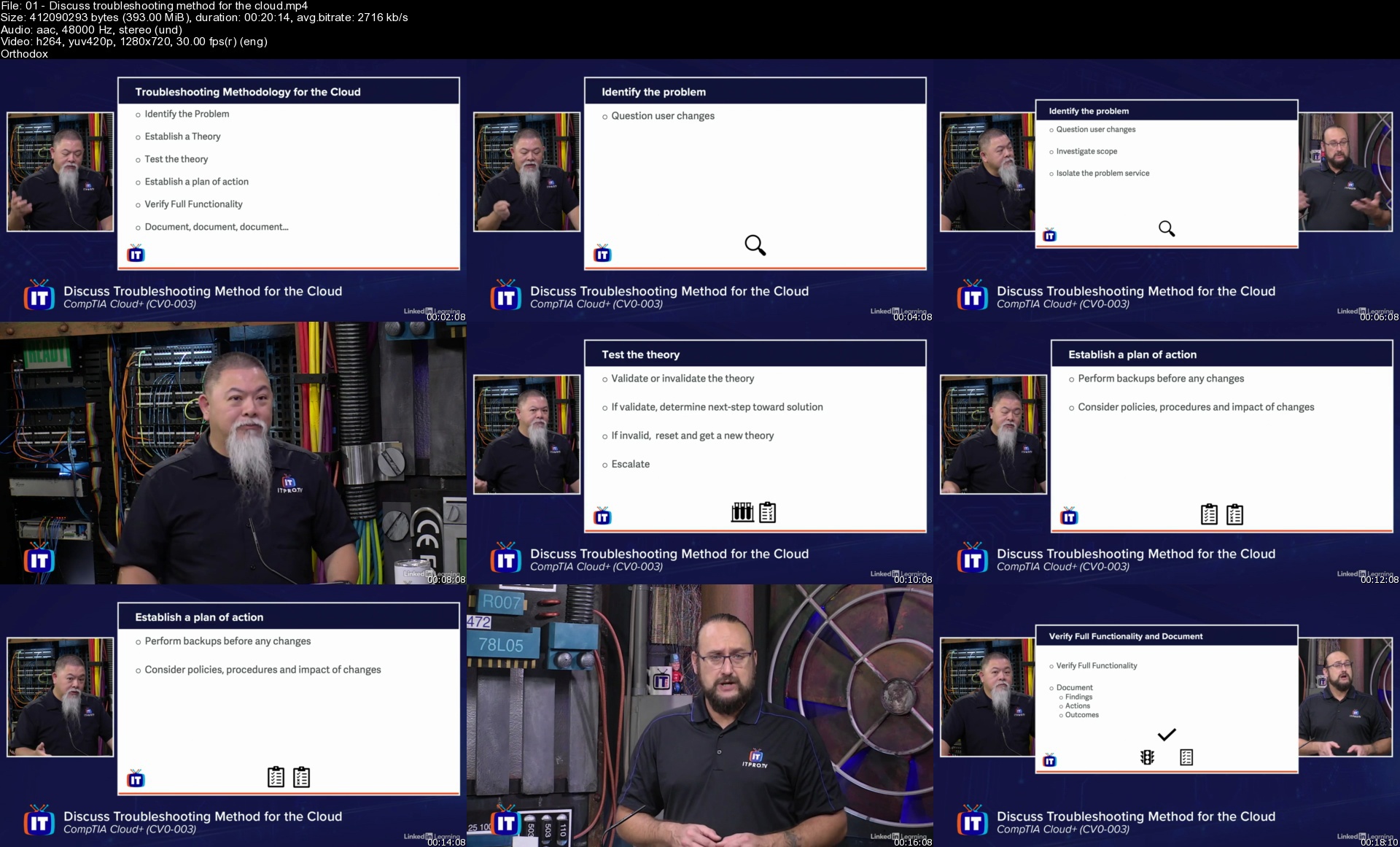
CompTIA Cloud+ Cert Prep (CV0-003): 3 Operations, Support, and Troubleshooting

hykm8.jpg


CompTIA Cloud+ Cert Prep (CV0-003): 3 Operations, Support, and Troubleshooting
MP4 | Video: h264, 1280x720 | Audio: AAC, 44.1 KHz, 2 Ch
Skill Level: Intermediate | Genre: eLearning | Language: English + srt | Duration: 6h 19m | Size: 7.3 GB

The CompTIA Cloud+ certification is the global standard for information security solutions. It validates your skills as an IT expert who deploys and automates secure cloud environments that support mission-critical applications and data storage for your business. This course reviews how to maintain and optimize cloud-based solutions as well as troubleshoot problems when things go awry, preparing you for part three of the CompTIA Cloud+ (CV0-003) certification exam.

Explore the essentials of cloud operations and support, including centralized logging, monitoring, patching configuration, automated reporting, and disaster recovery. Learn basic troubleshooting methods that can help you get out of sticky situations. Find out how to solve common problems related to deployment, storage, automation, connectivity, and security. Upon completing this course, you'll have the skills you need to tackle the third domain of the exam.

Homepage

01discusstroubleshoote2ju8.jpg


SM4jEO1BgE2PFzgNzWLZeYGrq3NSv7JB.jpg

30 Day Ab & Core - Six Pack Abs
Video: .mp4 (1280x720, 30 fps(r)) | Audio: aac, 48000 Hz, 2ch | Size: 2.96 GB
Genre: eLearning Video | Duration: 25 lectures (4 hour, 43 mins) | Language: English


Do you have what it takes to get 6 pack abs? Come along for the challenge and stick it out to the end.
What you'll learn
Be on your way to having 6 pack abs
You will feel more energized
You will feel a tighter stomach
You will be able to do day-to-day functional movements easier
Requirements
Need a comfortable place on the floor
Workouts only go for 10 minutes daily
Can do these workouts from home, gym, office or park; no equipment needed
Description
How To Get Six Pack Abs Fast
A six pack may can seem impossible. You can get a six pack within a short time if you pay attention to your diet and take the right action from the right recommendations.
Everyone's got a six-pack, but for most people is it's hidden under a layer of fat.
Everyone wants a 6 pack, yet why is it the hardest part to train?
You always wonder..Are you forgetting something?
This course will work best for those who are already hitting the gym. You need to be doing cardio to burn the calories along with a good, healthy diet, full of highly alkalising foods.
All you need to complete this course is 10 minutes each day, a comfortable place on the floor and your favourite workout beats to keep you motivated.
Here are 30 days of exercises to get you that highly sought, but rarely achieved; the six pack.
Who this course is for
Anyone who wants a 6 pack
Anyone who wants to feel a tighter stomach
Anyone who wants day to day core strength
Screenshots


6vfp0spKH3L9XLQ14Q5Ry1iUsxtwldOl.jpg

A Biophilic Home.
MP4 | Video: h264, 1280x720 | Audio: AAC, 44.1 KHz
Language: English | Size: 645 MB | Duration: 30m
Interior Design for All Your Senses.
What you'll learn​

How to create more wellbeing at home by designing for all the senses
How light, air, noise and the textures we surround ourselves with can impact our well-being
How the design of your kitchen can impact how healthy you eat
How to asses your own home with the attached class checklist
Requirements
Interest in the crossing between science, psychology and interior design .
Description
Learn how to create more well-being at home by designing for all your senses with a biophilic home. In interior design, there is a lot of attention given to the visual elements of our environment, but a biophilic home, a home in which we invite and are connected to nature, is a home that supports and stimulates all our senses.
In this class, I wanted to share with you the fundamental elements that you need to look out for that will make or break your sense of happiness at home. Things like
Light
Air
Noise
The materials and textures you surround yourself with
Your ability to cook a healthy meal
We can select wall colours and matching curtains all we want, but if our senses are impaired because we chose the wrong home or focused on the wrong things when we designed our home, it's very hard to reach a sense of well-being at home.
So before you start selecting furniture and colours, you need to take care of the fundamentals. The support of your senses in a way that would happen in nature
Your space allows you to receive copious amounts of light
You make sure the air you breathe is clean
You make sure you have windows that can keep the noise levels in check
You select natural materials that offer a variety of textures
The design of your home supports you in cooking healthy
Who this course is for
People who wish to feel more balanced at home.
Screenshots


yoL058uyWcSUYFDD6fLjuIe2suwqYc2Z.jpg

A follow along Home Exercise to burn fat and build muscles
Video: .mp4 (1280x720, 30 fps(r)) | Audio: aac, 48000 Hz, 2ch | Size: 2.98 GB
Genre: eLearning Video | Duration: 20 lectures (2 hour, 26 mins) | Language: English


Build strength at home, just follow along
What you'll learn
You will follow a, at home, full body exercise routine for strength.
You will learn how to have proper form.
The routine has multiple levels, from beginners to experts.
You don't need any equipment except a exercise band.
Requirements
No exercise experience needed.
Description
This exercise program, is simple yet will still challenge you. It will help you build muscle, flexibility, coordination, etc. You can be a very beginner and I will help you get to a expert level. I will walk you through the exercise form and I will also let you know when you should be progressing to the next level. There are 3 levels in this program, beginners, intermediate, and experts. You will get multiply meal plans and a food eating formula.
COURSE ALWAYS UPDATED: WITH NEW TIPS, MORE LESSONS
This is a Workout & Diet Program That Is Based On Actual Science And Proven To Get You Results
This course is for people who want to build muscle and lose fat with a science-based workout plan. Not only does it teach you the exercises this program also gives you a scientific approach to how the body works and how to progressively get stronger.
We give you the necessary tools to reach your fitness goals, and we keep the program simple and not bombard you with all of the unproven and sometimes dangerous exercises. You have often heard, in order to build muscle you need to.
Exercise at least five times per week.
Exercise three hours a day.
Drink protein shakes.
And perfectly time your meals no more than three hours apart.
As you will see in the course, most of these "tips" are misleading at best and most of the time will work against your progress
That is why I give you the exact training methods that are scientifically proven to work.
Here is what's inside the program
Part 1: Introduction
Part 2: How To Build Muscle & Lose Fat The Scientific Way
The Step-By-Step Muscle Bulding Formula for your full body
The Step-By-Step Fat Loss Food Formula
The Best Modifications For Beginners
How To Create A Fat burning Diet
Part 3: Workout Program
The Full Workout Plan
How To Progress And See Results
Exercise Videos To Help You Train With Perfect Form
Ectomorph Muscle Building
How To Get Six-Pack Abs from the kitchen to the workout
Who this course is for
This course is for beginner exercisers, that are looking for a good, at home, strength program.
Course content
3 sections • 20 lectures • 2h 26m total length
Screenshots


Cjj3PINM9if5E9GwQuslLHHwQX4hvlUi.jpg

Advanced MySQL: Stored Procedures,Subqueries,Views,Functions
MP4 | Video: h264, 1280x720 | Audio: AAC, 44.1 KHz
Language: English | Size: 583 MB | Duration: 1h 58m
Build Advanced MySQL Queries​

What you'll learn
Create and execute Stored Procedures
Modify and delete stored procedures
Create subqueries
Create nested subqueries
Create derived tables
Create character functions
Create queries with concat functions
Aggregate data with aggregate functions
Requirements
Basic knowledge of MySQL advised
Description
Advanced queries are a part of every database administrator or developer job. Advanced queries must be handled delicately, because improperly coded SQL or poorly performing SQL can create bugs and application crashes. Advanced queries are typically used for reporting, joining multiple tables, nesting queries, and transaction locking.
The stored procedure is SQL statements wrapped within the CREATE PROCEDURE statement. The stored procedure may contain a conditional statement like IF or CASE or the Loops. The stored procedure can also execute another stored procedure or a function that modularizes the code.
A procedure (often called a stored procedure) is a subroutine like a subprogram in a regular computing language, stored in database. A procedure has a name, a parameter list, and SQL statement(s). All most all relational database system supports stored procedure, MySQL 5 introduce stored procedure.
A MySQL subquery is a query nested within another query such as SELECT, INSERT, UPDATE or DELETE. Also, a subquery can be nested within another subquery.
A MySQL subquery is called an inner query while the query that contains the subquery is called an outer query. A subquery can be used anywhere that expression is used and must be closed in parentheses.
A view is a database object that has no values. Its contents are based on the base table. It contains rows and columns similar to the real table. In MySQL, the View is a virtual table created by a query by joining one or more tables. It is operated similarly to the base table but does not contain any data of its own. The View and table have one main difference that the views are definitions built on top of other tables (or views). If any changes occur in the underlying table, the same changes reflected in the View also.
MySQL has a variety of functions you can use . examples includes aggregate functions , concat functions and character functions.
Who this course is for
Data Analyst
Data Scientist
Anyone who wants tl learn more advanced MySQL queries
Screenshots


eYDymGyLDxmkKqOwGRbe0vwm9J7J47Fb.jpg

Apache Druid Complete Guide
Genre: eLearning | MP4 | Video: h264, 1280x720 | Audio: AAC, 48.0 KHz
Language: English | Size: 856 MB | Duration: 21 lectures • 2h 0m
Learn Druid Architecture, Kafka Ingestion, Schema Evolution, Tuning and Druid Hive Integration with Twitter example

What you'll learn
In depth knowledge on Druid Components and it's Architecture
Realtime data ingestion from Apache Kafka using Twitter Producer application
Tuning Apache Druid for better throughput
Accessing Apache Druid Tables through Avatica JDBC driver
Learning Schema Evolution
Complete Druid Hive Integration with hands-on experience
Requirements
Basics of Apache Kafka, Apache Hive
Practical experience on Mysql, AWS
Description
What do you learn from this course ?
In this course, we learn end-to-end apache druid salient features and integration with Apache Hive.
We start this course by gaining theoretical knowledge on Druid and its key features.
Next, we jump to practical part where we install druid locally and walk you through its user portal.
We change the druid metadata storage to Mysql and deep storage to S3 for enhancing the druid setup.
After that, we write our own Twitter Producer app which pulls the tweets from twitter in realtime and push the tweets to apache Kafka.
We create a Kafka ingestion task on Druid which pull tweets from Kafka and store it into Apache Druid.
Also, we learn how to apply transformation, filter, schema configuration during Kafka ingestion process.
Keeping practical knowledge in mind we jump to the theory part and dig deeper into the druid internal working principal.
We learn, how the data is distributed between the data nodes and retrieved in realtime.
Next, we tune our ingestion pipeline to gain better result. Lastly, we explore salient features like Accessing Druid through JDBC and Schema Evolution.
In the 2nd module, we talk about druid hive integration.
At first, we learn what is this integration ? Next, we provision VM from AWS and install apache druid on it.
After that, we acquire a hive EMR cluster from AWS and configure it such that it can communicate to druid easily.
Lastly, we run the same druid queries on hive and learn how the computation is pushdown to druid for better performance.
Overall, this course is composite of theory and practical sessions. Throughout this course we use latest druid and hive version. At the end of this course, you will be excel on apache druid.
Who this course is for
Data Engineers
Software Engineers
Screenshots


th_Mrmu7JN48caFMJ31o7iw58jVCqwscpv3.jpg

Apache Kafka Crash Course for Java and Python Developers
Published 05/2022
MP4 | Video: h264, 1280x720 | Audio: AAC, 44.1 KHz, 2 Ch
Genre: eLearning | Language: English + srt | Duration: 66 lectures (9h 15m) | Size: 4.23 GB


A fast track for Python or Java developers to gain valuable skills using Apache Kafka
What you'll learn
Kafka Basics: Key Architecture Components and Data Flow
Kafka Admin Client API (Java in Spring for Kafka and Python kafka-python)
Kafka Producer Client API (Java in Spring for Kafka and Python kafka-python)
Kafka Consumer Client API (Java in Spring for Kafka and Python kafka-python)
Schema Registry (Java in Spring for Kafka and Python kafka-python)
Kafka Connect for Data Pipelining into and out of Kafka
Stream Processing with Overview of Common Tech Used with Kafka
Requirements
Basic understanding of Docker along with comfortability using the CLI and familiarity with either Java or Python programming languages.
Description
In this course students, Java or Python Software Developers, will be taken on a fast track journey to attaining skills required to harness the amazing power for Apache Kafka. Students gain the practical knowledge to build loosely coupled distributed systems that scale to insane levels of throughput while maintaining unprecedented resiliency.
Topics covered include
Kafka Basics of Key Architecture Components and Data Flow
Kafka Admin API (In Java with Spring for Kafka as well as in Python)
Kafka Producer API (In Java with Spring for Kafka as well as in Python)
Kafka Consumer API(In Java with Spring for Kafka as well as in Python)
Confluent Schema Registry (In Java with Spring for Kafka as well as in Python)
Kafka Connect to Import and Export Data to/from Kafka from Common Source/Sink Systems
Stream Processing Basics with Overview of Relevant Technologies used with Kafka
The Apache Kafka Crash Course for Java and Python Developers is specifically designed for quickly getting Developers up to speed using Apache Kafka to be prepared for upcoming interviews or make timely yet significant contributions implementing Apache Kafka pub/sub messaging or event streaming in their current roles. The course provides a balance of fundamental theory on the inner workings of Apache Kafka's storage mechanism along with the know how to tune producer and consumer applications for performance and resiliency. This course is packed full of practical examples with code samples for putting the theoretical content into practice in two of the most popular languages used in industry, Java and Python.
Who this course is for
Software Developers and Software Architects with experience programming in Java or Python interested in using Kafka for building robust, scalable, decoupled systems.
Homepage


cuLFRRqAtIyTuz5uchdfnupkNESc5LPf.jpg

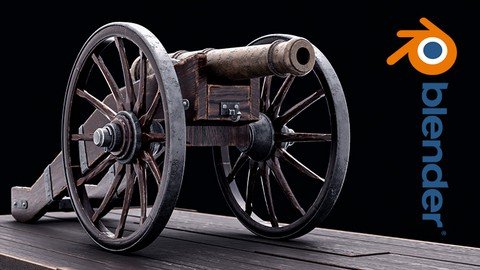
BLENDER: Learn how to create old realistic cannon
Genre: eLearning | MP4 | Video: h264, 1280x720 | Audio: AAC, 44.1 KHz
Language: English | Size: 6.25 GB | Duration: 27 lectures • 7h 26m
In this course step-by-step we will learn how to create old cannon from start to finish

What you'll learn
We will learn how to model the cannon from start to finish
Learn how to unwrap the whole cannon from start to finish
Learn step by step how to create realistic Procedural material
Learn how to use Cycles to make realistic render result
Learn how to use dumped truck to make camera trucking a point
Learn how to use the compositor to post-process the final render result.
Requirements
You need to download Blender
Download PureRef tool
Description
Hello everyone my name is Marwan Hussein Welcome to my new course
Step-by-step we will learn how to create a realistic cannon with Blender I'm not going to use any exterior plugins to create this Cannon everything will be done within Blender
I divided the course into sections We will start with modeling and in the modeling section, we will model the whole Cannon from start to finish.
In the modeling section, we will learn how to model the cannon parts and how to get clean nice shading and we will use a lot of tools Equipped with Blender to achieve that.
After modeling the cannon we will learn step by step how to unwrap it and make it ready to create a texture for it, we will learn how to use the unwrapping seam Technique, and follow the active quad as well, and a lot of things to create nice UV map ready to use.
When we finish with the unwrapping, we will start with materials creation, and step by step we will learn how to create realistic materials to give the cannon a realistic looking.
I will render the cannon using cycles and I will use the compositor to post-process the final render.
This course is not as long as my other courses, we will achieve all of that in a short period of time.
I will leave a section for the resources under the name of the project folder there you should find all the necessary files you need to start the course with me, and don't forget to download the Pure Ref tool to browse the images.
Who this course is for
This course for student likes to create realistic render result, it's best for intermediate
Screenshots


d9ecRu0NHCcV9x3xYpBdVjnDLl6qFmpo.jpg

Basic English Phrases Used by Native Speakers
MP4 | Video: h264, 1280x720 | Audio: AAC, 44.1 KHz
Language: English | Size: 686 MB | Duration: 1h 46m
Master 470 Common English phrases, this course is to upgrade your listening, speaking, reading & writing abilities.​

What you'll learn
How to start a conversation in English,
Basic English phrases used by native speakers,
Ways to end up a conversation politely
Phrases to inquire about something
Phrases for telephonic conversations
Phrases about different daily situations ........................................... more and more.
Requirements
The basic ability to read and write English.
Description
TABLE OF CONTENTS
Introduction ( How To Start A Conversation In English )
1. Different Ways To Say Hello and Goodbye
2. Different Ways To Say Yes and No
3. Ways To Ask/Say How Someone is
4. Ways To Reply To How Are You
5. Ways To Say Thank You And Welcome
6. Ways To Say Sorry
7. Ways To Respond To An Apology
8. Phrases To Introduce Yourself In English
9. Some Other Phrases Related To Introduction
10. Ways To Show Interest
11. Ways To End Up A Conversation Politely
12. Phrases For Telephonic Conversations
13. Phrases To Inquire About Something
14. Ways To Say I Don't Know
15. Phrases To Talk About Food
16. Phrases To Talk About Clothes
17. Phrases For Responding To Good News
18. Phrases For Responding To Bad News
19. Phrases For Inviting People
20. Phrases To Reply To The Invitation
21. Ways To Make An Offer/Ways To Respond To An Offer
22. Ways To Wish Happy Birthday And Happy Anniversary
23. Phrases To Talk About Future Plans/Possibilities
24. Phrases To Talk About Likes And Dislikes
25. Phrases To Talk About Jobs/Work
26. Phrases For Describing Relationships
27. Phrases To Ask For Clarification
28. Ways To Encourage Someone
29. Phrases For Complaining
30. Phrases Related To Shopping
31. Phrases To Talk About Streaming Services And T.V.
32. Phrases (At The Airport)
33. Useful Sentences To Talk About Price
34. Sentences To Talk About Financial Status
Who this course is for
All learners who need to speak English like native speakers.
Screenshots


reLyubBrL2RaHfVV8cHKS349uKFEr8td.jpg

Beekeeping for Beginners in Tropical Climates
Video: .mp4 (1280x720, 30 fps(r)) | Audio: aac, 48000 Hz, 2ch | Size: 4.22 GB
Genre: eLearning Video | Duration: 13 lectures (3 hour, 18 mins) | Language: English


Learn how to keep bees and run a profitable apiary in Africa and beyond.
What you'll learn
Understand the lives of bees, how the bee colony works and what types of products bees produce
Learn about the different types of hives you can use in Africa, and which is best for your situation
Learn how to set up your apiary and attract a bee colony
Understand what type of records you should be keeping, and why
Learn about the common bee pests and diseases in Africa, and how to control them
Understand the harvesting process: what equipment is needed and the proper steps to take
Learn how to process honey so that it is ready for sale
Understand the economics of production: revenues, costs and the secrets to maximizing your profits
Requirements
No experience is required. Just an interest in beekeeping!
Description
This course will teach you how to properly set up and manage a profitable apiary, including harvest and processing. This course will interest anyone thinking of keeping bees, but it also includes SPECIFIC INFORMATION ABOUT BEEKEEPING IN AFRICA.
What material does this course cover?
THE BASICS
Essential knowledge you MUST know before starting or growing your apiary.
CARING FOR YOUR APIARY
The proper procedures and tasks you NEED to do for maximum profits.
STEPS FOR KEEPING HEALTHY AND PRODUCTIVE BEEHIVES
Learn about beehive management, equipment, harvesting and processing.
SECRETS TO MAXIMIZE PROFITS
Discover numerous cost-saving techniques and business skills to help you find a market and grow your income!
This course is a MUST ATTEND if...
You dream of becoming a beekeeper but don't know where to start.
You are a soon-to-be beekeeper who wants to get things done right the first time.
You are an existing beekeeper who wants to improve and MAKE MORE MONEY.
Lessons include
Introduction
Definitions
The Importance of Beekeeping & The Honey Bee Colony
Bee Products & Uses
The Types of Hives
Apiary Management - Setup
Apiary Management - Record Keeping
Apiary Management - Pests & Disease Control
Cost & Revenue Analysis
Harvesting - The Steps and Equipment Required
Harvesting - In the Field
Honey Processing
BONUS: Interview with an Expert
STUDENT TESTIMONIAL
In 2017 I graduated from university and was excited to start my career. I was very optimistic and began to hand out my resume, only to find that this journey was more challenging than I ever expected. Six months later, I was still unemployed and worried about my future.
I began to search for a side hustle to sell second-hand clothing and one day noticed a post on Facebook about the opportunities in beekeeping. A few more months passed when I learned about online training in beekeeping offered by eLengo! This course was educational, and I was again filled with hope, but I now had a different dream.
I decided to move back to my home in Machakos, where my parents had some idle land. I officially became a beekeeper with a small investment to buy the right equipment!
Today I am almost two years into the journey and am making more money than I would have if I had found a job in Nairobi! It took a lot of hard work, but I am now proud to have a profitable farm and be my boss.
Thank you so much, eLengo, for teaching me the basics of beekeeping. I would not be here without you. I strongly recommend this course, and I guarantee you will not regret it!
Ann Nasieku - Machakos, Kenya
Who this course is for
This course is for anyone with an interest in making money by becoming a beekeeper
If you are thinking about keeping bees it will help you get started on the right path while avoiding common mistakes
If you already have an apiary it will teach you techniques to maximize your profits through improved production and lower costs
Screenshots


HbZhLRa1nwW9nv5TvX83r86HuJHubHf6.jpg

Boost Productivity and be better organized with Notion
MP4 | Video: h264, 1280x720 | Audio: AAC, 44.1 KHz
Language: English | Size: 560 MB | Duration: 1h 38m
Save time , organize your work and life in Notion
What you'll learn​

Create Web Pages
Create Sub pages
Add images and icons to your pages
Edit pages and sub pages
Create Productive workflows
Create Organized workflows
Collaborate with others
Create contents with templates
Create databases
Publish and share your content
Requirements
No experience of Notion required
Description
Notion is a multi-purpose app combining the power of Evernote, Trello, Airtable, Excel and more into one highly flexible and customizable desktop and mobile workspace.
Learn how to use this amazing app from the ground up: what you can do with it and how you can do it. Increase your productivity with a custom-designed workspace that suits your unique needs and style. Manage your work, home, and hobbies with Notion databases and pages.
Notion is note-taking, wiki management, and task and project management software that gives you control of your working environment. By creating pages using a variety of block types and database styles, the possibilities are endless.
Notion is an application that provides components such as databases, boards, wikis, calendars and reminders. Users can connect these components to create their own systems for knowledge management, note taking, data management, project management, among others.
Notion is an all-in-one workspace where you can write, plan, collaborate and get organized. It is productivity and organizational tool.
This is a beginners course and will teach you more than enough to get creative and productive using Notion. With Notion you can create and organize different types of contents in pages including databases.
Notion offers you a way to integrate all of your tasks, documents, activities, habits, ideas, and creativity in one place.
It's the most versatile and customizable platform for personal and professional organization + productivity, and the one I use to run every area of my life and business.
Design a custom workspace that works for you Learn how to design custom dashboards that are tailor made for you and your style.
Topic covered include
Creating pages and sub pages
Editing pages and sub pages
Using Notion Templates to create contents
Working and collaborating with teams
Creating databases
Creating database views
Creating database templates
Creating connections between databases using relations
Publishing and sharing your content
Creating links and backlinks
Creating a personal wiki
Creating linked databases
Adding images and icons to your pages
Who this course is for
Beginners to Notion
Anyone who wants toe be more productive and better organized
Screenshots


tfTif3aF1fV85LrN8hUctunjRohPdJAC.jpg

Build Applications using Python IDLE and Python Shell
MP4 | Video: h264, 1280x720 | Audio: AAC, 44.1 KHz
Language: English | Size: 552 MB | Duration: 1h 55m
Create Practical and Useful Applications using Python IDLE
What you'll learn​

Setup Python Development Environment
Create applications with Python Idle
Create a countdown timer
Create a digital clock
Create a weight converter app
Create a calculator
Requirements
Basic knowledge of Python advised
Description
Python IDLE comes included in Python installations on Windows and Mac. If you're a Linux user, then you should be able to find and download Python IDLE using your package manager. Once you've installed it, you can then use Python IDLE as an interactive interpreter or as a file editor.
IDLE is Python's Integrated Development and Learning Environment.
The Python shell is an excellent place to experiment with small code snippets. You can access it through the terminal or command line app on your machine. You can simplify your workflow with Python IDLE, which will immediately start a Python shell when you open it.
IDLE has the following features
cross-platform: works mostly the same on Windows, Unix, and macOS
Python shell window (interactive interpreter) with colorizing of code input, output, and error messages
multi-window text editor with multiple undo, Python colorizing, smart indent, call tips, auto completion, and other features
search within any window, replace within editor windows, and search through multiple files (grep)
debugger with persistent breakpoints, stepping, and viewing of global and local namespaces
configuration, browsers, and other dialogs.
IDLE has two main window types
The Shell window
The Editor window.
It is possible to have multiple editor windows simultaneously. On Windows and Linux, each has its own top menu. Each menu documented below indicates which window type it is associated with.
The idle can be used to create various types of applications.
Who this course is for
Beginner programmers
Beginner developers
Screenshots


Zurück
Oben Unten