• Regeln für den Video-Bereich:

    In den Börsenbereich gehören nur Angebote die bereits den Allgemeinen Regeln entsprechen.

    Einteilung

    - Folgende Formate gehören in die angegeben Bereiche:
    - Filme: Encodierte Filme von BluRay, DVD, R5, TV, Screener sowie Telesyncs im Format DivX, XviD und x264.
    - DVD: Filme im Format DVD5, DVD9 und HD2DVD.
    - HD: Encodierte Filme mit der Auflösung 720p oder darüber von BluRay, DVD, R5, TV, Screener sowie Telesyncs im Format x264.
    - 3D: Encodierte Filme von BluRay, die in einem 3D Format vorliegen. Dies gilt auch für Dokus, Animation usw.
    - Serien: Cartoon/Zeichentrick, Anime, Tutorials, Dokumentationen, Konzerte/Musik, Sonstiges sind demnach in die entsprechenden Bereiche einzuordnen, auch wenn sie beispielsweise im High Definition-Format oder als DVD5/DVD9/HD2DVD vorliegen. Ausnahme 3D.
    - Bereich Englisch: Englische Releases gehören immer in diesen Bereich.
    - Bereich Talk: Der Bereich, in dem über die Releases diskutiert werden kann, darf, soll und erwünscht ist.


    Angebot/Beitrag erstellen

    - Ein Beitrag darf erst dann erstellt werden, wenn der Upload bei mindestens einem OCH komplett ist. Platzhalter sind untersagt.
    - Bei einem Scenerelease hat der Threadtitel ausschließlich aus dem originalen, unveränderten Releasenamen zu bestehen. Es dürfen keine Veränderungen wie z.B. Sterne, kleine Buchstaben o.ä. vorgenommen werden. Ausnahme Serienbörse:
    - Bei einem Sammelthread für eine Staffel entfällt aus dem Releasename natürlich der Name der Folge. Beispiel: Die Simpsons S21 German DVDRip XviD - ITG
    - Dementsprechend sind also u.a. verboten: Erweiterungen wie "Tipp", "empfehlenswert", "only", "reup", usw. / jegliche andere Zusatzinformation oder Ergänzung, welche nicht in obiger Beschreibung zu finden ist.

    Aufbau des Angebots und Threadtitel

    Der Titel nach folgendem Muster erstellt zu werden. <Name> [3D] [Staffel] [German] <Jahr> <Tonspur> [DL] [Auflösung] <Quelle> <Codec> - <Group>
    Beispiel: The Dark Knight German 2008 AC3 DVDRip XviD - iND
    Beispiel: The Dark Knight 2008 DTS DL BDRip x264 - iND
    Beispiel: The Dark Knight 2008 AC3 DL BDRip XviD - iND
    Beispiel: The Dark Knight German 2008 AC3 720p BluRay x264 iND
    Beispiel: The Dark Knight 2008 DTS DL 1080p BluRay x264 iND
    Beispiel: Die Simpsons S01 German AC3 DVDRip XviD iND
    Beispiel: Die Simpsons S20 German AC3 720p BluRay x264 iND
    Beispiel: Sword Art Online II Ger Sub 2014 AAC 1080p WEBRip x264 - peppermint
    Entsprechend sind also u.a. verboten: Sonderzeichen wie Klammern, Sterne, Ausrufezeichen, Unterstriche, Anführungszeichen / Erweiterungen wie "Tipp", "empfehlenswert", "only", "reup", usw. / jegliche andere Zusatzinformation oder Ergänzung, welche nicht in obiger Beschreibung zu finden ist
    Ausnahmen hiervon können in den Bereichen geregelt sein.

    Die Beiträge sollen wie folgt aufgebaut werden:
    Überschrift entspricht dem Threadtitel
    Cover
    kurze Inhaltsbeschreibung
    Format, Größe, Dauer sind gut lesbar für Downloader außerhalb des Spoilers zu vermerken
    Nfo sind immer Anzugeben und selbige immer im Spoiler in Textform.
    Sind keine Nfo vorhanden z.B. Eigenpublikationen, sind im Spoiler folgende Dateiinformationen zusätzlich anzugeben :
    Quelle
    Video (Auflösung und Bitrate)
    Ton (Sprache, Format und Bitrate der einzelnen Spuren)
    Untertitel (sofern vorhanden)
    Hosterangabe in Textform außerhalb eines Spoiler mit allen enthaltenen Hostern.
    Bei SD kann auf diese zusätzlichen Dateiinformationen verzichtet werden.

    Alle benötigten Passwörter sind, sofern vorhanden, in Textform im Angebot anzugeben.
    Spoiler im Spoiler mit Kommentaren :"Schon Bedankt?" sind unerwünscht.


    Releases

    - Sind Retail-Release verfügbar, sind alle anderen Variationen untersagt. Ausnahmen: Alle deutschen Retail-Release sind CUT, in diesem Fall sind dubbed UNCUT-Release zulässig.
    - Im Serien-Bereich gilt speziell: Wenn ein Retail vor Abschluss einer laufenden Staffel erscheint, darf diese Staffel noch zu Ende gebracht werden.62
    - Gleiche Releases sind unbedingt zusammenzufassen. Das bedeutet, es ist zwingend erforderlich, vor dem Erstellen eines Themas per Suchfunktion zu überprüfen, ob bereits ein Beitrag mit demselben Release besteht. Ist dies der Fall, ist der bereits vorhandene Beitrag zu verwenden.
    - P2P und Scene Releases dürfen nicht verändert oder gar unter einem iND Tag eingestellt werden.


    Support, Diskussionen und Suche

    - Supportanfragen sind entweder per PN oder im Bereich Talk zu stellen.
    - Diskussionen und Bewertungen sind im Talk Bereich zu führen. Fragen an die Uploader haben ausschließlich via PN zu erfolgen, und sind in den Angeboten untersagt.
    - Anfragen zu Upload-Wünschen sind nur im Bereich Suche Video erlaubt. Antworten dürfen nur auf Angebote von MyBoerse.bz verlinkt werden.


    Verbote

    - Untersagt sind mehrere Formate in einem einzigen Angebotsthread, wie beispielsweise das gleichzeitige Anbieten von DivX/XviD, 720p und 1080p in einem Thread. Pro Format, Release und Auflösung ist ein eigener Thread zu eröffnen.
    - Grundsätzlich ebenso verboten sind Dupes. Uploader haben sich an geeigneter Stelle darüber zu informieren, ob es sich bei einem Release um ein Dupe handelt.
    - Gefakte, nur teilweise lauffähige oder unvollständige Angebote sind untersagt. Dies gilt auch für eigene Publikationen, die augenscheinlich nicht selbst von z.B. einer DVD gerippt wurden. Laufende Serien, bei denen noch nicht alle Folgen verfügbar sind, dürfen erstellt und regelmäßig geupdatet werden.
    - Untersagt sind Angebote, welche nur und ausschließlich in einer anderen Sprache als deutsch oder englisch vorliegen. Ausnahmen sind VORHER mit den Moderatoren zu klären.


    Verstoß gegen die Regeln

    - Angebote oder Beiträge, die gegen die Forenregeln verstoßen, sind über den "Melden"-Button im Beitrag zu melden.
  • Bitte registriere dich zunächst um Beiträge zu verfassen und externe Links aufzurufen.

*** Bestes IPTV *** bester Preis *** gratis Test ***


Englische Tutorials

a3e24d49-5b84-4762-8d36-a1320c7bb467.png

Become a 6-figure Fiverr Freelancer: Content Writing Edition
MP4 | Video: h264, 1280x720 | Audio: AAC, 44.1 KHz
Language: English | Size: 495 MB | Duration: 1h 12m
Learn Fiverr Freelancing and Content Writing, get Fiverr Seller Plus and become a top seller. I did it, and you can too.​

What you'll learn
Learn to leverage Fiverr - a famous freelancing website
Increase your Gig Ranking and Seller Success
Become a 6 figure Freelancer on Fiverr
Amp up your Content Writing earnings
Embrace the Digital Nomad Lifestyle via Fiverr
Requirements
No freelancing experience is required.
Description
Do you prefer freelancing and remote work? Do you love content writing or even digital marketing? Are you interested in making 6 figures from it?
Welcome to the beautiful world of Fiverr - a Stevie® Awards Winner Freelancing Business Website.
About me
I am a successful Fiverr Seller and a Content Writing Freelancer, and I started my Fiverr Freelancing journey in March 2020 after my corporate job at a Fortune 200.
What will you gain from this course
For the initial 3-4 months after I joined Fiverr, I was lost as to how Fiverr operates. I wish I had this course then! Since then, fortunately, I learned everything on my own and now making decent money on Fiverr. More importantly, I get to live that digital nomad lifestyle. I will teach you how to get started on Fiverr, and not just that, I will show you how to make good money off it.
Who is your class for?
If you're hearing about Fiverr for the first time or if you are on Fiverr but wondering how to Level up, this course is for you. With some serious hacks to quickly make your way up the freelancing ladder while making money, I have ensured that this course suits all levels.
Why my course?
The best part about this course is that it is interactive. So you will not just find relevant content but a step-by-step method of how I operate my profile with real-life client examples and the mistakes I have committed, but you shouldn't!
This is that honest and refreshing Fiverr course that you have been looking for, for a long time now.
Because I believe in customer service, if you have any questions or concerns about amping up your freelancing journey, make sure you write to me, and I shall help you happily!
Now, let's make money via freelancing, shall we? Cheers!
Who this course is for
From content writers to digital marketers, this course is for all freelancing enthusiasts.
Screenshots




 
63cd87f1e3871c42b0bd24493c5164dd.jpg

Beginner's Soap Making : Melt 'n' Pour Soap for Beginners
Duration: 41m | Video: .MP4, 1280x720, 30 fps | Audio: AAC, 48 kHz, 2ch | Size: 401 MB
Genre: eLearning | Language: English​

You don't have to work with lye to make soap. In fact you can make homemade soap without lye. While lye is necessary to make true soap, you can work around this by buying a pre-made melt and pour soap base.
There are lots of way to create unique homemade soaps without lye by using a melt 'n' pour*soap base.
Discover how to get started making homemade soaps the right way.
Homepage
Screenshots


4b0cc49c-fdd8-4a37-be8a-e52e1d9ce415.png

Best Solution Ever To Crack API Testing Interview
Published 04/2022
MP4 | Video: h264, 1280x720 | Audio: AAC, 44.1 KHz, 2 Ch
Genre: eLearning | Language: English + srt | Duration: 13 lectures (1h 9m) | Size: 504.7 MB


Just 13 videos less than 1.5 hours and a single section To Crack API Testing Interview
What you'll learn
Real-world practical end to end aspects expected in API testing Interviews.
An in-depth explanation for the solutions in simple and lucid language.
Clearing the core API concepts with examples.
Complex areas like Oauth simplified in the explanations
Interviewers perspective in the videos
Requirements
Basics of Manual testing shall be clear.
Description
The objective of this course is to provide a solution which covers all the possible practical aspects a candidate will face in an API interview along with the detailed explanation for the areas in the videos, as there is no comprehensive structured material available over the internet for API testing interview.
The question and the solution on the internet provide just the theory areas like what is API, what are the status codes and how to use the postman. The API interviews demand the candidates actual practical experience, and an experienced interviewer can easily figure out whether the candidate has the actual firsthand experience or no.
It's been observed that very sharp candidates are not able to clear these areas. API testing is very easy like Manual testing. I have added videos which covers all the practical API testing areas right from API requirement gathering, API test strategy, planning to execution and touch of automation and security OAuth flow.
The course is designed in very simple format 13 videos a single section and overall time of less than 1.5 hours. As simple as wake up in the morning have your breakfast, start going through the videos and before your lunch time you will be confident and knowledgeable enough to handle any API testing interviews with ease.
There are less than 14 videos in a single section with detailed explanation for each area which can be grasped within few hours as the overall time of the course is less than 1.5 hours.
The explanations are not just a dry theory, but what the interviewer is expecting from the candidate. A real-time experience.
After going through these tests a candidate won't lose his confidence due to any out of the box questions.
In addition to this, any other software testing professional will get a very quick exposure to the API testing interviews.
There are instances when we experienced professionals having hands-on experience, are not able to crack the interviews due to lack of exposure to the interviews. After finishing this course and preparing around any candidate will have the inbuilt confidence to face an interview.
Who this course is for
Software Testers.
Homepage


ba6c5662-92a8-43ae-9d1a-c386e34bc5a2.png

Blender 3.1 : learn to make looping animations!
Published 04/2022
MP4 | Video: h264, 1280x720 | Audio: AAC, 44.1 KHz, 2 Ch
Genre: eLearning | Language: English + srt | Duration: 7 lectures (1h 15m) | Size: 1 GB


Create 4 high quality looping animations in Blender
What you'll learn
Fundamentals of Looping Animations.
Create 4 infinitely looping animation for your portfolio
Learn tons of looping techniques
fundamentals of real time motion graphics
Requirements
Blender 3D , any recent version is required to follow along this course
Description
This course will teach you how to create professional 4 3D looping animations utilizing the free open-source software Blender!
You will learn
Non Destructive 3D modelling
Modifiers and Constraints Workflow
Lighting and Camera Setup
Rendering
Procedural Animation Utilizing Empty Objects & Modifiers
I will walk you through from start to finish the process of creating a looping animation inside of Blender, you will learn valuable techniques and workflows to boost your personal productivity within the software, and during this course, create an 4 awesome 3D looping animations for your portfolio!
The course is split into multiple lessons, each lesson will dive deep into the workflows and techniques I have picked up over the years as an instructor and 3D artist.
I will be walking you through each step and process needed to create the end result animation, as well as all of the interfaces, hotkeys, and navigation elements of Blender 3D!
You will learn how to create a non-destructive model, which we will modify utilizing modifiers and instances.
You will be learning how to set up lighting for your scene and how to set up your digital camera.
Moving on from that, we will be walking through the rendering inside of Blender.
And finally, you will 4 looping animations to share on your social media and add to your personal portfolio!
Who this course is for
Art Students
Beginners to Blender wanting to expand their skillset
Motion Graphic Artists
Advertisers
Homepage


f0901887-582f-4fae-8107-e92714339938.png

Complete PowerPoint Megacourse: Beginner to Expert
Published 04/2022
MP4 | Video: h264, 1280x720 | Audio: AAC, 44.1 KHz, 2 Ch
Genre: eLearning | Language: English + srt | Duration: 40 lectures (14h 18m) | Size: 7.6 GB


Learn how to use Microsoft PowerPoint like a pro with this step-by-step course!
What you'll learn
How to use Microsoft PowerPoint and its basic functions
How to create slides
How to use the animation functions
Color theory
How to create tables, charts, and figures
How to use the photo, text, and object functions
How to insert media (videos, audio, photos)
Basic keyboard shortcuts
Requirements
No previous knowledge of PowerPoint required
A desire to learn!
A positive attitude!
Description
Learn Microsoft PowerPoint!
Have you ever wanted to create your own professional presentations? In the era of digital literacy, we constantly need to present information in professional, academic, and even casual settings. Maybe you want to give a presentation to propose a new project at your job, or perhaps you want to discuss an academic topic in your classes. Whether you're a student or a professional, creating presentations isn't only for the pros. You can take your presentations from zero to a hundred with a few handy hacks and techniques-and we're here to teach you how.
In this course, you're going to learn everything about creating and designing presentations in Microsoft PowerPoint, from creating a simple and basic outline of slides, to designing objects, text, charts, and images at an advanced level to present your information. You'll even learn how to create and design slides, objects, text, and graphics like a professional. You will also learn how to bring these elements into life using smooth and eye-catching animations and transitions.
Our instructor has years of experience not only in designing, but also in teaching and the expertly crafted syllabus is designed to be easy to follow and thorough. We've even included plenty of examples explained and created on-screen for you to study. That's why this is the only Microsoft PowerPoint course you'll ever need to create awesome presentations and master this software!
Start using PowerPoint today!
After taking this course, you will be able to
● Create slides and presentations from scratch
● Work professionally with Microsoft PowerPoint
● Develop slides following design principles
● Use new tools to speed up the creation of presentations
Who this course is for
Anyone who wants to learn to use Microsoft PowerPoint - no experience needed!
Professionals who want to learn new tools of PowerPoint
Anyone with specialised needs (speakers, businessmen, students, teachers, etc.)
Homepage


BSZEkWY0tMQqLTbNOvP8iX9hZxZTynkf.jpg

CreativeLive - Beginner's Guide to Investing
Video: .mp4, 1280x720 | Audio: AAC, 48 kHz, 2ch | Size: 682mb
Genre: eLearning | Language: English | Duration: 1hr 37m
How to start investing your money and saving for your future
AFTER THIS CLASS YOU'LL BE ABLE TO​


Create an investment plan that's right for you and your budget
Build your net worth through stocks
Know the basics of investment terminology
Create short, medium, and long term financial goals
Understand your company's investment options
ABOUT ERIN'S CLASS
Exchange-traded funds. Brokerages. Asset allocation.
Most people want to start investing, but have no idea where to begin. How much do you need to start? How do you know if you're taking the right first steps? In Beginner's Guide to Investing, author and financial expert Erin Lowry breaks down the obtuse language and lays out your investment strategy options. Learn the common misunderstandings, set your financial goals, and take strategic steps no matter your starting amount, time frame or business context - Erin has you covered.
Don't let beginner's paralysis get in your way; Erin provides you with the knowledge and tools for financial literacy. Learn the basics of investment terminology, the stock market, saving for retirement and everything you need to feel confident to start growing your wealth.
Screenshots


0660e810-edf1-492a-9874-f4853614174f.png

Crehana - Bootstrap online course from scratch by Raul (Rulo) Gonzalez
Video: h264, 1920x1080, 29.97 fps | Audio: aac, 22050 Hz, 1 channels, 60 kb/s
Genre: eLearning | Duration: 1hr 45mn | Language: Spanish (NO SUBTITLE) | File size: 1.4 GB
Learn how to use Bootstrap from scratch and build highly interactive websites.​


What will you learn in this basic Bootstrap course?
- You will learn how to install and use the Bootstrap library from scratch, reviewing its components, columns and grids.
- You will understand how to create the main structure of a website with Bootstrap and you will be able to create inputs and forms.
- You will be able to implement different components of the Bootstrap library, such as the navbar, dropdown or progress bar.
- You will discover additional framework tools for user interaction and you will be able to customize your project.
Description
Learning to build web pages with Bootstrap can be a bit of a hassle at first. Among so many codes, forms and components, you can't help but wonder how this integrates with HTML, CSS or JS? If this scenario sounds familiar to you, in this basic Bootstrap course you will be able to disentangle your doubts to use Bootstrap in the development of your web projects.
To do this, you will start this online course by installing Bootstrap and reviewing how to use its library to speed up your work process. From the hand of Raúl Gonzáles, professor of this basic Bootstrap course, you will understand how certain structures of the components, the layout and utilities of this library work.
Before finishing, you will discover how to build complicated interfaces with optimal structures to plan projects that you can iterate over time. With everything learned, you will be able to design the code of the project you have in mind and build a landing page with all the features that Bootstrap allows.
Homepage


2404700-b3cc-2.jpg

Crehana - Power BI online course for decision making by Jorge Karam
Video: h264, 1280x720, 1286 kb/s, 29.97 fps | Audio: aac, 44100 Hz, stereo, 157 kb/s
Genre: eLearning | Duration: 2hrs+ | Language: Spanish (NO SUBTITLE) | File size: 1.1 GB
Take your Power BI skills to the next level by learning hands-on database analysis and optimization for impactful results.​


What I need?
power BI
Excel
Power Bi Desktop
About the course
He manages to make effective and high-impact reports. In this course we will delve into advanced visualizations, delve into the use of advanced DAX, and continue with data modeling and analysis. Additionally, you can learn Power BI online. In addition, the application of what you have learned will help you in the workplace and academically.
Homepage


5534faca-18d9-4bc8-ad92-551c5887058f.png

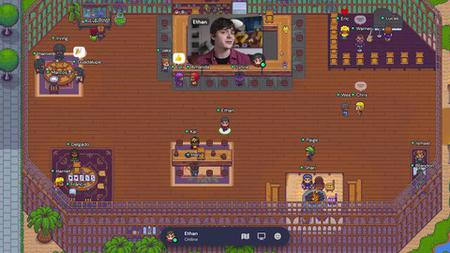
Gather town Training : How to build your Virtual office
Published 04/2022
MP4 | Video: h264, 1280x720 | Audio: AAC, 44.1 KHz, 2 Ch
Genre: eLearning | Language: English + srt | Duration: 18 lectures (1h 20m) | Size: 1.44 GB


Create your online office in 1 hour without coding on gather town
What you'll learn
Create your online office in 1 hour without coding
Get trained quickly and launch your own virtual space with Gather town
Learn how to master and to use the video chat platform designed to make virtual interactions more human.
Master Gather town
Requirements
No skills required
Description
Get trained in the Gather town tool quickly and launch your own virtual space*
Understand & Master Gather town spaces
+20 videos and dozens of templates
No need for technical skills
*Office - Conference - Events
Learn how to master and to use the video chat platform designed to make virtual interactions more human. It is a free service for up to 25 people, which allows you to chat in audio, video and chat with your friends, your family, your colleagues in a gamified environment. THE most powerful platform to quickly design virtual spaces.
Working in a remote company can be a challenge for team members due to the lack of social interactions and physical presence between them. This created the need to find a simulation close to real interactions in the office in a virtual way.
In this course, you will learn
What is gather town and why it is the suitable platform for creating a virtual work environment.
How to create a gather town virtual space.
How to use Gather Town
How to design a virtual office. Build the wall, the ground, place object. And make the office of your dream.
Adding interactive video screens, whiteboards, and games to enhance productivity in work. You will learn how to add them and use them as well.
Creating specific areas for conducting small and large team meetings.
Who this course is for
Remote team
Remote worker
Startup
Remote company
Homepage


cd2b96d6-0f01-4aae-8f91-34fefb42b36e.png

Importance of Power Quality in Power System
Published 04/2022
MP4 | Video: h264, 1280x720 | Audio: AAC, 44.1 KHz, 2 Ch
Genre: eLearning | Language: English + srt | Duration: 9 lectures (1h) | Size: 1.12 GB


We're going to talk about causes of power quality, power quality issues and parameters in much detail
What you'll learn
Importance of power quality in the power system
Causes of poor power quality
Common power quality issues and parameters
Effects of poor power quality on the power system
Power quality standards
Power quality improvement techniques
Requirements
Basic electrical engineering
Description
We're going to talk about the importance of power quality in the power systems, we're going to talk about the causes of power quality, uncertain events from the utility end, generation, transmission, and distribution as well as from the consumer and the manufacturer end, the common power quality issues and parameters such as on the transient side, the voltage variation side, the unbalanced voltages, the flickers, the distorted waveforms, the thing called total harmonic distortion and what that means as well as power factor and varying frequency.
We will also talk about the effects of poor power quality on the power system and the detrimental things that it causes to equipment and other types of devices. We're going to talk about the power quality standards, what are they, who are the organization that produces and where do you go for specific power quality standards that most utilities, consumers, manufacturers, most people kind of follow and defines the baseline of power quality all over the world. We're going to talk about power quality improvement techniques, you know something called power system studies which is AllumiaX offers and we really excel at as well as power conditioning devices, surge protectors, filters, voltage regulators, ups. We're going to talk about power quality monitoring in detail.
So, stick around you'll expect to learn a lot from this course. And we hope to see you on the other side.
Who this course is for
Electrical engineering students
Electrical Engineers
Instrument Engineers
Power system designers
Safety engineers
Homepage


aa884651-dbc8-4ac3-b66b-b417e282bd6d.png

Introduction To Swedish Body Massage
MP4 | Video: h264, 1280x720 | Audio: AAC, 44.1 KHz
Language: English | Size: 1.36 GB | Duration: 1h 15m
Basics To Massage​

What you'll learn
Understand why the theoretical lessons are important before seeking to go straight into practical
Be able to deduce if (based on client consultation) a client is fit for therapy and if so, make recommendations based off desired effect and observation
Understand the massage techniques and movements and know where to apply them best for optimum benefits and effects
Be able to give advice to the clients post the treatment so as to elongate the massage treatment benefits and allow the body to heal efficiently
Requirements
It is made for beginner students thus open for ALL levels, even intermediate students seeking to recall the basics
Description
This course is aimed at assisting you on your journey to become a massage therapist. If you don't know where to start, this IS FOR YOU. You will learn all the theory you need before you can begin your practical lessons. As a student of Body massage, I was perplexed when I enrolled in school and was taught massage theory. I thought I was simply going to be taught practical lessons but after my lessons, i understood why learning the theory was essential before we explored practical lessons.
You will learn the different types of movements, techniques, equipment needed and also the things you need to take into consideration such as clients body type, effective massage and more. This class will set you as beginners at an advantage as were many learn the practical without knowledge of the human body, you will be able to incorporate such knowledge for an effective class.
I am willing to assist you post class and address any enquiries you have from your experiences in the practical assignment/project or any other related massage enquiry I may assist with.
What more is there to say, the only thing left is to say: See you in class :)
Who this course is for
Everyone interested in learning about massage
It teach Swedish as it is the standard massage that all therapists must know before seeking to diversify
Screenshots


89ac1286-2ff7-47be-a2e0-6cafb14d661d.png

Learn Multithreading and Parallel Programming in C# and .Net
Published 04/2022
MP4 | Video: h264, 1280x720 | Audio: AAC, 44.1 KHz, 2 Ch
Genre: eLearning | Language: English + srt | Duration: 54 lectures (5h 2m) | Size: 2.35 GB


Understanding in multithreading and asynchronous programming and parallel programming in C# and .Net
What you'll learn
Understand everything about the Threads
Able to create MultiThreading application in C#
Understand all the concepts such as "Process"; asynchrony programming", "multithreading"
Understand the Parallel programming in dotnet and C#
Able to understand the asynchronous programming in Advance level
Requirements
Basic knowledge of C# and .NET framework
Description
I welcome you all to this amazing course. Hope the learning would add value to your knowledge and you will learn to make an Application using the multithreading and asynchronous programming parallel programming in C#
Wishing you a happy learning. Please do comment and provide feedback on the course.
Requirements
Visual Studio 2013 or above
Before continuing on this course we should have basic knowledge in below technology. C#
This course is about .NET multithreading, asynchronous programming, and Parallel Programming with C# and Dotnet framework, namely the Task Parallel Library (TPL) and Parallel LINQ (PLINQ).
This course will teach you about
Multitasking:- Concept of multitasking, and how multitasking works
Thread:- How to use thread in C#
Task Programming: how to create and run tasks, cancel them, wait on them and handle exceptions that occur in tasks.
Parallel Loops which us to iterate over the thread in C#
Parallel LINQ, the parallel version of . NET's awesome Language-Integrated Query (LINQ) technology.
Async/Await and . NET's support for asynchronous programming.
This course is suitable for
Beginner and experienced .NET/C# developers
Anyone interested in multi-threading, asynchronous programming parallel programming
About project implementation
In this course, we will see each topic with a real-time example and we will see how to implement all concepts in Visual studio so we are able to understand it very well.
I recommend, please install visual studio 2013 or the above version so it will be helpful to implement logic in visual studio and you will learn every concept practically.
It will be very helpful if you have basic knowledge of C#.
I am glad that you successfully completed the course.
Hope you enjoyed it.
Keep growing.
Have a wonderful life ahead!!!!!
Who this course is for
Student
Beginner developer
Experience Developer
Homepage


Zurück
Oben Unten