• Regeln für den Video-Bereich:

    In den Börsenbereich gehören nur Angebote die bereits den Allgemeinen Regeln entsprechen.

    Einteilung

    - Folgende Formate gehören in die angegeben Bereiche:
    - Filme: Encodierte Filme von BluRay, DVD, R5, TV, Screener sowie Telesyncs im Format DivX, XviD und x264.
    - DVD: Filme im Format DVD5, DVD9 und HD2DVD.
    - HD: Encodierte Filme mit der Auflösung 720p oder darüber von BluRay, DVD, R5, TV, Screener sowie Telesyncs im Format x264.
    - 3D: Encodierte Filme von BluRay, die in einem 3D Format vorliegen. Dies gilt auch für Dokus, Animation usw.
    - Serien: Cartoon/Zeichentrick, Anime, Tutorials, Dokumentationen, Konzerte/Musik, Sonstiges sind demnach in die entsprechenden Bereiche einzuordnen, auch wenn sie beispielsweise im High Definition-Format oder als DVD5/DVD9/HD2DVD vorliegen. Ausnahme 3D.
    - Bereich Englisch: Englische Releases gehören immer in diesen Bereich.
    - Bereich Talk: Der Bereich, in dem über die Releases diskutiert werden kann, darf, soll und erwünscht ist.


    Angebot/Beitrag erstellen

    - Ein Beitrag darf erst dann erstellt werden, wenn der Upload bei mindestens einem OCH komplett ist. Platzhalter sind untersagt.
    - Bei einem Scenerelease hat der Threadtitel ausschließlich aus dem originalen, unveränderten Releasenamen zu bestehen. Es dürfen keine Veränderungen wie z.B. Sterne, kleine Buchstaben o.ä. vorgenommen werden. Ausnahme Serienbörse:
    - Bei einem Sammelthread für eine Staffel entfällt aus dem Releasename natürlich der Name der Folge. Beispiel: Die Simpsons S21 German DVDRip XviD - ITG
    - Dementsprechend sind also u.a. verboten: Erweiterungen wie "Tipp", "empfehlenswert", "only", "reup", usw. / jegliche andere Zusatzinformation oder Ergänzung, welche nicht in obiger Beschreibung zu finden ist.

    Aufbau des Angebots und Threadtitel

    Der Titel nach folgendem Muster erstellt zu werden. <Name> [3D] [Staffel] [German] <Jahr> <Tonspur> [DL] [Auflösung] <Quelle> <Codec> - <Group>
    Beispiel: The Dark Knight German 2008 AC3 DVDRip XviD - iND
    Beispiel: The Dark Knight 2008 DTS DL BDRip x264 - iND
    Beispiel: The Dark Knight 2008 AC3 DL BDRip XviD - iND
    Beispiel: The Dark Knight German 2008 AC3 720p BluRay x264 iND
    Beispiel: The Dark Knight 2008 DTS DL 1080p BluRay x264 iND
    Beispiel: Die Simpsons S01 German AC3 DVDRip XviD iND
    Beispiel: Die Simpsons S20 German AC3 720p BluRay x264 iND
    Beispiel: Sword Art Online II Ger Sub 2014 AAC 1080p WEBRip x264 - peppermint
    Entsprechend sind also u.a. verboten: Sonderzeichen wie Klammern, Sterne, Ausrufezeichen, Unterstriche, Anführungszeichen / Erweiterungen wie "Tipp", "empfehlenswert", "only", "reup", usw. / jegliche andere Zusatzinformation oder Ergänzung, welche nicht in obiger Beschreibung zu finden ist
    Ausnahmen hiervon können in den Bereichen geregelt sein.

    Die Beiträge sollen wie folgt aufgebaut werden:
    Überschrift entspricht dem Threadtitel
    Cover
    kurze Inhaltsbeschreibung
    Format, Größe, Dauer sind gut lesbar für Downloader außerhalb des Spoilers zu vermerken
    Nfo sind immer Anzugeben und selbige immer im Spoiler in Textform.
    Sind keine Nfo vorhanden z.B. Eigenpublikationen, sind im Spoiler folgende Dateiinformationen zusätzlich anzugeben :
    Quelle
    Video (Auflösung und Bitrate)
    Ton (Sprache, Format und Bitrate der einzelnen Spuren)
    Untertitel (sofern vorhanden)
    Hosterangabe in Textform außerhalb eines Spoiler mit allen enthaltenen Hostern.
    Bei SD kann auf diese zusätzlichen Dateiinformationen verzichtet werden.

    Alle benötigten Passwörter sind, sofern vorhanden, in Textform im Angebot anzugeben.
    Spoiler im Spoiler mit Kommentaren :"Schon Bedankt?" sind unerwünscht.


    Releases

    - Sind Retail-Release verfügbar, sind alle anderen Variationen untersagt. Ausnahmen: Alle deutschen Retail-Release sind CUT, in diesem Fall sind dubbed UNCUT-Release zulässig.
    - Im Serien-Bereich gilt speziell: Wenn ein Retail vor Abschluss einer laufenden Staffel erscheint, darf diese Staffel noch zu Ende gebracht werden.62
    - Gleiche Releases sind unbedingt zusammenzufassen. Das bedeutet, es ist zwingend erforderlich, vor dem Erstellen eines Themas per Suchfunktion zu überprüfen, ob bereits ein Beitrag mit demselben Release besteht. Ist dies der Fall, ist der bereits vorhandene Beitrag zu verwenden.
    - P2P und Scene Releases dürfen nicht verändert oder gar unter einem iND Tag eingestellt werden.


    Support, Diskussionen und Suche

    - Supportanfragen sind entweder per PN oder im Bereich Talk zu stellen.
    - Diskussionen und Bewertungen sind im Talk Bereich zu führen. Fragen an die Uploader haben ausschließlich via PN zu erfolgen, und sind in den Angeboten untersagt.
    - Anfragen zu Upload-Wünschen sind nur im Bereich Suche Video erlaubt. Antworten dürfen nur auf Angebote von MyBoerse.bz verlinkt werden.


    Verbote

    - Untersagt sind mehrere Formate in einem einzigen Angebotsthread, wie beispielsweise das gleichzeitige Anbieten von DivX/XviD, 720p und 1080p in einem Thread. Pro Format, Release und Auflösung ist ein eigener Thread zu eröffnen.
    - Grundsätzlich ebenso verboten sind Dupes. Uploader haben sich an geeigneter Stelle darüber zu informieren, ob es sich bei einem Release um ein Dupe handelt.
    - Gefakte, nur teilweise lauffähige oder unvollständige Angebote sind untersagt. Dies gilt auch für eigene Publikationen, die augenscheinlich nicht selbst von z.B. einer DVD gerippt wurden. Laufende Serien, bei denen noch nicht alle Folgen verfügbar sind, dürfen erstellt und regelmäßig geupdatet werden.
    - Untersagt sind Angebote, welche nur und ausschließlich in einer anderen Sprache als deutsch oder englisch vorliegen. Ausnahmen sind VORHER mit den Moderatoren zu klären.


    Verstoß gegen die Regeln

    - Angebote oder Beiträge, die gegen die Forenregeln verstoßen, sind über den "Melden"-Button im Beitrag zu melden.
  • Bitte registriere dich zunächst um Beiträge zu verfassen und externe Links aufzurufen.

*** Bestes IPTV *** bester Preis *** gratis Test ***


Englische Tutorials

4b48f7fb-c937-4f41-bd48-7b66635fca0d.png

100x productivity of Visual Studio Code by these extensions
MP4 | Video: h264, 1280x720 | Audio: AAC, 44.1 KHz, 2 Ch
Genre: eLearning | Language: English + srt | Duration: 7 lectures (30m) | Size: 206.2 MB

Increase your productivity of Visual Studio Code by using these themes and extensions to code in productive environment
What you'll learn
Students will learn about different themes
useful extensions to code in peaceful environment
Extensions of visual studio code
Useful extensions for the web development
Useful extensions for the python developers
Requirements
Visual studio code
Description
Visual Studio Code is a lightweight yet powerful free-ware source-code editor made by Microsoft. It is very popular among web, mobile, and hardware developers, and one of the best products created by Microsoft.
It offers support for debugging, intelligent code completion, syntax highlighting, code refactoring, a rich ecosystem of extensions, and hassle-free customization. It is widely used and developers love every feature of it including IntelliSense, built-in Git controls, quick navigation, fast editing, and various vs code themes that ultimately improve developer experience and productivity.
There are a lot of themes for visual studio code that have a significant impact on clarity, maintenance, and speed of coding. Let's explore the best vscode themes that are popular and trending.
Note: To install a new theme in VS Code, you can visit the marketplace and select the theme you want to download. Now, you can open the Color Theme Picker from File > Preferences > Color Theme or use the keyboard shortcut Ctrl+K Ctrl+T to display the picker. Navigate through the options to preview the colors of the theme and select the theme you want to use.
Here, in this list, we will talk about the Top vscode themes that include light vscode themes, dark vscode themes, vscode material themes, and other popular VS Code themes.
Why Choose Visual Studio Code as A Code Editor?
Firstly, it is very fast.
Visual Studio Code offers support for hundreds of languages, great for day-to-day use, and several advanced features such as auto-indention, IntelliSense code completion, snippets, syntax highlighting, and more.
It is obvious that more code means more debugging and more complexity. Visual Studio Code has an interactive debugger that helps view call stacks, inspect variables, and execute commands in the console.
Built-in support for Git and other scripting tools makes developing faster than ever in VS Code. It is suitable for modern web development with rich tooling support for technologies like JSX/React, HTML, CSS, JavaScript, TypeScript, Less, and JSON.
It can be used for a wide range of applications and technologies that include cross-platform web and cloud applications. It offers great flexibility and a customizable environment that help developers to improve edit-build-debug experiences.
We have tried covering top themes for VS Code. If you are using a theme that is not here in this list, you can share via starting a discussion below! Also, we would like to hear about your developer experience. Let us know your favorite editor and theme you use that help make you productive.
Who this course is for
Beginners of visual studio code
beginner's python developers
Visual studio code experts
Homepage





 
b44ce1a1-d0fa-4675-838b-8a318eb08cdb.png

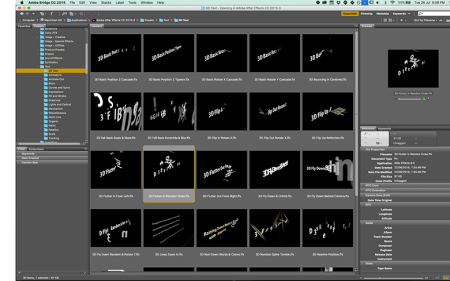
Animating Text Guide using Adobe After Effects
Duration: 40m | Video: .MP4, 1280x720, 30 fps | Audio: AAC, 48 kHz, 2ch | Size: 201 MB
Genre: eLearning | Language: English​

In this class*I'll*show you a bunch of different ways of creating Text Animations which are commonly used in motion graphics templates on world top stock markets such as
Envato Elements
Videohive (Envato Market)
Motion Array
Storyblocks
Mixkit
Rocketstock
Motionelements
Videobolt and others
I'll be teaching you the most common techniques as well as showing real-life examples*using design from my own project which I've made this year. It is approved for sale on Envato Elements and Videohive!
This means that you'll be learning up-to-date professional techniques.
Lets get started!
Homepage
Screenshots


df03b1a6-8c5c-4e91-a051-91ad5a832b1d.png

Artificial Neural Networks and Deep Learning in Practice
MP4 | Video: h264, 1280x720 | Audio: AAC, 44.1 KHz, 2 Ch
Genre: eLearning | Language: English + srt | Duration: 29 lectures (3h 48m) | Size: 1.8 GB

With Introductory Review on Machine Learning
What you'll learn
The fundamentals of Artificial Neural Networks (ANNs) and reviews state-of-the-art DL examples.
The fundamental of Deep learning and the most popular algorithms.
It has several coding examples.
It has several quizzes for learning better.
Requirements
Probability,
Calculus,
Basic of Python, Tensor Flow, Keras, and Numpy.
Description
Artificial Neural Networks and Deep Learning are the most recent and advanced topics in machine learning, with several applications in many fields. They show promising results in many areas, from computer vision to drug discovery and stock market prediction. Also, because of its capabilities and potential in solving different problems by deploying different data types, many researchers and people who are not in computer science or related fields are interested in learning and using Artificial Neural Networks and Deep learning architectures in their projects.
This course gives you some fundamentals of artificial neural networks and deep learning with some coding examples to understand the concepts better. The course is suitable for people who are new in the machine learning field and deep learning and would like to learn how to implement deep learning algorithms using Python, TensorFlow, and Keras.
The course provides some references and links for more reading. You have access to the Q/A session for asking your question. You also have access to communicate with the professor by the messaging system to ask your questions.
I would expect this course's contents to be welcomed worldwide by undergraduate and graduate students and researchers in deep learning, including practitioners in academia and industry.
Who this course is for
It is useful for undergraduate and graduate students, as well as practitioners in industry and academia.
Anyone who would like to learn Neural networks and deep learning.
Homepage


4634306-d1f1-3.jpg

Complete Blender Course: Creating Game Assets for Beginners
MP4 | Video: h264, 1280x720 | Audio: AAC, 44.1 KHz, 2 Ch
Genre: eLearning | Language: English | Duration: 9 lectures (1h 40m) | Size: 1.56 GB

Use Blender 3.1 to Create 3D models for Video Games, 3D Printing & More. Beginners & intermediate Level Course
What you'll learn
Use Blender 3.0 and understand it's interface
Modeling tips and trick for making a low poly game assets
How to set up PBR materials
Lighting usding Easy HDRI
Learn UV maping and unwraping
Project file are included
Requirements
Download Blender 3.1
No Program experience needed, we will teach you from the basic
Description
Hello friends!
In this course I will teach you how to model low poly Bucket game assets inside the blender 3.1 which is new released version. This tutorial is around 2 hours and if you like be sure to check out our other courses.
Here in first step we will discuss about tools and techniques for modeling and in general how to use blender for creating your desired 3D model. You will learn Edit Mode and how it works in general.
In the second part you will learn how to use Modifiers to create the desired form of your model.
In next third section we go directly into the modeling, and we model our bucket and for a small part we will use some free add on called Loop-Tools to make our work nicer and faster and in here you will learn what is normal and what happen if normals flips on an object and how to fix the flipped normal in Blender
Then we will use bolt-Factory add-on which is free and we use some bolts and by snap we pot them on the bucket surface.
We will use shading and explain the right way of UV Unwrapping and how to texture your model using PBR material.
and finally you will learn how to us Easy-HDRI free add-on for lighting the bucket.
What Topics are Covered?
3D Modeling
You will learn about Modifiers, which are special modeling effects that you can use for complex modeling tasks.
We will create PBR Materials.
How to illuminate the scene using Easy-HDRI add-on (free).
Learn how to use snap.
Get introduced to Cycles
So I hope to see you in there.
Who this course is for
Beginner Blender user
Anyone interested in learning how to model game assets, or switching from another 3D software to Blender
Game Developers who wish to expand their Skill Set.
Homepage


34738ad4-c777-44ac-b11a-7aa4e41f60d6.png

Design & Code Twitter Home Page with JavaScript, CSS & Figma
MP4 | Video: h264, 1280x720 | Audio: AAC, 44.1 KHz, 2 Ch
Genre: eLearning | Language: English + srt | Duration: 58 lectures (11h 38m) | Size: 6.1 GB

Transfer UI UX Design to Front-End Native Web Development Components with HTML, CSS, JavaScript, Lit JS, & Figma
What you'll learn
Design Figma components & develop them using JavaScript
Utilize native web component API to develop reusable custom elements
Fast-track native web component development using Lit JS framework
Encapsulate your CSS & JavaScript logic to develop light & dark theme components
Design custom components using Figma Variants & Auto Layout
Learn how to set up a Design Syste
Requirements
Advance knowledge of HTML, CSS, JavaScript
Intermediate understanding of Figma
Description
In this course we will learn how to use the native web component technology to our advantage.
Design beautiful web components for Twitter using Figma
Transfer all those beautiful designs to front-end code using Lit JS
Code light & dark user interface for Twitter home page using JavaScript & Figma
Before we dive right into front-end coding, we will first design everything in Figma from scratch.
Not only will we design components in Figma, but also build a design system for our Twitter UI project
We will design reusable color, typography, & shadow styles
At the end, we transfer Figma styles to CSS variables
We will learn how to use Lit JS to develop native shareable components.
We will learn how to encapsulate our HTML and CSS into JavaScript classes using Lit JS
We will learn how to build simple future-ready native web components
We only use pure vanilla JavaScript to create customizable components and scope our CSS styles inside each of them
One of the best practices in front-end development is to reuse code as much as possible. However, transfering design to HTML markup tends to be complex.
We will use Lit JS to make our development life easy because it is built on top of native web component API
Since Lit JS uses native web component API, our development environment is simple yet powerful
That means we do not have to worry about Node Modules or JavaScript bundlers to convert our syntax to code
Who this course is for
Designers who want to add Twitter Figma Project to their portfolio
Developers who want to transfer Figma components to code
Developers who want to create native custom components from scratch
Homepage


896665dc-322f-49e6-a0ee-9df1ae7870da.png

Domestika - Creating Your Own Fashion Brand by Moisés Nieto
Video: h264, yuv420p, 1920x1080, 2292 kb/s, 25.00 fps | Audio: aac, 44100 Hz, stereo, s16, 128 kb/s
Genre: eLearning | Duration: 16 lessons (51m) | Language: Spanish (No subtitles) | File size: 504 MB​

Learn the essential steps to starting, defining, and launching your own clothing or accessories brand
Screenshots

Do you dream of launching your own clothing or accessories brand? Discover the entire process alongside renowned fashion designer, Moisés Nieto. He established himself in the industry from a very young age and has worked with designers like Antonio Alvarado and brands like Bimba y Lola. He also had the opportunity to work in Milán for Valentino, where he got an internship with Vogue Italia.
In this course, Moisés shows you all the steps to start, define, and launch your clothing or accessories brand. Analyze your product, market, and target audience, defining objectives and business model, and getting expert tips to build your brand's identity. Finally, explore the different ways of selling your product, learn about your brand's potential and the importance of creating synergies.
Homepage


ea1493ff-8a60-4d76-ac53-6fb5b4dfd4f4.png

Forex RENKO expert advisor practice coding MT4
MP4 | Video: h264, 1280x720 | Audio: AAC, 44.1 KHz, 2 Ch
Genre: eLearning | Language: English + srt | Duration: 32 lectures (2h 54m) | Size: 1.81 GB

Learn everything about renko creating , testing ,coding , types
What you'll learn
how to find the necessary tools to create renko charting
how to use these tools
how to code profitable strategy that is working in renko
types of renko charts
Requirements
medium level in forex coding and trading
Description
Hello all my students and visitors
this is a complete course about RENKO charting . you will learn how to
prepare your mt4 for renko
how to find the right program to create renko
how use these programs
how to test renko on strategy tester
how to code the strategy using mq4 (MQL4 ) language
What is a Renko Chart?
A Renko chart is a type of chart, developed by the Japanese, that is built using price movement rather than both price and standardized time intervals like most charts are. It is thought to be named after the Japanese word for bricks, "renga," since the chart looks like a series of bricks. A new brick is created when the price moves a specified price amount, and each block is positioned at (up or down) to the prior brick. An up brick is typically colored white or green, while a down brick is typically colored black or red
Renko charts are designed to filter out minor price movements to make it easier for traders to focus on important trends. While this makes trends much easier to spot, the downside is that some price information is lost due to simple brick construction of Renko charts.
The first step in building a Renko chart is selecting a box size that represents the magnitude of price movement. For example, a currency may have a 50 pip box size. A Renko chart is then constructed by placing a brick in the next column once the price has surpassed the top or bottom of the previous brick by the box size amount.
Renko charts show a time axis, but the time intervals are not fixed. One brick to could take weeks to form, while several bricks may form within a day or minuets. This varies from candlestick or bar charts where a new candle/bar forms at specific time intervals.
Increasing or decreasing the box size will affect the "smoothness" of the chart. Decreasing the box size will create more swings, but will also highlight possible price reversals earlier. A larger box size will reduce the number of swings and noise but will be slower to signal a price reversal.
Renko charts are effective in identifying support and resistance levels since there is a lot less noise than a candlestick chart. When a strong trend forms, Renko traders may be able to ride that trend for a long time before even one brick in the opposite direction forms.
Trading signals are typically generated when the direction of the trend changes and the bricks alternate colors. For example, a trader might sell the asset when a red box appears after a series of climbing white boxes. Similarly, if the overall trend is up (lots of white/green boxes) a trader may enter a long position when a white brick occurs after one or two red boxes (a pullback).
Who this course is for
medium mql4 coders that spent 3 ~ 5 months with mql4 programming languages
Homepage


45c0d311-6cb1-4ecb-bd7f-228c923f7d2a.png

Go MATLAB! Elevate your skills to make a difference
MP4 | Video: h264, 1280x720 | Audio: AAC, 44.1 KHz, 2 Ch
Genre: eLearning | Language: English | Duration: 5 lectures (2h 42m) | Size: 2.13 GB

All you need to know to start mastering MATLAB and advance data analysis. From basic concepts to more advanced topics
What you'll learn
Learn in 5 lectures all you need to know to start programming in MATLAB.
Gain experience by coding during the lectures.
Understand how MATLAB can help you apply advanced maths and statistics to analyse your data.
Get the critical knowledge needed to address complex mathematical and programming problems.
Learn how powerful programming languages are for automating repeated tasks.
Requirements
No programming experience needed. You'll learn everything you need in this course.
Description
MATLAB is a powerful programming language specifically designed for data manipulation and analyses using advanced mathematics and statistics. It provides an extensive built-in library for applying all sorts of simple and advanced mathematical, numerical and statistical methods.
Learning a new programming language can be a daunting task. It can take months (or years) until you master a programming language, which results in many students quitting or losing interest. But it doesn't need to be that way. Our experience with students over the years has shown that the best learning experiences are when students get involved in real-world projects of their interest. Instead of going through hours and hours of lectures covering all the awesome things you can do in MATLAB (or any programming language for that matter), we believe that providing very solid foundations on syntax, programming logic, and troubleshooting is all the students need to be able to become independent programmers and tackle any problem.
We designed and prepared this course having this mind. The course consists of five lectures with an average duration of 30 min each (2.5 hours in total) where you'll learn everything you need to know to start mastering MATLAB and advance your data analysis.
The course instructor has many years of experience (academic and private sector) in different programming languages, including MATLAB, Python, C++ and Fortran. He has designed this course in a way that condensates everything that beginners, or more advanced programmers in other computer languages, need to know to get going in MATLAB and quickly start exploring data efficiently and comprehensively. MATLAB provides several built-in functions that make complex mathematical, numerical and statistical analyses quickly accessible to everyone. We'll cover from the basic concepts, all the way to more advanced topics.
By the end of the course, you'll know the basic syntax of MATLAB and important concepts ubiquitous to programming, which make it so powerful for automating data manipulation tasks. We will go through many critical build-in functions for importing, analyzing and visualizing data. Navigating real-world code can be a challenging task, especially for large and complex projects. You'll learn how to approach such projects, as well as several resources to debug your code. In the last lecture, we will apply the knowledge acquired to write our own script to analyze real data. By then, you'll have all you need to be an independent programmer in MATLAB.
Join us!
Who this course is for
Beginners in MATLAB.
Programmers that need to learn the basic syntax of MATLAB.
Everyone interested in learning how programming can help you analyse data.
Everyone interested in learning how programming can be used to automate repeated tasks.
Homepage


5a4dc446-9731-49a6-a873-1eb7f7decb3d.png

Implementing Lookup Logic in SQL Server Integration Services
MP4 | Video: h264, 1280x720 | Audio: AAC, 44.1 KHz, 2 Ch
Genre: eLearning | Language: English + srt | Duration: 23 lectures (1h 58m) | Size: 668.5 MB

Perform lookup transformation logic with SSIS and SQL Server
What you'll learn
Implementing Lookup Logic in SQL Server Integration Services
Create SSIS Package
Create data flow task
Write Data to a Cache
Performing Lookups from Cached Data
Running Your SSIS Package
Requirements
Basic knowledge of SQL Server Integration Services
Basic knowledge of SQL Server
Description
SQL Server Integration Services is a component of the Microsoft SQL Server database software that can be used to perform a broad range of data migration tasks. SSIS is a platform for data integration and workflow applications. It features a data warehousing tool used for data extraction, transformation, and loading.
With SSIS, you can perform a lookup on data in the course of a task, using referenced data from any OLE DB source. It is a useful feature that enables you to check on the validity of data, or interpret it before proceeding.
There might be times when developing a SQL Server Integration Services (SSIS) package that you want to perform a lookup in order to supplement or validate the data in your data flow. A lookup lets you access data related to your current dataset without having to create a special structure to support that access.
To facilitate the ability to perform lookups, SSIS includes the Lookup transformation, which provides the mechanism necessary to access and retrieve data from a secondary dataset. The transformation works by joining the primary dataset (the input data) to the secondary dataset (the referenced data). SSIS attempts to perform an equi-join based on one or more matching columns in the input and referenced datasets, just like you would join two tables in in a SQL Server database.
Because SSIS uses an equi-join, each row of the input dataset must match at least one row in the referenced dataset. The rows are considered matching if the values in the joined columns are equal. By default, if an input row cannot be joined to a referenced row, the Lookup transformation treats the row as an error. However, you can override the default behaviour by configuring the transformation to instead redirect any rows without a match to a specific output. If an input row matches multiple rows in the referenced dataset, the transformation uses only the first row. The way in which the other rows are treated depends on how the transformation is configured.
The Lookup transformation lets you access a referenced dataset either through an OLE DB connection manager or through a Cache connection manager. The Cache connection manager accesses the dataset held in an in-memory cache store throughout the duration of the package execution. You can also persist the cache to a cache file (.caw) so it can be available to multiple packages or be deployed to several computers.
Who this course is for
Beginner Data Analyst
Beginner Data Engineer
Beginner Data Scientist
Beginner Data Warehouse developer
Beginner ETL developer
Homepage


201f71c9-71cd-452c-9189-53965b60d664.png

Laptop Repair: Most Common Faults On Failed Laptops
MP4 | Video: h264, 1280x720 | Audio: AAC, 44.1 KHz, 2 Ch
Genre: eLearning | Language: English + srt | Duration: 21 lectures (1h 29m) | Size: 1.94 GB

Motherboard faults repair, computer hardware Technicians, Laptop repair course, Integrated Circuits, Electronics, PC
What you'll learn
The Most common faults about failed laptops;
How to diagnose laptop motherboards;
How to troubleshoot, isolate and repair failed laptops,
How to identify short circuit on laptop motherboards;
Tips and Tricks about laptop hardware repairing and much more.
Requirements
Basics of computer hardware
Description
13 Reasons why you should choose this course
The course will teach you Everything about the Most Common Faults On Failed Laptops;
The course is created with perfect care by a computer engineer;
One-On-One Support;
The course is not long, so you can complete it in a short time, and then enjoy your new experiences;
Your inquiries will be answered in a short time with a full explanation of any question;
Simple and easy-to-understand explanation with examples;
A certificate will be provided upon completion of the course;
You going to understand laptop motherboard parts and components;
You will learn how to check laptop motherboard circuits and components;
You going to learn how to identify the short circuit in any laptop motherboard;
You will learn and master how to troubleshoot, isolate and repair most laptop common faults;
You going to learn many tips and tricks about laptop repairing;
This course will transform you from a beginner to a Pro.
Topics that we will be discussing in this course are
Power Adapter failure;
The Power jack failure;
The Random Access Memory RAM;
Power circuit & protection components failure;
How to check Super Input-Output IC, SIO, and its circuit;
How to check Basic Input Output System IC, BIOS;
Power switches ( power MOSFETs );
Charge IC;
Power switch troubleshoot;
The BIOS IC failure;
The HDD or SSD failure;
Graphics Card failure repair;
The CMOS battery failure;
Motherboard connectors failure;
USB & other motherboard connectors failure;
Dry solder failure;
Blown IC failure
Identifying the short circuit;
Electrostatic problems;
How to use the Multimeter in the correct way.
You will also learn many tips and tricks that will make you a hardware professional and have a deep understanding of Laptop motherboard repairing.
I will guide you step by step with an easy explanation along this course.
If you are interested in one of the points we talked about before, then this course is for you.
What are you waiting for?
Enroll now and join us.
I'll love to see you in the class.
Who this course is for
Hardware Students and technicians;
Homepage


065f3232-6f70-4fc6-b2c2-6ac246b259fc.png

Master Deep Learning | A Step-by-Step Guide for 2022
Last Update: 4/2022
Duration: 1h 30m | Video: .MP4, 1280x720 30 fps | Audio: AAC, 48 kHz, 2ch | Size: 664 MB
Genre: eLearning | Language: English​

Master Deep Learning | A Step-by-Step Guide for 2022 | Practice your skills with 200 (MCQs) Multiple Choice Questions.
What you'll learn
List the major Application areas of Deep Learning that exist today.
Familiarize yourself with Deep Learning Tools.
Recount the advantages and disadvantages of Deep Learning.
Ideate a project work for practicing Deep Learning.
Choose from the wide range of career options available in Deep Learning.
Requirements
No prior knowledge of Deep Learning is required.
Description
Welcome to the most in-demand course to Master Deep Learning | A Step-by-Step Guide for 2022.
This course is developed by R Tutor in coordination with industry masters and professors from elite educational institutes. R Tutor is a team of Deep Learning training professionals who explain complex concepts in the simplest form with real-life examples.
The course offers extensive training on the most in-demand Deep Learning skills with hands-on exposure to key tools and technologies. Become an expert in Deep Learning by diving deep into the nuances of data interpretation, mastering new technologies, and learning relevant skills to take your career in Deep Learning competency to the next level.
This course accelerates your career in Deep Learning and provides you with the world-class training and skills required to become successful in this field. Practice your skills with 200 Multiple Choice Questions and be a pro in the domain of Deep Learning.
After you have completed this Deep Learning course, you will receive a certificate from R-Tutor and Udemy, stating that you have acquired the skill set required to be a Deep Learning professional. This certificate will testify to your skills and assert your Deep Learning expertise.
On completing the course, you will be able to
List the major Application areas of Deep Learning that exist today.Familiarize yourself with Deep Learning Tools.Recount the advantages and disadvantages of Deep Learning.Ideate a project work for practicing Deep Learning.Choose from the wide range of career options available in Deep Learning.
No prior knowledge of Deep Learning is required.
Everyone can take this course and is best suited for: Students of high school, college, and university. Professionals and employees looking to step into the Deep Learning space. Everyone who is involved with Deep Learning in their everyday work.
Become a Deep Learning professional by enrolling in this course which helps you get started and pave your success from a beginner to an expert.
Start your Deep Learning journey today. It's easy! Start now!
Who this course is for
Students of high school, college, and university.
Professionals and employees looking to step into the Deep Learning space.
Everyone who is involved with Deep Learning in their everyday work.
Homepage
Screenshots


6592e772-95c2-440b-bfb8-0f24683f70b8.png

Meta-analysis - Basic course 2022
MP4 | Video: h264, 1280x720 | Audio: AAC, 44.1 KHz
Language: English | Size: 207 MB | Duration: 46m​

An introductory course to understand lucidly the complex science of meta-analysis
What you'll learn
Be able to perform meta-analysis
Be able to use the RevMan Software to do meta-analysis
Be able to explain the various types of heterogeneity
Be able to generate and interpret forest and funnel plots
Requirements
Be able to understand simple instructions and to search for information online
Description
Meta-analysis is an important statistical approach to validly combine the results of studies following a systematic review. This course takes you through the concepts of meta-analysis and the various graphical representation required to display the results. A complete understanding of concepts is required to properly interpret the results to the scientific world. The two important types of data, binary and continuous, and their pooled estimates are discussed in simple language with relevant examples for you to understand better. This will form the basis for your understanding to perform the meta-analysis. The RevMan software offered free by the Cochrane Collaboration is a sturdy application to do meta-analysis, with the image quality good for journal publication. The figures generated are standard and comparable to other images from other applications. I personally will recommend this application for beginners in meta-analysis.
Heterogeneity is variations among the studies which are included in the meta-analysis. Understanding the various types of heterogeneity and how it impacts the interpretation of the results from meta-analysis is important. The course also deals with the learning and generation of forest and funnel plots. They are the graphical presentation of data and results displayed in the form of a scatter plot. These plots give a bird's eye view of the results, their meaning, and interpretation.
Come join this course and take yourself to the next level in understanding and interpreting meta-analysis and become a part of cutting-edge research.
Who this course is for
Higher education/university students, academics, doctors, dentists, researchers and anyone interested in meta-analysis
Screenshots


Zurück
Oben Unten