• Regeln für den Video-Bereich:

    In den Börsenbereich gehören nur Angebote die bereits den Allgemeinen Regeln entsprechen.

    Einteilung

    - Folgende Formate gehören in die angegeben Bereiche:
    - Filme: Encodierte Filme von BluRay, DVD, R5, TV, Screener sowie Telesyncs im Format DivX, XviD und x264.
    - DVD: Filme im Format DVD5, DVD9 und HD2DVD.
    - HD: Encodierte Filme mit der Auflösung 720p oder darüber von BluRay, DVD, R5, TV, Screener sowie Telesyncs im Format x264.
    - 3D: Encodierte Filme von BluRay, die in einem 3D Format vorliegen. Dies gilt auch für Dokus, Animation usw.
    - Serien: Cartoon/Zeichentrick, Anime, Tutorials, Dokumentationen, Konzerte/Musik, Sonstiges sind demnach in die entsprechenden Bereiche einzuordnen, auch wenn sie beispielsweise im High Definition-Format oder als DVD5/DVD9/HD2DVD vorliegen. Ausnahme 3D.
    - Bereich Englisch: Englische Releases gehören immer in diesen Bereich.
    - Bereich Talk: Der Bereich, in dem über die Releases diskutiert werden kann, darf, soll und erwünscht ist.


    Angebot/Beitrag erstellen

    - Ein Beitrag darf erst dann erstellt werden, wenn der Upload bei mindestens einem OCH komplett ist. Platzhalter sind untersagt.
    - Bei einem Scenerelease hat der Threadtitel ausschließlich aus dem originalen, unveränderten Releasenamen zu bestehen. Es dürfen keine Veränderungen wie z.B. Sterne, kleine Buchstaben o.ä. vorgenommen werden. Ausnahme Serienbörse:
    - Bei einem Sammelthread für eine Staffel entfällt aus dem Releasename natürlich der Name der Folge. Beispiel: Die Simpsons S21 German DVDRip XviD - ITG
    - Dementsprechend sind also u.a. verboten: Erweiterungen wie "Tipp", "empfehlenswert", "only", "reup", usw. / jegliche andere Zusatzinformation oder Ergänzung, welche nicht in obiger Beschreibung zu finden ist.

    Aufbau des Angebots und Threadtitel

    Der Titel nach folgendem Muster erstellt zu werden. <Name> [3D] [Staffel] [German] <Jahr> <Tonspur> [DL] [Auflösung] <Quelle> <Codec> - <Group>
    Beispiel: The Dark Knight German 2008 AC3 DVDRip XviD - iND
    Beispiel: The Dark Knight 2008 DTS DL BDRip x264 - iND
    Beispiel: The Dark Knight 2008 AC3 DL BDRip XviD - iND
    Beispiel: The Dark Knight German 2008 AC3 720p BluRay x264 iND
    Beispiel: The Dark Knight 2008 DTS DL 1080p BluRay x264 iND
    Beispiel: Die Simpsons S01 German AC3 DVDRip XviD iND
    Beispiel: Die Simpsons S20 German AC3 720p BluRay x264 iND
    Beispiel: Sword Art Online II Ger Sub 2014 AAC 1080p WEBRip x264 - peppermint
    Entsprechend sind also u.a. verboten: Sonderzeichen wie Klammern, Sterne, Ausrufezeichen, Unterstriche, Anführungszeichen / Erweiterungen wie "Tipp", "empfehlenswert", "only", "reup", usw. / jegliche andere Zusatzinformation oder Ergänzung, welche nicht in obiger Beschreibung zu finden ist
    Ausnahmen hiervon können in den Bereichen geregelt sein.

    Die Beiträge sollen wie folgt aufgebaut werden:
    Überschrift entspricht dem Threadtitel
    Cover
    kurze Inhaltsbeschreibung
    Format, Größe, Dauer sind gut lesbar für Downloader außerhalb des Spoilers zu vermerken
    Nfo sind immer Anzugeben und selbige immer im Spoiler in Textform.
    Sind keine Nfo vorhanden z.B. Eigenpublikationen, sind im Spoiler folgende Dateiinformationen zusätzlich anzugeben :
    Quelle
    Video (Auflösung und Bitrate)
    Ton (Sprache, Format und Bitrate der einzelnen Spuren)
    Untertitel (sofern vorhanden)
    Hosterangabe in Textform außerhalb eines Spoiler mit allen enthaltenen Hostern.
    Bei SD kann auf diese zusätzlichen Dateiinformationen verzichtet werden.

    Alle benötigten Passwörter sind, sofern vorhanden, in Textform im Angebot anzugeben.
    Spoiler im Spoiler mit Kommentaren :"Schon Bedankt?" sind unerwünscht.


    Releases

    - Sind Retail-Release verfügbar, sind alle anderen Variationen untersagt. Ausnahmen: Alle deutschen Retail-Release sind CUT, in diesem Fall sind dubbed UNCUT-Release zulässig.
    - Im Serien-Bereich gilt speziell: Wenn ein Retail vor Abschluss einer laufenden Staffel erscheint, darf diese Staffel noch zu Ende gebracht werden.62
    - Gleiche Releases sind unbedingt zusammenzufassen. Das bedeutet, es ist zwingend erforderlich, vor dem Erstellen eines Themas per Suchfunktion zu überprüfen, ob bereits ein Beitrag mit demselben Release besteht. Ist dies der Fall, ist der bereits vorhandene Beitrag zu verwenden.
    - P2P und Scene Releases dürfen nicht verändert oder gar unter einem iND Tag eingestellt werden.


    Support, Diskussionen und Suche

    - Supportanfragen sind entweder per PN oder im Bereich Talk zu stellen.
    - Diskussionen und Bewertungen sind im Talk Bereich zu führen. Fragen an die Uploader haben ausschließlich via PN zu erfolgen, und sind in den Angeboten untersagt.
    - Anfragen zu Upload-Wünschen sind nur im Bereich Suche Video erlaubt. Antworten dürfen nur auf Angebote von MyBoerse.bz verlinkt werden.


    Verbote

    - Untersagt sind mehrere Formate in einem einzigen Angebotsthread, wie beispielsweise das gleichzeitige Anbieten von DivX/XviD, 720p und 1080p in einem Thread. Pro Format, Release und Auflösung ist ein eigener Thread zu eröffnen.
    - Grundsätzlich ebenso verboten sind Dupes. Uploader haben sich an geeigneter Stelle darüber zu informieren, ob es sich bei einem Release um ein Dupe handelt.
    - Gefakte, nur teilweise lauffähige oder unvollständige Angebote sind untersagt. Dies gilt auch für eigene Publikationen, die augenscheinlich nicht selbst von z.B. einer DVD gerippt wurden. Laufende Serien, bei denen noch nicht alle Folgen verfügbar sind, dürfen erstellt und regelmäßig geupdatet werden.
    - Untersagt sind Angebote, welche nur und ausschließlich in einer anderen Sprache als deutsch oder englisch vorliegen. Ausnahmen sind VORHER mit den Moderatoren zu klären.


    Verstoß gegen die Regeln

    - Angebote oder Beiträge, die gegen die Forenregeln verstoßen, sind über den "Melden"-Button im Beitrag zu melden.
  • Bitte registriere dich zunächst um Beiträge zu verfassen und externe Links aufzurufen.

*** Bestes IPTV *** bester Preis *** gratis Test ***


Englische Tutorials

271f8fca-5abd-4f91-83bc-eab3908f48ec.png

OSINT by Jeff M
MP4 | Video: h264, 1280x720 | Audio: AAC, 44.1 KHz, 2 Ch
Genre: eLearning | Language: English + srt | Duration: 65 lectures (5h 11m) | Size: 2.38 GB

Business, personal, and investigation edition
What you'll learn
Open source intelligence
investigation
fact checking
background checking
Requirements
basic computer knowledge, online access, access to install software
Description
*NOTE* This course is only intended for the Udemy Business program. If you have taken the OSINT 1, 2, OSINT For Windows, Or other OSINT courses by me, do no purchase this one through the normal Udemy Channel.
This course is designed to help you learn OSINT (Open source intelligence) aimed to help those on a personal level, business level, and investigation level. You do not need a prior background in network security, ethical hacking or OSINT to take this course. Getting started can be scary and tough, however it doesn't have to be! I try to walk you through the virtual machine setup, use of tools, sock puppets and more. The format is simple, yet designed to help you build and understand the amazing world of OSINT. Building a virtual machine, installing a Linux OSINT environment, reverse image searches, social media crawling, website crawling, and much more. By the end of this course you should have a solid foundation of OSINT, able to safely conduct scans and investigations along with reporting your findings in a professional manner. Have a question or a problem? Feel free to message me and I will do my best to get back to you ASAP. Also expect periodic updates to the course and things change.
I am a OSINT practitioner, ethical hacker and have been training and writing articles on both OSINT and ethical hacking for Udemy, EC-Council, Hackin9 and eForensics magazine.
Who this course is for
Anyone who does investigations, fact checking, personal safety, hackers, etc.
Homepage


007c9fea-medium.jpg

Pinterest For Beginners - Learn The Basics Of Pinterest And How To Generate Traffic To Your Website
Duration: 58m | Video: .MP4, 1280x720, 30 fps | Audio: AAC, 48 kHz, 2ch | Size: 408 MB
Genre: eLearning | Language: English​

If*the sentence*"I still can't make sense of Pinterest"*sounds like*something*you'd say, this*class is created exactly for you!
Before diving deep into Pinterest marketing and the advanced growth strategies, join this class and learn the basics of Pinterest and what the idea behind this visual search engine is.
I've created a simple, easy-to-follow course that covers everything you need to start using Pinterest and create content that promotes your*website and help you reach more audience.
All you need is your computer or iPad to follow all the steps. No content creation or design skills are required.
The class is created for beginners who want a free and simple way to promote their website, product or service using Pinterest. It covers the basics starting from how to create a business account and how to create content and includes some of the common growth recommendations that help you see the results you want.
Homepage
Screenshots


98eda4c0-021b-424a-bcf6-473db736bd07.png

Practical Accounting: Trial Balance to Financial Statements
MP4 | Video: h264, 1280x720 | Audio: AAC, 44.1 KHz
Language: English | Size: 393 MB | Duration: 58m​

Learn to use the Trial Balance information to create the two most important Financial Statements
What you'll learn
This course teaches you how to interpret Trial Balance accounts using the accounting rules that are applied at all levels of Accountancy.
You will learn how to create a Statement of profit & loss and other Comprehensive Income and a Statement of Financial Position
Learn how to apply Accounting basics to a Trial Balance to create Financial Statements
Draw up draft sets of Financial Statements from a set of Trial balance accounts
Requirements
Professional/Business English (proficiency in understanding vocabulary relating to business)
Basic Accounting Knowledge of the 6 most important accounting rules
Description
This course teaches you how to interpret the Trial Balance accounts using the accounting rules that are applied at all levels of Accountancy. You will understand the importance of needing Financial Statements to make business decisions. You will learn how to create a Statement of profit & loss and other Comprehensive Income and a Statement of Financial Position.
This course is suited for anyone who does not have a background in accounting but wants to learn what the most important skills for applying accounting knowledge and information at any level (basic to advanced) for financial statements
Who this course is for
Students, Entrepreneurs, Managers, and anyone who wants to learn how to use a Trial Balance for creating Financial Statements. This course is suited for anyone who does not have a background in accounting but wants to learn what the most important skills for applying accounting knowledge and information
Screenshots


09f4b53e-0340-47f8-b9ea-1835e52a1fa0.png

SQL/Oracle Database Administrator : Migration,Security,Query
MP4 | Video: h264, 1280x720 | Audio: AAC, 44.1 KHz, 2 Ch
Genre: eLearning | Language: English + srt | Duration: 76 lectures (7h 12m) | Size: 2.57 GB

Learn Real World Oracle DBA and SQL Skills
What you'll learn
Oracle Database Setup
Exporting and Importing Data
Managing Users | Database Security
Monitoring Oracle Database
Database Backup and Recovery
Database Migration: SQL Server to Oracle
Build Real World SQL Queries
Oracle SQL Aggregate Functions
Build Bulk SQL Queries with Excel
Requirements
Basic knowledge of Excel advised but not a show stopper.
Description
Oracle Database Administrator's are in constant demand in the IT industry.
The rapid growth of data has fuelled the demand for database administrator's in general. We are more than before reliant on data in our everyday life either through the use of social media with applications like Facebook, Instagram Whatsapp ,Twitter and may more data rich applications.
This course is designed for beginners who are considering a career as a database administrator. It will guide you
through some of the tasks that an Oracle database administrator has to perform.
Oracle DBA Responsibilities includes
Installing new versions of the Oracle database and its tools
Installing tools required to access the Oracle database.
Shutting down and Starting the database
Backing up and Recovering Data
Exporting and Importing Data
Managing Users
Managing security of the database
Monitoring the database
Creating database objects like databases, tables and views
Create new database users as required.
Upgrading the database
Plans and implements backup and recovery of the Oracle database.
Assists with impact analysis of any changes made to the database objects.
Provides technical support to application development teams
Enforces and maintains database constraints to ensure integrity of the database.
Administers all database objects, including tables, clusters, indexes, views, sequences, packages and procedures.
Troubleshooting problems regarding the databases, applications and development tools.
SQL stands for Structured Query Language
SQL lets you access and manipulate databases
SQL can execute queries against a database
SQL can retrieve data from a database
SQL can insert records in a database
SQL can update records in a database
SQL can delete records from a database
SQL can create new databases
SQL can create new tables in a database
SQL can create stored procedures in a database
SQL can create views in a database
SQL can set permissions on tables, procedures, and views
Who this course is for
Beginner Oracle DBA
Beginner SQL Data Analyst
Homepage


45e2c031-f18c-4015-ac8e-aff963cfbfe0.png

Simple Line & Wash : Birds
Duration: 57m | Video: .MP4, 1280x720, 30 fps | Audio: AAC, 48 kHz, 2ch | Size: 661 MB
Genre: eLearning | Language: English​

This is a basic class on Line & Wash and I chose birds as the subjects as I think birds are easiest to draw and paint as they have quite a simple body shape.
Line & Wash is basically drawing your subject with liner pen and then finish off with a wash of watercolor. Wash is basically diluted watercolor, hence, wash is just a mix of watercolor and water with a consistency of milk. We do not want it to be too thin like tea as watercolor will tends to dry into a light colour.
My name is Zain and I am an artist who loves all kinds of mediums. I paint with watercolors, soft pastels, Panpastels, gouache, charcoal, markers, inks, pastel pencils, color pencils and even wool.
In this class, I am going to walk you through the process step by step right from pencil sketching to the painted birds. I will also give you some tips and tricks all compiled into one video.
With that all being said, lets proceed with our video lessons...
Homepage
Screenshots


79271a81-3e71-477d-a59f-d1de4452acf1.png

Social Media Copywriting Tips For Beginners
MP4 | Video: h264, 1280x720 | Audio: AAC, 44.1 KHz
Language: English | Size: 863 MB | Duration: 38m​

Social Media Copywriting Tips To Boost Your Content Engagement and Product Conversions
What you'll learn
How to write effective copy to boost your social media content engagement
How to write effective copy to increase your product/service sales
Understand how to keep your audience engaged through effective copywriting
How to build a voice for your brand on social media through copywriting
How to keep your copywriting lean to ensure that you articulate your messaging effectively
How to increase persuasiveness through effective copywriting
Requirements
There is no previous copywriting or social media skills required to take this course. This course is a fantastic introduction for improving your copywriting skills to set you on the path to becoming an effective copywriter.
Description
In this class, I am going to be sharing some of the key copywriting tips that have assisted me in my content creation and entrepreneurial journey so far. They're the copywriting tips that I wish I'd learnt sooner and that's why I want to teach them to you today.
There is a phenomenal amount of noise on social media. There are millions of creators posting on social media every single day, all competing for attention.
So to cut through the noise, the way your articulate your messaging in your content and your product/service descriptions is going to be one of the key ways you're going to separate yourself from the competition.
This is exactly what being an effective copywriter is all about.
In this class you will learn the following
Copywriting Tip 1: People Care About What You Can Do For Them
Copywriting Tip 2: Replace Adjectives With Data
Copywriting Tip 3: Ensure Your Copywriting Is Scannable
Copywriting Tip 4: Less Is More When Writing Titles
Copywriting Tip 5: Start Thinking Call-To-Value (Not Call-To-Action)
Copywriting Tip 6: Write How You Talk
Copywriting Tip 7: The Goal Is To Keep People Reading
This class is perfect for.
Creatives, entrepreneurs, thought leaders, personal brands, team leaders, or simply experts in their field. By the end of this class, you're going to understand some key copywriting tips that are going to be able to transform your copywriting skills.
Who this course is for
This class is perfect for creatives, entrepreneurs, thought leaders, personal brands, team leaders, or simply experts in their field. By the end of this class, you're going to understand some key copywriting tips that are going to be able to transform your copywriting skills.
Screenshots


4d621d65-2398-4364-9cd2-f96a3229534c.png

Starting a Career in Data Science 101
MP4 | Video: h264, 1280x720 | Audio: AAC, 44.1 KHz
Language: English | Size: 683 MB | Duration: 1h 8m
Learn About Jobs, Build Your Resume, Prepare for Interviews, and Get on Board!
What you'll learn​

Why data science is (still) the best choice
How to pick data science area that is right for you
What are 4 proven ways to acquire data science skills
How to increase your chances using portfolio
How to decode job descriptions in data science
How to make effective resume and cover letter
What to expect during data science interview
How to maximize the job offer
Requirements
It is a strategic course - no math or statistics knowledge required
Description
Welcome to my introductory course on careers in data science!
Whether you are a recent graduate, a young professional, or a seasoned expert - if you want to start a career in data science, this course is for you.
A few words about me
I've been working in IT for over 18 years, conducted many interviews, and interviewed candidates myself. In the last two years, I've focused on data science and talked to over a hundred data scientists in interviews, meetings, and privately. As a result, I have collected an extensive knowledge base on job search and employment in data science.
About this course
In this course, I will share what I have learned so far from the detailed responses of data scientists who have applied or are already working in this challenging field. After this course, you'll know how to get basic data science skills, understand what data science jobs are like, prepare for an interview, and get hired.
Important remark
It is a strategic course. Therefore, I will not cover topics such as building machine learning models or writing code in Python or R.
Also, I based this course on personal and subjective statements from real people in data science. Since the field is still evolving, there are no objective standards in HR and recruiting.
Got interested? Start today, and I wish you a lot of fun!
Who this course is for
Graduates who are pursuing careers in data science
Young IT professionals who want to try their hand at data science
Seasoned professionals who are considering a career change to data science
Screenshots


d39b6625-c38d-4160-bbc0-4c6230d9d634.png

Step-by-Step: Getting Started with Scrum
MP4 | Video: h264, 1280x720 | Audio: AAC, 44.1 KHz, 2 Ch
Genre: eLearning | Language: English + srt | Duration: 48 lectures (2h 59m) | Size: 739.6 MB

A hands-on guide for getting started with Scrum for Developers, Scrum Masters, and Product Owners
What you'll learn
Preparing for Scrum, which includes steps you need to take for selecting Product Owner, Project Details, Scrum Master, and Development Team.
Starting the First Sprint, which includes steps to create Sprint Board, Product Backlog, Prioritising backlog items, and planning the first Sprint.
Planning the Sprint, which includes steps to hold Sprint Planning meeting, estimating the backlog items, implementing them, and holding Daily Sprints.
Reviewing the Sprint, which includes steps to hold Sprint Review meeting and Sprint Retrospective meeting.
Downloadable 14-page Scrum Quick Guide PDF that helps you as a pocket reference that summarises all points covered in this course.
Downloadable 9-page Scrum Worksheet that helps you to immediately start using Scrum in your project.
Requirements
No prior knowledge is needed.
Description
Scrum is easy to get started. Scrum is one of the most popular frameworks used to develop software applications through the Agile methodology. You may be feeling confused or lost when it comes to starting learning the Scrum framework. This course will provide you with step-by-step instructions for getting hang of Scrum.
The usage of Scrum has dramatically increased in recent times for product development and faster delivery. Companies such as Google, Amazon, and Salesforce use Scrum as the framework for their software development. You will be learning Scrum with a hands-on approach in this course.
My name is Praveen, your instructor for this course! I had worked for about 10 years in Honeywell wherein I'd transitioned from Software Engineer to Senior Software Engineer, Tech Lead, and so on in C#. I'm a Certified ScrumMaster (CSM) and Scrum Master for a Security R&D team for the past 5+ years. Moreover, I've published dozens of courses and taught over 1000's of students on various software development topics.
Topics Covered In This Course
Preparing for Scrum, which includes steps you need to take for selecting Product Owner, Project Details, Scrum Master, and Development Team.
Starting the First Sprint, which includes steps to create Sprint Board, Product Backlog, Prioritising backlog items and planning the first Sprint.
Planning the Sprint, which includes steps to hold Sprint Planning meetings, estimating the backlog items, implementing them, and holding Daily Sprints.
Reviewing the Sprint, which includes steps to hold Sprint Review meeting and Sprint Retrospective meeting.
Downloadable 14-page Scrum Quick Guide PDF that helps you as a pocket reference that summarises all points covered in this course.
Downloadable 9-page Scrum Takeaway Template PDF that helps you to immediately start using Scrum in your project.
Downloadable 6-page Sprint Board Types PDF that shows you the different ways of using a Sprint Board.
More Reasons To Take This Course
A step-by-step approach to guide you in a clear fashion.
Gives you a strong foundation for your journey toward various Scrum certifications.
Keep yourself updated with the most popular framework.
Each lesson in this course is bite-sized and easy to finish.
Google and Amazon use Scrum for productive software development as well as to remain the top leader in their respective segment.
This course provides over 2 hours of content in simpler terms. To help you better, it follows a step-by-step approach to applying Scrum to your work.
At The End Of This Course
You will know to apply Scrum at your work immediately.
Who This Course Is For?
Developers, who are involved in product development (of any programming language).
Scrum Masters, who just started managing a team as ScrumMaster who wants to brush up the core concepts.
Managers, who are involved in technical or people management with a team of developers.
Prerequisite
No prior knowledge is needed.
This course will provide step-by-step instructions on how to get started with applying Scrum for your Agile-based product team. You will be confident to instantly be part of the Scrum team for faster product development.
Enroll now to get started.
What Do You Get When You Enrol In This Course?
Lifetime access to the course and all future updates to the course content.
Personalized support and answers to your questions.
Udemy certificates of completion.
30-Day 100% money-back guarantee.
Who this course is for
Developers, who are involved in product development (of any programming language).
Scrum Masters, who just started managing a team as ScrumMaster who wants to brush up the core concepts.
Managers, who are involved in technical or people management with a team of developers.
Homepage


dadac7a6-8173-496d-8227-60be3cb0cc9e.png

Working with Buttercream: Simple and Stunning Spatula Techniques
Duration: 58m | Video: .MP4, 1280x720, 30 fps | Audio: AAC, 48 kHz, 2ch | Size: 591 MB
Genre: eLearning | Language: English
Skill Level: Beginner​

Prerequisites: you will need to prepare buttercream and plain baked cakes for this course.
I learned cake decorating years ago using only buttercream and I feel it's still relevant to learn that way.
Every event, activity, celebration, or day could use a cake. Why? Because, they make people happy. If you want to get on board with making the lives of others just a little bit brighter, then join me in this beginner cake decorating course.
You will learn great fundamentals, including
How to level, torte, and fill a cake.
How to frost a cake smooth.
Simple and beautiful spatula techniques.
These designs are so simple to learn and would be great for any occasion, from birthdays to dinner parties. You can even spruce them up with fresh flowers, ribbon, sprinkles, or edible glitter. It's really up to your imagination!
The fundamentals in this course will also prepare you for building your skill set beyond the designs in this course! You will be prepared to dive into other techniques such as
Blooming Buttercream: Elegant Cake Design
Learn to Pipe: Beautiful Buttercream Blooms
I've included an equipment and resource list as well as a recipe for Swiss Meringue Buttercream. You can download and print these sheets to help you with the course. If you need help making the Buttercream, head over here and get started
Master Buttercream Frostings
This course will help you decorate beautiful cakes, but if you need help baking them too...
A Beginner's Guide to Baking Butter Cakes
Explore Cake Baking with Oils
Get Started Baking Sponge Cakes
Are you ready to get started? I'll see you in the course!
Homepage
Screenshots


jitLMB3yzHn3jX6YprlIEOVBs50eVU8F.jpg

3D Printing from Zero to Hero in Blender 3x - 3D Design
MP4 | Video: h264, 1280x720 | Audio: AAC, 44.1 KHz
Language: English | Size: 5.17 GB | Duration: 7h 17m​

Learn to 3D Model & 3D Print with the Free Software Blender - Start 3D Printing your Imagination in Blender 3D!
What you'll learn
How to 3D Model & 3D Print Successfully
How to Create 3D Models Fast And Efficiently Inside the Free Software Blender
How to Export your 3D Models
How to Slice your 3D Models and Generate G-Code
How to Print your Models in a 3D Printer
How to Upload your Models to Shapeways for Costing & 3D printing
Requirements
A Computer Capable of Running the Free Software Blender
A basic understanding of computers
Description
Learn to 3D Model & 3D Print with this comprehensive & detailed 3D printing course on Udemy. The software we use will be the free and open source software Blender. On completion of the course you will be able to use Blender as the complete 3D design and creation package. Using the methods and techniques demonstrated throughout this course you will be capable of Designing, 3D Modelling & Slicing, your own unique 3D models for 3D printing.
The course is designed for practical learning. The videos will take you step by step through the process of creating 3D models and exporting for 3D printing. Each step is clearly detailed so beginners to intermediate students can successfully complete the course. With the latest release of Blender there has never been a better time to get your creativity flowing.
Learn about common 3D Printing terms such as Wall Thickness, Infill, Supports, Bridging, Brim, STL Files, Slicing, G - code, Heat Bed & Extruder and many more.
During the course we create a range of models. These include a phone stand, door grip, vase, piggy bank, coin and we 3D reconstruct a model taken from a phone camera. All these examples will expose you to the powerful tools within Blender and teach you the most important concepts while working in 3D software.
The Course Includes
3D Modelling in Blender
The 3D print Toolbox Add-on to test and fix common issues
Exporting STL files
Generating the G-Code
Printing on a Prusa 3D printer
Uploading to the Shapeways Print Service
3D reconstruction, photo scanning & Printing
Importing External Models & Techniques for Preparing for 3D Printing
Blender is an amazing program that enables your creative side while constantly challenging you to improve. By simply following this course you will not only be be learning the basics of Blender but on completion be capable of modelling anything and 3D Printing successfully.
The lessons are taught using practical examples and designed so you can complete each section before moving forward. Learning Blender doesn't need to be difficult and you should enjoy the journey as you create some amazing 3D models. This 3D printing course will take you step by step through each critical stage and help you develop your skills along the way.
Learn how to design in this amazingly powerful 3D production suite and you'll be amazed at what you can create.
This introduction to 3D printing course is designed to provide students with the necessary skill set required to model their designs in a free 3D program and export to either their own 3D printer or a 3D print service. This course will guide the student step by step through every process involved in bringing their idea or drawing into the physical form. 3D printing is changing the way we design and buy our products. Unleash your creative side with this incredible process and stay ahead of the curve by seeing your products quickly without the huge investment.
The course includes a simple model of a smart phone to help with the design stage of the mobile phone stand. This course is structured so students gain an understanding of the processes involved early on and by the end should be competent to begin their very own creations.
Unleash your Creative side
Open Blender and be amazed at the possibilities. Discover a new world of creativity. Blender is free, and constantly improving to deliver industry standard tools. It has a strong online community just waiting to be discovered.
More industries than ever are starting to use Blender with more and more small production houses releasing work created using this amazing and user focused software. This will increase greatly over
So jump in and start creating today!
Who this course is for
Beginners Who Want To 3d Model & 3d Print Their Own Models Successfully
Students Who Need To Get From Zero To Hero Without The Fluff
Students Who Want To Create Unique 3d Models For 3d Printing
Designers Who Need To Iterate Quickly And See Their Ideas In Physical Form
Architects Who Need To 3d Print Models For Clients
3D Printer Owners Who Want An Easy To Follow Course 3D Printing
Blender Users Who Want to 3D Print their Models
Students who want to 3D Print even without a 3D Printer
Students Who Want To Learn A Free Design Package For Their Own Professional Use
3D Print Hobbyist
Screenshots


iC5XEZ9wbRR22dQGDhGjR7CAhEw34ABK.jpg

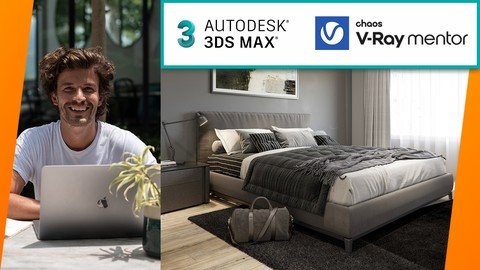
3ds Max + V-Ray FULL Photorealistic 3D Rendering Masterclass
MP4 | Video: h264, 1280x720 | Audio: AAC, 44.1 KHz
Language: English | Size: 7.62 GB | Duration: 9h 34m​

The Best 3d Rendering Class By An Official V-Ray Mentor: Create Photorealistic Renders Beginners & Advanced 3D Artists
What you'll learn
⭐NEW! Completely Updated with new 3ds Max + V-Ray 5 lessons.
⭐DOWNLOAD! 3ds Max scene files to use to develop your own projects.
Learn 3ds Max + V-Ray from scratch and create your first photorealistic render within 20 minutes.
By the end of the course, you'll have rendered out 5+ photorealistic images for your portfolio.
Create an entire 3d scene from beginning to end, using professional techniques.
Master the confidence to use 3ds Max and V-Ray in a professional setting.
Edit your renders and make them publication ready with professional post production techniques.
Take your 3D rendering knowledge from zero to professional by following the easy-to-follow steps.
Develop your career as a 3D Artist.
Improve your lighting workflow.
Build your own high-quality material library to use over and over again.
Access to the student only group to ask questions and get support.
NEW! 3ds Max Introduction Section. Learn the essential tools of 3ds Max. Navigation, moving, creating, lighting, materials and rendering in 3ds Max
NEW! Learn to use Photoshop to add people to you 3D renderings.
New content added regularly!
You'll learn the essential tools for modelling, mapping, materials, lighting and rendering.
You will be able to start earning money from your CGI Skills.
You will create your own 3D rendering studio scene.
You'll learn how to write your own 3ds Max Scripts to speed up your work by up to 80%.
Create photo realistic images from scratch.
Have the knowledge to create photo realistic images every time.
Know the secrets the professionals use to stand out from the crowd.
Learn the value of systems and how to use them.
Understand how professional studios work.
Master the workflow pros use day to day to make 3D renders.
Have the skills needed to work in the 3D rendering industry.
Improve your 3D rendering quality.
You'll learn how to use client plans and DWG files.
You will know how to source 3D models for projects.
You'll be comfortable navigating 3ds Max and rendering photo real images with V-Ray.
You will know how to model your own 3ds Max interior scene.
You will understand how to use V-Ray Fur.
You'll be comfortable creating V-Ray Materials and UVW Mapping.
How to light a 3ds Max scene with HDRI lights.
You will build a world class portfolio.
and so much more!
Requirements
You will need 3ds Max and V-Ray software installed to follow along.
You can use the 30-day free trials of 3ds Max and V-Ray to get started.
Experience in 3D Rendering is a bonus but not essential.
NO EXPERIENCE NEEDED. Prior knowledge of 3D is advantageous but not essential. A full Introduction to 3ds Max section is included ?
Description
"This is the best course on Udemy to get started on this 3ds Max." Abdelmalek Bensetti
3Ds Max + V-Ray workflow explained in an understandable teaching style by an Official V-Ray Mentor. Start creating photorealistic renders, build an amazing 3D portfolio and launch your career.
Create better images, get more clients, with less effort. Create a world-class 3D portfolio and workflow in 9 hours.
Who is it for?
Anybody who wants to be able to create photorealistic images for their clients. Regardless of previous experience, it will work for anybody that wants to create professional 3D renders.
How does it work?
You watch the videos, complete the exercises, and start building your skills. You can ask questions in the community group as well as post work and receive feedback.
Why does it exist?
I was where you are now. I was frustrated that there was nothing that showed how to create photorealistic images in an understandable way. This shows you how, step by step, it works, and 10,000 happy students agree.
The Promise of the Course
You will learn how to create a portfolio of photorealistic images using industry tools and workflows, with ongoing support that will build confidence, increase work quality and get clients.
What's included
9+ hours of video lectures simplifying industry workflows taught by Jake. (plus lifetime access to future lectures)
Private online community of like-minded, supportive artists. Get the answers you need and meet other 3D artists.
30-Day Money-Back Guarantee To make this decision risk-free, if within 30 days you decide the course didn't deliver on its promise, just let us know and you'll get a full refund.
Get the 3D CGI training you need. Learn 3D CGI from an expert with simple, hands-on training.
1 of only 28 Official V-Ray Mentor in the world and Autodesk University Speaker.
*Completely updated with the latest V-Ray 5 and 3ds Max 2021 updates*
08/11/2021 - Introduction to 3ds Max added
Whilst the course is made to be as beginner-friendly as possible, a new section called Introduction to 3ds Max has been added. This is if you want to brush up on the basics before you begin, have been away from 3ds Max for a while, or are completely new. Just scroll down in the lectures until you see Introduction to 3ds Max. I hope this helps!
07/2021 - Bonus Lectures Added
05/2021 - Adding People to our Images
A whole new section has been added called Adding People to our Images. In this section, we look at how we can add life to our image using both 2D and 3D people.
07/2020 - Official V-Ray Mentor.
Jake is now recognized by Chaos Group as a V-Ray Mentor, and they comply with the standards of the Chaos Group Academy program.
You want to learn how to use 3ds Max and V-Ray to create photorealistic 3D rendering, right?
3ds Max and V-Ray are the industry standard applications in Architectural Visualisation and I am going to show you how to use them both.
Take the guesswork out of 3D visualisation and start making photo-real renders today!
Designed for all levels of 3ds Max and V-Ray users, you'll learn how to master 3D rendering and useful techniques used in 3ds Max to create amazing images. Here's more detail about what you'll learn in this best selling 3ds Max and V-Ray Class...
3D Rendering with 3ds Max and V-Ray.
Are you having trouble achieving photo realistic results?
In this project-based course I am going to walk you step by step through how to create photo-realistic images every time, no more hoping for a good result. You can follow along with your own project or use the example scene.
By the end of this tutorial series, you will have...
Mastered the 3D Rendering Workflow
Have the knowledge to create photorealistic images every time.
Know the secrets the professionals use to stand out from the crowd.
It's great to have you here. I LOVE 3D RENDERING ESPECIALLY 3DS MAX AND V-RAY!
The Interior 3D Rendering with 3ds Max + V-Ray course is the highest quality course I've ever put out! And I'm proud to invite you to join us in the course today. It's the course about 3d rendering I needed 15 years ago!
TAKE YOUR 3D RENDERING TO THE NEXT LEVEL
This course is perfect for anyone that wants to learn the quickest way to make high-end images that sell, win awards and get published. These are the exact steps I use when working with world-famous brands.
Whether you're an Interior Designer, Architect, 3D Generalist, 3D Visualisation Artist, 3D Artist, 3Ds Max User or just want to be able to make world-class 3D renders - this course will help you make better 3D images.
COURSE BONUSES
Download the 3ds Max scenes
Download the Photoshop Files
Follow along to the step by step guide
Create and download the scripts to speed up your work
Student only Facebook group
What makes me qualified to teach you?
I am an Offical V-Ray Mentor, meaning I have been trained by Chaos Group to train and certify V-Ray users. I have given talks at universities and conferences including Autodesk University, BFX and Creative Expo.
I have spent the last 15 years figuring out how to make world-class renders. I did this through a Bachelors and a Masters of Arts from Universities in the UK. And working for some of the best design teams in places like Monaco, USA and UK. You can get all my knowledge. Seriously, I will teach you the most important things that will get you making remarkable 3D images.
Great Reviews Already!
This is the quickest way to get results, just check out some of the course feedback below!
"After finishing this course I feel very confident working with V-RAY. It just takes like 90 minutes but i learned so so much about render setup, materials, etc. So I absolutely recommend this course to anyone who wants to get started with V-RAY!" - Pascal Bürkle
"Fast no BS. Quick to the point!" - Joonas Tähtinen
"Straight to the point from someone at the top of their game. Look no further, this is the one!" - Donnie Todd
My Promise to You I'll be here for you every step of the way. If you have any questions about the course content or anything related to this topic, you can always post a question in the course or send me a direct message. I want to make this the best course on how to create photorealistic images with 3ds Max and V-Ray. So if there is any way I can improve this course, just tell me and I'll make it happen.
What's this course all about? Get ready to create images that will improve your confidence, clients and pricing. If you've always wanted to learn how the professionals create remarkable images and land the best contracts, you can learn 3ds Max and V-Ray right now.
Practice lessons will get you motivated and moving to your goals. The lessons are meant to teach you how to think like a 3D Visualisation Artist. 3ds Max is a robust tool that is capable of creating almost any 3d graphics out there. Don't be intimidated, you will learn everything you need to know to create photorealistic renders and then apply slick post-production in Photoshop.
Key things you will learn
You'll learn the essential tools for modelling, mapping, materials, lighting and rendering.
You will have 5 of your own images to add to your portfolio.
You will create your own 3D rendering studio scene.
You'll learn how to write your own 3ds Max Scripts to speed up your work by up to 80%.
Create photo-realistic images from scratch.
Have the knowledge to create photorealistic images every time.
Know the secrets the professionals use to stand out from the crowd.
Learn the value of systems and how to use them.
Understand how professional studios work.
Master the workflow pros use day to day to make 3D renders.
Have the skills needed to work in the 3D rendering industry.
Improve your 3D rendering quality.
You'll learn how to use client plans and DWG files.
You will know how to source 3D models for projects.
You'll be comfortable navigating 3ds Max and rendering photo-real images with V-Ray.
You will know how to model your own 3ds Max interior scene.
You will understand how to use V-Ray Fur.
You'll be comfortable creating V-Ray Materials and UVW Mapping.
How to light a 3ds Max scene with HDRI lights.
You will build a world-class portfolio.
and so much more!
Knowing 3ds Max is a great skill to have that is in demand and highly marketable. These are the exact steps I use to deliver remarkable work to dream clients. I've landed many jobs with the skills that I teach you in this course.
With a 30-day 100% money-back guarantee, there is nothing holding you back from jumping in right now and trying the course out.
Go ahead and click the enrol button, and I'll see you in lesson 1!
Render On!
Jake
Who this course is for
Students and aspiring CGI artists
Photographers and designers
CGI Professionals
Interior Designers, Architects, 3D Generalists
3D Visualization Artists, 3D Artists, 3Ds Max Users
3D Visualisation Artists
New and experienced 3ds Max users who want to create photo realistic 3D renderings.
Anyone who would like to make money creating photo realistic 3d renderings.
Screenshots















 
B6nfCEAQYmiNiHX1wsHyxOQR7jF8kmTJ.jpg

3ds Max + V-Ray: 3ds Max PRO in 6 hrs
MP4 | Video: h264, 1280x720 | Audio: AAC, 44.1 KHz
Language: English | Size: 10.1 GB | Duration: 20h 18m
3ds Max intro course: 3Ds Max and V-Ray for creating 3D architectural imagery, from beginner to advanced​

What you'll learn
Learn 3ds Max + V-Ray from scratch by creating your first arch viz project in the first 6 hrs of the course
Take your rendering knowledge from basic to pro by following along with multiple projects using a pro workflow
Become comfortable creating with the two industry standard software packages, 3ds Max and V-Ray
Learn to use Photoshop for texture creation and post-processing your renderings
Learn Vray materials, lighting and cameras.
Provide the foundation for starting a career in 3d visualization.
Complete your first photoreal, professional rendering using 3ds Max and Vray.
Improve your lighting, composition, and post-processing skills
Start creating professional looking 3d visualization by following along with the course projects.
After learning the basics with the first projects, jump into more advanced projects with the latest versions of the software
New content added regularly
Adjust your knowledge for the most up to date versions of the software
Requirements
64 bit Windows operating system
Computer and Internet
Ability to download / install trial software
Basic computer knowledge
Knowledge of CAD, 3d software, photo editing, art / illustration -- helpful but not necessary.
Previous experience in a design field is helpful, but also not necessary.
Description
*Course Updated 09/11/2020 - A complete revamp of the course to bring it up to speed with the newest software. Includes an entire new project from start to finish with various professional model / texture downloads for your use in learning.
*Much more content coming soon (advanced techniques for arch viz, interior renderings with V-Ray, animation, etc)
*I'll be your technical support - I answer questions every day in the discussion area, and I always respond to your private messages. In these advanced computer programs, you will inevitably run into technical problems. I am always here to answer all your questions and help you troubleshoot. You can't find another course anywhere that gives you this much training, from a practicing professional, who is also at your beckon call to help, for such a reasonable price.
*Recent Student Feedback
"The Missing Link
Having done numerous on-line 3D courses I am always looking for new ways of doing things to speed up production and modeling. The course although basic is very well structured with very few ambiguities. What Adam outlines in the Intro clip is what you should achieve relatively easily by the end of the course. . The only downside is that he hasn't done more advanced Visualisation courses yet. When they do come on stream I will no doubt enroll as his skill and experience within the industry comes through in his presentation." NOTE: I do, in fact, have some more advanced classes now.
"This course is perfect for the beginners in 3ds max and V-ray. The information is clear and easy to understand. The course was a blast..."
About This Course
When I first made this course, it was to fill a void that I noticed in the arch viz industry. There are not a lot of tutorials out there that help you to learn arch viz from the beginning in a professional way, using the PRO software and a PRO workflow. So, I created this course, and I never could have imagined how popular it has become! It has also evolved a lot since that first time I published. Here are some key things to know
ORIGINAL COURSE
teaches 3ds Max and V-Ray from the very beginning
follows a project from nothing, all the way to the end
demonstrates the exact workflow that I use daily as a practicing professional (thus the PRO part)
uses my UI setup, shortcuts, etc (all downloadable for your use)
shows you everything you need to know to create a basic project
uses 3ds Max 2011, so as long as you have any version after that, you should be able to follow (updates have been made where necessary to account for changes all the way up to most current versions)
contains 6 HRS of video from start to finish
ADDITIONAL CONTENT
brings you up to speed with the latest versions of the software and fills in the gaps where they exist
more advanced techniques (i.e. HDRI lighting, etc)
more advanced and complex projects
currently two additional projects to follow along with, including an advanced interior and exterior.
much higher production quality than original videos
awesome new content being added regularly to make you aware of new techniques, software updates, etc.
new projects coming soon
About 3ds Max and V-Ray
Knowing how to use these two programs together is a valuable skill. Seriously, I taught myself how to use these programs many years ago, and now I get paid quite well for my expertise. 3d is not just my hobby, it is also how I support my family. You can learn, and start a career in 3d too. Everything you need to get started is in this course. I will take you through 3ds Max and V-Ray from the very beginning, and by the end you will be well on your way to creating your own images and filling up your portfolio with polished work. Keep in mind, you do not typically need formal training to get a job in 3D. What it takes is an awesome portfolio, so let's get started on yours.
Some Questions To Ask Yourself:
Are you currently in a job you do not enjoy?Jobs in 3d are seriously fun and rewarding!
Are you an architecture student who feels overwhelmed sometimes trying to learn complicated software just to present your design properly? This course can get you up and running QUICK! Plus, you'll learn it the right way, from a pro.
Are you a SketchUp user who is no longer satisfied with the modeling / rendering capabilities of SketchUp, and are ready to take your 3d skills to the next level? SketchUp is great at what it does, but it falls short when it comes to making flashy, photoreal images. Also, bring your sketchUp with you, then learn to import it into 3ds Max and render with V-Ray, the best render engine out there.
Are you a practicing architect that needs a better way to portray your designs to clients? You've come to the right place. I am an expert at just that.
Maybe you're a gamer who wants to create your own game assets? Even you should learn 3ds Max. It is the industry standard for video games, and I personally have used it for asset creation for my unity 3d games.
Course Structure (Original 6 hrs of instruction)
For absolute beginners, I will show you how to get the software as a free trial and start finding your way around. I will also go over how to customize your UI for a professional workflow, because why learn the slow way to do things, right? I'll also share with you my custom UI files. Of course, you can skip all of this if you are more seasoned.
Next we will start with the basics of modeling. I will show you different techniques, and we will begin to work on our project. Again, files will be provided if you want / need them.
With modeling down, we will go into V-Ray and start playing with lighting, materials, cameras, render settings, etc.
Finally, we will learn how to enhance our images with Photoshop. I give some great post-processing tips in this course.
By the end you will be able to create architectural renderings on your own with a completely professional setup and workflow. Then it is your turn to start practicing your skills, creating beautiful work, building a portfolio and landing a job.
AFTER THE INITIAL PROJECT - once you have completed your first project and learned the basics, I will then move into more advanced techniques (also, there is fully professional interior V-Ray project coming soon that students will be able to learn along with -- this is for more advanced users, or people who are ready to move on from the initial 6 hrs of instruction)
How Will This Course Benefit You?
If you are a beginner, this class will be a great overview of how to get up and running. It will cut out all the stuff you do not need and show you exactly the workflow necessary to work like a pro.
If you are a veteran user, take this course to polish your V-Ray skills, and also to streamline your workflow. I show so many tips and tricks that I use everyday to pump out arch viz projects fast and on budget. There is no need to sacrifice quality and creativity if you can fly through the project quickly and on budget. I'll show you how.
COMING SOON: If you feel like you have mastered the basics, I have now added more advanced / obscure techniques that can really help your images to stand out, and much more will be coming soon, including a professional V-Ray interior shot that is completely photoreal.
Ready To Sign Up?
What are you waiting for? If you're still not sure, check out the preview videos. Also, check out my profile to the left and see some of my portfolio. Cool, right? Wan't to make some of your own images? Let's get started. 6 hrs is all you need to get started, then take the skills I share and practice, practice, practice.
Remember, I will provide the files and download links that you need for everything. My models are included. Come with nothing, leave with a finished project and a great knowledge base.
Start Your Love Affair With 3d Today!
PURCHASE THE COURSE.
*If the price isn't right, keep an eye out for Udemy promotions and coupon codes around the web, but I think a 6 hr training for $64 is a pretty good deal. Sure beats a semester at community college :)
*30 day money back guarantee, no questions asked! (If you hate it, get a refund)
-Adam Zollinger
Professional (self-taught and ready to teach you) 3d Artist
Who this course is for
Design professionals who want to learn 3D
Architecture students
SketchUp users looking to advance their skill set
Anyone with a vague interest in 3d
Draftsman who are interested in learning rendering
Architects
Current 3ds Max users who want to learn how to work with Vray
Gamers who want to learn to model their own game assets (especially architectural ones) in 3ds Max.
Screenshots


Zurück
Oben Unten