• Regeln für den Video-Bereich:

    In den Börsenbereich gehören nur Angebote die bereits den Allgemeinen Regeln entsprechen.

    Einteilung

    - Folgende Formate gehören in die angegeben Bereiche:
    - Filme: Encodierte Filme von BluRay, DVD, R5, TV, Screener sowie Telesyncs im Format DivX, XviD und x264.
    - DVD: Filme im Format DVD5, DVD9 und HD2DVD.
    - HD: Encodierte Filme mit der Auflösung 720p oder darüber von BluRay, DVD, R5, TV, Screener sowie Telesyncs im Format x264.
    - 3D: Encodierte Filme von BluRay, die in einem 3D Format vorliegen. Dies gilt auch für Dokus, Animation usw.
    - Serien: Cartoon/Zeichentrick, Anime, Tutorials, Dokumentationen, Konzerte/Musik, Sonstiges sind demnach in die entsprechenden Bereiche einzuordnen, auch wenn sie beispielsweise im High Definition-Format oder als DVD5/DVD9/HD2DVD vorliegen. Ausnahme 3D.
    - Bereich Englisch: Englische Releases gehören immer in diesen Bereich.
    - Bereich Talk: Der Bereich, in dem über die Releases diskutiert werden kann, darf, soll und erwünscht ist.


    Angebot/Beitrag erstellen

    - Ein Beitrag darf erst dann erstellt werden, wenn der Upload bei mindestens einem OCH komplett ist. Platzhalter sind untersagt.
    - Bei einem Scenerelease hat der Threadtitel ausschließlich aus dem originalen, unveränderten Releasenamen zu bestehen. Es dürfen keine Veränderungen wie z.B. Sterne, kleine Buchstaben o.ä. vorgenommen werden. Ausnahme Serienbörse:
    - Bei einem Sammelthread für eine Staffel entfällt aus dem Releasename natürlich der Name der Folge. Beispiel: Die Simpsons S21 German DVDRip XviD - ITG
    - Dementsprechend sind also u.a. verboten: Erweiterungen wie "Tipp", "empfehlenswert", "only", "reup", usw. / jegliche andere Zusatzinformation oder Ergänzung, welche nicht in obiger Beschreibung zu finden ist.

    Aufbau des Angebots und Threadtitel

    Der Titel nach folgendem Muster erstellt zu werden. <Name> [3D] [Staffel] [German] <Jahr> <Tonspur> [DL] [Auflösung] <Quelle> <Codec> - <Group>
    Beispiel: The Dark Knight German 2008 AC3 DVDRip XviD - iND
    Beispiel: The Dark Knight 2008 DTS DL BDRip x264 - iND
    Beispiel: The Dark Knight 2008 AC3 DL BDRip XviD - iND
    Beispiel: The Dark Knight German 2008 AC3 720p BluRay x264 iND
    Beispiel: The Dark Knight 2008 DTS DL 1080p BluRay x264 iND
    Beispiel: Die Simpsons S01 German AC3 DVDRip XviD iND
    Beispiel: Die Simpsons S20 German AC3 720p BluRay x264 iND
    Beispiel: Sword Art Online II Ger Sub 2014 AAC 1080p WEBRip x264 - peppermint
    Entsprechend sind also u.a. verboten: Sonderzeichen wie Klammern, Sterne, Ausrufezeichen, Unterstriche, Anführungszeichen / Erweiterungen wie "Tipp", "empfehlenswert", "only", "reup", usw. / jegliche andere Zusatzinformation oder Ergänzung, welche nicht in obiger Beschreibung zu finden ist
    Ausnahmen hiervon können in den Bereichen geregelt sein.

    Die Beiträge sollen wie folgt aufgebaut werden:
    Überschrift entspricht dem Threadtitel
    Cover
    kurze Inhaltsbeschreibung
    Format, Größe, Dauer sind gut lesbar für Downloader außerhalb des Spoilers zu vermerken
    Nfo sind immer Anzugeben und selbige immer im Spoiler in Textform.
    Sind keine Nfo vorhanden z.B. Eigenpublikationen, sind im Spoiler folgende Dateiinformationen zusätzlich anzugeben :
    Quelle
    Video (Auflösung und Bitrate)
    Ton (Sprache, Format und Bitrate der einzelnen Spuren)
    Untertitel (sofern vorhanden)
    Hosterangabe in Textform außerhalb eines Spoiler mit allen enthaltenen Hostern.
    Bei SD kann auf diese zusätzlichen Dateiinformationen verzichtet werden.

    Alle benötigten Passwörter sind, sofern vorhanden, in Textform im Angebot anzugeben.
    Spoiler im Spoiler mit Kommentaren :"Schon Bedankt?" sind unerwünscht.


    Releases

    - Sind Retail-Release verfügbar, sind alle anderen Variationen untersagt. Ausnahmen: Alle deutschen Retail-Release sind CUT, in diesem Fall sind dubbed UNCUT-Release zulässig.
    - Im Serien-Bereich gilt speziell: Wenn ein Retail vor Abschluss einer laufenden Staffel erscheint, darf diese Staffel noch zu Ende gebracht werden.62
    - Gleiche Releases sind unbedingt zusammenzufassen. Das bedeutet, es ist zwingend erforderlich, vor dem Erstellen eines Themas per Suchfunktion zu überprüfen, ob bereits ein Beitrag mit demselben Release besteht. Ist dies der Fall, ist der bereits vorhandene Beitrag zu verwenden.
    - P2P und Scene Releases dürfen nicht verändert oder gar unter einem iND Tag eingestellt werden.


    Support, Diskussionen und Suche

    - Supportanfragen sind entweder per PN oder im Bereich Talk zu stellen.
    - Diskussionen und Bewertungen sind im Talk Bereich zu führen. Fragen an die Uploader haben ausschließlich via PN zu erfolgen, und sind in den Angeboten untersagt.
    - Anfragen zu Upload-Wünschen sind nur im Bereich Suche Video erlaubt. Antworten dürfen nur auf Angebote von MyBoerse.bz verlinkt werden.


    Verbote

    - Untersagt sind mehrere Formate in einem einzigen Angebotsthread, wie beispielsweise das gleichzeitige Anbieten von DivX/XviD, 720p und 1080p in einem Thread. Pro Format, Release und Auflösung ist ein eigener Thread zu eröffnen.
    - Grundsätzlich ebenso verboten sind Dupes. Uploader haben sich an geeigneter Stelle darüber zu informieren, ob es sich bei einem Release um ein Dupe handelt.
    - Gefakte, nur teilweise lauffähige oder unvollständige Angebote sind untersagt. Dies gilt auch für eigene Publikationen, die augenscheinlich nicht selbst von z.B. einer DVD gerippt wurden. Laufende Serien, bei denen noch nicht alle Folgen verfügbar sind, dürfen erstellt und regelmäßig geupdatet werden.
    - Untersagt sind Angebote, welche nur und ausschließlich in einer anderen Sprache als deutsch oder englisch vorliegen. Ausnahmen sind VORHER mit den Moderatoren zu klären.


    Verstoß gegen die Regeln

    - Angebote oder Beiträge, die gegen die Forenregeln verstoßen, sind über den "Melden"-Button im Beitrag zu melden.
  • Bitte registriere dich zunächst um Beiträge zu verfassen und externe Links aufzurufen.

*** Bestes IPTV *** bester Preis *** gratis Test ***


Englische Tutorials

40aace8a-f2af-4509-9fb5-c7d34f416adb.png

Learn Maya in 20 Minutes
Duration: 25m | Video: .MP4, 1280x720, 30 fps | Audio: AAC, 48 kHz, 2ch | Size: 226 MB
Genre: eLearning | Language: English​

Hi!*I'm Shane*and I have been using and teaching*Maya*to*beginners*like you for over 12 years!
Welcome yo my "Learn Maya in 20 Minutes" course.*This course gives you everything you need to know to get up and running in Maya quickly and covers essentials including the interface, 3D navigation, important tools and settings, modelling techniques, creating & assigning materials, lighting & rendering and setting up a camera for your final render.
This class requires no prior knowledge of Maya or 3D modelling and is designed to be accessible to anyone wanting to learn how to use Autodesk Maya. Due to the design of the course being a very quick introduction it might move a little quickly for you and if this is the case you can check out my slower paced and more detailed "The Complete Beginner's Guide to Maya" also here on SkillShare.
I'm Shane and I have been using Maya professionally for 15 years and have been teaching beginners how to use Maya for over 12 years. I am a qualified teacher and have used my years of experience to create a project based class with a deliberate and methodical learning curve designed to go from holding your hand at the beginning through to setting you complex, independent challenges as the class progresses.
So what are you waiting for??? Jump right in and I'll see you in class!
Need a copy of Maya so that you can take this class?
Click Here for a 1 year student license
Click Here for a free trial
Homepage
Screenshots


fe45160a-3ca5-4a3f-a664-18a16d32a3ab.png

Linux Security and Hardening, The Practical Security Guide.
Last Update: 3/2022
Duration: 4h 25m | Video: .MKV, 1280x720 30 fps | Audio: AAC, 48 kHz, 2ch | Size: 986 MB
Genre: eLearning | Language: English​

Secure any Linux server from hackers & protect it against hacking. The practical Linux Administration security guide.
What you'll learn:
By the end of this course you will be able to harden a Linux system, reduce its surface of vulnerability, and reduce the risk of your Linux system being hacked or compromised.
Requirements
A basic understanding of the Linux operating system. Please consider taking "Learn Linux in 5 Days" before taking this course.
Description
JOIN THE OTHER 40,000 SUCCESSFUL STUDENTS WHO HAVE ALREADY MASTERED THE LINUX OPERATING SYSTEM WITH ONE OF MY TOP RATED COURSES!
Keep yourself and your company out of the news by protecting your Linux systems from hackers, crackers, and attackers!
This course will not only teach you the security concepts and guidelines that will keep your Linux servers safe, it will walk you through hardening measures step-by-step.
Hello. My name is Jason Cannon and I'm the author of Linux Administration, the founder of the Linux Training Academy, and an instructor to thousands of satisfied students. I started my IT career in the late 1990's as a Unix and Linux System Engineer. I've worked for many technology companies who take information security seriously. I've even worked for security firms such as Mandiant and FireEye. I'll be sharing my real-world Linux security experience with you throughout this course.
By the end of this course you will be able to tighten up the security on any Linux system. You'll learn the security weaknesses of the Linux operating system and be given step-by-step instructions on how to protect those weaknesses. You'll even learn some security concepts that apply to information security as a whole while focusing on the Linux specific issues that require special consideration.
What People Are Saying About Jason and his Courses
"Excellent course on Linux! It is the best way to get started using Linux that I have come across." --Chris Bischoff, Udemy student
"This class was a great review of the 2 Linux classes I took in school. I learned plenty of new stuff and got a great refresher on things I haven't used in some time. I did well on my interview and got the job I was looking for. Thanks!" --Alan Derrick, Udemy student
"This was a great course! Learned a lot from it!" --Ricardo José Crosara Junior, Udemy student
"Excellent starter course. Very good and complete guide to get you started on working on Linux." --Brian Mulder, Udemy student
"Great course! Easy to understand for beginners and a great refresher for experienced users!" --Spencer Ball, Udemy student
"Very well laid out course. Thanks Jason!" --Eric Etheredge, Udemy student
"Love it... it's absolutely one of the best courses I've taken here on Udemy." --Idriss N, Udemy student
"Awesome Course! Another great one. Thanks Jason!" --John Wilmont, Udemy student
"Excellent Course! Having come from a moderate understanding of Linux, this course has given me a deeper and more streamlined understanding of Linux. Definitely worth the money." --Armando Cabrera, Udemy student
"Fantastic course and very beautifully explained." --S John, Udemy student
"Great course, great instructor. I enjoyed every minute of it. I recommend this course 100%." --Alfredo, Udemy student
"I am lovin' it. Nice way to begin one's journey into Linux." --Rohit Gupta, Udemy student
____________________
Here is just some of what you will learn by taking this Linux Security and Hardening course
What you learn in course applies to any Linux environment or distribution including Ubuntu, Debian, Linux Mint, RedHat, CentOS, Fedora, OpenSUSE, Slackware, Kali Linux and more.
____________________
Free Bonus - PDFs of All the Material Covered
As an added bonus for enrolling in this Linux Server Security video training course, you'll receive access to all the slides used in the lessons. You can download them and refer to them when you want to jog your memory or double-check your work.
Enroll now and start learning the skills you need to hack-proof your Linux systems today!
Who this course is for
Anyone with a desire to learn how to secure and harden a computer running the Linux operating system.
Linux system administrators looking to make the systems they support more secure.
People thinking about a career as a Linux system administrator or engineer.
This course is not for people who have never used the Linux operating system before.
Homepage
Screenshots


74a1863c-566a-4223-bcb5-78c36cd0b0f5.png

Maltego Forensic Tool For Beginners
Genre: eLearning | MP4 | Video: h264, 1280x720 | Audio: AAC, 44.1 KHz
Language: English | Size: 2.18 GB | Duration: 3h 40m
Become a Maltego Forensic Tool Expert

What you'll learn
what is the maltego
Download maltego.
Install maltego
Setup maltego
Get api keys
Discover the tools under in Maltego.
How to use Maltego tool
Investigations With Maltego
Requirements
Knowledge on computer
Computer with a minimum RAM 2GB / 4GB AND 500GB HDD.
Operating System: Windows / OS X / Linux.
Software Requirements: Java version 8.
Bit knowledge on Networking.
Description
Welcome to my comprehensive course on Maltego open-source intelligence and forensics tool, This course assumes you have no prior knowledge of the Hacking & Maltego forensic tool after done this course you'll get knowledge and ability to understand and use the Maltego tool.
########################################################################################
1. This curse video is very easy and able to understand you.
2. This course is highly practical. I will not teach you the boring Hacking stuff that you can get from Google.
3. All the videos in this course are simple and practical.
4. You will learn how to get Maltego community edition Transform Hub under in tools API Keys.
5. You will learn how to Maltego permits creating custom entities, allowing it to represent any type of information in addition to the basic entity types which are part of the software, and the focus of the application is analyzing real-world relationships between people, groups, Webpages, domains, networks, internet infrastructure, and among its data sources are DNS records, whois records, search engines, online social networks, various API sand various metadata.
I will start by teaching you the basics of the Maltego tool, like about maltego, which maltego version we use for, download maltego, Install maltego, how to get API keys, and use maltego tool for online investigations for finding relationships between pieces of information from various sources located on the Internet.
When I learn something new I add it to the course - at no additional cost to you! This is a course that will continue to add more and more to every aspect of your life.
You are guys facing any kind of problem uses the Maltego tool Message Me or Email Me.
NOTE:- This course only for educational purposes do not misuse this course knowledge in any kind of illegal way.
See you on the course!
Sincerely,
Rohon
Who this course is for
Anybody can learn who have interested on Ethical Hacking.
Who's want become a computer expart and devoted knowing on Forensic tool.
Who's want to know what is the Maltego Forensic tool.
People who want transition to Cyber Security.
This course is for beginners or people interested in learning about hacking and don't know where to start.
Screenshots


abdc4b04-df89-4f53-9b5d-aeb5016af624.png

Modern Android app using Java, MVVM, Dagger2, RxJava &more
MP4 | Video: h264, 1280x720 | Audio: AAC, 44.1 KHz
Language: English | Size: 1.39 GB | Duration: 3h 10m​

Learn the latest Android technologies including Dagger2, MVVM, Java, RxJava, Retrofit, Mockito and Glide
What you'll learn
Android development
Mobile applications
Android architecture
Dagger2
Java
RxJava
MVVM
Retrofit
Mockito
Unit testing
Requirements
Interest in Android development
Java development knowledge
Mac or Windows PC
Description
Learn how to make a modern Android App with this new course on Android development in Java.
Most tutorials and how to's on Udemy show you the basics of app building, but they don't show you how to use the latest technologies and libraries.
Most projects and jobs require you to know how to use the latest libraries. This is what this course is all about.
The purpose of this course is to give you a practical example of how to use these technologies, all while building a simple example app.
We will learn about
MVVM architecture using the Google recommended Android Lifecycle Extensions
Dagger2 for dependency injection
RxJava as a reactive framework
Retrofit and JSON for remote server communication
Glide for seamless image loading
Unit tests to test the application and make it stable and robust
And we will build everything in Java
If you want to get that job as an Android Developer, you need to know how to use these technologies.
If you want to build an app that scales and is robust, these technologies will make your life easy in the long term.
Sign up today, and let's learn how to properly build a modern Android Application.
30 day money back guarantee - provided by Udemy
Highly rated instructor with over 8000 active students and growing monthly.
Who this course is for
Intermediate Android Developers
Beginner Android Developers
People Interested in Mobile App development
Screenshots


aede1de1-11d6-4095-ba38-904c279f3824.png

Power Transformer Trainings from Basics to FAT
MP4 | Video: h264, 1280x720 | Audio: AAC, 44.1 KHz, 2 Ch
Genre: eLearning | Language: English + srt | Duration: 8 lectures (2h 17m) | Size: 1.17 GB

Power Transformers Design and basics
What you'll learn
Power Transformer Basics
Specifying Power Transformer Characteristics
Power Transformer Sizing
Power Transformer Documents Design Review
Power Transformer FAT & SAT Procedures
Requirements
Electrical Knowledge
Description
The course is prepared to cover the necessary knowledge for engineers about transformers from prescription up to commissioning.
Training will consist of seven lectures covering
1. Transformer basics & Definitions, Main parts, Vector group, transformer's short circuit voltage (Z%) & the calculation of the through fault short circuit current.
2. Transformer types explained which are Dry-type & oil type (Hermetically sealed & conservator type), cooling & insulation, surface treatment, and transformer's mounting.
3. Tap changer (on-load & offload types), Monitoring, protection devices including Buchholz relay, winding temperature indicator, oil temperature indicator, oil level indicator, pressure relief device, Integrated safety detector, Dissolved gas analyzer, Temperature control unit, Silica gel and all accessories including cable boxes, post insulators, LV & HV bushings, lifting lugs, Jacking pads, arcing horn, neutral earthing resistor and eventually an example for transformer's monitoring system.
4. Special application transformer such as Neutral grounding transformer, pulse converter transformer, K factor rated transformer, wind turbine and finally autotransformer.
5. Transformer sizing criteria include distribution transformer sizing & motor starting transformers.
6. Transformer Drawing review such as Datasheets, General arrangement, Marshalling box General arrangement and Wiring, Nameplates, AVR, OLTC, RTCC General arrangement & wiring.
7. Finally, Inspection Test Plan (ITP), Factory Acceptance Tests (FAT) which are
· Measurement of winding resistance.
· Measurement of voltage ratio & vector group.
· Measurement of short circuit impedance & load losses.
· Measurement of no-load losses and current.
· Leak testing with pressure for liquid immersed transformers.
· Dielectric tests which are: Separate source AC withstand voltage test (Applied voltage test) & Short duration induced AC withstand voltage.
Type Tests which are
· Temperature-rise type test.
· Dielectric type tests.
· Determination of sound level for each method of cooling for which a guaranteed sound level is specified
and Site Acceptance Tests (SAT) which are part of FAT except for the additional tan delta test.
Who this course is for
Electrical engineers
Engineering students
Electrical technicians
Homepage


97bbc3a4-7253-454d-9a06-19f73382e483.png

Principles of Watercolor: Learn to Paint a Torch-Ginger Flower
Duration: 48m | Video: .MP4, 1280x720, 30 fps | Audio: AAC, 48 kHz, 2ch | Size: 682 MB
Genre: eLearning | Language: English​

Have you struggled with watercolor painting? That's because watercolor is unlike any other medium. And therefore, the way you use it, is*different to*other mediums. In this class I share*six principles of working with watercolor. Because to have success with this medium, you have to understand it - and, more importantly, understand how to think about it. Because with watercolor, it's not just a case of trying harder. In fact,*the harder you try, the worse it gets.
In this class you will learn
• Why watercolor is NOT like housework (hooray!)
• How to use your paintbrush when working with watercolor
• How to handle the paint

• How to get the best out of colour*blending and layering
• How to master the paint-to-water ratio
• How to add "zing" to your paintings (in a very simple way!)
Why this class is different
I teach the class using fun, some might say unusual (!) and memorable devices which*you won't*easily forget! Once you know how to THINK about watercolor, you will be able to apply the principles in your own watercolor practice and get a lot more JOY out of painting. Because painting with watercolor, when you know how to*approach it, is AMAZING.
Who this class is for
This class is for anyone who wants to learn, or improve their watercolor painting.*You don't need any prior knowledge of painting.
If you're a seasoned watercolor professional, you've probably figured it all out already (though possibly not the way I describe it, so you may still find it entertaining!)
What you will need
All you need for the class are some watercolor paints and paper, and an ipad or phone to download the images for the project. The project is FUN and EASY, and will enable you to practice ALL the principles in one painting.
Homepage
Screenshots


782efbe1-58fb-47ca-ae37-fd4a3e2199c8.png

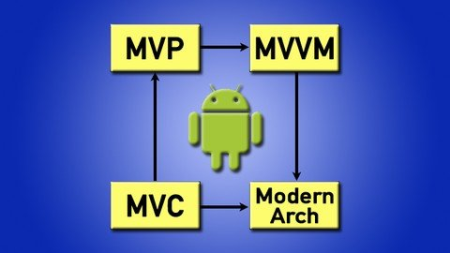
Pro Android: Modern Android Architectures - MVVM MVP MVC
MP4 | Video: h264, 1280x720 | Audio: AAC, 44.1 KHz
Language: English | Size: 1.11 GB | Duration: 2h 20m​

Android Architecture Masterclass teaching you MVC, MVP and MVVM using Google Android Architecture Components
What you'll learn
Android Architectures
Theory and Practical Applications
MVC, MVP, MVVM
RxJava and Retrofit
Requirements
Basic Android Development experience
Interest in Programming
Java development
Description
Take your development to the next level with this course on Android architectures.
We will discuss several topics related to MVC, MVP and MVVM.
what MVC, MVP and MVVM stand for
how they structure the code and why
we will learn the advantages and disadvantages of each one
how to know when to use which architecture
we will use the Google official library for Android Architecture Components to build our MVVM architecture
I have designed this course with ease of use in mind. Learn quickly in a short amount of time. No need to waste hours watching someone waffle on. To the point.
Learn by doing. This course is designed for you to follow along and code at the same time. That way you will have a deep understanding of all architectures and Android concepts presented.
Lastly, I have used these Architectures in real life industry applications that have millions of users on the play store. They are scalable, maintainable and make code easy to understand.
Sign up today and learn what the Android architectures are, when and how to use them.
30 day money back guarantee - provided by Udemy
Student feedback
*****
"I needed a good example that compares MVC and MVP and MVVM and I hesitated at first but now I don't regret purchasing this course. What the most I liked beside the content it's the spontaneity of the instructor and the music at the begging and at the end of each video ;)" - Skander
*****
"From this course I understood Android Architectures - MVVM MVP MVC. The Instructor described to the point and each and every topic very clearly." - Cyrus
Who this course is for
Beginner Android Developers
Intermediate Android Developers
Screenshots


1ad7ecb3-db6e-4ac0-8c5e-4b71e0dfd0a8.png

Qlik Sense For Beginner + Intermediate + Advanced(All in 1)
Genre: eLearning | MP4 | Video: h264, 1280x720 | Audio: AAC, 44.1 KHz
Language: English | Size: 2.68 GB | Duration: 5h 35m
Qlik Sense Load Script + Visualizations

What you'll learn
Qlik Sense Load Script
Qlik Sense Set Analysis
Qlik Sense Visualizations
Qlik Sense Expression
ETL
Requirements
Understand basic functionality in Qlik Sense
Description
In the Intermediate session, you will be exposed to the load script where we load our data into Qlik Sense.
And also did some of the basic transformations.
Once we have all the tables transformed and saved into QVD formats, we will load all the QVDs back into the load script.
And finally, we will load the data model into our final application, which is the dashboard layer.
Next, we will go into the Sheets to expose ourselves to visualization expressions, how to create buttons, and also the idea of having master dimension, master expressions, and master visualizations in the dashboard.
For the Advanced session, we will guide you on how to build our load scripts with Master Calendar and Fiscal Calendar, YTD tables, and so on.
Once the load script is completed, we will move on to the sheets to know how do we apply the flags created in the load script into the visualization expression.
A more simplified way to create MTD/YTD logic will be introduced at this session as well.
Functions such as Rank and AGGR are also introduced in the advanced session.
Together with all the knowledge that we learned so far, we will create a 100% chart which will be an interesting chart to showcase the distribution of the specific dimensions that we are interested in.
Thanks for enrolling and Happy Qliking!
Who this course is for
Beginner in BI
IT Fresh Graduate
Beginner in Data Analytics
Screenshots


cce64c3f-1e3b-4de1-8306-fcd5b7d5d7b3.png

Small Business Guide to Logo File Formats
Duration: 19m | Video: .MP4, 1280x720, 30 fps | Audio: AAC, 48 kHz, 2ch | Size: 156 MB
Genre: eLearning | Language: English​

Are you planning on hiring a freelance graphic designer to design your small business' logo? Are you having a hard time understanding all the different logo file formats and what you might need for your small business? Maybe you already have received your logo package from your designer and feel overwhelmed. This class is for small business owners who don't have experience with managing their graphic files. In this class, Joanne Lesk, will teach you all about different graphic file formats and break down what uses they have.
In this class, you will learn the*following
Colour Profiles*The 3 main colour profiles and how important they are to your logo. CMYK, RGB and PMS are the 3 colour profiles that she works with creating a logo.
Bitmap*vs. Vector FilesBitmap and vector images and the differences, pros, and cons of each.
Vector FilesWe*will go more into detail about vector images and all the specific file formats like EPS, PDF, AI and SVG.
Bitmap FilesWe*will be*explaining more*about bitmap images like JPG, GIF, PNG and TIFF.
Print vs. DisplayWe will talk about*print and display resolutions. We will learn about resolution, pixels, PPI and DPI.
Branding GuidelinesWe will*talk about branding guidelines and how they can help your business and if you need them. We will go on a walkthrough of*Barre & Soul's branding guidelines. You can follow along here.
Joanne's goal is to take away any overwhelming feelings around talking to your designer or looking thru your logo package. If there's one thing, we hope you take away from the class it's that you don't have to be a designer to understand the basics of logo file formats.
In this class, you will be creating a unique logo file format specific to your small business. Joanne provides a downloadable checklist that you can find in the project resources.
Homepage
Screenshots


cbc55dab-6c73-4c87-8bfe-9e8223928b69.png

The Agile Samurai Bootcamp
Last Update: 8/2018
Duration: 3h 8m | Video: .MKV, 1280x720 30 fps | Audio: AAC, 48 kHz, 2ch | Size: 539 MB
Genre: eLearning | Language: English​

Everything you need to setup, execute, and successfully deliver your own Agile project.
What you'll learn:
A thorough understanding of how Agile works, how it's different from traditional Waterfall, and the mindset necessary to transformation your organization and team
A deep, thorough, understanding of how Agile User stories, Estimation and Planning work
How to form effective Agile teams, and what to look for in quality players
Complete description of roles typically seen on Agile projects including the Agile Customer, Business Analyst, Programmer, Tester, UX Designer, and Project Manager
In depth discussion on topics not typically covered in other Agile course like Agile Teams, How to Create Visual Works Spaces, Communication Plans, and the mechanics behind the Agile Iteration
The rhythm and ritual necessary for delivering something of value every week
Covers important concepts not covered in Scrum training like production readiness, and software engineering
A primer on essential software engineering practices like automated Unit Testing, Refactoring, Test-Driven Design, and Continuous Integration
Techniques and methods to ensure your project works within it's means, while delivering phenomenal value to your customer (The Way of the Spartan Warrior)
Requirements
Pen, paper, and fierce desire to learn
Description
Get ready to kick some software project butt.
Enter the world of the Agile Samurai, where the most dire of software projects are dispatched with ease and grace. By learning the ways of the Agile Samurai you will discover:
What Agile is, how it works, and the mindset necessary for working iteratively
Common myths and pitfalls and how to choose the right Agile method for you
How to build a good Agile team
How from traditional waterfall roles (like developer, analyst, tester, and project manager) change on Agile project
How to create a plan you and your customer can believe in
How to gather requirements in a fraction of the time using Agile User Stories
How to deliver something of value every week
What to do when the schedule is wrong, and how to look like a pro correcting it, and
The four essential Agile Engineering practices*and why they are so important for Agility.
By the end of this course you'll have everything you need to successfully set up, execute, and deliver your own Agile project.
Course Outline
Agile In a Nutshell
What Agile is, how it works, and how to choose the right Agile method for you.
Agile Teams
What makes the Agile team tick. Characteristics of good Agile teams. And how to find quality players.
User Stories
In this session we break down what user stories are, how they work, what effective user stories look like for your project, and how to host great story gathering work shops.
Estimation
By learning how to estimate the Agile way, you'll stop trying to get something your up-front estimates can't give (precision and accuracy) and instead focus on what really matters-building a plan you and your customer can believe in.
Planning
In this session, you're going to learn how to create plans you can believe in and follow through on commitments you and your team make.
Iteration Mechanics
This session shows teams how to set the iterations up for success, breaks down what actually occurs during an iteration, and how to setup an agile communication plan for you and your team.
Visible Workspaces
By learning how to create a visual workspace, you and the team will never be at a loss for what to do next or where you can add the greatest value.
Engineering
Agile doesn't work on planning alone. That would be wishful thinking. Only by apply these core software engineering practices can you reduce the time it takes to test, ensure you always have a good design, and confidently make necessary changes with speed.
Unit Testing - Automated tests proving your software works
Refactoring - Paying down technical debt, while continuously improving your design
Test-Driven Development - Write the tests first to help improve your design
Continuous Integration - Maintaining a culture of production readiness, and deploying at a moments notice
Intended Audience
This is an introductory level course on Agile software delivery.
Course Requirements
No previous experience with Agile expected or necessary.
Instructional Level
All Levels
Update NEW*FAQ Section April 2017
New FAQ section added answering most commonly asked questions
New templates section added containing downloadable examples of burn down charts
Update NEW Cheat Sheet Section August 2018
New section summarizing key concepts in downloadable pdf
Who this course is for
Beginners
Assumes no prior knowledge of Agile of software development
Homepage
Screenshots







 
5f6f322a04bfdb0bac5483f7c0246fd0.png

Understanding Track Mattes inside After Effects
Duration: 30m | Video: .MP4, 1280x720, 30 fps | Audio: AAC, 48 kHz, 2ch | Size: 272 MB
Genre: eLearning | Language: English​

This class*will give you a good understanding of what Track Mattes are, teach you how to apply them and*will show you the potential of effectively using Alpha and Luma Mattes.
Homepage
Screenshots


ef023c6c-c71a-410b-ad28-0da1236413d5.png

Web 3.0 Portfolio - ReactJs, Spline 3D & Framer Motions
MP4 | Video: h264, 1280x720 | Audio: AAC, 44.1 KHz, 2 Ch
Genre: eLearning | Language: English + srt | Duration: 10 lectures (1h 49m) | Size: 1.1 GB

Personal Portfolio with Custom Framer motion Animation effects & 3d Spline designs
What you'll learn
How to create modern UI using React Js
learn how to use 3D Spline designs?
Learn how to use Framer Motion Animations in your websites
Learn how build a modern UI and deploy it into firebase freely
Requirements
Need some programming knowledge about core fundamentals
Description
I will show you how simple it is to create a full stack, PORTFOLIO using React, Firebase & Material-UI... ?
Course Module
1. Project Overview - Setup & Configurations
2. Styling Home Component
3. Styling Services, About, Clients - Components
4. Styling Projects, Contact, Footer - Components
5. Animating the components using GSAP & Scrollreveal
6. Storing data in Firebase Realtime Cloud Database
7. Deploying Project in Cloud
What is Firebase ?
Firebase is a platform developed by Google for creating mobile and web applications. It was originally an independent company founded in 2011. In 2014, Google acquired the platform and it is now their flagship offering for app development.
What is React?
React is a free and open-source front-end JavaScript library for building user interfaces based on UI components. It is maintained by Meta and a community of individual developers and companies. React can be used as a base in the development of single-page or mobile applications.
What is spline in design?
Spline, a 3D design tool, was launched towards the end of 2020. As you probably know, it's not your typical 3D environment like Blender, 3D Max, or Cinema 4D. For instance, it doesn't allow you to edit meshes. You could say Spline is more like three. js editor, but unlike this tool, Spline is codeless.
What is Framer Motion?
Framer Motion is a new open source, production-ready motion library for React on the web.
What is Framer used for?
Framer is primarily a design and prototyping tool. It allows you to design interactive prototypes of websites and applications using production components and real data.
Who this course is for
Students who are willing to start their carrier as UI developer
Homepage


Zurück
Oben Unten