• Regeln für den Video-Bereich:

    In den Börsenbereich gehören nur Angebote die bereits den Allgemeinen Regeln entsprechen.

    Einteilung

    - Folgende Formate gehören in die angegeben Bereiche:
    - Filme: Encodierte Filme von BluRay, DVD, R5, TV, Screener sowie Telesyncs im Format DivX, XviD und x264.
    - DVD: Filme im Format DVD5, DVD9 und HD2DVD.
    - HD: Encodierte Filme mit der Auflösung 720p oder darüber von BluRay, DVD, R5, TV, Screener sowie Telesyncs im Format x264.
    - 3D: Encodierte Filme von BluRay, die in einem 3D Format vorliegen. Dies gilt auch für Dokus, Animation usw.
    - Serien: Cartoon/Zeichentrick, Anime, Tutorials, Dokumentationen, Konzerte/Musik, Sonstiges sind demnach in die entsprechenden Bereiche einzuordnen, auch wenn sie beispielsweise im High Definition-Format oder als DVD5/DVD9/HD2DVD vorliegen. Ausnahme 3D.
    - Bereich Englisch: Englische Releases gehören immer in diesen Bereich.
    - Bereich Talk: Der Bereich, in dem über die Releases diskutiert werden kann, darf, soll und erwünscht ist.


    Angebot/Beitrag erstellen

    - Ein Beitrag darf erst dann erstellt werden, wenn der Upload bei mindestens einem OCH komplett ist. Platzhalter sind untersagt.
    - Bei einem Scenerelease hat der Threadtitel ausschließlich aus dem originalen, unveränderten Releasenamen zu bestehen. Es dürfen keine Veränderungen wie z.B. Sterne, kleine Buchstaben o.ä. vorgenommen werden. Ausnahme Serienbörse:
    - Bei einem Sammelthread für eine Staffel entfällt aus dem Releasename natürlich der Name der Folge. Beispiel: Die Simpsons S21 German DVDRip XviD - ITG
    - Dementsprechend sind also u.a. verboten: Erweiterungen wie "Tipp", "empfehlenswert", "only", "reup", usw. / jegliche andere Zusatzinformation oder Ergänzung, welche nicht in obiger Beschreibung zu finden ist.

    Aufbau des Angebots und Threadtitel

    Der Titel nach folgendem Muster erstellt zu werden. <Name> [3D] [Staffel] [German] <Jahr> <Tonspur> [DL] [Auflösung] <Quelle> <Codec> - <Group>
    Beispiel: The Dark Knight German 2008 AC3 DVDRip XviD - iND
    Beispiel: The Dark Knight 2008 DTS DL BDRip x264 - iND
    Beispiel: The Dark Knight 2008 AC3 DL BDRip XviD - iND
    Beispiel: The Dark Knight German 2008 AC3 720p BluRay x264 iND
    Beispiel: The Dark Knight 2008 DTS DL 1080p BluRay x264 iND
    Beispiel: Die Simpsons S01 German AC3 DVDRip XviD iND
    Beispiel: Die Simpsons S20 German AC3 720p BluRay x264 iND
    Beispiel: Sword Art Online II Ger Sub 2014 AAC 1080p WEBRip x264 - peppermint
    Entsprechend sind also u.a. verboten: Sonderzeichen wie Klammern, Sterne, Ausrufezeichen, Unterstriche, Anführungszeichen / Erweiterungen wie "Tipp", "empfehlenswert", "only", "reup", usw. / jegliche andere Zusatzinformation oder Ergänzung, welche nicht in obiger Beschreibung zu finden ist
    Ausnahmen hiervon können in den Bereichen geregelt sein.

    Die Beiträge sollen wie folgt aufgebaut werden:
    Überschrift entspricht dem Threadtitel
    Cover
    kurze Inhaltsbeschreibung
    Format, Größe, Dauer sind gut lesbar für Downloader außerhalb des Spoilers zu vermerken
    Nfo sind immer Anzugeben und selbige immer im Spoiler in Textform.
    Sind keine Nfo vorhanden z.B. Eigenpublikationen, sind im Spoiler folgende Dateiinformationen zusätzlich anzugeben :
    Quelle
    Video (Auflösung und Bitrate)
    Ton (Sprache, Format und Bitrate der einzelnen Spuren)
    Untertitel (sofern vorhanden)
    Hosterangabe in Textform außerhalb eines Spoiler mit allen enthaltenen Hostern.
    Bei SD kann auf diese zusätzlichen Dateiinformationen verzichtet werden.

    Alle benötigten Passwörter sind, sofern vorhanden, in Textform im Angebot anzugeben.
    Spoiler im Spoiler mit Kommentaren :"Schon Bedankt?" sind unerwünscht.


    Releases

    - Sind Retail-Release verfügbar, sind alle anderen Variationen untersagt. Ausnahmen: Alle deutschen Retail-Release sind CUT, in diesem Fall sind dubbed UNCUT-Release zulässig.
    - Im Serien-Bereich gilt speziell: Wenn ein Retail vor Abschluss einer laufenden Staffel erscheint, darf diese Staffel noch zu Ende gebracht werden.62
    - Gleiche Releases sind unbedingt zusammenzufassen. Das bedeutet, es ist zwingend erforderlich, vor dem Erstellen eines Themas per Suchfunktion zu überprüfen, ob bereits ein Beitrag mit demselben Release besteht. Ist dies der Fall, ist der bereits vorhandene Beitrag zu verwenden.
    - P2P und Scene Releases dürfen nicht verändert oder gar unter einem iND Tag eingestellt werden.


    Support, Diskussionen und Suche

    - Supportanfragen sind entweder per PN oder im Bereich Talk zu stellen.
    - Diskussionen und Bewertungen sind im Talk Bereich zu führen. Fragen an die Uploader haben ausschließlich via PN zu erfolgen, und sind in den Angeboten untersagt.
    - Anfragen zu Upload-Wünschen sind nur im Bereich Suche Video erlaubt. Antworten dürfen nur auf Angebote von MyBoerse.bz verlinkt werden.


    Verbote

    - Untersagt sind mehrere Formate in einem einzigen Angebotsthread, wie beispielsweise das gleichzeitige Anbieten von DivX/XviD, 720p und 1080p in einem Thread. Pro Format, Release und Auflösung ist ein eigener Thread zu eröffnen.
    - Grundsätzlich ebenso verboten sind Dupes. Uploader haben sich an geeigneter Stelle darüber zu informieren, ob es sich bei einem Release um ein Dupe handelt.
    - Gefakte, nur teilweise lauffähige oder unvollständige Angebote sind untersagt. Dies gilt auch für eigene Publikationen, die augenscheinlich nicht selbst von z.B. einer DVD gerippt wurden. Laufende Serien, bei denen noch nicht alle Folgen verfügbar sind, dürfen erstellt und regelmäßig geupdatet werden.
    - Untersagt sind Angebote, welche nur und ausschließlich in einer anderen Sprache als deutsch oder englisch vorliegen. Ausnahmen sind VORHER mit den Moderatoren zu klären.


    Verstoß gegen die Regeln

    - Angebote oder Beiträge, die gegen die Forenregeln verstoßen, sind über den "Melden"-Button im Beitrag zu melden.
  • Bitte registriere dich zunächst um Beiträge zu verfassen und externe Links aufzurufen.

*** Bestes IPTV *** bester Preis *** gratis Test ***


Englische Tutorials

d9c2439b-9bbd-42f1-a50e-e6977e049a14.png

Digitalization at Retail Banking: Investments Assessment
Last Update: 1/2022
Duration: 1h 7m | Video: .MP4, 1280x720 30 fps | Audio: AAC, 48 kHz, 2ch | Size: 561 MB
Genre: eLearning | Language: English​

Digital at sales, cross-sale, loyalty increase and costs, risks decrease. Practical cases and profitability assessment
What you'll learn:
Introduction to digitisation of sales, service, operations at Retail Banking and as an example for each area of business development
Digitalisation Strategy. Usage of Digital tools for growth of business, as a part of Marketing and Online Business Strategy
Examples of areas of digitization: increasing of sales. cross-sales, clients loyalty (NPS, CSI), decreasing of operational cost and risks
Example of assessment of digital investments. Practical case of stakeholders management and investments prioritisation
Investment profitability planning and assessment. Overal approach of profitability calculation, excel usage, retail banking products net profit calculation
Digitalisation at Consumer Lending, Mortgage and Retail
Project Management and Digital Leadership Skills
Digital tools at B2B Sales, B2C Sales, Customer Relationship Management CRM
Requirements
Basic understanding of retail banking products and processes
Description
Digitalization at Retail Banking: Assessment of investment profitability
Our course will be interesting for anybody who work or wish to work at areas: banking, fintech, IT, digital technologies.
We will go through introduction to topic of digitalisation and usage of digital tools at Retail Banking.
Next we will consider practical examples from business of worldwide banking group. You will see cases from Consumer Lending, Mortgage, and online and general retail banking business.
We will diskuss usage of digital tools at sales, service and loyalty increasing, and at decreasing of operational costs and risks level.
As a final we will talk about assessment of investments, about planning of profitability and monetisation and about prioritisation of investments.
This course will be interesting also as an example for anybody who need more skills at areas: Business, Stakeholder Management, Project Management, Product Management, Leadership. Course will be interesting at career of: Product owner, Platform owner, Project Manager, Digital expert, Retail Banking Expert.
Course purposes
- Provide an example of assesment of digital investments in case of choosing between different teams and needs of wide list of stakeholders.
- Consinder basic drivers of profitability increase at retail banking digitization.
- Consider practical cases of usage of digital tools at retail banking.
Course content
- Introduction to digitisation of sales, service, operations at Retail Banking and as an example for each area of business development
- Digitalisation Strategy. Usage of Digital tools for growth of business, as a part of Marketing and Online Business Strategy
- Example of assessment of digital investments. Practical case of stakeholders management and investments prioritisation
- Investment profitability planning and assessment. Overal approach of profitability calculation, excel usage, retail banking products net profit calculation, analysis of profitability drivers.
- Digitalisation at Consumer Lending, Mortgage and Retail
- Digital tools at B2B Sales, B2C Sales, Customer Relationship Management CRM
- Factors of budgeting of digital teams
- Examples of areas of digitization
- growth of sales
- growth of cross-sale
- growth of clients loyalty (NPS, CSI)
- decrese of cost level
- decrease of risk level
Course author:
Igor Dmitriev
Digital Business and Retail Banking Expert
Education
- MBA, The Boston University, USA
- Master of Science at Engineering (Technical) Management, The State University of New York at Buffalo, USA
- Master of Science at Informatics and Economics, The Saint Petersburg State University of Finance and Economics, Russia
- Six Sigma Black Belt
Experience
- Expert at Banking (>15 years), FinTech & Digital (>12 years). Experienced Manager (>10 years) with successful track of records at personal and corporate entrepreneurship.
- More than 10 years at worldwide banking groups such us Societe Generale, Raiffeisenbank.
- Experience at roles: CEO, Head of Business, Chief Digital & Marketing Officer, Head of Digital Transformation and Channels, Head of Products and Marketing.
Linked topics
- Finance and Commercial Banking Fundamentals
- Entrepreneurship and Business Fundamentals
- English Language course
- Project Management
- Digital Marketing & Acquisition
- Business and Digital Strategy, Marketing Strategy
- Machine learning and AI profitability calculations
- Retail Banking Online business
- Sales and Service management skills
- Digital in banking, Digital banking, Digital bank, Internet Bank, Online bank
- Digitalized sales and service. How to digitize a bank
- How to digitise a bank at America and other countries, digitisation of banks at USA
Who this course is for
Course will be interesting to persons working at areas: retail banking, digitisation, IT and for anybody who want to increase knowledge about digital strategy, sales and service management
Course will be interesting as an example for any retail or b2b/b2c sales industry
Homepage
Screenshots





 
78d8b0f3-6c7e-4fed-a69c-12d9806a30db.png

Ethereum Blockchain Dapp With Solidity Smart Contract | A-Z
Last Update: 3/2022
Duration: 3h 21m | Video: .MP4, 1280x720 30 fps | Audio: AAC, 48 kHz, 2ch | Size: 1.71 GB
Genre: eLearning | Language: English​

Learn Blockchain, Etherium, Smart Contract and Dapp
What you'll learn:
Blockchain Fundamentals and its working
solidity on remix IDE
Solidity Fundamentals
Smart Contract Fundamentas with use cases
How to write Smart Contract
How to Optimize Etherium Smart Contract and how to save gas fees
Tuffle Project
Ganache Local EVM
ReactJs UI with Smart Contract
End to End Dapp
Requirements
Basic understanding of blockchain would be helpful
Description
Decentralize application aka Dapp is one of the most exciting things people are adopting in technology, Dapp has the potential to fill all security and ownership related gaps which other technologies failed to provide we are witnessing a revolution in the industry but the future of any tech gets decided based on adoption in the market many big organizations already started working on this tech and started making their existing services decentralized. all and all we can say it's the right time to understand this tech when it's growing because if we delay understanding it we might miss once in life time opportunity in many ways.
What this Course Offering
This course is mainly designed for intermediate learners anyone new to this technology and doesn't understand anything about
blockchain, solidity, and many other related technologies or maybe just heard these words and don't have in and out the idea this course could be the best choice for you.
in this course, we are mainly focusing on fundamentals along with examples that are required to create Dapp
In this course we are not gonna create big projects rather we will create small projects like an online auction to clear all
technology-related doubts and we will solve queries one by one.
this course includes a quiz to test and revise learnings.
this course will also provide a certificate by the end of course completion
Technologies used in the course
we will start with solidity on remix IDE and learn the fundamentals of Solidity
in the next step, we will set up everything on the local machine to learn more in-depth about the entire process
later we will setup truffle and create a truffle project
we will learn about Ganache after that
we will see how migration works
we will create React.js User interface to interact with deployed solidity smart contracts
Who this course is for
Blockchain Enthusiast
Blockchain Learning Beginner
Smart Contract Learning Beginner
Homepage
Screenshots


008301ee_medium.jpg

Java And PHP Programming Complete Course 2022
Genre: eLearning | MP4 | Video: h264, 1280x720 | Audio: AAC, 44.1 KHz
Language: English | Size: 3.09 GB | Duration: 7h 3m
Learn Java Programming And PHP Programming Languages Two Programming Languages In One Complete Course

What you'll learn
Learn 2 major programming languages In web and software development Java Programming PHP programming In general
Practical demonstrations of Java And PHP Concepts
Learn about Java programming and the software's interface And PHP In web development
Java Arrays, Lists and Structured Data Class ,Java: Discovering its Power Class
Learn java operators, java datatypes and java conditional statements
PHP Introduction Basic Syntax,PHP Arrays, Lists and Structured Data Class
PHP Operators, PHP conditional statements, PHP loops
Requirements
Basic Computer Knowledge
No programming knowledge required to learn java and PHP programming.
Description
Java And PHP Complete Training Course
Why This Course
7 hours of Applied Learning
Hands-on coding and implementation of each tutorial
Lifetime access to self-paced learning
Flexibility to choose careers in Java And PHP
1) Java Complete Course
This advanced Java Certification Training is designed to guide you through the concepts of Java from introductory techniques to advanced programming skills. This Java course will also provide you with the knowledge of Core Java 8, operators, arrays, loops, methods, and constructors while giving you hands-on experience In java programming language.
In this course, students will learn fundamentals of Java programming. Using the Java Developmental Kit (JDK 6 SE), students will learn basic object-oriented formatting so they can move on to more advanced classes.
The curriculum for this course covers Java Remote Method Invocation (RMI), socket-based network programming, I/O files, serialization and the Java runtime environment. Students in this class also practice native methods, thread handling and synchronization.
The purpose of this course is teach students how to write programs in Java that will solve real world issues. After this course, students should be able to design software that solves problems on a scalable level.
This class furthers students' knowledge of Java programming. Those enrolled will learn to manipulate and read data with more complex structure.
* Why This Course
4 hours of Applied Learning
Hands-on coding and implementation of each tutorial
Lifetime access to self-paced learning
Flexibility to choose careers in java.
* Java Course Contents
Introduction To Java Programming
Identifier rules
Naming variables, constants (final) and references
Primitive data types
Arithmetic Operators
Assignment Operators
Relational and Logical Operators.
2) PHP Programming
Introduction To PHP Programming
This section will learn the basic structure of a web application and how a web browser interacts with a web server. You'll be introduced to the request/response cycle, including GET/POST/Redirect. You'll also gain an introductory understanding of Hypertext Markup Language (HTML), as well as the basic syntax and data structures of the PHP language, variables, logic, iteration, arrays, error handling, and superglobal variables, among other elements.
syllabus
Web concepts of Php
basic syntax
Arithmetic Operators
Assignment Operators
New php-7 features scalar type declaration
Class and objects
inheritance
Thank you and see you inside the course.
Who this course is for
For People New to Java, and PHP
Who want to learn Java, And PHP Fundamentals and later Transition into software development
Screenshots


18d02b38-61c5-41d5-abbf-10e0c3dbfd35.png

Mining and Analyzing Facebook Data
MP4 | Video: h264, 1280x720 | Audio: AAC, 44.1 KHz, 2 Ch
Genre: eLearning | Language: English + srt | Duration: 50 lectures (6h 24m) | Size: 2.53 GB

Use Python, Data Science and Natural Language Processing techniques to extract data and analyze your Facebook page!
What you'll learn
Extract data from your Facebook page using the Graph API
Extract and analyze the following information: basic page data, views, clicks, engagement, impressions, and posts
Apply natural language processing techniques to analyze your Facebook posts
Use sentiment analysis to analyze positivity and negativity in user comments
Aggregate fans by language, city, country, age and gender
Print various types of graphs to analyze Facebook page information
Find relationships between page likes and dislikes
Extract positive and negative actions in your Facebook page
Compare paid, organic and viral content distribution
Use time series to predict the future number of page fans using ARIMA algorithm
Use the Facebook Prophet tool to predict future page engagement
Extract and analyze the text of posts and the text of comments made by the fans
Requirements
Programming logic
Basic Python programming
No Facebook knowledge is required
Description
Facebook is one of the most popular social networks in the world, which allows you to chat with friends, share messages, links, photos, and videos. Companies can create business pages to promote and sell products and services. On the other hand, users (or fans) can like and follow the pages to receive updates about the company. It is important that companies know how to use the data of this social network in their favor and Facebook provides an API (called Graph API) for extracting several types of information about your page, making it possible to apply Data Science techniques to extract important and interesting insights considering some metrics, such as: engagement, views, content distribution, clicks, and many others! Below you can see the main topics that will be implemented step by step in this course
Extract data from your Facebook page using the Graph API
Extract and analyze several types of information, such as: basic page data, views, clicks, engagement, impressions and posts
Aggregate page fans by language, city, country, age, and gender
Find relationships between the number of likes and dislikes
View important information about page engagement
View the positive and negative actions of the page's fans
Compare paid, organic and viral content impressions
Use time series to predict the future number of page fans using ARIMA algorithm
Use the Facebook Prophet tool to predict future page engagement
Extract reactions to page posts, such as the number of likes per post
Extract texts from posts and apply natural language processing techniques, such as the word cloud to view the most frequent terms
Perform key-word search in the posts
Extract texts from comments written by the fans of the page to apply sentiment analysis to check whether the comments are positive or negative
During the course, we will use the Python programming language and Google Colab, so it is not necessary to spend time installing softwares on your own machine. You will be able to follow the course with a browser and an Internet connection! This is the best course if this is your first contact with social media data analysis!
Who this course is for
Anyone interested in data analysis using social media data
People interested in applying Artificial Intelligence and Data Science techniques to data extracted from social networks
People interested in extracting data from social networks
Undergraduate students who are studying subjects related to Artificial Intelligence, Data Science or Data Analysis
Homepage


3d6f8e4ffcb1b02c61cf86e539d8eb45.png

Beginner's guide to master Adobe Animate (animation course)
Genre: eLearning | MP4 | Video: h264, 1280x720 | Audio: AAC, 48.0 KHz
Language: English | Size: 1.13 GB | Duration: 1h 26m
cartoon and animation

What you'll learn
master the tools of Adobe animate
Drawings, illustrations, designs (art)
Animation and motion graphics
storyboard, editing, compilation
Description
This is a very unique course that is suitable for both beginners and advanced levels. It also has the source files that students can download and overview to get in-depth knowledge. I as an experienced artist/animator have poured in my years of knowledge and skills in this course to share and make it easy for everyone willing to start into 2d animation and adobe animate that otherwise would take years to learn. I believe there are so many beginners and creative minds out there who would benefit so much from this content that I have put together. I have prepared the lesson in such a what that it's easy to learn so much in a short time. I have tried to nicely put in the things I learned in all these years and I am sure you will find it very useful. in these lessons you will learn in-depth about all the kinds of tools of adobe animate and also get familiar with the layout, you will learn to create designs animate them around, you will learn about the animation basics and different types of animation techniques in animate, create background illustration, drawings, etc, you will go from beginner to actually creating beautiful complete animated scenes and also be project ready. this means the lessons are designed from every level, from beginners to advance because I have also put in some project overviews of the project that I worked on. you will just have to be patient and full of passion.
Thank you
Deepak
Who this course is for
Beginners who wants to step into the world of animation and motion graphics
Screenshots


080e5da3-9ba0-4c35-bae1-2c24028e187b.png

Build Employees Management System With PHP
Genre: eLearning | MP4 | Video: h264, 1280x720 | Audio: AAC, 48.0 KHz
Language: English | Size: 794 MB | Duration: 1h 27m
Build Employees Management System Using PHP & MySql

What you'll learn
Build Employees Management System With PHP
How to work on the UI.
How to insert employee info
How to update employees info
How to get and display employees info
How to delete employees info
How to create forms
How to submit forms
And much more...
Requirements
PC with Windows or Mac
Internet connection
Basic knowledge in PHP
Description
This courses will teach you How to Build a Complete Employees Management Web App Using PHP. You will learn a lot in thus course. You will learn how to build a brilliant employees management system, how to get employees info, how to insert a new employee in the system, how to update employees info and how to delete employees from the system. The good news about this course is that you do not need advanced knowledge in PHP, all you need is just simple knowledge of how to create simple PHP functions/scripts.
Being able to create PHP web applications on your own is so important if you want to take your PHP skills to the next level and specialize in web app development.
By the end of this course you will have built a website using PHP programming language.
Why should you take this course?
There are many reasons why this course is extremely important.
First and most prominently is that you will learn one of the most amazing PHP capabilities.
Secondly you will improve your PHP skills by creating a complete project.
Third you can highlight this particular skill in your CV which would potentially make you stand out from the crowd.
What you will learn in this course?
1. How to work on the UI.
2. How to insert a new employee in the system.
3. How to make the website responsive.
4. How to update employees info.
5. How to get and display employees info.
6. How to delete employees info.
7. How to create forms.
8. How to submit forms.
9. Create Django paths/url
10. And much more...
Note: The project that will be created throughout this course will be provided so that you can download it and use it for commercial and non commercial purposes.
Who this course is for
Web developers
PHP developers
Screenshots


d092d87c-2dfb-4eff-8319-a4e60da48f4d.png

Fatek Plc Programming Basics with Applications - All In One
Genre: eLearning | MP4 | Video: h264, 1280x720 | Audio: AAC, 48.0 KHz
Language: English | Size: 2.33 GB | Duration: 3h 58m
Learn Fatek Plc Programming Effectively and Improve Plc Programming Skills and Experiences in Industrial Automation

What you'll learn
You are going to learn Fatek Plc Programming Basics.
You are going to learn PLC Programming Basics.
You are going to learn that how to do an application with Plcs.
You are going to understand power circuit of Plcs and Electronical Components.
Requirements
This course does not require any prior knowledge.
Description
Dear Students,
Mini Fatek Plc Programming Basics course is suitable for anyone who has just started to learn plc and wants to learn fatek plc.
This tutorial series created for students who wants to control fatek plcs or faced in any machine with fatek plc.
You will start this course by learning the winproladder software.
We will control a Fatek FBs-48MAR2-AC plc together with winproladder software.
By working with real hardware, you will be able to see all the possibilities that will come your way.
This part, where we see what we can do with an FBs-48MAR2-AC plc, will also teach us the basics of plc programming.
Later, we will learn HMI programming software used FV Designer.
You will find the maximum HMI programming information required for a machine process in this course.
And finally, with our technical information section, you will learn other basic information you need.
At the end of the course, when you want to work with a fatek plc, you will realize that you have learned what you need.
Also this mini course supported by electrical drawing and simulation tutorials with another softwares.
At the end of the course, in summary;
- You Will Learn Plc Programming Basics
- You will Learn the WinProLadder Software
- You will Learn the FV Designer Software
- You will Learn Fatek Plc Programming.
- You will Learn Basic Plc Techniques and Informations
After starting the course, you can ask your questions at any time.
Best regards
Mustafa
Who this course is for
Anyone who wants to learn plc programming.
Anyone who wants to learn fatek plc & hmi programming basics.
Anyone who interested in with plcs.
Anyone who wants to work in industrial automation field.
Anyone who interested in with create a powerful real machine programs.
Screenshots


1f55f867-ef2b-4699-97e0-cef6034f19dc.png

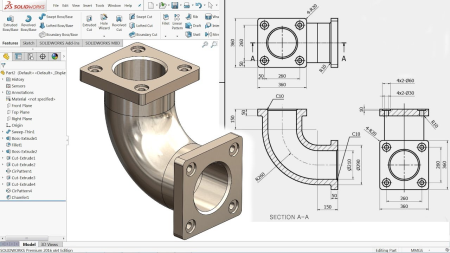
How to use Solidworks ? For Beginners
MP4 | Video: h264, 1280x720 | Audio: AAC, 44.1 KHz, 2 Ch
Genre: eLearning | Language: English + srt | Duration: 56 lectures (15h 57m) | Size: 8.3 GB

Solidworks for Beginners | Learn solidworks from basic lGetting started with Solidworks | Certified Solidworks Associate
What you'll learn
CAD modelling on Solidworks
Sketch in Solidworks using various commands.
3D modelling in Solidworks using all the features.
Assembly in Solidworks.
Engineering Drawing in Solidworks.
Can excel in CSWA exam after completing this course.
Student can confidently create the CAD model of any object.
Requirements
There are no prerequisites for this course.
Anyone who is eager to learn, will be able master Solidworks after completing this course.
Description
WHY YOU SHOULD ENROLL IN THIS COURSE ?
16+hrs of watch time. This makes it the longest course available.
55+ Lectures with simple and easy explanation.
Only course which explains 4 sections:- Sketch, Parts, Assembly & Drawing.
Exercise after finishing features/commands.
Real life models along with exercise.
In depth explanation about every feature on the latest version Solidworks 2020.
Application based.
Certificate after completion.
CSWA certified exam oriented.
30 Days Money Back Guarantee.
This course is specially designed for beginners. There are no prerequisites. Anyone who is eager and enthusiastic about learning solidworks software can enroll in this course. During this course, you will progress from scratch to advanced level. The course covers each and every feature available in the Parts, Assembly and Drawing section of Solidworks 2020. We have divided this course into 4 major sections
Sketch Section - The first step in CAD is making a sketch of a desired model. This section covers various commands like line, circle, rectangle, parallelogram, arc, spline, slot, polygon, text, point, trim, extend, offset, mirror, linear pattern, move, copy, quick snaps, project curve and many more.... After we finish few sketch commands, we will practice them during the exercise. These exercises will help you to gain confidence and you can easily do any complex sketch. We have also included some practice sketch which you can practice to improve your skills. The quiz will test your understanding and help you in the application of commands learnt.
3D Modelling Section - After understanding how to sketch, in this section will understand on how to convert sketch into 3D models. This section covers various features available in Solidworks 2020 like extrude boss/base, extrude cut, swept boss/base, swept cut, lofted boss/base, lofted cut, boundary boss/base, boundary cut, wrap, shell, revolved boss/base, revolved cut and other miscellaneous features. The interesting thing about this section is that, along with the exercises we will be doing real life models like chess pawn, cricket bat, exhaust manifold, ICC cricket world cup.
Assembly Section - In this section, we basically assemble the parts that we have created. In simple words, we join various parts to form a machine. This section is full of excitement as you will learn the CAD models like Ball Bearing, Gearbox and Road Bike. Here we will understand all the types of mates like standard mates, advanced mates and mechanical mates.
Drawing Section - This section covers engineering drawing at an advanced level. All the features in Solidworks 2020 are covered under this section.
Who this course is for
Beginners who are curious to learn Solidworks from scratch.
All the Undergraduate Students.
Students pursuing Post graduate studies.
Students preparing for CSWA & CSWP exam.
Mechanical Engineer
Architect
Civil Engineer
Electronics engineer


390e2998-d801-4a30-8f87-c4f1812a6b2f.png

Java Testing: A Course For Wannabes
MP4 | Video: h264, 1280x720 | Audio: AAC, 44.1 KHz, 2 Ch
Genre: eLearning | Language: English + srt | Duration: 18 lectures (45m) | Size: 175 MB

Learning Java Testing From Scratch
What you'll learn
Learning Java Testing basic knowledge,
Gettin relevaant information.
Getting tips to study better,
Learning about Java Testing
Requirements
Computer and speakers,
Description
Do you like Java Testing and would like to give the first steps? Are you getting the first knowledge in the world of Java Testing this is going to be then an introduction for you so that you learn about the world of informatics and technology. At the end of the day, you are the one who makes the difference in your learning. It is really advisable that you go further with your improvement, in general terms, you can advance a lot with dedication.
It would be very advsiable that you see what is the reason why you are learning this topic so you take the best advantage of your time. There are plenty of people and companies that will be willing to hire people that do have knowledge on technology topics so it is nice to get started as soon as possible.
Remember that the more you learn, the better for you, there is going to be a lot of tips so that you can study in a good manner as well so keep that in mind while you learn about the worldd of Java Testing.
By the moment this is the main information so see you in the videos and remember to stay as motivated as possible.
Who this course is for
Anybody who wants to learn Java Testing
Homepage


3316938-fd52-9.jpg

The Gnomon Workshop - Creating Costume Concept Art for Film and TV
Instructors: GINA DEDOMENICO
Duration: 3h 35m • 6 Lessons
Video: MP4 1920x1080 44 KHz | English
Size: 575 MB​

Costume concept artists are responsible for bringing a costume designer's vision to life. They create the template for building the costumes that we see on screen. Gina DeDomenico is an industry veteran with over three decades of experience creating costume concept art. She has worked with many renowned costume designers, such as Ruth Carter and Laura Jean Shannon, and has amassed credits including Doom Patrol, Django Unchained, Malcolm X, Green Lantern, plus so many more.
In this 3.5-hour workshop, Gina lectures on the importance of concept art in costume design for film and TV. Sharing her complete workflow for creating costume concept art, Gina reveals her personal approach, from her hardware preferences to how she uses DAZ 3D to establish an initial pose and through her entire Photoshop process. You'll see how she illustrates the design elements, details the character, adds color, and completes her work by setting the background and lighting for the final presentation.
The subject of the workshop offers a fresh take on a Star Trek classic: Borg Queen - an illustration Gina first tackled back in the 1990s. The workshop demonstrates her current process and discusses some of the evolution in hardware and techniques that she's experienced over the decades, revealing just how far concept art has come.
Screenshots


85a59b39-be2e-4452-910e-ddec714ca492.png

The Gnomon Workshop - Digital Painting in Photoshop
Instructors: DAVE NEALE
Duration: 3h 45m • 11 Lessons
Video: MP4 1920x1080 44 KHz | English
SOFTWARE: Photoshop | Size: 767 MB​

INTERFACE, TOOLS, TIPS & TECHNIQUES WITH DAVE NEALE
Take your digital painting to the next level with this 4-hour workshop dedicated to teaching the foundations of professional-level painting in Photoshop. As the leading 2D creative software used throughout the world by artists in the digital entertainment industry, this extremely versatile tool serves many different disciplines, including Illustration, Concept Art, Matte Painting, Texture Painting - and the list goes on. With so many uses, the power of the software can also make it intimidating to learn. In this detailed Photoshop tutorial, Concept Artist Dave Neale demystifies all the key tool settings, menus, and shortcuts needed to create industry-standard digital paintings to help you get started. Dave provides a clear understanding of how you can utilize this exciting program and leverage it for your very own creative projects.
To give you a really great overview of all of the potential uses of the software, Dave begins with a guide to setting up an efficient workspace, using Photoshop Actions to automate and streamline your workflow. He demonstrates how to get to grips with the Photoshop Pen Tool, and shows how to use Photoshop Selections, Adjustment Layers, and Layer Styles. You'll also learn how to use Photoshop Filters, explore the Transform tools, discover how to utilize Masks, plus much more. Dave concludes the workshop with his professional tips and helpful processes that will come in handy as you tackle your own future digital painting projects. He also provides a complete walkthrough of how he organizes his images for clients so that you can hand off your next project like a pro.
Screenshots


a53125dd03ad8771e1e7e0064825d3f7.jpg

The Gnomon Workshop - Preparing ZBrush Models for 3D Printing
Instructors: MAARTEN VERHOEVEN
Duration: 3h 6m • 10 Lessons
Video: MP4 1920x1080 44 KHz | English
MeshMixer ZBrush PreForm | Size: 1.4 GB​

FROM DIGITAL SCULPTURE TO 3D PRINT WITH MAARTEN VERHOEVEN
Discover how to efficiently translate your CG models into physical objects with this detailed ZBrush workshop by Maarten Verhoeven. Taking you through the entire workflow, from digital sculpture to 3D print, Maarten walks through how to break down a ZBrush model to prepare it for your 3D printer and discusses all the important steps to help you successfully prepare your models for printing. The workshop covers the technical processes involved in keying, scaling, and hollowing, as well as setting up drain holes and how to set everything up on a print bed.
By completing this workshop, you will develop a firm grasp of what is needed to take a ZBrush model into the physical realm. You'll learn how to create hollowed-out, keyed, and watertight meshes, and understand how to take advantage of tools like Meshmixer and PreForm to successfully engineer models for 3D printing - in particular for resin printers.
Due to the technical nature of this workshop and the processes covered, this tutorial is recommended for intermediate and advanced digital artists with previous experience using ZBrush.
Maarten's Key brushes are included as a downloadable resource with this workshop.
SOFTWARE USED
MeshMixer ZBrush PreForm
Screenshots


Zurück
Oben Unten