• Regeln für den Video-Bereich:

    In den Börsenbereich gehören nur Angebote die bereits den Allgemeinen Regeln entsprechen.

    Einteilung

    - Folgende Formate gehören in die angegeben Bereiche:
    - Filme: Encodierte Filme von BluRay, DVD, R5, TV, Screener sowie Telesyncs im Format DivX, XviD und x264.
    - DVD: Filme im Format DVD5, DVD9 und HD2DVD.
    - HD: Encodierte Filme mit der Auflösung 720p oder darüber von BluRay, DVD, R5, TV, Screener sowie Telesyncs im Format x264.
    - 3D: Encodierte Filme von BluRay, die in einem 3D Format vorliegen. Dies gilt auch für Dokus, Animation usw.
    - Serien: Cartoon/Zeichentrick, Anime, Tutorials, Dokumentationen, Konzerte/Musik, Sonstiges sind demnach in die entsprechenden Bereiche einzuordnen, auch wenn sie beispielsweise im High Definition-Format oder als DVD5/DVD9/HD2DVD vorliegen. Ausnahme 3D.
    - Bereich Englisch: Englische Releases gehören immer in diesen Bereich.
    - Bereich Talk: Der Bereich, in dem über die Releases diskutiert werden kann, darf, soll und erwünscht ist.


    Angebot/Beitrag erstellen

    - Ein Beitrag darf erst dann erstellt werden, wenn der Upload bei mindestens einem OCH komplett ist. Platzhalter sind untersagt.
    - Bei einem Scenerelease hat der Threadtitel ausschließlich aus dem originalen, unveränderten Releasenamen zu bestehen. Es dürfen keine Veränderungen wie z.B. Sterne, kleine Buchstaben o.ä. vorgenommen werden. Ausnahme Serienbörse:
    - Bei einem Sammelthread für eine Staffel entfällt aus dem Releasename natürlich der Name der Folge. Beispiel: Die Simpsons S21 German DVDRip XviD - ITG
    - Dementsprechend sind also u.a. verboten: Erweiterungen wie "Tipp", "empfehlenswert", "only", "reup", usw. / jegliche andere Zusatzinformation oder Ergänzung, welche nicht in obiger Beschreibung zu finden ist.

    Aufbau des Angebots und Threadtitel

    Der Titel nach folgendem Muster erstellt zu werden. <Name> [3D] [Staffel] [German] <Jahr> <Tonspur> [DL] [Auflösung] <Quelle> <Codec> - <Group>
    Beispiel: The Dark Knight German 2008 AC3 DVDRip XviD - iND
    Beispiel: The Dark Knight 2008 DTS DL BDRip x264 - iND
    Beispiel: The Dark Knight 2008 AC3 DL BDRip XviD - iND
    Beispiel: The Dark Knight German 2008 AC3 720p BluRay x264 iND
    Beispiel: The Dark Knight 2008 DTS DL 1080p BluRay x264 iND
    Beispiel: Die Simpsons S01 German AC3 DVDRip XviD iND
    Beispiel: Die Simpsons S20 German AC3 720p BluRay x264 iND
    Beispiel: Sword Art Online II Ger Sub 2014 AAC 1080p WEBRip x264 - peppermint
    Entsprechend sind also u.a. verboten: Sonderzeichen wie Klammern, Sterne, Ausrufezeichen, Unterstriche, Anführungszeichen / Erweiterungen wie "Tipp", "empfehlenswert", "only", "reup", usw. / jegliche andere Zusatzinformation oder Ergänzung, welche nicht in obiger Beschreibung zu finden ist
    Ausnahmen hiervon können in den Bereichen geregelt sein.

    Die Beiträge sollen wie folgt aufgebaut werden:
    Überschrift entspricht dem Threadtitel
    Cover
    kurze Inhaltsbeschreibung
    Format, Größe, Dauer sind gut lesbar für Downloader außerhalb des Spoilers zu vermerken
    Nfo sind immer Anzugeben und selbige immer im Spoiler in Textform.
    Sind keine Nfo vorhanden z.B. Eigenpublikationen, sind im Spoiler folgende Dateiinformationen zusätzlich anzugeben :
    Quelle
    Video (Auflösung und Bitrate)
    Ton (Sprache, Format und Bitrate der einzelnen Spuren)
    Untertitel (sofern vorhanden)
    Hosterangabe in Textform außerhalb eines Spoiler mit allen enthaltenen Hostern.
    Bei SD kann auf diese zusätzlichen Dateiinformationen verzichtet werden.

    Alle benötigten Passwörter sind, sofern vorhanden, in Textform im Angebot anzugeben.
    Spoiler im Spoiler mit Kommentaren :"Schon Bedankt?" sind unerwünscht.


    Releases

    - Sind Retail-Release verfügbar, sind alle anderen Variationen untersagt. Ausnahmen: Alle deutschen Retail-Release sind CUT, in diesem Fall sind dubbed UNCUT-Release zulässig.
    - Im Serien-Bereich gilt speziell: Wenn ein Retail vor Abschluss einer laufenden Staffel erscheint, darf diese Staffel noch zu Ende gebracht werden.62
    - Gleiche Releases sind unbedingt zusammenzufassen. Das bedeutet, es ist zwingend erforderlich, vor dem Erstellen eines Themas per Suchfunktion zu überprüfen, ob bereits ein Beitrag mit demselben Release besteht. Ist dies der Fall, ist der bereits vorhandene Beitrag zu verwenden.
    - P2P und Scene Releases dürfen nicht verändert oder gar unter einem iND Tag eingestellt werden.


    Support, Diskussionen und Suche

    - Supportanfragen sind entweder per PN oder im Bereich Talk zu stellen.
    - Diskussionen und Bewertungen sind im Talk Bereich zu führen. Fragen an die Uploader haben ausschließlich via PN zu erfolgen, und sind in den Angeboten untersagt.
    - Anfragen zu Upload-Wünschen sind nur im Bereich Suche Video erlaubt. Antworten dürfen nur auf Angebote von MyBoerse.bz verlinkt werden.


    Verbote

    - Untersagt sind mehrere Formate in einem einzigen Angebotsthread, wie beispielsweise das gleichzeitige Anbieten von DivX/XviD, 720p und 1080p in einem Thread. Pro Format, Release und Auflösung ist ein eigener Thread zu eröffnen.
    - Grundsätzlich ebenso verboten sind Dupes. Uploader haben sich an geeigneter Stelle darüber zu informieren, ob es sich bei einem Release um ein Dupe handelt.
    - Gefakte, nur teilweise lauffähige oder unvollständige Angebote sind untersagt. Dies gilt auch für eigene Publikationen, die augenscheinlich nicht selbst von z.B. einer DVD gerippt wurden. Laufende Serien, bei denen noch nicht alle Folgen verfügbar sind, dürfen erstellt und regelmäßig geupdatet werden.
    - Untersagt sind Angebote, welche nur und ausschließlich in einer anderen Sprache als deutsch oder englisch vorliegen. Ausnahmen sind VORHER mit den Moderatoren zu klären.


    Verstoß gegen die Regeln

    - Angebote oder Beiträge, die gegen die Forenregeln verstoßen, sind über den "Melden"-Button im Beitrag zu melden.
  • Bitte registriere dich zunächst um Beiträge zu verfassen und externe Links aufzurufen.

*** Bestes IPTV *** bester Preis *** gratis Test ***


Englische Tutorials

3d2e488f-51c6-40dc-8e72-fb4fca657172.png

Power BI Development || Admin || Modelling || DAX
MP4 | Video: h264, 1280x720 | Audio: AAC, 44.1 KHz, 2 Ch
Genre: eLearning | Language: English + srt | Duration: 49 lectures (6h 13m) | Size: 2.73 GB

Master Power BI Desktop & Power BI Analysis & Data Visualization, Power BI Modelling, Power BI Admin Task, DAX
What you'll learn
Module1: Basic Report Design: Power BI Desktop Installation,Architecture of Power BI,Data sources and Visual Types,Canvas, Visualization and fields
Format Button and data labels,Legend, Category and Grid,Visual Interaction, Data Points,Edit Interaction,Format Options,PBIX and PBIT File Formats
Spotlight and Focus Mode,Tooltips
Module2: Visual Sync, Grouping,Slicer Visual: Real-Time Usage,Orientation, Selection Properties,Single and Multi-Select, Ctrl Options
Slicer: Number, Text and Date Data,Slicer List and Slicer Drop Down,Visual sync,Disabling Slicer,Clear selection Limitation with slicers
Module 3: Hierarchies, Filters:Creating Hierarchies in Power BI,Independent Drill-Down Options,Dependent Drill-Down Options
Conditional Drilldowns, Data Points,Drill Up Buttons and Operations,Expand & Show Next Level Options
Dynamic Data Drills Limitations,Show Data and See Records,Filters : Types and Usage in Real-time
Visual Filter, Page Filter, Report Filter,Basic, Advanced and TOP N Filters,Category and Summary Level Filters,Drill Thru Filters, Drill Thru Reports
Drill-thru Filters, Page Navigations,Bookmarks: Real-time Usage,Bookmarks for Visual Filters, Bookmarks for Page Navigation
Selection Pane with Bookmarks Buttons, Images with Actions Buttons, Actions and Text URLs, Bookmarks View & Selection Pane
Import & Direct Query with Power BI,SQL Queries and Enter Data,Data Modelling : Currency, Relations, Summary, Format, Synonyms,Web View & Mobile View
Module 8: Power Query Level 1,Power Query M Language Purpose,Power Query Architecture and ETL, Data Types, Literals and Values,Power Query Transformation
Table & Column Transformations,Text & Number Transformations,Date, Time and Structured Data
List, Record and Table Structures let, source, in statements M Lang ,Power Query Functions, Parameter,Invoke Functions, Execution Results
Get Data, Table Creations and Edit,Merge and Append Transformations, Join Kinds, Advanced Editor, Apply ETL Operations with Power Query
Module 9: Power Query Level 2 Query Duplicate, Query Reference,Group By and Advanced Options,Aggregations with Power Query
Transpose, Header Row Promotion,Reverse Rows and Row Count,Data Type Changes & Detection,Replace Columns: Text, NonText
Replace Nulls: Fill Up, Fill Down,PIVOT, UNPIVOT Transformations,Move Column and Split Column Extract, Format and Numbers
Date & Time Transformations,Deriving Year, Quarter, Month, Day, Add Column : Query Expressions,Query Step Inserts and Step Edits
Creating Parameters in Power Query, Parameter Data Types, Default Lists,Static/Dynamic Lists For Parameters,Removing Columns and Duplicates
Convert Tables to List Queries,Linking Parameters to Queries,Testing Parameters and PBI Canvas,Multi-Valued Parameter Lists
Creating Lists in Power Query,Converting Lists to Table Data,Advanced Edits and Parameters,Data Type Conversions, Expressions
Columns From Examples, Indexes,Conditional Columns, Expressions
Module 14: Power BI Cloud - 1,Power BI Service Architecture,Power BI Cloud Components, Use App Workspace, Report Publish,Reports & Related Data
Creating New Reports in Cloud,Report Publish and Report Uploads,Dashboards Creation and Usage,Adding Tiles to Dashboards
Pining Visuals and Report Pages,Visual Pin Actions in Dashboards,LIVE Page Interaction in Dashboard,Dashboards Actions, Report Actions
DataSet Actions: Create Report,Share, Metrics and Exports,Mobile View & Dashboard Themes,Q & A, and Pin Visuals,Export, Subscribe
Favorite, Insights, Embed Code,Featured Dashboards and Refresh,Gateways Configuration, PBI Service Gateway Types, Cloud Connections,Gateway
Data Refresh : Manual, Automatic,Power Query Expressions,Import and Upload Options in Excel,Excel Workbooks and Dashboards
Datasets in Excel and Dashboards,Using Excel Analyser in Power BI,Using Excel Publisher in PBI Cloud,Excel Workbooks, PINS in Power BI
Excel ODC Connections, Power Pivot,Row Level Security (RLS) with DAX,Need for RLS in Power BI Cloud,Data Modelling in Power BI Desktop
DAX Roles Creation and Testing,Adding Power BI Users to Roles,Custom Visualizations in Cloud,Create Report on PBI Services,View Usage Metrics
DAX Functions
Requirements
Laptop with good configuration, Power BI Desktop software, Internet
Description
From this course you will able to do professional reports for your client also you will get good hands on each property which we are going to take in this session. Below properties will learn from this course
• Export , show as table, Remove, spotlight, Sorting,• Hide and show column and table.• Filter Types (Visual, Page, Report)• Drill Through• Basic Filters• Advanced Filter• TOP N• Sync Slicer ,Edit Interaction,Book Mark Pane ,Page Navigation,Selection Pane,Tooltip ,Drill Down,Hierarchy, Conditional Formatting(Bar, Background, Text, icons, Web URL) , Home Ribbon,Transform Ribbon, Add Column Ribbon Publishing Report on PBI Services• Creating Workspace• Create Dashboard/Pin to live page/Pinning• Create Report on PBI Services• Create Datasets • Download and Print the Report• Analyze in Excel• Export report in various format• QR Code>> Microsoft power bi• Search Option • View Related •View Usage Metrics•Get Quick Insight •Subscription •Sharing Report • Row Level Security -Applied on PBI Desktop • Security at Dataset Level/Assigning Role •Uses of Shared with me •Delete•App creation•Download Data Gateway•Schedule Refresh . DAX Functions
Will connect to different types of data sources and then transform it in a data model. The final part of the report creation process is to add visuals based on the data model. The Power BI Service is the cloud-based service where users view and interact with the reports.
Who this course is for
Power BI Developer
Fresher + Experience Professional
Any one who is interested to learn amazing Reporting tool
Homepage







 
5f4f0ffc-6af3-4355-9b32-bb98dfe8058c.png

Power BI Services & DAX
MP4 | Video: h264, 1280x720 | Audio: AAC, 44.1 KHz, 2 Ch
Genre: eLearning | Language: English + srt | Duration: 15 lectures (2h 3m) | Size: 773.1 MB

Power BI Services & DAX
What you'll learn
Power BI Cloud - 1 ,Power BI Service Architecture, Power BI Cloud Components,Use,App Workspaces,Report Publish,Reports & Related Data
Creating New Reports in Cloud,Report Publish and Report Uploads,Dashboards Creation and Usage, Adding Tiles to Dashboards
Pining Visuals and Report Pages,Visual Pin Actions in Dashboards,LIVE Page Interaction in Dashboard , Dashboards Actions, Report Actions
DataSet Actions: Create Report,Share, Metrics and Exports,Mobile View & Dashboard Themes,Q & A[Cortana] and Pin Visuals,export, Subscribe
Favorite, Insights, Embed Code,Featured Dashboards and Refresh,Gateways Configuration, PBI Service,Gateway Types, Cloud Connections,Gateway
Data Refresh : Manual, Automatic,Power Query Expressions,Import and Upload Options in Excel,Excel Workbooks and Dashboards
Datasets in Excel and Dashboards,Using Excel Analyser in Power BI,Using Excel Publisher in PBI Cloud,Excel Workbooks, PINS in Power BI
Excel ODC Connections, Power Pivot,Row Level Security (RLS) with DAX,Need for RLS in Power BI Cloud,Data Modelling in Power BI Desktop
DAX Roles Creation and Testing,Adding Power BI Users to Roles,Custom Visualizations in Cloud,Create Report on PBI Services,View Usage Metrics
DAX Functions
Requirements
Laptop with good configuration, Power BI Desktop software, Internet , Basic SQL
Description
Power BI Service Architecture , Power BI Cloud Components,App Workspace, Report Publish , Reports & Related Data, Creating New Reports in Cloud , Report Publish and Report Uploads , Dashboards Creation and Usage , Adding Tiles to Dashboards, Pining Visuals and Report Pages , Visual Pin Actions in Dashboards , LIVE Page Interaction in Dashboard , Dashboards Actions, Report Actions, Datasets Actions: Create Report , Share, Metrics and Exports , Mobile View & Dashboard Themes , Q & A[Cortana] and Pin Visuals , Export, Subscribe, Favorite, Insights, Embed Code , Featured Dashboards and Refresh , Gateways Configuration, Power bi Service , Gateway Types, Cloud Connections , Gateway, Data Refresh : Manual, Automatic , Data Flows, Power Query Expressions , Import and Upload Options in Excel , Excel Workbooks and Dashboards, Datasets in Excel and Dashboards , Using Excel Analyser in Power BI , Using Excel Publisher in Power bi Cloud , Excel Workbooks, PINS in Power BI, Excel ODC Connections, Power Pivot , Row Level Security (RLS) with DAX , Need for RLS in Power BI Cloud , Data Modelling in Power BI Desktop, DAX Roles Creation and Testing , Adding Power BI Users to Roles , Custom Visualizations in Cloud ,Create Report on Power bi Services ,View Usage Metrics ,DAX Functions
Students/Professional can learn power bi services option easily from this course and also they can able to understand dax functions.
Who this course is for
Power BI Developer
Fresher + Experience Professional
Homepage


ada67c62-e5ac-4481-9bed-cc619de2a2f9.png

Product Owner PSPO 1 Scrum Product Owner Certification 2021
Last Update: 2/2022
Duration: 7h 35m | Video: .MP4, 1280x720 30 fps | Audio: AAC, 48 kHz, 2ch | Size: 2.97 GB
Genre: eLearning | Language: English​

Become a Scrum Product Owner and Prepare for the PSPO 1 ® and PSM 1 ® Certifications with Practice Exam Questions
What you'll learn:
Essential skills to become a great Product Owner
About the Professional Product Owner PSPO 1 certification with all the preparation necessary to take the assessment
How to get the Scrum team ready for their first Sprint and how to run the first Sprint
Tried and tested advice on applying the Scrum theory in practice
All Scrum theory covering the Scrum Team, Scrum Events, Scrum Artifacts, Empiricism and Evidence-based Management
How to use popular Scrum based software products such as Jira, Trello and Retrospective Boards
Requirements
No prior knowledge is necessary, but a backround in project management or software development is useful
Description
Do you want to learn to become a great Product Owner?
Are you ready to learn about Agile and Scrum?
Do you want to take your Product Owner PSPO 1 and PSM*1 certifications?
Great, then this course is for you!
This course is for anyone who wants to rapidly improve their career prospects in the booming industry of software development without learning how to code.
It is also for anyone that wants to make the most of their Development Team, improve their management skills and create higher-value products for their business.
If you are an entrepreneur with an idea, this course will teach you how to manage a team to turn your vision into a reality ready for the marketplace.
After taking this course, you will have a good understanding of the skills necessary for effective leadership in Product Ownership and be well prepared to take both the PSPO 1 Product Owner and PSM 1*Scrum Maser certifications for Product Owner and Scrum Master.
Until now, you might have struggled to manage a team to build the right product or solution...
Or, you might have finished a project and the item developed was over budget, delayed and once launched it didn't get as many users as you hoped.
If this sounds familiar, then this course will help!
What students are saying:
"I have been a product owner in a scrum team for almost two years now, without certification, and he is really showing me how to be better at it. I am enjoying this course and I think I will be in a great position to write my exams when I am done."
"Very good course thus far. It is honestly exceeding expectations and is super easy to follow. Great Job!"
"Very help, easy to understand, and appreciate the examples to work through and apply information taught"
"I took the test and PASSED!!!!! thanks for this wonderful course"
Who is your instructor?
Michael James is a UK Business and Leadership Instructor who has over a decade of experience in management and leadership in the corporate environment and has been working in product development for over 10 years as both a private consultant and for one of the largest organizations in the UK. Michael James has also managed and built many private entrepreneurial mobile app and website products with 1000s of downloads and users.
This course covers the entire Scrum theory essentials focusing on the Product Owner. It also includes software practicals and advice from tried and tested experience
Agile and Scrum history
The PSPO*1*and PSM*1*certification exams
Practice quizzes and tests based on the certification exams
Certification assessment tips
Scrum work management tool demonstrations (Jira, Trello,*Asana and more)
The Product Owner role
The Scrum Master role
The Developer role
The Scrum Events
The Scrum Artefacts
Multiple Scrum Teams
The Scrum Guide
The Sprint
Sprint Planning
Sprint Review
Sprint Retrospective
Sprint Retrospective software demonstrations
Backlog refinement
Tips on Work Estimation
User Stories
Burndown Charts
Evidence-based management
Empirical process
Product Vision formulation tips
Leadership tips
...and more with content continuing to be added!
Anyone who is looking to build a career as a professional Product Owner must understand the above. If you don't, then this course is perfect for you.
So go ahead and click the enroll button, and I'll see you in lesson 1!
Cheers,
Mike
Who this course is for
People wanting to progress their career in management and product development
Former Project Managers looking to reskill with the Scrum Framework
Entrepreneurs looking to get the most value out of their Developers and developed products
Anyone interested in Agile or Scrum
Developers looking for a side ways move into Product Ownership
Anyone looking obtain a certification in Scrum as a Product Owner
People wanting to take Professional PSPO 1 certification and PSM 1 Certification
Homepage
Screenshots


76c8f61e-e216-4bfd-b056-c73a1277e7ee.png

QuickBooks Online A-Z Training Course 2022 Edition
MP4 | Video: h264, 1280x720 | Audio: AAC, 44.1 KHz, 2 Ch
Genre: eLearning | Language: English + srt | Duration: 35 lectures (2h 32m) | Size: 869 MB

Develop A Powerful QuickBooks Online Skill And Excel Your Financial knowledge To Next Level!
What you'll learn
Use Problem Solving And Reasoning Skills To Overcome Real Life "On The Job" Challanges, When Using QuickBooks Online
Setup QuickBooks Online file from the very beginning
Setup products, customers, vendors
Create users and assign permissions
Setup and analyze impact to chart of accounts
Create invoices, bills, purchase orders, expenses, credits, discounted invoices, recurring invoices, sales receipts and more
Categorize and automate your transactions
Create custom reports
Import data through excel and csv file formats
Create petty cash accounts and manage it through reports tab
Upload bank statements and perform reconciliation
Requirements
No Prior QuickBooks Knowledge required
Prior Accounting Knowledge will be usefull
Description
Want to upgrade your financial knowledge portfolio? Want to learn the most common financial business software out there?
Well, you are in right place.
QuickBooks Online is one of the most popular accounting software. This course is designed by keeping an idea of helping mass individuals to achieve financial knowledge of QuickBooks Online.
Each Course is 5-7 mins long and you can learn at your own pace. If you find traditional bookkeeping textbooks and classes boring and confusing, then this course is perfect for you because I explain everything in plain simple language that's easy to understand and fun to learn.
All of the tabs are explained thoroughly & we will fully walkthrough examples together end to end
Currently, 2.5 hours of material has been uploaded but, we will keep adding additional material which will include extra advanced lessons & multiple examples as well which will be only available to our audience.
Our end goal is to have you confident and comfortable in using QuickBooks Online. so that you can utilize QuickBooks in your business. After this course, you will be ready to tackle any problem related to QuickBooks Online
In this course, you will learn
· Singing in QuickBooks Online.
· Complete understanding of navigation tabs in QuickBooks Online.
· Will be able to record suppliers & customers in QuickBooks Online.
· Will be able to connect a bank account and import bank statements in QuickBooks Online.
· Will be able to record invoices and payments in QuickBooks Online.
· Will have a complete understanding of Charts Of Accounts in QuickBooks Online.
· Will be able to record bills and expenses in QuickBooks Online.
· Will be able to record journal entries in QuickBooks Online.
· Will have complete knowledge of petty cash account, why it is used & Transfer function in QuickBooks Online.
· Will be able to record bank deposits in QuickBooks Online.
· Will be able to use budgeting tools in QuickBooks Online.
· Will be able to use audit logs and purchase orders in QuickBooks Online.
Who this course is for
· Business owners wanted to learn QuickBooks Online to manage their financial records.
· Job seekers looking to add QuickBooks knowledge to their arsenal.
· Anyone looking to understand the basics of QuickBooks Online.
· Individuals wanting to learn bookkeeping in QuickBooks Online.
Who this course is for
Anyone who needs to use QuickBooks Online for their Business.
Anyone looking for a thorough understanding of how to use all functions of QuickBooks Online software
Anyone looking to get a good job by adding QuickBooks Online to their Resume
Anyone looking to become an expert in QuickBooks Online
Homepage


b9ddefd8-ece0-41b3-82c7-bc16c0d2d537.png

Ruby Essential Training Part 1: The Basics
MP4 | Video: h264, 1280x720 | Audio: AAC, 44.1 KHz, 2 Ch
Skill Level: Intermediate | Genre: eLearning | Language: English + srt | Duration: 4h 15m | Size: 501.9 MB

Ruby, the popular object-oriented open-source programming language, is a great place to start learning programming or web development. You can use it to write interactive programs or build scripts to speed up common tasks. In this course, instructor Kevin Skoglund provides the basics that new and experienced developers need to know to start coding with Ruby, starting with the core object types: numbers, strings, symbols, booleans, and more. He demonstrates Ruby's control structures, including conditionals, loops, and iterators. Kevin explains scripting best practices and shows the power of using enumerables and code blocks. By the end of the course, you should be able to use Ruby to define your own custom methods with loops and conditional logic.
Homepage


f3500793-92ba-4bab-95b4-9e8e245d9b1e.png

SOLIDWORKS - Resilient CAD Modeling (RCM) Technique
MP4 | Video: h264, 1280x720 | Audio: AAC, 44.1 KHz, 2 Ch
Genre: eLearning | Language: English + srt | Duration: 13 lectures (1h 4m) | Size: 597.1 MB

A defined set of rules & best practices for creating robust CAD models that will help distinguish yourself & your team
What you'll learn
Learn the systematic "best practices" processes for creating robust CAD models.
Create robust CAD models that can be easily modifiable without breaking.
If everyone in a company models using this systematic strategy, engineering firms can save time & money.
Distinguish yourself from other SolidWorks CAD designers with our defined set of rules & best practices for creating robust CAD models.
Requirements
SoildWorks basics (Sketching, extruding, revolving)
Description
Resilient CAD Modeling (RCM)
-WHAT IT IS? A systematic "best practices" process for creating robust CAD models.
-WHY SHOULD WE USE IT? Make CAD model modifications without the model "blowing up." Coworkers benefit because if an employee leaves a company, the next employee can pick up right where the original author of the CAD model left off with minimal time getting up to speed and understanding how the model was originally created. This saves engineering companies time and money.
-Spend less time fixing your CAD, and more time designing your product.
-CAD less likely to break
-Standard rules the whole team understands & follows (makes inheriting others' models easier, improves collaboration)
-Design intent at a glance (convenient, and promotes "seeing" in 3D)
-Order leads to productivity, compounding affects
========
This is a streamlined course to give you an introduction to Resilient CAD Modeling (RCM) methodology. This course should enable you to, with confidence, use RCM SOLIDWORKS to design your next innovation. After this course, you can proudly list RCM for SOLIDWORKS skills in your resume.
THIS COURSE IS NOT A SHORTCUT TO BECOMING AN EXPERT AT RCM, IT'S AN INTRODUCTION. RCM EXPERTISE TAKES HANDS ON PRACTICE.
*You can perfectly follow this course if you have SOLIDWORKS versions 2014-2022. This course is delivered using SOLIDWORKS 2019.
========
About this course
With this course, you will get
Full, free lifetime access to 13 lectures (increasing over time).
All future extra lectures and upgrades will always be free.
Unconditional Udemy 30 days money-back guarantee - We are sure you would love the course though :)
Regular free bonus additions to increase your knowledge. - lots of fun topics!
Today, you can start your journey to becoming a SOLIDWORKS RCM with ZERO prior experience!
I stress that you need no prior experience and there is nothing to buy or pay for!!! You will only need SOLIDWORKS itself.
Why our course?!
Learn from the best, your instructor, Rafael Testai.
Have all your questions answered by experts in the course forum.
Get access to an exclusive students SOLIDWORKS community.
We are following the learning by doing approach which is proven the best for learning software like SOLIDWORKS.
We have enlarged the interface icons in our screencasts to make our videos more eye-friendly. We even used a circular highlighting tool so it's easier to follow the mouse.
We made our videos short and concentrated on one or a few aspects to make them easier for reference. We also designed each lecture to be a stand-alone lecture.
You will learn
Introduction to Resilient CAD Modeling (RCM) using SOLIDWORKS interface.
The 8 groups that make up RCM.
How to overcome the main obstacles students face when learning RCM.
RCM Lite, you don't have to learn all the bells and whistles. We distilled it for you into RCM Lite.
The logic behind RCM.
Master Modeling introduction in SOLIDWORKS (advanced)
Converting entities, hiding sketches, and more pro tips that instructors often overlook.
Click the 'take this course' button, top right, now... Every hour you delay is costing you great creations and skills :)
Who this course is for
Individuals intending to take SOLIDWORKS Associate Certificate - CSWA or CSWP.
Individuals intending to move beyond the basics of SOLIDWORKS
Individuals wanting to get started with 3D modeling
Individuals wanting to get a better job via SOLIDWORKS skills
Individuals wanting to list SOLIDWORKS skills in their resume
Designers, Engineers, Makers, and Hobbyist
Who this course is for
Any SolidWorks user who already understand the SolidWorks basics. We will not cover SolidWorks basics in this course.
Homepage


fcd64340-c27a-4b26-9a08-e8c0fac3f1df.png

SQL / MySQL Masterclass For Complete Beginners
MP4 | Video: h264, 1280x720 | Audio: AAC, 44.1 KHz, 2 Ch
Genre: eLearning | Language: English + srt | Duration: 79 lectures (8h 51m) | Size: 3.7 GB

SQL course for complete beginners : MySql From Zero to Hero..
What you'll learn
You will learn how to query a database in SQL
You will have detailed knowledge and understanding of using MySQL, one of the most used databases in the world.
You will code SQL to solve a variety of database problems, with applicability in IT industry projects
You will gain knowledge of SQL and MySQL, which will allow you to apply for jobs in the IT sector.
Requirements
A PC or laptop with Windows or MAC operating system
No prior knowledge of databases, SQL or MySQL is required.
Description
Hello,
Getting here means you want to learn programming. You've come to the right place!
Why programming?
Because you earn well, the employment rate in the field is almost 100% or maybe just for fun.
We want to help you build a real experience in the field, not just learn a programming language.
When you are just starting out in IT and want to get a job, the most important thing is to prove to your employer that you are capable of producing for him.
If you bring added value to the employer, everything is fine, and our complete beginner course can help you do just that. You will learn how to read and write complex queries in a database using one of the most sought after skills. - MySQL.
Learning SQL is one of the fastest ways to improve your career prospects, as it is one of the most sought-after technological skills! In this course you will learn quickly and you will receive challenges along the way to improve your understanding!
In this course you will learn the basics of SQL without the need for prior knowledge of databases.
You will learn the basics of SQL syntax.
You will learn what databases are, tables, and how to use them.
You will learn how to create databases and tables.
You will learn to manipulate the structure of tables
You will learn to modify existing tables.
You will learn to enter data in tables.
You will learn to read data from tables.
You will learn to modify existing data in tables.
You will learn how to delete data from tables.
You will learn what joins are and how to use them.
You will learn what aggregation functions are and how to use them
You will learn what triggers are and how to use them
You will learn what functions are stored and how they are used
You will learn what stored procedures are and how to use them
Upon completion of this course, you will have the skills to be able to use SQL with confidence, to have a solid understanding of MySQL and to be skilled in designing databases.
Success!
Who this course is for
This course is for people who want to learn SQL and work with databases
Homepage


96dfe4ce-47cf-4f0a-b279-32fab27cacff.png

SQL for Beginner-For Data Analytics & Business Intelligence
MP4 | Video: h264, 1280x720 | Audio: AAC, 44.1 KHz, 2 Ch
Genre: eLearning | Language: English + srt | Duration: 28 lectures (1h 16m) | Size: 561.3 MB

SQL for Beginner-For Data Analytics & Business Intelligence
What you'll learn
Key concepts you will learn and work with in this course. SQL (Structured Query Language - very much an in-demand technology). Database Design Data Analysis
Creating, Modifying and Deleting Tables in a Database (DDL), Inserting, Updating and Deleting Data from Tables (DML)
Select Queries, Joins Aggregate Functions Subqueries Database Design Creating Databases. Constraints, Case when, Clauses, Operators
Not only does the course teach you SQL, but there are multiple exercises for you to try with video solutions to further help you understand the material.
Requirements
Microsoft SQL Server Management Studio.
Description
Have a detailed knowledge and understanding of using Microsoft SQL, one of the most widely used databases in the world.
Obtained a knowledge of SQL, allows students to apply for jobs in the IT sector.
In-depth knowledge of database design will give students an edge over other applicants.
Key concepts you will learn and work with in this course.
SQL (Structured Query Language - very much an in-demand technology).
Database Design
Data Analysis
Through out the course you will go through creating an example database for Movie.
Creating, Modifying and Deleting Tables in a Database (DDL)
Inserting, Updating and Deleting Data from Tables (DML)
Select Queries
Joins
Aggregate Functions
Sub queries
Database Design
Creating Databases.
Constraints,
Case when,
Clauses,
Operators
Not only does the course teach you SQL, but there are multiple exercises for you to try with video solutions to further help you understand the material. Become skilled as a database developer generally needs you to learn SQL, a database, and then database design. Often this will require multiple courses. However you learn all those topics, and data analysis in this one course.
Essentially, you are learning from someone who has all the professional training, skills, and experience needed to teach you how to become proficient with SQL and Database design as quickly as possible.
After completing this course, you will have the necessary skills to be able to use SQL confidently, have a solid understanding of SQL and be skilled in database design.
Who this course is for
Anyone who wants to learn how to use SQL.
SQL Developer, Business Analyst, BI People
Homepage


26fde3c3-d6b7-4852-aa54-9f7361c021d5.png

The Best Security Awareness Training Video For Anyone!
Last Update: 2/2022
Duration: 1h 30m | Video: .MP4, 1280x720 30 fps | Audio: AAC, 48 kHz, 2ch | Size: 488 MB
Genre: eLearning | Language: English​

Security Awareness Training Video Course
What you'll learn:
Identify types of phishing attacks and how to protect oneself against them
Learn the characteristics of a fake email
How and why cyber criminals target specific people
The modus operandi of cyber criminals
Ways in which a cyber attacker could get into your email account and how to keep him out for good
Requirements
No prior technical skills required for this course
Description
This course teaches you how to recognize types of phishing attacks and scams and how to protect yourself against them. The course shows different situations in which social engineering tactics are used to get consumers to give up their confidential data. It takes students under the hood of cyber attackers' sophisticated strategies and tactics and reveal their modus operandi: Students learn the things that make consumers vulnerable to cyber attacks and how to close those doorways that provide entry to cyber attackers.
The course highlighs current scams that target specific consumers. It also touches on some main tools that cyber criminals use to get people's confidential information such as text messaging, voIP, and email, and how to protect yourself from being tricked into revealing your personal and confidential information. The course teaches you about email security. It shows how to spot fake emails and how to secure different areas of your email account in order to prevent a cyber hacker from gaining access to it. Throughout this course, you are provided with cases in point for each lesson, how to protect and defend yourself from each type of attacks, and step by step instructions for securing your confidential information. The course is all about making you cyber security alert ready at all times against cyber attacks and scams
Who this course is for
Anyone who wants to protect him/herself from phishing attacks and scams
Anyone who was a victim of a phishing attack
Anyone who is interested in cyber security
Anyone who is looking to keep him/her email account from being hacked
Homepage
Screenshots


d84dcfd0-b039-46ca-b2e9-4d29b15d26aa.png

The Ultimate Guide To Reprogramming The Mind
Last Update: 2/2022
Duration: 1h 46m | Video: .MP4, 1280x720 30 fps | Audio: AAC, 48 kHz, 2ch | Size: 1.02 GB
Genre: eLearning | Language: English​

Increase Your Vibrational Awareness & Emotional Intelligence
What you'll learn:
Learn Basic Meditation
Increase Emotional Intelligence
Learn How To Create Affirmations (For Powerful Transformation)
Learn The Power Of Thought
Learn Basic Yoga For Everyday
Learn Basic Law Of Attraction!
Learn How To Create A Powerful Routine!
Learn how to balance your emotions
Requirements
Must be able to watch & listen to lectures.
Must have patience
Must be ready to apply in daily life!
Description
Now is your chance to learn all the tricks to reprogramming your mind!
This course will teach you everything you need to know about harnessing mindfulness tools & creating a personalized ritual to help unlock your hidden superpowers (Intuition, Awareness, Inner Healer).
It's tough figuring out how to reprogram your mind on your own! It's like being stuck in a vicious circle. Don't get caught in that trap. Use this unique course material provided by Curandero Gabriel & Finally Detached to help break through your own barriers! Now is the time '11:11'
'The Ultimate Guide To Reprogramming Your Mind' includes the following
Downloadable Videos To Help With Learning Different Approaches To Meditation
Downloadable Videos To Help Increase Emotional Your Intelligence
Downloadable Video To Help You Create Affirmations (For Powerful Transformation & Anything You Desire!)
Downloadable Video To Help You Learn The Power Of Thought!
Downloadable Video To Help You Learn Basic Yoga For Everyday Practical Use!
Learn Basic Law Of Attraction!
Learn How To Create A Powerful Ritual!
Tons Of Free Resources To Help You Along Your Journey To Becoming A Master Of Your Mind
We highly recommend that you approach this course with patience and integrity! It is important that you watch the course content more than once if you really want to gain a deeper understanding of the lectures given & the weaving of modalities for your personal and energetic benefit.
Your Journey Awaits!
Who this course is for
Intermediate & Advanced Mindfulness Practitioners
Those Who Seek More Knowledge
Those who are on the journey to become a medicine man or medicine women
Anyone interested in Law Of Attraction
Anyone interested in reprogramming their mind
Anyone interested in learning the connection between holistic modalities & deep healing
Anyone interested in self improvement!
Anyone who is ready to increase their emotional intelligence
Those who are new to understanding thought as 'energy'
Anyone who wants more happiness in their lives!
Homepage
Screenshots


c54b767c-c548-4802-8f40-d8c0181256fd.png

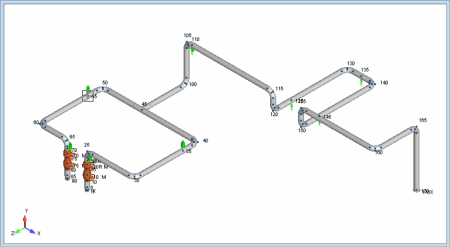
Buried or Underground Piping Stress Analysis using Caesar II
MP4 | Video: h264, 1280x720 | Audio: AAC, 44.1 KHz, 2 Ch
Genre: eLearning | Language: English + srt | Duration: 5 lectures (1h 25m) | Size: 690.5 MB

Stress Analysis of Buried Piping and Pipeline Systems using Caesar II
What you'll learn
Learn how to model buried piping and pipeline system in Caesar II software
Create load cases based on ASME B31.3/B31.4/B31.8 codes
Perform the underground/buried pipe stress analysis
Review the results calculated by the software and understand their meanings
Requirements
Basic knowledge of using Caesar II software
Preferably an engineering graduate.
Description
Buried or Underground pipe and pipeline stress analysis course covers the step-by-step methodology for performing the analysis in Caesar II software. The candidate will learn the methods for modeling the pipe/pipeline with proper inputs, create load cases depending on the code requirements, analyze the system, and finally review the results to decide if the system is acceptable or any changes are to be made.
Moreover, the course also covers a brief about buried piping, what it means, different types of underground piping and pipeline systems, and their applications.
If you are a starter into the piping and pipeline stress analysis domain and are just learning the basics of pipe and pipeline stress analysis then this course is just perfect for you. You will learn which inputs are required for buried analysis in Caesar II. From where to get or collect those data for inputting into the Caesar ii input spreadsheet. Then you will learn how to convert an above-ground piping system into the underground model, create analysis load cases and finally perform the analysis to find out the results.
The main objective of the buried pipe stress analysis is to ensure that the calculated stresses based on the relevant code in Caesar II software are well within the allowable values.
Who this course is for
Beginners into pipe stress analysis using Caesar II
Mechanical piping stress analysis engineers,
Fresh Caesar ii software users.
Homepage


296e0bd3-ed44-49b4-bc20-5548fd28a780.png

Complete Linux Course + Bash Scripting - DevOps Path
MP4 | Video: h264, 1280x720 | Audio: AAC, 44.1 KHz, 2 Ch
Genre: eLearning | Language: English + srt | Duration: 56 lectures (5h 4m) | Size: 2.56 GB

Learn Linux basics, bash scripting to automate your servers, automate VMs with Vagrant Tool
What you'll learn
Learn Linux Terminal for Linux Administrators
Learn Bash Scripting Programming Language
Learn Vagran VM Automation Tool
Learn with Hands-on Examples
Requirements
No programming experience needed
Description
Why we need for Linux Administration?
Linux is the one of the key and essential OS For Devops Engineers, system engineers and cloud engineers. In your career, you must learn linux, its functions and linux scripting deeply. Learning Linux, is the 1st step to go on those careers. The good thing is, no need any programming skills to learn Linux.
What will you do after course?
You can create your own Linux server and manage with many details. You can create automation scripts with Bash Scripting. With many of real life examples, you can directly use all of codes in your real network.
Concepts
- Linux Basics
- Installation of Linux on VM
- Essential Linux Terminal Commands
- Linux Server Management
- Bash Scripting for Server Management and Automation
- Vagrant Tool for VM Orchestration andManagement
Why Is Linux?
It's an open source Operating System. And very flexible for developers and system administrators. Many companies uses Linux based OS for their datacenters and also for tools. Even when you enter Cloud Technologies, you will always meet with Linux in AWS or in any other cloud services.
DevOps Path
Keep on tracking on our Becoming a DevOps Engineer path with below order. The new courses will come each month.
1- Linux
2- Automation Tools (Ansible, Puppet and Chef)
3- Containers (Docker and Kubernetes)
4- Managemet Tools (Terraform, NGINX, Prometheus and Grafana)
Who this course is for
System Administrators
DevOps Engineers
Cloud Engineers
Automation Engineers
Homepage


Zurück
Oben Unten