• Regeln für den Video-Bereich:

    In den Börsenbereich gehören nur Angebote die bereits den Allgemeinen Regeln entsprechen.

    Einteilung

    - Folgende Formate gehören in die angegeben Bereiche:
    - Filme: Encodierte Filme von BluRay, DVD, R5, TV, Screener sowie Telesyncs im Format DivX, XviD und x264.
    - DVD: Filme im Format DVD5, DVD9 und HD2DVD.
    - HD: Encodierte Filme mit der Auflösung 720p oder darüber von BluRay, DVD, R5, TV, Screener sowie Telesyncs im Format x264.
    - 3D: Encodierte Filme von BluRay, die in einem 3D Format vorliegen. Dies gilt auch für Dokus, Animation usw.
    - Serien: Cartoon/Zeichentrick, Anime, Tutorials, Dokumentationen, Konzerte/Musik, Sonstiges sind demnach in die entsprechenden Bereiche einzuordnen, auch wenn sie beispielsweise im High Definition-Format oder als DVD5/DVD9/HD2DVD vorliegen. Ausnahme 3D.
    - Bereich Englisch: Englische Releases gehören immer in diesen Bereich.
    - Bereich Talk: Der Bereich, in dem über die Releases diskutiert werden kann, darf, soll und erwünscht ist.


    Angebot/Beitrag erstellen

    - Ein Beitrag darf erst dann erstellt werden, wenn der Upload bei mindestens einem OCH komplett ist. Platzhalter sind untersagt.
    - Bei einem Scenerelease hat der Threadtitel ausschließlich aus dem originalen, unveränderten Releasenamen zu bestehen. Es dürfen keine Veränderungen wie z.B. Sterne, kleine Buchstaben o.ä. vorgenommen werden. Ausnahme Serienbörse:
    - Bei einem Sammelthread für eine Staffel entfällt aus dem Releasename natürlich der Name der Folge. Beispiel: Die Simpsons S21 German DVDRip XviD - ITG
    - Dementsprechend sind also u.a. verboten: Erweiterungen wie "Tipp", "empfehlenswert", "only", "reup", usw. / jegliche andere Zusatzinformation oder Ergänzung, welche nicht in obiger Beschreibung zu finden ist.

    Aufbau des Angebots und Threadtitel

    Der Titel nach folgendem Muster erstellt zu werden. <Name> [3D] [Staffel] [German] <Jahr> <Tonspur> [DL] [Auflösung] <Quelle> <Codec> - <Group>
    Beispiel: The Dark Knight German 2008 AC3 DVDRip XviD - iND
    Beispiel: The Dark Knight 2008 DTS DL BDRip x264 - iND
    Beispiel: The Dark Knight 2008 AC3 DL BDRip XviD - iND
    Beispiel: The Dark Knight German 2008 AC3 720p BluRay x264 iND
    Beispiel: The Dark Knight 2008 DTS DL 1080p BluRay x264 iND
    Beispiel: Die Simpsons S01 German AC3 DVDRip XviD iND
    Beispiel: Die Simpsons S20 German AC3 720p BluRay x264 iND
    Beispiel: Sword Art Online II Ger Sub 2014 AAC 1080p WEBRip x264 - peppermint
    Entsprechend sind also u.a. verboten: Sonderzeichen wie Klammern, Sterne, Ausrufezeichen, Unterstriche, Anführungszeichen / Erweiterungen wie "Tipp", "empfehlenswert", "only", "reup", usw. / jegliche andere Zusatzinformation oder Ergänzung, welche nicht in obiger Beschreibung zu finden ist
    Ausnahmen hiervon können in den Bereichen geregelt sein.

    Die Beiträge sollen wie folgt aufgebaut werden:
    Überschrift entspricht dem Threadtitel
    Cover
    kurze Inhaltsbeschreibung
    Format, Größe, Dauer sind gut lesbar für Downloader außerhalb des Spoilers zu vermerken
    Nfo sind immer Anzugeben und selbige immer im Spoiler in Textform.
    Sind keine Nfo vorhanden z.B. Eigenpublikationen, sind im Spoiler folgende Dateiinformationen zusätzlich anzugeben :
    Quelle
    Video (Auflösung und Bitrate)
    Ton (Sprache, Format und Bitrate der einzelnen Spuren)
    Untertitel (sofern vorhanden)
    Hosterangabe in Textform außerhalb eines Spoiler mit allen enthaltenen Hostern.
    Bei SD kann auf diese zusätzlichen Dateiinformationen verzichtet werden.

    Alle benötigten Passwörter sind, sofern vorhanden, in Textform im Angebot anzugeben.
    Spoiler im Spoiler mit Kommentaren :"Schon Bedankt?" sind unerwünscht.


    Releases

    - Sind Retail-Release verfügbar, sind alle anderen Variationen untersagt. Ausnahmen: Alle deutschen Retail-Release sind CUT, in diesem Fall sind dubbed UNCUT-Release zulässig.
    - Im Serien-Bereich gilt speziell: Wenn ein Retail vor Abschluss einer laufenden Staffel erscheint, darf diese Staffel noch zu Ende gebracht werden.62
    - Gleiche Releases sind unbedingt zusammenzufassen. Das bedeutet, es ist zwingend erforderlich, vor dem Erstellen eines Themas per Suchfunktion zu überprüfen, ob bereits ein Beitrag mit demselben Release besteht. Ist dies der Fall, ist der bereits vorhandene Beitrag zu verwenden.
    - P2P und Scene Releases dürfen nicht verändert oder gar unter einem iND Tag eingestellt werden.


    Support, Diskussionen und Suche

    - Supportanfragen sind entweder per PN oder im Bereich Talk zu stellen.
    - Diskussionen und Bewertungen sind im Talk Bereich zu führen. Fragen an die Uploader haben ausschließlich via PN zu erfolgen, und sind in den Angeboten untersagt.
    - Anfragen zu Upload-Wünschen sind nur im Bereich Suche Video erlaubt. Antworten dürfen nur auf Angebote von MyBoerse.bz verlinkt werden.


    Verbote

    - Untersagt sind mehrere Formate in einem einzigen Angebotsthread, wie beispielsweise das gleichzeitige Anbieten von DivX/XviD, 720p und 1080p in einem Thread. Pro Format, Release und Auflösung ist ein eigener Thread zu eröffnen.
    - Grundsätzlich ebenso verboten sind Dupes. Uploader haben sich an geeigneter Stelle darüber zu informieren, ob es sich bei einem Release um ein Dupe handelt.
    - Gefakte, nur teilweise lauffähige oder unvollständige Angebote sind untersagt. Dies gilt auch für eigene Publikationen, die augenscheinlich nicht selbst von z.B. einer DVD gerippt wurden. Laufende Serien, bei denen noch nicht alle Folgen verfügbar sind, dürfen erstellt und regelmäßig geupdatet werden.
    - Untersagt sind Angebote, welche nur und ausschließlich in einer anderen Sprache als deutsch oder englisch vorliegen. Ausnahmen sind VORHER mit den Moderatoren zu klären.


    Verstoß gegen die Regeln

    - Angebote oder Beiträge, die gegen die Forenregeln verstoßen, sind über den "Melden"-Button im Beitrag zu melden.
  • Bitte registriere dich zunächst um Beiträge zu verfassen und externe Links aufzurufen.

*** Bestes IPTV *** bester Preis *** gratis Test ***


Englische Tutorials

ada66388-bbdf-4f9e-a75c-beabab329aff.png

Edit Your Own Envelope Photos in Adobe Photoshop
Instructors: Alexandra
Duration: 30m • 8 Lessons
Video: MP4 1280x720 44 KHz | English
Level: Beginner | Size: 266MB​

Learn how to professionally edit a product photo in Adobe Photoshop, specifically looking at an envelope to later use for a greeting card mockup. Join me from taking a simple photograph with your smart phone (or camera) and follow along a few simple steps in Adobe Photoshop to get rid of the background and make the envelope stand out!
As a stationery designer and small business, I know how important it is to easily (and professionally) add new products to a wholesale or retail line. Rather than relying on photographers schedules for every single new listing, I am putting together a 3-part series of classes to learn how to make your own greeting card mockups! This class is step 1; learning how to edit your own envelope photo in Adobe Photoshop to use for future listing photos.


b0eab544-dde5-4977-9432-aa2138f0db7a.png

Etherium Blockchain Dapp With Solidity Smart Contract | A-Z
Instructors: JHM ACADEMY
5 sections • 16 lectures • 2h 51m
Video: MP4 1280x720 44 KHz | English + Sub
Updated 2/2022 | Size: 1.5 GB​

Learn Blockchain, Etherium, Smart Contract and Dapp
What you'll learn
How Blockchain Work
Solidity
What is Smart Contract
How to write Smart Contract
How to Optimize Etherium Smart Contract
Requirements
Basic understanding of blockchain would be helpful
Description
We are witnessing the next generation of the internet in today's date. everyone is talking about web3 due to which the internet industry completely going to revolutionize. and the best thing about this industry is it's still in evolving phase no one really knows what will happen we can just imagine the things. but soon enough our imagination is going to become a reality whoever will be the first mover and think creatively in this field is gonna grow more in this field. as of now, the sky is the limit no one knows what will work and what won't and this is once in a lifetime opportunity for all of us . The best way to enter the web3 is to learn all basics and implement them to solve real-life problems.
that is the reason this course exists. the intention behind creating this course is to learn how to create Decentralize applications using solidity smart contracts and enter them into web3. in this course we will start with the basics of solidity programming we will learn each and every single concept in solidity and not just that we will learn all concepts surrounded by smart contract such as Etherium, blockchain, remix,truffle, etc, create our own project and try to solve real-life problems. so I am pretty excited to see you in the course.
Who this course is for
Blockchain Enthusiast
Blockchain Learning Beginner
Smart Contract Learning Beginner
Screenshots


5bf109a0-44e4-4c79-bd8a-02832e5e2c00.png

Floral Illustration using Adobe Fresco Shape Tool, Includes Tutorial of Adobe Capture App
Instructors: Heidi Cogdill
Duration: 1h 18m • 5 Lessons
Video: MP4 1280x720 44 KHz | English
Level: Beginner | Size: 772 MB​

Adobe Fresco features a Shape tool that connects seamlessly with Adobe's Capture App.
In this class, I'll be giving a tutorial on how to use Adobe Capture. How to import images to create shapes that can be used in Adobe Fresco's Shape Tool to create any illustration. For this class, we'll be creating a floral bouquet using only shapes we create with Capture.
7ea564b1.jpeg
Lesson 1: I'll walk you through Adobe's Capture app and how to import images, create and edit your shapes.
Lesson 2: We'll move over to Adobe Fresco where I'll walk you through a few of the new Fresco features and we'll practice using shapes.
Lesson 3: Using only shapes from Capture we'll create a floral bouquet illustration.
de4f84b8.png
I'm sharing all the Capture shapes I created for this illustration so you can follow along and create a similar illustration. Or you can use your own images and create your own shapes to use in your project. I'm also sharing the color palette I used in this class.
Screenshots


TMZJ6A9RqXRGD43xNrgUje6dGatygsO8.jpg

Forex Trading Course For Beginners
Genre: eLearning | MP4 | Video: h264, 1280x720 | Audio: AAC, 44.1 KHz
Language: English | Size: 3.93 GB | Duration: 5h 16m
Learn the simple, professional art of Forex trading online

What you'll learn
What the Forex market is, how it works, what the relationship between currencies is, and what makes them change.
Where to get software for trading charts, trading platforms, news feeds and time zone differences - a lot of it is even FREE!
How to set up your charts and platform to track the changes in exchange rates, your trades and your profit history
How to add indicators and lines to your charts to identify low risk/high reward trading opportunities, using the professional G7 Forex trading system
Requirements
You don't need to be a 'pro, because I've boiled down the very best of my 18+ years of professional Forex expertise into a simple, step by step video training which literally anyone can easily follow and implement.
Description
Here's What You'll Discover In This Forex Video Course...
Video 1: What Forex is, and what is the relationship of one currency against another. What affects their relationships, how they are traded on the multi-trillion dollar foreign exchange market, and how this provides you with an opportunity to harvest profits from the moves that take place.
Video 2: Which currency pairs you should trade, the "minors" vs. "the majors", why and how are they different, better or worse, how many pairs you should consider, how to select them on your charts and trading platform and what times of the day each pair is likely to provide the best opportunites for trading.
Video 3: Opening a live or a demo (practice) trading account; from service provider selection, registration, installation and setting up on your laptop, desktop or even your mobile device. Which are the best options for demo and/or live accounts and how to access all of it without paying a penny to get going. And, how to fund your trading account, should you wish to start trading with real money!
Video 4: Opening a FREE Forex charting service (your charts are the heart of your trading system) from chart provider selection, registration, installation and setting up your charts with the essentials to get started. (Like the trading platforms, you can choose either a web-based platform, a computer app., or an app. for your mobile device).
Video 5: An introduction to candlestick charting (crucial for understanding the market), including; what a candlestick is, what time-frame we observe on the charts, single and multi pair reversal patterns, what price action is, and what it means to the trader, the use of candles in conjunction with other indicators, and my favourite, most profitable candle patterns.
Video 6: What is a pip and how to calculate the number of pips in each move, how much money you gain or lose per pip, depending on your trading lot size (lots refer to the amount of money you allocate to each trade, and the currency pair(s) you are trading. The "pip" is the most important concept in your trade excecution.
Video 7: Next we move into setting up your chart indicators, beginning with support and resistance lines - horizontal lines placed on your chart which indicate important price points in the market from where trades may be considered (depending on other indicators and candlestick price action). If you had nothing else available to you, support and resistance lines by themselves would be enough to profitably trade the Forex market moves.
Video 8: A fun little interlude from the technical stuff (we all need a breather sometimes) - A song by a famously successful market trader with some vital trading concepts in the lyrics. Like I said, a bit of fun, but with a very vital message from an expert. Play this every day before you start trading :)
Video 9: Trend lines and how to use them. Trend lines are angled lines you place on your charts to indicate reversal points, retracement levels, trade opportunities, overall market direction and sentiment. We look at longer and shorter term trend lines and how to combine them to identify high probability trading zones on your charts.
Video 10: Fibonacci levels (Fibs). These appear to be very mysterious levels on your charts where trade opporunities can be picked with a very high success rate. I say "appear" because the mystery is actually mathematically explainable, and I'll tell you about it inside (this fascinates me, because I have post-grad degrees in math). But, fibs are certain levels on the charts we all watch very carefully, because they really work. I'll show you where they are and how to trade them.
Video 11: Indicators. These are very useful in both trending and ranging markets to identify what I call "no brainer" trade opportunities. You'll learn about Stochastics, Bollinger Bands and Moving Averages - the only three indicators I personally use on my trading charts. These indicators add to the already accurate tools in the previous videos.
Video 12: Money management and trading. Here I show you several live trades on my personal account and discuss crucial money management factors such as leverage, lot size vs. account balance, percentage risk and percentage reward, risk-reward ratios, stop losses and take profit levels in terms of pips and price levels and more. This video is incredibly important, as money management (or lack thereof) is often the trader's downfall, even if they understand everything else.
Video 13: Final video in which I discuss monthly targets in terms of pips and percentage growth of your account. I also talk about trading time ones and what to expect from the European, Asian and New York trading sessions, plus when news announcements come out and which announcements are important and how to react to them. Finally, I talk about the greatest challenge of them all - trading psychology, and how to deal with the perils of anxiety, fear and greed when you are in the cut and the thrust of the market trading times.
Who this course is for
Beginner and experienced Forex traders and those interested in trading for a living
Screenshots












 
4d1269ad-3759-4ba5-a0cf-e3744985ac68.png

Fundamentals of Drawing: Line making for Beginners
Duration: 43m • 10 Lessons
Video: MP4 1280x720 44 KHz | English
Level: Beginner | Size: 331 MB​

This Asset we are sharing with you the Fundamentals of Drawing: Line making for Beginners free download links. On our website, you will find lots of premium assets free like Free Courses, Photoshop Mockups, Lightroom Preset, Photoshop Actions, Brushes & Gradient, Videohive After Effect Templates, Fonts, Luts, Sounds, 3d models, Plugins, and much more. Psdly.com is a free graphics content provider website that helps beginner graphic designers as well as freelancers who can't afford high-cost courses and other things.
If you ever been scared of drawing a line or thought that you can't draw like a true artist, then this class is for you. In this class we will take the first steps of learning how to draw. It's simple and accessible to all skill levels. Even if you have a problem drawing a straight line, this class is to address these fundamentals. Starting with an overall definition of Drawing you will be introduced to the first element of drawing; lines. We will take the time to explore the different types of lines an artist can use in a drawing.
Who is the class for? The class is aimed towards anyone with no previous knowledge of drawing skills. This class is for beginners or those who want to learn the basics of drawing and build a solid foundation.
Why is the class useful? Although it might seem as an easy task; However, the knowledge of the basics can and will save time and effort in our future work. Knowing the basics is the foundation structure to becoming an artist.
Materials / Resources
Sketchbook/Pad
Pencil
Pen ( one pen or different tips)
Straight edge
Eraser
*optional: small sized frame
Screenshots


fc5f8646-66a7-464b-9a2a-357389596c8c.png

HVAC systems Intro : Start Here you HVAC Career here !
Instructors: Elite Educational
7 sections • 11 lectures • 1h 7m total length
Video: MP4 1280x720 44 KHz | English + Sub
Updated 2/2022 | Size: 1.3 GB​

HVAC systems explained in a simplistic Manner for HVAC professionals
What you'll learn
Mechanical Engineers
HVAC Professionals
Project Managers
Architects
Requirements
Interest in the HVAC practice
Description
In this course we will classify the various types of HVAC systems in addition to listing and explaining the various types within each criteria. This course is a great starting point for anyone who is keen to improve their HVAC knowledge and enhance their understanding of the various types of the HVAC systems which are present in todays market.
If you want to develop a general understanding of the various types of HVAC systems out there then this course is a MUST. We will cover the various options of HVAC systems that are heavily used in todays industry , instead of providing theoretical information that is far from the practice we will be sharing information based on the expertise straight from the field of HVAC.
The course serves as an introductory level Course for upcoming HVAC professionals or anyone who is interested in enhancing their HVAC knowledge based on field expertise.
The course is taught by an HVAC professional with extensive knowledge in the field in addition to being a lecturer and a certified educator ;Hence you are receiving quality educational material which is delivered in an excellent manner!
Our courses are highly reviewed by thousands of students and our track record of educational excellence allows us to provide premium educational experience to our students that will surely transform them at an educational and professional context.
Who this course is for
HVAC professionals
Mechanical Engineers with interest in the HVAC industry
HVAC Suppliers
Recent Engineering Graduates
Screenshots


e56a03ff-4de6-4da6-bd12-6988dadaed86.png

How to Design a Logo using various Tools & Effects in Adobe Illustrator
Instructors: Ketan Sai
Duration: 44m • 14 Lessons
Video: MP4 1280x720 44 KHz | English
Level: Beginner | Size: 293 MB​

Adobe Illustrator has been the industry standard for many years when it comes to Logo Design. I have, personally, tried a number of vector design software but in my opinion, nothing comes close to Adobe Illustrator in terms of the features and ease of use.
No matter how much creativity and knowledge there is in you, it needs the right medium to let it all out in the best way possible. This class will help us explore exactly that!
In this class, we'll look at how to use the various tools, options, and effects available in Adobe Illustrator to come up with interesting and unique logo symbol designs. The lessons covered as part of the course are
Setting up the artboard
Shape tools & Pen tool
Pencil tool & Smooth tool
Align options
Pathfinder options
Transform options
Shape Builder tool
Width tool & more
Effect: Distort & Transform
Effect: Warp
Effect: 3D
The class is perfect for absolute beginners as well as those who've already been professionals in the fields of branding and logo design. While beginners will benefit the most, people who already use the design software could also learn a lot of tips and tricks to improve their design.
There's no pre-requisite knowledge required as such. Just a laptop with Adobe Illustrator installed, and a curious mind!
To make the most out of this class, please do check out the class resources which will help you implement the learnings immediately into your real-time logo design client projects.
Hope you enjoy the class...Happy Learning!
Screenshots


1BgDRtYGpmJ4ljlBB7DX0zIy8ZHVgOnL.jpg

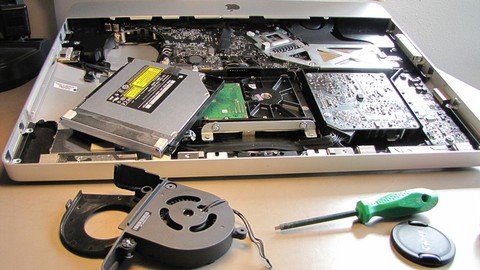
How to disassemble, clean, upgrade & build laptop computer
Genre: eLearning | MP4 | Video: h264, 1280x720 | Audio: AAC, 44.1 KHz
Language: English | Size: 1.74 GB | Duration: 1h 25m
Computer repairing, hardware upgrade, build computer, build your own pc, computer building, pc building, build computer


What you'll learn
How to disassemble and assemble laptops;
How to professionally clean laptops and their motherboards,
Learn laptop motherboard parts and components,
How to upgrade the laptop motherboard for better performance
Learn how to maintain your laptop in good state;
Learn how to add thermal compound to the CPU, GMCH and graphic card;
Learn many tips and tricks about laptop repairing.
Description
9 Reasons why you should choose this course
The course will teach you How to disassemble, clean, upgrade & build laptop computers step by step.
The course is created with perfect care by a computer engineer;
The course is not long, so you can complete it in a short time;
Your inquiries will be answered in a short time with a full explanation of any question;
A certificate will be provided upon completion of the course;
You going to understand everything you need to know about how to maintain your laptop;
You going to learn how to disassemble any laptop whatever its type,
You going to learn how to upgrade laptop motherboard for better performance;
I'm going to teach you how to assemble and build laptop computers step by step and much more.
Topics that we will be discussing in this course are
How to disassemble, clean, upgrade & build laptop computer;
How to assemble DUO 2 CORE laptop step by step;
How to assemble I7 laptop step by step;
How to upgrade the CPU or the Processor for the laptop;
How to upgrade the RAM for the laptop;
How to upgrade the storage for the laptop;
How to upgrade the BIOS for the laptop and much more.
I'm going also to teach you many tips and tricks that will make you a hardware professional and have a deep understanding of motherboard repairing.
I will guide you step by step with an easy explanation along this course.
If you are interested in one of the points we talked about before, then this course is for you.
So what are you waiting for?
Enroll now and join us.
I'll love to see you in the class.
Who this course is for
Hardware students and technicians;
Anyone who want to learn how to maintain and repair their own laptop.
Screenshots


ZPFXL7di1KZoVfuarroNMErp0chnrne0.jpg

Interview and Survival Skills in the Corporate World
MP4 | Video: h264, 1280x720 | Audio: AAC, 44.1 KHz
Language: English | Size: 672 MB | Duration: 1h 35m
To get into the corporate world and survive in it
What you'll learn​

Discover how to understand your super talent from your personality
Guide to answer interview questions in using your super talent to bring value to the company
Multiple resources to help you in resume writing and prepare for interview
Step by Step on how to prepare for video resume including script
Survive in the corporate world by recognizing who is your friend, enemy and friendenemy
How to get good performance review
Learn, unlearn and relearn to thrive in the corporate work
Requirements
Commitment to learn each module
Description
To go through an interview successfully and getting hire is not the Disney ending to your career story. In fact your career story had just begin where you will need to learn how to survive and thrive in the corporate environment.
There are many courses which talk about preparing for interview extensively however there is not much being discussed what happen when you get into the workforce or join the corporate world.
I have created this course base on my interest in personal development and my 30 years experience in the corporate world as a hiring manager and seeing many young professional struggle to fit into the challenging fast moving and even dealing with unreasonable bosses.
This compact course is designed to prepare college graduate and young professionals to enter the workforce and what to expect in the corporate. It starts with job application process, interview preparation, how to create linkedin profile, follow by your first job which guide you to survive in the new corporate environment, understanding different management style of a manager, recognizing friends and enemy. There will also be content on guideline on get good performance review and learn, unlearn and relearn to apply your knowledge well in working environment.
Who this course is for
Individual who wants to stand out in interview
Individual who wants to have unique idea of answering interview question match with personality
Individual who would like to understand corporate world better to survive in it
Screenshots


6271143b-77bb-45b3-9868-8a9b9a3ec561.png

Intro to AI for Gen Z
MP4 | Video: h264, 1280x720 | Audio: AAC, 44.1 KHz, 2 Ch
Genre: eLearning | Language: English | Duration: 18 lectures (59m) | Size: 319.4 MB

Become an Expert in the Future of Artificial Intelligence
What you'll learn
Understand what artificial intelligence is and how its changing the world around us.
Conceptualize problems inside and outside AI, how they arise, and what they mean.
Understand the intricate world of job automation and how it affects those who are unprepared.
Explore the alternate pathways that you must take in order to succeed in a world dominated by AI.
Requirements
No programming experience needed. This is a course that covers concepts, not technical skills.
A passion for learning about new technologies, the future, and how our world will change.
Description
This course is an extension of the book, AI for Gen Z: Data to Stop Disruption. This course is intended to inform any audience of the ramifications of artificial intelligence. We talk about things like the history of AI, the goals of the technology, the dilemmas of AI (bias, transparency, explainability), responsible use cases of AI (privacy, trust, accountability), autonomous weapons, job automation, and re-skilling and adapting. There are many avenues we take in the course but we go through them with detail, examples, research, and easily consumable content.
Why now? Well, that's difficult to say in fewer words. Realistically, AI will most likely replace most people. But those that are aware of this can change that inevitability by actionable steps presented in this course. First, however, they must understand the technology they are dealing with.
Why do you need this? Do you really understand how dangerous AI that includes bias is? Have you considered how World War 3 could start via autonomous weapons? Has your family planned for a future where automation replaces them all, leaving everyone you know and love searching for work and meaning? Chances are, you haven't. Luckily, you found this course. Luckily, you are looking to take massive steps forward in understanding artificial intelligence and cementing yourself in the marketplace. Luckily, this course talks about the ramifications of AI, the steps you need to take, and gives you everything you need for success in the future.
Who this course is for
For all members of Gen Z.
For those who find themselves stuck in an easily-replaceable career.
For those who are interested in how artificial intelligence will change the world.
For those who simply want to learn about AI for Gen Z.
Homepage


0eac5ac2-db45-41e6-8151-21231e7db7cc.png

Learn Mathematical Coding in Python
MP4 | Video: h264, 1280x720 | Audio: AAC, 44.1 KHz, 2 Ch
Genre: eLearning | Language: English + srt | Duration: 21 lectures (5h 53m) | Size: 1.16 GB

Shortest way of learning algebra, calculus, statistics, trigonometry, and linear algebra through coding in Python
What you'll learn
Pre Algebra
Algebra
Linear Algebra
Abstract Algebra
Integral Calculus
Statistics
Pure Mathematics
Differential Calculus
Graphing
Trigonometry
Regression and Data visualization
Correlation Coefficient
Latex in Python
Complex Numbers System
Applied Mathematics in Python
Probability
Matplotlib, Numpy, and Sympy
Coordinate Geometry
Applied Mathematics
Functional Mathematics
Requirements
Internet connection
Interest in learning new things
Description
Description
Learn Mathematical Coding in Python
In this course, you will learn mathematics through coding in Python. We will start from basics mathematical coding in python and end by using the teaching techniques "Maxims of the teaching"(simple to abstract). In the beginning, we will do simple math algorithms and formulas in Python. We will also use the screen board before coding in python to illustrate the concepts and understanding of definitions and examples. After an hour by dipping in the course, you will jump toward the next level of learning. Then we will switch our techniques from basics math to algebra. Algebra coding is super interesting in Python. We will define the algebra topics by examples and code them in Python. Graphing of different algebraic equations is one of the extra interesting parts of this section.
Our next will be linear algebra, We will master matrices, determinants, Gauss method, linear combination, basis, and vectors, norms, linear dependence, and independence.
In statistics, you will learn to mean, mode, median, standard deviation, regression, and correlation analysis for both group and ungrouped data by coding in Python. We will also learn about probability along with statistics.
Calculus: is an advanced topic and here we will master limits and continuity, differentiation, integration, plane curve problems, and coordinate geometry by coding in Python.
Sketching: We have learned to sketch mathematical functions at high school but do you know how this is super interesting in Python by using Python libraries like Matplotlib and Numpy.
Trigonometry: We shall learn the trigonometric identities, angles in radian, and degree through coding in Python
Regression and Correlation Analysis: Here we shall learn the coding of regressional and correlational data in Python. We will plot the scattering curves as well to show the data visualization in Python.
Complex Numbers System: A comprehensive discussion has been made about complex number systems. How to add, subtract, multiply, and how to find the argument of complex numbers through coding in Python.
Latex in Python: This section includes the abstract equation in Python. Latex is another library of Python. How to write mathematics in Python. We shall do a comprehensive discussion in this section.
Course Objective
1. We want o give the next level of understanding of mathematics from casual calculation to the use of Python.
2. Learning new techniques of learning mathematics.
3. Explanation of simple and easy concepts by the use of Python
4. Making learning possible for every student to learn mathematics.
5. New exploration for all levels of learners.
Who this course is for
Maths lover in python
Homepage


Zurück
Oben Unten