• Regeln für den Video-Bereich:

    In den Börsenbereich gehören nur Angebote die bereits den Allgemeinen Regeln entsprechen.

    Einteilung

    - Folgende Formate gehören in die angegeben Bereiche:
    - Filme: Encodierte Filme von BluRay, DVD, R5, TV, Screener sowie Telesyncs im Format DivX, XviD und x264.
    - DVD: Filme im Format DVD5, DVD9 und HD2DVD.
    - HD: Encodierte Filme mit der Auflösung 720p oder darüber von BluRay, DVD, R5, TV, Screener sowie Telesyncs im Format x264.
    - 3D: Encodierte Filme von BluRay, die in einem 3D Format vorliegen. Dies gilt auch für Dokus, Animation usw.
    - Serien: Cartoon/Zeichentrick, Anime, Tutorials, Dokumentationen, Konzerte/Musik, Sonstiges sind demnach in die entsprechenden Bereiche einzuordnen, auch wenn sie beispielsweise im High Definition-Format oder als DVD5/DVD9/HD2DVD vorliegen. Ausnahme 3D.
    - Bereich Englisch: Englische Releases gehören immer in diesen Bereich.
    - Bereich Talk: Der Bereich, in dem über die Releases diskutiert werden kann, darf, soll und erwünscht ist.


    Angebot/Beitrag erstellen

    - Ein Beitrag darf erst dann erstellt werden, wenn der Upload bei mindestens einem OCH komplett ist. Platzhalter sind untersagt.
    - Bei einem Scenerelease hat der Threadtitel ausschließlich aus dem originalen, unveränderten Releasenamen zu bestehen. Es dürfen keine Veränderungen wie z.B. Sterne, kleine Buchstaben o.ä. vorgenommen werden. Ausnahme Serienbörse:
    - Bei einem Sammelthread für eine Staffel entfällt aus dem Releasename natürlich der Name der Folge. Beispiel: Die Simpsons S21 German DVDRip XviD - ITG
    - Dementsprechend sind also u.a. verboten: Erweiterungen wie "Tipp", "empfehlenswert", "only", "reup", usw. / jegliche andere Zusatzinformation oder Ergänzung, welche nicht in obiger Beschreibung zu finden ist.

    Aufbau des Angebots und Threadtitel

    Der Titel nach folgendem Muster erstellt zu werden. <Name> [3D] [Staffel] [German] <Jahr> <Tonspur> [DL] [Auflösung] <Quelle> <Codec> - <Group>
    Beispiel: The Dark Knight German 2008 AC3 DVDRip XviD - iND
    Beispiel: The Dark Knight 2008 DTS DL BDRip x264 - iND
    Beispiel: The Dark Knight 2008 AC3 DL BDRip XviD - iND
    Beispiel: The Dark Knight German 2008 AC3 720p BluRay x264 iND
    Beispiel: The Dark Knight 2008 DTS DL 1080p BluRay x264 iND
    Beispiel: Die Simpsons S01 German AC3 DVDRip XviD iND
    Beispiel: Die Simpsons S20 German AC3 720p BluRay x264 iND
    Beispiel: Sword Art Online II Ger Sub 2014 AAC 1080p WEBRip x264 - peppermint
    Entsprechend sind also u.a. verboten: Sonderzeichen wie Klammern, Sterne, Ausrufezeichen, Unterstriche, Anführungszeichen / Erweiterungen wie "Tipp", "empfehlenswert", "only", "reup", usw. / jegliche andere Zusatzinformation oder Ergänzung, welche nicht in obiger Beschreibung zu finden ist
    Ausnahmen hiervon können in den Bereichen geregelt sein.

    Die Beiträge sollen wie folgt aufgebaut werden:
    Überschrift entspricht dem Threadtitel
    Cover
    kurze Inhaltsbeschreibung
    Format, Größe, Dauer sind gut lesbar für Downloader außerhalb des Spoilers zu vermerken
    Nfo sind immer Anzugeben und selbige immer im Spoiler in Textform.
    Sind keine Nfo vorhanden z.B. Eigenpublikationen, sind im Spoiler folgende Dateiinformationen zusätzlich anzugeben :
    Quelle
    Video (Auflösung und Bitrate)
    Ton (Sprache, Format und Bitrate der einzelnen Spuren)
    Untertitel (sofern vorhanden)
    Hosterangabe in Textform außerhalb eines Spoiler mit allen enthaltenen Hostern.
    Bei SD kann auf diese zusätzlichen Dateiinformationen verzichtet werden.

    Alle benötigten Passwörter sind, sofern vorhanden, in Textform im Angebot anzugeben.
    Spoiler im Spoiler mit Kommentaren :"Schon Bedankt?" sind unerwünscht.


    Releases

    - Sind Retail-Release verfügbar, sind alle anderen Variationen untersagt. Ausnahmen: Alle deutschen Retail-Release sind CUT, in diesem Fall sind dubbed UNCUT-Release zulässig.
    - Im Serien-Bereich gilt speziell: Wenn ein Retail vor Abschluss einer laufenden Staffel erscheint, darf diese Staffel noch zu Ende gebracht werden.62
    - Gleiche Releases sind unbedingt zusammenzufassen. Das bedeutet, es ist zwingend erforderlich, vor dem Erstellen eines Themas per Suchfunktion zu überprüfen, ob bereits ein Beitrag mit demselben Release besteht. Ist dies der Fall, ist der bereits vorhandene Beitrag zu verwenden.
    - P2P und Scene Releases dürfen nicht verändert oder gar unter einem iND Tag eingestellt werden.


    Support, Diskussionen und Suche

    - Supportanfragen sind entweder per PN oder im Bereich Talk zu stellen.
    - Diskussionen und Bewertungen sind im Talk Bereich zu führen. Fragen an die Uploader haben ausschließlich via PN zu erfolgen, und sind in den Angeboten untersagt.
    - Anfragen zu Upload-Wünschen sind nur im Bereich Suche Video erlaubt. Antworten dürfen nur auf Angebote von MyBoerse.bz verlinkt werden.


    Verbote

    - Untersagt sind mehrere Formate in einem einzigen Angebotsthread, wie beispielsweise das gleichzeitige Anbieten von DivX/XviD, 720p und 1080p in einem Thread. Pro Format, Release und Auflösung ist ein eigener Thread zu eröffnen.
    - Grundsätzlich ebenso verboten sind Dupes. Uploader haben sich an geeigneter Stelle darüber zu informieren, ob es sich bei einem Release um ein Dupe handelt.
    - Gefakte, nur teilweise lauffähige oder unvollständige Angebote sind untersagt. Dies gilt auch für eigene Publikationen, die augenscheinlich nicht selbst von z.B. einer DVD gerippt wurden. Laufende Serien, bei denen noch nicht alle Folgen verfügbar sind, dürfen erstellt und regelmäßig geupdatet werden.
    - Untersagt sind Angebote, welche nur und ausschließlich in einer anderen Sprache als deutsch oder englisch vorliegen. Ausnahmen sind VORHER mit den Moderatoren zu klären.


    Verstoß gegen die Regeln

    - Angebote oder Beiträge, die gegen die Forenregeln verstoßen, sind über den "Melden"-Button im Beitrag zu melden.
  • Bitte registriere dich zunächst um Beiträge zu verfassen und externe Links aufzurufen.

*** Bestes IPTV *** bester Preis *** gratis Test ***


Englische Tutorials

IxfMfY7IzYev1PacYrpd3b7keDCFgyrE.jpg

Master Python For Data Science In 2022
Genre: eLearning | MP4 | Video: h264, 1280x720 | Audio: AAC, 44.1 KHz
Language: English | Size: 6.08 GB | Duration: 13h 41m
Learn To Use Python To Manipulate Data And Draw Insights From It

What you'll learn
Python Basics concepts
Python Intermediate concepts
Python Advanced concepts
Python Numpy
Python Pandas
Python Matplotlib
Python Assignments and Exercises
Requirements
This is complete beginner to advanced concepts and there is prerequisite required to take the course
Description
By far, Python is one of the most sought after programming languages in the world. The stackoverflow 2020 survey report suggests that majority of Data Analysts, Data Scientist, Machine Learning engineers as well as Artificial Intelligence engineers prefer to use Python in the industry to complete their task.
Not only do employers prefer Python programming language, employers are also keen to employ applicants with python and analytical skills. They are even willing to pay these skilled individuals with a salary hike.
In this course, you will master the core concepts of Python and learn how to use it in your job place.
We have carefully put together this course to help you easily learn and practice python.
Learn Python For Data Science & Analytics
Learn how to use Python for Data Analysis, Data Science, Machine Learning, Artificial Intelligence, Buisiness Analysis, etc.
Become A Python Programmer.
From beginner to advanced Python professional.
Learn Robust Python Libraries such as
Numpy
Pandas
Matploblib
Seaborn
Learn to use python to perform
Univariate Data Analysis
Bivariate Data Analysis
Multivariate Data Analysis
Data Cleaning
Data Manipulations
Data Munching
Exploratory Data Analysis (EDA)
Data Munching
Hands-on Projects and Exercises
This is a complete beginner to Advanced level course and you will be taken right from the basics step-by-step to advanced level.
Learn from experienced professionals.
Who this course is for
Students who want to learn Python programming
Anyone who wants to use Python for Data Science
Anyone who wants to use Python for Data Analysis
Anyone who wants to Python For Cleaning and drawing insights from data
Anyone who wants to know more about Python programming
Screenshots


yli8YvYdKRxBJTdc6Bg3o3qDMT9bwVGB.jpg

Microsoft Teams for Professionals
Genre: eLearning | MP4 | Video: h264, 1280x720 | Audio: AAC, 44.1 KHz
Language: English | Size: 1.82 GB | Duration: 1h 36m
BEGINNER TO PRO

What you'll learn
Get comfortable with the fundamentals of Microsoft Teams, the interface and the functionality.
Working in Teams day to day, activity feed, chatting, running and attending meetings.
Stay organized with your files, contacts, manage your calendar and tasks.
Integrate Teams with Outlook and other apps to boost your productivity and save time.
Requirements
No Microsoft Teams experience necessary. Everything is covered in detail.
Description
Learn Microsoft Teams as a professional. Are you using Microsoft Teams every day at work (or are about to use it)? This course is going to walk you through the entire Microsoft Teams application and teach you how to make the most of all of its features: chat, meetings, organizing your team, the activity feed, sharing resources in Teams, PowerPoint integration and Outlook integration.
I have been teaching the entire suite of Microsoft applications for many years privately, to my corporate clients and on YouTube. I have an easy to follow pace and provide all the necessary information on a topic, and no more!
If you are new to Microsoft Teams or are looking to expand your expertise, this detailed course taught by a Microsoft Certified Master Instructor will get you up to speed in no time.
This course takes a progressive approach. We start off with an overview of the Teams interface, finding out where stuff is, what it's called and why it's there.
Then we take a look at the Activity Feed and why you should start your morning there. We move on to Teams Chats, one-on-one chats or group chats. Then I show you how to start a video call.
Teams Meetings takes up a good portion of my course, because we do spend a lot of time in meetings, so we look at scheduling meetings, the meeting controls, roles in a meeting, sharing content and more.
Finally, we go through Microsoft Teams integrations with external applications - PowerPoint or Outlook, as well as Apps from the Teams Apps marketplace.
Further, the course is frequently updated with new sessions. Microsoft Teams changes fast, new features are being added every month and sometimes it can be hard to keep up. I will be updating this course with new sessions frequently and this way, you will always be up to speed with what's new, what's changed and the best practices for making the most out of your Microsoft Teams.
Who this course is for
Business professionals and teams that want to stay productive and in sync using the Microsoft ecosystem.
Screenshots


fNPXW2aaWf6GgbLVZMVIw5QJxSiQWxLL.jpg

NextJS and Firebase - Learn Auth and CRUD Operations
Genre: eLearning | MP4 | Video: h264, 1280x720 | Audio: AAC, 44.1 KHz
Language: English | Size: 733 MB | Duration: 1h 15m
In this course, we are going to Learn about Authentication and CRUD Operations with NEXT App and Firebase!

What you'll learn
Next JS
Firebase
CRUD Operations in Next JS
Firebase Firestore and Authentication
Requirements
Advance JavaScript
Intermediate React
Description
Hello, I am Nishant and I am an enthusiastic developer with a knack for building products with good UI and UX. I teach Front-end Development to beginners, and some other things too. I build projects to learn how code works And while I am not coding, I enjoy writing poetry and stories and cooking delicious meals.
In this course, we cover all the steps from creating an app in NextJS and Firebase authentication.
We will start by initializing the NextJS App.
We will learn how to initialize Firebase
How to catch errors.
Session-based authentication
How to create Protected Routes using Next Router.
How to use Firebase functions for Login, Sign up, and Log out.
How to implement Google and Github Sign up in easy steps.
How to store Auth token in Session Storage
How to Read data from Firebase Firestore
How to Create data from Firebase Firestore
How to Update data from Firebase Firestore
How to Delete data from Firebase Firestore
This course is for you if you are
Anyone who is interested in learning NextJS
Anyone who is interested in learning Firebase
Beginner React.
Beginner Front-end developers.
Beginner Full Stack Developers.
Beginner Mobile Developers.
Beginner JavaScript Developers.
Intermediate Front-end Developers.
Intermediate React Developers
Beginner HTML/CSS Developers
Intermediate HTML/CSS Developers
Beginner Backend Developers
Intermediate Backend Developers
Who this course is for
Frontend developers eager to learn
Full Stack Developers
Screenshots


2KUrqPwYltbbFTnO00qntQQfEsHFX3kc.jpg

PLC Training - RSLogix 5000 & Studio 5000 | Basic + Advanced
Genre: eLearning | MP4 | Video: h264, 1280x720 | Audio: AAC, 44.1 KHz
Language: English | Size: 2.91 GB | Duration: 3h 0m
Become an EXPERT in Rockwell Software - Controllogix and Compactlogix - Start today Get earn a BONUS (FTView Basics)

What you'll learn
Rockwell Automation - Studio 5000
Rockwell Automation - RSlogix 5000
FactoryTalk View Basics
You'll learn how to be the best PLC Programmer, Best Practices
Requirements
Be able use computer
It wants to learn PLC Programming.
Description
Dive in deep with us on Rockwell Automation solutions. This course will give you a deep understanding of the core values needed to be able to program, troubleshooting on Rockwell Automation PLC controls with RSlogix 5000 or Studio 5000
Some questions that in this course we'll answer
How can I setup my PLC in Ethernet network to communicate with others PLC's?
=> Ethernet/IP COMM
=> What's firmware revision?
=> What's the difference between RSLogix 5000 and Studio 5000?
=> Digital and Analog Inputs and Outputs
=> Template with Pump Station PLC Logic created on Studio 5000 Version 32.
=> Creating PLC logic with ADD-ON Instructions between Controllogix and Powerflex 525
=> To assist with this effort as will which is Online PLC Support
As part of making this course the best, I will be adding revisions or videos from time to time to add more sections but as it sits right now there is over 15 hours of video training about RSLogix 5000 and Studio 5000 controls.
I have a very successful YouTube channel about PLC programming and run a website.
The instructor was employee on Rockwell Automation and still designing several projects around USA.
Learn with who it worked at Rockwell Automation and can advise in everything that you need related to RSLogix or Studio 5000.
Who this course is for
Engennering
Screenshots


1SEPj6BhLKN2Vl50eUklAaJMBcWV3sqm.jpg

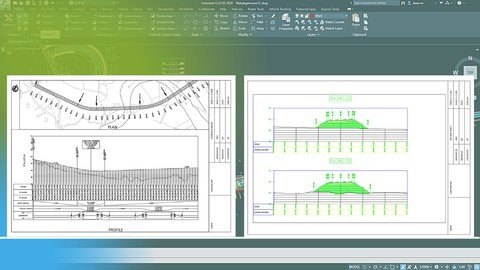
Plotting Civil 3D Road Designs - Beginner's Guide
Genre: eLearning | MP4 | Video: h264, 1280x720 | Audio: AAC, 44.1 KHz
Language: English | Size: 1.22 GB | Duration: 2h 2m
Plan Production with AutoCAD Civil 3D


What you'll learn
Create title box and viewports to match paper sizes
Create plan profile sheets and cross section sheets
How to get proper print (plot) output from Civil 3D road designs
Various tips and tricks related to Civil 3D
Requirements
If you have followed my course 'Road Design With Civil 3D' it will be a good starting point. Further you need to have certain idea on basic AutoCAD functions like working with layers.
Know the AutoCAD basics of plotting will be an added advantage.
Description
In this course, we will be looking at how to plot road design drawings with AutoCAD Civil 3D. This course is created more related to a Highway Engineering background.
The version used in this course is Civil 3D 2020. However, you can use Civil 3D 2018 to 2022 to follow this course.
This course is an addon to my previous course 'Road Design with AutoCAD Civil 3D'. Learning the content of that course would give you a better idea to follow this course.
Knowing the basics of AutoCAD such as layer management would be an added advantage while following this course.
Even though the course is intended for beginners, students at all levels can use this to get to know about plan production tools in Civil 3D. Not only plan production tools I will be teaching you various tips and tricks of using AutoCAD Civil 3D throughout the course.
The course content is as follows.
1. Create Title Block
2. Create page setup
3. Create View Ports
4. Set Scales for viewports
5. Add North Arrow
6. Add Drawing Details
7. Save Layout as a template
8. Create View Frames
9. Create Sheets
10. Modify Sheets
11. Understanding Plan Production Process
12. Export Drawing AutoCAD
13. Plotting Plan Profile Sheets
14. Create Section Sheet Template
15. Create Section Sheets Part 1
16. Create Section Sheets part 2
17. Plotting Section Sheets
Who this course is for
Engineers, Draughtsman, CAD operators
Any who use road design with Civil 3D
Screenshots


Ma6qHjwjaqhkJAvCxlSOQwL1bC4Hmllm.jpg

Printed Circuit Boards (PCBs) For Electrical & Electronics
MP4 | Video: h264, 1280x720 | Audio: AAC, 44.1 KHz
Language: English | Size: 284 MB | Duration: 34m
Hardware (Module I)​

What you'll learn
What is PCB
Historic evolution of PCBs
Structure of PCB
How PCBs are categorized based on the number of layers
How PCBs are categorized based on the level of flexibility
How PCBs are categorized based on the mounting techniques it utilizes
How PCBs are categorized based on the material used to form its structure
Multiwire PCBs
Cross talk in PCBs
Recommendations to minimize Crosstalk in PCBs
Top 10 reasons for PCB issues and failures
Requirements
No prior knowledge needed nor you need any software skills
Description
About me
Hello ,
My name is "Riya Pal" . I am Electronics Engineer by profession .
1) I have 9+ years experience in the field of
- Thermal management.
- Power electronics .
- Heat sink designing .
- Computer Architecture & Programming languages .
And had
2) Published 9 research papers at international level.
3) Currently , I teach Power Electronics .
4) Apart from this , I also handle projects for students and does seminars on Power Electronics .
About this course
This course - "Printed Circuit Boards (PCBs) For Electrical & Electronics - Module 01" is designed/framed in such a way that even the non-technical person will easily be able to understand the concepts explained in this course. With simple explanations and proper images you will be able to understand every lectures of this course .
Apart from understanding what a PCB is, you will go through the PCB evolution . This will help you in understanding how the PCBs came into existence.
You will also learn about the structure of the PCB and importance of every part of the PCB.
Under the session of PCB classification, you will learn how the PCBs are categorized based on the number of layers it has , based on the level of flexibility it supports, based on the component mounting techniques it utilizes and also based on the materials used to form the PCB board structure.
You will also understand what is multi-wire PCB and its applications.
Apart from this I will make you understand what is cross-talk problem and how to reduce or eliminate this issue.
Last but not the least you will go through all the top 10 reasons for PCB issues and failures such as - platting void , emi issue , emc issue , acid trap , copper to edge clearance , missing trace , components dislodge issue , aging , lack of DFM check and much more.
Who this course is for
Those who want to know /learn about PCBs
Screenshots


UIvoc0ja50eRI21Aoh2bSENIHqzeaDpS.jpg

PyTorch The Complete Guide 2022
Genre: eLearning | MP4 | Video: h264, 1280x720 | Audio: AAC, 44.1 KHz
Language: English | Size: 3.81 GB | Duration: 9h 31m
Learn how to create state of the art neural networks for deep learning with Facebook's PyTorch Deep Learning library!

What you'll learn
Pandas
Pytorch
Numpy
Artificial Neural Networks (ANN)
Generative adversarial network (GAN)
Convolution Neural Network (CNN)
Recurrent Neural Network (RNN)
Google Colab .
Matplotlib.
Long Short Term Memory (LSTM)
Language Model
Reinforcement Learning
OpenAI Gym
Requirements
There will be no Prerequisites.
Basic knowledge of Python will be good.
But everything will be taught from the round up.
Description
Welcome to the best online course for learning about Pytorch!
Although Google's Deep Learning library Tensorflow has gained massive popularity over the past few years, PyTorch has been the library of choice for professionals and researchers around the globe for deep learning and artificial intelligence.
Is it possible that Tensorflow is popular only because Google is popular and used effective marketing?
Why did Tensorflow change so significantly between version 1 and version 2? Was there something deeply flawed with it, and are there still potential problems?
It is less well-known that PyTorch is backed by another Internet giant, Facebook (specifically, the Facebook AI Research Lab - FAIR). So if you want a popular deep learning library backed by billion dollar companies and lots of community support, you can't go wrong with PyTorch. And maybe it's a bonus that the library won't completely ruin all your old code when it advances to the next version. ;)
On the flip side, it is very well-known that all the top AI shops (ex. OpenAI, Apple, and JPMorgan Chase) use PyTorch. OpenAI just recently switched to PyTorch in 2022, a strong sign that PyTorch is picking up steam.
In this course you will learn everything you need to know to get started with Pytorch, including
NumPy
Pandas
Tensors with PyTorch
Neural Network Theory
Perceptrons
Networks
Activation Functions
Cost/Loss Functions
Backpropagation
Gradients
Artificial Neural Networks
Convolutional Neural Networks
Recurrent Neural Networks
and much more!
By the end of this course you will be able to create a wide variety of deep learning models to solve your own problems with your own data sets.
So what are you waiting for? Enroll today and experience the true capabilities of PyTorch! I'll see you inside the course!
Who this course is for
Anyone interested in Machine Learning.
Students who have at least high school knowledge in math and who want to start learning Machine Learning, Deep Learning, and Artificial Intelligence
Any intermediate level people who know the basics of machine learning, including the classical algorithms like linear regression or logistic regression, but who want to learn more about it and explore all the different fields of Machine Learning, Deep Learning, Artificial Intelligence.
Any people who are not that comfortable with coding but who are interested in Machine Learning, Deep Learning, Artificial Intelligence and want to apply it easily on datasets.
Any students in college who want to start a career in Data Science
Any data analysts who want to level up in Machine Learning, Deep Learning and Artificial Intelligence.
Any people who are not satisfied with their job and who want to become a Data Scientist.
Any people who want to create added value to their business by using powerful Machine Learning, Artificial Intelligence and Deep Learning tools. Any people who want to work in a Car company as a Data Scientist, Machine Learning, Deep Learning and Artificial Intelligence engineer.
Any people who want to create added value to the local hospital by using powerful Machine Learning, Artificial Intelligence and Deep Learning tools.
Any people who want to work in healthcare field as a Data Scientist, Machine Learning, Deep Learning and Artificial Intelligence engineer.
Any people who want to work in a Taxi Company as a Data Scientist, Machine Learning, Deep Learning and Artificial Intelligence engineer.
Screenshots


th_gCuEzvqxaokkUdgKVlwzouKF6TkJblc6.jpg

Simplify Your Life With a Bullet Journal - Learn How With Me
MP4 | Video: h264, 1280x720 | Audio: AAC, 44.1 KHz, 2 Ch
Genre: eLearning | Language: English + .srt | Duration: 28 lectures (2 hour, 44 mins) | Size: 3.16 GB


There are a lot of reasons to create and use a bullet journal, from wanting to become more organized, to looking for a m
What you'll learn
Bullet Journaling is the hot topic right now - WHY- because it just makes sense.
In this course you will learn how to set up your own journal
You will learn how to best use your journal
You will learn how to grow your journal as you become more experienced with the process
All this is done in a step by step process, take it as fast or as slow as time allows using templates that I have provided
Requirements
It will be helpful but not necessary if you have access to a printer and quality paper. I provide 10 templates to help you get started but you will need to be able to print them. Again, it is not necessary just a time saver.
Description
There are a lot of reasons to create and use a bullet journal, from wanting to become more organized, to looking for a more interactive planner.
Bullet journaling, created by a New York-based designer named Ryder Carroll, is a new twist on journal writing. The intended goal was to plan future events, keep track of things that happened in the past and organize things in the present.
This type of journal combines the best of planning, journal writing, creating to-do lists, and tracking important events in your calendar. It is a fully customizable type of planner that provides benefits like
Giving you multiple views for your daily, weekly and monthly calendars
Providing a quick and easy way to keep your life organized
Allowing you plenty of space for to-do and tasks lists
Simplifies your life for optimal success
Gives you an overview of your priorities
Makes it easy to customize it to fit your needs
The bullet journal is ideal not just for someone who loves using a planner, but also someone who wants the benefits of a journal, but doesn't enjoy writing. Everything is done in a rapid logging method, reducing how much writing is actually done in the journal.
You may have searched the Internet to understand more about bullet journaling. In this course you will learn what bullet journaling is, how to effectively use it, and learn how to make the most out of the technique. Bullet journaling is a lifestyle change because it changes your behavior about writing, organizing and priorities. However, the changes for the better are worth it and much more. I have even included 10 journal templates you can download and make your own as you build your Bullet Journal.
Who this course is for
If you really want to get organized, stop missing appointments, forgetting important events or just wish you had a way to check back on something you did a year ago then this course is for you.
Screenshots


007da4fc_medium.jpg

Smart Tips: Financial Analysis
MP4 | Video: h264, 1280x720 | Audio: AAC, 44.1 KHz, 2 Ch
Genre: eLearning | Language: English | Duration: 45 lectures (4h 8m) | Size: 2.2 GB

Understand and communicate the fundamentals of financial analysis, important ratios & Excel formulas to shine at work
What you'll learn
Navigate through Financial Reports with Ease
Create Financial Statements from Scratch
Analyze a Company's Performance Based on its Annual Report
Prepare Forecasts and Use Regression Analysis to Make Predictions
Knowledge of all Essential Excel Functions & Features Required for Financial Analysis
Understand Variance and Standard Deviation Calculations with Practical Examples
Requirements
A Computer with Microsoft Excel
Familiarity with basic Excel features and formulas
Willingness to learn. Let's do this!
Description
This Smart Tips course provides an introduction to financial analysis, covering several topics, which are fundamental for every aspiring Financial Analyst.
You'll get short focused lectures about different aspects of financial analysis. Because the lectures are short, you'll be able to learn fast, so that you can immediately apply it to your work. The tutorials in this course are standalone. That means you don't have to watch in any particular order. If you're searching for a specific topic that's relevant for you, take a look through the available tips to find the knowledge you need when you need it. So feel free to jump around as you like.
Here are the topics we cover
Overview of the main financial statements and how to create an income statement, balance sheet and cash flow statement from scratch. You'll also learn how to use ratios to conduct a comprehensive analysis to assess the overall financial condition and performance of a company.
The most important Excel formulas and functions as well as important Excel features a good financial analyst needs to work with. You'll lean how to use Excel Pivot Tables to quickly summarize data and create charts to visualize the results effectively.
Important concepts in financial analysis such as the time value of money, discounted cash flows, NPV and annuities. You'll learn various techniques to forecast and apply regression analysis to make predictions.
Get started now! This is the course for busy professionals to learn fast and make a lasting impression at work
Who this course is for
Students who want a successful career in Finance
Anyone who wants to learn the necessary techniques for Financial Analysis
Homepage


008d1144_medium.jpg

SQL Server: The 28 hour Masterclass course (16 courses in 1)
MP4 | Video: h264, 1280x720 | Audio: AAC, 44.1 KHz, 2 Ch
Genre: eLearning | Language: English + srt | Duration: 395 lectures (28h 17m) | Size: 13.8 GB

Learn how to become a future developer, or either a future DBA, or a performance expert on SQL Server with 150 exercices
What you'll learn
Learn the SQL language from A to Z (10 hours of lessons).
To administer an SQL server ( 13 hours of lessons ).
Greatly improve the performance of your SQL Server engine ( 4 hours of lessons ).
And take a virtual interview at the end of the course with these 40 questions and 40 answers!
+ 80 practical exercises are in this course to consolidate your knowledge!
In short, become a real expert on SQL server (and that's very much in demand).
Requirements
Have a great desire to learn, and a computer in great shape
Description
Stop ruining yourself by buying courses and switch to a subscription you will make serious savings !!!
◉ All my training catalogue is on Podia for a subscription of only 4 euros per month or 35 euros per year (more economical)
◉ If you are interested in this great offer contact me to
◉ Otherwise, if you are interested in this course for a price between 12 and 16 euros, please send me an email to
Average score for all these courses 4.5/5!!!
Welcome to the richest and most comprehensive course on the Udemy platform about SQL Server.
This course lists the 16 courses in my catalogue
SQL Server for complete beginners (7 hours of practice + 80 practical exercises)
Learn the in-demand job of developer SQL
The Complete SQL Server 2019 Database Administration Course
SQL Server 2019 : Administration SQL Server Part 1
SQL Server 2019 : Administration SQL Server Part 2
SQL Server 2019 : Administration SQL Server Part 3
The complete course about BACKUP and RESTORE
Detecting and Correcting Database Corruption
SQL Server: Configuring and modifying a database on SQL
99 queries to master SQL in less than 4 hours!
SQL Server: The complete course on Indexes
Learn the in-demand job of DBA SQL Server
SQL Server: Security and Privilege Management
Come and challenge the Transact SQL with these 50 exercises
Joins, partition functions, and CTE in Transact SQL 2019.
Prepare your future interview on SQL Server (with these 40 questions and 40 answers ! )
I challenge you to find in a single course these 3 very important chapters on SQL Server
◉ Chapter 1 : Transact SQL for the absolute beginner and also experienced developers (10 hours of class)
Let's start by installing SQL Server and management studio on your workstation.
The creation and definition of a database and a table.
Let's start playing with data with SELECT,UPDATE,INSERT and DELETE
Discover the column aliases and tackle the specificity and secrets of LIKE and TOP.
Learn how to remove duplicates with the DISTINCT and discover the Comparison operators = != and Copying a table with the SELECT INTO.
Let's talk about the IN, NOT IN, IS and IS NOT operators, and Sort your data with ORDER BY.
Discover aggregate functions with MIN MAX and AVG and the two operators AND,OR.
Let's discover the specificity of COUNT and SUM and how to SELECT a range of data with the BETWEEN and Group several results with the GROUP BY
A long chapter of 1h30 minutes on JOINS with INNER JOIN,LEFT/RIGHT JOIN FULL OUTER JOIN and so on..
Let's discover the specificity of UNION and UNION ALL, and the LEFT and RIGHT function.
Let's go even further with Transact SQL with the IIF,CASE WHEN,OFFSET FETCH NEXT ROWS and CHOOSE.
Let's look at the conversion functions through CAST and CONVERT, TRY_CAST and TRY_CONVERT.
Let's approach the DATE type functions with DATEADD,DATEDIFF,GETDATE (), EOMONTH ...
Let's deepen our knowledge of TSQL even more With IF/ELSE, STRING SPLIT,STUFF,MERGE.
The creation and definition of a view and Stored Procedure,function, schéma and trigger.
A very long chapter of 1h30 minutes on RANKING functions such as ROW_NUMBER, OVER and PARTITION BY, ROWS /RANGE UNBOUNDED PRECEDING, FIRST and LAST VALUES, LAG and LEAD,ROW_NUMBER, DENSE _RANK, RANK, NTILE.
We will discover a one hour course on CTE (common table expression). So powerful and so little known (I still don't understand by the way) and the derived table.
Do you know the difference between Temporary tables, Variable tables and Global tables?
◉ Chapter 2: The complete administration of a SQL Server (11 hours of class)
Tackle BACKUP and RESTORE for 3 hours, we will see in detail in this course, how to set up a robust and reliable strategy, to guarantee your data on a production server.
In another 2 hour course, we will learn how to detect and repair corruption on a database. Did you know that Microsoft logs over 1000 support cases per day regarding corruption! And you, how would you react in case of corruption?
We will also discuss during 3 hours, the configuration and modification of your database on SQL. Did you know that a bad Autogrow set on your database, can make you lose 60% of your performance? Do you know the TRUSTWORTHY or DB_CHAINING option? Everything is covered in this course, and believe me, you will be surprised at the number of options on a DB that SQL Server offers.
Administration rhymes with precaution, and therefore of course with security. We will discuss security and privilege management during 2 hours. We will learn how to set up a robust and secure SQL server.
We will cover a long chapter on the different isolation modes (READ COMMITED, SERIALIZABLE, SNAPSHOT...), we will also see the different types of constraints (PK,FK,CHECK,UNIQUE...), as well as SEQUENCES, and IDENTITY.
We will also discuss the change data capture (CDC), many new features released on SQL Server 2016 such as Row Level Security, Dynamic Data Masking (DDM), Temporal Data.
◉ Chapter 3: How to improve performance on your production SQL server (4 hours)
If we are talking about performance, we will of course be talking about indexes. This is a good thing because it will be covered in this chapter for 4 hours. A good implementation of your indexes can really save your performance on your SQL server. I strongly advise you to look at this chapter, to perhaps avoid going into huge costs of buying servers, which may not be necessary.
Do you know SARGABLE queries? I let you discover it in this chapter, to rewrite your SQL queries, in a better way, and thus of course, better performance.
◉ Chapter 4: Come and take a virtual interview through these 40 questions and 40 theoretical answers.
Start out more confident by tackling all these theoretical questions, so that you can face an interview on SQL.
You are a Java developer or Python for example, you go to an interview, you don't really know what to review beforehand, this is a sum**** of the most frequently asked questions.
For example : What is a pri**** key ? what is an index? What is the difference between OLAP and OLTP ? Do you know the COALLESCE function ? or how do you remove duplicates with your query ?
There will be many new sections added in 2021, of course if you have already purchased this course, these new modules will be free for you
How to administer your SQL server with powershell? (3 hours of class)
Improve the performance of stored procedures (2 hours of class)
Let's go together on SQL Azure ! (3 hours of class)
Of course there are more than 100 exercises and corrections in this course.
Who this course is for
Future Database Administrators (DBA)
Developers who want to learn about SQL
BI consultants working on technologies other than SQL Server (Oracle etc...)
Students who want to get started on SQL
Tech leads (CRM, Web etc...) who want to discover SQL
Homepage
















FzAmzuM5UmcSseossXDUf9YcJQXLbp6a.jpg

The Ultimate Upwork Proposal - Get More Jobs!
Video: .mp4 (1280x720, 30 fps(r)) | Audio: aac, 48000 Hz, 2ch | Size: 2.29 GB
Genre: eLearning Video | Duration: 22 lectures (2 hour) | Language: English


Learn how to create extremely effective proposals on Upwork and get hired more often!
What you'll learn
How to Write Proposals That Get More Jobs
The 7 Elements of a Perfect Cover Letter
A Template That Doesn't Look Like a Template
The BIGGEST MISTAKE When Sending Proposals
How to Set Your Bids (and stop leaving money on the table!)
Why You're Wasting Your Proposals (and Connects)
My EMBARASSING Hack to Get Clients
A 30-Day Challenge To Get More Clients
Requirements
You need to have an active Upwork profile.
Description
As someone who's been using Upwork since 2018 with great success, I can tell you right now that learning how to write effective proposals is one the most important factors for getting hired consistently.
If you send weak proposals your chances of landing the job are very low.
Many freelancers will be applying for the same job, and your proposal is your opportunity to stand out from the rest.
In this course I'll teach you how to write a killer proposal and I'll even share my own 'Ultimate Template' that I've been using for years to land amazing clients on Upwork and earn a full-time income while working from home (or from Bali).
While it can be tempting to simply steal my template, you'll also learn all the principles and elements of writing great proposals so that you can create your own version of the Ultimate Proposal!
In this course you'll learn
How to Write Proposals That Get More Jobs
The 7 Elements of a Perfect Cover Letter
A Template That Doesn't Look Like a Template
The BIGGEST MISTAKE When Sending Proposals
How to Set Your Bids (and stop leaving money on the table!)
Why You're Wasting Your Proposals (and Connects)
My EMBARASSING Hack to Get Clients
A 30-Day Challenge To Get More Clients
...and much more!
If you're a freelancer on Upwork who wants to learn how to get more clients, charge higher rates and make more money, then you NEED to learn how to send amazing proposals.
I have more than 5,000 students on Udemy and I'm one of the highest-rated instructors in this industry - and I WISH there was a course like this when I first started freelancing...
So don't miss out on this opportunity to learn once and for all how to send effective proposals that will GET THE JOB!
See you inside,
Bruno P.
Who this course is for
Freelancers on Upwork who want to learn how to send better proposals and get more clients.
Both beginners and experts can benefit from this course.
Course content
7 sections • 22 lectures • 2h 0m total length
Screenshots


nEQBjXUQS6KxFXSxExtQfd3C72xrQ0ZY.jpg

The Nest JS Bootcamp - Complete Developer Guide
Genre: eLearning | MP4 | Video: h264, 1280x720 | Audio: AAC, 48.0 KHz
Language: English | Size: 4.08 GB | Duration: 9h 29m
Build and test production ready backend REST APIs with NestJS, Prisma, and Postgres


What you'll learn
Learn how to utilize NestJS to be a production ready REST API
Learn how to implement complex functionality like authentication and authorization
Learn how to write tests for your services and controllers
Learn all of the different entities provided in NestJS
Requirements
Basic JavaScript knowledge
Fundamental understanding of a REST API
Description
As someone that utilizes NestJS on a daily basis at work and beyond, I'd love to share everything that I've learned in this course. This is the most comprehensive NestJS course on Udemy and if you don't think so, you can request a full refund.
NestJS is a progressive NodeJS framework that will allow us to build reliable scalable, and maintainable server-side backend applications with incredible ease.
In this course, you will be building two professional applications. The first will be an Expense App, where you will learn
The fundamentals of NestJS
Different NestJS entities, like controllers, services, interceptors, pipes, and modules
NestJS best practices
In the second project, the Realtor App, we will learn about
Interacting with a Postgress database with an ORM (Prisma)
Creating a database model and performing CRUD operations
How to authenticate and identify a user
How to authorize certain endpoints for specific users
How to properly write automated tests for our services and controllers
How to create custom param decorators
Learn about advanced NestJS entities like guards and interceptors
I am very proud of this course and I really hope you take and enjoy it. If you ever need any sort of help, please send me a message on Udemy and I will always answer your questions.
Who this course is for
Beginner NestJS developers that want to become a NestJS expert
Screenshots


Zurück
Oben Unten