• Regeln für den Video-Bereich:

    In den Börsenbereich gehören nur Angebote die bereits den Allgemeinen Regeln entsprechen.

    Einteilung

    - Folgende Formate gehören in die angegeben Bereiche:
    - Filme: Encodierte Filme von BluRay, DVD, R5, TV, Screener sowie Telesyncs im Format DivX, XviD und x264.
    - DVD: Filme im Format DVD5, DVD9 und HD2DVD.
    - HD: Encodierte Filme mit der Auflösung 720p oder darüber von BluRay, DVD, R5, TV, Screener sowie Telesyncs im Format x264.
    - 3D: Encodierte Filme von BluRay, die in einem 3D Format vorliegen. Dies gilt auch für Dokus, Animation usw.
    - Serien: Cartoon/Zeichentrick, Anime, Tutorials, Dokumentationen, Konzerte/Musik, Sonstiges sind demnach in die entsprechenden Bereiche einzuordnen, auch wenn sie beispielsweise im High Definition-Format oder als DVD5/DVD9/HD2DVD vorliegen. Ausnahme 3D.
    - Bereich Englisch: Englische Releases gehören immer in diesen Bereich.
    - Bereich Talk: Der Bereich, in dem über die Releases diskutiert werden kann, darf, soll und erwünscht ist.


    Angebot/Beitrag erstellen

    - Ein Beitrag darf erst dann erstellt werden, wenn der Upload bei mindestens einem OCH komplett ist. Platzhalter sind untersagt.
    - Bei einem Scenerelease hat der Threadtitel ausschließlich aus dem originalen, unveränderten Releasenamen zu bestehen. Es dürfen keine Veränderungen wie z.B. Sterne, kleine Buchstaben o.ä. vorgenommen werden. Ausnahme Serienbörse:
    - Bei einem Sammelthread für eine Staffel entfällt aus dem Releasename natürlich der Name der Folge. Beispiel: Die Simpsons S21 German DVDRip XviD - ITG
    - Dementsprechend sind also u.a. verboten: Erweiterungen wie "Tipp", "empfehlenswert", "only", "reup", usw. / jegliche andere Zusatzinformation oder Ergänzung, welche nicht in obiger Beschreibung zu finden ist.

    Aufbau des Angebots und Threadtitel

    Der Titel nach folgendem Muster erstellt zu werden. <Name> [3D] [Staffel] [German] <Jahr> <Tonspur> [DL] [Auflösung] <Quelle> <Codec> - <Group>
    Beispiel: The Dark Knight German 2008 AC3 DVDRip XviD - iND
    Beispiel: The Dark Knight 2008 DTS DL BDRip x264 - iND
    Beispiel: The Dark Knight 2008 AC3 DL BDRip XviD - iND
    Beispiel: The Dark Knight German 2008 AC3 720p BluRay x264 iND
    Beispiel: The Dark Knight 2008 DTS DL 1080p BluRay x264 iND
    Beispiel: Die Simpsons S01 German AC3 DVDRip XviD iND
    Beispiel: Die Simpsons S20 German AC3 720p BluRay x264 iND
    Beispiel: Sword Art Online II Ger Sub 2014 AAC 1080p WEBRip x264 - peppermint
    Entsprechend sind also u.a. verboten: Sonderzeichen wie Klammern, Sterne, Ausrufezeichen, Unterstriche, Anführungszeichen / Erweiterungen wie "Tipp", "empfehlenswert", "only", "reup", usw. / jegliche andere Zusatzinformation oder Ergänzung, welche nicht in obiger Beschreibung zu finden ist
    Ausnahmen hiervon können in den Bereichen geregelt sein.

    Die Beiträge sollen wie folgt aufgebaut werden:
    Überschrift entspricht dem Threadtitel
    Cover
    kurze Inhaltsbeschreibung
    Format, Größe, Dauer sind gut lesbar für Downloader außerhalb des Spoilers zu vermerken
    Nfo sind immer Anzugeben und selbige immer im Spoiler in Textform.
    Sind keine Nfo vorhanden z.B. Eigenpublikationen, sind im Spoiler folgende Dateiinformationen zusätzlich anzugeben :
    Quelle
    Video (Auflösung und Bitrate)
    Ton (Sprache, Format und Bitrate der einzelnen Spuren)
    Untertitel (sofern vorhanden)
    Hosterangabe in Textform außerhalb eines Spoiler mit allen enthaltenen Hostern.
    Bei SD kann auf diese zusätzlichen Dateiinformationen verzichtet werden.

    Alle benötigten Passwörter sind, sofern vorhanden, in Textform im Angebot anzugeben.
    Spoiler im Spoiler mit Kommentaren :"Schon Bedankt?" sind unerwünscht.


    Releases

    - Sind Retail-Release verfügbar, sind alle anderen Variationen untersagt. Ausnahmen: Alle deutschen Retail-Release sind CUT, in diesem Fall sind dubbed UNCUT-Release zulässig.
    - Im Serien-Bereich gilt speziell: Wenn ein Retail vor Abschluss einer laufenden Staffel erscheint, darf diese Staffel noch zu Ende gebracht werden.62
    - Gleiche Releases sind unbedingt zusammenzufassen. Das bedeutet, es ist zwingend erforderlich, vor dem Erstellen eines Themas per Suchfunktion zu überprüfen, ob bereits ein Beitrag mit demselben Release besteht. Ist dies der Fall, ist der bereits vorhandene Beitrag zu verwenden.
    - P2P und Scene Releases dürfen nicht verändert oder gar unter einem iND Tag eingestellt werden.


    Support, Diskussionen und Suche

    - Supportanfragen sind entweder per PN oder im Bereich Talk zu stellen.
    - Diskussionen und Bewertungen sind im Talk Bereich zu führen. Fragen an die Uploader haben ausschließlich via PN zu erfolgen, und sind in den Angeboten untersagt.
    - Anfragen zu Upload-Wünschen sind nur im Bereich Suche Video erlaubt. Antworten dürfen nur auf Angebote von MyBoerse.bz verlinkt werden.


    Verbote

    - Untersagt sind mehrere Formate in einem einzigen Angebotsthread, wie beispielsweise das gleichzeitige Anbieten von DivX/XviD, 720p und 1080p in einem Thread. Pro Format, Release und Auflösung ist ein eigener Thread zu eröffnen.
    - Grundsätzlich ebenso verboten sind Dupes. Uploader haben sich an geeigneter Stelle darüber zu informieren, ob es sich bei einem Release um ein Dupe handelt.
    - Gefakte, nur teilweise lauffähige oder unvollständige Angebote sind untersagt. Dies gilt auch für eigene Publikationen, die augenscheinlich nicht selbst von z.B. einer DVD gerippt wurden. Laufende Serien, bei denen noch nicht alle Folgen verfügbar sind, dürfen erstellt und regelmäßig geupdatet werden.
    - Untersagt sind Angebote, welche nur und ausschließlich in einer anderen Sprache als deutsch oder englisch vorliegen. Ausnahmen sind VORHER mit den Moderatoren zu klären.


    Verstoß gegen die Regeln

    - Angebote oder Beiträge, die gegen die Forenregeln verstoßen, sind über den "Melden"-Button im Beitrag zu melden.
  • Bitte registriere dich zunächst um Beiträge zu verfassen und externe Links aufzurufen.

*** Bestes IPTV *** bester Preis *** gratis Test ***


Englische Tutorials

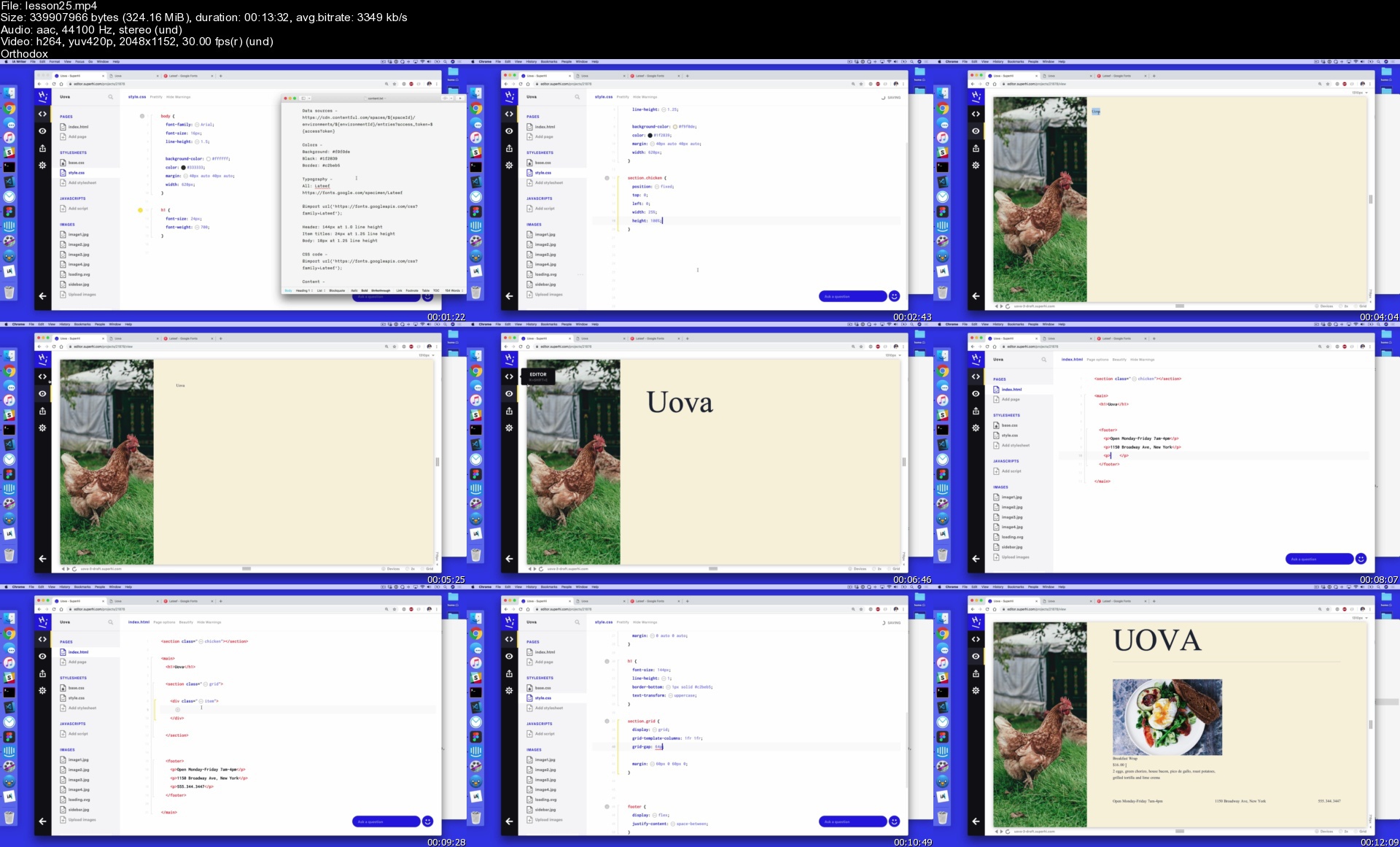
SuperHi - Ajax + APIs

originalnvqq5meh3v6bn6vkd9.png


SuperHi - Ajax + APIs
MP4 | Video: h264, 1920x1080 | Audio: AAC, 44.1 KHz, 2 Ch
Genre: eLearning | Language: English + srt | Duration: 85 Lessons (7h 49m) | Size: 6.52 GB

Remix projects by learning how to work with APIs (how different websites talk to each other) and Ajax (a way of grabbing and working with that data).

Whenever someone says "Twitter has an API", what they mean is that Twitter has a particular way to let other sites remix their data to create brand new projects.

If you want to make a custom Instagram feed, a Figma-driven client presentation tool, a Bitcoin tracker, or your own redesigned version of Twitter, all of these projects need to communicate back-and-forth with a data source.

Our short online course, aimed at beginners, is designed for people who want to work with APIs (how different websites talk to each other) and Ajax (one way of grabbing and sending that data) together to make remixed projects.


What you'll learn
Learn to work with your own data and external data sources

Work with data across several formats such as JSON, XML + HTML

Make sites that use services like Figma, Instagram and Contentful to make data-driven sites

Using data from sources like Unsplash search to build interactive API-driven sites

How to work with sites that don't have APIs to use with web scraping

Making sites that can log in and sign up with Twitter (or other 3rd parties!)

WHAT YOU'LL GET
Real world projects - Projects and code that you can alter and remix to add to your own sites and portfolio

Access the community - Join our Slack and connect with thousands of SuperHi students and alumni

Continued help - Help from our expert teachers and educators with years of experience in the industry

Resources - Resources to get you started and going post-course

8+ hours of video lessons - Practical, go-at-your-own pace learning

WHO THIS COURSE IS FOR
Anyone who is looking for ways to work with data from third party services such as Figma, Contentful, Twitter or Instagram.

We would recommend a little knowledge of HTML, CSS and Javascript before starting this course - taking one of Foundation HTML, CSS + JS or Javascript for Designers courses will be sufficient - as we'll be covering how to work with them in context of sending and receiving data to web pages.

A portion of the course covers back-end coding with Ruby but prior knowledge of Ruby or back-end coding isn't needed to join this course.

Most of our students work in the creative industries - designers, strategists and copywriters are the most common jobs - but you can work in any industry to join the course.

WHAT YOU'LL NEED
A computer with Mac OS X 10.9 or above, Windows XP or above, or a recent Linux version installed and a broadband internet connection. That's it!

Homepage

lesson25ssajho.jpg


737bb7b6-26a4-45a3-8bc4-c1cfe8f1e85d.png

Create a Poster Illustration in Procreate: Keys to Composition
Duration: 1h 45m | Video: .MP4, 1280x720, 30 fps | Audio: AAC, 48 kHz, 2ch | Size: 1.1 GB
Genre: eLearning | Language: English​

Design creative compositions with Procreate! We'll create digital illustrations inspired by nature! You'll learn how composition fundamentals work to design powerful compositions in your drawings.*We'll train our eyes for composition, practice with composition guidelines, learn many tips and tricks to help you create poster illustrations on your iPad.
Who is this class for?
This class is for everyone who is interested in illustration, and eager to upgrade the composition in their artworks. If you're interested in coming up with unique, well-balanced creative compositions, then this class is definitely for you.
What*will you learn?
Part 1: Getting Ready
Training the eye to find basic composition shapes in artworks
Creating quick thumbnails with basic composition guidelines ( golden ratio, the rule of thirds, golden triangle, triangle)
Tips and tricks for well balanced compositions (including colour composition)
Part 2: Bonus
Drawing animals, plants, objects and characters with fashion (all in Safari theme)
Part 3: Go Deeper
Learn creating powerful compositions
Creating a eye-catching composition with only three elements
How to use symmetry as a tool in composition
Depth in composition: Foreground, Middle Ground, Background
Power tools in composition: scale changes, negative space, placement
Creating complex illustrations with help of the rule of thirds
All about colours in composition
Part 4: Finalize
How to get ready for printing in Procreate
What do you need for this class?
If you'll practice on digital drawing, basic knowledge in Procreate or any kind of drawing app is necessary.
Materials/Resources:
I'll be using Procreate on Ipad, but feel free to use any kind of drawing app. You can even use a pencil and paper, and still learn a lot from this class.
Music:*
Homepage
Screenshots


de896624-4b5f-4c7a-be52-5f3211696bac.png

Autonomotive/Automobile : Autonomous Vehicles overview
Instructors: Palem Vamsi
3 sections • 9 lectures • 1h 6m total length
Video: MP4 1280x720 44 KHz | English + Sub
Updated 1/2022 | Size: 678 MB​

A detailed Overview about the Autonomos Vehicles
What you'll learn
Autonomous Vehicles ; Increasing role of Software in Autonomous Vehicles
Autonomous Vehicles; Cost savings due to Autonomous Vehicles
Autonomous Vehicles; Government Regulations and challenges
Autonmous Vehicles ; Foray of Frieght Vehicles
Requirements
Basic Automobile Engineering , BAsic Automotive Engineering ,Mechanical Engineering, Automotive Enthusiasts
Description
Autonomotive/Automobile : Autonomous Vehicles overview course will clearly explain the various advantages of Autonomous Vehicles when compared to manual driven vehicles. Autonomotive/Automobile : Autonomous Vehicles overview will elaborately discuss the change in the fuel consumption, change in the traffic pattern, reduction in the lives saved and the boost in the economy. Autonomotive/Automobile : Autonomous Vehicles overview will clearly explain why Autonomous Vehicles are no more realm of science fiction. They are on the verge of becoming reality. Autonomotive/Automobile : Autonomous Vehicles overview course will discuss the various legal hindrances faced by the government in legalising the Autonomous vehicles . Autonomotive/Automobile : Autonomous Vehicles overview will explain the revenue model and the percentage of the cost of the software in the entire revenue model.Autonomotive/Automobile : Autonomous Vehicles overview will explain the various hardware components required in the manufacturing the Autonomous vehicles. Autonomotive/Automobile : Autonomous Vehicles overview will also discuss the various sensors including LIDAR and RADAR. Autonomotive/Automobile : Autonomous Vehicles overview will discuss how to enhance the customer awareness , how to improve on the government regulatory support and how to build the necessary infrastructure and the various issues that need to be resolved before full Autonomous vehicle penetration. Autonomotive/Automobile : Autonomous Vehicles overview course will explain the future of the Automotive/ Automobile including the content/experience
Who this course is for
Autonomous Vehicle Enthusiasts
Screenshots


ae5dc6c0-dd4d-48e4-9515-f138f8e71236.png

The Sitting Solutions For The Busy Professional
MP4 | Video: h264, 1280x720 | Audio: AAC, 44.1 KHz
Language: English | Size: 1.33 GB | Duration: 2h 26m
The Busy Professionals Health and Fitness Guide To Pain Free, Flexible Hips, Back and Neck Even If You Sit All Day Long​

What you'll learn
Learn how to assess the overall status of your body and what level of the sitting solution is best for you
Learn the specific mobility drills, stretches, exercises, and more to deal with the stressors involved with sitting
How learning simple patterns of mobilization will empower you to achieve incredible transformations in the way your neck and back feel on a daily basis
Why movement is a natural law, and what we meant for as human beings, similar to the laws of gravity, and why implementing small changes will make you unstoppable in your own life.
Understand the "pathways" to feeling great that you can use over and over again
Discover one simple "pattern inturrupt" that can activate the full power of the Sitting Solutions in a matter of hours
Know precisely where you are at in this journey of reversing the "Sitting Effect", and start a program to reverse those effects.
Understand why SITTING is increasing your stress and causing havoc on your heart, brain, stomach and much more.
Requirements
If you have any health concerns, please consult with your physician before engaging in The Sitting Solutions
Description
Is this course for you?
As a busy professional, do you sit for the majority of your days?
Have you seen in the news that "sitting is the new smoking" and are you concerned as to what sitting is doing to your health?
Are you stiff and sore by the end of your day?
Do you suffer from low back pain, headaches, shoulder pain, or any other musculoskeletal conditions?
Has your doctor told you that you need to sit less or perform anti sitting stretches, but not sure where to start?
THEN SITTING SOLUTIONS FOR THE BUSY PROFESSIONAL IS FOR YOU!
Are you a busy professional who sits in traffic on your way to work, works all day sitting in front of a computer, gets home after dark and does not have the energy to do anything else but sit on the couch and watch T.V.? Has sitting all day, made you feel sluggish, and zapped your energy? Has your sitting job created health problems for you like weight gain or pain in your body?
If you answered yes to any of these questions you are absolutely not alone! The vast majority of us sit all day long and have no real way to fix the issue. You may have recently heard that "sitting is the new smoking" and can cause all kinds of health issues. But what in the heck are we supposed to do? Many of us have tried exercise as a way to counter act the effects of sitting only to get injured. Fads, scary news, and the fact that life is just dang too busy can become extremely overwhelming, confusing, and stressful. At this point most people just give up because they have no idea where to start. Where DO you start? Who DO you believe? It all becomes too overwhelming to even start at times.
Sitting Solutions For The Busy Professional Make It Simple To Give You Mastery Over Your Body, Reverse The Effects Of Sitting, Reduce Pain, Lower Risk Of Injury, And Have More Energy!
Confidently understand if sitting is affecting your body through an assessment system
Learn if sitting truly IS the new smoking
Easily find if you need to start at the 1. beginner 2. intermediate, or 3. advanced level
Learn the 5 minute "fix" that will reverse the effects of sitting on your body
Become confident in what your body can do when sitting is not an issue
Increase your balance, strength, and coordination
Learn the 30 second "Pattern Interrupt" that you can implement immediately to reset your body's patterns toward sitting
The Sitting Solutions For The Busy Professional, comes with the Udemy 30 Day 100% Money Back Guarantee. You have nothing to lose, EXCEPT THE STIFFNESS SITTING HAS CREATED!
Meet your teacher
My name is Dr. Michael Weir, and I am a wellness based chiropractor with over a decade in private practice, helping my busy, professional patients reach their fullest health potentials. My practice is in Bellevue, Washington home of Microsoft, Google, and Amazon, and the vast majority of my patients sit at a computer all day long, some for as many as 12 hours a day! I was recently asked what the main problem is that I help, and my answer was "SITTING".
My back ground and post-doctorate education is in the field of "chiropractic neurology" and postural restoration. Poor posture has become an epidemic in our culture creating problems such as headaches, low back pain, mid back pain, shoulder discomfort and hip pain. Sitting is the main issue creating poor posture in our current culture. Not only does sitting create the poor posture related to pain, these postures are unsightly, make us look fatter than we actually are and reduce our overall confidence.
One of the things that greatly separate me from some other teachers is that I am still in daily private practice working one on one with my patients just like you in the real world. These principles in the Sitting Solutions are the principles that I have been teaching my patients one on one, for the last 12 years. I understand the struggles of sitting, because I hear the struggles that my patients deal with on a daily basis.
Why did I create The Sitting Solutions for the Busy Professional?
After over a decade in dealing with the struggles my patients have with sitting I found that each person who sits for too long deals with very similar issues. I have taken 1000's of x-rays of these patients and found that each person presents with varying degrees of the same problem. I have also found that the correction of these problems is also very similar in each of these "sitters". These patterns lead me to develop the specific correction plans that make up The Sitting Solutions.
This has become my expertise and I want to now give the gift of how to fix these issues to you. I have taken the education that I teach my patients on a one on one basis and recorded video of how to do each step of the process. This is a process that my patients will easily pay well over $1000 for. I want to make it accessible to anyone who sits the majority of their day.
What is The Sitting Solutions For The Busy Professional?
Sitting Solutions is about demystifying the steps necessary to fix the damaging effects of sitting. You see it on Facebook, Twitter and even in the news now that sitting is bad for you, but they don't give you solutions for how to fix it. Some websites may give you a few ways to help with the sitting effects, but do not give the entire process which leaves you feeling "half way put together". Its four simple tools to help you fix your body in a simple, uncomplicated way. Sitting Solutions gives you the tools, the knowledge, and the motivation to make fixing your body a part of your life.
Why Sitting Solutions For The Busy Professional?
I have found in over a decade private practice that if my busy patients did not make simple lifestyle changes there was no way that they would be able to 1) feel better and 2) even if they did start to feel better they had a terrible time sustaining those changes. That is why I wanted to make a program and a course that was easy to make into a life style. I wanted to make it something that you look forward to instead of dreading.These reutines should be very easy, take a short amount of time and be something that you need very little space for. It should also be something that you could do at the office with ease, and this is all what The Sitting Solutions does for you.
Don't forget that with The Sitting Solutions For The Busy Professional, you have the Udemy 30 Day 100% Money Back Guarantee!
Is The Sitting Solutions For The Busy Professional Exercise Program?
Not in the traditional sense...The Sitting Solutions is more of a movement program designed to specifically counteract the effects of sitting on the body. There is no cardio, no weight lifting, but we will be doing some stretches, and some strength building to break the stiffness and muscle imbalances that sitting creates.
30 Day Trial of Sitting Solutions For Busy Professionals
You really wouldn't believe how excited I am for you to join me in this course, and bring your health and fitness to its greatest potential! I know though, that this course may not be for every one out there. Every one is at a different point in their journey, so if you are for any reason unhappy with the results you are seeing from The Sitting Solutions I want you to find a program that is going to work for you.
So, if for any reason you aren't happy with the results you are seeing from The Sitting Solutions For The Busy Professional, you have the Udemy 30 Day 100% Money Back Guarantee.
So you have absolutely not one thing to lose...except maybe pain, stiffness, and that lack of energy!
Isn't it time that you finally moved past your battle with sitting, and live life you want to?
Join me today and together, we will find the SITTING SOLUTIONS!
Who this course is for
This course is for anyone who sits for any longer than one hour of their day
Anyone who is struggling with headaches, back pain, mid back pain, etc. that comes on after a long day of sitting
Any professional that is looking to feel good, look good, and have more energy even if they sit all day.
Screenshots


b2fb75d5-2ad2-498c-9f59-0d5522bd882f.png

Color Palette Basics: How to Mix and Paint with Watercolor Greys
Duration: 1h 17m | Video: .MP4, 1280x720, 30 fps | Audio: AAC, 48 kHz, 2ch | Size: 681 MB
Genre: eLearning | Language: English​

One of the most misunderstood but best part of watercolor is color mixing! This class is the first in a series of Color Palette Basics, and we're going to focus on how to mix and paint with the color gray.
I chose grey because it's the last color that people think of when it comes to watercolor. Most gravitate towards the pinks, purples, and greens. But I want to show you how the color grey can be bright and beautiful when used in the right context.
Through this class you'll increase your color theory knowledge, learn how to paint with values, and paint vibrantly with a limited color palette.
This class is for you if you already have a basic understanding of how to paint with watercolors, and you're ready to challenge yourself to think more critically about the colors you use in your painting.
See you in class!
Homepage
Screenshots


abdbcaee-5414-4686-a482-5d0a2bc95fa3.png

ASP.NET Core 6: Big Picture
Duration: 1h 35m | Video: 1280x720 30fps | Audio: AAC, 44.1 kHz, 2ch | Size: 205 MB
Genre: eLearning | Language: English​

This course is an overview and technical introduction to ASP.NET Core 6 which contains several frameworks to create web applications and web APIs.
The secret of getting ahead is getting started, Mark Twain said. This course, ASP.NET Core 6: The Big Picture will provide you with the necessary overview of ASP.NET Core before you actually get started. First, you'll see what ASP.NET Core is and how it can work for you and next, you'll discover the different UI frameworks ASP.NET Core offers such as Blazor, MVC, and Razor page. Finally, you'll learn all about creating APIs with Web API and gRPC. When you're finished with this course, you'll have a good idea of what ASP.NET Core is and where it could be applied to help you create wonderful applications.
Screenshots


007cd6c5_medium.jpg

Microsoft Sharepoint - Organize Cooperation in Groups
Instructors: SONIC Performance Support
8 sections • 19 lectures • 1h 32m
Video: MP4 1280x720 44 KHz | English + Sub
Updated 2/2022 | Size: 874 MB​

Learn to efficiently manage files and share content on intranet sites to collaborate seamlessly
What you'll learn
Learn to use the SharePoint application with confidence
Learn how to efficiently manage files and share content on intranet sites to collaborate seamlessly as a team
Get to know the SharePoint user interface
Get to know Team Sites and Communication Sites
Discover how seamlessly SharePoint works with other applications
Operate SharePoint even on mobile devices
Requirements
Since Microsoft SharePoint does not require a desktop application, all you need is a browser, an active Internet connection and your Microsoft 365 user account to comprehend and directly implement all the content shown in the training.​
Description
COURSE DESCRIPTION
Microsoft SharePoint is a crucial building block for optimally collaborating as a team with Microsoft 365. SharePoint integrates easily with Office applications such as Word, Excel, PowerPoint and Microsoft Teams, and is also easy to manage via your file explorer.
Learn how you can centrally create, store, and make a wide variety of content available on flexibly configurable intranet sites thanks to state-of-the-art storage technology. Learn to navigate SharePoint quickly and easily, identify the various elements of SharePoint Sites and how to make the most of them. Discover key benefits, such as working across devices or accessing data offline.
Chapters of this training
► Course Overview
► The User Interface
► Team Sites
► Communication Sites
► Interaction with Other Applications
► SharePoint on Mobile Devices
► SharePoint Administration
► Review​
COURSE OBJECTIVES
Learn to use the SharePoint application with confidence. Learn how to efficiently manage files and share content on intranet sites to collaborate seamlessly as a team.
THIS TRAINING IS SUITABLE FOR YOU
► if you already work with Microsoft SharePoint or would like to start soon.
► if you want to learn how to use SharePoint with confidence and easily manage files and create intranet pages.​
PREREQUISITES
Since Microsoft SharePoint does not require a desktop application, all you need is a browser, an active Internet connection and your Microsoft 365 user account to comprehend and directly implement all the content shown in the training.​
METHOD
Your trainer will guide you through the training content in an easy-to-understand, step-by-step manner. If necessary, you can pause videos or even rewind and watch them again. Beyond the training videos, helpful handouts and quizzes are available for you to ensure you get the most out of this training.
Who this course is for
This training is suitable for all people who already work with Microsoft SharePoint or would like to start soon.
If you want to learn how to use SharePoint with confidence and easily manage files and create intranet pages, this training is for you.​
Screenshots


9b018bf6-c6fe-4661-9bf9-e3913a8aa660.png

Branding ServiceNow Instances and Service Portals
Duration: 57m | Video: 1280x720 30fps | Audio: AAC, 48 kHz, 2ch | Size: 128 MB
Genre: eLearning | Language: English​

In this course, you will learn how to brand the Now Platform and Portal to match your corporate design.
Branding the Now Platform can create personalized and distinguished development and production instances. In this course, Branding ServiceNow Instances & Service Portals, you will learn how to brand a ServiceNow instance as per your company theme. First, you will explore the options you have to brand the ServiceNow instance to match company branding. Next, you'll discover how to add some personalization to your instance so you can match company colors, fonts, and more. After that, you will learn to brand the Service Portal. Finally, you'll learn how to perform this activity in a way so that there is very little impact on future upgrades. When you're finished with this course, you will be able to perform branding of Now Platform with ease using configurations.
Screenshots


05c7a288-abf0-4682-a44e-63f34225858d.png

How to Make YouTube Videos at Home
Duration: 47m | Video: .MP4, 1280x720, 30 fps | Audio: AAC, 48 kHz, 2ch | Size: 510 MB
Genre: eLearning | Language: English​

Are you ready to start making YouTube videos? This course takes you through the fundamentals on how to start filming right now.
I started my on YouTube journey by making travel vlogs as a creative outlet and*my channel has transformed into so much more. Along the way*I have learned so much about how*to make videos for YouTube and I'm*going to teach you how you can film them too.
Through this course you'll learn
Setting up your Camera
Finding a Background
Lighting Yourself
How to get clean Audio
What is important for filming YouTube Videos
Whether you*just want to find an audience for your passion or you want to build your channel to something bigger this class will give you the*ingredients to achieve your version of YouTube success.
_________
The lessons in this class are designed to apply to all*YouTubers and content creators.
Homepage
Screenshots


424d0293-7e6c-4418-863a-ac545c3cb4f3.png

Travel Sketching Essentials: Capture the Light!
Duration: 1h 47m | Video: .MP4, 1280x720, 30 fps | Audio: AAC, 48 kHz, 2ch | Size: 1.36 GB
Genre: eLearning | Language: English​

A great travel sketch can transport you, in a way that great books and cinema do. There are a number of factors at play-composition, lively lines, color-but the secret sauce is LIGHT! In this class you'll learn to capture the dramatic effects of light in relatively simple ink and watercolor techniques from a master urban sketching instructor, raising your own sketches to a new level.
You'll learn:
How dramatic shade and shadow heighten the impact of a scene, in real life and in your sketchbook.
How to create a quick, loose and lively line sketch to act as the framework for color, shade and shadow.
How to use wet-in-wet watercolor to create beautifully subtle depictions of architecture.
How to add bold shade and shadow to transform your flat sketch into a dramatic, 3-dimensional sun-drenched scene.
How and where to add small details to delight the eye and complete the scene.
This is a class for all skill levels, from beginners to professionals. The lessons are drawn from Jim's decades of on-the-spot sketching and teaching experience in 40 countries across the globe. By the end of the class, the lessons will be your own, and you'll be drawing your world with new skills and confidence.
Homepage
Screenshots


caf8ccdf-6d26-4dee-a448-97111a8dfaec.png

25 Must-Know formulas and functions in Excel
Duration: 1h 13m | Video: .MP4, 1280x720, 30 fps | Audio: AAC, 48 kHz, 2ch | Size: 433 MB
Genre: eLearning | Language: English​

In today's world, it's an absolute must that you know Microsoft Excel for most office jobs. There's some formulas and functions that will make your use of Excel more productive . This course shows you how to use 25 "Must-Know" formulas and functions.
Topics
AutosumRelativeAbsoluteLinking sheetsIfAndOrNested ifCountifSumifAverageifSumifsCountifsAverageifsiferrorVlookupHlookupXlookupMatchIndexSubtracting datesNetworkdaysAdding days to a dateWorkdayWeekday/Weeknum
The course also includes the Excel file that is used in the video. It has the file before the changes, and then another copy of the file with all of the formulas and functions.
It also includes the presentation used .
Homepage
Screenshots


ed3be837-b87e-41a9-a639-2d6a908ee7bc.png

Practical Junit & Mockito Test with Java SpringBoot & JPA
Published 2/2022
Duration: 8h 56m | Video: .MP4, 1280x720 30 fps | Audio: AAC, 48 kHz, 2ch | Size: 5.31 GB
Genre: eLearning | Language: English​

Learn about Test Driven Development & how its implemented in companies for Java SpringBoot project using Junit & Mockito
What you'll learn:
You will learn about Unit testing and Test Driven Development(TDD) Approach
You will learn to write Junit and Mockito test cases for various scenarios
You will learn about Spring, SpringBoot and Create REST API's using different Annotations
You will learn to code with Layered Architecture approach
You will learn about Hibernate and JPA ORM framework and how to work with them
You will learn all this by the help of a project and complete hands-on
Requirements
Basics of Java Programming Language
Description
Welcome to this amazing course, where you will learn about
What is unit testing?
Why is unit testing important?
What is Test Driven Development(TDD) ?
How to apply Test Driven Development to the projects?
What is Junit and Mockito?
We will learn to write unit tests using Junit 5 Framework and Mockito Library.
We will start with how projects are developed in software companies using modern stacks like Java, Spring, SpringBoot, Hibernate, Spring Data JPA and Restful webservices.
In this course you will be understanding how different technology and its components work together to build a real world application which end users are able to use in real life. It will be a Property Management System.
We will also learn to relate different concepts with real world examples. In this course we will learn the following
We will learn different concepts Spring Framework and RESTful webservices
We will learn about different design patterns like Singleton, Prototype, Factory, MVC, Adapter etc
We will learn to create production ready application in a layered architecture
We will learn about ORM and Spring data JPA(Java Persistence API)
What is Unit Testing
What is TDD(Test Driven Development)
Why is Testing important
What is Junit and Mockito
Different Annotations of Junit and Mockito
Comparison between Junit-4 and Junit-5
Writing Test cases for the project's different API endpoints
Checking the code coverage & Debugging
Writing Test cases for Success, Failure and Error scenarios
Test cases for Model classes
You will also get the complete source code used in the course.
Who this course is for
Anyone who wants to become a real backend developer and start to work in companies as a developer of develop high quality projects of their own
Homepage
Screenshots


Zurück
Oben Unten