• Regeln für den Video-Bereich:

    In den Börsenbereich gehören nur Angebote die bereits den Allgemeinen Regeln entsprechen.

    Einteilung

    - Folgende Formate gehören in die angegeben Bereiche:
    - Filme: Encodierte Filme von BluRay, DVD, R5, TV, Screener sowie Telesyncs im Format DivX, XviD und x264.
    - DVD: Filme im Format DVD5, DVD9 und HD2DVD.
    - HD: Encodierte Filme mit der Auflösung 720p oder darüber von BluRay, DVD, R5, TV, Screener sowie Telesyncs im Format x264.
    - 3D: Encodierte Filme von BluRay, die in einem 3D Format vorliegen. Dies gilt auch für Dokus, Animation usw.
    - Serien: Cartoon/Zeichentrick, Anime, Tutorials, Dokumentationen, Konzerte/Musik, Sonstiges sind demnach in die entsprechenden Bereiche einzuordnen, auch wenn sie beispielsweise im High Definition-Format oder als DVD5/DVD9/HD2DVD vorliegen. Ausnahme 3D.
    - Bereich Englisch: Englische Releases gehören immer in diesen Bereich.
    - Bereich Talk: Der Bereich, in dem über die Releases diskutiert werden kann, darf, soll und erwünscht ist.


    Angebot/Beitrag erstellen

    - Ein Beitrag darf erst dann erstellt werden, wenn der Upload bei mindestens einem OCH komplett ist. Platzhalter sind untersagt.
    - Bei einem Scenerelease hat der Threadtitel ausschließlich aus dem originalen, unveränderten Releasenamen zu bestehen. Es dürfen keine Veränderungen wie z.B. Sterne, kleine Buchstaben o.ä. vorgenommen werden. Ausnahme Serienbörse:
    - Bei einem Sammelthread für eine Staffel entfällt aus dem Releasename natürlich der Name der Folge. Beispiel: Die Simpsons S21 German DVDRip XviD - ITG
    - Dementsprechend sind also u.a. verboten: Erweiterungen wie "Tipp", "empfehlenswert", "only", "reup", usw. / jegliche andere Zusatzinformation oder Ergänzung, welche nicht in obiger Beschreibung zu finden ist.

    Aufbau des Angebots und Threadtitel

    Der Titel nach folgendem Muster erstellt zu werden. <Name> [3D] [Staffel] [German] <Jahr> <Tonspur> [DL] [Auflösung] <Quelle> <Codec> - <Group>
    Beispiel: The Dark Knight German 2008 AC3 DVDRip XviD - iND
    Beispiel: The Dark Knight 2008 DTS DL BDRip x264 - iND
    Beispiel: The Dark Knight 2008 AC3 DL BDRip XviD - iND
    Beispiel: The Dark Knight German 2008 AC3 720p BluRay x264 iND
    Beispiel: The Dark Knight 2008 DTS DL 1080p BluRay x264 iND
    Beispiel: Die Simpsons S01 German AC3 DVDRip XviD iND
    Beispiel: Die Simpsons S20 German AC3 720p BluRay x264 iND
    Beispiel: Sword Art Online II Ger Sub 2014 AAC 1080p WEBRip x264 - peppermint
    Entsprechend sind also u.a. verboten: Sonderzeichen wie Klammern, Sterne, Ausrufezeichen, Unterstriche, Anführungszeichen / Erweiterungen wie "Tipp", "empfehlenswert", "only", "reup", usw. / jegliche andere Zusatzinformation oder Ergänzung, welche nicht in obiger Beschreibung zu finden ist
    Ausnahmen hiervon können in den Bereichen geregelt sein.

    Die Beiträge sollen wie folgt aufgebaut werden:
    Überschrift entspricht dem Threadtitel
    Cover
    kurze Inhaltsbeschreibung
    Format, Größe, Dauer sind gut lesbar für Downloader außerhalb des Spoilers zu vermerken
    Nfo sind immer Anzugeben und selbige immer im Spoiler in Textform.
    Sind keine Nfo vorhanden z.B. Eigenpublikationen, sind im Spoiler folgende Dateiinformationen zusätzlich anzugeben :
    Quelle
    Video (Auflösung und Bitrate)
    Ton (Sprache, Format und Bitrate der einzelnen Spuren)
    Untertitel (sofern vorhanden)
    Hosterangabe in Textform außerhalb eines Spoiler mit allen enthaltenen Hostern.
    Bei SD kann auf diese zusätzlichen Dateiinformationen verzichtet werden.

    Alle benötigten Passwörter sind, sofern vorhanden, in Textform im Angebot anzugeben.
    Spoiler im Spoiler mit Kommentaren :"Schon Bedankt?" sind unerwünscht.


    Releases

    - Sind Retail-Release verfügbar, sind alle anderen Variationen untersagt. Ausnahmen: Alle deutschen Retail-Release sind CUT, in diesem Fall sind dubbed UNCUT-Release zulässig.
    - Im Serien-Bereich gilt speziell: Wenn ein Retail vor Abschluss einer laufenden Staffel erscheint, darf diese Staffel noch zu Ende gebracht werden.62
    - Gleiche Releases sind unbedingt zusammenzufassen. Das bedeutet, es ist zwingend erforderlich, vor dem Erstellen eines Themas per Suchfunktion zu überprüfen, ob bereits ein Beitrag mit demselben Release besteht. Ist dies der Fall, ist der bereits vorhandene Beitrag zu verwenden.
    - P2P und Scene Releases dürfen nicht verändert oder gar unter einem iND Tag eingestellt werden.


    Support, Diskussionen und Suche

    - Supportanfragen sind entweder per PN oder im Bereich Talk zu stellen.
    - Diskussionen und Bewertungen sind im Talk Bereich zu führen. Fragen an die Uploader haben ausschließlich via PN zu erfolgen, und sind in den Angeboten untersagt.
    - Anfragen zu Upload-Wünschen sind nur im Bereich Suche Video erlaubt. Antworten dürfen nur auf Angebote von MyBoerse.bz verlinkt werden.


    Verbote

    - Untersagt sind mehrere Formate in einem einzigen Angebotsthread, wie beispielsweise das gleichzeitige Anbieten von DivX/XviD, 720p und 1080p in einem Thread. Pro Format, Release und Auflösung ist ein eigener Thread zu eröffnen.
    - Grundsätzlich ebenso verboten sind Dupes. Uploader haben sich an geeigneter Stelle darüber zu informieren, ob es sich bei einem Release um ein Dupe handelt.
    - Gefakte, nur teilweise lauffähige oder unvollständige Angebote sind untersagt. Dies gilt auch für eigene Publikationen, die augenscheinlich nicht selbst von z.B. einer DVD gerippt wurden. Laufende Serien, bei denen noch nicht alle Folgen verfügbar sind, dürfen erstellt und regelmäßig geupdatet werden.
    - Untersagt sind Angebote, welche nur und ausschließlich in einer anderen Sprache als deutsch oder englisch vorliegen. Ausnahmen sind VORHER mit den Moderatoren zu klären.


    Verstoß gegen die Regeln

    - Angebote oder Beiträge, die gegen die Forenregeln verstoßen, sind über den "Melden"-Button im Beitrag zu melden.
  • Bitte registriere dich zunächst um Beiträge zu verfassen und externe Links aufzurufen.

*** Bestes IPTV *** bester Preis *** gratis Test ***


Englische Tutorials

004a6cca_medium.jpg

Python For Accountants 2022
MP4 | Video: h264, 1280x720 | Audio: AAC, 44.1 KHz, 2 Ch
Genre: eLearning | Language: English + srt | Duration: 41 lectures (3h 8m) | Size: 1.67 GB

Learn Python to automate: Excel reports, stock & crypto data extraction, and send it to your phone via Push Notification
What you'll learn
Accounting Data Analytics (Data Cleansing & Spreadsheet Automation)
Stock Data Extraction
Use APIs to Extract Cryptocurrency Data
Use APIs to Send Price Alerts (Stock & Crypto) To Your Phone
Python Basics & Fundamentals
Requirements
Basic computer skills
No programming experience required
Basic Microsoft Excel skills ideal, but not required
Description
Welcome to Python For Accountants 2022!
This is a ~3 hour beginners Python Accounting Course that covers
Chapter 1
A quick introduction about me, and what this course covers.
Chapter 2
Explains basic Python syntax and fundamentals - for example, you might love reading novels and want to write a book, but before you write it, you have to learn grammar, syntax, and style guides - same thing goes with coding, and that's what this chapter is about - learning the grammar, syntax, and style guides of Python. This chapter will go through the following
- Installing Python & downloading course files,
- Using the code editor (IDLE) & print function
- Arithmetic operators,
- Comparison operators,
- Variables & datatypes,
- Code documentation,
- If statements,
- F-String,
- Lists,
- For loops,
- Opening & saving text files,
- Custom functions,
- Standard libraries,
- While loops,
- Third party libraries, and
- Installing Pandas.
We'll then apply what you've learnt in the basics to solve your first real world case study - Python stock analysis - specifically, extracting stock market data to a spreadsheet using the Yahoo Finance / YFinance library.
Chapter 3
An introduction to Jupyter Notebooks. We upgrade our code editor to Jupyter Notebook which is more powerful than IDLE (the default code editor that comes with Python).
Chapter 4
Teaches fundamental Data Analytics techniques using the Pandas library which is important for every Accountant to know. This is THE chapter for Excel automation. You'll learn techniques like
- Adding & removing columns,
- Sorting data,
- Filtering,
- Removing duplicates,
- Formatting,
- Pivot tables,
- Exporting to CSV & Excel, and
- Location / If Function.
We'll then apply those learnings by automating 2 case studies
- Supermarket sales report - we'll aggregate loads of sales data into a pivot table with just a few lines of code.
- Data Cleaning / Data Wrangling case study which is about fixing bad data.
Chapter 5
A general overview of APIs. I'll explain what is an API, how to connect to APIs, and the difference between a Get and Post Request.
We'll be using the Binance API as an example as I go through the API explanation which means you'll learn how to automatically extract cryptocurrency prices to your Python script or to an Excel spreadsheet.
We'll then finish this chapter with a case study which combines EVERYTHING we've learnt in this course - we'll use the Telegram App (Android / iOS) and Telegram API to send stock market alerts, messages, and push notifications to our phone.
Who this course is for
Accountants who want to automate: repetitive computer tasks (e.g., Excel reports), data analytics, and stock & crypto data extraction.
Accountants who are new to coding / programming
Accountants who want to learn Python quickly
Accountants who want an easy to understand Python course
Homepage








 
th_8afDFVMn6G8Vcud32f1Xn2Uj5ldtt8HY.png

Introduction to Statistics with Python
MP4 | Video: h264, 1280x720 | Audio: AAC, 44.1 KHz, 2 Ch
Genre: eLearning | Language: English + srt | Duration: 59 lectures (7h 43m) | Size: 2.22 GB

Where Statistics and Programming Meet
What you'll learn
Basic statistical analysis
How to utilize the Jupyter Notebook
Basic of the Python language for statistical analysis
Data visualization
Requirements
No prior coding experience required
No prior statistical experience required
Description
This course provides a basic introduction to statistics and the use of Python a popular programming language. During the course, we look at many fundamental ideas in statistics within the framework of analysis in Jupyter Notebook a commonly used integrated development environment for Python. Topics include both descriptive and inferential statistics. Concepts related to data visualization will also be discussed to empower you in your journey as a data analyst. Among the concepts shared include mean, median, mode, standard deviation, histograms, confidence intervals, t-test, correlation, regression, ANOVA, chi-square, and more. All of these ideas can be learned from the comfort of your own home without the hassle of having to go to class. Quizzes are also available to assess your progress along with the actual Python that is used in the videos.
For students and those who want exposure to statistical analysis while also obtaining a basic insight into some tools involved in data science, this is a course for you. With the growth in demand for quantitative skills with the rise of Big Data, developing mastery of statistics and analytical tools such as Jupyter Notebook is becoming a norm.
Come and be a part of the analytics experience by enrolling in a course that will prepare you for the demands of the mid 20th century.
Who this course is for
Beginning Python users
People interested in data science
Students looking to learn statistics
Homepage


BoEz6NboBYiBmNpJojy1ERXn3cFfRKQf.jpg

Vector Crash Course 2022: Learn Vector in 5 Hours
MP4 | Video: h264, 1280x720 | Audio: AAC, 44.1 KHz
Language: English | Size: 1.37 GB | Duration: 4h 46m
Get the insight knowledge of Vector.
What you'll learn​

Vector concept
How to prove geometrical theorem in vector
Different types of vectors
In depth knowledge of vector
Important practice on vector geometry
Scalar product concept
Angle between two vectors
Requirements
Familiar with geometrical shapes
Description
How to become an expert on Vector ?
It seems vector as one of the easy lesson but reality is different for some students. For those students who feels Vector as a difficult lesson, this course helps you to understand easily.
It is the 50+ videos lessons and each video teaches you very important concepts in Vector. There will be some quizzes and workbooks including in the upcoming days.
Become an expert on Vector: The content is organized into the following sections
Vector Basic Overview with some important examples
Types of vectors and exercise related to types of vectors
Vector Operation with important exercise
Vector geometry with worked out example
What you will get inside every section ?
Videos: In each section, there are dedicated videos. I will be teaching you the important lessons and I will guide you into the right direction. The content of videos consists of conceptual lessons and important examples.
Quizzes: Some sections contain important quizzes that examines your ability. And quizzes check whether you have understood or not.
The features
Lifetime access to this course
Friendly support in the Q&A section
Udemy Certificate of Completion available for download
30-day money back guarantee
Enroll today!
I can't wait for you to get started on mastering vector.
- Kamal Bdr. Tamang:)
Who this course is for
Anyone who is interested in mathematics and vector geometry
Screenshots


e40c85a9-80d3-4616-929d-9b4629de92f2.png

How to be productive and focused on things that matter
MP4 | Video: h264, 1280x720 | Audio: AAC, 44.1 KHz
Language: English | Size: 505 MB | Duration: 2h 46m
Learn to create a process that makes getting things done as effortless as possible with focus
What you'll learn​

Learn practical strategies to gain clarity on the things you need to focus on
Learn to cut out non-essentials from your life using effective methods
Learn to decide your priorities and stick to them
Learn how to meet your deadlines and set realistic goals
Learn how to balance professional and work life
Learn how to select opportunities without getting lost
Learn how to say "no" to almost everything that isn't essential
Learn how you can contribute your best self in the world
Requirements
No previous knowledge of this subject is required
Description
In this course, you'll learn to create a process that makes getting the essential things done as effortless as possible.
This course will show you how to live a life true to yourself, not the life others expect from you. It will teach you a method for being more efficient, productive, and effective in both personal and professional realms. It will teach you a systematic way to discern what is important, eliminate what is not, and make doing the essential as effortless as possible. In short, it will teach you how to apply the disciplined pursuit of less to every area of your life. Here's how
There are four parts to the course. The first outlines the core mindset of an Essentialist or Minimalist. The next three turn the mindset into a systematic process for the disciplined pursuit of less, one you can use in any situation or endeavor you encounter.
If you are interested in minimalism this course is for you. If you are confused, tired of too many things, and want to start an afresh life then this course is for you. If your life's closet is disorganized and stuffed then this course if for you.
You'll learn
Learn practical strategies to gain clarity on the things you need to focus on
Learn to cut out non-essentials from your life using effective methods
Learn to decide your priorities and stick to them
Learn how to meet your deadlines and set realistic goals
Learn how to balance professional and work-life
Learn how to select opportunities without getting lost
Learn how to say "no" to almost everything that isn't essential
Learn how you can contribute your best self in the world
About Instructor
Aman Varma has undergone accredited course training in CBT practitioner, Diploma in Hypnotherapy, Mental Health Practitioner, NLP Specialist Practitioner, Diploma in Psychological Counseling and Diploma in Modern Applied Psychology.
Who this course is for
Working Professionals
Students
Part time workers
Employees as well as Employers
Managers & Executives
Screenshots


00499280_medium.jpg

Customer Experience: Creating Customer Personas
LinkedIn Learning
Duration: 21m 44s | .MP4 1280x720, 30 fps(r) | AAC, 48000 Hz, 2ch | 259 MB
Genre: eLearning | Language: English​

In today's competitive marketplace, knowing your customer is almost as important as knowing your own products and services. With limited marketing budgets and competition for consumer's attention, you need to optimize your message to target people who are most likely to drive sales. In this course, Myra Golden shows you how to create customer personas that will allow you to better connect with your customers and improve engagement. She shares important tips like how to conduct research, how to identify your customers' motivation and pain points, and ways to apply persona data for engagement, support, and problem resolution. By following her step-by-step guide-along with a cheat sheet of persona templates-you'll have the tools to create your own customer personas to help you increase sales.
Homepage
Screenshots


ae1f7d7e-8c5f-499f-8a3f-78739c6e4f46.png

How to get the right website for your business
MP4 | Video: h264, 1280x720 | Audio: AAC, 44.1 KHz
Language: English | Size: 412 MB | Duration: 56m
Practical steps for business owners and business managers
What you'll learn​

Get ideas on the user facing features you may want on your website
See examples of backend features that will help maintain and grow your website
See the top 5 platforms for websites by market share
Understand the basic building blocks for a website
Hear our unbiased recommendations for website platforms
Understand the pros and cons of building a website yourself versus getting professional help
See the potential costs for getting a website both upfront and ongoing
Use our "next steps" plan to take action and get the right website for your business
Requirements
No experience necessary. You will learn all you need to know as part of the course.
Description
Getting a website for your business can be a daunting task if you don't know where to start. What features do you need? Which website platform should you use? Do you need a website developer? What is the ongoing effort required to maintain a website? How much does it all cost?
Unfortunately, most information available for free on the Internet involves kickback payments to website providers. As such it can be difficult to know if what you are reading is really the best option for your business.
We built this course for non-technical business owners and managers who want unbiased advice on the options for getting a website irrespective if taking a Do-It-Yourself approach or if hiring a professional.
The course includes a technical primer so that you can understand the components of a website and how these relate to the options to consider when getting a website.
By spending 1 hour on this course, you can build an informed action plan to get the right website for your business irrespective if you decide to Do-It-Yourself or hire a professional.
So if you need to get a website for your business enrol in my course to get unbiased advise and build an action plan for your next steps.
Who this course is for
Anyone who wants to get a website for their business but are not sure where to start.
Screenshots


00de21f5-8976-47b5-9b01-956acfd1cc1d.png

Mastering Microsoft windows 10
MP4 | Video: h264, 1280x720 | Audio: AAC, 44.1 KHz
Language: English | Size: 913 MB | Duration: 1h 51m
A Practical Guide to Windows 10
What you'll learn​

Understand Windows 10 Basics
Understand File Explorer, Taskbar & Action Center
Perform Organizing & Finding Your Files
Perform Redesigning the Desktop
Perform Windows 10 Desktop & Start Menu
Requirements
No previous experience is needed, you will learn everything you need to know.
Description
If you are beginner for Windows, you're in luck, If you are intermediate you are so lucky too. In this course you will learn windows from "A to Z", you will learn windows secret, tricky and tips. Windows 10 is completely different from any Windows that has come before. Windows 10 brings a kinder, gentler approach for the 1.7 billion or so people who have seen the Windows desktop and know a bit about struggling with it. Yes, Window 10 will expose you to those phone-style tiles, but they aren't nearly as intrusive, or as scary, as you think.
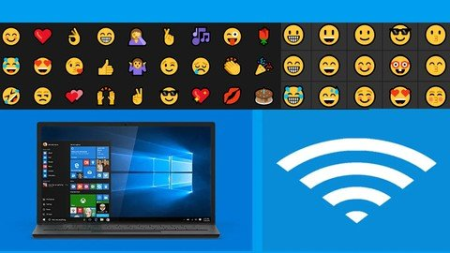
Do you know how to insert Emoji in windows ten? do you know how to transform you tablet or laptop or PC into WIFI or Wireless hotspots.
Do you know Cortana? Cortana is a new feature of Windows 10. It is a voice-activated personal associate.
Windows 10 is the safest windows ever. Microsoft has defined Windows 10 as the safest windows system ever because of its enhanced Windows Defender and Smart Screen features. These features help to protect system from viruses, malware and phishing. Smart screen recognizes your face and provides the customized windows experience.
Windows 10 come with built in antivirus, what expect from you is updating the built in antivirus or windows defender and Smart Screen application.
Who this course is for
All Microsoft Window users
Screenshots


aa831763-4ffd-4fab-b0a4-a210046b666e.png

Stock market and crypto currencys working in detail
MP4 | Video: h264, 1280x720 | Audio: AAC, 44.1 KHz
Language: English | Size: 952 MB | Duration: 42m
Everything explained about stock market , bitcoin and ethirum
What you'll learn​

Basics of stock trading
Long term investment
Short term investment
Intraday trading
Options trading
Futures trading
Mutual funds
Crypto currency
Ipo
How to invest
Requirements
No anyone anyone can join this course
Description
This course is designed to clear all the doubts one can have regarding the functioning of stock market. This course is a detailed analysis of the functioning of stock market and various components of trading involved. This course will take you from a starting of an ipo to the world of futures and options derivative markets . This course will also teach you about the functioning of crypto currencys. I have put years of my experience and learning into this course to make it easily understandable and simplified the complex working of the system. This course will include
IPOs
Stock movements
Long term investment
Short term investment
Option trading
Futures trading
Mutual funds
Crypto currencys
Where to invest
This course has been designed to give a deep sense of direction to the people who are willing to enter in the stock market world the risks involved and how one can lose all the money he invested without knowledge . This course will make you self reliable for your investment and add value to your investing journey. In these chapters i have also discussed how the crypto currency market operates and risks involved . Many examples from real life have been used to simply the complex terms sl that people can have a deeper and better knowledge about their investments
Who this course is for
Stock market begginers
Stock market investors
Stock market traders
Crypto currency investors
Crypto currency traders
Mutual fund investors
Passive income
Options traders
Etfs
Futures
Bitcoin traders
Doge coin traders
Ethirum traders
Screenshots


i2uVifaZzJRCvYyTJM0T76DF8BcXaX6V.jpg

Future Artificial Intelligence Reinforcement Learning
MP4 | Video: h264, 1280x720 | Audio: AAC, 44.1 KHz
Language: English | Size: 978 MB | Duration: 1h 2m
Reinforcement Learning Use Case (Applications)
What you'll learn​

What is Reinforcement Learning
What is AWS DeepRacer
What is Industry Automation with Reinforcement Learning
Reinforcement Learning applications in Trading and Finance
Reinforcement Learning Applications in Healthcare
More Reserch In Reinforcement Learning Applications
Requirements
No prior experience is needed to join in this course.
You can study anywhere this master class with a stable internet connection.
Students are advised to take notes for self-reflection purposes.
Description
Hello, I'm Noble.
Let me share my journey as Global Future Skills & Computer Science - Artificial Intelligence Expert. We have Served 7000+ Students and 500+ Teachers and 5000+ Other students, I have done Global Future Skills Implementation and Future Skills Research for last 15 Years. I am Lifelong Lerner of Future Skills, Future Technologies. I am Self Taught Computer - Artificial Intelligence Scientist and Super Pure Consciousness Expert
Value Spent on Skills
I have Spent 75000+ USD on 1. Digital Skills 2. Future Skills 3. Freedom and Transformation Skills 4.Technologies Skills 5.Soft Skills and I have done 500+ global digital and future skills trainings.
I have done 100+ Project with these Skills with over 15 years
1. GE.
2. Wipro Technologies.
3. Himalayan Institute of Alternatives Ladakh.
4. Teach for India.
5. Harvard Medical School.
6. Toastmasters International.
Skills Research
Digital and Future Skills Research for last 15 Years and also have done Implementation real projects.
I am Lifelong Learner of all thses skills.
Skills Training Conducted
I have been conducting trainings for 7 years.
I have been training professionals how to file Ideas, Kaizen, Innovative Ideas, Creativity, and Problem-Solving skills.
I have been training CEOs of Fortune 500 companies, Contract Managers, Automobile Project Managers, Project Managers Executives, Teachers, Students, Collage Students, and Universities on Future Skills, Project Management, Future Technologies, Total Quality Management
I do Running training daily as an athlete, I have been participating in WIPRO Runs and other marathons for the last 10 years
Deep Pursuits
I have been doing deep Meditation ( have done 9 courses (10 days) & (served 10 days courses) from 2016.
Teaching methodology is super simple
Super Simplicity
Step to Step Process
Simple Theory
Simple Model
Simple Implementation
No Complexity
Super Clarity.
You Will Learn
What is Reinforcement Learning Use Case (Applications)
What are Reinforcement Learning Applications used in Self-Driving Cars
What Is AWS DeepRacer
Industry Automation with Reinforcement Learning
Reinforcement Learning applications in Trading and Finance
Reinforcement Learning in NLP (Natural Language Processin
Reinforcement Learning applications in Healthcare
More Reserch In Reinforcement Learning Applications
Only purchases made here on Udemy will get lifetime course updates and personal support from the Instructor
This course will be regularly updated with fresh content so you will always have access to up-to-date knowledge and information.
Understanding the metrics, principles and concepts and practices it daily make the most out of it.
Who this course is for
Anyone who is wants learn Real life Applications of Reinforcement Learning with Simplicity and Step by Step Process
Screenshots


84134384-88ee-458b-9be3-c2fb9cc00033.png

React Project - Convert a Static Website to React js App
MP4 | Video: h264, 1280x720 | Audio: AAC, 44.1 KHz
Language: English | Size: 267 MB | Duration: 34m
Polish your basic React Skills by converting an html website to a react js application
What you'll learn​

Revisit your concepts on React Basics
Convert a static website to React js application
find and solve bugs in your React Js code
will have better understanding of react components
Requirements
Basic Web development knowledge i.e. html, css, js
Although react js is also important, but if you don't know it yet, you can still learn most of it's basics in this video
Description
In this course you are going to learn how you can convert a basic H T M L website to a fully working R e a c t Js Application.
You will be polishing your react basics skills by learning
- R e a c t js installation and basic set up
- R e a c t components
- H T M L to J S X Conversion
- How to use errors as our helping guide
- Importing R e a c t js
- Creating and Exporting R e a c t js functions.
React makes it painless to create interactive UIs. Design simple views for each state in your application, and React will efficiently update and render just the right components when your data changes.
Declarative views make your code more predictable and easier to debug.
Components
Build encapsulated components that manage their own state, then compose them to make complex UIs.
Since component logic is written in JavaScript instead of templates, you can easily pass rich data through your app and keep state out of the DOM.
We don't make assumptions about the rest of your technology stack, so you can develop new features in React without rewriting existing code.
React can also render on the server using Node and power mobile apps using React Native.
Who this course is for
Beginner React Js or MERN Stack developers
Screenshots


Socket.IO (with websockets) - the details. (socket io v2)

sfvlbkf4mcendut6tpphiv1j7g.jpg


Socket.IO (with websockets) - the details. (socket io v2)
MP4 | Video: h264, 1280x720 | Audio: AAC, 44.1 KHz
Language: English | Size: 5.03 GB | Duration: 13h 47m

Socket io. For those who want to learn how to harness real-time communication on the web. With Cluster, redis, & React


What you'll learn
Socketio. That's (mostly) all we cover so when you finish, you'll know it!
Setup a socketio application between the browser and an Express server and run real-time back and forth
Understand the basics of websockets and how they work
The basics of the transport layer and how a packet works
Requirements
You have a solid working knowledge of JavaScript and nodejs (Not a ninja, but you are not new).
You have used the node ecosystem (npm, Express, etc.). This is NOT an intro to node class and I will NOT cover these in detail.
You have basic command line knowledge (at least capable of navigating and running a program)
You have a computer capable of running Nodejs.

Description
Websockets are one of the coolest things to hit the web in ages. They allow the browser real-time communication bridging one of the last gaps in both human and web-based communication. Socket io is the king library that uses websockets under the hood. There's a good chance if you're reading this, you've heard about socket io. Maybe even done a tutorial on it. But how far did you get? In my experience, the vast majority of the material on the web goes no farther than a quick-start, instant chat app. You don't learn how anything works, never look at the docs, and are stuck at the end wondering what to do now. The remaining shred of material is waaaaay over everyone's head. The fact that the websocket API was standardized in 2011 and most developers still don't know how to use it is evidence of the gap.
This course is meant to alleviate that! It is not a quick start guide to socket.IO. There are loads of those all over the Internet. You should definitely look elsewhere if you are wanting a 10 minute intro to the 3-4 things you need to know to make something quick. On the other hand, if you are looking to really learn one of the most awesome JavaScript libraries in socket io, you should stick around. Like Express and other JavaScript/Node pieces, it's getting passed over in the wave to learn just enough to get to the term "full-stack developer." My main goal is to help you figure out how to go from being a good developer to a great developer. Understanding... not just knowing a few methods... of socketio is part of that! It even trancends the browser and node with implementations in most other languages, and even mobile. This means as you grow, you have the power of sockets without having to learn more than the socket io library.
I first used socket.IO in 2013 for a tiny company directory app. I've been following since and have been frustrated that it hasn't gotten more mainstream notice because it opens the way for so many improvements to existing applications and obvious groundwork for new ones. Let's change that :) Prepare to for a detailed look at socketio and websockets and start going real-time.
Sections:
Environment Setup (skip if you have node installed already)
Before Socket.IO... - TCP, network sockets, & a native websockets app
Socketi.IO 101 - Why you'd want to use socketio and how it works (simple chat app)
Socket.IO 201 - Making the chat app into a slack clone with namespaces and rooms
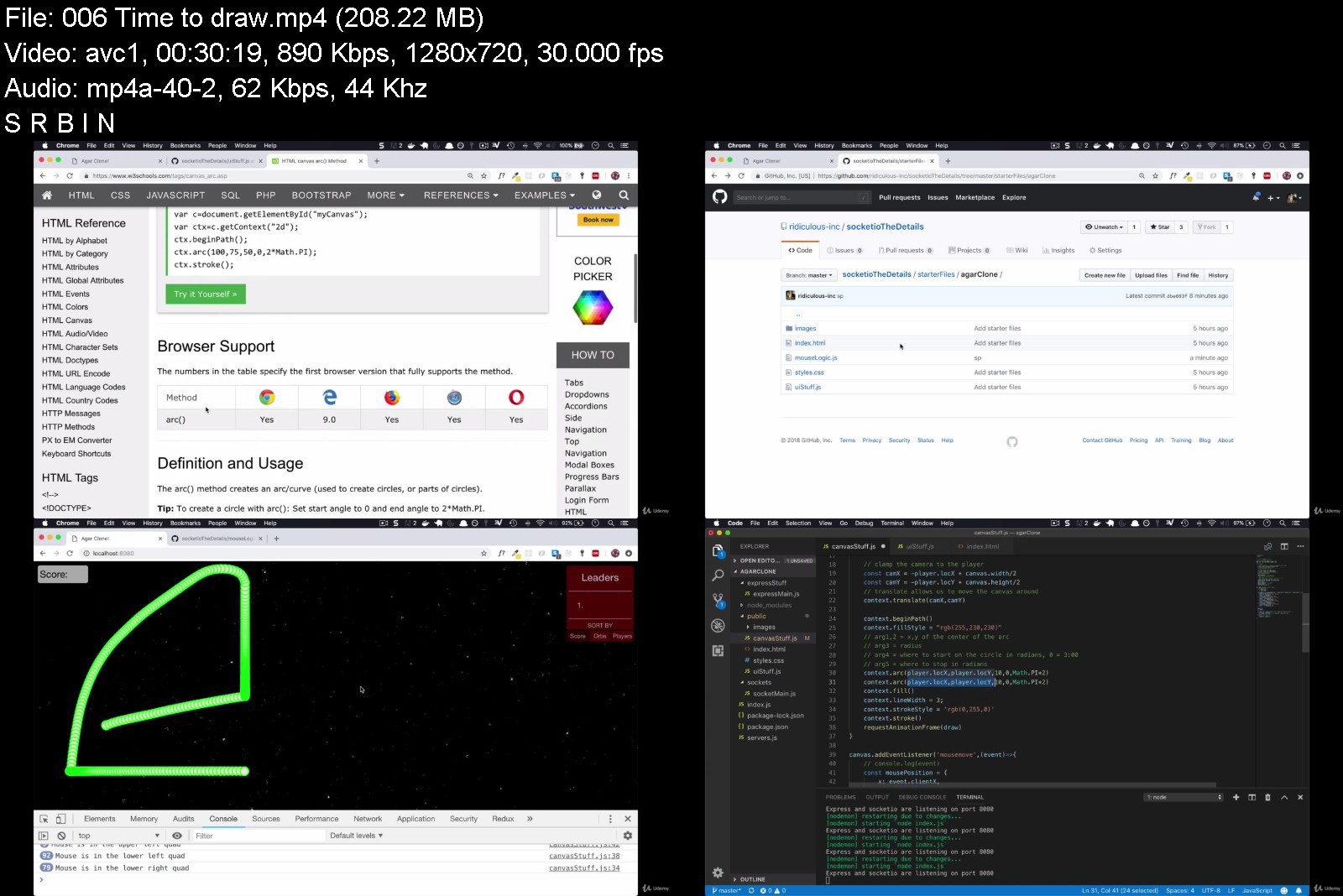
Project 1 - real-time canvas game
Project 2 - Real-time performance data (uses React, Cluster, and Redis)
streaming videos & socket.io-stream - in development
Supplemental - HTTP (for those in need of a review)

Who this course is for:
JS/Node developers who want to actually learn how to use Socketio for more than a chat app tutorial
JS developers interested in how node & JS combine to make the networking happen
Developers interested in building real time applications


socket.iowithwebsockey1jd5.jpg


Download from RapidGator


Download from Keep2Share


ASP.NET Core MVC 5.0 Razor Pages for beginners with Project

4229340507910s7j5d.jpg


ASP.NET Core MVC 5.0 Razor Pages for beginners with Project
MP4 | Video: h264, 1280x720 | Audio: AAC, 44.1 KHz, 2 Ch
Genre: eLearning | Language: English + srt | Duration: 101 lectures (17h 3m) | Size: 10.5 GB

"Find a Doctor" Project is consistently completed as the course progresses. IDE used is Visual Studio 2019 and 2022


What you'll learn
Write a fully functional web application using .NET Core and EF Core
Understand razor syntax, 2-way Model Binding, CRUD database connectivity, JSON file as a database, File upload and download, Master-Slave cascading dropdowns
State management with Cookies, Session, TempData, Consent Banner, JSON Serialization of custom types into Cookies
Modular design with Areas, ViewImports, Layouts, Partial Views and Razor Components
Identity and Role based Authentication and Policy based Authorization, Authentication with AJAX Requests.
AJAX communication with ASPNET Core, Minor project on EBook style Admin panel, Ajax based inline, in-place edit, update and cancel of tabular data
A project "Find a Doctor" is completed as the course progresses. This project covers all the common scenarios that a web developer has to deal with. . .
Requirements
Some programming experience with C#
Knowledge of html, css, javascript basics
General understanding of databases, RDBMS
[optional]Familiarity with any web based platform like classic ASP DOTNET, MVC or with PHP
Knowledge of .NET Core is NOT a pre-requisite
Description
SOURCE CODE PROVIDED FOR ALL PROGRAMS, EXERCISE SOLUTIONS AND PROJECT
This is a beginner's course in ASP.NET Core.
About the Project
A project "Find a Doctor" is completed as the course progresses.
Registration and Login Modules
Role based Authentication and Authorization
SQlite as Database
Doctors and patients can update their profiles and pictures
Patients can search for doctors of various specializations and in various cities.
AJAX based cascading dropdowns for search
JSON based database of cities
Patients can upload PDF reports
A consultation and a payment loop is fully built in this project.
Bootstrap based UI
Source code is provided in zipped form for each step of completion
Even though the project is "Find a Doctor", but it can be thought of as a "customer-service provider project". Hence, it can be modified for a website where customers search for plumbers, technicians, etc., or for a website where students search for teachers of various subjects.
Modules of the project are INTERLACED with theory topics and added consistently. The last lecture finishes the project.
Following is the table of chapters covered in this video course.
Ch 1 - Razor Pages
L01 - Introduction to Razor Pages (20 min)
L02 - Middleware Configuration (15 min)
L03 - Integrating CSS, JS and _Layout (16 min)
L04 - Inter Page Navigation and Linking of Razor Pages with Tag Helpers (10 min)
Exercises on Ch1
Find a Doctor (Project Step 1 Implementation Walkthrough)
Ch 2 - Basic Event Handling in Razor Pages
L01 - How to handle a click event (14 min)
L02 - Creating an HTML FORM with Razor Pages (15 min)
L03 - How to handle a FORM submit event (10 min)
L04 - How to handle Server Side Validation (14 min)
Exercises on Ch2
Find a Doctor (Project Step 2 Implementation Walkthrough)
Ch 3 - Database Connectivity - I
L01 - Various Database Options and the initial Setup (13 min)
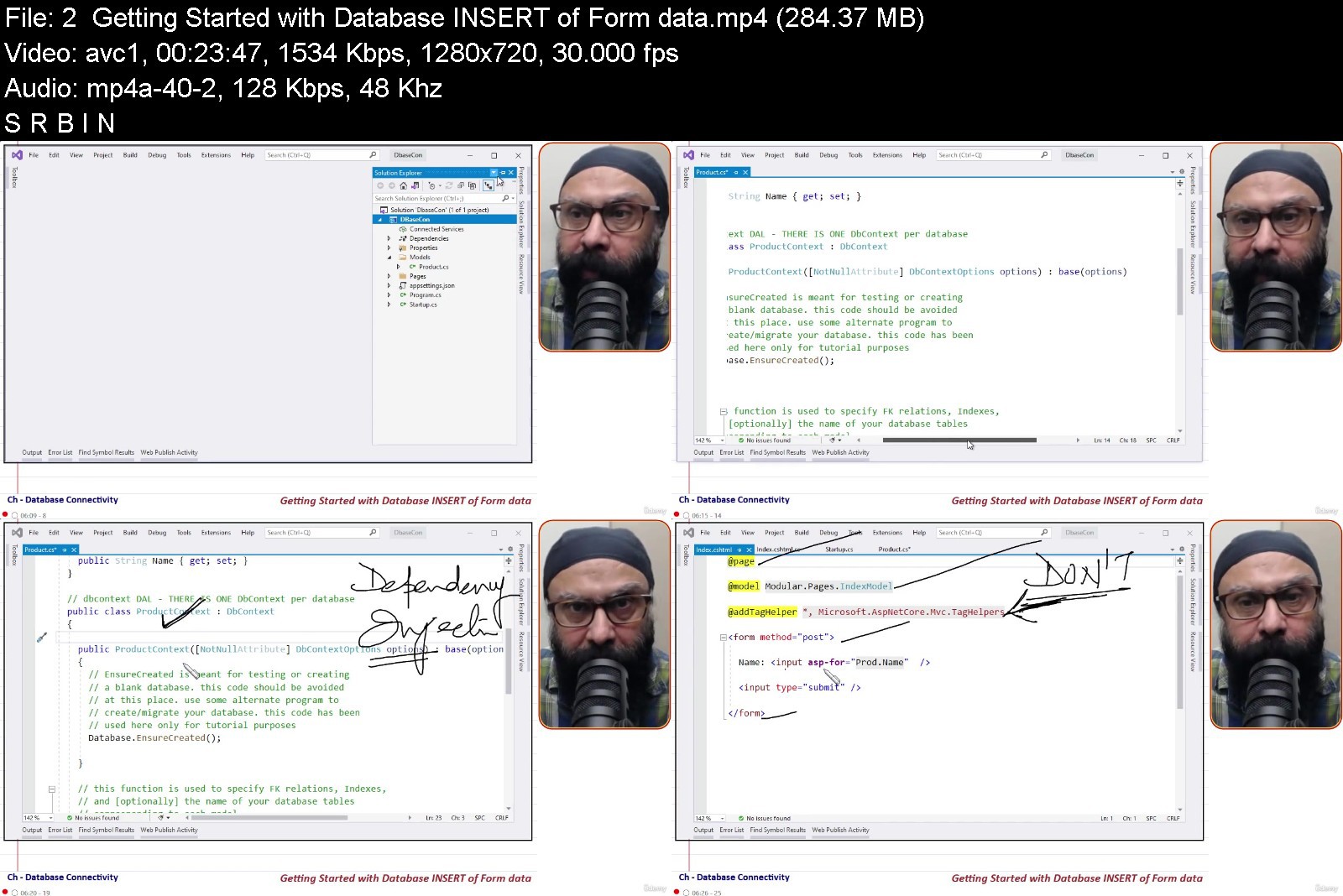
L02 - Getting Started with Database INSERT of Form data (23 min)
L03 - Strategy to handle a DbUpdateException (9 min)
L04 - Composite Primary Keys and Search by PK (9 min)
L05 - Displaying Data and OnGetAsync (10 min)
L06 - Deleting Records and the Anchor Tag Helper (10 min)
L07 - Updating Records (13 min)
L08 - Checkbox in a Razor Form (13 min)
L09 - Radiobuttonlist in a Razor Form (15 min)
Find a Doctor (Project Step 3 Implementation Walkthrough)
Ch 4 - Modularity
L01 - ViewImports (10 min)
L02 - Razor Components (20 min)
L03 - Currency Converter Component (10 mins)
Find a Doctor (Project Step 4 Implementation Walkthrough)
Ch 5 - Areas and Partial Views
L01 - Concept of Areas and an Authorization Scheme (17 min)
L02 - Partial Views (19:59 mins)
Find a Doctor (Project Step 5 Implementation Walkthrough)
Ch 6 - State Management
L01 - Reading and Writing Cookies (18 min)
L02 - Consent Banner with ITrackingConsentFeature (13 min)
L03 - The Concept of Session (16 min)
L04 - Serializing DateTime into Session (9 min)
L05 - When and how to use TempData (11 min)
Ch 7 - Authentication and Authorization
L01 - Configuring Role based Authorization (15 min)
L02 - SignIn, ReturnUrl and LocalRedirect (17 min)
L03 - Displaying User Info on each Page (7 min)
L04 - SignOutAsync with Tag Helpers (8 min)
Find a Doctor (Project Step 6 Implementation Walkthrough)
Ch 8 - Database Connectivity - II
L01 - Dropdownlist in a Razor Form (7 min)
L02 - Uploading file(s) and Storing in a Database (16 min)
L03 - Downloading file(s) and FileResult (11 min)
Find a Doctor (Project Step 7 Implementation Walkthrough)
Ch 9 - Ajax Communication
L01 - Ajax based POST of a Razor FORM (13 min)
L02 - Ajax based POST without a FORM (11 min)
L03 - Parameterized AJAX GET Request to a C# function (10 min)
L04 - Ajax based EBook style Admin Panel (8 min)
L05 - Authentication and Authorization with AJAX Requests (8 min)
L06 - Inline, In-place Edit, Update, Cancel of records (13 min)
L07 - Master Slave Cascading Dropdowns with Ajax (13 min)
Find a Doctor (Project Step 8 Implementation Walkthrough)
Ch 10 - Understanding LINQ Queries
L01 - SingleOrDefault, Find, FirstOrDefault, Single and First (11 min)
L02 - Where, Include and ToList (10 min)
L03 - How to Sort Records (6 min)
L04 - Direct Execution of SQL Queries and Stored Procedures (9 min)
Find a Doctor (Project Step 9 Implementation Walkthrough)
Ch 11 - Database Connectivity - III
L01 - Status of the App_Data folder in ASP.NET Core (10 mins)
L02 - XML as a database in ASP.NET Core (9 mins)
L03 - Repository Pattern and Dependency Injection with XML as Database (16 mins)
Find a Doctor (Finalized)
Who this course is for
Programmers and students willing to get started with ASP DOTNET Core


asp.netcoremvc5.0razo0bjaq.jpg


Download from RapidGator


Download from Keep2Share


Zurück
Oben Unten