• Regeln für den Video-Bereich:

    In den Börsenbereich gehören nur Angebote die bereits den Allgemeinen Regeln entsprechen.

    Einteilung

    - Folgende Formate gehören in die angegeben Bereiche:
    - Filme: Encodierte Filme von BluRay, DVD, R5, TV, Screener sowie Telesyncs im Format DivX, XviD und x264.
    - DVD: Filme im Format DVD5, DVD9 und HD2DVD.
    - HD: Encodierte Filme mit der Auflösung 720p oder darüber von BluRay, DVD, R5, TV, Screener sowie Telesyncs im Format x264.
    - 3D: Encodierte Filme von BluRay, die in einem 3D Format vorliegen. Dies gilt auch für Dokus, Animation usw.
    - Serien: Cartoon/Zeichentrick, Anime, Tutorials, Dokumentationen, Konzerte/Musik, Sonstiges sind demnach in die entsprechenden Bereiche einzuordnen, auch wenn sie beispielsweise im High Definition-Format oder als DVD5/DVD9/HD2DVD vorliegen. Ausnahme 3D.
    - Bereich Englisch: Englische Releases gehören immer in diesen Bereich.
    - Bereich Talk: Der Bereich, in dem über die Releases diskutiert werden kann, darf, soll und erwünscht ist.


    Angebot/Beitrag erstellen

    - Ein Beitrag darf erst dann erstellt werden, wenn der Upload bei mindestens einem OCH komplett ist. Platzhalter sind untersagt.
    - Bei einem Scenerelease hat der Threadtitel ausschließlich aus dem originalen, unveränderten Releasenamen zu bestehen. Es dürfen keine Veränderungen wie z.B. Sterne, kleine Buchstaben o.ä. vorgenommen werden. Ausnahme Serienbörse:
    - Bei einem Sammelthread für eine Staffel entfällt aus dem Releasename natürlich der Name der Folge. Beispiel: Die Simpsons S21 German DVDRip XviD - ITG
    - Dementsprechend sind also u.a. verboten: Erweiterungen wie "Tipp", "empfehlenswert", "only", "reup", usw. / jegliche andere Zusatzinformation oder Ergänzung, welche nicht in obiger Beschreibung zu finden ist.

    Aufbau des Angebots und Threadtitel

    Der Titel nach folgendem Muster erstellt zu werden. <Name> [3D] [Staffel] [German] <Jahr> <Tonspur> [DL] [Auflösung] <Quelle> <Codec> - <Group>
    Beispiel: The Dark Knight German 2008 AC3 DVDRip XviD - iND
    Beispiel: The Dark Knight 2008 DTS DL BDRip x264 - iND
    Beispiel: The Dark Knight 2008 AC3 DL BDRip XviD - iND
    Beispiel: The Dark Knight German 2008 AC3 720p BluRay x264 iND
    Beispiel: The Dark Knight 2008 DTS DL 1080p BluRay x264 iND
    Beispiel: Die Simpsons S01 German AC3 DVDRip XviD iND
    Beispiel: Die Simpsons S20 German AC3 720p BluRay x264 iND
    Beispiel: Sword Art Online II Ger Sub 2014 AAC 1080p WEBRip x264 - peppermint
    Entsprechend sind also u.a. verboten: Sonderzeichen wie Klammern, Sterne, Ausrufezeichen, Unterstriche, Anführungszeichen / Erweiterungen wie "Tipp", "empfehlenswert", "only", "reup", usw. / jegliche andere Zusatzinformation oder Ergänzung, welche nicht in obiger Beschreibung zu finden ist
    Ausnahmen hiervon können in den Bereichen geregelt sein.

    Die Beiträge sollen wie folgt aufgebaut werden:
    Überschrift entspricht dem Threadtitel
    Cover
    kurze Inhaltsbeschreibung
    Format, Größe, Dauer sind gut lesbar für Downloader außerhalb des Spoilers zu vermerken
    Nfo sind immer Anzugeben und selbige immer im Spoiler in Textform.
    Sind keine Nfo vorhanden z.B. Eigenpublikationen, sind im Spoiler folgende Dateiinformationen zusätzlich anzugeben :
    Quelle
    Video (Auflösung und Bitrate)
    Ton (Sprache, Format und Bitrate der einzelnen Spuren)
    Untertitel (sofern vorhanden)
    Hosterangabe in Textform außerhalb eines Spoiler mit allen enthaltenen Hostern.
    Bei SD kann auf diese zusätzlichen Dateiinformationen verzichtet werden.

    Alle benötigten Passwörter sind, sofern vorhanden, in Textform im Angebot anzugeben.
    Spoiler im Spoiler mit Kommentaren :"Schon Bedankt?" sind unerwünscht.


    Releases

    - Sind Retail-Release verfügbar, sind alle anderen Variationen untersagt. Ausnahmen: Alle deutschen Retail-Release sind CUT, in diesem Fall sind dubbed UNCUT-Release zulässig.
    - Im Serien-Bereich gilt speziell: Wenn ein Retail vor Abschluss einer laufenden Staffel erscheint, darf diese Staffel noch zu Ende gebracht werden.62
    - Gleiche Releases sind unbedingt zusammenzufassen. Das bedeutet, es ist zwingend erforderlich, vor dem Erstellen eines Themas per Suchfunktion zu überprüfen, ob bereits ein Beitrag mit demselben Release besteht. Ist dies der Fall, ist der bereits vorhandene Beitrag zu verwenden.
    - P2P und Scene Releases dürfen nicht verändert oder gar unter einem iND Tag eingestellt werden.


    Support, Diskussionen und Suche

    - Supportanfragen sind entweder per PN oder im Bereich Talk zu stellen.
    - Diskussionen und Bewertungen sind im Talk Bereich zu führen. Fragen an die Uploader haben ausschließlich via PN zu erfolgen, und sind in den Angeboten untersagt.
    - Anfragen zu Upload-Wünschen sind nur im Bereich Suche Video erlaubt. Antworten dürfen nur auf Angebote von MyBoerse.bz verlinkt werden.


    Verbote

    - Untersagt sind mehrere Formate in einem einzigen Angebotsthread, wie beispielsweise das gleichzeitige Anbieten von DivX/XviD, 720p und 1080p in einem Thread. Pro Format, Release und Auflösung ist ein eigener Thread zu eröffnen.
    - Grundsätzlich ebenso verboten sind Dupes. Uploader haben sich an geeigneter Stelle darüber zu informieren, ob es sich bei einem Release um ein Dupe handelt.
    - Gefakte, nur teilweise lauffähige oder unvollständige Angebote sind untersagt. Dies gilt auch für eigene Publikationen, die augenscheinlich nicht selbst von z.B. einer DVD gerippt wurden. Laufende Serien, bei denen noch nicht alle Folgen verfügbar sind, dürfen erstellt und regelmäßig geupdatet werden.
    - Untersagt sind Angebote, welche nur und ausschließlich in einer anderen Sprache als deutsch oder englisch vorliegen. Ausnahmen sind VORHER mit den Moderatoren zu klären.


    Verstoß gegen die Regeln

    - Angebote oder Beiträge, die gegen die Forenregeln verstoßen, sind über den "Melden"-Button im Beitrag zu melden.
  • Bitte registriere dich zunächst um Beiträge zu verfassen und externe Links aufzurufen.

*** Bestes IPTV *** bester Preis *** gratis Test ***


Englische Tutorials

bf50a3248f4996ea324d05b1231a680e.jpg

Backend Master Class [Golang + PostgreSQL + Kubernetes]
Genre: eLearning | MP4 | Video: h264, 1280x720 | Audio: AAC, 48.0 KHz
Language: English | Size: 4.40 GB | Duration: 9h 58m
Learn to design, develop, and deploy a backend web service from end to end

What you'll learn
Design database schema using DBML and automatically generate SQL code from it
Deeply understand the DB isolation levels, transactions and how to avoid deadlock
Automatically generate Golang code to interact with the database
Develop a RESTful backend web service using the Gin framework
Secure the APIs with user authentication, JWT and PASETO
Write stronger test set with high coverage using interfaces and mocking
Build a minimal Docker image for deployment and use Docker-compose for development
Set up Github Action to automatically build and deploy the app to AWS Kubernetes cluster
Register a domain and config Kubernetes ingress to route traffic to the web service
Enable automatic issue & renew TLS certificate for the domain with Let's Encrypt
Description
In this course, you will learn step-by-step how to design, develop and deploy a backend web service from scratch. I believe the best way to learn programming is to build a real application. Therefore, throughout the course, you will learn how to build a backend web service for a simple bank. It will provide APIs for the frontend to do the following things
Create and manage bank accounts.
Record all balance changes to each of the accounts.
Perform a money transfer between 2 accounts.
The programming language we will use to develop the service is Golang, but the course is not just about coding in Go. The course is divided into 3 main parts
In the first part, you will learn deeply about how to design the database, generate codes to talk to the DB in a consistent and reliable way using transactions, understand the DB isolation levels, and how to use it correctly in production. Besides database, you will also learn how to use docker for local development, how to use Git to manage your codes, and how to use Github Action to run unit tests automatically.
In the second part, you will learn how to build a set of RESTful HTTP APIs using Gin - one of the most famous Golang frameworks for building web services. This includes everything from loading app configs, mocking DB for more robust unit tests, handling errors, authenticating users, and securing the APIs with JWT and PASETO access tokens.
In the last part, you will learn how to build your app with Docker and deploy it to a production Kubernetes cluster on AWS. The lectures are very detailed with a step-by-step guide, from how to build a minimal docker image, set up a free-tier AWS account, create a production database, store and retrieve production secrets, create a Kubernetes cluster with EKS, use Github Action to automatically build and deploy the image to the EKS cluster, buy a domain name and route the traffics to the service, secure the connection with HTTPs and auto-renew TLS certificate from Let's Encrypt.
This course is designed with a lot of details, so that everyone, even with very little programming experience can understand and do it by themselves. I strongly believe that after the course, you would be able to work much more confidently and effectively in your projects.
Who this course is for
Anyone who wants to learn about backend web service development using Golang, Postgres, Docker & Kubernetes
The course is designed so that even a beginner with very basic programming skills can understand
But I'm sure even developers with more experienced (intermediate level) can still learn something new
Screenshots


[Golang___PostgreSQL___Kubernetes].part5.rar.html
[Golang___PostgreSQL___Kubernetes].part4.rar.html
[Golang___PostgreSQL___Kubernetes].part3.rar.html
[Golang___PostgreSQL___Kubernetes].part2.rar.html
[Golang___PostgreSQL___Kubernetes].part1.rar.html


8a50d359df50c5742e8931ad5dc4ebd4.jpg

Build Coffee E-commerce Website Using PHP
Genre: eLearning | MP4 | Video: h264, 1280x720 | Audio: AAC, 44.1 KHz
Language: English | Size: 1.34 GB | Duration: 2h 14m
Create Coffee and Snacks Ordering Website Using PHP

What you'll learn
Build Coffee E-commerce Website Using PHP
Setting up PHP environment
Working on the user-interface
How to create a database
How to get drinks and snacks from database
How to add drinks and snacks to cart
How to remove drinks and snacks from cart
How to increase and decrease meal quantity
How to make an order and checkout
How to integrate Paypal payment system
How to let customers pay using Paypal
How to verify Payment
And much much more...
Requirements
Good Knowledge in PHP
Computer with Windows or MAC
Internet connection
Description
This courses will teach you how to create an online coffee & snacks ordering website using PHP.
In this course you will learn how to build coffee e-commerce website using PHP. Learning how to build an e-commerce website that lets customers order from you will give you the opportunity to build a real-world, in-demand project and will open up the door of opportunity for you to become a professional Full-Stack developer.
First, you will learn how to install PHP environment, then you will learn how to incorporate an HTML & CSS coffee shop template. Then you will be taught the most important parts of this projects such as creating a cart and letting customers checkout. Thereafter, you will be taught how to integrate Paypal Payment system so that customers will pay you.
You will also learn how to integrate PayPal correctly so that you receive money for your meals. PayPal is one of the most powerful payment systems. By integrating PayPal into your PHP website you will learn a very important skill that is indispensable these days in any website.
By the end of this course you will have built a project using PHP that is capable of letting customers buy meals online while you have a control over the business and the website.
Why should you take this course?
There are many reasons why this course is extremely important.
1. You will build a real-world web app, rather than building unrealistic project.
2. I will teach you the "how-to" rather than concepts that you will end up abandoning.
3. You will learn HTML, CSS, PHP & MYSql and how they can work together.
4. You will learn Full-Stack development and become a professional one having build a complete e-commerce website.
Some of What You Will Learn in This Course
1. Install project environment & create project.
2. Run PHP project files.
3. Structure your project.
4. How to add a complete HTML & CSS coffee shop Template.
5. Logic behind building complete coffee & snacks ordering website.
6. How to let customers add drinks to cart.
7. How to let customers make orders and checkout.
8. How to integrate Paypal Payment System.
9. How to manage your database.
10. Best practices and techniques.
11. Organize your project.
12. Much much more...
Wish you an incredible learning journey.
Who this course is for
PHP developers
Web developers
Programmers & developers
Screenshots


92416185948d826ff947604446931319.jpg

MATLAB Basics and Particle Swarm Optimization Algorithm
Genre: eLearning | MP4 | Video: h264, 1280x720 | Audio: AAC, 48.0 KHz
Language: English | Size: 975 MB | Duration: 2h 59m
Learn MATLAB basics and implementation of Particle Swarm Optimization algorithm from scratch

What you'll learn
Learn the basics of MATLAB programming
Understand Particle Swarm Optimization (PSO) algorithm
Implement PSO algorithm in MATLAB to solve benchmark functions
Implement PSO algorithm to solve a mechanical engineering optimization problem
Work on a research problem in the field of optimization
Description
This course is specifically developed for B. Tech. and M. Tech/MS students of all Engineering disciplines. Engineering students from all branches can take this course and apply the knowledge to solve optimization problems in their field as part of a mini-project or capstone project. In addition to this, the course is also useful to Ph. D. students of different engineering branches. This course can be taken by everyone irrespective of their programming knowledge. The basics of MATLAB programming is taught in the beginning of the course and the concept of optimization algorithms is also explained from the scratch. The content is so organized that the learner should be able to understand Engineering optimization from scratch and solve research problems leading to publication in an international journal of high repute. A guided project is also included at the end of the course to make sure students can apply the knowledge to real engineering optimization problems. It should be useful to students of all universities around the world.
This course is divided into FOUR Parts
Part I - Basics of MATLAB Programming
Part 2 - Concept of Optimization and Particle Swarm Optimization (PSO) algorithm
Part 3 - MATLAB Implementation of PSO algorithm to solve benchmark functions
Part 4 - MATLAB Implementation of PSO Algorithm to solve a typical Engineering optimization Problem
Who this course is for
Undergraduate, Post graduate Students and PhD scholars of all Engineering disciplines
Screenshots


4b119851f7822dcb652504c69b21f449.jpg

A Beginner's Guide to Java Server Pages
Genre: eLearning | MP4 | Video: h264, 1280x720 | Audio: AAC, 44.1 KHz
Language: English | Size: 800 MB | Duration: 45m
A Beginner's Guide to Java Server Pages Java Server Pages (JSP) is a server-side programming technology

What you'll learn
learn data science, java , machine learning
learn machine learning
learn AI
learn java 2EE
Description
Java Server Pages (JSP) is a server-side programming technology that enables the creation of dynamic, platform-independent method for building Web-based applications. JSP have access to the entire family of Java APIs, including the JDBC API to access enterprise databases. This tutorial will teach you how to use Java Server Pages to develop your web applications in simple and easy steps.
Why to Learn JSP?
JavaServer Pages often serve the same purpose as programs implemented using the Common Gateway Interface (CGI). But JSP offers several advantages in comparison with the CGI.
Performance is significantly better because JSP allows embedding Dynamic Elements in HTML Pages itself instead of having separate CGI files.
JSP are always compiled before they are processed by the server unlike CGI/Perl which requires the server to load an interpreter and the target script each time the page is requested.
JavaServer Pages are built on top of the Java Servlets API, so like Servlets, JSP also has access to all the powerful Enterprise Java APIs, including JDBC, JNDI, EJB, JAXP, etc.
JSP pages can be used in combination with servlets that handle the business logic, the model supported by Java servlet template engines.
Finally, JSP is an integral part of Java EE, a complete platform for enterprise class applications. This means that JSP can play a part in the simplest applications to the most complex and demanding.
Audience
This tutorial has been prepared for the beginners to help them understand basic functionality of Java Server Pages (JSP) to develop your web applications. After completing this tutorial you will find yourself at a moderate level of expertise in using JSP from where you can take yourself to next levels.
Who this course is for
curious about data science, java
Screenshots


6d36094f4b72cdda09db19750610f25a.jpg

Algorithmic trading for beginners from zero to hero
Genre: eLearning | MP4 | Video: h264, 1280x720 | Audio: AAC, 44.1 KHz
Language: English | Size: 2.60 GB | Duration: 6h 55m
Technical indicators, risk management, Python programming, maths for trading, MetaTrader 5 live trading. Bots included

What you'll learn
Create a trading strategy from scratch, backtest it and optimize it
Basics in Python and Maths for algorithmic trading
Advanced algo trading concepts like Hurst exponent and how to adapt your strategy to your data
Understand how to create and use technical indicators with Python
Backtest your strategy without error using vectorized backtesting
Learn many financial metrics: Sortino ratio, alpha, beta,...
Learn how to analyze your drawdown
Add a stop loss on your strategies
Combine different technical indicators to double your earnings
MetaTrader 5 live trading using Python
Requirements
None. You have to be motivated to learn the techniques of quantitative analysts. You just need a computer and Internet!
Description
Do you want to create algorithmic trading strategies?
You already have some trading knowledge and you want to learn about quantitative trading/finance?
You are simply a curious person who wants to get into this subject to monetize and diversify your knowledge?
If you answer at least one of these questions, I welcome you to this course. All the applications of the course will be done using Python. However, for beginners in Python, don't panic! There is a FREE python crash course included to master Python.
In this course, you will learn how to use technical analysis to create robust strategies. You will perform quantitative analysis to find patterns in the data. Once you will have many profitable strategies, we will learn how to perform vectorized backtesting. Then you will apply portfolio and risk management techniques to reduce the drawdown and maximize your returns.
You will learn and understand quantitative analysis used by portfolio managers and professional traders
Modeling: Technical analysis (Moving average, RSI) and condition combination.
Backtesting: Do a backtest properly without error and minimize the computation time (Vectorized Backtesting).
Risk management: Manage the drawdown(Stop loss), combine strategies properly (Strategies portoflio).
Why this course and not another?
This is not a programming course nor a trading course or a machine learning course. It is a course in which statistics, programming and financial theory are used for trading.
This course is not created by a data scientist but by a degree in mathematics and economics specializing in mathematics applied to finance.
You can ask questions or read our quantitative finance articles simply by registering on our free Discord forum.
Without forgetting that the course is satisfied or refunded for 30 days. Don't miss an opportunity to improve your knowledge of this fascinating subject.
Screenshots


258a1ec119ffb272c3a86855847b5beb.jpg

PTC Creo Parametric - Full Motorbike Build - Advanced Module
Genre: eLearning | MP4 | Video: h264, 1280x720 | Audio: AAC, 48.0 KHz
Language: English | Size: 21.8 GB | Duration: 28h 8m
This Creo with Chris advanced course module will teach you to build a full motorcycle! Think you have what it takes?

What you'll learn
You will gain a fundamental understanding of the inner workings of a motorcycle.
You will learn to build a truly complex and intricate engineering motorcycle CAD model
You will learn how to create and set chain mechanisms.
You will learn to read and follow complex engineering drawings
Requirements
You need PTC Creo Parametric to take this course
You need to be advanced in your PTC Creo Parametric skills. If you are learning, take a look at my other course 'PTC Creo Parametric-A Complete Beginner to Advanced Course'. It's the bestseller, you can't miss it!
You need a computer and basic computer skills
This course is hard work, you need to have the drive and motivation to succeed to take this course!
Description
Welcome to CREO with Chris! This advance course module, building a full motorcycle, is going to challenge you and take your skills to the MAX!
With nearly 30 hours of highly advanced part creation and assemblies to go through, and nearly 200 downloadable resources, this course is not for the faint hearted! You can't miss a single step if you want to have that finished motorcycle in your workspace - so get ready to put in some effort!
I will be putting you through your paces and testing your PTC Creo Parametric skills through every step of this motorcycle build.
To take this course you need to be confident in your skills with PTC Creo Parametric. If you are a learner then take a look at my comprehensive course on Creo: PTC Creo Parametric-A Complete Beginner to Advanced Course. Thanks to my amazing students, this course is the number one course on PTC Creo Parametric on Udemy! It's the only course you need to develop your skills and set you on your journey to being a CAD professional.
By the time you have completed this advanced motorcycle build courser, you will have a fundamental understanding of the interna workings of a motorcycle and you will have a model that you can be proud to show off to your friends and colleagues, or maybe even show it off in interviews when you progress in your CAD career!
This course has over 28+ hours of Full HD video lecture content. And nearly 200 downloadable resources.
Who this course is for
This course is for advanced PTC Creo Parametric Users
Screenshots


88781ed5d1c204d00698028f25d24346.jpg

Agile project planning and estimation
Genre: eLearning | MP4 | Video: h264, 1280x720 | Audio: AAC, 44.1 KHz
Language: English | Size: 2.29 GB | Duration: 2h 0m
About the effective project management in the IT

What you'll learn
You will learn the process of planning and task estimating in the agile projects - from the beginning to end
You will learn how to encourage others to participate actively in the process of tasks estimation
You will be able to obtain information about the estimated delivery date of the entire project and its phases
You will practice the metrics and tools supporting the planning and estimation process
You will learn how to quickly react to any disturbing signals appearing in the project
Requirements
Basic knowledge about the software development life cycle (SDLC)
Using Excel spreadsheets and a bit of math
No programming experience or other technical skills are required
Description
Planning and estimation can be a boring activity in the IT project management, or an interesting challenge. Process of estimating can be simply a boring filling cell contents in Excel, or it can provide valuable information for the entire team and project stakeholders.
Which option do you choose?
I invite you to apply a comprehensive, repeatedly proven approach, adapted to the changing world of IT projects. By using the approach presented in this course, you will reduce planning costs while increasing the efficiency.
You will change an agile IT project management into an efficient and transparent process.
Is it possible? I can assure you that it is!
In this course, I cover topics such as
differences between the traditional and agile approach to estimation,
preparation for the planning and estimation process,
explanation of the principle of relative estimation (in Story Points) - from the absolute basic level,
organizing an estimation session using the Planning Poker technique,
agile project planning, with an emphasis on delivering the MVP version,
project implementation and project management in agile - specific case study,
measuring project progress - typical and less known agile project metrics (you will download template spreadsheets that you can use in your project)
At the end, you will receive a set of test questions that will help you verify the acquired knowledge.
The materials from this course have already helped many people. The Polish version of this course is one of the highest rated IT project management courses at Udemy in Poland.
Minimum theory, maximum practicing.
Who this course is for
Project Managers
Scrum Masters and Agile Coaches
Product Owners, Product Managers
Business Analysts
Leaders of the development teams
Screenshots


4871cb242152d8675bc4683b32fef7e1.jpg

CAMS certification: A Beginner's Guide Anti-Money Laundering
Genre: eLearning | MP4 | Video: h264, 1280x720 | Audio: AAC, 48.0 KHz
Language: English | Size: 502 MB | Duration: 52m
Exam for Certified Anti-Money Laundering Specialist (CAMS) - 40 New & Revised Questions for the CAMS certification Exam

What you'll learn
Explaining CAMS Certification
The CAMS Exam Format
How to Prepare for the CAMS Exam
CAMS Exam Simulator
Description
Do you possess the necessary expertise to spot suspicious transactions?
If you answered yes, then the Certified Anti-Money Laundering Specialist (CAMS) certification is a highly sought-after way to start or enhance your career in the Anti-Money Laundering and Counter-Terrorism Financing Sector. And, if you're still wondering if the CAMS is worthwhile, the answer is emphatically yes.
So, let's get started on a rewarding and reputable career as an Anti-Money Laundering Professional. As a result, we'll go over all you need to know about the Cams certification in this article. But, before you go all in on ACAMS, let's take a look at why there's so much buzz about them.
Financial crime has dominated the news in recent years, and the focus has shifted to compliance. CAMS is a globally recognized certification that explains the fundamentals of money laundering and how to avoid it. Individuals and teams can become certified as Anti-Money Laundering Specialists in as little as three months.
ACAMS is the world's largest membership organization dedicated to improving fraud detection abilities and expertise in both the public and private sectors.
We'll go over what CAMS certification is, why it's necessary, and the most crucial things you need to know to earn it in this course.
Who this course is for
Anyone who Want to Take the CAMS Exam.
Screenshots


eb2a1d956bfb376a8c598405b699aeb3.jpg

Analog Circuits From Scratch
Genre: eLearning | MP4 | Video: h264, 1280x720 | Audio: AAC, 44.1 KHz
Language: English | Size: 1.66 GB | Duration: 5h 14m
Learn the concepts of Analog Elecronics and Design Analog Circuits from Scratch!

What you'll learn
Understand the concepts of Analog Electronics
Solve circuits using diodes and transistors
Design analog circuits from scratch using basic electronic components
Learn about Power Supplies, Amplifiers, Current Mirrors, Multistage Amplifiers, Differential Amplifiers, Power Amplifiers and so on.
Description
Hey all! Welcome to my course on Analog Circuits From Scratch where everything is taught from scratch towards applications. The syllabus of the course is as follows
Unit 1 - Fundamentals of Diode Circuits
Fundamentals of PN Junction
Fundamentals of Diode
Forming circuits using Diode
Diode Approximation
Solving Diode Circuits
Unit 2 - Power Supplies
Building blocks of a power supply
Half wave rectifier circuit - RMS, Average values, Ripple Factor, Form Factor
Full wave rectifier circuit - RMS, Average values, Ripple Factor, Form Factor
Centre tapped rectifier - RMS, Average values, Ripple Factor, Form Factor
Bridge rectifier - RMS, Average values, Ripple Factor, Form Factor
Problems on Rectifiers
Filters - Response Curves
Capacitor Filters
Regulator - types
Series Voltage Regulator
Shunt Voltage Regulator
Unit 3 - Bipolar Junction Transistor Applications
Working of BJT
BJT - Characteristics, Types
BJT - Modes of Operation
BJT Amplifier
BJT Amplifier - Frequency Response Curves
BJT Voltage Regulator - Series, Shunt
BJT Current Mirrors - Explanation, Equation, Problems
Unit 4 - MOSFET Applications;
Working of MOSFET
MOSFET - Characteristics, Types
MOSFET - Modes of Operation
MOSFET Amplifier
MOSFET Current Mirrors - Explanation, Equation, Problems
Unit 5 - Differential Amplifiers and Power Amplifiers
Differential Amplifier - Introduction, Circuit using BJT
Voltage and Current curves of Differential Amplifier
Power Amplifiers - Classification
Class A, B, C, AB, D
You will get all the basics right to build a strong foundation in understanding, analyzing and designing the analog circuits using the fundamental electronic components such as a diode, transistor and so on. What are you waiting for? See you there in my course!
Who this course is for
Beginner Electronics Aspirants
Beginner Electrical Engineering Aspirants
Anyone who wants to learn and design Analog Circuits from Scratch
Screenshots


5347bb143548bad1ec1c4b9684c8d540.jpg

Global Dimensions of Artificial Intelligence (AI)
Genre: eLearning | MP4 | Video: h264, 1280x720 | Audio: AAC, 48.0 KHz
Language: English | Size: 3.8 GB | Duration: 3h 4m
The Role of AI in increasing intellectual and analytical abilities and providing professional development of personality

What you'll learn
Students will learn the Role of Artificial Intelligence (AI) on the way to perform creative functions that are considered the prerogative of person
To study AI as a science and technology of creating intelligent machines, especially intelligent computer programs
To study possible role of artificial intelligence in the daily life of international society and its reflection on the global development of the world.
To study Various methods, which are used in the field of Artificial Intelligence
To study main fields of the using Artificial Intelligence, including: Banking system, education, medicine, industry, human resources, philosophy, communication
Requirements
For the involvement in the course, the minimal requirement for the student is the having knowledge about Origin and understanding of the term "artificial intelligence"
Description
The purpose of the lecture course in Artificial Intelligence (AI) is to review and analyze the role and place of AI in the framework of the scientific-technical revolution and to explain, how it performs the creative functions that are traditionally considered the prerogative of a person. During the lecture course, the history of Artificial Intelligence development, different tests of the logical character, fields of business and economy, and other sciences, where the AI is used, main scientific centers of AI, and other interesting topics will be discussed.
Discussing AI, the following definitions of artificial intelligence are given
• Scientific direction, within the framework of which the problems of hardware or software modeling of those types of human activity that are traditionally considered to be intellectual are set and solved.
• The property of intelligent systems to perform functions (creative), which are traditionally considered the prerogative of a person. At the same time, an intelligent system is a technical or software system capable of solving problems traditionally considered creative, belonging to a specific subject area, knowledge about which is stored in the memory of such a system. The structure of an intelligent system includes three main blocks - a knowledge base, a solver, and an intelligent interface that allows you to communicate with a computer without special programs for data entry.
• Direction in computer science and information technology, the task of which is to recreate intelligent reasoning and actions using computer systems and other artificial devices.
• The ability of the system to correctly interpret external data, learn from such data and use the knowledge gained to achieve specific goals and objectives through flexible adaptation.
One of the particular definitions of intelligence, common to humans and "machines", can be formulated as follows: "Intelligence is the ability of a system to create, in the course of self-learning, programs (primarily heuristic) for solving problems of a certain class of complexity and to solve these problems."
Who this course is for
Taking into consideration, that the introduction and development of Artificial Intelligence is possible in the framework of different academic disciplines and specialties within both directions: Natural and Humanitarian Sciences, the lecture course can be useful for the representatives of the various specialties and different ages
Lecture course will promote the development of analytical skills among the students - representatives of the different specialties
Taking into account the development of Information technologies, field: Artificial Intelligence has its global dimension and can be useful for the representatives of the different countries and regions of the World
Screenshots


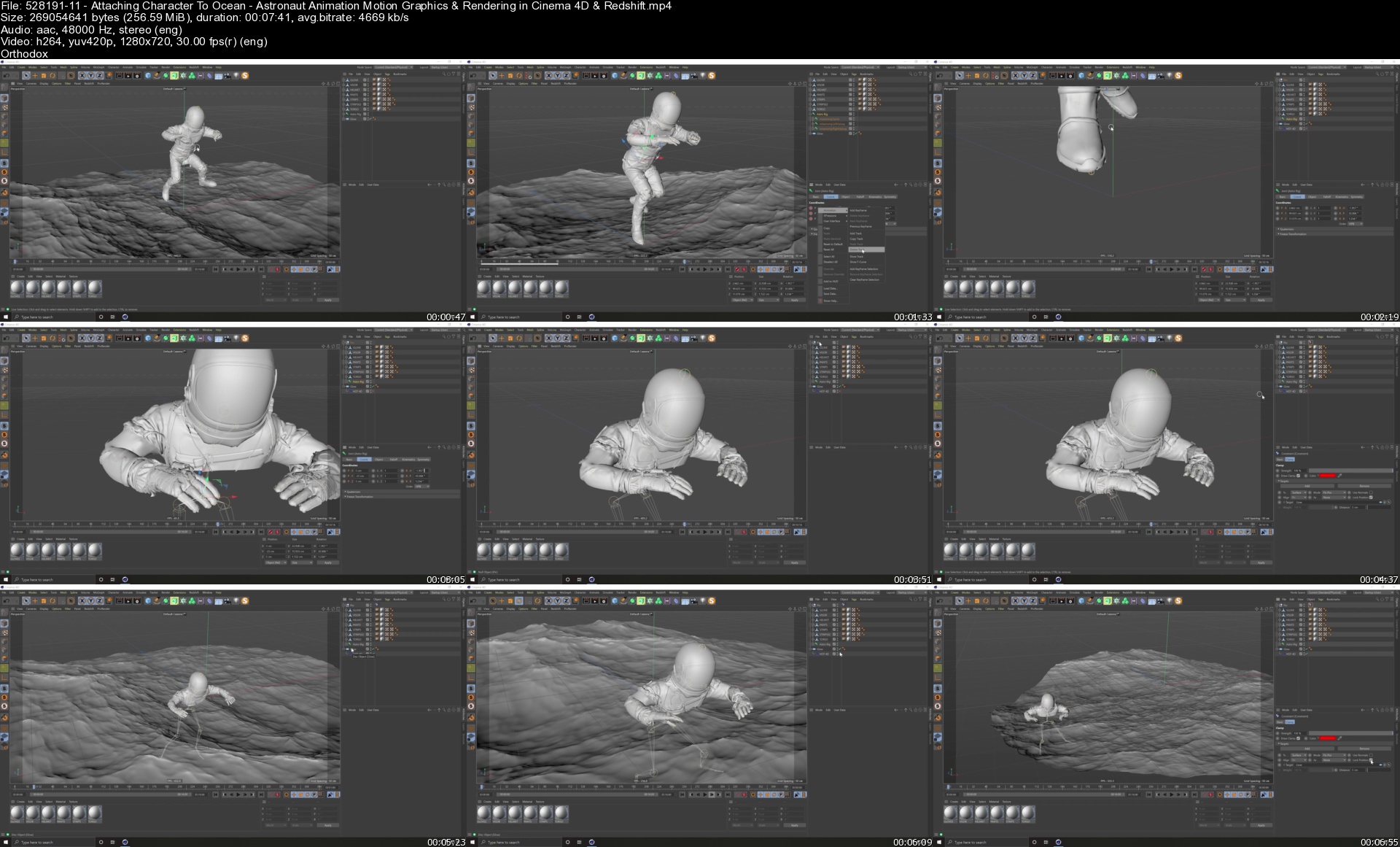
Astronaut Animation: Motion Graphics & Rendering in Cinema 4D & Redshift

scmrxnvfogbkmnhld9me5zik5y.jpg


Astronaut Animation: Motion Graphics & Rendering in Cinema 4D & Redshift
Don Mupasi X Visualdon | Duration: 3:33 h | Video: H264 1280x720 | Audio: AAC 48 kHz 2ch | 8,71 GB | Language: English

In this class, you will learn how to create a floating astronaut scene in Cinema 4D and render it with Redshift Render, the GPU based Render Engine for Cinema 4D. In addition to learning the full step by step process of creating this scene in particular you will also learn several general techniques, tips & tricks to working with Cinema 4D & Redshift Render.

Important Additional Class Notes & Files - Google Drive Link: The class covers the following topics and more that you can use for your animation and motion graphics projects in general such as:

• Creating on ocean simulation using a free plugin for Cinema 4D called Hot4D
• Rigging & animating characters with a free tool by Adobe called MIXAMO
• Camera animation in Cinema 4D
• How to instal 3rd party plugins in Cinema 4D & Integrate them in your user interface
• Creating a scene & animation that loops seamlessly
• A cinematic lighting style in with Redshift Render in Cinema 4D
• Atmospheric and fog effects with Redshift Render
• Output/render settings from Cinema 4D & Redshift. Optimizing for both quality & speed
• Importing the rendered sequence/s into Adobe After Effects
• Using Adobe After Effects for the finishing touches, applying glow effects and color adjustments.
• The best final export settings in Adobe Premiere Pro for Instagram and YouTube.

The class is probably more suitable for intermediate to advanced users buts its also detailed enough that beginners should be able to follow along without too many problems either. If you get suck on any part of the class, you can ask your question under the class and I will answer your question as soon as possible. Remember to share a screen with your question which will make it easier to understand the question!

If the class is too advanced, no need to worry! I have several other and more beginner friendly classes for Cinema 4D on my profile, one of which is a complete masterclass aimed at absolute beginners and people who have never opened the software before. You could start there and then come back to this class after!

Homepage


52819111attachingchar63knh.jpg


Mega Course VMware vSphere 6.7 Optimize Upgrade Troubleshoot

xlfhnuxy2xhcm079oqrntsujlz.jpg


Mega Course VMware vSphere 6.7 Optimize Upgrade Troubleshoot
MP4 | Video: h264, 1280x720 | Audio: AAC, 44.1 KHz
Language: English | Size: 11.5 GB | Duration: 34h 18m

34.5hrs of VMware vSphere 6.7 lectures, lab demos to learn ESXi / vCenter, for VCP / VCAP VMware Certification and more


What you'll learn
In this class you will learn how to install, configure, manage, upgrade, scale up, design, deploy, troubleshoot and use vSphere 6.7
Emphasis is placed on good design and implementation, best practices and use cases so you understand not only what you are doing but why you are doing it
Performance, scalability and service availability are recurring topics. This course includes many tips to improve server, VM, networking and storage performance, redundancy and how to deliver scalability
Troubleshooting tips, tricks and procedures are covered in every chapter. We show you how to work around problems, configure and repair systems from the command line and how to monitor hosts, VMs, networking and storage using esxtop and other tools
Command line tools are explained and demonstrated so you can still fix issues when Web interfaces aren't working
Design advice, tips and trade offs are included so you can build the best possible environment with the equipment you have.
Exactly how to perform ever task because we include Hands-on Lab Demo lectures in every chapter

Requirements
You should have prior experience with vSphere 4.x, 5.0, 5.5 or higher as an experienced user or junior administrator
You should have some familiaity with physical server hardware (CPUs, Memory, Networking and storage technologies)
You should understand TCP/IP networking and know how to use tools like ping, traceroute, nslookup, etc.
You should have basic knowledge of how to build and run virtual machines
You should have some experience managing ESXi hosts and vCenter using vSphere Client or Host Client
You should have an understanding of general IT security considerations
You should have familiarity with popular Guest operating systems like Windows or Linux (we use Windows 10 in this course)

Description
About this Course

This 34.5 hr course is the longest, most information packed and most complete VMware vSphere 6.7 course you will find on Udemy.

Do you already have basic VMware vSphere / virtualization knowledge and experience and want to take your skills to the next level? Maybe your goal is to skill up so you can pass VCP-DCV or VCAP certification exams, get that promotion or earn a senior position as a VMware vSphere 6.7 administrator?

If so, this 100% downloadable course is for you! Want to be sure? Every chapter in my course has at least one free preview lecture and a 30-day, no questions asked, money back guarantee.

I originally developed the content in this course for 5-day Instructor Led training classes - the kind of class that can cost $4,200+USD/seat at major training companies. But now, it is here on Udemy - so you can get the same high quality training for a lot less.

Don't settle for VMware video training that is just a few hours of recorded PowerPoint slides. In this mega-course, I include both lecture and hands-on lab demo videos. In the lecture material, I explain concepts, provide an overview of using vSphere 6.7 and include best practices and design and troubleshooting tips, etc. In the hands-on lab demos, I log into one of our live vSphere rental labs and show you exactly how to get the job done, step-by-step.

Please note that this course does not provide access to live labs but does include video demonstrations of how to complete tasks using vSphere 6.7.

What I Cover In This Course

In this course, I explain step-by-step how to upgrade or migrate from vCenter for Windows or vCenter Appliance to vCenter Server Appliance 6.7 and how to use VMware Update Manager to upgrade ESXi hosts and how to upgrade Virtual Machine virtual hardware and VMware Tools. I also cover advanced topics such as Fibre/iSCSI shared storage, Raw Device Maps, working with VMFS 6 Filesystems, Storage Profiles, Storage DRS Clusters, High Availability Clusters, Fault Tolerance and Distributed Virtual Switches.

I'll show you how to diagnose, isolate and fix common problems. We will use Host Client, Web Client, HTML 5 Client and command line tools to explore, configure, update, investigate and zero in on performance bottlenecks and trouble spots. Up to 45% of class time is devoted to labs so concepts, skills and best practices are developed and reinforced.

By the end of the class, attendees will have learned practical, actionable skills in vSphere design, implementation, upgrading, sizing, scaleability, performance optimization and troubleshooting.

Use This Course to Prepare for VMware Certification Exams

Many of my Udemy students use this course to help them prepare for vSphere certification. You can use this course to gain knowledge and skills that are tested for in VMware certifications including:

VMware Certified Associate (VCA)

VMware Certified Professional (VCP-DCV), and

VMware Certified Advanced Professional (VCAP)

Detailed Chapter by Chapter Topics Covered in this Course

Chapter 0 - Course Overview

What this course will cover

The technical skills and background of ideal attendees

Training with a focus on vSphere Best Practices, Good Design, Diagnosis and Troubleshooting, Scaleability, VM Availability, Performance, Availability, Security and more

Chapter 1 - How to install and configure ESXi according to best practices

Selecting and preparing supported hardware for ESXi 6.7

Performing install and post install tasks

Using advanced settings to review and set password strength rules

Connecting ESXi to the management network via the DCUI including tips and best practices

Accessing ESXi through the DCUI, server console and via Secure Shell

Review and managing host access services from the command line (troubleshooting tip)

How to access the DCUI when the DCUI isn't running (troubleshooting tip)

Four different ways to review ESXi logs (web, Host Client, Command line and Console)

How to manage local users and permissions from the command line (troubleshooting tip)

Sizing ESXi hosts for pCPU, pMemory. and, how to enable Transparent Page Sharing to improve memory efficiency by up to 20%

How to use local Flash storage to accelerate ESXi host read I/Os and minimize the impact of host memory stress (performance tip)

How to use Lockdown Mode to secure your ESXi host

How to install VMware packages (called VIBs) using both Host Client and command line

Now to query and restart local host management agents from DCUI and from the command line (troubleshooting tip)

Where to find best practices for security your ESXi hosts

Chapter 2 - Introduction to ESXi Physical and Virtual Networking

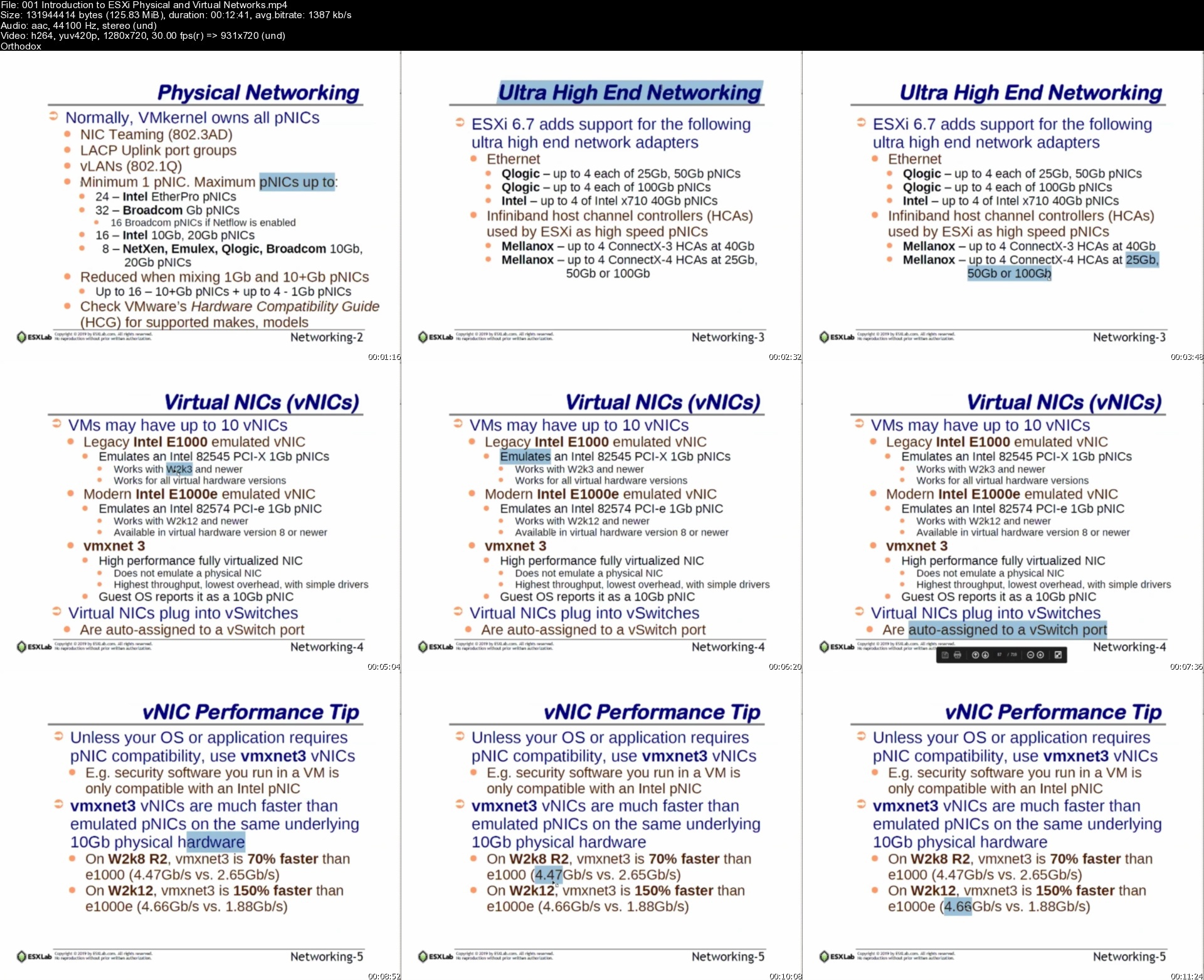
Physical networking hardware supported by ESXi. Includes the latest, ultra fast network hardware

The three Virtual NIC options along with use cases to help you select the best vNIC for best performance

The three different TCP/IP stacks supported by ESXi (and why)

How to create and manage vSwitches, VMkernel NICs and Port Groups using Host Client

How to create and manage vSwitches, VMkernel NICs and Port Groups using command line (troubleshooting tip)

The basics of Physical NIC teaming

Great ESXi command line tools to test networking, verify peer connectivity and troubleshoot networking issues

Chapter 3 - Advanced ESXi Physical and Virtual Networking

Virtual / Physical networking design goals

The three vSwitch Security Policies (Promiscuous Mode, MAC Address Changes, Forged Transmits) and when to use them

Network traffic bandwidth management with Traffic Shaping

How to improve network throughput with Jumbo Frames. Includes use cases, how to configure and how to test Jumbo Frame support

The five Physical NIC teaming policies:

Route by Originating Port

Route by MAC Hash

Route by IP Hash

Route by pNIC Load

Route by Active / Stand-by
Includes pros, cons and use cases for each policy

The three different ways to do vLAN tagging

Route by Originating Port

vSwitch Tagging

pSwitch Tagging

VM Tagging
When / how to use each one

VMkernel pNIC Offloading including TCP Segment Offloading and TCP Checksum offloading including benefits and how each works

Exclusive pNIC to VM ownership and use cases using DirectPath I/O and how to do it

Shared pNIC to VM ownership and use cases using Single Root I/O Virtualization and how to do it

How to monitor pNIC and VM network traffic using esxtop

How to query an ESXi host's active network connections on the command line

How to get detailed pNIC statistics including transmits, receives, errors, etc. on the command line

Network design tips and best practices

Chapter 4 - Connecting ESXi to NFS Shares

Supported and unsupported (but works) NFS server options (includes Windows as an NFS server)

The layout of an NFS network. Includes security concerns and compensating controls to address these issues

NFS network design to maximize service access and availability

How to publish NFS shares on Linux (works for Windows too) so that ESXi can use the shares

ESXi physical network and TCP/IP requirements for connecting to NFS shares

How to mount NFS shares using Host Client

How to query NFS servers for their share list from the command line (hint - you can't do this from Host Client)

How to mount NFS shares on the command line (troubleshooting tip)

Using advanced ESXi configuration parameters to increase the maximum number of supported, concurrent NFS shares

Connecting to ESXi to NFS shares from the command line (troubleshooting tip)

ESXi / NFS best practices, pros and cons

NFS v4.1 features, limitations, how to migrate from NFS v3 to 4.1 and how to avoid data corruption

Chapter 5 - Virtual Hardware and Virtual Machines

Introduction to the features and capabilities of Virtual Hardware v14

pCPUs and vCPUs including configuration options and limits

vCPU socket and core hard and practical maximums and guidelines

VMemory configuration, sizing and best practices

How to select and customize vNIC properties for different use cases

The three different virtual SCSI storage controllers and use cases and best practices for each one

How to select the best virtual SCSI storage controller for best VM storage performance

The purpose, features and capabilities of VMware Tools and why it needs to be in every VM

Windows VM configuration and performance tips

The files that need to be backed up to capture a powered off VM

How Snapshots work. Using the Snapshot Manager

Troubleshooting VM Snapshots

The Files that are added to a VM when it is snapshotted

Guest OS Security tips and best practices

Virtual Hardware upgrades and best practices

How to list and shut down VMs from the command line

How to get a VM's power status, power on, power off or reboot a VM from the command line

How to take ownership and give up ownership of a VM from the command line

How to change a running VM's console screen resolution from the command line (great troubleshooting tip)

VM security considerations for Windows VMs

How to streamline the virtual hardware layer and Guest OS for runtime efficiency

An introduction to the VMware Guest OS Optimization Tool

Chapter 6 - vSphere 6.7 Management with vCenter Server Appliance

How to use Javascript Object Notation (JSON) files for automated vCSA installs

vCenter for Windows. How to install it, upgrade to it, migrate from it to vCSA and why you want to migrate

vCenter Server Appliance (vCSA) hardware requirements and how to adjust for your VM and ESXi host needs

Platform Services Controller (PSC) and why VMware is strongly encouraging Embedded PSC rather than External PSC

How to Upgrade old vCSA to vCSA 6.7

How to Migrate from vCenter for Windows to vCSA 6.7

An introduction to vSphere Web (flash / flex) Client and new HTML 5 Client

Perform vCSA post install / migrate tasks using the Virtual Appliance Management Interface (VAMI)

Why you should always upgrade vCSA before you upgrade ESXi hosts (and what to do about it if you accidentally upgrade ESXi first)

Why you should review and change vCSA's default root password management policy

How to add vCSA to Active Directory and how to use Active Directory accounts as vCenter administrator accounts

How Platform Services Controller Global Permissions and Solution Permissions work

Enable and secure ESXi hosts fia Lockdown Mode from vCenter

The VMware (Digital) Certificate Authority and its three modes (Default, Enterprise and Custom) and which to use

How to maintain high vCSA service availability through vCSA High Availability configurations

Two other vCSA high service availability options if you choose not to use vCSA High Availability

How to back up and restore vCenter Appliance configurations using vCSA's VAMI service

Best practices for securing ESXi and vCSA

Accessing vCSA as root from the command line

How to query, start and restart critical vCSA services from the command line (troubleshooting tip)

vCSA log files. Where they are and how to view them

Chapter 7 - Virtual Machines, Templates, Clones, Hotplug Hardware and Performance Analysis, Tips and Tricks

Rapid VM deployments with Clones and Templates

Template theory, benefits and best practices

Virtual disk formats explained - Thick Disk Lazy Zero, Thick Disk Eager Zero and Thin Disk

Which disk format is best. Performance vs. space efficiency and why Thin Disk is almost always the best format to choose

Cold cloning and hot cloning a VM

Windows Guest OS Customization using Sysprep and non-Windows Guest OS customization

Exporting VMs in Open Virtual Machine Format (OVF) and Open Virtual Machine Archive (OVA) formats

Importing OVF / OVA format VMs

VM multi-vCPU core sizing and best practices and how to do it

VM memory sizing considerations and best practices

Hot-add (almost) any virtual hardware with Hot-plug. How to set it up and how to do it

Hot-plug vCPU and vRAM strategy, best practices and limitations

Hot adding virtual hardware including hot adding virtual disks with no VM down time

Hot adding additional vSCSI controllers to a VM. Why do it (hint - performance) and the best vSCSI controllers to use based on use cases

Using virtual NVMe controllers and flash backed storage for the ultimate in VM storage performance

Monitoring VM performance in real time with esxtop

Drilling down to VM pCPU core performance with esxtop

Common VM performance issues, how to identify them and how to fix them

Great Guest OS performance monitoring tools. What to use, what to believe and what not to believe when using these tools

Chapter 8 - Use VMware Update Manager to Upgrade ESXi hosts

Using command line tools to backup and restore an ESXi host's configuration

Configure VMware Update Managers

Create ESXi host Patch Baselines

Importing a new ESXi install media image

Attaching a Host Upgrade patch baseline

Performing host compliance scans

Upgrading an ESXi host from ESXi 6.0 to ESXi 6.7

Chapter 9 - Connecting to Fibre & iSCSI Shared Storage

General SAN features and capabilities

Overview of Fibre Storage Networks

VMware APIs for Array Integration (VAAI)

Storage network design for performance and redundancy

Connecting to Fibre and iSCSI shared storage

iSCSI Hardware and Software Initiators

iSCSI Static and Send Targets LUN discovery

Troubleshooting storage issues

Use esxtop to review storage controller and datastores configuration and I/O activity

Chapter 10 - Direct VM to SAN Access with Raw Device Maps

Explain Physical and Virtual Raw Device Maps (RDMs)

Use cases for Raw Device Maps

How Raw Device Maps work with VM cold, VMotion and Storage VMotion migrations

Using RDMs to implement Virtual and Virtual/Physical Microsoft Fail Over Clusters

Chapter 11 - VMware File System (VMFS)

Unique file system properties of VMFS

Creating and managing shared Volumes

Managing VMFS capacity with LUN spanning and LUN expansion

Understand VMware multipath options

Benefits of using vendor multipath solutions

Understanding and selecting multipathing policies

VMFS performance, scalability and reliability considerations

Review storage queuing, I/O aborts and other storage issues

Diagnose and troubleshoot storage performance

VMware vSphere Flash Read Cache description and use cases

Troubleshooting VMFS issues

Use esxtop to review datastore I/O activity

Chapter 12 - Storage Profiles

SAN and user defined storage profiles

Using storage speed, replication to define storage capabilities

VMware APIs for Storage Awareness (VASA)

Creating VM storage profiles

VM/Storage compliance checks

Remediating incorrectly placed VM

Understanding Storage I/O Control

Enable priority storage queues with Storage I/O control

Chapter 13 - Storage Load Balancing with SDRS Clusters

Creating and using Storage Distributed Resource Scheduling clusters (SDRS)

Cluster properties for capacity and I/O load balancing

Best practices for building storage clusters

Chapter 14 - VMotion Migration, Cold Migration, Storage VMotion (coming soon)

Cold Migrations to new ESXi hosts, datastores

Hot Migrations with VMotion

VMotion requirements and dependencies

How VMotion works - detailed explanation

Troubleshooting VMotion

Storage VMotion for hot VM disk migrations

Chapter 15 - VMware High Availability Clusters (coming soon)

Minimize unplanned VM down time VMware High Availability clusters

VM requirements for HA Clusters

Storage fault recovery in High Availability clusters (All Paths Down, Permanent Device Loss)

Monitoring VM health in HA clusters

Admission Control policy settings for predictable pCPU/pRAM resource availability

Identifying and troubleshooting issues in VMware HA clusters

Chapter 16 - VMware Fault Tolerance (coming soon)

Eliminate VM unplanned down time with VMware Fault Tolerance

Role of the Primary and Secondary VM in a Fault Tolerance configuration

Explain how Fast Checkpointing keeps the Secondary VM vCPU, vRAM, vDisk up to date

Enabling VM Fault Tolerance

Initial VM synchronization

Testing Fault Tolerance

Chapter 17 - Distributed vSwitch Features and Scalability (coming soon)

Features and benefits of Distributed vSwitches

Role of the DVUplink port group

Adding ESXi hosts to dvSwitches

Creating dvSwitch port groups

Migrating physical NICs and VMkernel ports to dvSwitches

dvSwitch configuration backup and restore

Configuring custom VM MAC address generation policies

Testing dvSwitch network healt

Chapter 18 - Final Thoughts

How to tell if your workload is suitable for virtualization

The benefits of virtualizing Enterprise Application workloads

How to mitigate the risks of Virtual Machine theft

Great tips on where to look for additional, quality information on vSphere

How to (Legally) Get all of VMware's Enterprise Class Virtualization Software for Just $200/year

End of Course Wind Down

Chapter 19 - End of Class Lecture

A quick review of what we covered in this course

A quick introduction to the topics we'll cover in Part-2 of this course


Who this course is for:
Anyone who has prior experience using or administering VMware vSphere (from vSphere 3.x on up)
People who are very familiar with other virtualization platforms (like Hyper-V) and who want detailed vSphere knowledge
IT professionals who have experience with WIndows, Linux, desktop and server hardware, networking, etc.
Most importantly, you should not be entirely new to virtualization / vSphere as this is a fast paced, in depth course that may move to quickly for you
Anyone preparing for VMware Certified Professional (VCP) certification exams
Anyone preparing for VMware Advanced Certified Professional (VCAP) certification exams
Anyone who wants to take their vSphere knowledge and skill to the next level to get that job or earn that promotion


001introductiontoesxihsk5l.jpg


Zurück
Oben Unten