• Regeln für den Video-Bereich:

    In den Börsenbereich gehören nur Angebote die bereits den Allgemeinen Regeln entsprechen.

    Einteilung

    - Folgende Formate gehören in die angegeben Bereiche:
    - Filme: Encodierte Filme von BluRay, DVD, R5, TV, Screener sowie Telesyncs im Format DivX, XviD und x264.
    - DVD: Filme im Format DVD5, DVD9 und HD2DVD.
    - HD: Encodierte Filme mit der Auflösung 720p oder darüber von BluRay, DVD, R5, TV, Screener sowie Telesyncs im Format x264.
    - 3D: Encodierte Filme von BluRay, die in einem 3D Format vorliegen. Dies gilt auch für Dokus, Animation usw.
    - Serien: Cartoon/Zeichentrick, Anime, Tutorials, Dokumentationen, Konzerte/Musik, Sonstiges sind demnach in die entsprechenden Bereiche einzuordnen, auch wenn sie beispielsweise im High Definition-Format oder als DVD5/DVD9/HD2DVD vorliegen. Ausnahme 3D.
    - Bereich Englisch: Englische Releases gehören immer in diesen Bereich.
    - Bereich Talk: Der Bereich, in dem über die Releases diskutiert werden kann, darf, soll und erwünscht ist.


    Angebot/Beitrag erstellen

    - Ein Beitrag darf erst dann erstellt werden, wenn der Upload bei mindestens einem OCH komplett ist. Platzhalter sind untersagt.
    - Bei einem Scenerelease hat der Threadtitel ausschließlich aus dem originalen, unveränderten Releasenamen zu bestehen. Es dürfen keine Veränderungen wie z.B. Sterne, kleine Buchstaben o.ä. vorgenommen werden. Ausnahme Serienbörse:
    - Bei einem Sammelthread für eine Staffel entfällt aus dem Releasename natürlich der Name der Folge. Beispiel: Die Simpsons S21 German DVDRip XviD - ITG
    - Dementsprechend sind also u.a. verboten: Erweiterungen wie "Tipp", "empfehlenswert", "only", "reup", usw. / jegliche andere Zusatzinformation oder Ergänzung, welche nicht in obiger Beschreibung zu finden ist.

    Aufbau des Angebots und Threadtitel

    Der Titel nach folgendem Muster erstellt zu werden. <Name> [3D] [Staffel] [German] <Jahr> <Tonspur> [DL] [Auflösung] <Quelle> <Codec> - <Group>
    Beispiel: The Dark Knight German 2008 AC3 DVDRip XviD - iND
    Beispiel: The Dark Knight 2008 DTS DL BDRip x264 - iND
    Beispiel: The Dark Knight 2008 AC3 DL BDRip XviD - iND
    Beispiel: The Dark Knight German 2008 AC3 720p BluRay x264 iND
    Beispiel: The Dark Knight 2008 DTS DL 1080p BluRay x264 iND
    Beispiel: Die Simpsons S01 German AC3 DVDRip XviD iND
    Beispiel: Die Simpsons S20 German AC3 720p BluRay x264 iND
    Beispiel: Sword Art Online II Ger Sub 2014 AAC 1080p WEBRip x264 - peppermint
    Entsprechend sind also u.a. verboten: Sonderzeichen wie Klammern, Sterne, Ausrufezeichen, Unterstriche, Anführungszeichen / Erweiterungen wie "Tipp", "empfehlenswert", "only", "reup", usw. / jegliche andere Zusatzinformation oder Ergänzung, welche nicht in obiger Beschreibung zu finden ist
    Ausnahmen hiervon können in den Bereichen geregelt sein.

    Die Beiträge sollen wie folgt aufgebaut werden:
    Überschrift entspricht dem Threadtitel
    Cover
    kurze Inhaltsbeschreibung
    Format, Größe, Dauer sind gut lesbar für Downloader außerhalb des Spoilers zu vermerken
    Nfo sind immer Anzugeben und selbige immer im Spoiler in Textform.
    Sind keine Nfo vorhanden z.B. Eigenpublikationen, sind im Spoiler folgende Dateiinformationen zusätzlich anzugeben :
    Quelle
    Video (Auflösung und Bitrate)
    Ton (Sprache, Format und Bitrate der einzelnen Spuren)
    Untertitel (sofern vorhanden)
    Hosterangabe in Textform außerhalb eines Spoiler mit allen enthaltenen Hostern.
    Bei SD kann auf diese zusätzlichen Dateiinformationen verzichtet werden.

    Alle benötigten Passwörter sind, sofern vorhanden, in Textform im Angebot anzugeben.
    Spoiler im Spoiler mit Kommentaren :"Schon Bedankt?" sind unerwünscht.


    Releases

    - Sind Retail-Release verfügbar, sind alle anderen Variationen untersagt. Ausnahmen: Alle deutschen Retail-Release sind CUT, in diesem Fall sind dubbed UNCUT-Release zulässig.
    - Im Serien-Bereich gilt speziell: Wenn ein Retail vor Abschluss einer laufenden Staffel erscheint, darf diese Staffel noch zu Ende gebracht werden.62
    - Gleiche Releases sind unbedingt zusammenzufassen. Das bedeutet, es ist zwingend erforderlich, vor dem Erstellen eines Themas per Suchfunktion zu überprüfen, ob bereits ein Beitrag mit demselben Release besteht. Ist dies der Fall, ist der bereits vorhandene Beitrag zu verwenden.
    - P2P und Scene Releases dürfen nicht verändert oder gar unter einem iND Tag eingestellt werden.


    Support, Diskussionen und Suche

    - Supportanfragen sind entweder per PN oder im Bereich Talk zu stellen.
    - Diskussionen und Bewertungen sind im Talk Bereich zu führen. Fragen an die Uploader haben ausschließlich via PN zu erfolgen, und sind in den Angeboten untersagt.
    - Anfragen zu Upload-Wünschen sind nur im Bereich Suche Video erlaubt. Antworten dürfen nur auf Angebote von MyBoerse.bz verlinkt werden.


    Verbote

    - Untersagt sind mehrere Formate in einem einzigen Angebotsthread, wie beispielsweise das gleichzeitige Anbieten von DivX/XviD, 720p und 1080p in einem Thread. Pro Format, Release und Auflösung ist ein eigener Thread zu eröffnen.
    - Grundsätzlich ebenso verboten sind Dupes. Uploader haben sich an geeigneter Stelle darüber zu informieren, ob es sich bei einem Release um ein Dupe handelt.
    - Gefakte, nur teilweise lauffähige oder unvollständige Angebote sind untersagt. Dies gilt auch für eigene Publikationen, die augenscheinlich nicht selbst von z.B. einer DVD gerippt wurden. Laufende Serien, bei denen noch nicht alle Folgen verfügbar sind, dürfen erstellt und regelmäßig geupdatet werden.
    - Untersagt sind Angebote, welche nur und ausschließlich in einer anderen Sprache als deutsch oder englisch vorliegen. Ausnahmen sind VORHER mit den Moderatoren zu klären.


    Verstoß gegen die Regeln

    - Angebote oder Beiträge, die gegen die Forenregeln verstoßen, sind über den "Melden"-Button im Beitrag zu melden.
  • Bitte registriere dich zunächst um Beiträge zu verfassen und externe Links aufzurufen.

++ Premium IPTV ++ 7000 Live Sender ++ UHD Qualität ++ Mediathek mit 18.000 Inhalten ++


VenneTV


Englische Tutorials

1811071004160107.jpg

Journey to the Soul
MP4 | Video: AVC 1280x720 | Audio: AAC 44KHz 2ch | Duration: 2 Hours | Lec: 5 | 1.31 GB
Genre: eLearning | Language: English
​
Discover your soul gifts & higher calling.
This course teaches you how to:
Connect to your intuition
Discover what your potential gifts & purpose are
Meditate and connect to your higher soul calling
Bonus: 3rd eye activation class inside
Have you ever wondered what your soul calling is?
Or what your purpose is? Discover now what your soul potential and calling is in this course.


1811071004170103.jpg


Recommend Download Link Hight Speed | Please Say Thanks Keep Topic Live ​

 

1812071854530120.jpg

Microsoft Windows Server Networking
MP4 | 1280x720 | English AAC 2.0 @ 125 Kbps | ISBN: 0-13-449671-X | 9h 2mn | 6,69 Gb
Genre: e-Learning | Instructor: Ed Liberman​

This complete video course helps you build a solid understanding of networking in the Windows Server environment. Hands-on skills for real-world success!
One of the key ingredients to being a successful server administrator is to have a firm understanding of how networking works in the server environment. These easy video tutorials are designed to help you quickly build an understanding of Windows Server 2012 Networking Services including DNS, DHCP, NPS, IPv4, IPv6, and more. World-class networking instructor and consultant Ed Liberman starts by introducing the absolute basics of the OSI networking model and the TCP/IP protocol suite. Next, he guides you through the basics of IP addressing and subnetting, static and automatic TCP/IP configuration, DHCP and DNS installation and management, zones and name resolution, and more. He concludes by explaining how IPv6 overcomes the growing limitations of IPv4 networks, how to get started with it, and what you need to know to ensure compatibility between IPv4 and IPv6.
Skill Level
Intermediate to advanced
What You Will Learn
Essentials of the OSI Networking Model and the TCP/IP Protocol Suite
How IP addresses work and how to work with them
What subnets are and how to use them
How to perform static or automatic TCP/IP configuration
How to install, configure, and manage DHCP and use it with DNS and in routed networks
How to install and configure DNS and work with zones and name resolution
How to get started with IPv6 and ensure IPv4/IPv6 compatibility


1812071854540108.jpg


1812071854560104.jpg


1812071854580103.jpg


Recommend Download Link Hight Speed | Please Say Thanks Keep Topic Live ​

 

1811051155320105.jpg

Launch Ethereum Tokens & Crowdsales without Coding
.MP4 | Video: h264, 1280x720 | Audio: AAC, 44.1 KHz, 2 Ch
Genre: eLearning | Language: English + .VTT | Duration: 1.5 hours | Size: 1.32 GB​

Learn about token contracts and crowdsale contracts by launching your own ICO on Ropsten (testnet)

What you'll learn

Deploy your first token and crowdsale within the first lesson on Ropsten (testnet)
Get free Ethers for deploying smart contracts on Ropsten
Navigate Etherscan and MyEtherWallet
Understand the ERC20 standards
Publish your token contract code on Etherscan
Publish your token on exchanges
Create your own token sale contract (ICO) on Mainnet

Requirements

Chrome browser with Metamask extension

Description

Token & Crowdsale (ICO) Contracts

Dealing with bleeding edge technologies such as Ethereum is daunting for many non-developers. In this course, I will be sharing with you how to deploy your own token and crowdsale smart contract on Ethereum, and I will make the process fun and easy for you! By the end of this course, you will understand how token contracts and crowdsale contracts work on the Ethereum network and will be able to deploy your own token on both the test network (Ropsten) as well as the main ethereum network.

Look Ma, no code!

With the tool I provide for you, you will be able to deploy your own token and crowdsale smart contracts within a few clicks on your browser!

Challenges

There will be some challenges in the course where you can try out what you've learnt in the course. At the end of the course, feel free to drop me a message if you have deployed your own token or crowdsale on the main Ethereum network, I will help you list them on the website where you deploy the contracts from to showcase your token to the world.

Resources

All tools to deploy your contracts are included in the course, including how to get free ethers for testing. Throughout the course, I will include external resources to help you learn more about the subject.

Who is the target audience?

Entrepreneurs who are thinking of launching and marketing their own ICO
Crypto-enthusiasts who are curious about the basics of tokens & smart contracts
Beginners who are curious about deploying their own ERC20 token
This is not a course for developers, there will not be any coding exercises

1811051155330105.jpg


Recommend Download Link Hight Speed | Please Say Thanks Keep Topic Live ​

 

1811051155430096.jpg


Wordpress for Beginners up to Advanced
MP4 | Video: AVC 1280x720 | Audio: AAC 44KHz 2ch | Duration: 1 Hours | Lec: 26 | 234 MB
Genre: eLearning | Language: English​

Master Wordpress / Learn how to Control ANY Wordpress Website / Create Make Build a professional website

Warning, Web Professionals - You May Find This Course Too Basic. We do not cover creating custom themes or working with codes. This course is intended for entreprenuers, marketers, brand owners and small business people - not developers.

You're here because you want to create your own website isn't it?

This is the perfect place to start. This complete course is designed for beginners like you who have never built a WordPress website (or any website for that matter).

While WordPress might seem scary from the outside, once you get started, it's fairly intuitive. Everything from hosting to installing a theme, then actually building your first pages can be learned in the first few lessons of this course.

Why learn from my course?

I've been building WordPress websites for years. Just like you, there was a time when I was a complete newbie! I was honestly scared of starting a WordPress website because it seemed so daunting.

Now I like WordPress! I wouldn't recommend using any other web-building tool.

Why Take This Course ?

Learn To Create A WordPress Website in Less Than 1 Hour

The Wordpress Website Will Be Fully Responsive (Mobile Friendly)

Learn To Create A Logo For Free!

USING A FREE Wordpress theme

Master wordpress

Learn All the ins And outs of Wordpress

Learn how to Create an Professional Blog with Wordpress

Using Most Up To Date Version of WordPress

I have got 4+ Years experience of working with WordPress

Learn From a Top Instructor in Wordpress Find out why!


1811051155450090.jpg


Recommend Download Link Hight Speed | Please Say Thanks Keep Topic Live ​

 
1811141047290102.jpg


The Basics of Modern Recording and Mixing (2 DVD set)
2xDVD5 | English | VIDEO_TS | 720 x 480 | MPEG2 ~4593 kbps | 29.970 fps
AC-3 448 Kbps 48.0 KHz | 2 channels | ~3 hours | 7.88 GB
Genre: eLearning Video / Sound Processing, Music Production
Learn how the best in the music biz make great recordings. This 2-DVD set leads you through the often mystifying details of setting up your studio recording and mixing. Find out how the best in the music biz make world-class records and learn how you can take advantage of decades of expert knowledge.​

You don't need a lot of money to create professional recordings, but you do need the expertise. Secrets of the Pros will speed you through years of trial and error so you can focus on creating music instead of spending all your time trying to figure out the best way to make the gear work.

With over three hours of information, these DVDs will take you through standard methods of audio engineering that have been refined over decades by the best of the best.

If you were to closely observe the best producers and engineers in the audio world as they record, edit, and mix, you would see many of them using similar techniques. This is because almost every one of them learned their skills from a lineage of other top-notch talent in the audio production industry. This 2-DVD set will show you these techniques.

You will also hear a world-class studio designer show you easy and inexpensive ways to correctly set up your studio. This process is critical if you want to record and mix pro sounding tracks and have your mixes accurately translate from your studio to the outside world.

Topics

Mixing (techniques to vastly improve your mixes)
The Big Secret - Acoustics and how to set up a studio (this chapter features one of the world's top studio designers talking about cutting edge, inexpensive ways to set up your studio)
Pre-Amps (what they are and why they are extremely important)
Typical signal routing scenarios
Loops (how to work them into you into your music)

Professional standard techniques for:
- Recording vocals
- Recording drums
- Recording bass guitar
- Recording electric and acoustic guitar
- Keyboards, synths, and MIDI
- Recording bass guitar, and much more...

Features
Over 3 hours of information!
World-class endorsements
Easy to follow and inexpensive
Review at your own pac


1811141047310091.jpg


1811141047310109.jpg


1811141047320105.jpg


1811141047330112.jpg


1811141047340100.jpg


1811141047340108.jpg


Recommend Download Link Hight Speed | Please Say Thanks Keep Topic Live ​

 
1811221706310089.jpg

Basics of Capacitors
MP4 | Video: h264, 1280x720 | Audio: AAC, 44.1 KHz, 2 Ch
Genre: eLearning | Language: English | Duration: 1 hours | Size: 230 MB​

Simplified approach to understand capacitors.First step towards electronic circuit design
What you'll learn
Understand the Q-V-C relation in a capacitor
Solve Voltage division and current division problems
Description current/voltage waveform across the capacitors for given input signals like ramp,step and impulse
Solve the charge sharing problems between the capacitors
Analyse basic RC circuits
Requirements
Simple kvl and kcl equations
basic knowledge about ohms law and its application
Description
This course is designed for beginners in electronics. It is also a preliminary course to understand the RC circuits. All of electronics is built around resistors and capacitors. But often these are the only components which are not understood clearly. This course is an effort to present complex topics and bring out details is small and easy steps. Students at all levels can opt for this course.
Who is the target audience?
students who are dealing with subjects like :Basic electronics, circuit design etc
candidates interested to understand the capacitor working
anyone who is interested to learn the basic concepts in detail.

1811221706320097.jpg


Recommend Download Link Hight Speed | Please Say Thanks Keep Topic Live ​
 
916c819d6ba1d132b445064dd36ee635.jpg

AWS Certified SysOps Administrator (Associate)
.MP4, AVC, 3800 kbps, 1280x720 | English, AAC, 317 kbps, 2 Ch | 5.2 hours | 10.09 GB
Instructor: Chad Smith​

The Sneak Peek program provides early access to Pearson video products and is exclusively available to Safari subscribers. Content for titles in this program is made available throughout the development cycle, so products may not be complete, edited, or finalized, including video post-production editing.


Introduction
Module 1: AWS Certified SysOps Administrator Basics
Lesson 1: About this Course
Learning objectives
1.1 Definition of Sysops
1.2 Course Prerequisites
1.3 Course Scope
Lesson 2: Sysops Administrator Certification
Learning objectives
2.1 Exam Dashboard
2.2 Exam Registration
2.3 Exam Mechanics
2.4 Exam Blueprint
2.5 Exam Concepts
2.6 Examinee Abilities
Lesson 3: AWS Knowledge
Learning objectives
3.1 Design Principles
3.2 CLI Introduction
3.3 CLI Install
3.4 CLI Configuration
3.5 CLI Usage Basics
3.6 CLI Example
3.7 AWS SDK Introduction
3.8 Case Study: CLI vs. SDK for Operations
3.9 Question Breakdown
Module 2: Monitoring and Reporting
Lesson 4: Monitoring Performance and Availability
Learning objectives
4.1 Key Terms
4.2 CloudWatch Entry Points
4.3 Service Metric Highlights
4.4 CloudWatch Custom Metrics
4.5 CloudWatch Alarms
4.6 Resource Status Checks
4.7 Remediate Performance Issues
4.8 Question Breakdown
Lesson 5: Monitoring Logs
Learning objectives
5.1 CloudWatch Events
5.2 CloudWatch Logs
5.3 Service Access Logs
5.4 Case Study: Log Monitoring and Storage
5.5 Question Breakdown
Module 3: High Availability
Lesson 6: High Availability
Learning objectives
6.1 Key Terms
6.2 VPC
6.3 ELB
6.4 Auto Scaling
6.5 Route 53
6.6 EC2 Autorecovery
6.7 RDS
6.8 Elastic Beanstalk
6.9 Tradeoffs
6.10 Question Breakdown
Module 4: Deployment and Provisioning
Lesson 7: Infrastructure as Code Provisioning
Learning objectives
7.1 Key Terms
7.2 Provisioning Resources in AWS
7.3 CloudFormation
7.4 Opsworks
7.5 Elastic Beanstalk
7.6 Case Study: Blue/Green Deployment Choices
7.7 Question Breakdown
Lesson 8: Containers and Code Deployment
Learning objectives
8.1 Systems Manager Run Command
8.2 ECS and EKS
8.3 CodeDeploy
8.4 Question Breakdown
Module 5: Storage and Data Management
Lesson 9: Backups and Disaster Recovery
Learning objectives
9.1 Key Terms
9.2 Backups in AWS
9.3 Case Study: Backup Workflows
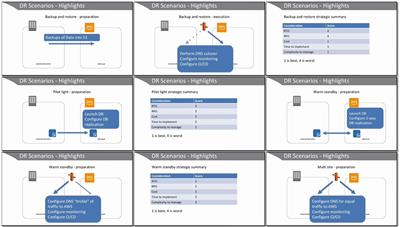
9.4 Disaster Recovery
9.5 Data Retention Compliance
9.6 Question Breakdown
Lesson 10: Data Encryption and Protection
Learning objectives
10.1 Data Encryption at Rest
10.2 Data Encryption in Transit
10.3 Storage Capacity Planning
10.4 Question Breakdown
Module 6: Security and Compliance
Lesson 11: Access Control
Learning objectives
11.1 Key Terms
11.2 User Level Permissions
11.3 Resource Level Permissions
11.4 Shared Responsibility Model
11.5 Access Control Compliance
11.6 Question Breakdown
Lesson 12: Security Compliance
Learning objectives
12.1 Security Assessment Services
12.2 Case Study: Posting GuardDuty Findings to Slack
12.3 Question Breakdown
Module 7: Networking
Lesson 13: Networking
Learning objectives
13.1 Key Terms
13.2 VPC
13.3 CloudFront
13.4 Elastic Load Balancer
13.5 Connectivity Features
13.6 Case Study: Troubleshoot Network Connectivity Issue (Quicksight->RDS)
13.7 Question Breakdown
Module 8: Automation and Optimization
Lesson 14: Automation
Learning objectives
14.1 Key Terms
14.2 Automation with Scripts
14.3 Automation with AWS Lambda
14.4 Automation with SSM Run Command
14.5 Automation with Orchestration Services
14.6 Question Breakdown
Lesson 15: Optimization
Learning objectives
15.1 Resource Utilization Tools
15.2 Cost Optimization Strategies
15.3 Case Study: Log Delivery Cost Optimization
15.4 Question Breakdown
Summary
More Info

d61989686abd399e3b3b578bc6f4a70f.jpg


6474c18d331b61ebf2e28939f13400ad.jpg


Recommend Download Link Hight Speed | Please Say Thanks Keep Topic Live ​
 

1811291026250090.jpg

English Vocabulary SAT
MP4 | Video: AVC 1280x720 | Audio: AAC 44KHz 2ch | Duration: 1.5 Hours | Lec: 23 | 278 MB
Genre: eLearning | Language: English​

Memorize 100 common Vocabulary words in 2 hours
Let me share my Vocabulary secrets with you.
Do you find learning English frustrating?
Do you think that English words are hard to pronounce, hard to remember, and and confusing to memorise?
Do you feel nervous when you have to take a test, and overwhelmed by the number or things you have to remember?
What if there was an easy, fun way to remember English Vocabulary?
...you won't forget what you learned
...you'll get through the class without PAIN and ANNOYANCE
...you won't be BORED
Always here to help...YOU
Just like my other courses, I'm always available to answer your questions, or to explain things further, usually within 24 hours; I love to help you achieve YOUR goals.
How is this course different?
There are lots of great courses on SAT. Unfortunately, there are almost no good courses on Vocabulary.
Teachers usually tell you to memorize lists or dictionaries, and it's a huge time consumer.
In this course, I focus on a different way to learn vocabulary - with pictures.
Scientific Research has shown that you will remember vocabulary the best when you receive visual, audio, and written cues at the same time.
In this Course, you will learn with pictures, head how the vocabulary is pronounced, and see an example of the word in a sentence.
Who'll benefit?
Who will benefit? Anyone who is taking the SAT, of course.
Anyone who wants to learn English in a PAINLESS way.
Anyone interested in learning QUICKLY, without being confused, tired, or overwhelmed.


1811291026260093.jpg


Recommend Download Link Hight Speed | Please Say Thanks Keep Topic Live ​

 

1811211545200093.jpg

HMI using Siemens Tia Portal
MP4 | Video: h264, 1280x720 | Audio: AAC, 44.1 KHz, 2 Ch
Genre: eLearning | Language: English | Duration: 43 mins | Size: 407 MB
PLC Ladder Logic Programming​

What you'll learn

Students will get to know regarding different types of Siemens stations and tools which will be used in this. Moreover, they will be able to create ladder logic program, its HMI and how to connect HMI with PLC.

Requirements

Basic knowledge of logic gates is required. You will need Siemens Total Integrated Automation Portal (TIA PORTAL)

Description

I will be using Total Integrated Automation Portal (TIA Portal V15). Starting from ladder logic program of the problem, will end the lecture with working simulation of the system with HMI.

I Will talk about

Addition of HMI to program

The addition of graphics in HMI.

Allocation of PLC button to specific graphics.

Communication of HMI with PLC.

Simulation of the program and controlling of our system from HMI.

Who is the target audience?

Any body who want to learn, how to create a ladder logic program, its HMI and communication of HMI with PLC.

1811211545210090.jpg


Recommend Download Link Hight Speed | Please Say Thanks Keep Topic Live ​

 

1812052244500106.jpg

Serverless Deep Learning with TensorFlow and AWS Lambda
MP4 | Video: AVC 1280x720 | Audio: AAC 44KHz 2ch | Duration: 1.5 Hours | 725 MB
Genre: eLearning | Language: English​

One of the main problems with deep learning models is finding the right way to deploy them within the company's IT infrastructure. Serverless architecture changes the rules of the game-instead of thinking about cluster management, scalability, and query processing, it allows us to focus specifically on training the model. This course prepares you to use your own custom-trained models with AWS Lambda to achieve a simplified serverless computing approach without spending much time and money. You will use AWS services to deploy TensorFlow models without spending hours training them. You'll learn to deploy with serverless infrastructures, create APIs, process pipelines, and more. By the end of the course, you will have implemented a project that demonstrates using AWS Lambda to serve TensorFlow models.
All the code and supporting files for this course are available on Github at
1812052244520087.jpg


Recommend Download Link Hight Speed | Please Say Thanks Keep Topic Live ​
 

1812092235420096.jpg

MP4 | Video: h264, 1280x720 | Audio: AAC, 44.1 KHz, 2 Ch
Genre: eLearning | Language: English + .VTT | Duration: 4 hours | Size: 2.29 GB
Learn everything you need to know to become a Python Software Developer! From basics to creating your own applications!​

What you'll learn
Learn everything you need to know to start using Python professionally!
Learn basic topics like strings to advanced topics like functions and code optimization!
Read and write to files
Full labs and source code available for you to use!
Get started with Python today!
Requirements
Access to a computer with an Internet connection.
Willing to learn!
Description
Learn one of employer's most requested skills of 2018! Become a Python Programmer and jumpstart your career!
You are learning from an industry veteran with over 30 years of programming experience and over 15 patents to his name! No boring PowerPoint slides - just working code that you can learn from and use,
Don't worry if you have never programmed before. This course gives you the foundation to start your programming career today.
Every module has labs. Verify your knowledge of the topic with your lab and then check how you did with Chuck's solution.
A large number of topics are covered including:
Python variables, numbers and printing
How everything in Python is an object
Python Lists (and lists with loops)
Reading from files
How to print formatted data
How to parse multiple items from a file
Python data structures: lists
Python data structures: dictionaries
Python data structures: sorting
Python data structures: nested data structures
Python while loop with dictionary search
Python functions
Python function parameter types (positional, keyword, default)
Python modules
Python parsing data information
Python writing output to files
And labs for you to complete in each module.
You will get lifetime access to all lectures and code samples for both the lectures and labs!
This course comes with a 30 day money back guarantee! If you are in any way not satisfied with the course, you'll get your money back. Plus you will keep the code as thank you for trying out the course!
So what are you waiting for? Learn Python practically to jump start your career and increase your knowledge, with an expert helping you each step of the way!
Who this course is for:
Beginners who have never programmed before.
Programmers switching languages to Python.

1812092235420093.jpg


Recommend Download Link Hight Speed | Please Say Thanks Keep Topic Live ​
 

1811261509240109.jpg

SCCM Current Branch: Support Intune and Co-management
MP4 | Video: AVC 1280x720 | Audio: AAC 44KHz 2ch | Duration: 2 Hours | 348 MB
Genre: eLearning | Language: English​

Get introduced to "modern" desktop management in this course by enabling SCCM and Intune Co-management and exploring common tasks in the Intune console.
Our learning path's long journey through SCCM ends in this course through its integration with Microsoft Intune. In this course, SCCM Current Branch: Support Intune and Co-management, we explore the SCCM and Intune Co-management configuration, as well as the everyday tasks in managing desktops via Microsoft's "modern" approach. In this final course out of seven, you'll experience the important differences between SCCM's traditional approach to desktop management and how Intune focuses on more of a light touch. First, you'll begin by enabling the co-management configuration and determining which of SCCM's workloads should be shifted wholesale over to Intune's control. Then, you'll enroll a series of Windows 10 desktops via both automated and manual enrollment. Next, you'll manage a few device configurations and even deploy a few applications via the Intune console. Finally, you'll walk through a simple, but powerful use case in applying device compliance and conditional access policies to restrict user access to company data when devices go noncompliant. By the end of this course, you'll be prepared to start your journey in shifting certain desktop workloads to Microsoft Intune in the cloud.


1811261509260104.jpg


Recommend Download Link Hight Speed | Please Say Thanks Keep Topic Live ​
 
Zurück
Oben Unten