• Regeln für den Video-Bereich:

    In den Börsenbereich gehören nur Angebote die bereits den Allgemeinen Regeln entsprechen.

    Einteilung

    - Folgende Formate gehören in die angegeben Bereiche:
    - Filme: Encodierte Filme von BluRay, DVD, R5, TV, Screener sowie Telesyncs im Format DivX, XviD und x264.
    - DVD: Filme im Format DVD5, DVD9 und HD2DVD.
    - HD: Encodierte Filme mit der Auflösung 720p oder darüber von BluRay, DVD, R5, TV, Screener sowie Telesyncs im Format x264.
    - 3D: Encodierte Filme von BluRay, die in einem 3D Format vorliegen. Dies gilt auch für Dokus, Animation usw.
    - Serien: Cartoon/Zeichentrick, Anime, Tutorials, Dokumentationen, Konzerte/Musik, Sonstiges sind demnach in die entsprechenden Bereiche einzuordnen, auch wenn sie beispielsweise im High Definition-Format oder als DVD5/DVD9/HD2DVD vorliegen. Ausnahme 3D.
    - Bereich Englisch: Englische Releases gehören immer in diesen Bereich.
    - Bereich Talk: Der Bereich, in dem über die Releases diskutiert werden kann, darf, soll und erwünscht ist.


    Angebot/Beitrag erstellen

    - Ein Beitrag darf erst dann erstellt werden, wenn der Upload bei mindestens einem OCH komplett ist. Platzhalter sind untersagt.
    - Bei einem Scenerelease hat der Threadtitel ausschließlich aus dem originalen, unveränderten Releasenamen zu bestehen. Es dürfen keine Veränderungen wie z.B. Sterne, kleine Buchstaben o.ä. vorgenommen werden. Ausnahme Serienbörse:
    - Bei einem Sammelthread für eine Staffel entfällt aus dem Releasename natürlich der Name der Folge. Beispiel: Die Simpsons S21 German DVDRip XviD - ITG
    - Dementsprechend sind also u.a. verboten: Erweiterungen wie "Tipp", "empfehlenswert", "only", "reup", usw. / jegliche andere Zusatzinformation oder Ergänzung, welche nicht in obiger Beschreibung zu finden ist.

    Aufbau des Angebots und Threadtitel

    Der Titel nach folgendem Muster erstellt zu werden. <Name> [3D] [Staffel] [German] <Jahr> <Tonspur> [DL] [Auflösung] <Quelle> <Codec> - <Group>
    Beispiel: The Dark Knight German 2008 AC3 DVDRip XviD - iND
    Beispiel: The Dark Knight 2008 DTS DL BDRip x264 - iND
    Beispiel: The Dark Knight 2008 AC3 DL BDRip XviD - iND
    Beispiel: The Dark Knight German 2008 AC3 720p BluRay x264 iND
    Beispiel: The Dark Knight 2008 DTS DL 1080p BluRay x264 iND
    Beispiel: Die Simpsons S01 German AC3 DVDRip XviD iND
    Beispiel: Die Simpsons S20 German AC3 720p BluRay x264 iND
    Beispiel: Sword Art Online II Ger Sub 2014 AAC 1080p WEBRip x264 - peppermint
    Entsprechend sind also u.a. verboten: Sonderzeichen wie Klammern, Sterne, Ausrufezeichen, Unterstriche, Anführungszeichen / Erweiterungen wie "Tipp", "empfehlenswert", "only", "reup", usw. / jegliche andere Zusatzinformation oder Ergänzung, welche nicht in obiger Beschreibung zu finden ist
    Ausnahmen hiervon können in den Bereichen geregelt sein.

    Die Beiträge sollen wie folgt aufgebaut werden:
    Überschrift entspricht dem Threadtitel
    Cover
    kurze Inhaltsbeschreibung
    Format, Größe, Dauer sind gut lesbar für Downloader außerhalb des Spoilers zu vermerken
    Nfo sind immer Anzugeben und selbige immer im Spoiler in Textform.
    Sind keine Nfo vorhanden z.B. Eigenpublikationen, sind im Spoiler folgende Dateiinformationen zusätzlich anzugeben :
    Quelle
    Video (Auflösung und Bitrate)
    Ton (Sprache, Format und Bitrate der einzelnen Spuren)
    Untertitel (sofern vorhanden)
    Hosterangabe in Textform außerhalb eines Spoiler mit allen enthaltenen Hostern.
    Bei SD kann auf diese zusätzlichen Dateiinformationen verzichtet werden.

    Alle benötigten Passwörter sind, sofern vorhanden, in Textform im Angebot anzugeben.
    Spoiler im Spoiler mit Kommentaren :"Schon Bedankt?" sind unerwünscht.


    Releases

    - Sind Retail-Release verfügbar, sind alle anderen Variationen untersagt. Ausnahmen: Alle deutschen Retail-Release sind CUT, in diesem Fall sind dubbed UNCUT-Release zulässig.
    - Im Serien-Bereich gilt speziell: Wenn ein Retail vor Abschluss einer laufenden Staffel erscheint, darf diese Staffel noch zu Ende gebracht werden.62
    - Gleiche Releases sind unbedingt zusammenzufassen. Das bedeutet, es ist zwingend erforderlich, vor dem Erstellen eines Themas per Suchfunktion zu überprüfen, ob bereits ein Beitrag mit demselben Release besteht. Ist dies der Fall, ist der bereits vorhandene Beitrag zu verwenden.
    - P2P und Scene Releases dürfen nicht verändert oder gar unter einem iND Tag eingestellt werden.


    Support, Diskussionen und Suche

    - Supportanfragen sind entweder per PN oder im Bereich Talk zu stellen.
    - Diskussionen und Bewertungen sind im Talk Bereich zu führen. Fragen an die Uploader haben ausschließlich via PN zu erfolgen, und sind in den Angeboten untersagt.
    - Anfragen zu Upload-Wünschen sind nur im Bereich Suche Video erlaubt. Antworten dürfen nur auf Angebote von MyBoerse.bz verlinkt werden.


    Verbote

    - Untersagt sind mehrere Formate in einem einzigen Angebotsthread, wie beispielsweise das gleichzeitige Anbieten von DivX/XviD, 720p und 1080p in einem Thread. Pro Format, Release und Auflösung ist ein eigener Thread zu eröffnen.
    - Grundsätzlich ebenso verboten sind Dupes. Uploader haben sich an geeigneter Stelle darüber zu informieren, ob es sich bei einem Release um ein Dupe handelt.
    - Gefakte, nur teilweise lauffähige oder unvollständige Angebote sind untersagt. Dies gilt auch für eigene Publikationen, die augenscheinlich nicht selbst von z.B. einer DVD gerippt wurden. Laufende Serien, bei denen noch nicht alle Folgen verfügbar sind, dürfen erstellt und regelmäßig geupdatet werden.
    - Untersagt sind Angebote, welche nur und ausschließlich in einer anderen Sprache als deutsch oder englisch vorliegen. Ausnahmen sind VORHER mit den Moderatoren zu klären.


    Verstoß gegen die Regeln

    - Angebote oder Beiträge, die gegen die Forenregeln verstoßen, sind über den "Melden"-Button im Beitrag zu melden.
  • Bitte registriere dich zunächst um Beiträge zu verfassen und externe Links aufzurufen.

*** Bestes IPTV *** bester Preis *** gratis Test ***


Englische Tutorials


be1cae1ec33fe73c5864fea8f86ba801.jpg


Algorithms: Sorting and Searching
MP4 | Video: AVC 1280x720 | Audio: AAC 44KHz 2ch | Duration: 1 Hour 11M | 84 MB
Genre: eLearning | Language: English

This course will look at algorithms in two categories: sorting and searching. We'll implement well-known sorting algorithms like selection sort, quicksort, and merge sort. You'll also learn basic search algorithms like sequential search and binary search.


f5de854d2d1816fadab3fc30687e2245.jpg


Recommend Download Link Hight Speed | Please Say Thanks Keep Topic Live
 

73ababf0282ed069684c3b3405f959d4.jpg


Git and Version Control
MP4 | Video: AVC 1280x720 | Audio: AAC 44KHz 2ch | Duration: 1.5 Hours | 321 MB
Genre: eLearning | Language: English

Git & Version control is an essential skill for any programmer. It's a system that records changes to a file or set of files over time so that you can recall specific versions later.

This course is designed to get students working with Git and Github as soon as possible. By the end of the course you will have hands-on experience working with Git and Github and will be able to use Version Control on any project.


4559efe56a8ae60bc4f746cf5066bd0b.jpg


Recommend Download Link Hight Speed | Please Say Thanks Keep Topic Live
 

2ba81122bac2c88d91058ae587e9952f.jpg


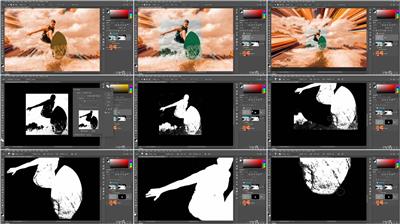
Photoshop: Channels and Masks
.MP4, AVC, 1000 kbps, 1280x720 | English, AAC, 128 kbps, 2 Ch | 7h 37m | 3.89 GB
Instructor: Deke McClelland

Learn how to leverage masks and channels to isolate areas of an image for making enhancements. Join Photoshop expert Deke McClelland as he takes you step by step through working with channels and masks in Adobe Photoshop. First, Deke explains how channels and masks work. Then he shows how to make selections and use the Color Range command and the Focus Area command. Next, he covers refining selections, extracting masks, blending, and mixing. Additionally, Deke demonstrates how to put all of the layers together into a final composite.

Topics include:

Working with the different channels
Creating the best masks
Enhancing selections text display
The Color Range command
Defining a selection
The Focus Area command
Applying global refinements
Refining selections and masks
Working with alpha channels
Extracting masks from channels
Working with blend modes
Working with the Refine Edge adjustment
Compositing

More Info


a42e50d22538434122d5c8ce6cdfed00.jpg


Recommend Download Link Hight Speed | Please Say Thanks Keep Topic Live
 

2ea2705cf3e06cb612513c026bd6566e.jpg


Bash Shell Scripting 1 Hour Intro: Start Automating Today
MP4 | Video: AVC 1280x720 | Audio: AAC 44KHz 2ch | Duration: 1.5 Hours | Lec: 24 | 181 MB
Genre: eLearning | Language: English

Learn basic shell programming now! Automate and write bash scripts on Linux, UNIX, Mac & Windows like a pro.

LEARN BASH SHELL SCRIPTING IN JUST 1 HOUR

Are you looking to further your career by learning do complex automation tasks using Bash Shell?

Are you a beginner wanting to learn bash scripting - FAST?

Do you want to master the fundamentals and core components of Shell Scripting, but don't want to waste 10 hours on a repetitive course, when you can learn the same in a short, to-the-point 1 hour course?

My Bash Shell Scripting for beginners course is all you need to acquire the real world job skills of Bash Shell Scripting - that will further your career fast!

This course is a step-by-step introduction on how to use Bash Shell to write programs, automate tasks and much more. All taught by an experienced System Administrator.

Writing your first script, variables, cron automation, loops and more - it's all covered step-by-step.

This course will give you a solid theoretical understanding of Bash Shell Scripting as well as the practical skills to use it proficiently at your job.

No experience required!


76374a4055cb47a1adbc407c381ed0af.jpg


Recommend Download Link Hight Speed | Please Say Thanks Keep Topic Live
 

97d664e05e72a9f3db7be32d0ebc3eb4.jpg

Google Certified Cloud Engineer Associate Practice Exam 102
.MP4 | Video: h264, 1280x720 | Audio: AAC, 48 KHz, 2 Ch
Genre: eLearning | Language: English + .VTT | Duration: 7.5 hours | Size: 4.78 GB
[PE-102] 30 curated practice exam questions, video answers, hands-on labs with video walkthrough, PDFs & more​

What you'll learn

Prepare & Pass Google Certified Cloud Engineer Associate exam
Configure Google Cloud VPC
Configure Google Cloud Compute Engine
Configure Google IAM
Configure Google Cloud Firewall
Self generated outline for Google Cloud Certification topics

Requirements

General computing knowledge
Access to Mac or Windows computer
Access to the Internet

Description

This Course ID: HCC-GCP-Eng-A-PE-102

Google Certified Cloud Engineer Associate training program based on Kasey's Practice Exam Questions based Training Program.

This course includes:

30 curated high quality practice exam questions,

video answers with detailed breakdown of correct and incorrect answer choices,

hands-on labs with video walkthrough and PDF handout with steps to complete the lab,

video lectures on related substantive topics,

exam relevance of each topic,

Kasey's outlining approach and Outline template for all Google Cloud Certifications,

one hour free 1:1 guidance session for Active Learners.

technical synthesis of the course, and

Numerous resources to prepare & pass this certification exam.

This course includes the following Google Cloud topics:

VPC (Virtual Private Cloud)

Compute Engine

IAM (Identity and Access Management)

Firewalls

What is Kasey's Practice Exam Questions based Training Program?

Over my career I have achieved over 40 certifications. Through success and failure I have learnt a lot. Practice Exam based training is one of my such learnings that I have been sharing with my learners and it has produced great results. e.g. I have 4.97 rating from dozens of reviewers over a year for a course that I have published on Udemy based on this method. Here is how it works:

These courses contain 30 curated practice exam questions.

In the beginning of the course I provide you with the course outline template that you will fill over time.

I give you a Google Search exercise for topics related to questions 1 through 10.

I quiz you on questions 1 through 10. You answer the quiz.

I then give you my answers for each question in Video and PDF formats.

You will update your outline based on your learnings.

I have inserted hands-on labs related to these practice exam questions as appropriate. Follow the instructions on my recommendations about hands-on lab in the PDF handout for each lab.

We repeat this process for questions 11 to 20 and then questions 21 to 30.

You continue to update your outline as you learn more.

In the end, I provide a complete synthesis of all key learnings from these 30 questions.

You update your outline based on my synthesis.

You should have learnt a lot from this 30 question practice exam based training.

This is one of several PE based training courses for this certification. e.g. PE-102, PE-104, PE-106, PE-108, PE-110, PE-112, each containing 30 unique curated questions with answers and supporting technical content to prepare the candidates for this certification exam.

Sample Practice Question from this Course

Question:

You have deployed 10 servers in Google Cloud Platform. When you deployed these servers you chose n1-standard-4 for all these servers. Product manager wants you to change one of these servers named srv-bizdev to have 6 vCPU instead of 4 vCPU that it was deployed (n1-standard-4).

You go to edit srv-bizdev in Compute Engine, VM instances section of the Console. However, you don't see any pre-defined machine type with 6 vCPU. How can you satisfy the product manager's requirements?

(A) Stop srv-bizdev, edit this server properties, click on customize, change the slider to 6 vCPU.

(B) Edit this server properties, click on customize, change the slider to 6 vCPU.

(C) Stop srv-bizdev, edit this server properties, select the nearest pre-defined machine type e.g. n1-standard-8 or something comparable.

(D) Edit this server properties, select the nearest pre-defined machine type e.g. n1-standard-8 or something comparable.

Answer: A

PQ Metadata:

PQ ID = HCC-GCP-PQ-1046

Difficulty Level = 70

Version 1.0

Topic: Google Compute Engine (GCE)

Subtopic: Machine type

Key Learning: You must stop the VM instance to change machine type. If you don't find a pre-defined machine type for your requirement, use customize slider to deploy exactly what you need for vCPU and memory.

Sample Encouraging Quotes from my Learners

"The approach with the highlighting, explanation, and detailed including additional information are very helpful to learning."

"This morning, I passed my AWS CCP exam! Thank you for your course! If you look at my progress in your course, you'll note that it LOOKS like I haven't viewed all the videos; I have actually viewed them all but had reset my progress.

When I arrived at the exam site -with 15 minutes to spare- there were already people taking the exam. Start time apparently was apparently flexible but, as you know, the test limit of 90 minutes was enforced.

I'm writing to tell you that, despite being the LAST person to start, I was the FIRST person to finish! Practice exams prepared me for the format of the test, but the preparation for the CONTENT of the test was from you (and the resources you indicated we should study). I didn't attempt to rush the test; I finished quickly because I had a thorough understanding of all the material! I don't feel "lucky" I passed; I feel I could take the test with whatever they "throw at me" and pass; whatever scenario they propose in a question, I will have the answer! I didn't study for the test; I studied for the material and content. It felt so good to know and understand the material and be confident in my abilities and knowledge.

Thank you!

Next up! Solutions Architect Professional!"

"I had experience with some videos from this course from a friend. I was impressed enough that, despite having been able to study with my friend together using his one account, I decided I wanted to support the guy that made the course (Kasey!). I'm doing this because I want MORE from him! I want to go up to professional."

"Hi Kasey,

I am just now listening to your final wrap-up. I enjoyed your course very much, and will rate you to 5 stars. I am scheduled to take the Exam on July 17. I have 12 years of experience in support of patent litigation as an expert witness and technical analyst as well as four years managing the patent lawyers for a startup in Silicon Valley (i.e. Director of Intellectual Property). Much of my work has been with company engineers to get their ideas inspired, expressed and carried all the way through the patent process.

As you can guess, even with all that experience, it is a big step to take on the MPEP and become a registered patent agent. I have been jumping through hoops for months, and am now down to the final few weeks before the test. If you had another 100 questions (especially hard ones), I would buy them right now.

Thank you for making this available."

"It is a wonderfully organized course. I have been studying for the exam for a few weeks now and this course has helped me a lot. The course is formatted in a way that it provides you preparing material very precisely, this has saved me a lot of time"

"Mr. Shah immediately reminded me of my graduate professor for Finite Element Methods in that he is a proponent of the students success and fluid understanding of the material."

"The course was very helpful as the instructor provided in-depth explanation for some important topics"

"I just finished your class and wow.. amazing!! "

"I am absolutely motivated and I am going to pass the exam."

Who is the target audience?

Leaners who want to become Google Certified Cloud Engineer Associate
Learners who want to deploy Google Cloud
Anyone who wants to enter Cloud Computing field


Recommend Download Link Hight Speed | Please Say Thanks Keep Topic Live

 

b74b70c382486ced48de8deed294990e.jpg


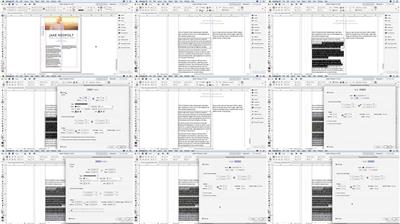
InDesign Secrets pdated 10/18/2018
.MP4, AVC, 1000 kbps, 1280x720 | English, AAC, 128 kbps, 2 Ch | 31h 38m | 5.12 GB
Instructors: David Blatner, Anne-Marie Concepción

In this series, David Blatner and Anne-Marie Concepción, co-hosts of the web's top resource for InDesign tips and tricks, InDesignSecrets.com, share some hidden and sometimes surprising workflow tips that will make working in InDesign more efficient and more fun. The course covers built-in timesaving features such as Quick Apply and auto-expanding text, but also little-known tricks, such as using the eyedropper to copy and paste character and paragraph text attributes and making accurate selections by selecting through or even into objects.

More Info

ce56125c832f591d930efe0e68cf9b3e.jpg


Recommend Download Link Hight Speed | Please Say Thanks Keep Topic Live

 

74a10b7ce1fafa69c224e92f3efbb56f.jpg


A Front-End Web Developer MasterClass Using HTML, CSS, and JavaScript
MP4 | Video: AVC 1280x720 | Audio: AAC 44KHz 2ch | Duration: 17 Hours | 3.7 GB
Genre: eLearning | Language: English

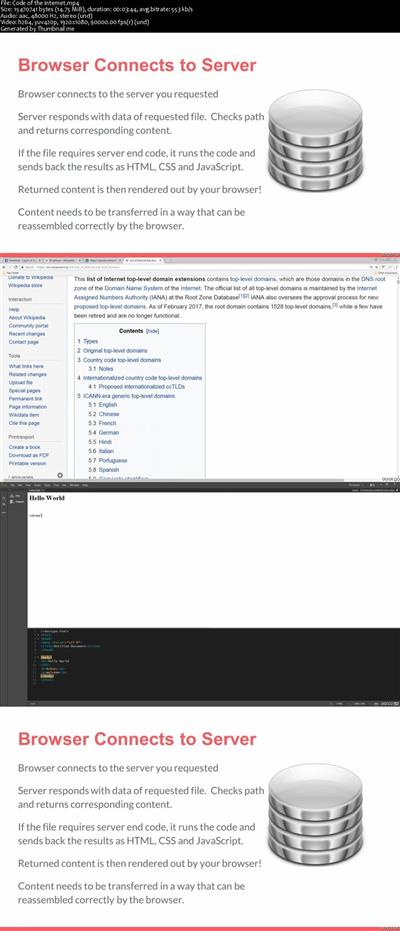
This course is going to take you on a journey where you'll learn and practice HTML CSS and JavaScript all in one course. This includes various topics in HTML such as how to write and practice HTML, Heading Tags, Update template and lot more. You will be able to understand CSS, Advanced CSS, and Apply CSS in creating a website etc. This course is designed to help you learn and practice front-end coding for website development and design. Source Code and examples are included to get you started quickly. Links to top resources and more all available in one massive course. You will be able to create interactive websites from scratch and allows you to become familiar with coding and creating web pages and applications.


03d1c5e861be07e10a7111c3e4ed24de.jpg


Recommend Download Link Hight Speed | Please Say Thanks Keep Topic Live
 

3f2e4ef7aa819f6b6b3d82485a9f95a8.jpg


SOLIDWORKS Essentials - Sheet Metal 101
.MP4, AVC, 360 kbps, 1280x720 | English, AAC, 96 kbps, 2 Ch | 1h 42m | 281 MB
Instructor: Mike Thomas

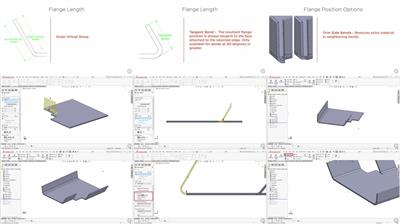
This course introduces you to sheet metal within SOLIDWORKS, including how to build sheet metal components, working with the flat pattern, and documenting your designs with the SOLIDWORKS drawing environment.

The forming of sheets of metal into components is a key manufacturing process for many industries. SOLIDWORKS includes tools for the creation, development, management, and documentation of Sheet Metal components. In this course, SOLIDWORKS Essentials - Sheet Metal 101, you will learn how to use these tools. First, you will build sheet metal components from scratch and see how to convert existing models into fully functioning sheet metal components. Next, you'll use the Sheet Metal Parameters to manage the model sizing and bending criteria of the model. Further development of your models includes adding secondary features with like edge, curved, and miter flanges. Finally, you'll use the Sheet Metal Drawing environment to fully detail your sheet metal models for manufacturing. After finishing this course, you'll be ready to use a significant number of SOLIDWORKS tools and features for the design and documentation of sheet metal components.

More Info


0c51c112cc83e5625a6f34419669ace5.jpg


Recommend Download Link Hight Speed | Please Say Thanks Keep Topic Live

 

69871e9726f19ec7465656b9b173867f.jpg


Top Secrets for Improving Study Skills and Time Management
MP4 | Video: AVC 1280x720 | Audio: AAC 44KHz 2ch | Duration: 1.5 Hours | Lec: 19 | 191 MB
Genre: eLearning | Language: English

Learn to boost study skills and time management.

Hello and welcome to this Course Top Secrets for Improving Study Skills and Time Management for Students.

This course offers a "one-stop shop" for the wide and varying area of study skills.

It successfully and clearly pulls together a broad range of skills from personal to academic.

Although aimed specifically at students in Higher Education, readers from most levels of study would find sections of this text helpful in understanding and broadening their skillsR30;

The ability to encompass the diverse needs and capabilities of students across sectors and disciplines is a real achievementR30;

You will learn to achieve emotional balance

You will learn to minimize anger

Your will learn about unpleasant emotions.

Product Description In this course you will learn some of the Top Secrets For Improving Your Study Skills.

Learn to Become a Top Achiever by Mastering the Skills required to excel in standard tests and Exams.

You will learn to be punctual

You will learn the factors which effect time management.

You will learn the concentration techniques as part of study skills.


e57bb9bc2b95613f8481017c5e5d47a1.jpg


Recommend Download Link Hight Speed | Please Say Thanks Keep Topic Live

 

e4a5ef26169c480e49096881c787e0d7.jpg

How To Write A Movie Script Film & Movie Script Writing
.MP4 | Video: h264, 1280x720 | Audio: AAC, 44.1 KHz, 2 Ch
Genre: eLearning | Language: English + .VTT | Duration: 1 hours | Size: 285 MB
How To Write A Script For A Movie : Film & Movie Script Writing : Write A Screenplay : How To Write A Movie Script​

What you'll learn

Layout screenwriting script to the correct format and learn how to write a movie script
How to apply the three act structure to movie script writing
Know how to analyze movie script writing examples - movie script screenplay (Die Hard)
Submit a screenplay to a scriptwriting agent or producer
How to write a movie script pitch letter
How to write a screenplay filled with with conflict and drama
How to use online tools to help with screenwriting

Requirements

Students should have a good command of written English

Description

Film & Movie Script Writing : How To Write A Script For A Movie : How To Write A Movie Script

For beginners, the idea of screenwriting seems to be way beyond anything that we're capable of, but like many things in life that we know very little about, the opposite is true - scriptwriting is for anyone!

There's a saying in Hollywood that goes something like this: "Nobody knows anything and anybody can do anything" , which just about opens it up for everyone! To succeed at movie scriptwriting you need these basic essentials:

How to develop a great idea and produce a scriptwriting gem

How to Write a Movie Script from a great idea

Understand what movie producers are looking for in Movie Script Writing

How to structure your screenwriting so that it hooks the reader

Beginners should know how to present the results of their screenwriting in industry format

How to write the pitch for your screenwriting

Where to pitch your movie script

This course shows you the basics of screenwriting in detail and covers all the points above. Scriptwriting is a craft - great news for us, beginners and all, because it means that anyone can learn it! All you need is this course ' How To Write A Movie Script : Scriptwriting Basics ' and you're half-way there. Information is the key to your success.

Good grounding for a beginner. Explanations are basic and structured, but he doesn't talk down to you. Jeremy Gaines

These are great basic explanations of what makes a movie tick and how to put a script together. Tells you what keeps an audience on the edge of their seats. The script analysis alone is worth the price. Ben Kramer

How Do You Write A script For A Movie For Success?

In another course 'How To Write Novels' I describe the structure behind 99% of modern novels. This same structure also applies to the movies, with some subtle differences. One of the essential tools for any budding scriptwriting genius is script analysis, and we pull apart the movie Die Hard to see what makes it tick - exactly what makes a movie like this so successful?

This is how it works - analyse something that's successful and then apply the principles to your own work. It's true that the best way to learn how to write a script for a movie is by doing it!

Finally, I cover the best way to pitch your idea to producers or agents to get the best results. The industry appetite for new material is surging upwards over the last couple of years and studios need new writers. Scriptwriting isn't such a difficult thing - if you're organized and understand the industry requirements.

You can do it - I'll show you how to write a movie script! Sign Up Now!

Movie script writing has come a long, long way since film-going became popular. Just like novel writing, the early writers didn't exactly fly by the seat of their pants, but they suffered from not having a solid structure as a basis for writing screenplays>

Basically, a movie is a story. Sometimes it might not seem so simple. Let's face it - some movie Descriptions can get very complex, which can be a bad thing. It dawned on screenwriters that all successful movies had certain things in common.

This correct proportion of hero (protagonist), villain (antagonist), quest, challenges and climax is what makes a movie tick. This is what we have to capture if we want to write a screenplay that sells.

#howtowriteamoviescript #howtowriteascreenplay #moviescriptwriting #scriptwriting #howtowriteascriptforamoviepdf

Film & Movie Script Writing : How To Write A Script For A Movie : How To Write A Movie Script

Who is the target audience?

Beginners who want to learn how to write a movie script
Scriptwriting beginners wanting to know how to write a script for a movie


Recommend Download Link Hight Speed | Please Say Thanks Keep Topic Live
 

f6d2dd8456cae88b5fd5ee53b5dd63fd.jpg


Vim Masterclass
MP4 | Video: AVC 1280x720 | Audio: AAC 44KHz 2ch | Duration: 5 Hours 46M | 1.04 GB
Genre: eLearning | Language: English

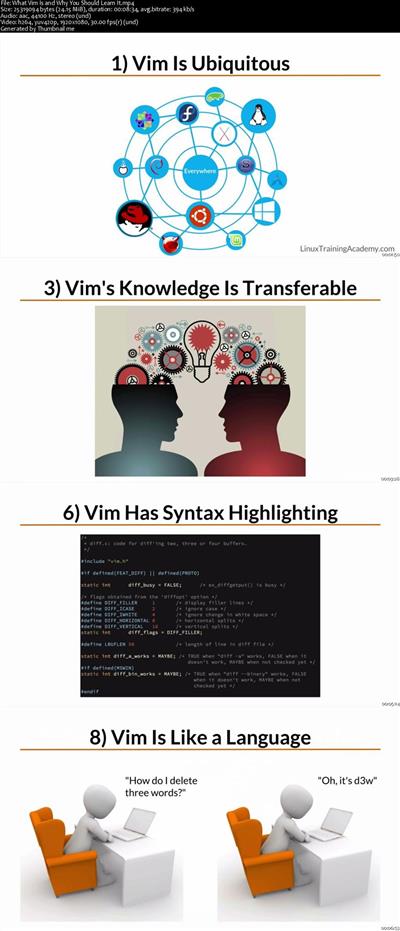
Did you know that most productive command-line experts exploit the powerful features of the Vim text editor?

The problem is that, if you want to get really good with Vim, it can take you an extremely long time if you're trying to learn it on your own. That's why the Vim Masterclass course was created. This course gives you the absolute shortest path to learning the basics. It's also the fastest way to learn the most advanced features, too.

By the time you finish Vim Masterclass, you'll know how to:

Work with multiple files, including how to move data back and forth between different files, copying and pasting from one file to another, and quickly jumping to another file. You'll also learn how to view multiple files at the same time using Vim's windowing system.
Use must-know keyboard shortcuts and remember them easily. You'll actually learn how to think in Vim so you don't even have to memorize each and every command, saving you countless hours of work.
Find and replace entire blocks of information within a file. That includes how to refactor your code by renaming all variables in a file, or set of files, reliably. Of course, you'll learn simple find and replace techniques to replace a word in an entire file, and much more.
Visually select blocks of text and edits them-for example, moving a block, deleting a block, indenting/shifting a block, and more. You'll understand Vim's text objects so you can quickly select single or multiple words, lines, paragraphs, HTML/XML tags, code blocks, and more.
Make vertical edits and use Vim's Visual Block mode. (Some people call this column editing mode or rectangle mode...)
Enable syntax highlighting for source code, configuration files, or any type of file you edit often. That includes how to customize the color scheme and color code text in Vim.
Employ simple-to-advanced navigation techniques so you can go to a precise location in a file very rapidly.
Practical application tips such as how to edit source code, scripts, HTML, and more. You'll find lots of opportunities for practice in this course.
Make the most of the built-in help system to quickly find what you need, all without leaving Vim.
Use MacVim and gVim on Linux and Windows. This includes learning the advantages and disadvantages of both the textual interface and graphical Vim interfaces.
When you start the course, you'll be able to use Vim almost immediately. After that, we'll build on your knowledge and even get into some really advanced techniques such as editing multiple files at once, creating macros, making global substitutions in many files at the same time, ways to format and normalize data, how to think in vim, and much more


5bfe42defb9915a0168e7e62e157d46f.jpg


Recommend Download Link Hight Speed | Please Say Thanks Keep Topic Live
 

5acfa58565f5b80f6aa7d0b7d516d092.jpg


Building AI-driven Characters Using Playmaker in Unity
.MP4, AVC, 600 kbps, 1280x720 | English, AAC, 96 kbps, 2 Ch | 3h 1m | 1.71 GB
Instructor: Shane Whelan

In this course, you will learn to understand AI character behavior by building a small game with a state-driven UI, a point and click character control system, and an enemy character driven by Navmesh and Animator movement.

It can be difficult to visualize something as abstract as the behavior of an AI character in a game, let alone implement the code to make it work. In this course, Building AI-driven Characters Using Playmaker in Unity, you will use Playmaker to build a working UI. First, you will implement a point-and-click player control system driven by Navmesh. Then, you will add a 'brain' inside an enemy character, all without writing a line of code.Finally, you will sketch out a flow diagram of state-driven behavior, then add actions to that diagram to get the gameplay working for real. By the end of the course, you will know how to prototype your own games using Playmaker. Required Software: Unity 2017 and Playmaker.

More Info


74accddf3b365d14180a1cbf7f499ff0.jpg


Recommend Download Link Hight Speed | Please Say Thanks Keep Topic Live

 
Zurück
Oben Unten