• Regeln für den Video-Bereich:

    In den Börsenbereich gehören nur Angebote die bereits den Allgemeinen Regeln entsprechen.

    Einteilung

    - Folgende Formate gehören in die angegeben Bereiche:
    - Filme: Encodierte Filme von BluRay, DVD, R5, TV, Screener sowie Telesyncs im Format DivX, XviD und x264.
    - DVD: Filme im Format DVD5, DVD9 und HD2DVD.
    - HD: Encodierte Filme mit der Auflösung 720p oder darüber von BluRay, DVD, R5, TV, Screener sowie Telesyncs im Format x264.
    - 3D: Encodierte Filme von BluRay, die in einem 3D Format vorliegen. Dies gilt auch für Dokus, Animation usw.
    - Serien: Cartoon/Zeichentrick, Anime, Tutorials, Dokumentationen, Konzerte/Musik, Sonstiges sind demnach in die entsprechenden Bereiche einzuordnen, auch wenn sie beispielsweise im High Definition-Format oder als DVD5/DVD9/HD2DVD vorliegen. Ausnahme 3D.
    - Bereich Englisch: Englische Releases gehören immer in diesen Bereich.
    - Bereich Talk: Der Bereich, in dem über die Releases diskutiert werden kann, darf, soll und erwünscht ist.


    Angebot/Beitrag erstellen

    - Ein Beitrag darf erst dann erstellt werden, wenn der Upload bei mindestens einem OCH komplett ist. Platzhalter sind untersagt.
    - Bei einem Scenerelease hat der Threadtitel ausschließlich aus dem originalen, unveränderten Releasenamen zu bestehen. Es dürfen keine Veränderungen wie z.B. Sterne, kleine Buchstaben o.ä. vorgenommen werden. Ausnahme Serienbörse:
    - Bei einem Sammelthread für eine Staffel entfällt aus dem Releasename natürlich der Name der Folge. Beispiel: Die Simpsons S21 German DVDRip XviD - ITG
    - Dementsprechend sind also u.a. verboten: Erweiterungen wie "Tipp", "empfehlenswert", "only", "reup", usw. / jegliche andere Zusatzinformation oder Ergänzung, welche nicht in obiger Beschreibung zu finden ist.

    Aufbau des Angebots und Threadtitel

    Der Titel nach folgendem Muster erstellt zu werden. <Name> [3D] [Staffel] [German] <Jahr> <Tonspur> [DL] [Auflösung] <Quelle> <Codec> - <Group>
    Beispiel: The Dark Knight German 2008 AC3 DVDRip XviD - iND
    Beispiel: The Dark Knight 2008 DTS DL BDRip x264 - iND
    Beispiel: The Dark Knight 2008 AC3 DL BDRip XviD - iND
    Beispiel: The Dark Knight German 2008 AC3 720p BluRay x264 iND
    Beispiel: The Dark Knight 2008 DTS DL 1080p BluRay x264 iND
    Beispiel: Die Simpsons S01 German AC3 DVDRip XviD iND
    Beispiel: Die Simpsons S20 German AC3 720p BluRay x264 iND
    Beispiel: Sword Art Online II Ger Sub 2014 AAC 1080p WEBRip x264 - peppermint
    Entsprechend sind also u.a. verboten: Sonderzeichen wie Klammern, Sterne, Ausrufezeichen, Unterstriche, Anführungszeichen / Erweiterungen wie "Tipp", "empfehlenswert", "only", "reup", usw. / jegliche andere Zusatzinformation oder Ergänzung, welche nicht in obiger Beschreibung zu finden ist
    Ausnahmen hiervon können in den Bereichen geregelt sein.

    Die Beiträge sollen wie folgt aufgebaut werden:
    Überschrift entspricht dem Threadtitel
    Cover
    kurze Inhaltsbeschreibung
    Format, Größe, Dauer sind gut lesbar für Downloader außerhalb des Spoilers zu vermerken
    Nfo sind immer Anzugeben und selbige immer im Spoiler in Textform.
    Sind keine Nfo vorhanden z.B. Eigenpublikationen, sind im Spoiler folgende Dateiinformationen zusätzlich anzugeben :
    Quelle
    Video (Auflösung und Bitrate)
    Ton (Sprache, Format und Bitrate der einzelnen Spuren)
    Untertitel (sofern vorhanden)
    Hosterangabe in Textform außerhalb eines Spoiler mit allen enthaltenen Hostern.
    Bei SD kann auf diese zusätzlichen Dateiinformationen verzichtet werden.

    Alle benötigten Passwörter sind, sofern vorhanden, in Textform im Angebot anzugeben.
    Spoiler im Spoiler mit Kommentaren :"Schon Bedankt?" sind unerwünscht.


    Releases

    - Sind Retail-Release verfügbar, sind alle anderen Variationen untersagt. Ausnahmen: Alle deutschen Retail-Release sind CUT, in diesem Fall sind dubbed UNCUT-Release zulässig.
    - Im Serien-Bereich gilt speziell: Wenn ein Retail vor Abschluss einer laufenden Staffel erscheint, darf diese Staffel noch zu Ende gebracht werden.62
    - Gleiche Releases sind unbedingt zusammenzufassen. Das bedeutet, es ist zwingend erforderlich, vor dem Erstellen eines Themas per Suchfunktion zu überprüfen, ob bereits ein Beitrag mit demselben Release besteht. Ist dies der Fall, ist der bereits vorhandene Beitrag zu verwenden.
    - P2P und Scene Releases dürfen nicht verändert oder gar unter einem iND Tag eingestellt werden.


    Support, Diskussionen und Suche

    - Supportanfragen sind entweder per PN oder im Bereich Talk zu stellen.
    - Diskussionen und Bewertungen sind im Talk Bereich zu führen. Fragen an die Uploader haben ausschließlich via PN zu erfolgen, und sind in den Angeboten untersagt.
    - Anfragen zu Upload-Wünschen sind nur im Bereich Suche Video erlaubt. Antworten dürfen nur auf Angebote von MyBoerse.bz verlinkt werden.


    Verbote

    - Untersagt sind mehrere Formate in einem einzigen Angebotsthread, wie beispielsweise das gleichzeitige Anbieten von DivX/XviD, 720p und 1080p in einem Thread. Pro Format, Release und Auflösung ist ein eigener Thread zu eröffnen.
    - Grundsätzlich ebenso verboten sind Dupes. Uploader haben sich an geeigneter Stelle darüber zu informieren, ob es sich bei einem Release um ein Dupe handelt.
    - Gefakte, nur teilweise lauffähige oder unvollständige Angebote sind untersagt. Dies gilt auch für eigene Publikationen, die augenscheinlich nicht selbst von z.B. einer DVD gerippt wurden. Laufende Serien, bei denen noch nicht alle Folgen verfügbar sind, dürfen erstellt und regelmäßig geupdatet werden.
    - Untersagt sind Angebote, welche nur und ausschließlich in einer anderen Sprache als deutsch oder englisch vorliegen. Ausnahmen sind VORHER mit den Moderatoren zu klären.


    Verstoß gegen die Regeln

    - Angebote oder Beiträge, die gegen die Forenregeln verstoßen, sind über den "Melden"-Button im Beitrag zu melden.
  • Bitte registriere dich zunächst um Beiträge zu verfassen und externe Links aufzurufen.

++ Premium IPTV ++ 7000 Live Sender ++ UHD Qualität ++ Mediathek mit 18.000 Inhalten ++


VenneTV


Englische Tutorials

1805260039200116.jpg

Cubebrush - ART School Term 1 by Marc Brunet
MP4 | 1920 x 1080 | 4.28 GB
Genre: eLearning | Language: English​

Title: Cubebrush - ART School Term 1 by Marc Brunet
Information
TERM 1 (8.5 hours)
Nude Figure Drawing
Perspective 1
Photoshop for Digital Prod 1
Visual Communication 1

1805260040260101.jpg


Recommend Download Link Hight Speed | Please Say Thanks Keep Topic Live ​

 
6d2f3d79f6dfbf948193102a9b1b71ac.jpg


Illustrator CC 2018 Essential Training
.MP4, AVC, 1000 kbps, 1280x720 | English, AAC, 64 kbps, 2 Ch, .SRT (EN) | 4h 44m | 844 MB
Instructor: Tony Harmer​

Illustrator-the world's leading vector illustration software-can be used to accomplish many different design tasks. This course teaches core concepts and techniques that can be applied to any workflow: for print, for the web, or for assets that will find their way into other applications. Instructor Tony Harmer shows you how to get around the interface, and explains elements of Adobe Illustrator, such as artboards, workspaces, layers, and shapes. He discusses vector graphics-which are composed of paths, strokes, and fills-and shows how to create and edit them using the Illustrator drawing tools. He demonstrates how to combine and clean up paths, and organize artwork into groups and layers. Tony also covers typography and text editing, color, expressive brush drawing, effects, leveraging CC Libraries, printing and export, and much more.

Topics include:

What is Illustrator?
Navigating documents
Saving a custom workspace
Working with multiple artboards
Creating and deleting layers
Drawing shapes
Transforming objects
Adding fills and strokes
Working with color
Creating complex shapes, such as compound shapes
Working with type
Editing graphics
Adding content to CC Libraries
Printing and exporting artwork

More Info


92dac40144775633d17fdb9c73c440a1.jpg


Recommend Download Link Hight Speed | Please Say Thanks Keep Topic Live ​

 
4fff72b84e311cf6bc29c29ee5f50d04.jpg


Jenkins Essential Training
MP4 | Video: 720p | Duration: 2:28:36 | English | Subtitles: VTT | 413.9 MB​

Continuous integration, deployment, and delivery pipelines can be built from many tools, but Jenkins is one of the most popular, for its open-source extensibility and ease of use. Jenkins Essential Training covers the fundamentals of the platform, including automating builds and testing and securing deployments. Learn how to create jobs, trigger builds, and distribute those builds to multiple environments. Instructor Robert Starmer also shows how to add notifications to alert you to build state changes and failures and extend Jenkins with plugins, shared libraries, and APIs. He also explains how to secure deployments and access to your Jenkins environment, and store artifacts from the build process for safekeeping. Plus, learn how to combine multiple stages of the CI/CD process into a single automated pipeline. The course includes advanced use cases, best practices, and customization tips, designed to give even the first-time user the skills to become a capable Jenkins engineer.


Topics include:


CI/CD workflows in Jenkins
Creating jobs
Tracking and triggering builds
Distributing builds with agents
Extending Jenkins
Adding notifications
Testing builds
Using a REST API to trigger builds
Securing your deployments
Creating and storing artifacts
Creating pipelines
Best practices for Jenkins

Recommend Download Link Hight Speed | Please Say Thanks Keep Topic Live ​

 

a97e932d79a4a39f82e130451e82ff72.jpg


Power BI Pro Essential Training
MP4 | Video: 720p | Duration: 3:39:25 | English | Subtitles: VTT | 537.8 MB

​


Microsoft Power BI has been replaced with a far more powerful versionR12;Power BI ProR12;which combines Power BI Services, Desktop, and Mobile into a formidable business intelligence and analytics package. In this course, Gini von Courter shows how and why to get the most out of this toolset, including Power BI Publisher and the Power BI mobile apps. In this course, Gini von Courter shows how and why to get the most out of this package: Power BI, Power BI Publisher, and the Power BI mobile apps. Learn how to connect to external data sources and upload CSV and Excel files, and then use Power BI Pro to create insightful reports, visualizations, and dashboards, complete with charts and maps. Get further insights from your data with Power BI Q&A and Microsoft Cortana, and then share the results with colleagues. Gini also covers the desktop and mobile versions of the software, which allow you to conduct analysis offline or on the go.


Topics include:


Signing up for Power BI Pro
Connecting to data sources
Uploading data such as CSV and XLS files
Creating reports, visualizations, charts, and maps
Filtering, sorting, copying, and pasting visualizations
Downloading custom visuals from the gallery
Modifying existing reports
Creating and managing data dashboards
Querying data with Power BI Q&A and Microsoft Cortana
Sharing report and dashboards
Using Power BI Desktop and mobile apps

Recommend Download Link Hight Speed | Please Say Thanks Keep Topic Live ​

 
f00c43fdef1397f231a0a7be50a43fdf.jpg


Lean Technology Strategy: Running Agile at Scale
MP4 | Video: AVC 1280x720 | Audio: AAC 44KHz 2ch | Duration: 46M | 866 MB
Genre: eLearning | Language: English​

For large tech organizations, the path to agile adoption is hardly ever a smooth one. If you're aiming to implement agile at scale, then this course can help by letting you know which pitfalls you may encounter and providing techniques for successfully managing a transformation. Instructor Jez Humble dives into the key principles that are at the heart of high-performance program management. He also provides a case study that showcases an iterative and adaptive approach to running large programs and discusses the importance of continuous improvement.


c2d225458af128ad82c333c9ffb444c4.jpg


Recommend Download Link Hight Speed | Please Say Thanks Keep Topic Live ​

 

1aadfac4e6570b9b5e27c9913c3976f2.jpg


Interactive Computing with Jupyter Notebook
.MP4, AVC, 380 kbps, 1920x1080 | English, AAC, 112 kbps, 2 Ch | 2 hrs 17 mins | 385 MB
Instructor: Cyrille Rossant​

Gain hands-on experience in data analysis and visualization with IPython and Jupyter Notebook

Python is one of the leading open source platforms for data science and numerical computing. IPython and the associated Jupyter Notebook offer efficient interfaces to Python for data analysis and interactive visualization, and they constitute an ideal gateway to the platform.

Interactive Computing with Jupyter Notebook, contains many ready-to-use, focused recipes for high-performance scientific computing and data analysis, from the latest IPython/Jupyter features to the most advanced tricks, to help you write better and faster code. This course covers programming techniques: code quality and reproducibility, code optimization, high-performance computing through just-in-time compilation, parallel computing, and graphics card programming.

In short, you will master relatively advanced methods in interactive numerical computing, high-performance computing, and data visualization.

What You Will Learn

Master all features in Jupyter Notebook
Code better: write high-quality, readable, and well-tested programs; profile and optimize your code; and conduct reproducible, interactive computing experiments
Visualize data and create interactive Descriptions in Jupyter Notebook
Write blazingly fast Python programs with NumPy, ctypes, Numba, Cython, OpenMP, GPU programming (CUDA), parallel IPython, Dask, and more
Work with the most widely used libraries for data analysis: matDescriptionlib, Seaborn, Bokeh, Altair, and others

More Info


bfdae2935a8aac33665c9d81efda9053.jpg


Recommend Download Link Hight Speed | Please Say Thanks Keep Topic Live ​
 

8e86f75a8fa96826c37f7ae08ecb2b4e.jpg


Microservices with Spring Cloud ntegrated Course
MP4 | Video: AVC 1280x720 | Audio: AAC 44KHz 2ch | Duration: 9 Hours | 1.86 GB
Genre: eLearning | Language: English​

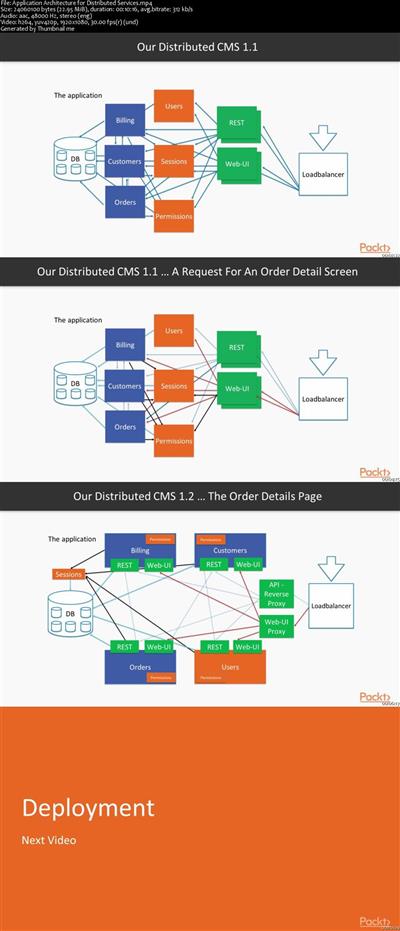
In this course, you will learn how to split an existing application into smaller services and what you need to build, deploy, and run it. You will learn how you can use Docker to support your local development and how you can utilize it to run your application in the cloud. To work with multiple services, you will need (for example) service discovery and reverse proxies. To be able to maintain the development pace, you also need to break up your user interface, so every service can serve its own UI, and you need to learn how to communicate with these services synchronously using REST and asynchronously using events. To run your application, you need to know what is going on in your distributed application, so monitoring and tracing calls is an important topic as well, and one that you'll learn about. So overall, this course will give you valuable insights and recipes with which to create your own distributed application, for deployment to the cloud.

You will also see what needs to be done to upgrade a Spring Boot 1.x service to Spring Boot 2 with the recent Spring Cloud release.

The code bundle for this video course is available at
fe54a5888c0925561caa410850f0cf84.jpg


Recommend Download Link Hight Speed | Please Say Thanks Keep Topic Live ​
 
42e2373f8d03486855b5464bb6c4add9.jpg


Intermediate Game Asset Creation - 3D Modeling in Blender
MP4 | Video: 1280x720 | 312 kbps | 48 KHz | Duration: 4 Hours | 1.2 GB + Projects files
Genre: eLearning | Language: English | Skill level: All Levels​

Learn intermediate 3D modeling, texturing, and rendering with Blender and 3D-Coat by creating AAA ready game assets.

This course will cover every aspect of:
Blender and 3D-Coat's Interface and How to Navigate It
3D Modeling a Complicated 3D Game Asset
UV Unwrapping and Understanding How UVs Work
How Normals Work and How to Bake Textures Into Your Model
Texturing Your Game Asset with Smart Materials
Exporting Your Model to Unity, the Number One Game Engine

Whether you want to create game assets just for fun, or you work in a production studio and need this information done right this instant, this course is for you. We will guide you every step of the way and are here to make sure you succeed in your ventures. We are always available to answer any messages, discussions, questions, or feedback that you have.

Who is the target audience?
This course is geared to anyone who wants to learn how to use Blender as well as intermediate 3D modeling, texturing, rendering, and exporting techniques.
A prior knowledge of Blender is recommended, though students who are beginners and follow along carefully can learn Blender rather quickly as we cover the different aspects of the using the software.
Anyone who is looking for a complete Blender course that explains every tool and facet of the application should not take this course. This is a course that provides a practical project for 3D artists in real world settings, so not every tool and function will be explained.

Requirements
Students who want to follow along with the project should have the newest version of Blender installed. We will be using the most current version at the time of this recording, but the tools and techniques are generally the same as other versions.
A basic understanding of the software Blender, xNormal, and 3D Coat is needed for this intermediate course as we will discuss more advanced modeling tools and object management systems.
The software versions we are using are Blender 2.78c, xNormal 3.19.3, and 3D-Coat 4.7.4


835e9d436047bbb350f6b3a17155890f.jpg


f9e52591859ed219c72de9d29159b7ca.jpg


06763752a5fd1f1788a17f90ae21ab82.jpg


Recommend Download Link Hight Speed | Please Say Thanks Keep Topic Live ​

 
f36afadc95dfd75ac52d935d527c7dff.jpg


Building a Voice-enabled Serverless Website with AWS Polly
MP4 | Video: AVC 1280x720 | Audio: AAC 44KHz 2ch | Duration: 1 Hour 46M | 341 MB
Genre: eLearning | Language: English​

With all the new technology trends like AI, Serverless, and DevOps, tieing everything together can be overwhelming. In this course, you'll not only demystify this process but also see how using voice can save you time and keep your users engaged.


e41ea2f9f03a10e33f214fb96aeaa582.jpg


Recommend Download Link Hight Speed | Please Say Thanks Keep Topic Live ​

 

5443d975a4f79f37e4aa04466889b6e4.jpg


Learning Reason 10: Core Feature Flashback
MP4 | Video: AVC 1280x720 | Audio: AAC 44KHz 2ch | Duration: 1 Hour | 254 MB
Genre: eLearning | Language: English​

Before you dive into the new and updated functionality that comes packed in Reason 10, take some time to refresh your understanding of this professional-grade DAW's core features. In this course, Matt Piper goes over the areas of Reason that have remained consistent over the releases and years, as well as how they've grown over time. This includes tried-and-true synths, virtual instruments, and interface elements, as well as core areas of functionality that make your Reason workflow particularly smooth. Learn how to create drum beats with Kong Drum Designer, use external MIDI instruments, work with Neptune-an advanced pitch adjuster-and more


a4c72ea50faaf689713520bffb5f695d.jpg


Recommend Download Link Hight Speed | Please Say Thanks Keep Topic Live ​
 

4701d83454fd52b44329f3ed46ae078a.jpg


The Break-Even Sales Funnel Blueprint and Fundamentals Guide
MP4 | Video: AVC 1280x720 | Audio: AAC 44KHz 2ch | Duration: 5 Hours | 2.70 GB
Genre: eLearning | Language: English​

This course will help you set up a profitable funnel that can start to bring in income without the need for a website. You'll be walked through the entire funnel creation process. You'll learn how to build your own funnel without having a website and a converting list and to advertise products super effectively. You'll be taught the fastest and most powerful ways to turn visitors into subscribers. You'll create an email list and integrate it onto your capture pages and learn how to pick the right offers. In short, this course will help you create and optimize a money-magnet Facebook fan page which will automatically turn browsers into buyers.


f5082bf400ecc1e293beac5e8f4a1ccd.jpg


Recommend Download Link Hight Speed | Please Say Thanks Keep Topic Live ​
 

62894f4c5a98ff270a464b575192e180.jpg


Introduction to Spring Cloud Contract
.MP4, AVC, 800 kbps, 1280x720 | English, AAC, 96 kbps, 2 Ch | 3h 4m | 637 MB
Instructor: Andrew Morgan​

Learn to develop and test Java microservices more effectively with this foundational course on Spring Cloud Contract, a Java-based consumer-driven contract framework.

Testing Java microservices is challenging. This is because, despite their independence, they often end up being coupled through some form of message passing or API calls. In this course, Introduction to Spring Cloud Contract, you will learn foundational knowledge of a powerful new framework, gaining the ability to test and release Java microservices more effectively. First, you will learn about the challenges of microservices testing, taking a look at the shortcomings of both end-to-end testing microservices and mocking their collaborators. Next, you will discover the consumer-driven contracts testing technique, the TDD at the API level approach to microservices testing that Spring Cloud Contract implements. Finally, you will become proficient in using Spring Cloud Contract to build both HTTP driven and message driven Java microservices. When you're finished with this course, you will have the skills and knowledge of Spring Cloud Contract and consumer-driven contract testing needed to truly make your microservices independently testable and deployable.

More Info


b094a8e776705b9ab67f23a3f86dcae8.jpg


Recommend Download Link Hight Speed | Please Say Thanks Keep Topic Live ​

 
Zurück
Oben Unten