• Regeln für den Video-Bereich:

    In den Börsenbereich gehören nur Angebote die bereits den Allgemeinen Regeln entsprechen.

    Einteilung

    - Folgende Formate gehören in die angegeben Bereiche:
    - Filme: Encodierte Filme von BluRay, DVD, R5, TV, Screener sowie Telesyncs im Format DivX, XviD und x264.
    - DVD: Filme im Format DVD5, DVD9 und HD2DVD.
    - HD: Encodierte Filme mit der Auflösung 720p oder darüber von BluRay, DVD, R5, TV, Screener sowie Telesyncs im Format x264.
    - 3D: Encodierte Filme von BluRay, die in einem 3D Format vorliegen. Dies gilt auch für Dokus, Animation usw.
    - Serien: Cartoon/Zeichentrick, Anime, Tutorials, Dokumentationen, Konzerte/Musik, Sonstiges sind demnach in die entsprechenden Bereiche einzuordnen, auch wenn sie beispielsweise im High Definition-Format oder als DVD5/DVD9/HD2DVD vorliegen. Ausnahme 3D.
    - Bereich Englisch: Englische Releases gehören immer in diesen Bereich.
    - Bereich Talk: Der Bereich, in dem über die Releases diskutiert werden kann, darf, soll und erwünscht ist.


    Angebot/Beitrag erstellen

    - Ein Beitrag darf erst dann erstellt werden, wenn der Upload bei mindestens einem OCH komplett ist. Platzhalter sind untersagt.
    - Bei einem Scenerelease hat der Threadtitel ausschließlich aus dem originalen, unveränderten Releasenamen zu bestehen. Es dürfen keine Veränderungen wie z.B. Sterne, kleine Buchstaben o.ä. vorgenommen werden. Ausnahme Serienbörse:
    - Bei einem Sammelthread für eine Staffel entfällt aus dem Releasename natürlich der Name der Folge. Beispiel: Die Simpsons S21 German DVDRip XviD - ITG
    - Dementsprechend sind also u.a. verboten: Erweiterungen wie "Tipp", "empfehlenswert", "only", "reup", usw. / jegliche andere Zusatzinformation oder Ergänzung, welche nicht in obiger Beschreibung zu finden ist.

    Aufbau des Angebots und Threadtitel

    Der Titel nach folgendem Muster erstellt zu werden. <Name> [3D] [Staffel] [German] <Jahr> <Tonspur> [DL] [Auflösung] <Quelle> <Codec> - <Group>
    Beispiel: The Dark Knight German 2008 AC3 DVDRip XviD - iND
    Beispiel: The Dark Knight 2008 DTS DL BDRip x264 - iND
    Beispiel: The Dark Knight 2008 AC3 DL BDRip XviD - iND
    Beispiel: The Dark Knight German 2008 AC3 720p BluRay x264 iND
    Beispiel: The Dark Knight 2008 DTS DL 1080p BluRay x264 iND
    Beispiel: Die Simpsons S01 German AC3 DVDRip XviD iND
    Beispiel: Die Simpsons S20 German AC3 720p BluRay x264 iND
    Beispiel: Sword Art Online II Ger Sub 2014 AAC 1080p WEBRip x264 - peppermint
    Entsprechend sind also u.a. verboten: Sonderzeichen wie Klammern, Sterne, Ausrufezeichen, Unterstriche, Anführungszeichen / Erweiterungen wie "Tipp", "empfehlenswert", "only", "reup", usw. / jegliche andere Zusatzinformation oder Ergänzung, welche nicht in obiger Beschreibung zu finden ist
    Ausnahmen hiervon können in den Bereichen geregelt sein.

    Die Beiträge sollen wie folgt aufgebaut werden:
    Überschrift entspricht dem Threadtitel
    Cover
    kurze Inhaltsbeschreibung
    Format, Größe, Dauer sind gut lesbar für Downloader außerhalb des Spoilers zu vermerken
    Nfo sind immer Anzugeben und selbige immer im Spoiler in Textform.
    Sind keine Nfo vorhanden z.B. Eigenpublikationen, sind im Spoiler folgende Dateiinformationen zusätzlich anzugeben :
    Quelle
    Video (Auflösung und Bitrate)
    Ton (Sprache, Format und Bitrate der einzelnen Spuren)
    Untertitel (sofern vorhanden)
    Hosterangabe in Textform außerhalb eines Spoiler mit allen enthaltenen Hostern.
    Bei SD kann auf diese zusätzlichen Dateiinformationen verzichtet werden.

    Alle benötigten Passwörter sind, sofern vorhanden, in Textform im Angebot anzugeben.
    Spoiler im Spoiler mit Kommentaren :"Schon Bedankt?" sind unerwünscht.


    Releases

    - Sind Retail-Release verfügbar, sind alle anderen Variationen untersagt. Ausnahmen: Alle deutschen Retail-Release sind CUT, in diesem Fall sind dubbed UNCUT-Release zulässig.
    - Im Serien-Bereich gilt speziell: Wenn ein Retail vor Abschluss einer laufenden Staffel erscheint, darf diese Staffel noch zu Ende gebracht werden.62
    - Gleiche Releases sind unbedingt zusammenzufassen. Das bedeutet, es ist zwingend erforderlich, vor dem Erstellen eines Themas per Suchfunktion zu überprüfen, ob bereits ein Beitrag mit demselben Release besteht. Ist dies der Fall, ist der bereits vorhandene Beitrag zu verwenden.
    - P2P und Scene Releases dürfen nicht verändert oder gar unter einem iND Tag eingestellt werden.


    Support, Diskussionen und Suche

    - Supportanfragen sind entweder per PN oder im Bereich Talk zu stellen.
    - Diskussionen und Bewertungen sind im Talk Bereich zu führen. Fragen an die Uploader haben ausschließlich via PN zu erfolgen, und sind in den Angeboten untersagt.
    - Anfragen zu Upload-Wünschen sind nur im Bereich Suche Video erlaubt. Antworten dürfen nur auf Angebote von MyBoerse.bz verlinkt werden.


    Verbote

    - Untersagt sind mehrere Formate in einem einzigen Angebotsthread, wie beispielsweise das gleichzeitige Anbieten von DivX/XviD, 720p und 1080p in einem Thread. Pro Format, Release und Auflösung ist ein eigener Thread zu eröffnen.
    - Grundsätzlich ebenso verboten sind Dupes. Uploader haben sich an geeigneter Stelle darüber zu informieren, ob es sich bei einem Release um ein Dupe handelt.
    - Gefakte, nur teilweise lauffähige oder unvollständige Angebote sind untersagt. Dies gilt auch für eigene Publikationen, die augenscheinlich nicht selbst von z.B. einer DVD gerippt wurden. Laufende Serien, bei denen noch nicht alle Folgen verfügbar sind, dürfen erstellt und regelmäßig geupdatet werden.
    - Untersagt sind Angebote, welche nur und ausschließlich in einer anderen Sprache als deutsch oder englisch vorliegen. Ausnahmen sind VORHER mit den Moderatoren zu klären.


    Verstoß gegen die Regeln

    - Angebote oder Beiträge, die gegen die Forenregeln verstoßen, sind über den "Melden"-Button im Beitrag zu melden.
  • Bitte registriere dich zunächst um Beiträge zu verfassen und externe Links aufzurufen.

++ Premium IPTV ++ 7000 Live Sender ++ UHD Qualität ++ Mediathek mit 18.000 Inhalten ++


VenneTV


Englische Tutorials


ce88f092c33ffba4b01411d45a1ec7fa.jpg


Lynda - Learning Chrome Web Developer Tools
Size: 271 MB | Duration: 1h 10m | Video: AVC (.mp4) 1280x720 15&30fps | Audio: AAC 48KHz 2ch
Genre: eLearning | Level: Intermediate | Language: English​

All major browsers include developer tools, which enable developers to examine the code of a webpage or app, as well as run tests and evaluate metrics related to that code.

All major browsers include developer tools, which enable developers to examine the code of a webpage or app, as well as run tests and evaluate metrics related to that code. Chrome Developer Tools (DevTools for short) is the industry standard. Explore how the tools work in actual testing and debugging scenarios and get an expanded toolbox for your day-to-day work. This course teaches the most widely used parts of DevTools, using sample files to walk through identifying issues and bugs, fixing them, and then verifying that they've been fixed. Each chapter digs into a different tool, including the Console, Elements panel, and Network panel, exploring how it's useful and when to use it. Author and educator Sasha Vodnik helps you explore the DOM, examine errors, look at source files, identify bottlenecks in page loads, and more. Start watching and get started with Chrome DevTools today.


* Setting up your testing and debugging environment
* Customize the display of Chrome Developer Tools
* Inspecting elements and styles
* Using the Console
* Opening source files in the Sources panel
* Identifying code that slows page loading
* Emulating mobile connections


91f428f1bc14f82fcee3a524dbec2133.jpg


Recommend Download Link Hight Speed | Please Say Thanks Keep Topic Live ​

 
f0fa5e79177d44fecc96d646694e0c0b.jpg


Pluralsight - Java Fundamentals: Exception Handling
Size: 236.74 MB | Duration: 2 hrs 18 mins | Video: AVC (.mp4) 1024x768 15fps | Audio: AAC 44KHz 2ch
Genre: eLearning | Level: Intermediate | Language: English | + Exercise files
This course will teach you what you need to know about exception handling in Java, from error handling to creating your own custom exceptions.​

Error handling doesn't always get the attention it deserves. In this course, Java Fundamentals: Exception Handling, you'll learn exactly how exception handling works in Java. First, you'll learn what error handling means, along with developing an understanding of the Java exception hierarchy. Next, you'll dive into the difference between checked and unchecked exceptions. Finally, you'll explore how to create custom exceptions. When you're finished with this course, you'll have a foundational knowledge of exception handling that will help as you move forward to build more robust programs.


7dd439e72472230c9840f7d01cd560a2.jpg


]


Recommend Download Link Hight Speed | Please Say Thanks Keep Topic Live ​

 

e7d54450ced5cfd573b2a270c36daf81.jpg


Pluralsight - Premiere Pro CC 360° Video
Size: 259.30 MB | Duration: 1 hr 44 mins | Video: AVC (.mp4) 1024x768 15fps | Audio: AAC 44KHz 2ch
Genre: eLearning | Level: Intermediate | Language: English | + Exercise files​

Learn how to edit 360° virtual reality video content like a pro inside of Adobe Premiere Pro CC 2017. Leverage the power of immersive 360 degree visual storytelling like never before, and also offer your clients a unique form of video marketing....

360 degree VR video is the most immersive and powerful form of content creation that is just now being realized by the general public. This new paradigm of video is a great chance for you to leverage immersive visual storytelling like never before. In this course, Premiere Pro CC 360° Video, you'll learn exactly how to work with 360 degree footage inside of Adobe Premiere Pro CC with the help of a third party plug-in called Skybox 360/VR.

First, you'll develop an understanding of the power of 360 degree video in modern marketing. Next, you'll be guided through a step-by-step framework for pre-processing, importing, editing, and exporting unforgettable 360 degree video content for your audience and clients. Finally, you'll engage with 360 degree video inside of Premiere using native tools, as well as the Skybox 360/VR plugin tools. By the end of this course, you'll be able to create fully immersive 360 degree video content.

Software required for the course: Adobe Premiere Pro CC 2017.


fa5784dfe47e0671f84eb6953ddd1fab.jpg


Recommend Download Link Hight Speed | Please Say Thanks Keep Topic Live ​

 

dfd5f9f1eac9c5f4c82f2216981b7070.jpg


**** Art Program Mixed-Media Painting & Drawing Projects
MP4 | Video: AVC 1280x720 | Audio: AAC 44KHz 2ch | Duration: 2.5 Hours | Lec: 33 | 1.36 GB
Genre: eLearning | Language: English​

Art Program Designed for **** Ages 8+. Includes 8 Drawing, Acrylic and Watercolor Painting & Oil Pastel Projects.

Have you been searching for an art course for your little artist?

Are you looking for an experienced art teacher to guide your child through the creating process?

Are you seeking a healthy activity that has the potential to drive creativity and self-confidence in your child?

The Kid's Mixed-Media Art course may be just what you are looking for! Designed with beginners in mind, this course is perfect for children ages 8+. With a total of 8 fun and drawing and painting projects, your child will learn the skills to create masterpieces of their own long after the course is complete.

The teaching process used is a kid-tested, step-by-step method that will both inspire and delight your child into drawing and painting action! Students will learn basic drawing, watercolor, oil pastel, and acrylic painting skills and techniques, and apply these skills and techniques to complete their projects.

The Kid's Mixed-Media Art course is designed to give young children the tools they need to begin their artistic journey into self-expression, reflection, and creative thinking.

Supplies and materials needed for this course:

watercolor paper (or any thick paper)
scratch paper
watercolor paints
acrylic paints (black, white, and your choice of colors)
paintbrushes
permanent marker (Sharpie marker works great)
oil pastels or crayons
pencil with eraser
paper towels
paper plate (to use as paint palette)
bowl of water
mat to protect work area
I would love to hear from you.

Please let me know if you have questions, comments, or suggestions. I will get back to you ASAP.

About the Instructor:

My name is Miss Em and teaching art to children is what I love to do! I pride myself on creating dynamic, meaningful, and engaging art lessons that are taught in a relaxing and joyful way. I have nearly 20 years teaching experience in the elementary classroom and in the art studio, and I feel that I have a good grasp on how to create an environment that makes children feel happy, motivated, confident, and successful.

I look forward to seeing both you and your child in this Watercolor Workshop for **** course.


741211d7d4b7978284bd1ab8aa872a39.jpg


Recommend Download Link Hight Speed | Please Say Thanks Keep Topic Live ​

 

f2062387cc128693493071e65fd1c304.jpg


Subqueries
MP4 | Video: AVC 1280x720 | Audio: AAC 44KHz 2ch | Duration: 1 Hour | 254 MB
Genre: eLearning | Language: English​

Subqueries are a powerful tool for solving difficult problems. In this session, we cover how they work and where you can use them, and then dig deep into a complex example. We wrap up by looking at Common Table Expressions (CTEs) and how they make complex queries more readable and easier to understand.


5c7759b0cae2a14cc2c972c402b5b753.jpg


Recommend Download Link Hight Speed | Please Say Thanks Keep Topic Live ​

 

4569e7af14534e09dab8482b731c55f5.jpg


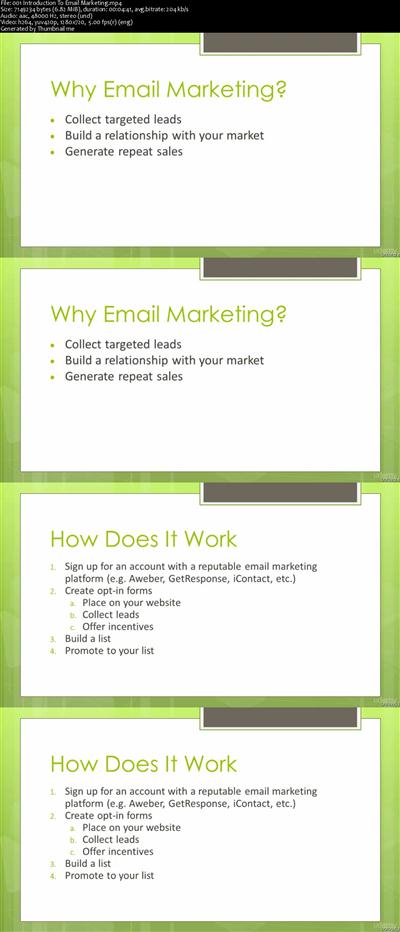
Email Marketing A-Z: Click, Send, Profit
MP4 | Video: AVC 1280x720 | Audio: AAC 44KHz 2ch | Duration: 1.5 Hours | Lec: 16 | 238 MB
Genre: eLearning | Language: English​

Create Email Marketing Campaigns That Drive Revenue.

Welcome to Click, Send, Profit! As a member of A-Z Email Marketing: Click, Send, Profit

you have full access to this crash course on sending profitable emails.

The Click, Send, Profit Course consists of 4 modules:


Module 1 - Email Sending 101

In this module you'll learn why you would want to use email marketing and why it's one of the best marketing options available to you.

You'll learn the key components to monetizing your email list and how to test each along the way to optimize your emails and make as much money as possible. Knowing how to test and optimize your emails is huge when it comes to making money with email marketing.


Module 2 - Email Subject Lines

In this module you'll learn how to optimize the critical component to getting people to actually open your emails, your subject line.

We'll break down the psychology behind why certain subject lines do better than others when it comes to getting opens.

You'll also learn the 3 best types of subject lines, and we'll give you several examples that you can start using today in your email marketing campaigns.


Module 3 - Email Body

In this module you'll learn how to write compelling content that gets people to click on the links in your email. This step is extremely important because if no one clicks on your links it's impossible to make money with email marketing.

We'll cover everything from the 3 best types of emails you can send all the way to how to properly place your links in your email body to maximize your clicks.

Finally we'll give you 3 done-for-you email templates you can use in your campaigns to streamline the process even further.


Module 4 - Email Profits

In this module you'll learn how to start building a profitable list with an email autoresponder.

We'll also show you how to find great offers to promote to your list as an affiliate. Being able to distinguish high converting offers from the duds is essential to making money with email marketing.

We'll also show you how to set up your own website if your interested in promoting your own products.

Finally you'll learn about a great resource you can use to outsource everything from writing and sending your emails all the way to setting up your sales page.


We've only included what we think are the most important factors in sending highly profitable emails.

We hope you get a lot of value from this course and as always we'd love to hear your feedback!

26069894b564cad27855e17cf0a27efa.jpg


Recommend Download Link Hight Speed | Please Say Thanks Keep Topic Live ​
 
0e3a6d16924039d0fabd20f3149a2e7a.jpg


Pluralsight - Maya Dynamics: Common Effects Techniques
Size: 692.32 MB | Duration: 1 hr 55 mins | Video: AVC (.mp4) 1024x768 15fps | Audio: AAC 44KHz 2ch
Genre: eLearning | Level: Intermediate | Language: English | + Exercise files
Commonly used effects in VFX and animation have been used on a number of award winning shows. In this course, you'll learn how these effects can be created in under 30 minutes whether you are an animator, lighter, modeler or FX artist.​

Have you ever wanted to have a few solid effects under your belt to create in a time crunch? In this course, Maya Dynamics: Common Effects Techniques, you'll learn how to create two simple separate scenes, and start adding all the effects on top to create a final shot. First, you'll begin by creating a scene where you'll discover how to create blood, shattered glass, and dust effects.

Next, you'll dive into the next scene where you'll create a logo animation utilizing fantasy effects. Finally, you'll learn how to efficiently render these effects, and how they work together in compositing. By the end of this course, you'll have a better understanding of how these effects can be useful, and be able to create them in under 30 minutes.

Software required for the course: Maya.


c766b8d2ea81aeca865abd1939a82b01.jpg


Recommend Download Link Hight Speed | Please Say Thanks Keep Topic Live ​
 

bf044c55535c0132b78347b10c3ad56a.jpg


July Live Webinar Recording - Photography Tutorial
MP4 | Video: AVC 1280x720 | Audio: AAC 44KHz 2ch | Duration: 3 Hours 41M | 947 MB
Genre: eLearning | Language: English​

5 complete edits as well as 2 bonus edits. Bonus edits cover black & white conversions, dropping in a sunset, as well as color enhancement of the red rocks. Images shown are images covered in this recording.

* The images edited during these recordings and videos may turn out slightly differently than those shown here. I do not use actions or presets in my editing, therefore, each time that I edit a certain image, it will come out with slight variations from previous edits.

* Images edited in videos and recordings are done without the use of any actions or presets.

* All post-processing is done using LR5 and CS6. The steps taught should be easily translatable using other versions of Photoshop as well as ACR. I am not versed in Photoshop Elements or ACR, but this is what I have heard from past students who have attended one of my live online classes. If you use different editing software than what I use, purchases are made at your own discretion.

75e3524f93ebbad413c58e48471a5063.jpg


Recommend Download Link Hight Speed | Please Say Thanks Keep Topic Live ​

 

7725a1dd19fdcf397172534cb56f778d.jpg


Lynda - Program Management
Size: 299 MB | Duration: 0h 52m | Video: AVC (.mp4) 1280x720 30fps | Audio: AAC 48KHz 2ch
Genre: eLearning | Level: Intermediate | Language: English​

What is the difference between a project and a program? What do program managers do? These questions and others are answered in this course which covers the essentials of program management.

What is the difference between a project and a program? What do program managers do? These questions and others are answered in this course which covers the essentials of program management. Learn about the skills needed to be a program manager. Discover the milestones and phases involved in the life cycle of a program-from planning to delivery and beyond. Find out how to manage programs, align programs to business strategies, deliver beneficial results, communicate with stakeholders, govern program activities, map program schedules, and support integral program processes.


* What is program management?
* Who are program managers?
* Program versus project
* Program life-cycle phases
* Aligning programs to an organization's strategies
* Analyzing needs and planning programs
* Delivering and sustaining benefits from programs
* Working with program stakeholders
* Supporting program governance activities
* Managing program finances and resources
* Scheduling programs
* Managing program scope and quality


4f306864f95e4c8766708601fdd2e3c4.jpg


Recommend Download Link Hight Speed | Please Say Thanks Keep Topic Live ​

 

30eb783619aab3bd57dc1143b8830024.jpg


Beauty Retouching: Prerequisites
MP4 | Video: AVC 1280x720 | Audio: AAC 44KHz 2ch | Duration: 1 Hour 10M | 515 MB
Genre: eLearning | Language: English​

Pratik Naik is a high end retoucher specializing in commercial and editorial work, represented by One Mega Management. His proficiency with retouching and Photoshop stems from 10 years of experience in the field. His work can be seen in magazines all over the world, ranging from Marie Claire, Elle, Zink and many more. Pratik is also a retouching mentor and instructor, teaching photographers and other retouchers across the world on a regular basis.

In this course Pratik Naik Teches you the prerequisites and requirements of Beauty & Portrait Retouching...


b4986004ce2dd94e05e2a25c4f3d2adb.jpg


Recommend Download Link Hight Speed | Please Say Thanks Keep Topic Live ​
 

e96eb4b51bf028b36d3891824edce679.jpg


PMI-ACP Certification Initiation and Requirements Gathering
MP4 | Video: AVC 1280x720 | Audio: AAC 44KHz 2ch | Duration: 2 Hours | Lec: 15 | 326 MB
Genre: eLearning | Language: English​

Agile Certified Practitioner Certification Program - Course 4 of 8 - Initiation and Requirements Gathering

Welcome to the 4th course of the Agile Project Management - The PMI-ACP (Agile Certified Practitioner) Certification Program. This course is focused on Agile Planning and more precisely on Project Initiating and Requirements Gathering.

Who will benefit from taking this course

This course is intended for project managers, program managers, or anyone who wants to efficiently participate in agile projects. It is aligned with the Agile Certified Practitioner exam objectives developed by the Project Management Institute® and Certified ScrumMaster learning objectives.

The course includes training videos, examples, exercices and quizes. And, if you take your time to go through all the learning materials this will entitle you to claim 5 PDU's for the PMI certification exams and to maintain your PMI certification.

An agile development team uses rolling wave planning and progressive elaboration, refining and adjusting plans at various points throughout a project's life cycle. Planning is beneficial because it reduces risk and uncertainty, improves decision-making, fosters trust, and makes it easier to pass on information to stakeholders.

Three levels of planning

Agile teams focus on three levels of planning. During release planning, the customer and developers collaborate to provide high-level information on what user stories, or features, and how many iterations, to include in a product release.

During iteration planning, a team conducts detailed planning of the tasks to complete in a specific iteration. This planning is informed by the results of previous iterations. Daily planning occurs during brief meetings, when developers discuss their progress, immediate plans, and any obstacles.

Release and iteration planning

In an agile approach, release planning involves gathering requirements, creating user stories, prioritizing stories, estimating stories, grouping stories, and setting a release date.

Iteration planning is more detailed. It involves updating requirements, confirming user stories and priorities, decomposing stories into tasks, and refining estimates before each new iteration begins.

A business case and a product vision

The first step in planning an agile project is developing a business case and a product vision. The business case is a short document outlining the opportunity that a project represents, the project's goals and a strategy for achieving them, a project vision, milestones, the required investment, and the expected payback.

The product vision is a description of what will be delivered - which is encapsulated in a vision statement, of who will be involved in creating a product, and of how the work will be done.

A project scope and a use case

A project's scope is the extent of the work it includes. Using an agile approach, a team controls project scope by focusing only on developing functionality that is of direct value to the customer.

A use case provides an overview of a project's scope. It describes how users must be able to interact with a system, and the required results. It also describes exceptions, or the steps that must occur in response to system errors.

User stories

User stories break down the project's high-level requirements into specific, discrete requirements for particular product functions. They're usually expressed using the wording "As a , I want to so that I can ." An agile team may need to break large user stories, known as epics, into smaller stories as a project progresses. It may also group related user stories into themes.

This course will have two main sections. The first one is called Introduction to Agile Planning and the second Initiating and Scoping an Agile Project.

After completing the first section, Introduction to Agile Planning, you be able to:

recognize the levels of agile planning,
understand the benefits of having a plan for an agile project,
identify activities that take place during the different phases of agile planning.
After completing the second section, Initiating and Scoping an Agile Project, you will be able to:

understand the essential elements of a business case,
identify the elements of product vision,
analyze an example of a use case,
develop examples of user stories.
So, thank you for considering this course! Now, go ahead, and hit that "Take This Course" button. And, see you on the inside.


3967af525829941589dadc5bdefd3126.jpg


Recommend Download Link Hight Speed | Please Say Thanks Keep Topic Live ​
 
95ac8d1c7cbfa15e09abe1c8e9244ce6.jpg


The Creative Newborn Photography Studio
WEBRip | MP4 | English | 960 x 536 | AVC ~1500 kbps | 25 fps
MPEG | 192 Kbps | 44.1 KHz | 2 channels | 17:09:50 | 12.2 GB
Genre: Video Tutorial / Photographing, Adobe Photoshop
There are few images more powerful and moving than those capturing a newborns first days and months in the world. Join international award-winning photographer Julia Kelleher to learn how to create your own captivating style as an infant and newborn photographer​
.

9cdc566c708e2bbeb61fbfd650b58dd1.jpg


1a909c98df21d70e06a0f9156e2b18e2.jpg


a30ee3e9d2161a175798436425229f34.jpg


385a655cb84783e8001830c9d8228c83.jpg


Recommend Download Link Hight Speed | Please Say Thanks Keep Topic Live ​
 
Zurück
Oben Unten