• Regeln für den Video-Bereich:

    In den Börsenbereich gehören nur Angebote die bereits den Allgemeinen Regeln entsprechen.

    Einteilung

    - Folgende Formate gehören in die angegeben Bereiche:
    - Filme: Encodierte Filme von BluRay, DVD, R5, TV, Screener sowie Telesyncs im Format DivX, XviD und x264.
    - DVD: Filme im Format DVD5, DVD9 und HD2DVD.
    - HD: Encodierte Filme mit der Auflösung 720p oder darüber von BluRay, DVD, R5, TV, Screener sowie Telesyncs im Format x264.
    - 3D: Encodierte Filme von BluRay, die in einem 3D Format vorliegen. Dies gilt auch für Dokus, Animation usw.
    - Serien: Cartoon/Zeichentrick, Anime, Tutorials, Dokumentationen, Konzerte/Musik, Sonstiges sind demnach in die entsprechenden Bereiche einzuordnen, auch wenn sie beispielsweise im High Definition-Format oder als DVD5/DVD9/HD2DVD vorliegen. Ausnahme 3D.
    - Bereich Englisch: Englische Releases gehören immer in diesen Bereich.
    - Bereich Talk: Der Bereich, in dem über die Releases diskutiert werden kann, darf, soll und erwünscht ist.


    Angebot/Beitrag erstellen

    - Ein Beitrag darf erst dann erstellt werden, wenn der Upload bei mindestens einem OCH komplett ist. Platzhalter sind untersagt.
    - Bei einem Scenerelease hat der Threadtitel ausschließlich aus dem originalen, unveränderten Releasenamen zu bestehen. Es dürfen keine Veränderungen wie z.B. Sterne, kleine Buchstaben o.ä. vorgenommen werden. Ausnahme Serienbörse:
    - Bei einem Sammelthread für eine Staffel entfällt aus dem Releasename natürlich der Name der Folge. Beispiel: Die Simpsons S21 German DVDRip XviD - ITG
    - Dementsprechend sind also u.a. verboten: Erweiterungen wie "Tipp", "empfehlenswert", "only", "reup", usw. / jegliche andere Zusatzinformation oder Ergänzung, welche nicht in obiger Beschreibung zu finden ist.

    Aufbau des Angebots und Threadtitel

    Der Titel nach folgendem Muster erstellt zu werden. <Name> [3D] [Staffel] [German] <Jahr> <Tonspur> [DL] [Auflösung] <Quelle> <Codec> - <Group>
    Beispiel: The Dark Knight German 2008 AC3 DVDRip XviD - iND
    Beispiel: The Dark Knight 2008 DTS DL BDRip x264 - iND
    Beispiel: The Dark Knight 2008 AC3 DL BDRip XviD - iND
    Beispiel: The Dark Knight German 2008 AC3 720p BluRay x264 iND
    Beispiel: The Dark Knight 2008 DTS DL 1080p BluRay x264 iND
    Beispiel: Die Simpsons S01 German AC3 DVDRip XviD iND
    Beispiel: Die Simpsons S20 German AC3 720p BluRay x264 iND
    Beispiel: Sword Art Online II Ger Sub 2014 AAC 1080p WEBRip x264 - peppermint
    Entsprechend sind also u.a. verboten: Sonderzeichen wie Klammern, Sterne, Ausrufezeichen, Unterstriche, Anführungszeichen / Erweiterungen wie "Tipp", "empfehlenswert", "only", "reup", usw. / jegliche andere Zusatzinformation oder Ergänzung, welche nicht in obiger Beschreibung zu finden ist
    Ausnahmen hiervon können in den Bereichen geregelt sein.

    Die Beiträge sollen wie folgt aufgebaut werden:
    Überschrift entspricht dem Threadtitel
    Cover
    kurze Inhaltsbeschreibung
    Format, Größe, Dauer sind gut lesbar für Downloader außerhalb des Spoilers zu vermerken
    Nfo sind immer Anzugeben und selbige immer im Spoiler in Textform.
    Sind keine Nfo vorhanden z.B. Eigenpublikationen, sind im Spoiler folgende Dateiinformationen zusätzlich anzugeben :
    Quelle
    Video (Auflösung und Bitrate)
    Ton (Sprache, Format und Bitrate der einzelnen Spuren)
    Untertitel (sofern vorhanden)
    Hosterangabe in Textform außerhalb eines Spoiler mit allen enthaltenen Hostern.
    Bei SD kann auf diese zusätzlichen Dateiinformationen verzichtet werden.

    Alle benötigten Passwörter sind, sofern vorhanden, in Textform im Angebot anzugeben.
    Spoiler im Spoiler mit Kommentaren :"Schon Bedankt?" sind unerwünscht.


    Releases

    - Sind Retail-Release verfügbar, sind alle anderen Variationen untersagt. Ausnahmen: Alle deutschen Retail-Release sind CUT, in diesem Fall sind dubbed UNCUT-Release zulässig.
    - Im Serien-Bereich gilt speziell: Wenn ein Retail vor Abschluss einer laufenden Staffel erscheint, darf diese Staffel noch zu Ende gebracht werden.62
    - Gleiche Releases sind unbedingt zusammenzufassen. Das bedeutet, es ist zwingend erforderlich, vor dem Erstellen eines Themas per Suchfunktion zu überprüfen, ob bereits ein Beitrag mit demselben Release besteht. Ist dies der Fall, ist der bereits vorhandene Beitrag zu verwenden.
    - P2P und Scene Releases dürfen nicht verändert oder gar unter einem iND Tag eingestellt werden.


    Support, Diskussionen und Suche

    - Supportanfragen sind entweder per PN oder im Bereich Talk zu stellen.
    - Diskussionen und Bewertungen sind im Talk Bereich zu führen. Fragen an die Uploader haben ausschließlich via PN zu erfolgen, und sind in den Angeboten untersagt.
    - Anfragen zu Upload-Wünschen sind nur im Bereich Suche Video erlaubt. Antworten dürfen nur auf Angebote von MyBoerse.bz verlinkt werden.


    Verbote

    - Untersagt sind mehrere Formate in einem einzigen Angebotsthread, wie beispielsweise das gleichzeitige Anbieten von DivX/XviD, 720p und 1080p in einem Thread. Pro Format, Release und Auflösung ist ein eigener Thread zu eröffnen.
    - Grundsätzlich ebenso verboten sind Dupes. Uploader haben sich an geeigneter Stelle darüber zu informieren, ob es sich bei einem Release um ein Dupe handelt.
    - Gefakte, nur teilweise lauffähige oder unvollständige Angebote sind untersagt. Dies gilt auch für eigene Publikationen, die augenscheinlich nicht selbst von z.B. einer DVD gerippt wurden. Laufende Serien, bei denen noch nicht alle Folgen verfügbar sind, dürfen erstellt und regelmäßig geupdatet werden.
    - Untersagt sind Angebote, welche nur und ausschließlich in einer anderen Sprache als deutsch oder englisch vorliegen. Ausnahmen sind VORHER mit den Moderatoren zu klären.


    Verstoß gegen die Regeln

    - Angebote oder Beiträge, die gegen die Forenregeln verstoßen, sind über den "Melden"-Button im Beitrag zu melden.
  • Bitte registriere dich zunächst um Beiträge zu verfassen und externe Links aufzurufen.

++ Premium IPTV ++ 7000 Live Sender ++ UHD Qualität ++ Mediathek mit 18.000 Inhalten ++


VenneTV


Englische Tutorials


37d12d2826c830bc63432e63874d415d.jpg

Lynda - Rhino for Mac Essential Training
Size: 1.12 GB | Duration: 5h 4m | Video: AVC (.mp4) 1280x720 15&30fps | Audio: AAC 48KHz 2ch
Genre: eLearning | Level: Beginner | Language: English​

Rhino for Mac offers a compelling 3D modeling experience for designers who prefer to work in the Mac environment.

* Installing Rhino for Mac
* Preparing a design
* Modeling metal parts
* Importing models
* Modeling parametrically with Grasshopper
* Extruding objects
* Modeling curves, surfaces, and solids
* Creating diagrams, 2D drawings, and layouts
* Rendering
* Preparing for fabrication: cutting and 3D printing

Recommend Download Link Hight Speed | Please Say Thanks Keep Topic Live ​
 

a479684b432a0da174f9918ca27126e3.jpg

Learn and Understand C++
13 h | Video: AVC (.MP4) 1280x720 30fps | Audio: AAC 44.1KHz 2ch | 2.32Gb
Genre: eLearning | Language: English​

Take this course to learn C++ which you can use for ethical hacking, game development, and most software you use daily!

If you want to learn C++ to advance your skills, gain the ability to program games, and create your own software, you might love this course! You can go from beginner to advanced with C++ using this course because it has 9+ hours of video that might motivate you to keep learning and programming in C++!

If you have no previous knowledge or experience in C++, you will like that the course begins with C++ basics. If you have learned about C++ already in another course and want to improve what you already know, the course has hours of different topics in C++ with one topic per section. Each section is linked to the previous one in terms of utilizing what was already learned. Each topic is supplied with lots of examples which help students in their process of learning. Also, some new features introduced in C++11 standard are explained. This is what makes it interesting for both beginner and advanced students. Even if you already have a lot of experience in programming in C++, this course can help you learn some new information you had missed before. Upon the completion of this course, you should be able to write programs that have real-life applications.

What I think is the best about this course is that you can search questions others have had, post your own questions, and get answers to challenges you are currently facing in learning and using C++. You get paid C++ expert technical support in this course here to answer every single question you ask!

If you still are not sure about taking the course, maybe these stories of what the students before you experienced will be more useful than whatever I can say about this course. Maybe you can see if you identify with where they were when they took the course and what they got out of it. These are all copied from the course reviews below.

So far I'm enjoying it, explanation of subjects are easy to understand.

Very clear instruction, easy to understand.

Straight forward. No fluff like some other courses where they take you on tangents about stuff you will probably never encounter.

If you any suggestions you have on topics that have not been covered, you can send them via private message. I will do my best to cover them as soon as possible.

Thank you for reading this. I hope to see you in the course soon and I hope you will enjoy your time learning as much as I have!

What are the requirements?
Basic Computer skills will be sufficient
What am I going to get from this course?
Understand C++ Code
Write C++ Code
Create Basic applications in C++
What is the target audience?
Complete beginners who wish to learn C++
No previous programming knowledge is needed

Recommend Download Link Hight Speed | Please Say Thanks Keep Topic Live ​
 

53a07b063540937122c05f07cc44f980.jpg

Getting Started with NodeJS for Beginners
MP4 | Video: AVC 1280x720 | Audio: AAC 44KHz 2ch | Duration: 1 Hours | Lec: 12 | 475 MB
Genre: eLearning | Language: English​

Learn Basic of Powerful JavaScript Engine NodeJS with Core Libraries

NodeJs is a powerful JavaScript engine that can be used for a variety of tasks. In this course, we'll learn the basics of working with NodeJS. We'll work with the core libraries, but also learn about using npm: the Node Package Manager to load and work with any third party package that has been developed for NodeJS. We'll also look at three ways to write and run a simple web server using node.The course is an hour long, and consists of two units. Topics include:- installation
- testing and verifying the installation
- introduction to the npm
- using the REPL utility
- file input and output

The course assumes that you are comfortable writing and understanding object oriented JavaScript.I hope you'll join us for this exciting introduction to NodeJS.

Recommend Download Link Hight Speed | Please Say Thanks Keep Topic Live ​
 

cf1e265fa120721bea7e66f3bdb88997.jpg

How To Clean Up Audio Files Effectively & Quickly in Minutes
MP4 | Video: AVC 1280x720 | Audio: AAC 44KHz 2ch | Duration: 36M | Lec: 21 | 158 MB
Genre: eLearning | Language: English​

Video Newbies: Follow my audacity tips to clean up audio tracks after filming. Saves Time. Focus on the essentials.

Online Instructors Newbies: Learn this Awesome Audio Editing SKILL to create high quality videos online!

When I was creating this course for my students who are starting out to teach online, it reminds me of a classic picture of a grandmother passing on her cooking skills to her grandchildren - something that the **** cannot learn from books or TV because they are 'family secrets' passed on with each steps shown all the way. This is exactly what I am doing in this course.

Reviews from Students

David Henry:

GREAT! This is JUST what I needed. Rosa has shared some great tips on how to clean up the audio. This has been VERY helpful. Thanks, Rosa.
Sylvia Muller

Very well explained. Good tips! Thank you Rosa
Bjartmar Huduson

A nice review of the many features of Audacity in cleaning up audio tracks.
In the last few years, I've created many online courses. One of the big challenge that we as instructors face is: how to create nice clean audio tracks to our videos so that when students take our courses, they will have a good and pleasant experience during their learning process.

When I first started teaching online in 2008, I was often bogged down by the immense task of cleaning up the audio tracks. I watched tons of You-tube videos & took different courses to help me pick up this skill. It was very time consuming & left me very frustrated in the end. I would end up spending hours and hours re-doing a lot of my audio tracks because I didn't know where to focus. Is this your situation?

And what is most frustrating is that it used to take me many trials to finally get my TEST Video approved by the Udemy team. I've been there.

For this reason, I am creating this course for all Udemy newbies or even online veterans to join me in this specialized course where I show you everything you need to do to create clean audios to your video production. You just need to follow my Easy Steps & Methods to get your audio tracks cleaned up in minutes. This class is going to help you concentrate on the ESSENTIALS so that you know exactly how to clean your audio tracks after filming your classes.

Great audio quality is critical to ensure students stay engaged in our courses.So it is absolutely essential to clean up the audio track professionally so that students do not get distracted by the background noises that are created by the fans, computers, or any other electronic devices that we have in the room.
Even if you use a top quality microphone to do your recording, there's inevitably still a lot of buzzing noises that need to be removed such as the hollow and echoey sounds in the room. I will show you my secret method of how I do them quickly & effectively.We will use the an open source software Audacity to create high quality clean audio tracks! Once you've picked up this skill, you will become very good at it following the procedure that I show you. What took me months to learn will just take you less than an hour to pick up this needed specialized skill. You have the advantage of the many experiments I've tried on my videos to get them perfect. By taking this course, you also don't need to make the many mistakes I made when I first started.

Come on in and join my students here. They are having a lot of fun! There is an effective and quick way to create clean audio tracks taking out all the background noises, hollow & echoey sounds, the annoying breathing that appears because of talking too closely into the microphone. For a bonus, I will show you how to clear out all the clicks & popping sounds that come up because of the powerpoint presentations we use during the

Recommend Download Link Hight Speed | Please Say Thanks Keep Topic Live ​
 

05f642859d9f9040ec780bb685ef7eb6.jpg

Lynda - AutoCAD: Tool Palettes
Size: 328 MB | Duration: 1h 54m | Video: AVC (.mp4) 1280x720 15&30fps | Audio: AAC 48KHz 2ch
Genre: eLearning | Level: Appropriate for all | Language: English​

What could make AutoCAD even more flexible and powerful? The answer lies in a humble feature: tool palettes.

* Using tool palettes
* Using AutoCAD DesignCenter
* Finding and inserting blocks
* Creating tool palettes from DesignCenter
* Setting up tool palettes with styles, hatches, and DWGs
* Adding blocks and groups
* Importing and exporting tool palettes

Recommend Download Link Hight Speed | Please Say Thanks Keep Topic Live ​
 

37f1b6755636078d815c10655e62ff65.jpg

Lynda - Video Gear: Audio
Duration: 1h 54m | Video: AVC (.mp4) 1280x720 30fps | Audio: AAC 48KHz 2ch | 989 MB
Genre: eLearning | Level: Appropriate for all | Language: English​

What's one of the best parts about being a video professional? All the cool gear! In this series, Rich Harrington and Robbie Carman team up to discuss the latest and greatest equipment for video production and post, including one of its most overlooked aspects: audio. Learn how to enhance the audio inputs on your camera, mobile device, or GoPro with smart and inexpensive adapters, and get the best sound from wireless mics. Discover accessories that will make your shoots run smoother-like a great pair of headphones-and how to record audio with a smartphone or tablet, laptop, or Tascam recorder. Plus, get an audio engineer's perspective on audio equipment from special guest Cheryl Ottenritter. As with the rest of the Video Gear series, Rich and Robbie keep both cost and quality in mind, so you'll never have to worry about blowing your budget or compromising production value

Topics include:
* Enhancing audio inputs with adapters
* Working with wireless mics
* Choosing a pair of professional headphones
* Recording audio with a smartphone or tablet
* Portable recording with the Zoom H4n
* Zoom H4n alternatives: iPads, iPhones, laptops, and Tascam recorders

Recommend Download Link Hight Speed | Please Say Thanks Keep Topic Live ​
 

a739458b1563b5d2c515352184467854.jpg

Make Your Website Highly Professional ,Attractive & Social
37m | Video: AVC (.MP4) 1280x720 30fps | Audio: AAC 44.1KHz 2ch | 97MB
Genre: eLearning | Language: English​

Sumo-Me Provide One Of Most Awesome Tools Kit Which Help Your Website To Look Attractive,Professional & Social

Welcome To The Course & I let you know this course is for you if you are looking to make your website super professional ,attractive & social .

As In This course you will see most valuable tools which help you to track your website visitor in a laser targeted manner.

In This course You Will See Most Valuable Tracked Data of Udemy SmartyBro Website

& also let you know how you can convert your website visitor into your website subscriber in a lot faster way.

In This Course You Will Learn:

How To setup SumoMe In Your Website a Lot faster way
How To Convert Your Website Visitor Into Your Email List Subscriber
In this Course I let You Know How each tool look when you use them in your website
After taking this course you will get to know when to use which tool & lot more Tricks which Udemy SmartyBro Website is using in their website
You Will Be able to Track Your Website Visitor interest more effectively
After Taking This course you are fully familiar with most working techniques which most successful websites are using and make their website super professional

And I also encourage you to ask as many questions as possible related to course

& that's the best way to make your website super social & professional.

As Every Week I Try to add new content in the course & if relevant also include article about most valuable question which student ask & feature them into the course.

See You In The Course

What are the requirements?
You will need to have at least one website to which you can convert & track most valuable visitor interest
What am I going to get from this course?
You Will Be Able to Access Most Effective Technique With Single Click
You Can Able to Create Your Website Super Professional
You Can Convert Your Website Visitor Into Your True Subscriber
Most Importantly you will able to track your visitor information laser targeted
What is the target audience?
Do You Have At Least One Website then this course is Specially For You
Are You Looking To Improve Your Website Impression When Some Search For Your Website & Related Keywords ? -This is Right Course For You
Do You want to convert your website visitor into subscriber ,if so grab this course now

Recommend Download Link Hight Speed | Please Say Thanks Keep Topic Live ​

 

5be1348b396e29215fc78ca51289c1f0.jpg

Lynda - Adobe Animate CC 2017: New Features
Size: 129 MB | Duration: 0h 43m | Video: AVC (.mp4) 1280x720 15fps | Audio: AAC 48KHz 2ch
Genre: eLearning | Level: Intermediate | Language: English​

The new Adobe Animate is here and better than ever.

* Panning, zooming, and rotating with the new Camera tool
* Sharing documents and symbols in CC Libraries
* Creating vector brushes
* Adjusting brush pressure, tilt, and size
* Using interactive HTML5 components
* Exporting images and animated GIFs with the enhanced Export dialog

Recommend Download Link Hight Speed | Please Say Thanks Keep Topic Live ​

 

971eb9fd7e2b306d846583d500a5ebd5.jpg

Learn Linux on a MAC
MP4 | Video: AVC 1280x720 | Audio: AAC 44KHz 2ch | Duration: 33M | Lec: 12 | 129MB
Genre: eLearning | Language: English​

Your very own Linux lab on your MAC

This primary aim of this short course is to help MAC users install and test a virtual Ubuntu Linux server on VirtualBox, in around an hour. Although becoming an expert in Linux will take some years, it is not difficult to get a basic server up and running and to get a taste of Linux in an hour.

Linux is very widely used now in Internet infrastructure like Web servers, in Public Cloud infrastructure like Amazon AWS and in Private Clouds running on OpenStack. So it will be really worth your while to get some basic experience on the Linux OS before you start working on Cloud servers.

The two great things about running a VM on your MAC are (i) if it goes wrong, you can easily delete it and start again and (ii) you can work offline without an Internet connection. I hope you benefit from the value of this short course. I really enjoyed putting it together for you.

Recommend Download Link Hight Speed | Please Say Thanks Keep Topic Live ​

 

bb500c38a523337d5cbc0c01a11d4ed8.jpg

EMMET Faster HTML & CSS workflow - Best Tool For Developers 2016
MP4 | Video: AVC 1280x720 | Audio: AAC 44KHz 2ch | Duration: 1 Hours | Lec: 20 | 941 MB
Genre: eLearning | Language: English​

Emmet is plugin for text editors that helps you write HTML and CSS faster. Work quicker saving time & making more money.

Do you want to code HTML, CSS and XML faster?

Do you want to save time when coding?

Do you want to code more error free?

Do you want to become a NINJA coder?

If your answered was YES to most of these questions, then this course is for you.

On this course I will teach how to use a plugin called emmet to help make your workflow super smooth and efficient. I will show you many handy tricks that will do wonders in saving you time when developing.

You will become a faster coder in no time and it will be super easy to learn if you already know CSS. Now that I use Emmet, I could NOT imagine living without it.

Come join me in the course, and I promise that you will learn a lot and you will greatly appreciate it forever.

Recommend Download Link Hight Speed | Please Say Thanks Keep Topic Live ​

 

93d4f2790f5621958c23452d303a9af9.jpg

PHP: Ultimate guide to PHP for everyone
MP4 | Video: AVC 1280x720 | Audio: AAC 44KHz 2ch | Duration: 1.5 Hours | Lec: 20 | 567MB
Genre: eLearning | Language: English​

PHP : Learn PHP from complete basic level. Complete training of core PHP for newbies - Beginner level course

Welcome to the course on beginner's training on PHP. As you know, PHP is one of the best server side language for web development. This course is strictly based on basics of PHP. If you are a complete newbie in web development, then this course is for you. I have created this course with a proper mindset that my students are learning PHP from A, and I have to teach them to Z without leaving any concept in basics of core PHP. I tried my best to explain each and every concept to the best. If you know a little about PHP, then you can join me. But, if you are much familiar with PHP then this course is not for you.

I have started this course with an introduction to PHP and installation of required free software. Very basic topics like creating PHP file, writing PHP code properly, are also included in this course. You will also learn reading PHP info and errors, doing proper indentation.

Other related topics include Echo, Comments, PHP in HTML, HTML in PHP, Variables, Concatenation, Conditional Statements, Operators, Loops and a little about functions.

I think these topics are more than enough to start a journey in web development. I have a strategy that my students and I follow in all my courses. Along with this course, you will get lifetime support for all your doubts and discussions on any topic of web development. If you have any doubt, you can ask me for a quick explanation and if required I can make an exclusive video of doubt and will post on course to help every student.

Recommend Download Link Hight Speed | Please Say Thanks Keep Topic Live ​

 

4dad06714c42ce94755ef0adddab5db5.jpg

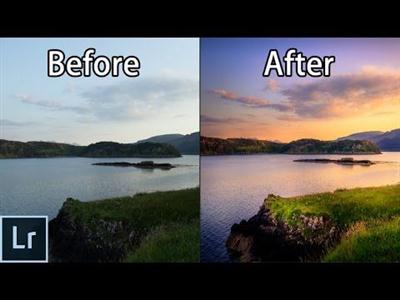
Simple Steps to Editing Breathtaking and Moody Landscape Shots in Lightroom
Duration: 21m | Video: h264, yuv420p, 1280x720 30fps | Audio: aac, 44100 Hz, 2 ch | 417 MB
Genre: eLearning | Language: English​

In this class I would like to share a very simple and easy-to-learn workflow to use in editing your landscape photography (DSLR or mobile phone) to make them look dramatic and vibrant. This is my "go-to" workflow in the beginning stages of editing and, with just a few easy to understand tools in Adobe Lightroom, can completely transform your photos into the kind of photo that you envisioned when you first took it.

Some of the tools we will be using in our edit:
-Crop/Straighten using a grid
-Basic adjustments to color temperature
-Adjusting exposure/highlights/shadows/contrast/clarity
-Using the HSL (hue, saturation, luminance) sliders to achieve dramatic colors
-Removing chromatic aberration in tree limbs automatically and manually using lens corrections
-Brushing colors by hand into the photo
-Adding clarity/sharpness with adjustment brushes
-Using adjustment brushes to edit lighten underexposed areas

Recommend Download Link Hight Speed | Please Say Thanks Keep Topic Live ​
 
Zurück
Oben Unten