• Regeln für den Video-Bereich:

    In den Börsenbereich gehören nur Angebote die bereits den Allgemeinen Regeln entsprechen.

    Einteilung

    - Folgende Formate gehören in die angegeben Bereiche:
    - Filme: Encodierte Filme von BluRay, DVD, R5, TV, Screener sowie Telesyncs im Format DivX, XviD und x264.
    - DVD: Filme im Format DVD5, DVD9 und HD2DVD.
    - HD: Encodierte Filme mit der Auflösung 720p oder darüber von BluRay, DVD, R5, TV, Screener sowie Telesyncs im Format x264.
    - 3D: Encodierte Filme von BluRay, die in einem 3D Format vorliegen. Dies gilt auch für Dokus, Animation usw.
    - Serien: Cartoon/Zeichentrick, Anime, Tutorials, Dokumentationen, Konzerte/Musik, Sonstiges sind demnach in die entsprechenden Bereiche einzuordnen, auch wenn sie beispielsweise im High Definition-Format oder als DVD5/DVD9/HD2DVD vorliegen. Ausnahme 3D.
    - Bereich Englisch: Englische Releases gehören immer in diesen Bereich.
    - Bereich Talk: Der Bereich, in dem über die Releases diskutiert werden kann, darf, soll und erwünscht ist.


    Angebot/Beitrag erstellen

    - Ein Beitrag darf erst dann erstellt werden, wenn der Upload bei mindestens einem OCH komplett ist. Platzhalter sind untersagt.
    - Bei einem Scenerelease hat der Threadtitel ausschließlich aus dem originalen, unveränderten Releasenamen zu bestehen. Es dürfen keine Veränderungen wie z.B. Sterne, kleine Buchstaben o.ä. vorgenommen werden. Ausnahme Serienbörse:
    - Bei einem Sammelthread für eine Staffel entfällt aus dem Releasename natürlich der Name der Folge. Beispiel: Die Simpsons S21 German DVDRip XviD - ITG
    - Dementsprechend sind also u.a. verboten: Erweiterungen wie "Tipp", "empfehlenswert", "only", "reup", usw. / jegliche andere Zusatzinformation oder Ergänzung, welche nicht in obiger Beschreibung zu finden ist.

    Aufbau des Angebots und Threadtitel

    Der Titel nach folgendem Muster erstellt zu werden. <Name> [3D] [Staffel] [German] <Jahr> <Tonspur> [DL] [Auflösung] <Quelle> <Codec> - <Group>
    Beispiel: The Dark Knight German 2008 AC3 DVDRip XviD - iND
    Beispiel: The Dark Knight 2008 DTS DL BDRip x264 - iND
    Beispiel: The Dark Knight 2008 AC3 DL BDRip XviD - iND
    Beispiel: The Dark Knight German 2008 AC3 720p BluRay x264 iND
    Beispiel: The Dark Knight 2008 DTS DL 1080p BluRay x264 iND
    Beispiel: Die Simpsons S01 German AC3 DVDRip XviD iND
    Beispiel: Die Simpsons S20 German AC3 720p BluRay x264 iND
    Beispiel: Sword Art Online II Ger Sub 2014 AAC 1080p WEBRip x264 - peppermint
    Entsprechend sind also u.a. verboten: Sonderzeichen wie Klammern, Sterne, Ausrufezeichen, Unterstriche, Anführungszeichen / Erweiterungen wie "Tipp", "empfehlenswert", "only", "reup", usw. / jegliche andere Zusatzinformation oder Ergänzung, welche nicht in obiger Beschreibung zu finden ist
    Ausnahmen hiervon können in den Bereichen geregelt sein.

    Die Beiträge sollen wie folgt aufgebaut werden:
    Überschrift entspricht dem Threadtitel
    Cover
    kurze Inhaltsbeschreibung
    Format, Größe, Dauer sind gut lesbar für Downloader außerhalb des Spoilers zu vermerken
    Nfo sind immer Anzugeben und selbige immer im Spoiler in Textform.
    Sind keine Nfo vorhanden z.B. Eigenpublikationen, sind im Spoiler folgende Dateiinformationen zusätzlich anzugeben :
    Quelle
    Video (Auflösung und Bitrate)
    Ton (Sprache, Format und Bitrate der einzelnen Spuren)
    Untertitel (sofern vorhanden)
    Hosterangabe in Textform außerhalb eines Spoiler mit allen enthaltenen Hostern.
    Bei SD kann auf diese zusätzlichen Dateiinformationen verzichtet werden.

    Alle benötigten Passwörter sind, sofern vorhanden, in Textform im Angebot anzugeben.
    Spoiler im Spoiler mit Kommentaren :"Schon Bedankt?" sind unerwünscht.


    Releases

    - Sind Retail-Release verfügbar, sind alle anderen Variationen untersagt. Ausnahmen: Alle deutschen Retail-Release sind CUT, in diesem Fall sind dubbed UNCUT-Release zulässig.
    - Im Serien-Bereich gilt speziell: Wenn ein Retail vor Abschluss einer laufenden Staffel erscheint, darf diese Staffel noch zu Ende gebracht werden.62
    - Gleiche Releases sind unbedingt zusammenzufassen. Das bedeutet, es ist zwingend erforderlich, vor dem Erstellen eines Themas per Suchfunktion zu überprüfen, ob bereits ein Beitrag mit demselben Release besteht. Ist dies der Fall, ist der bereits vorhandene Beitrag zu verwenden.
    - P2P und Scene Releases dürfen nicht verändert oder gar unter einem iND Tag eingestellt werden.


    Support, Diskussionen und Suche

    - Supportanfragen sind entweder per PN oder im Bereich Talk zu stellen.
    - Diskussionen und Bewertungen sind im Talk Bereich zu führen. Fragen an die Uploader haben ausschließlich via PN zu erfolgen, und sind in den Angeboten untersagt.
    - Anfragen zu Upload-Wünschen sind nur im Bereich Suche Video erlaubt. Antworten dürfen nur auf Angebote von MyBoerse.bz verlinkt werden.


    Verbote

    - Untersagt sind mehrere Formate in einem einzigen Angebotsthread, wie beispielsweise das gleichzeitige Anbieten von DivX/XviD, 720p und 1080p in einem Thread. Pro Format, Release und Auflösung ist ein eigener Thread zu eröffnen.
    - Grundsätzlich ebenso verboten sind Dupes. Uploader haben sich an geeigneter Stelle darüber zu informieren, ob es sich bei einem Release um ein Dupe handelt.
    - Gefakte, nur teilweise lauffähige oder unvollständige Angebote sind untersagt. Dies gilt auch für eigene Publikationen, die augenscheinlich nicht selbst von z.B. einer DVD gerippt wurden. Laufende Serien, bei denen noch nicht alle Folgen verfügbar sind, dürfen erstellt und regelmäßig geupdatet werden.
    - Untersagt sind Angebote, welche nur und ausschließlich in einer anderen Sprache als deutsch oder englisch vorliegen. Ausnahmen sind VORHER mit den Moderatoren zu klären.


    Verstoß gegen die Regeln

    - Angebote oder Beiträge, die gegen die Forenregeln verstoßen, sind über den "Melden"-Button im Beitrag zu melden.
  • Bitte registriere dich zunächst um Beiträge zu verfassen und externe Links aufzurufen.


Englische Tutorials


ee80c55eae2c2ca5785cb1283890c43c.jpg

MATLAB Projects with iPhone & iOS Sensors
MP4 | Video: AVC 1280x720 | Audio: AAC 44KHz 2ch | Duration: 2 Hours | 717 MB
Genre: eLearning | Language: English​

Build your own MATLAB programs using the Accelerometer, Compass, GPS & other iOS Sensors on your iPhone & iPad

Now you can collect sensor data from your iPhone or Apple iOS device using MATLAB! Impress your friends, build some cool programs, and take your MATLAB skills to a new level with this interactive course. Youll learn how to capture and utilize data from 5 different sensors without the need to buy additional software or hardware.

Please Note: THIS COURSE IS VERY SIMILAR TO œBuild MATLAB Projects with Android Sensors

Build 6 iPhone Sensor Projects (Source Code Included)

In this course, you will master the MATLAB® Support Package for Apple iOS Sensors by building a unique set of projects which enable you to:

Build Your Own 3D Compass
Rotate 3D Objects Using Your Phone
Detect iPhone Facing Up or Down
Track Position and Speed of A Car
Detect Shaking
Count Your Steps While Walking
Dont struggle. Ill show you step-by-step.

Getting set up is a little tricky, but, dont worry, Ill walk you through it. And if you have any problems you can ask for help through the discussion forum. Ill show an easy method to enable and acquire data from all 5 iOS sensors including:

Acceleration Sensors - Learn how to use abrupt changes in your iPhones movement
Magnetic Field Sensors - Explore magnetic fields used by the compass and other input devices
Orientation Sensors - See how you can detect your iPhone state and control virtual items
Angular Velocity Sensors - Detect your iPhones movement and use to control software
Position Sensors - Capture your GPS position and speed and build location based apps
You will learn how easy it is to enable these sensors and acquire data for your MATLAB programs.

in this course, you will get:

Instructional Videos
Interactive Exercises
6+ Sample Projects
Source Code
24/7 Instructor & Student Access
30 Day Guarantee
Lifetime Course Access
To execute the code and examples, you will need:

MATLAB R2015a or later, for creating the connection to the application and logging sensor data.
iOS 8 or later on your device.
Wifi Network for connecting your computer and iOS device.
Theres no better time to expand your MATLAB skills and use your iPhone to collect and process data. Enroll in this course and get started today!

Recommend Download Link Hight Speed | Please Say Thanks Keep Topic Live ​

 

fbcc40f773703eed4e4dfe529a7f75ae.jpg

Onshape Essentials: Revolves, Sweeps, and Lofts
MP4 | Video: AVC 1280x720 | Audio: AAC 44KHz 2ch | Duration: 1H 44M | 271 MB
Genre: eLearning | Language: English​


Creating non-geometric shapes in CAD can be simple. This course will show you how to use the revolve, sweep, and loft features in the CAD software Onshape through building a multi-part electrical controller. Required Software: Onshape.

Knowing how to construct non-geometric, manufacturable shapes in CAD is essential since not all designs are rectangular boxes. This course, , will teach you how to create shapes in Onshape that can't be bound by four corners. The Revolve, Sweep, and Loft features are powerful tools used to construct these non-geometric shapes, and you'll learn to use them here. Through this course you will also build a multi-part electrical controller that has complex wire routings and transitions. Finally, you will construct intricate features combining the skills learned in each module. In the end, your knowledge gained from this course will allow you to be a more accomplished and valued CAD designer. Required Software: Onshape.

Recommend Download Link Hight Speed | Please Say Thanks Keep Topic Live ​

 

151190780bafecb96686471f929f594c.jpg

R Courses : Intro to R Programming 101
MP4 | Video: AVC 1280x720 | Audio: AAC 44KHz 2ch | Duration: 1 Hours | 152 MB
Genre: eLearning | Language: English​

Learn basics of R Programming in a way it meant to be learnt!

Learn the basics of R Programming by following along with me or relax, sit back and watch!

There are lots of introductory R courses in the market. but, R was never taught in a way to address the steep learning curve and R enthusiasts often get overwhelmed. This course is totally different than others as it focuses on getting you up and running with R rather than getting too deep into concepts in R.

This course is truly step-by-step101 course to introduce you to R. In every section, l have carefully crafted and organized lessons.

After every lesson, you will learn a new valuable concept that will help you understand R better.

In summary, this course has been designed for beginner level R enthusiasts. You will be successful in this course even if you don't have statistical or programming educational background! So, Let's begin and see you inside the course :)

Recommend Download Link Hight Speed | Please Say Thanks Keep Topic Live ​
 

9a65574630a43686f09f93f408fb3fe8.jpg

Lynda - Recovering from a Layoff
Duration: 0h 59m | Video: AVC (.mp4) 1280x720 30fps | Audio: AAC 48KHz 2ch | 445 MB
Genre: eLearning | Level: Appropriate for all | Language: English​


Learn how to recover quickly from a layoff and find employment again. Brie Reynolds begins with the first steps to take after a layoff, including making a structured recovery plan. Then she covers topics such as filling the gap in your resume, networking after a layoff, searching and applying for jobs, and interviewing for a job after you've been laid off. By the end of this course, you'll be able to develop a personalized action plan that includes adding new experiences to your resume, strategically using your professional network, pinpointing the best open jobs, and tackling difficult interview questions with confidence.

Recommend Download Link Hight Speed | Please Say Thanks Keep Topic Live ​

 

fc19aacc63356932513359f48f9d3ad5.jpg

Simulating a Burning Tree in Maya
MP4 | Video: AVC 1280x720 | Audio: AAC 44KHz 2ch | Duration: 2h 39m | 749 MB
Genre: eLearning | Language: English​

Maya can create stunning visuals and fluid simulations. This course will teach you how to simulate a burning tree, creating fire and embers with fluids and particle systems in Maya. Software required: Maya 2014 or up, After Effects CS6.

Have you ever wanted to create and play with fire to create stunning visuals to enhance your demo reel? If so, this course, Simulating a Burning Tree in Maya is a perfect course to to learn the art of simulating realistic fire and embers using Autodesk Maya fluids and particle systems. First, you will discover the basic steps needed to block out fire and smoke fluid containers along with blocking of particle system to simulate embers. Next, you will learn skills to improve the simulations of fire, smoke, and embers while exploring the various attributes of fluid solvers in order to improve the fire quality and physics of embers. Finally, you will render fire and embers while going along with various utilities and attributes required to create a stunning rendered image. When you are done with this course, you will not have only understood the simulations of burning tree, but have also added many tools and techniques to improvise your existing knowledge as well as abilities to tackle other challenges of effect animations using Autodesk Maya. Software required: Maya 2014 or up, After Effects CS6.

Recommend Download Link Hight Speed | Please Say Thanks Keep Topic Live ​
 

8f04a073474bce2283ecb01b76c0b112.jpg

Video Production Business Tips: Freelance or Company
MP4 | Video: AVC 1280x720 | Audio: AAC 44KHz 2ch | Duration: 1.5 Hours | 1.86 GB
Genre: eLearning | Language: English​


Video Production Business Tips for success. Get new clients, make more money and grow your video production company

From start-up to successful, this video course will provide you with the knowledge and professional practices you need to become successful, make more money and take your career to the next level in video production. This course is designed to help you generate new leads, land clients and pitch ideas that will keep them hiring you again and again. You'll learn what you need in your professional kit, how to present yourself effectively as a video professional, how to quote clients and more.

This course is designed for people who are interested in building a career in video production as a freelancer or as a business owner.

This course is for:

Entrepreneurial-minded people
People who dont want to limit their income with a salary job
People who like freedom, fast growth and a challenging and rewarding lifestyle
Freelance videographers who want to have a successful career in video production
Videographers looking to work with their ideal clients and learn how to land them
Videographers looking to make more money and quote properly
People who want to sell themselves
Film graduates looking to start their own video production company or become a successful freelancer
Anyone who feels stuck in video and wants another production companies advice
Anyone looking to save hours of time and money by learning from our experience in video
Anyone who's unsure of what industry to focus on and what types of clients they should be attracting
Anyone who's ready to brand themselves effectively
Anyone who's unsure of where to spend their money
This course is NOT for:

Companies that are already established
Actors, make up artists, or other similar fields
People looking to get paid salary from a production company
People looking to join the union
About the Instructor:

Alli Saunders started her video career as freelance videographer and now runs an established video production company in Toronto, Canada where she produces corporate and commercial projects. She has an education from Humber College's Film and TV Production program, several years experience working in the radio broadcasting industry and a diploma in marketing. With the talents gained from her professional background she understands the value in connecting with people and how to build strong, lasting client relationships.

Recommend Download Link Hight Speed | Please Say Thanks Keep Topic Live ​

 

8d7b1175302d40e9339dff6a4b15c288.jpg

Accounting 101: How to read a Balance Sheet
MP4 | Video: AVC 1280x720 | Audio: AAC 44KHz 2ch | Duration: 2 Hours | 337 MB
Genre: eLearning | Language: English​

Accounting 101: Non-Accountants' Guide to Accounting. Learn Accounting. Get Paid More, and Get Promoted Faster!

Millions of people around the world, just like you and me are somehow involved in reading financial numbers.

Be it your business, your personal finance or your savings, understanding finance is now an essential pre-requisite for business survival and informed decision making.

Interestingly, the single biggest skill in life that could make or break your financial success is not taught in school.

Many entrepreneurs run businesses without having a clue on how to read a balance sheet. Business owners are and continue to remain dangerously ignorant of their numbers and the tax laws.

A recent study showed that 55% of small business owners did not review their monthly balance sheets, because they did not understand them.
Another survey finds that 83% of small businesses face a serious financial literacy gap.
The survey also found that the single reason why most small businesses didn't succeed was the lack of financial literacy skills needed to navigate the obstacles.
This course reveals exactly how you overcome these issues by following the simple steps and tips we give in this course!

There really is nothing more to do!
________________________________________________________________________

At the end of this course you will be able to:

Understand the business section of any newspaper or magazine, if you don't do so already.
Understand the three main financial statements, viz. Balance Sheet, Income Statement and Cash flow and how they are different from each other.
Read these financial reports and interpret what the numbers really mean.
Throw questions on your financial reports that your accountant has never been asked before!

Just follow the simple steps and tips that we reveal.

The course will continue to grow and grow with new materials, new examples and new case studies being added every week!

______________________________________________________________________

About this course:

Step-by-Step approach to reading financial statements
able case studies and material
Full lifetime access to this course and course material
FREE access to me by e-mail for any questions or concerns
Unconditional 30 day money back guarantee by Udemy
So, why are you waiting? Join me in learning how financial statements are made and what they mean!

Recommend Download Link Hight Speed | Please Say Thanks Keep Topic Live ​

 

fc80f13f3f476fcb6469eac99fad339c.jpg

Building HTML5 Canvas projects from scratch (Project file included)
MP4 | Video: AVC 1280x720 | Audio: AAC 44KHz 2ch | Duration: 2 Hours | 413 MB
Genre: eLearning | Language: English​


Learn to create several useful code projects using html5 canvas JavaScript. Learn by example as we build these projects

Best way to learn is by real examples of code, showing you how the code works together to create amazing applications from scratch.

Canvas drawing is done using JavaScript, this course focuses on JavaScript based around HTML5 canvas interactions. Also covers some basic AJAX, PHP, JQUERY, Bootstrap.

HTML5 canvas provides an amazing opportunity to create some really cool effects on web pages. This course will show you how to build projects from scratch, using HTML5 and JavaScript. How to use JavaScript applying it to the canvas to create animation and user generated content on the fly.

I have over 15+ years of web development experience, and have worked on hundreds of web applications just like these. One of the best ways to learn is by example, so I've created some projects that really demonstrate core applications that can be created using html5.

This course is designed to help you learn and develop skills for working on real world concepts using JavaScript and HTML5. Starting from scratch, step by step explanations of what code to use and where. We demonstrate how the code gets used, in addition to the process of building something from concept to launch.

All of the source files are included, top resources and links are shared throughout the course. Code samples are explained step by step, and you are encouraged to work along with the course material.

Project one canvas animation tutorial - designed to demonstrate animation in HTML5 canvas

Covers basic concepts of how to animate in canvas
JavaScript to use that helps with animation
how to draw paths on canvas using JavaScript
how to create arcs and circles
Added object effects in JavaScript - random colors and shadows
how to apply logic to create a continuous animation
Project two create user generated images - learn how to draw on the HTML5 canvas and output those images.

basics of scoping a project from scratch
setup html5 field types and buttons
link to bootstrap and jquery
apply event listeners for user interaction
get mouse cursor position and calculate actions
event triggered functions
pass base64 image data to webpage
use AJAX to send image data to the server
use PHP to generate png files from the HTML5 canvas drawing
In addition, I provide regular support to students. Also course upgrades and new projects will be added regularly.

The code in these projects is included!!! for you to be able to get a jump start on creating your own projects using Canvas.

Recommend Download Link Hight Speed | Please Say Thanks Keep Topic Live ​

 

e53348370bfce48913ce60fc6863d3e0.jpg

Bulletproof Personal Finance: Expert Asset Allocation
MP4 | Video: AVC 1280x720 | Audio: AAC 44KHz 2ch | Duration: 1 Hours | 560 MB
Genre: eLearning | Language: English​

The Ultimate Personal Finance Guide to Managing Money, Acquiring Assets, and Building Wealth

Tired of the same old "personal finance for dummies" advice? Fed up with high-fees, low-return mutual funds? Are you ready to build a customized asset portfolio like the experts? Is it time to super-charge your finances to finally reach your goals?

Bulletproof Personal Finance: Expert Asset Allocation is your solution!

The average person today completes twelve-to-sixteen years worth of formal education and graduates with no useful information regarding personal finance or money management. This leaves the average person with a predicament as they progress in their career: what should I do with my money? Where should I go to learn actionable personal financial strategies?

This course was written to answer those questions and fill that void. Bulletproof Money Management will show you how to construct a customized asset allocation model, and how to integrate each asset class into your portfolio. The course will walk you through several screencasts to demonstrate this where necessary.

All of the concepts presented in this course are rooted in a fundamental understanding of money, economics, and current macroeconomic trends based upon years of independent research. These concepts are more than abstract theory, however; they are the strategies used by the instructor to build a sustainable asset portfolio and quit his job within five years time.

Keep in mind, there are no get-rich-quick schemes. This course is designed with proper risk management techniques in mind. The number one rule of money management is: don't lose money. Remember " opportunities are endless, but capital is finite. As such, this course best suited for self-disciplined people with a long-term perspective.

Bulletproof Personal Finance is clear, concise, and to the point - you won't find any hype or filler here. To add additional value to this course, the instructor is completely willing to answer any and all questions you may have as you go through the material as well.

Do not take a backseat when it comes to your own finances. Learn everything you need to know to build a customized asset portfolio like the pro's by enrolling in Bulletproof Personal Finance today!

Recommend Download Link Hight Speed | Please Say Thanks Keep Topic Live ​

 

897265bcc86a30e4f1e5cd7a626c6cca.jpg

C++ Intermediate: Build C++ Programs
MP4 | Video: AVC 1280x720 | Audio: AAC 44KHz 2ch | Duration: 1.5 Hours | 428 MB
Genre: eLearning | Language: English​


Advance your C++ skills, build your portfolio and gain C++ experience by building programs

Build C++ programs that focus on developing your intermediate skills and apply more advanced C++ concepts and language fundamentals. Gain experience and build your portfolio of developed C++ programs by following the hands-on video tutorials as if your coding alongside the instructor. This course is about building C++ programs from scratch, applying and practicing beginner knowledge learned, developing skills at the intermediate level and having fun.

This course covers software installation on Windows and Mac. The software used in this course is free and open source for both platforms therefore there are no additional costs. The software is easy to setup, install and use and we cover all this in the course.

Each C++ program we write in this course focuses on applying certain skills and learning something new about C++ programming. The programming difficulty levels increase as you progress through the course. We start with more basic programs to ease into the course and refresh skills however you can move through the course as you choose since different programs are focused on in different sections. The C++ programs we write in this course cover essential intermediate skills and concepts.

In this course we write professional C++ code that adheres to standards and best practices. Its not just about writing some code its about writing professional code that you and anyone else would enjoy working with, contributing to and maintaining. You can apply the professional programming practices to any development language as those skills are transferable.

This course is for C++ developers looking to increase their C++ skills, students looking to build programs, those looking to gain more practical and applied experience building C++ programs, people looking for a refresher in C++ and those looking to practice and apply their C++ knowledge and skills.

Building C++ programs is exciting and an interesting way to learn new skills and increase your knowledge. Applying skills developed and knowledge learned through building programs in C++ is a great way to increase your practical C++ experience.

Recommend Download Link Hight Speed | Please Say Thanks Keep Topic Live ​
 

98319fac57dc9650893527c1c8e06e72.jpg

Lynda - Careers in the Game Industry
Size: 229 MB | Duration: 1h 19m | Video: AVC (.mp4) 1280x720 30fps | Audio: AAC 48KHz 2ch
Genre: eLearning | Level: Beginner | Language: English​


Interested in turning your love of video games into a career? This course will introduce you to the concepts and skills required to make it in the modern game industry-whether you want to build and finance your own game or land a job at a triple-A studio, with an indie team, or in mobile gaming. Learn about the history of video games, the structure of a typical game studio, the distribution paths for different types of games, marketing trends, the various roles (both artistic and technical), and the skills you need for each job. Christian Bradley provides practical, real-world advice about the game industry, and tips for getting your foot in the door. Plus, explore the courses and learning paths we offer to help get you started.

Topics include:
* A brief history of video games
* The phases of game development
* Roles in game development
* Essential programming, art, design, and audio skills
* Choosing a game engine
* Funding options outside the game studio system

Recommend Download Link Hight Speed | Please Say Thanks Keep Topic Live ​

 

27f3ac0fad49b950eb3520f8053e24c2.jpg

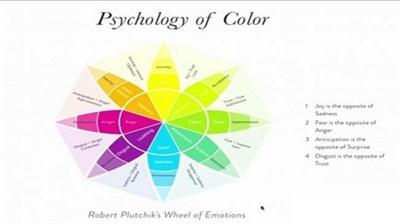
Color Workshop - Creative Approach: Communicate Emotion
Duration: 57m | Video: h264, yuv420p, 1280x720 30fps | Audio: aac, 44100 Hz, 2 ch | 357 MB
Genre: eLearning | Language: English​


This is Part 1 of the Color Workshop. We focus on using color with intention. Find the second part here:

Recommend Download Link Hight Speed | Please Say Thanks Keep Topic Live ​
 
Zurück
Oben Unten