• Regeln für den Video-Bereich:

    In den Börsenbereich gehören nur Angebote die bereits den Allgemeinen Regeln entsprechen.

    Einteilung

    - Folgende Formate gehören in die angegeben Bereiche:
    - Filme: Encodierte Filme von BluRay, DVD, R5, TV, Screener sowie Telesyncs im Format DivX, XviD und x264.
    - DVD: Filme im Format DVD5, DVD9 und HD2DVD.
    - HD: Encodierte Filme mit der Auflösung 720p oder darüber von BluRay, DVD, R5, TV, Screener sowie Telesyncs im Format x264.
    - 3D: Encodierte Filme von BluRay, die in einem 3D Format vorliegen. Dies gilt auch für Dokus, Animation usw.
    - Serien: Cartoon/Zeichentrick, Anime, Tutorials, Dokumentationen, Konzerte/Musik, Sonstiges sind demnach in die entsprechenden Bereiche einzuordnen, auch wenn sie beispielsweise im High Definition-Format oder als DVD5/DVD9/HD2DVD vorliegen. Ausnahme 3D.
    - Bereich Englisch: Englische Releases gehören immer in diesen Bereich.
    - Bereich Talk: Der Bereich, in dem über die Releases diskutiert werden kann, darf, soll und erwünscht ist.


    Angebot/Beitrag erstellen

    - Ein Beitrag darf erst dann erstellt werden, wenn der Upload bei mindestens einem OCH komplett ist. Platzhalter sind untersagt.
    - Bei einem Scenerelease hat der Threadtitel ausschließlich aus dem originalen, unveränderten Releasenamen zu bestehen. Es dürfen keine Veränderungen wie z.B. Sterne, kleine Buchstaben o.ä. vorgenommen werden. Ausnahme Serienbörse:
    - Bei einem Sammelthread für eine Staffel entfällt aus dem Releasename natürlich der Name der Folge. Beispiel: Die Simpsons S21 German DVDRip XviD - ITG
    - Dementsprechend sind also u.a. verboten: Erweiterungen wie "Tipp", "empfehlenswert", "only", "reup", usw. / jegliche andere Zusatzinformation oder Ergänzung, welche nicht in obiger Beschreibung zu finden ist.

    Aufbau des Angebots und Threadtitel

    Der Titel nach folgendem Muster erstellt zu werden. <Name> [3D] [Staffel] [German] <Jahr> <Tonspur> [DL] [Auflösung] <Quelle> <Codec> - <Group>
    Beispiel: The Dark Knight German 2008 AC3 DVDRip XviD - iND
    Beispiel: The Dark Knight 2008 DTS DL BDRip x264 - iND
    Beispiel: The Dark Knight 2008 AC3 DL BDRip XviD - iND
    Beispiel: The Dark Knight German 2008 AC3 720p BluRay x264 iND
    Beispiel: The Dark Knight 2008 DTS DL 1080p BluRay x264 iND
    Beispiel: Die Simpsons S01 German AC3 DVDRip XviD iND
    Beispiel: Die Simpsons S20 German AC3 720p BluRay x264 iND
    Beispiel: Sword Art Online II Ger Sub 2014 AAC 1080p WEBRip x264 - peppermint
    Entsprechend sind also u.a. verboten: Sonderzeichen wie Klammern, Sterne, Ausrufezeichen, Unterstriche, Anführungszeichen / Erweiterungen wie "Tipp", "empfehlenswert", "only", "reup", usw. / jegliche andere Zusatzinformation oder Ergänzung, welche nicht in obiger Beschreibung zu finden ist
    Ausnahmen hiervon können in den Bereichen geregelt sein.

    Die Beiträge sollen wie folgt aufgebaut werden:
    Überschrift entspricht dem Threadtitel
    Cover
    kurze Inhaltsbeschreibung
    Format, Größe, Dauer sind gut lesbar für Downloader außerhalb des Spoilers zu vermerken
    Nfo sind immer Anzugeben und selbige immer im Spoiler in Textform.
    Sind keine Nfo vorhanden z.B. Eigenpublikationen, sind im Spoiler folgende Dateiinformationen zusätzlich anzugeben :
    Quelle
    Video (Auflösung und Bitrate)
    Ton (Sprache, Format und Bitrate der einzelnen Spuren)
    Untertitel (sofern vorhanden)
    Hosterangabe in Textform außerhalb eines Spoiler mit allen enthaltenen Hostern.
    Bei SD kann auf diese zusätzlichen Dateiinformationen verzichtet werden.

    Alle benötigten Passwörter sind, sofern vorhanden, in Textform im Angebot anzugeben.
    Spoiler im Spoiler mit Kommentaren :"Schon Bedankt?" sind unerwünscht.


    Releases

    - Sind Retail-Release verfügbar, sind alle anderen Variationen untersagt. Ausnahmen: Alle deutschen Retail-Release sind CUT, in diesem Fall sind dubbed UNCUT-Release zulässig.
    - Im Serien-Bereich gilt speziell: Wenn ein Retail vor Abschluss einer laufenden Staffel erscheint, darf diese Staffel noch zu Ende gebracht werden.62
    - Gleiche Releases sind unbedingt zusammenzufassen. Das bedeutet, es ist zwingend erforderlich, vor dem Erstellen eines Themas per Suchfunktion zu überprüfen, ob bereits ein Beitrag mit demselben Release besteht. Ist dies der Fall, ist der bereits vorhandene Beitrag zu verwenden.
    - P2P und Scene Releases dürfen nicht verändert oder gar unter einem iND Tag eingestellt werden.


    Support, Diskussionen und Suche

    - Supportanfragen sind entweder per PN oder im Bereich Talk zu stellen.
    - Diskussionen und Bewertungen sind im Talk Bereich zu führen. Fragen an die Uploader haben ausschließlich via PN zu erfolgen, und sind in den Angeboten untersagt.
    - Anfragen zu Upload-Wünschen sind nur im Bereich Suche Video erlaubt. Antworten dürfen nur auf Angebote von MyBoerse.bz verlinkt werden.


    Verbote

    - Untersagt sind mehrere Formate in einem einzigen Angebotsthread, wie beispielsweise das gleichzeitige Anbieten von DivX/XviD, 720p und 1080p in einem Thread. Pro Format, Release und Auflösung ist ein eigener Thread zu eröffnen.
    - Grundsätzlich ebenso verboten sind Dupes. Uploader haben sich an geeigneter Stelle darüber zu informieren, ob es sich bei einem Release um ein Dupe handelt.
    - Gefakte, nur teilweise lauffähige oder unvollständige Angebote sind untersagt. Dies gilt auch für eigene Publikationen, die augenscheinlich nicht selbst von z.B. einer DVD gerippt wurden. Laufende Serien, bei denen noch nicht alle Folgen verfügbar sind, dürfen erstellt und regelmäßig geupdatet werden.
    - Untersagt sind Angebote, welche nur und ausschließlich in einer anderen Sprache als deutsch oder englisch vorliegen. Ausnahmen sind VORHER mit den Moderatoren zu klären.


    Verstoß gegen die Regeln

    - Angebote oder Beiträge, die gegen die Forenregeln verstoßen, sind über den "Melden"-Button im Beitrag zu melden.
  • Bitte registriere dich zunächst um Beiträge zu verfassen und externe Links aufzurufen.


Englische Tutorials


146fc645a8a56663dc5f90b234318446.jpg

Build Modern Websites In 1 Hour! Make Money.
MP4 | Video: AVC 1280x720 | Audio: AAC 44KHz 2ch | Duration: 1.5 Hours | 380 MB
Genre: eLearning | Language: English​


Learn how to become freelance web developer

This course is designed to educate and transform you into a fast and flexible freelance web developer. When it comes to freelance web development time is everything. The faster you finish your project, the faster you can work on different projects, thus enabling you to make more profit. You will work on the real world project that will greatly help you on your future projects and career.
You will work with HTML, CSS, and Bootstrap framework. Also learn about FTP, website hosting and domain. When it comes to developing websites it is absolutely crucial to know these above mentioned skills.
You will see how easy it is to program in HTML and style the website with CSS.
Bootstrap is clearly the world's most admired mobile ready web development framework for HTML, CSS and JavaScript. It is free and open-source. This is what makes it possible for developers to build websites that are modern and user friendly in a very short period of time. With dynamic website functionalities.
Bootstrap is important to learn due to the advancements of mobile technology. Mobile friendly websites are a must in today's society.
Course video material covers building navigation menu, the featured website layout, image carousel, gallery that can also function as your portfolio using the tab system. You will build php contact form, collapsible menu, work with ftp, hosting website for free and getting a domain.
While it is possible to finish this course in 1 hour and 30 minutes, you can follow the lectures on your own phase. Course is structured in an easy to follow manner.
Why should you take this course?
To learn something new or improve your skills and reduce the time you spend coding the websites. After completing this course you will code websites in less than 1 hour.


Build Modern Websites In 1 Hour! Make Money.

Recommend Download Link Hight Speed | Please Say Thanks Keep Topic Live
 

397d6bd4f6786fb5d9cd40dd431e6a52.jpg

Byte-Sized-Chunks: Bit Manipulation Problems
MP4 | Video: AVC 1280x720 | Audio: AAC 44KHz 2ch | Duration: 2 Hours | 308 MB
Genre: eLearning | Language: English​


Learn how to set, test or reverse bits - interview favorites, made easy with a visual approach that you will love

Programming interviews are like standard plays in professional sport - and bit manipulation questions are very common in certain types of interviews!

This course has been drawn by a team that has conducted hundreds of technical interviews at Google and Flipkart

Bit manipulation problems are an interview favorite, and they also pop up in some real-word programming cases, particularly low-level or very computationally intensive tasks.

What's covered:

The bitwise AND, OR, NOT operators: Visually understand exactly how the bitwise AND, OR and NOT operators work
Bitwise Shifting - Overflow and Fill: The bitwise shift operators can be quite tricky - we cover these in some detail
Bit Manipulation - get and set a specific bit
Counting Set Bits with a nifty trick to do so in time complexity O(# of 1s)
Reverse Bits in a number


Byte-Sized-Chunks: Bit Manipulation Problems

Recommend Download Link Hight Speed | Please Say Thanks Keep Topic Live
 

164b12606be01d1c645d1246b860f93b.jpg

Byte-Sized-Chunks: Closures in Javascript
MP4 | Video: AVC 1280x720 | Audio: AAC 44KHz 2ch | Duration: 1.5 Hours | 597 MB
Genre: eLearning | Language: English​


Use closures with confidence!

Closures and first class functions in Javascript - that's what this course is about.

This is not a course on Javascript frameworks - its about solid, fundamental Javascript. You'll be surprised by how much more you can get done on your web pages once you learn this the right way.

What do we mean by that?

Relatively few folks formally learn HTML, CSS or Javascript, because its quite easy to get stuff done in these technologies in a "quick-and-dirty way".
That "quick-and-dirty" way of learning and doing leads to problems over time, because Javascript and CSS are actually quite complex, so it is easy to do things the wrong way
This course will help, because it is entirely based on examples . Each is self-contained, has its source code attached, and gets across a simple, specific use-case. Each example is simple, but not simplistic.
What's Included:

Closures in Javascript are a rather mind-bending concept - functions that "remember" how the world looked when they were created.


Byte-Sized-Chunks: Closures in Javascript

Recommend Download Link Hight Speed | Please Say Thanks Keep Topic Live
 

ae13c18e5420ecc077a828542a36b6b8.jpg

Camtasia Studio 8 Essential Training
WEBRip | English | MOV + Project files | 960 x 540 | AVC ~66.6 kbps | 15 fps
AAC | 96 Kbps | 48.0 KHz | 1 channel | 6h 19mn | 1.33 GB​

Genre: Video Tutorial / Video Processing
Follow along as Chris creates an elearning project from start to finish with Camtasia Studio's tools. Discover how to add animation, PowerPoint slideshows, quizzes, and other effects that boost the interactivity and visual interest of your screencasts. The final chapter shows how to incorporate your Camtasia projects into an overall teaching strategy.


Includes:
Introduction 2m 31s
Welcome 1m 0s
Using the exercise files 1m 31s
1. Getting Started 41m 59s
Creating a recording account 3m 34s
Configuring a recording account 8m 29s
Choosing a microphone 5m 42s
Connecting a microphone 2m 0s
Installing Camtasia Studio 8 4m 18s
Understanding the interface 3m 47s
Calibrating a microphone 10m 14s
Updating Camtasia Studio 3m 55s

2. Capturing Your Screen 31m 6s
Introducing Camtasia Recorder 5m 49s
Exploring recording workflow options 7m 58s
Selecting a file format 3m 1s
Choosing the screen area 4m 4s
Capturing audio 3m 7s
Creating a screen recording 7m 7s

3. Keys to a Successful Recording 24m 26s
Preparing to record 2m 59s
Setting up a target application 3m 43s
Managing mouse movements 6m 9s
Handling mistakes 4m 0s
Inviting students to learn 1m 40s
Focusing on content 2m 45s
Exploring SmartFocus 3m 10s

4. Editing in Camtasia Studio 33m 4s
Understanding the editing workflow 3m 21s
Exploring the timeline 4m 17s
Basic timeline editing 4m 38s
Advanced timeline editing 6m 5s
Canvas editing basics 6m 43s
Editing visual properties 4m 38s
Using markers 3m 22s

5. Working with Audio 39m 52s
Basic audio editing 9m 8s
Removing room noise 9m 7s
Leveling audio clips 4m 39s
Advanced audio editing 8m 31s
Adding background music 8m 27s

6. Working with Media and Effects 45m 47s
Importing media 5m 13s
Backing up media and restoring project files 3m 0s
Using the Clip Bin 3m 2s
Working with callouts 8m 57s
Animating visual properties 5m 27s
Creating Zoom-n-Pan effects 3m 40s
Using SmartFocus 6m 49s
Using cursor effects 5m 16s
Adding transitions 4m 23s

7. Working with PowerPoint 26m 10s
Configuring the PowerPoint Add-In 7m 30s
Optimizing a PowerPoint file 4m 45s
Recording a presentation 5m 3s
Using PowerPoint markers 3m 36s
Creating a table of contents 5m 16s

8. Working with Captions 29m 30s
Using Speech-to-Text 7m 43s
Syncing with a script 8m 11s
Adding captions manually 4m 3s
Exporting and importing captions 4m 22s
Making movies searchable 5m 11s

9. Using Advanced Features 29m 38s
Creating an interactive quiz 7m 7s
Creating a Picture-in-Picture effect 4m 53s
Adding a voiceover 4m 54s
Using markers and groups 3m 46s
Using animated titles 5m 40s
Adding themed callouts 3m 18s

10. Producing and Sharing 47m 30s
Exporting a movie 5m 46s
Publishing to Screencast.com 5m 4s
Exporting a PowerPoint movie 5m 43s
Publishing to YouTube 2m 18s
Publishing a quiz 6m 54s
Batch producing multiple movies 4m 24s
Creating a custom export setting 13m 25s
Sharing custom export settings 3m 56s

11. Teaching and Learning Techniques 27m 19s
Publishing SCORM assessments 8m 53s
Recording training videos for software 3m 53s
Using screencasts for grading 4m 3s
Flipping your classroom 2m 5s
Preparing materials for class 2m 59s
Creating review notes 2m 26s
Learners become teachers 3m 0s
Conclusion 40s
Goodbye 40s

Recommend Download Link Hight Speed | Please Say Thanks Keep Topic Live
 

69906ab1ba94c2fe48d9fdd86db3a2b5.jpg

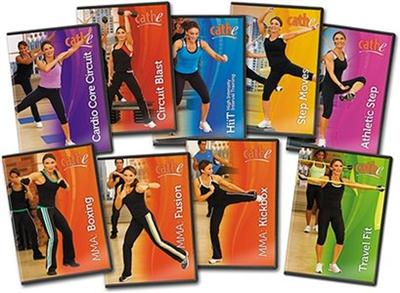
Cathe Friedrich - STS Shock Cardio Series
9xDVDRip | English | AVI | 672 x 512 | DX50 ~1403 kbps | 29.970 fps
AC-3 | 192 Kbps | 48.0 KHz | 2 channels | ~9 hours | 5.63 GB​

Genre: eLearning Video / Fitness, Sports, Health
STS Shock Cardio features 11 different intense fat blasting cardio routines that have also been designed by Cathe to be very time efficient to fit your busy schedule. All 11 Shock cardio workouts have been designed to be used with Cathe's STS

strength workouts or as individual standalone cardio workouts. In keeping with the philosophy of always "shocking" your system, Shock Cardio offers a wide variety of different workout types, lengths, and intensities. All of the workouts in this series are under 55 minutes and several are only around 30 minutes in length.

Shock Cardio HiiT
HiiT stands for High Intensity Interval training and is hands down one of the best ways to burn fat without causing your body to catabolize your own muscle tissue.
HiiT features three different high intensity routines that are all right around 30 minutes or less making these workouts perfect for you to use on days where you're short on time.
The first HiiT workout is 30/30, and as the title suggests, each interval is divided into 30 second high energy, plyo reps, followed by an equal 30 second rest for a total of 16 tough intervals.
The 2nd HiiT workout is 40/20 and you'll be doing 16 intervals. Each interval will be divided into 40 second high energy, plyo reps, followed by a 20 second rest. Three additional one minute breaks will be spread throughout the program.
The 3rd HiiT workout is Double Wave Pyramid. In this workout you'll do two rounds of intervals separated by only a one minute rest. In each round, you'll follow a pyramid cycle of nine intervals, in which you'll start your first set with a 20 second interval, and work your way up to the top of the pyramid, increasing each interval by five seconds as you go. Then you'll work your way back down the pyramid decreasing each interval by five seconds.

MMA Boxing
MMA Boxing is a 49 minute cardio boxing program with a touch of MMA thrown in to give your workout a new twist. While any fighter would definitely be challenged from this intense and thorough program, this workout focuses on getting the fitness enthusiast in the best shape possible "outside of the ring".
In this workout you'll do a warm up followed by a series of boxing combinations. After each combination you'll do sports specific boxing drills to increase your stamina and improve your speed and coordination.
MMA Boxing concludes with core conditioning drills and a stretch. A bonus heavy Bag workout (20 mins) is also featured in this program for those of you who have this piece of equipment.
Boxing is by far one of the most intense total body conditioning workouts out there. It is guaranteed to get your heart pumping, your muscles moving and those calories burning!

MMA Kickbox
MMA Kickbox is a 53 minute high intensity workout that will blast fat, build stamina, increase flexibility and muscle endurance.
After a warm up, you'll do three punching and kicking combinations, followed by a sports specific cardio drill to whip you into incredible shape. MMA Kickbox concludes with sports specific core drills that are new, exciting, and get the job done.
Get ready to kick and punch your way to an unbelievable level of fitness. Just as with our Boxing and Fusion programs, MMA Kickbox trains you for the love of fitness, not the sport of fighting.

MMA Fusion
MMA Fusion is a 50 minute high energy workout that fuses basic Martial Art Exercises along with various Martial Art Styles for those who are really looking to push their cardiovascular and strength endurance limits. In this workout, you'll do three MMA fusion combinations followed by a sports specific cardio drill to really deliver an intense workout. The program concludes with new and effective MMA inspired core exercises and a nice stretch.
Get ready to kick, grab, strike, and thrust your way to an unbelievable level of fitness. Just as with our boxing and kickboxing programs, MMA Fusion trains you for the love of fitness, not the sport of fighting.

Athletic Step
Athletic Step is an advanced, all step workout that will keep you jumping and pumping with both new and energizing choreography. While there is no dancy footwork here, you will surely be challenged by scrambling new moves with some familiar moves and making them feel totally different. Be prepared to power up, straddle down, jump forward and shuffle around. There's lots of variety for everyone!
Athletic Step is easy to learn and fun to do. Coming in at just around 47 minutes, you'll find yourself reaching for this quick pick me up often.

Step Moves
Step Moves is a 44 minute advanced, all-step workout, loaded with interesting choreography. It's the perfect steady state workout for those who like a little rhythm with their step. You'll enjoy mambo's, cha cha's, pivots, and lots of rhythmic patterns, all scrambled up, in new and exciting ways, to keep the footwork fun, and the action packed. Don't worry if you don't get the workout down in the first try or two, just take your time and have fun with it. This is one workout you'll be sure to keep reaching for!

Cardio Core Circuit
Cardio Core Circuit, 51 minutes, is broken into five fitness rounds and is very cardio intensive. In each round you will do three short cardio drills back to back and then repeat them (so it's six cardio bursts per round). After each of these cardio groupings you will do intense functional core work. Other than an exercise mat, no equipment is needed for this workout.

Circuit Blast
Circuit Blast is a 44 minute fun and fast paced circuit challenge. This workout consists of a series of six rounds that will surely burn fat and calories, while shocking your muscles. Each round consists of four parts: a) cardio, b) cardio/legs, c) compound exercise, d) core work. We use various pieces of equipment to increase the intensity, deliver variety, and inspire you to work harder. You'll need a set of moderate hand weights, a step, resistance band, medicine ball, and most importantly, your focus.

Travel Fit
Travel Fit is a 51 minute low impact cardio and total body stretch band workout designed to keep you fit anytime you are on the road or just wanting to enjoy a workout that doesn't require a lot of equipment.
If you think this workout is easy, think again. The only easy thing about Travel Fit is the fact that you only need a resistance band to do it. This workout incorporates challenging and effective isolation exercises, along with compound exercises, and brief cardio bursts, to maximize your muscle toning and fat burning benefits. Travel Fit is a total body conditioning workout and even includes Abs. You'll love how much you get accomplished in just 51 minutes. Its fast, its fun and it works!

Recommend Download Link Hight Speed | Please Say Thanks Keep Topic Live
 

425b7d4c7a4489431b61063acaf4f6c5.jpg

Creating a Photo Composite Illustration with Adobe Apps
MP4 | Video: AVC 1280x720 | Audio: AAC 48KHz 2ch | Duration: 50M | 183 MB
Genre: eLearning | Language: English


With Adobe's mobile apps, you can enhance and composite photosâ€"including the ones you snap on your iPhone or iPadâ€"and quickly create compelling images and illustrations on the go. With the Creative Cloud, and a tap on an icon, you can send those graphics to Photoshop (and other CC desktop tools or your CC Libraries) for further refinement. This combination provides a complete mobile-to-desktop workflow for today's busy designer. In this course, Tony Harmer shows how to bring photographic elements together into engaging photo illustrations with Adobe apps. He uses Photoshop Sketch to work out ideas, enhances images with Photoshop Fix, combines graphics with Photoshop Mix, and then refines the composite in Photoshop. The end result is a polished composite illustration ready for publishing or sharing with clients.

Recommend Download Link Hight Speed | Please Say Thanks Keep Topic Live
 

0e2fc9ced13c5e82677e00490978b4ee.jpg

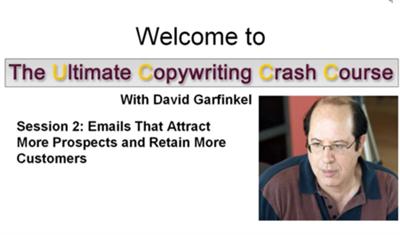
David Garfinkel - Ultimate Copywriting Crash Course
WEBRip | English | MP4 + MP3 + PDF workbook | 640 x 480 | AVC ~115 kbps | AAC | 92.9 Kbps | 22.05 KHz | 2 channels | ~6 hours | 681 MB
Genre: eLearning Video / Business, Copywriting​

The Ultimate Copywriting Crash Course Is...The One Resource You Need To "Rev Up" Your Online Recruiting, Sponsoring and Product Sales! Created especially for home-based business owners, this program makes it easy for you to start flourishing online right now. You'll save time... increase your personal feeling of confidence... and capture more business than you ever have before!
Dear Friend,

If you are looking for a simple, proven way to get more business online quickly, you've come to the right place.

We know for a fact, from personal experience: The answer is copywriting.

* You can watch it - as a recorded Webinar, right on your computer (even in an airplane, since you can download the video files to the hard drive of your laptop)

* You can listen to it: on your computer or on your iPod or mp3 play (and plug it right into your car's sound system if you have a media player connection there)

* You can read it - on your computer, or print it out the supplied transcripts and put them in a binder for your quick reference.

106 Templates To Guide You, Step By Step, As You
Create Powerful Copy Much Faster Than Ever Before

David shortened your learning curve dramatically by creating time-saving Templates that are so easy to use. The templates glide you through the entire copywriting process.

You get 106 of his David's Templates as part of this course. Important: Other people have paid over $1,000.00 just for David's Copywriting Templates alone. But you get 106 of them free as part of this course (all told, it still costs way less than $1000.00).

Here are just some of the Templates you get:

* 5 Email Templates (with examples) to bring in leads and sales

* 7 Subhead Templates.

(This Is What A Subhead Looks Like.
Good Subheads Increase Your Conversion!)

. for writing powerful subheads on lead-capture and sales pages

* 7 groups of Bullet Point Templates (37 unique fill-in-the-blank Bullet Point Templates in all) to create irresistible bullet points that generate cash for you!

* 3 powerful Templates to get more leads right away from Social Media like Twitter, Facebook and YouTube

* 7 hard-hitting P.S. Templates to rekindle interest in your prospects and increase conversion. (IMPORTANT: When most people see a sales letter - including an online Web page - they skip right to the end to see who it's from. A strong P.S. has proven time and time again to dramatically increase readership - and sales!)

* 20 attention-getting Headline Templates - very flexible, easy to use, yet based on proven headlines that have made millions of dollars apiece

Session 1: 6 Simple Secrets That Will Put The Power of Copywriting in the Palm of Your Hand

* The one simple thing you need to do with your copywriting to keep your business growing (in any economy)
* 7 profitable ways to use copywriting that have nothing to do with asking people to buy something!
* A mega-powerful change you can make in your point of view that will instantly revolutionize your business
* How copywriting lets you serve more people more effectively (most people miss this point entirely, and miss many opportunities as a result)
* A copywriting secret to get people who disagree with you to see things differently and resolve disputes fairly
* How to write genuine copy AND get spectacular results (most people can do one or the other, but few people can do both!)
* Why people rarely buy WHAT you think you are selling. what they really DO buy instead. and how to describe your offer in a simple and authentic way that makes them WANT to buy
* 11 Copywriting Templates to help you use what you learned - right away!

Session 2: Emails That Attract More Prospects and Retain More Customers

* The 5 key components of emails that people read and act on
* Secrets of emails that calm down upset customers and get them to comfortably change their mind about requesting a refund
* 8 profitable (and underused) ways to use emails to grow your business. (SURPRISE: None of these involves asking for money!)
* Insider techniques that keep people reading your email
* 3 proven autoresponder sequences that create powerful connections with customers, subscribers and followers on the Internet
* Subject lines: How the pro's get their emails opened more often!
* Follow-up secrets to keep students, clients and customers excited and motivated
* 20 easy-to-use email templates created especially for this course!
* 20 easy-to-use Email Templates created especially for this course!

Session 3: How to Increase Conversions on Lead Capture and Sales Pages

* The best way to make a prospect feel comfortable giving you their name and email address
* How to use a compelling "hook" to increase your conversions
* Layout and design secrets that make your page more attractive and effective
* How to write bullets that work like crazy on lead-capture pages AND sales pages
* Step-by-step tips for simple audio and video scripts that boost conversions dramatically
* Simple ways to track traffic and conversion on your landing pages
* Special headline techniques that draw visitors into your lead capture pages - and keep them reading!
* 20 Headline Templates, 7 bullet templates, and 7 P.S. templates

Session 4: Writing to Sustain Satisfying Relationships

* 2 simple writing secrets for serving more people more effectively
* How to "walk a mile in your customer's shoes" in crucial email messages. This will pay off BIG-TIME for you!
* 3 masterful techniques to keep angry customers from leaving - and keep happy customers with you longer
* The hidden power of "thank you" emails and Web pages. How you can tap into it!
* The Rich Networker's Secret: cashing in on the Lifetime Value of a Customer
* Little-known email technique that thrills your customers as it increases your profits
* Secret of emails that help people retain more of what they learn. How these benefit your business!
* 3 brand-new Templates to increase the cash value of customers to you!

Session 5: 7 Ways to Add Sales Magnetism to Written/Audio/Video Instructions, and to Motivational Content

* Why you DON'T have to be George Clooney, Martha Stewart or Jay Leno to be entertaining. and how to never be boring, either!
* How wearing your "copywriting hat" brings you rich rewards from social media
* 3 steps to add sales magnetism to ANY message you write or record
* A screenwriter's trick to easily add intrigue to video, audio or written content
* An old copywriting rule says "never write about yourself - it's all about your CUSTOMER." The ONE exception to this rule - how to tell a story that keeps viewers, listeners and readers GLUED to their computer monitors!
* The biggest mistake most content-creators make when they need to give readers and viewers directions. Don't make this mistake - here's what to do instead
* "Borrow" the success formula of the World's #1 Content Creator and Presenter!
* 3 Templates to add Sales Magnetism to your copy!

Session 6: Add Intrigue to What You Say in Community Conversations: Blogs, Forums, Social Networking

* 3 attention-grabbing techniques from radio and TV. Use them to create addictive content!
* How to get an avalanche of comments from a blog post
* The secret of turning social networking contacts into paying customers WITHOUT offending them
* A brand-new opportunity: build a trusted reputation online the same way you would with an offline business (but it's much easier and faster online)
* The story of the Stonecutter and the Blasting Cap! How to use social networking to increase sales
* A 3-1/2 minute YouTube video that creates instant credibility
* Combine social media with copywriting to turn Tweets into into Treasure. and watch Friends become Evangelists for your business!
* 3 brand-new templates to make your posts and tweets more compelling!

Recommend Download Link Hight Speed | Please Say Thanks Keep Topic Live

 

121504a433f02d162efe5f67aaa27611.jpg

Digital Tutors - Integrating Photographs into Paintings in Photoshop
WEBRip | English | MP4 + Project files | 1280 x 720 | AVC ~1100 kbps | 15 fps
AAC | 192 Kbps | 32.0 KHz | 2 channels | 03:08:32 | 1.95 GB​

Genre: Video Tutorial / Painting, Adobe Photoshop
When it comes to creating believable environment concepts that seamlessly integrate photographs and painting, a lot of artists struggle with how to blend the two. For this reason, this tutorial will take color out of the equation and allow you to focus on simple black and white values as we weave our final scene together. To start out, we will begin to snatch pieces of photographs that are appealing and can be used for our scene.
We will learn why these photographs were selected and how we can use them to block in the land masses and some of the architectural elements for our concept. From here we will begin painting to blend things together. We'll add in some rock structures as well as modify some of the architecture.
Along the way, you'll pick up some valuable tips for using adjustment layers to modify values and for adding details to our painting that will distract a viewers eye and lead it through the composition. After finishing this course, you will have learned some great tools and techniques for blending photographs seamlessly into your paintings.

Topics include:
1 Introduction and project overview
2 Bringing in major land masses
3 Painting our body of water
4 Blocking in background rock formations
5 Bringing in architectural structures
6 Manipulating architectural structures
7 Fitting our castle to the island
8 Adjusting values and contrast for elements in our scene
9 Painting over architecture
10 Painting in additional architecture
11 Painting trees and foliage
12 Adding subtle detail to background areas
13 Building highway structures
14 Building additional structures
15 Reinforcing lighting on the city
16 Final details and value adjustments

Recommend Download Link Hight Speed | Please Say Thanks Keep Topic Live

 

02e5f593ab6af77ef4b9aba5b6c095da.jpg

Easy PHP Projects: Time Zone Conversion
MP4 | Video: AVC 1280x720 | Audio: AAC 48KHz 2ch | Duration: 2h 54m | 250 MB
Genre: eLearning | Language: English


Follow along with Easy PHP Projects to practice your PHP skills while solving real-world programming challenges. This project focuses on converting dates and times between time zones using PHP's built-in functions. Kevin Skoglund explains the history and purpose of time zones, along with quirks like daylight-saving Ttme, and then shows how to design location-sensitive webpages and to build a PHP-driven time zone calculator. Each tutorial offers practical PHP techniques suitable for any developer, including PHP beginners.


Easy PHP Projects: Time Zone Conversion

Recommend Download Link Hight Speed | Please Say Thanks Keep Topic Live

 

884f4f49119ed1d0d63a39d3e8d3d9a0.jpg

Getting started with Banana Pro
MP4 | Video: AVC 1280x720 | Audio: AAC 44KHz 2ch | Duration: 1 Hours | 386 MB
Genre: eLearning | Language: English​


Wire up your Banana Pro to create a fully functional computer and make two complete projects

This is an introductory course about the credit card sized Banana Pro. This course is useful for those who are interested in exploring the possibilities of Banana Pro as a computer. The course does not assume any prior knowledge of computers or programming. However, a knowledge of Linux operating system and Python programming language would greatly help you in getting up to speed.

The course will teach you to hook up the Banana Pro with a keyboard and monitor so that you can use it as a low-cost computer. You will also learn how to step into the world of physical computing something that you normally do not do with your home computer or laptop.

You will learn to build two complete projects. The first one teaches you how to make a magic candle and turn it ON or OFF by just blowing air as you do in birthday parties. By doing this, you will learn how to code and interact with physical devices such as sensors.

The second project involves building a smoke and gas detector with e-mail notifier to enhance the safety in your kitchen area. You will use the Banana Pro to design the circuit and Python program to code the sensor.

You will also learn how to install Android operating system in your Banana Pro and experience the Android interface.

The course provides complete source code for both the projects.

The entire course can be completed within a week, including the hardware assembly for the magic candle and smoke sensor.

By the end of this course, you will learn how to boot and wire up a Banana Pro and write your own Python code to interact with physical world.


Getting started with Banana Pro

Recommend Download Link Hight Speed | Please Say Thanks Keep Topic Live

 

db494a7339f6576754d3af26c03fc523.jpg

How To Make Nite Rite 5 with Mason
WEBRip | English | FLV + Project files | 1280 x 800 | AVC ~1024 kbps | 30 fps
AAC | 128 Kbps | 44.1 KHz | 2 channels | 2h 40mn | 1.48 GB​

Genre: Video Tutorial / Sound Processing
Dutch heavy weight of the Nu Disco scene 'Mason' returns to Sonic Academy delivering another monster course. Here he rebuilds last years beatport chart smash 'Nite Rite Five'.

Released back in June of last year and tearing up dance floors across the globe, 'Nite Rite Five' is the blue print to that Nu Disco sound. Using mainly LPX stock plugins, ANA, Jupiter 8v and lots of tricks, Iason guides you through the creation of this groove laden monster. From creating the main lead line, laying in the drums, to arranging and mixing - this 2 hour 40 min course has it all.
Don't forget you get all samples, softsynth renders, Midi parts and project template, so you can see first hand a real beatport chart hit project in your own studio. Nite Rite Five features on the forthcoming compilation 'Nite Rites' out on Beatport on the 12th February.

Content:
Tutorial 01 - Introduction and Playthrough 05m 34s
Tutorial 02 - The Lead 09m 02s
Tutorial 03 - Kick and Clap 12m 09s
Tutorial 04 - More Drums 16m 25s
Tutorial 05 - The Bass 09m 04s
Tutorial 06 - Arranging the Intro 17m 23s
Tutorial 07 - Arrange to the Break 23m 43s
Tutorial 08 - Creating the Breakdown 21m 29s
Tutorial 09 - Adding the Vocals 13m 43s
Tutorial 10 - Arrange to the Outro 07m 18s
Tutorial 11 - Arranging the Outro 11m 06s
Tutorial 12 - Mastering 13m 15s

Recommend Download Link Hight Speed | Please Say Thanks Keep Topic Live

 

ade3cc87acec021728570df34e96322e.jpg

Improving WordPress Security Course
MP4 | Video: AVC 1280x720 | Audio: AAC 44KHz 2ch | Duration: 31Min | 148 MB
Genre: eLearning | Language: English​


Use this simple and effective course to make your WordPress site more safe and secure

Do you know that almost 80% of WordPress sites are considered "vulnerable"?

Or that of the top 10 most vulnerable plugins,five are actually commercial plugins available for purchase and over 20 percent of the 50 most popular plugins for WordPress are vulnerable to common cyber attacks ..

These are scary statistics and if you're a WordPress site owner you must do something about it before it's too late ...

Having your WordPress site hacked could result in:

Loss of hard work, custom coding, images, etc.
Stealing personal and sensitive information
Loss of money required to recover (if possible)
Not to mention the emotional consequences of this scenario. Trust me, I write this from experience ...

That's probably the main reason I created this course - to help you prevent something like this from happening.

And it doesn't have to be hard and complicated.

That's why this course is created with one goal in mind - simplicity. The content is well-structured, balanced, and action-oriented, without any useless and time-consuming information.

Throughout the course we will learn how to make our WordPress site more secure to common web attacks and how to protect ourselves from being hacked.

We'll cover also:

What makes WordPress vulnerable and which parts of WP are most vulnerable
How to install and configure special security plugin
How to implement few simple but powerful hosting tweaks
Does the hosting matter and how to select the right one
I've also created a simple checklist, so you can systematically apply the necessary methods.

Now you have the chance to avoid this scenario and give yourself a peace of mind.

So without wasting anymore time let's dive in and make our WordPress more secure.


Improving WordPress Security Course

Recommend Download Link Hight Speed | Please Say Thanks Keep Topic Live
 
Zurück
Oben Unten