• Regeln für den Video-Bereich:

    In den Börsenbereich gehören nur Angebote die bereits den Allgemeinen Regeln entsprechen.

    Einteilung

    - Folgende Formate gehören in die angegeben Bereiche:
    - Filme: Encodierte Filme von BluRay, DVD, R5, TV, Screener sowie Telesyncs im Format DivX, XviD und x264.
    - DVD: Filme im Format DVD5, DVD9 und HD2DVD.
    - HD: Encodierte Filme mit der Auflösung 720p oder darüber von BluRay, DVD, R5, TV, Screener sowie Telesyncs im Format x264.
    - 3D: Encodierte Filme von BluRay, die in einem 3D Format vorliegen. Dies gilt auch für Dokus, Animation usw.
    - Serien: Cartoon/Zeichentrick, Anime, Tutorials, Dokumentationen, Konzerte/Musik, Sonstiges sind demnach in die entsprechenden Bereiche einzuordnen, auch wenn sie beispielsweise im High Definition-Format oder als DVD5/DVD9/HD2DVD vorliegen. Ausnahme 3D.
    - Bereich Englisch: Englische Releases gehören immer in diesen Bereich.
    - Bereich Talk: Der Bereich, in dem über die Releases diskutiert werden kann, darf, soll und erwünscht ist.


    Angebot/Beitrag erstellen

    - Ein Beitrag darf erst dann erstellt werden, wenn der Upload bei mindestens einem OCH komplett ist. Platzhalter sind untersagt.
    - Bei einem Scenerelease hat der Threadtitel ausschließlich aus dem originalen, unveränderten Releasenamen zu bestehen. Es dürfen keine Veränderungen wie z.B. Sterne, kleine Buchstaben o.ä. vorgenommen werden. Ausnahme Serienbörse:
    - Bei einem Sammelthread für eine Staffel entfällt aus dem Releasename natürlich der Name der Folge. Beispiel: Die Simpsons S21 German DVDRip XviD - ITG
    - Dementsprechend sind also u.a. verboten: Erweiterungen wie "Tipp", "empfehlenswert", "only", "reup", usw. / jegliche andere Zusatzinformation oder Ergänzung, welche nicht in obiger Beschreibung zu finden ist.

    Aufbau des Angebots und Threadtitel

    Der Titel nach folgendem Muster erstellt zu werden. <Name> [3D] [Staffel] [German] <Jahr> <Tonspur> [DL] [Auflösung] <Quelle> <Codec> - <Group>
    Beispiel: The Dark Knight German 2008 AC3 DVDRip XviD - iND
    Beispiel: The Dark Knight 2008 DTS DL BDRip x264 - iND
    Beispiel: The Dark Knight 2008 AC3 DL BDRip XviD - iND
    Beispiel: The Dark Knight German 2008 AC3 720p BluRay x264 iND
    Beispiel: The Dark Knight 2008 DTS DL 1080p BluRay x264 iND
    Beispiel: Die Simpsons S01 German AC3 DVDRip XviD iND
    Beispiel: Die Simpsons S20 German AC3 720p BluRay x264 iND
    Beispiel: Sword Art Online II Ger Sub 2014 AAC 1080p WEBRip x264 - peppermint
    Entsprechend sind also u.a. verboten: Sonderzeichen wie Klammern, Sterne, Ausrufezeichen, Unterstriche, Anführungszeichen / Erweiterungen wie "Tipp", "empfehlenswert", "only", "reup", usw. / jegliche andere Zusatzinformation oder Ergänzung, welche nicht in obiger Beschreibung zu finden ist
    Ausnahmen hiervon können in den Bereichen geregelt sein.

    Die Beiträge sollen wie folgt aufgebaut werden:
    Überschrift entspricht dem Threadtitel
    Cover
    kurze Inhaltsbeschreibung
    Format, Größe, Dauer sind gut lesbar für Downloader außerhalb des Spoilers zu vermerken
    Nfo sind immer Anzugeben und selbige immer im Spoiler in Textform.
    Sind keine Nfo vorhanden z.B. Eigenpublikationen, sind im Spoiler folgende Dateiinformationen zusätzlich anzugeben :
    Quelle
    Video (Auflösung und Bitrate)
    Ton (Sprache, Format und Bitrate der einzelnen Spuren)
    Untertitel (sofern vorhanden)
    Hosterangabe in Textform außerhalb eines Spoiler mit allen enthaltenen Hostern.
    Bei SD kann auf diese zusätzlichen Dateiinformationen verzichtet werden.

    Alle benötigten Passwörter sind, sofern vorhanden, in Textform im Angebot anzugeben.
    Spoiler im Spoiler mit Kommentaren :"Schon Bedankt?" sind unerwünscht.


    Releases

    - Sind Retail-Release verfügbar, sind alle anderen Variationen untersagt. Ausnahmen: Alle deutschen Retail-Release sind CUT, in diesem Fall sind dubbed UNCUT-Release zulässig.
    - Im Serien-Bereich gilt speziell: Wenn ein Retail vor Abschluss einer laufenden Staffel erscheint, darf diese Staffel noch zu Ende gebracht werden.62
    - Gleiche Releases sind unbedingt zusammenzufassen. Das bedeutet, es ist zwingend erforderlich, vor dem Erstellen eines Themas per Suchfunktion zu überprüfen, ob bereits ein Beitrag mit demselben Release besteht. Ist dies der Fall, ist der bereits vorhandene Beitrag zu verwenden.
    - P2P und Scene Releases dürfen nicht verändert oder gar unter einem iND Tag eingestellt werden.


    Support, Diskussionen und Suche

    - Supportanfragen sind entweder per PN oder im Bereich Talk zu stellen.
    - Diskussionen und Bewertungen sind im Talk Bereich zu führen. Fragen an die Uploader haben ausschließlich via PN zu erfolgen, und sind in den Angeboten untersagt.
    - Anfragen zu Upload-Wünschen sind nur im Bereich Suche Video erlaubt. Antworten dürfen nur auf Angebote von MyBoerse.bz verlinkt werden.


    Verbote

    - Untersagt sind mehrere Formate in einem einzigen Angebotsthread, wie beispielsweise das gleichzeitige Anbieten von DivX/XviD, 720p und 1080p in einem Thread. Pro Format, Release und Auflösung ist ein eigener Thread zu eröffnen.
    - Grundsätzlich ebenso verboten sind Dupes. Uploader haben sich an geeigneter Stelle darüber zu informieren, ob es sich bei einem Release um ein Dupe handelt.
    - Gefakte, nur teilweise lauffähige oder unvollständige Angebote sind untersagt. Dies gilt auch für eigene Publikationen, die augenscheinlich nicht selbst von z.B. einer DVD gerippt wurden. Laufende Serien, bei denen noch nicht alle Folgen verfügbar sind, dürfen erstellt und regelmäßig geupdatet werden.
    - Untersagt sind Angebote, welche nur und ausschließlich in einer anderen Sprache als deutsch oder englisch vorliegen. Ausnahmen sind VORHER mit den Moderatoren zu klären.


    Verstoß gegen die Regeln

    - Angebote oder Beiträge, die gegen die Forenregeln verstoßen, sind über den "Melden"-Button im Beitrag zu melden.
  • Bitte registriere dich zunächst um Beiträge zu verfassen und externe Links aufzurufen.

*** Bestes IPTV *** bester Preis *** gratis Test ***


Englische Tutorials

b7af5d53-04ff-4f92-9e4e-cb0f33162770.png

Computer programming basics
Instructors: Rohit Srivastava, Ritika Upadhyay
1 section • 5 lectures • 44m total length
Video: MP4 1280x720 44 KHz | English + Sub
Updated 12/2021 | Size: 224 MB​

First step into programming
What you'll learn
Text editor
An integrated development environment (IDE)
Difference between text editor and IDE
Introduction to data structure
Introduction to algorithm
What is command line interface (CLI)
What is Graphical user interface (GUI)
Understand difference between CLI and GUI
<h
Requirements
None.
Description
A person with a basic understanding of computers and software has an easier time solving problems they may have encountered. Having computer skills in today's time is not only important but mandatory for the students, professionals, housewives, bureaucrats, leaders, entrepreneurs, and business owners. At least everyone needs to have basic computer skills to remain confident, competent in this technology era. There are thousands of uses computer in our daily life. The computer machine is important in all types of business from small to billion-dollar company. Even today, no business idea can work without the use of the internet and computer in business.
Learn basic programming with this online course. This course will prep you to start your journey into programming world. After you take this course, you'll be ready to pursue any language i.e. java, nodejs, reactjs, shell scripting, python, R etc.
Self paced course give you the understanding of computing and programming.
The course will address the following topics
- This course will give you enough high level knowledge of what is an editor, integrated development environment and what the difference between these two
- It will also make prep you for Data structure
- Make you aware of algorithms and their use in computer programming
- Ever wondered what is CLI/GUI. You will understand the concept of command line interface and graphical user interface.
Pre-requisite for essential coding skills needed for frontend and/or backend web development, machine learning, IOS, Android, and much more.
By the end of this course students should be able to
- Understand Editors and IDEs
- Understand Data Structure
- Understand Algorithm and APIs
- Difference between CLI and GUI
Syllabus
Lecture 1: Course introduction
Lecture 2: Introduction to text editors & IDE
Lecture 3: Understanding Data Structure
Lecture 4: Introduction to Algorithm, Api
Lecture 5: Learning of CLI VS GUI
Who this course is for:This course is designed to get an understanding of very basics of computers before you start your programming journey.
Homepage
Screenshots


3bf2148c-1be5-4d94-a65d-7f44d9835206.png

CrashCourse Lite for Authors
Published 05/2022
MP4 | Video: h264, 1280x720 | Audio: AAC, 44.1 KHz, 2 Ch
Genre: eLearning | Language: English + srt | Duration: 19 lectures (1h 19m) | Size: 1.1 GB


Convert your book into an inspirational online course
What you'll learn
Learn how to create an inspirational online course
Select and craft your content to inspire your students
Use course design (instructional design) to create a more compelling product
Understand the platform options, and which is right for you
Learn the different engagement techniques and decide which ones you will use
Learn about camera, microphone, software selection and which ones you should use
You will get an easy-to-follow step-by-step production plan that will get your course faster than ever
You will learn: content to include, best-practise course design, which platform to use and an easy to follow production plan so your course is completed faster
Requirements
No previous experience required
This course is created for authors (non authors will learn just as much, but will need 'content')
Description
More authors are creating online course than ever before. This 'Lite' easy-to-use online course will show you how.
As an author you have a distinct advantage over other course creators because you have all the content already produced.
However many authors have never created an online course before and often make the same rookie mistakes. They don't understand the three types of course, how they can best support your business, how long they should be, what content to include, what to exclude, what price point it should be sold at, and more.
You will learn;
The three types of online course
How to select the type of course that's right for you
How a course can best support and grow your business
How long your course should be
What content you should include
How to keep your students engaged
What price point to sell at
And what your best next step is
This course will answer all these questions and more.
Providing clarity, motivation and direction.
Simply use the free downloads included in the course and work through the video exercises and by the end of this short course you will have completed work sheets that answer many (if not all) of your critical course creation decisions.
You will then be able to create an inspirational online course that will wow your students, enhance your reputation as an expert in your field, and grow your business at the same time. Without the usual stress, confusion and mistakes that others make.
Who this course is for
For those creating their first ever online course, or.
Those that to improve the quality of the courses they produce
Authors who want to convert their book into an online course
Homepage


c18b794b-ee7e-4487-b0e2-54b9ad27e355.png

Create A Still Life Scene In Blender [beginner Level]
Video: .mp4 (1280x720, 30 fps(r)) | Audio: aac, 48000 Hz, 2ch | Size: 1.07 GB
Genre: eLearning Video | Duration: 7 lectures (1 hour, 16 mins) | Language: English


Practice your modeling skill and get better as a 3D Artist
What you'll learn
3D Environment Scene
Practice 3D Modeling
Practice Blender
Get better at Blender
Modeling
Sculpting
Extrude
Adding loop cuts
Lighting
Texturing
Adding materials
Composition
Creating a scene from scratch
Creating oranges
Creating flowers
Become a better 3D Artist
Requirements
Basic knowledge of Blender 3D
Description
Welcome to my new students and returning students, it's nice to see you again.
In this class you will learn some basic techniques to create...
3D Modeling
Sculpting
Lighting
Setting up the camera
Edit Mode
Object Mode
Vertex Bevel
Scaling
Rotating
Moving
Material Mode
Adding Materials
Adding Textures
This course will help you understand the ins and outs of blender at the beginner level that you can use as an asset in your scenes and in your games.
Everything we gonna cover in this course is gonna be well explained and taught in a manner fit for beginners.
I appreciate you for checking out this course, and hope that it fits your needs.
In this class you will learn the basic techniques to create this pretty cup that you can use as an asset in your scenes and in your games.
This course will help you understand the ins and outs of blender at the beginner level.
The course was created with the intent to help you succeed in your 3D modeling ventures.
I hope that this course helps you with starting off in blender, and sparks new ideas for you.
If you are interested in more courses, please take a look at my instructor page.
The course will cover topics in the same manner as
3D Modeling
Sculpting
Lighting
Setting up the camera
Edit Mode
Object Mode
Vertex Bevel
Scaling
Rotating
Moving
Material Mode
Adding Materials
Adding Textures
This course will help you understand the ins and outs of blender at the beginner level.
If I got your curiosity and you are ready to venture with me on this wild wild ride then lets get this show up and running!
Who this course is for
Students who wants to get better at Blender
Students who wants to get more practice
Students who wants to invest more time in learning 3D
Students who wants to improve their 3D skills
Students who wants to create a scene from scratch
Screenshots


d4020368-19a2-49a8-939f-28669baa4280.png

Create Your Personal Cryptocurrency for Less Than One Dollar
Instructors: Noname Nerd
5 sections • 6 lectures • 49m total length
Video: MP4 1280x720 44 KHz | English + Sub
Updated 4/2022 | Size: 381 MB​

Personalized Currency For Gamers, Streamers, and Content Creators
What you'll learn
Set up a digital wallet
Add the polygon blockchain and test network to your wallet
Create a basic smart contract using solidity and remix
Create a ERC20 smart contract with your own cryptocurrency name and as many coins as you want
Send and receive your cryptocurrency to other wallets
Fund your wallet inexpensively to keep your transaction costs low
<h
Requirements
No programming or cryptocurrency experience is required. You must own a desktop or laptop computer with internet access and the Chrome browser.
Description
If you have always wanted to have your own cryptocurrency, then this course is for you.; In this short course, you will learn absolutely everything that you need to know in order to create your own customized cryptocurrency on the Polygon blockchain and it will cost you literal pennies.; From setting up your Metamask wallet to developing and deploying a basic smart contract, you will quickly have your own cryptocurrency up and running.; ;With tips and tricks that will save your time and money, you will have your own smart contract written and deployed in less than an afternoon.; If you have a computer with internet access, I will show you how to generate a personalized cryptocurrency and send it to another wallet for literal pennies.; Looking for a gift for that person who already has everything?; Make your DaveCoin and send a million of them to your friend's digital wallet.; You don't have to share that it only costs you a few cents to create.; Not only is this process inexpensive, but it requires no prior programming knowledge or cryptocurrency experience.; With easy steps and time-saving hacks (including a smart contract template), you could have millions of your own cryptocurrency in your free and secure digital wallet in less than an hour.
This course is brought to you by the Noname Nerd, helping gamers, streamers, and content creators around the world build their personal brands and grow their followings.; We are pleased to show you step-by-step how to become a cryptocurrency millionaire for less than a dollar and less than an hour.; It's a fun and easy way to learn about the cryptocurrency space.
Who this course is for:Gamers, streamers, or content creators interested in their own personal cryptocurrency
Homepage
Screenshots


d5c5a582-357b-4f13-9e3a-29d6418eb32a.png

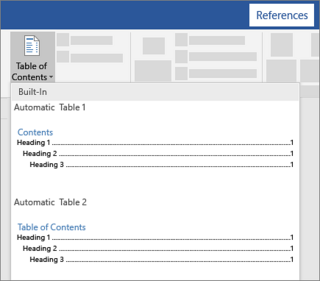
Creating an Automatic Table of Contents for Your Microsoft Word Document
Duration: 57m | Video: .MP4, 1280x720, 30 fps | Audio: AAC, 48 kHz, 2ch | Size: 274 MB
Genre: eLearning | Language: English​

Welcome to the class!
This class is for you if you currently or regularly work on a document containing many pages (or sections) such as
Project proposals and reports
Business plans and feasibility studies
Academic theses and dissertations
College assignments
Fiction or creative writing
Non-fiction books
Non-profit proposals and fundraising documents
Public sector reports
Market or equity research reports, etc.
Writing is an important aspect of communication in the academic, professional, business, public sector, and non-profit environments. As a result, you will often have to create documents (with a few or hundreds of pages) most of which have to be reviewed by people including yourself. To ease the review of your documents, it is crucial for you to add the table of contents to your documents. The table of contents references important sections and chapter headings in your document and their corresponding page numbers. With a table of contents in your document, important aspects of your documents will be easily accessible to the reader no matter the length of the document.
Since you have to review and edit your document multiple times while creating your document, you also need to update the document's table of contents to reflect the modifications you make to your document. Creating and updating your document's table of contents, manually, means that you will have to spend so much time going back and forth between each page in your document and the table of contents. This manual process of creating and updating your document's table of contents is very discouraging and time-wasting. An automatic table of contents that you can easily create and update will thus be of great help.
Generating an automatic table of contents for your Microsoft Word document saves you time, makes you more productive, and assists you in fulfilling your goal of submitting your documents before the submission deadlines. The automatic table of contents can also contain hyperlinks, which give you the ability to jump to any page in your document, from the table of contents page, with just a single click each time. This fast-paced document navigation using the hyperlinks on the automatic table of contents can be applied no matter the number of pages in your Microsoft Word document.
With an automatic table of contents, you will also become more organized and professional while creating your time-sensitive documents. I have in the past watched some of my colleagues struggle with manually creating a table of contents for their documents, and I have tried to help generate automatic table of contents in many cases. This is why I believe that an automatic table of contents will be of immense help to anyone creating documents by freeing up more time to apply creativity and thorough formatting to their documents. With more time to work on your documents, your final submissions will reflect the best you have to offer.
In this class, you will learn how to
Add page breaks to your document to prevent portions of your document from changing positions each time you edit your document
Add page numbers, which can be referenced by the automatic table of contents, to your document
Format the page numbers using home menu document formatting tools such as font size, font color, and bold tools
Create heading styles for all the headings in the document to help the Microsoft Word program identify and monitor the position of each heading text in your document
Customize automatic table of contents settings to make the format of the automatic table of contents compatible with the rest of the document
Generate a well-formatted automatic table of contents for your document
Automatically update the auto-generated table of contents with just a few clicks on your mouse
Navigate through your Microsoft Word document using the hyperlinks on the table of contents
Save the final version of your Microsoft Word document as a PDF file
This class assumes that
You have the 2010 or a later version of the Microsoft Word program installed on your computer or PC
You are familiar with the most important document formatting tools in Microsoft Word
If you need to learn or improve your knowledge of the basics of document formatting in Microsoft Word, you can check out my Introductory Microsoft Word class which is just fifty-five minutes in length.
Once you have the Microsoft Word program installed on your computer, you are fully ready to actively participate in this class. Irrespective of your profession or field, this class will be of great value to you. Whether you are an entrepreneur, a college or graduate student, a researcher, an engineer, a scientist, a project manager, a fundraiser, an attorney, an investor, a public sector professional, a poet or writer, a technical writer, a volunteer, a company secretary, a historian, a financial or equity analyst, a teacher, or a freelance writer, just name it, this class will be of immense help to you.
Why don't you join the class and let me show you how to improve your productivity while formatting your documents in Microsoft Word. Don't forget to follow me on this Skillshare platform to receive updates on my future classes. I'll see you there.
Homepage
Screenshots





 
008febdf_medium.jpg

Crypto Trading Execution with Flash Loans, Web3 and Hardhat
Published 05/2022
MP4 | Video: h264, 1280x720 | Audio: AAC, 44.1 KHz, 2 Ch
Genre: eLearning | Language: English + srt | Duration: 115 lectures (14h 6m) | Size: 6.5 GB


Reduce risk on Arbitrage with Uniswap and PancakeSwap Flash Swap smart contracts. Learn to interact with the blockchain
What you'll learn
Build your own Flash Loan (Flash Swap) Smart Contracts for arbitrage across multiple exchanges
Perform a triangular arbitrage Flash Loan (FlashSwap) transaction on Pancakeswap
Write and test a Flash Loan Smart Contract with HardHat
Build a trading algorithm which can read data and transact a swap in Python
Read and Write data to the Ethereum and Binance Smart Chain blockchains
Send and check transactions via Web3
Understand how to use Ethers JS for interacting with Smart Contracts
Calculate Gas used on transactions
Deploy Smart Contracts to the Ethereum blockchain
Requirements
Basic understanding of programming, in particular with Python and/or Javascript
Knowledge of cryptocurrency and DeFi exchanges such as Uniswap and PancakeSwap
Basic knowledge of Arbitrage (preferably completed the Triangular Arbitrage course)
Description
Learn how to reduce your risk in trading on the Ethereum and Binance Smart Chain blockchain networks by using Flash Loans via the Flash Swaps functions on the Uniswap and PancakeSwap Smart Contracts. In this course, we will cover all aspects of being able to borrow capital via the mechanism of a Flash Loan - which can only be done on the blockchain. Nothing like this exists outside of the blockchain. With this mechanism, if as long as the amount is paid back within the same transaction, you keep your arbitrage gains. If not, it's as though the transaction never happened and you're only left covering the gas fees.
We go deep into how to program and deploy a smart contract, but even more importantly, how to read, write and interact with Smart Contracts on the blockchain with Ethers JS. Hardhat is also used extensively for testing and deploying our own Smart Contracts too.
If you love Python, we have you covered too. There is a whole module just on how to interact with Smart Contracts where Shaun trades live to show the theory working in practice too.
If you have been trying to figure out Flash Loans or Flash Swaps and just can't find the code, or simply need help understanding it, then this is the course for you. We will go through each line of code and explain what it does. In this course you learn the principles, so that you can apply these in your own way to your own strategy.
Now if you are a complete beginner to programming, this is probably not the course for you. That said, we do have a crash course on Solidity and in the Appendix - Python and Javascript too.
For traders looking to improve their programming skills, you will likely love this. For programmers looking to learn some trading techniques, you will love this.
See you in class!
Who this course is for
Traders with an interest in programming looking to lower risk in arbitrage trading
Programmers with an interest in trading looking to work on an interesting project to learn solidity
Homepage


e5d301f30bbf91c3c732b57699fdae0e.jpg

Cryptocurrency Foundations (2022)
Released 05/2022
MP4 | Video: h264, 1280x720 | Audio: AAC, 44.1 KHz, 2 Ch
Skill Level: Beginner | Genre: eLearning | Language: English + srt | Duration: 1h 8m | Size: 442.9 MB

For hundreds of years, the concept of money was pretty straightforward, providing a means of exchange accepted by communities and backed by financial institutions and governments. But in the last decade, just as the world at large is undergoing a digital transformation, cryptocurrencies have caused a monetary revolution by introducing a new idea of the concept of money that requires no intermediary to function. For many, the concept of a digital currency that was seemingly created from nothing having any value at all is a tricky concept to reconcile with previous ideas of money. In this course, Dr. Jonathan Reichental gets you up to speed on the basics of cryptocurrency, from blockchain technology, to how you can buy and sell, what it means to be a crypto miner, and the risks and challenges ahead. If you're interested in exploring the world of crypto, but are tired of being cornered by acquaintances at social gatherings who really want to explain it to you, check out this course.
Homepage


th_ARgVebtvZkMZp5U5YznjIUhACJ6UAUp1.jpg

Cyber Security Training: Learning Access Management
Published 05/2022
MP4 | Video: h264, 1280x720 | Audio: AAC, 44.1 KHz, 2 Ch
Genre: eLearning | Language: English + srt | Duration: 39 lectures (3h 44m) | Size: 1.4 GB


You will learn the interactions between users and systems as well as between systems and other systems
What you'll learn
Learn About Access Management
Understanding Identification
Understanding Authentication
Identity as a Service and Federation
Understanding Authorization and Accountability
Access Control Models
Access Control Techniques
Access Control Technologies
Requirements
Internet Access
Description
Welcome to this course. Access is one of the most exploited aspects of security because it is the gateway that leads to critical assets. Access controls need to be applied in a layered defense-indepth method, and an understanding of how these controls are exploited is extremely important. In this course we will explore access control conceptually and then dig into the technologies the industry puts in place to enforce these concepts. We will also look at the common methods the bad guys use to attack these technologies.
Access controls are security features that control how users and systems communicate and interact with other systems and resources. They protect the systems and resources from unauthorized access and can be components that participate in determining the level of authorization after an authentication procedure has successfully completed. Although we usually think of a user as the entity that requires access to a network resource or information, there are many other types of entities that require access to other network entities and resources that are subject to access control. It is important to understand the definition of a subject and an object when working in the context of access control.
In this course, you'll learn
Identity as a service
Identification methods and technologies
Authentication methods, models, and technologies
Discretionary, mandatory, and nondiscretionary models
Accountability, monitoring, and auditing practices
Registration and proof of identity
Threats to access control practices and technologies
Who this course is for
Cybersecurity professionals
Software Developers
Anyone interested in Cyber Security
Homepage


3c4be226-a228-4a3c-9085-0fb0f877634e.png

Daily Art Practice: 14 Day Mindset Challenge
Duration: 3h 51m | Video: .MP4, 1280x720, 30 fps | Audio: AAC, 48 kHz, 2ch | Size: 2.49 GB
Genre: eLearning | Language: English​

You maybe full of enthusiasm when starting a daily art practice, however how do you encourage yourself to keep going way beyond day 18 or 38?
I've completed many 30, 100 and a 365 days of paint, and now filled over 20 sketchbooks so I understand what controls, guide and motivates us to keep pursing an art habit.
This class is about SHOWING UP FOR YOUR ART EVERYDAY to improve your skill set by getting out of your own way to support your strengths and creativity. My hope is you will start creating from a place of fun rather than fear. In this class I want you to see the true VALUE in taking just 10 MINUTES a day to make and assess art for yourself.
As part of a new 14 Day Challenge*you will
- find objects around your home for objects to sketch
-*create a plan for your 14 days
- write a daily power of intention to*support your 6 minutes sketching
- develop ways to respond positively to those uncomfortable feelings
- be mindful of the language we use to describe our art
After 14 days you will have a better understanding of how too use the MINDSET Multi-tool and the mediums you prefer*and different ways of working. It will be an investment in your creativity and a chance to seek new opportunities to grow.
Homepage
Screenshots



4ad9d566-aa5f-45ef-8386-2bec163b0843.png

Data Modeling and Future of Work: Fortune 500 Leaders
Instructors: Dr. Gleb Tsipursky, PhD
14 sections • 15 lectures • 2h 41m
Video: MP4 1280x720 44 KHz | English + Sub
Updated 4/2022 | Size: 3.3333 GB​

Master data modeling best practices of Fortune 500 firm leaders taught by a world-renowned future of work expert
What you'll learn
Master data modeling best practices used by Fortune 500 leaders to seize competitive advantage for their bottom lines and careers in the future of work
Maximize productivity, engagement, retention, and morale in the hybrid and remote future of work through data modeling best practices
Develop a plan with specific next steps to adapt for yourself the best practices used by Fortune 500 leaders for data modeling skills
Discover how to lead collaboration and innovation most effectively through data modeling best practices in the hybrid and remote future of work
Learn the dangerous judgment errors called cognitive biases that undermine successful leadership in the future of work and how Fortune 500 leaders defeat them
Feel truly confident about whether you mastered the best data modeling best practices to make the right calls in the hybrid and remote future of work
<h
Requirements
You need to trust data modeling best practices from Fortune 500 leaders and behavioral science-based findings over going with outdated advice stemming from pre-pandemic work arrangements to seize a competitive advantage in the hybrid and remote future of work
Description
Your ability to master data modeling best practices will determine whether you reach your business and career goals in the hybrid and remote future of work of our increasingly-disrupted post-COVID world.
Unfortunately, our intuitive leadership style is adapted to pre-pandemic work arrangements in the office, and is poorly suited to the hybrid and remote future of work. Our gut reactions on data modeling best practices in the future of work can't be trusted, as revealed by research in behavioral economics, psychology, and cognitive neuroscience. So how do the leaders of Fortune 500 companies make the right calls on data modeling best practices in the hybrid and remote future of work?
They follow evidence-based data modeling best practices as revealed by such research. In this course, you will master techniques for gaining data modeling skills by drawing on cutting-edge behavioral science and real-world best practices from Fortune 500 leaders. After taking this course, you will
Master data modeling best practices used by Fortune 500 leaders to seize competitive advantage for their bottom lines and careers in the future of work
Maximize productivity, engagement, retention, and morale in the hybrid and remote future of work through data modeling best practices
Develop a plan with specific next steps to adapt for yourself the best practices used by Fortune 500 leaders for data modeling skills
Discover how to lead collaboration and data modeling most effectively through data modeling best practices in the hybrid and remote future of work
Learn the dangerous judgment errors called cognitive biases that undermine successful leadership in the future of work and how Fortune 500 leaders defeat them
Feel truly confident about whether you mastered the best data modeling best practices to make the right calls in the hybrid and remote future of work
Homepage
Screenshots


73344142-eab7-490d-92bd-17e43cbd28b5.png

Digital Lettering Made Simple in Adobe Illustrator
Duration: 51m | Video: .MP4, 1280x720, 30 fps | Audio: AAC, 48 kHz, 2ch | Size: 245 MB
Genre: eLearning | Language: English​

Gain efficiency, quality, and style in your custom digital lettering, and create a piece that brings you joy and pride! This start-to-finish class with designer Brandon Rike is perfect for designers, illustrators, and enthusiasts eager to create stand-out digital lettering*in Adobe Illustrator.You will learn to manipulate an existing font into an interesting lettering piece. While the awareness of quality lettering continues to gain steam, it is important for designers to go the extra mile in their work, and create custom type and lettering to add more character to their composition. With the fast-paced nature of most projects, it is important to know the skills necessary to quickly create this style of type.
Key lessons include:Sketching The Possibilities.*First, you will*sketch several variations of the word, understanding each letter's relationship to the other. You'll explore possible alternates and swashes that can complement the overall composition.
Selecting The Right Font.*Second, you will learn to*select fonts*that will lend themselves to alterations. You'll learn the key attributes of a font that is easily customizable.
Building The Word.*Third, you will*work inside Adobe Illustrator to*bring the*sketches to life. You will learn the key tools to use that will help to get the piece done quickly, with attention to kerning and spacing, unity across the piece, and overall legibility.
Finishing Touches.*And finally, you will learn some of the*finishing touches and embellishments*that can be done on a lettering piece. From texture to dimension, you will learn tiny tricks that will make your lettering piece stand out.
In the project for this class, you will make a custom lettering piece in Adobe Illustrator for a word of your choosing. You will select your own font, based on the notes and resources outlined in section two, and explore the relationships between the letters using the appropriate tools in Illustrator.
Creating custom lettering is imperative to a graphic designer's success in the design industry. As the popularity and awareness of good lettering continues to grow, designers must take a little more care in the words and letters in their piece. Gone are the days of typing a word out and leaving it untouched. Designers must learn to create interesting lettering pieces, and know how to do create it and master it quickly and with high quality!
Homepage
Screenshots


33930b99-9069-4736-84c2-b44d16fba2ad.png

Digital Painting for Beginners : How to Paint Anything using Default Photoshop Brushes
Duration: 32m | Video: .MP4, 1280x720, 30 fps | Audio: AAC, 48 kHz, 2ch | Size: 183 MB
Genre: eLearning | Language: English​

Welcome to*Digital Painting for Beginners : Paint Anything using Default Brushes in Photoshop.
A very basic class covering all about Digital Painting in Photoshop.*Each aspect of using default brushes and mixing up colors. Within this class, you will be able to paint anything using photoshop brushes form our imagination.
This class is perfect for you if
want to grade up your skill in digital painting
want to learn a new skill
want to learn digital painting from begginers level
clear your basics
Homepage
Screenshots


Zurück
Oben Unten