• Regeln für den Video-Bereich:

    In den Börsenbereich gehören nur Angebote die bereits den Allgemeinen Regeln entsprechen.

    Einteilung

    - Folgende Formate gehören in die angegeben Bereiche:
    - Filme: Encodierte Filme von BluRay, DVD, R5, TV, Screener sowie Telesyncs im Format DivX, XviD und x264.
    - DVD: Filme im Format DVD5, DVD9 und HD2DVD.
    - HD: Encodierte Filme mit der Auflösung 720p oder darüber von BluRay, DVD, R5, TV, Screener sowie Telesyncs im Format x264.
    - 3D: Encodierte Filme von BluRay, die in einem 3D Format vorliegen. Dies gilt auch für Dokus, Animation usw.
    - Serien: Cartoon/Zeichentrick, Anime, Tutorials, Dokumentationen, Konzerte/Musik, Sonstiges sind demnach in die entsprechenden Bereiche einzuordnen, auch wenn sie beispielsweise im High Definition-Format oder als DVD5/DVD9/HD2DVD vorliegen. Ausnahme 3D.
    - Bereich Englisch: Englische Releases gehören immer in diesen Bereich.
    - Bereich Talk: Der Bereich, in dem über die Releases diskutiert werden kann, darf, soll und erwünscht ist.


    Angebot/Beitrag erstellen

    - Ein Beitrag darf erst dann erstellt werden, wenn der Upload bei mindestens einem OCH komplett ist. Platzhalter sind untersagt.
    - Bei einem Scenerelease hat der Threadtitel ausschließlich aus dem originalen, unveränderten Releasenamen zu bestehen. Es dürfen keine Veränderungen wie z.B. Sterne, kleine Buchstaben o.ä. vorgenommen werden. Ausnahme Serienbörse:
    - Bei einem Sammelthread für eine Staffel entfällt aus dem Releasename natürlich der Name der Folge. Beispiel: Die Simpsons S21 German DVDRip XviD - ITG
    - Dementsprechend sind also u.a. verboten: Erweiterungen wie "Tipp", "empfehlenswert", "only", "reup", usw. / jegliche andere Zusatzinformation oder Ergänzung, welche nicht in obiger Beschreibung zu finden ist.

    Aufbau des Angebots und Threadtitel

    Der Titel nach folgendem Muster erstellt zu werden. <Name> [3D] [Staffel] [German] <Jahr> <Tonspur> [DL] [Auflösung] <Quelle> <Codec> - <Group>
    Beispiel: The Dark Knight German 2008 AC3 DVDRip XviD - iND
    Beispiel: The Dark Knight 2008 DTS DL BDRip x264 - iND
    Beispiel: The Dark Knight 2008 AC3 DL BDRip XviD - iND
    Beispiel: The Dark Knight German 2008 AC3 720p BluRay x264 iND
    Beispiel: The Dark Knight 2008 DTS DL 1080p BluRay x264 iND
    Beispiel: Die Simpsons S01 German AC3 DVDRip XviD iND
    Beispiel: Die Simpsons S20 German AC3 720p BluRay x264 iND
    Beispiel: Sword Art Online II Ger Sub 2014 AAC 1080p WEBRip x264 - peppermint
    Entsprechend sind also u.a. verboten: Sonderzeichen wie Klammern, Sterne, Ausrufezeichen, Unterstriche, Anführungszeichen / Erweiterungen wie "Tipp", "empfehlenswert", "only", "reup", usw. / jegliche andere Zusatzinformation oder Ergänzung, welche nicht in obiger Beschreibung zu finden ist
    Ausnahmen hiervon können in den Bereichen geregelt sein.

    Die Beiträge sollen wie folgt aufgebaut werden:
    Überschrift entspricht dem Threadtitel
    Cover
    kurze Inhaltsbeschreibung
    Format, Größe, Dauer sind gut lesbar für Downloader außerhalb des Spoilers zu vermerken
    Nfo sind immer Anzugeben und selbige immer im Spoiler in Textform.
    Sind keine Nfo vorhanden z.B. Eigenpublikationen, sind im Spoiler folgende Dateiinformationen zusätzlich anzugeben :
    Quelle
    Video (Auflösung und Bitrate)
    Ton (Sprache, Format und Bitrate der einzelnen Spuren)
    Untertitel (sofern vorhanden)
    Hosterangabe in Textform außerhalb eines Spoiler mit allen enthaltenen Hostern.
    Bei SD kann auf diese zusätzlichen Dateiinformationen verzichtet werden.

    Alle benötigten Passwörter sind, sofern vorhanden, in Textform im Angebot anzugeben.
    Spoiler im Spoiler mit Kommentaren :"Schon Bedankt?" sind unerwünscht.


    Releases

    - Sind Retail-Release verfügbar, sind alle anderen Variationen untersagt. Ausnahmen: Alle deutschen Retail-Release sind CUT, in diesem Fall sind dubbed UNCUT-Release zulässig.
    - Im Serien-Bereich gilt speziell: Wenn ein Retail vor Abschluss einer laufenden Staffel erscheint, darf diese Staffel noch zu Ende gebracht werden.62
    - Gleiche Releases sind unbedingt zusammenzufassen. Das bedeutet, es ist zwingend erforderlich, vor dem Erstellen eines Themas per Suchfunktion zu überprüfen, ob bereits ein Beitrag mit demselben Release besteht. Ist dies der Fall, ist der bereits vorhandene Beitrag zu verwenden.
    - P2P und Scene Releases dürfen nicht verändert oder gar unter einem iND Tag eingestellt werden.


    Support, Diskussionen und Suche

    - Supportanfragen sind entweder per PN oder im Bereich Talk zu stellen.
    - Diskussionen und Bewertungen sind im Talk Bereich zu führen. Fragen an die Uploader haben ausschließlich via PN zu erfolgen, und sind in den Angeboten untersagt.
    - Anfragen zu Upload-Wünschen sind nur im Bereich Suche Video erlaubt. Antworten dürfen nur auf Angebote von MyBoerse.bz verlinkt werden.


    Verbote

    - Untersagt sind mehrere Formate in einem einzigen Angebotsthread, wie beispielsweise das gleichzeitige Anbieten von DivX/XviD, 720p und 1080p in einem Thread. Pro Format, Release und Auflösung ist ein eigener Thread zu eröffnen.
    - Grundsätzlich ebenso verboten sind Dupes. Uploader haben sich an geeigneter Stelle darüber zu informieren, ob es sich bei einem Release um ein Dupe handelt.
    - Gefakte, nur teilweise lauffähige oder unvollständige Angebote sind untersagt. Dies gilt auch für eigene Publikationen, die augenscheinlich nicht selbst von z.B. einer DVD gerippt wurden. Laufende Serien, bei denen noch nicht alle Folgen verfügbar sind, dürfen erstellt und regelmäßig geupdatet werden.
    - Untersagt sind Angebote, welche nur und ausschließlich in einer anderen Sprache als deutsch oder englisch vorliegen. Ausnahmen sind VORHER mit den Moderatoren zu klären.


    Verstoß gegen die Regeln

    - Angebote oder Beiträge, die gegen die Forenregeln verstoßen, sind über den "Melden"-Button im Beitrag zu melden.
  • Bitte registriere dich zunächst um Beiträge zu verfassen und externe Links aufzurufen.

*** Bestes IPTV *** bester Preis *** gratis Test ***


Englische Tutorials

TJ29pXDnCHAkFwiC5Sr2nA6DcqhFMIeZ.jpg

CSS Selectors: The Complete Guide (2022 Edition)
MP4 | Video: h264, 1280x720 | Audio: AAC, 44.1 KHz
Language: English | Size: 1.25 GB | Duration: 2h 48m​

20 years ago when I could first write the CSS with html document, we had a limited set of selector choices like- element, classes, ids and descendant selectors.
But now we have dozens and dozens of powerful CSS selectors we can use in your CSS to write more powerful, optimized CSS selectors to maintain our stylesheet.
So in this class discover how to effectively leverage the power of selectors to select the elements you want to style without adding classes, changing HTML, or getting overly specific with your selectors.
In this course, I will demonstrate how to pinpoint specific parts (and groups of parts) in an HTML document using the powerful declarative syntax of CSS selectors.
I will cover combinator selectors, attribute selectors, pseudo-class and pseudo-element selectors, and the universal selector.
But that's not all, there is a bonus video for you where i'll show you how you can use CSS selectors with javascript to add dynamic behavior in your html document with real world examples.
Topics include
Targeting elements, classes and IDs
Working with compound and group selectors
Targeting parent, child, and sibling elements (combinator)
Targeting element attributes
Targeting links with pseudo-class selectors
Targeting child elements and empty elements
Working with negation elements
Styling and validating forms
Matching pattern with Nth-child Selectors
Creating custom global variables
Using selectors with javascript.
Who this course is for
New web enthusiasts and front-end developers
Complete beginners who wants to enhance their skill sets
Experts who wants to reinforce themselves
Anyone who wants to refresh knowledge
Web designers and developers
Developers who are tired of fighting with CSS
Professionals who wants to level up CSS skills
So if you're ready to be one of the top 10% fronted developers then roll-up your sleeves, fire-up your code editor and let's get started with CSS selectors- the complete guide.
Screenshots


th_bVHmHN8zFl1ygdJ4L0LAT0FL98U1of8L.jpg

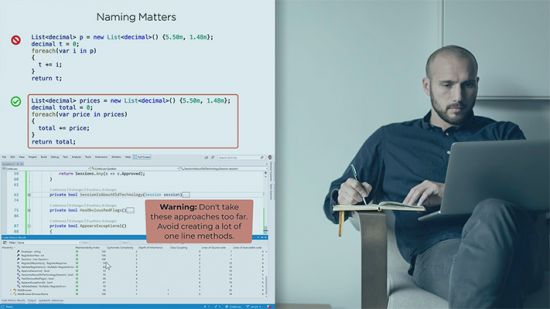
Clean Coding Principles in C#
Cory House | Duration: 3h 18m | Video: H264 1280x720 | Audio: AAC 48 kHz 2ch | 474 MB | Language: English​

Clean code is the art of writing code that humans can understand. Learn how to write C# in a style that's easy to write, read, and maintain. This course is filled with clear comparisons between "dirty" C# code to avoid, and the "clean" C# equivalent.
Clean code is the art of writing code that humans can understand. In this course, Clean Coding Principles in C#, you'll elevate your professionalism and increase your C# code quality by writing with the reader in mind. This course is built upon three core clean coding practices: selecting the right tool for the job, optimizing the signal to noise ratio, and creating self-documenting logic. Throughout this course you'll see clear comparisons between "dirty" C# code to avoid and the "clean" equivalent. You'll explore patterns like arrow code, failing fast, returning early, magnet classes, mayfly variables, techniques for reducing method complexity, and much more. These practices are the foundation for a professional development career and provide developers a clear vocabulary for evaluating code quality.
Homepage


vjbzAb1yQhwOTIHZP161GDXi8dOoTvqh.jpg

Coding Basics and Problem Solving and Logical Thinking
Genre: eLearning | MP4 | Video: h264, 1280x720 | Audio: AAC, 44.1 KHz
Language: English | Size: 529 MB | Duration: 1h 41m
Manual Testing To Automation Testing Part 1

What you'll learn
Learn Coding Essentails
Learn on Critical/Logical Thinking
Lean problem solving skills
Understand the building blocks of programming
Concepts before you start learning programming languages and advanced topics
Learn to illustrate the steps required to solve a problem
Requirements
No pre-requisite for this course anyone who knows English can join this course
Description
Are you an absolute beginner looking forward to kickstart your journey in the Automation Testing. Coding can be hard skill learn to learn for many but no more. Welcome to Coding Basics, the most fundamental course that every aspiring tester should take to kickstart their journey in the world of Automation Testing. The course teaches you the fundamental building blocks - before you start writing code in any programming language.
You will understand the basic concepts and techniques to break down a given problem into smaller parts by drawing flowcharts, write pseudocode, and real code is also demonstrated using Java.
The course is your first step towards Automation Testing. In Next Course that is Part 2 You will Learn About Java Programming Language and then in Part 3 you can chose any of the automation Tool but I will be covering Selenium as a part 3 of this course.
I am Anuja Jain 10 years plus experience in Automation Testing. I first Used Selenium Tool back in 2011 when it was very new and when I gave the demo of my first automated test everyone in my team was proud. Over the years I have worked with multiple Companies like Intel, TCS, Cropin and HP and learned lots of testing tools. So join me and learn and write your first automated test script with me.
Who this course is for
Manual Testers who want to Enter into Field of Automation Testing
Freshers who wants to learn coding basics
Anyone who wants to learn coding
Screenshots


xG3HboaTktsMbs0GX6p3KxFSlhsu4ba3.jpg

Cold Email Training Class
MP4 | Video: h264, 1280x720 | Audio: AAC, 44.1 KHz
Language: English | Size: 666 MB | Duration: 43m​

Grow your outbound sales skills. With this course you will learn the cold emailing techniques and gain new skills.
Grow your outbound sales skills. With this course you will learn the cold emailing techniques and gain new skills. You will learn how to: take control over your email deliverability & avoid spam folders, build a high-quality prospect list & contact good-fit prospects, write a cold email that actually works, create an effective follow-up strategy to get more responses and test and optimize your campaigns for better results.
Screenshots


127c5d16-4551-4f6a-a8fc-ec651e66d0df.png

Complete A.I. Art Generation Course - Beginner 2 MASTER
MP4 | Video: h264, 1280x720 | Audio: AAC, 44.1 KHz, 2 Ch
Genre: eLearning | Language: English + srt | Duration: 66 lectures (4h 7m) | Size: 1.97 GB

Learn how to generate everything from Language, Art, Music & much more using cutting-edge A.I. algorithms
What you'll learn
Become a MASTER Generative Artist
Generate the most Beautiful Art you have ever seen!
Understand how Neural Networks, GAN's, & LSTM's work!
Learn Powerful Tools that you can leverage to build the Apps of Tomorrow!
Learn the Tricks & Secrets from a Professional Generative Artist!
Continuously stay up to date with the latest trends of art generation so you can capitalize on the newest algorithms!
Requirements
No prerequisites! It was designed so that anyone can take it!
Description
Welcome to the Best course on Udemy!
In this course you will learn
What a GAN & Neural Network are
Handwritten Digits GAN
Cifar10 GAN
Bob Ross GAN
Paintings GAN
What an LSTM is
Shakespeare Generator
Star Wars Script Generator
Generate Blogs using GPT-2
Music Generator
VQGAN+CLIP
Liquid Warp GAN
StyleGAN2 Human Generator
StyleGAN2 NFT Generator
and much more!!
This course is will be updated with the latest trends in A.I.!
What are the prerequisites?
NO PREREQUISITES REQUIRED!!! You will learn everything in this course, but knowing how to code always helps! :)
Do you need to install anything on your computer???
NO! We will do everything in Google Colab!! :) There are also 50+ google colab notebooks of various art generation algorithms linked at the end of the course!!
After taking this course, you will become a MASTER generative artist capable of making Tik Toks that can get millions of views, or sell A.I. generated artwork as a painting or an NFT!! I will share all my tips and tricks so that you can generate the most incredible art, and make sure you join our community of Generative Artists in the discord link found in the curriculum below!
As technology improves every single day and unique art algorithms continue to pop up, you can capitalize on the latest trends and change your life. This course will stay updated every month so that you can catch up with the latest trends and use them however you like, whether its to make money, or to just hang beautiful art in your own house :)
Who this course is for
Artists & Developers who love learning!
Homepage


zmpu4NhccINjtWEmBvArdffgYQp52Ami.jpg

Complete Cryptocurrency Day Trading & Swing Trading Course
Genre: eLearning | MP4 | Video: h264, 1280x720 | Audio: AAC, 48.0 KHz
Language: English | Size: 6.92 GB | Duration: 8h 59m
Learn How to Generate Regular Income with both Mini Trades and Higher Time Frame Trades with Advanced Technical Analysis

What you'll learn
Making a full-time or part-time living with Cryptocurrency Day trading and Swing Trading!
Complete Mastery over Trading Psychology!
Use time-tested risk management strategies on every trade
Detailed understanding of Cryptocurrency market microstructure and Price Action
You'll be able to read candles, charts and patterns and forecast them efficiently
You'll learn difference between Spot and Futures Trading and how to trade on them
You'll learn why futures trading is attractive and how to avoid mistakes doing it
How to execute mini trades for maximum profits
Completely understanding indicators and use them to your advantage
You'll learn Order Flow, Volume Profile, Market Profile & Footprint charts
You'll learn time-tested Strategies to trade and some special strategies I use
You'll learn different advanced tools to use to optimize your trading & know overall market dynamics better
Requirements
You should have a computer/phone with good internet access
Atleast $100 (preferably $500) budget to start trading on different Crypto Exchanges
Prior Trading Experience will be an added benefit
Basic understanding of Cryptocurrencies will help
Description
WHAT EXACTLY IS IN THIS COURSE?
In a nutshell, here's how it works
The student understands the Easy-To-Follow Chart Patterns
Does Rigorous Back-testing, Apply it on Real-Time Trading Charts
Crypto Exchanges provide you leverage (loan) to Trade Aggressively with Ease
Your Crypto Assets increase relatively more due to the calculated risk and low leverage
From there, you have the potential to bankroll and trade confidently
And setup is quick and easy.
You can set up accounts with Crypto-Exchanges like Binance, Kucoin, Bitmex, etc., easily
There are a plethora of trading methods given in the course, but you can focus on a few and start earning with those alone! PRACTICE, PRACTICE, PRACTICE Makes You PERFECT!
The main goal of this trading course is to remove your limiting belief system and also remove whatever you might be doing wrong and inform you beforehand where you can mess up. We want you to initially learn effective ways of reducing your stress due to mistakes that are quite frequent from new traders. This will result in fewer drawdowns.
Our main focus will always be to engrain in you the seeds of proper trading methods to use. I want to see you like the "Superman in Trading."
After your fundamental understanding of the market and cryptocurrencies are aligned, the next trading modules will teach you about Price patterns that happen in every time frame. Price is like a fractal that keeps on repeating itself again and again. And having a hawk eye to identify these will be taught in the modules. You will be taught about the various tools and indicators we have to use to have an edge over other traders.
The next module will delve deep into the space of understanding the price movement from a new angle through Inflows Analysis, Outflow Analysis, Open Interest, Order Flow, Market Profile, Footprint Charts, Etc., It opens up your eyes to a new realm where you will be able to monitor and check the market as it happens and evaluate more precisely what is happening in the market. This is explained in a very lucid way so that you don't get bogged down by information overload. More stress will be given to what is that you need to know the most in this so that you can align your trades for the maximum potential profit targets.
So, the goals are mostly the ones given below
The most important mistakes to avoid while trading
The critical factors that drive the cryptocurrencies price up or down and how to know it beforehand or at the right moment.
Using Free and Paid Market tools to make more informed decisions while trading.
Strategies for taking entry points and where your exit points should be so that you don't unnecessarily lose money due to profit targets not being achieved for a few cents.
Strategies specific to Money Management and Trade Management.
How to Back-Test the trading methods taught and annotate and keep a journal.
The daily routine I use to scan the market.
(And a lot more stuff..)
Who this course is for
Anyone who wants to learn Cryptocurrency day-trading and swing trading
Anyone who wants to learn Technical Analysis (TA)
Anyone who wants to learn Cryptocurrency futures trading and spot trading
Anyone who wants to learn how markets actually move and work
Anyone who wants to learn how to identify false breaks, anomalies, support & resistance, etc.,
Anyone who doesn't have a trading plan at the moment
Screenshots















79b49064-28c4-4137-b4fd-c708204bc705.png

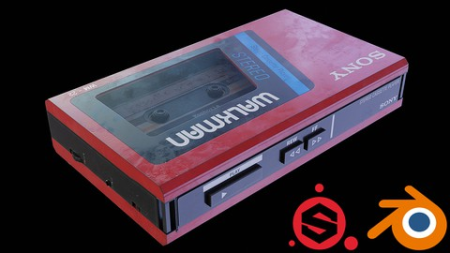
Create a 3D Asset in Blender and Substance Painter
Instructors: Aniket Rawat
2 sections • 8 lectures • 1h 52m total length
Video: MP4 1280x720 44 KHz | English + Sub
Updated 9/2021 | Size: 1.2 GB​

Create a Sony Walkman in Blender and Substance Painter, Learn 3D modelling in blender and texturing in substance painter
What you'll learn
Learn to create Hard Surface Models in Blender
Learn to use the Boolean modifier and techniques related to it
Learn to texture assets in Substance Painter
Learn to create a prop from Start to Finish
Learn Poly Modelling in Blender
Learn to create Highly Realistic Models using Blender and Substance
Requirements
A computer and basic understanding of Blender and Substance Painter
Description
Hi everyone, My name is Aniket Rawat and I am a 3D artist who likes to create realistic and high quality 3D props and assets. In this course, I will take you through the entire process of creating a Sony WALKMAN from Start to Finish.
We will start with modelling the Walkman in Blender and we will make use of the Hard Surface techniques and learn a lot about Boolean and Bevel modifiers and general poly modelling. We will learn how to solve various glitches and shading issues that occur while working with Booleans.
Then after that we will export our model to Substance Painter and start by baking mesh maps for our model, after that we will start to texture our model. We will learn how to create realistic textures for our models by using different features in Substance like Smart Masks, Smart Materials etc.
After we finish with texturing in Substance Painter we will take our model back to Blender and render it. We will setup the material, lighting and the camera. We will also learn how to use HDRIs. I will be rendering the scene using Cycles.
This course is for everyone who wants to upgrade their skillset and have a basic understanding of Blender and Substance Painter.
Who this course is for
Any type of Blender/Substance user who wants to increase their skill level
Screenshots


27a58927-428b-4ea1-9987-249156e85470.png

Data Analysis: Filter & Sort Data in SQL Server, SSMS T-SQL
Instructors: Bluelime Learning Solutions
4 sections • 20 lectures • 1h 39m total length
Video: MP4 1280x720 44 KHz | English + Sub
Updated 2/2022 | Size: 715 MB​

Hands-on Data Analysis on SQL Server using SSMS and T-SQL
What you'll learn
Learn how to Setup SQL Server
Connect to SQL Server using SSMS
Install sample database
Filter data using equality filters
Filter data using comparison filters
Filter data using logical filters
Filter data using string filters
Filter data using NULL Filters
Sort data in ascending order
Sort data in descending order
Requirements
Basic knowledge of database concepts advised
Description
Data analysis is a process of inspecting, cleansing, transforming, and modelling data with the goal of discovering useful information, informing conclusions, and supporting decision-making.
Microsoft SQL Server is a relational database management system developed by Microsoft. As a database server, it is a software product with the pri**** function of storing and retrieving data as requested by other software applications-which may run either on the same computer or on another computer across a network.
SQL Server Management Studio (SSMS) is an integrated environment for managing any SQL infrastructure. Use SSMS to access, configure, manage, administer, and develop all components of SQL Server, Azure SQL Database , Azure SQL Managed Instance, SQL Server on Azure VM, and Azure Synapse Analytics. SSMS provides a single comprehensive utility that combines a broad group of graphical tools with many rich script editors to provide access to SQL Server for developers and database administrators of all skill levels.
T-SQL, which stands for Transact-SQL and is sometimes referred to as TSQL, is an extension of the SQL language used primarily within Microsoft SQL Server. This means that it provides all the functionality of SQL but with some added extras.
Sorting is the process of arranging data into meaningful order so that you can analyse it more effectively. For example, you might want to order sales data by calendar month so that you can produce a graph of sales performance. You can sort text data into alphabetical order. sort numeric data into numerical order.
The ORDER BY keyword is used to sort the result-set in ascending or descending order. The ORDER BY keyword sorts the records in ascending order by default. To sort the records in descending order, use the DESC keyword.
Data filtering is the process of choosing a smaller part of your data set and using that subset for viewing or analysis.
A WHERE clause in SQL specifies that a SQL Data Manipulation Language (DML) statement should only affect rows that meet specified criteria. . SQL WHERE clause is used to extract only those results from a SQL statement, such as: SELECT , INSERT , UPDATE , or DELETE statement. Using the WHERE clause t you can filter data.
Who this course is for
Beginner Data Analyst
Beginner Data Scientist
Screenshots


b7696e3a-1711-46d0-bc8e-2e85f9546ed3.png

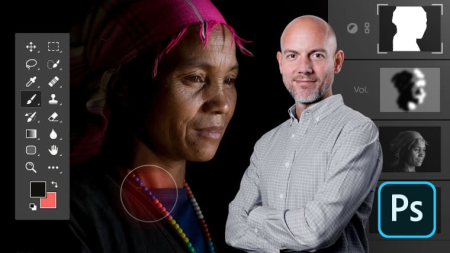
Domestika - Adobe Photoshop for Photo Editing and Retouching
Video: h264, yuv420p, 1280x720, 693 kb/s, 25.00 fps(r) | Audio: aac, 44100 Hz, stereo, s16, 128 kb/s
Genre: eLearning | Duration: 51 lessons (6h 30m) | Language: Spanish (No Subtitle) | File size: 2.1 GB​

Master this essential software's specific tools for photo editing to achieve professional results in your image processing


Gain full mastery of the most useful and powerful tools in Adobe Photoshop, the best software for professional photo editing. Learn how to take full advantage of your images with Daniel Arranz, professional photographer and certified Adobe expert, who in this course will teach you in-depth and from scratch how to use layers, selections, channels, and masks like a pro.
In the first course, start by defining what digital photography is, see why it is so important to develop your images and assign them a color space and bit depth, and take your first steps in Photoshop, learning how to use layers.
In the second course, learn how to use the selection tools and get to work on the layer masks with the brush tool and the gradient tool until you achieve great precision.
In the third course, master the level adjustment and curve layers, then learn how blending modes work for performing complex processing, and learn how to use the Dodge and Burn tools.
In the fourth course, discover what channels are and how to use them for complicated selections, find out how color is represented in Photoshop, and master the luminosity masks for highlights, shadows, and mid-tones.
In the fifth course, learn how to modify skies, make elements disappear with the help of other images, remove halos from a photograph and, finally, prepare your images for printing or for online publication.
Technical requirements
⦁ A computer with Windows 10 or macOS 10.12 Sierra (or higher).
⦁ Photoshop Adobe Photoshop CC (you can purchase or download the 7-day trial version from the Adobe website).
⦁ It is recommended to have a graphics tablet.
Homepage


7472d182-5469-40a8-904e-8db486ac2198.png

Domestika - Professional Food Photography Take Dynamic Shots
Video: h264, yuv420p, 1920x1080, 883 kb/s, 25.00 fps | Audio: aac, 44100 Hz, stereo, s16, 128 kb/s
Genre: eLearning | Duration: 15 lessons (2h 33m) | Language: Italian with Subtitle | File size: 3.4 GB​

Discover how to capture movement in food photography by learning the secrets of post-production to create striking images and animated GIFs
Screenshots

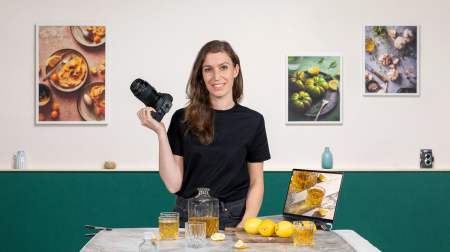
Food photography is the art of cooking with your eyes, transforming food into perfect, mouthwatering compositions and appetizing images. Lucia Marecak, food photographer and founder of the blog Healthy Goodies by Lucia, helps clients in the culinary industry produce delicious images for their websites and social media.
In this course, learn how to capture movement with your camera and take dynamic photos of food. Lucia teaches you some of the most common techniques, like dusting, splash, zest, and pouring, how to edit your photos in Lightroom, and how to create fun GIFs to share online. Get ready to freeze movement in time and savor it with your eyes!
Homepage


CldVNz4CBGATl9cv8pfrodNjr8m1oOTI.jpg

Econometrics: Solved Questions and Mathematical Proofs
MP4 | Video: h264, 1280x720 | Audio: AAC, 44.1 KHz
Language: English | Size: 3.43 GB | Duration: 11h 37m​

Step by step solutions to 60+ Econometrics Questions. Ideal for university students who are new to Econometrics.
What you'll learn
Practice Questions - Simple and Multiple Linear Regression
Mathematical Proofs - Simple Linear Regression
Practice Questions - Functional Forms and Dummy Variables
Practice Questions - Multicollinearity
Practice Questions - Heteroscedasticity and Autocorrelation
Feel much more confident in solving exam style questions
Requirements
Basics of Introductory Econometrics (Linear Regression)
Statistics Basics - Random Variables, Expected Values, Variance, Hypothesis Testing, Confidence Intervals
Knowledge of Elementary Calculus
Description
'Econometrics: Solved Questions and Mathematical Proofs' is a course for anyone studying Introductory Econometrics at University Level.
What other students are saying about this course?
''Clear and well organised course'' - Johnson Nyella
''This is surely very helpful. Whenever I have some doubt regarding concepts, I go through this course and the questions help a lot'' - Ananya Nath
Most of the times, even if students understand the Econometrics concepts, they struggle with connecting the dots. Consequently, they end up getting confused and make silly mistakes in the exam. This course can help you in building a strong foundation of Econometrics so that you could avoid that confusing state of mind and ace your exam.
This course contains solutions to exam style questions for the following topics
•Hypothesis Testing and Confidence Intervals
•Simple Linear Regression
•Multiple Linear Regression
•Functional forms
•Dummy Variables
•Multicollinearity
•Heteroscedasticity
•Autocorrelation
This course comes with
A 30 day money-back guarantee.
Support in the Q&A section - ask me if you get stuck!
I really hope you enjoy this course!
Shubham
Who this course is for
Students who are looking to test their basic econometrics concepts
Students who know the concepts but struggle with practice questions
Screenshots


9f433359-cff8-48a2-b6f4-6fc7b55878a6.png

Getting Started with MLflow
Duration: 1h 21m | Video: .MP4, 1280x720 30 fps | Audio: AAC, 48 kHz, 2ch | Size: 145 MB
Genre: eLearning | Language: English​


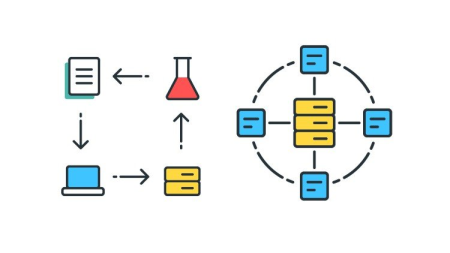
Efficiently delivering machine learning products is not easy, therefore good tools that support ML model development are needed. This course will teach you MLflow.
What you'll learn
Developing machine learning models in teams, with real-world data and serving real-world business needs may be complex. In this course, Getting Started with MLflow, you'll learn to manage the full lifecycle of machine learning models. First, you'll explore how to track your machine learning experiments for easy comparison and reproducibility. Next, you'll discover ways of using MLflow to collaborate on model development in teams of any size. Finally, you'll learn how to share your models in a way that makes them ready for use in real products. When you're finished with this course, you'll have the skills and knowledge of MLflow needed to create machine learning models in a collaborative, reproducible, and production-ready way.
Screenshots


Zurück
Oben Unten