• Regeln für den Video-Bereich:

    In den Börsenbereich gehören nur Angebote die bereits den Allgemeinen Regeln entsprechen.

    Einteilung

    - Folgende Formate gehören in die angegeben Bereiche:
    - Filme: Encodierte Filme von BluRay, DVD, R5, TV, Screener sowie Telesyncs im Format DivX, XviD und x264.
    - DVD: Filme im Format DVD5, DVD9 und HD2DVD.
    - HD: Encodierte Filme mit der Auflösung 720p oder darüber von BluRay, DVD, R5, TV, Screener sowie Telesyncs im Format x264.
    - 3D: Encodierte Filme von BluRay, die in einem 3D Format vorliegen. Dies gilt auch für Dokus, Animation usw.
    - Serien: Cartoon/Zeichentrick, Anime, Tutorials, Dokumentationen, Konzerte/Musik, Sonstiges sind demnach in die entsprechenden Bereiche einzuordnen, auch wenn sie beispielsweise im High Definition-Format oder als DVD5/DVD9/HD2DVD vorliegen. Ausnahme 3D.
    - Bereich Englisch: Englische Releases gehören immer in diesen Bereich.
    - Bereich Talk: Der Bereich, in dem über die Releases diskutiert werden kann, darf, soll und erwünscht ist.


    Angebot/Beitrag erstellen

    - Ein Beitrag darf erst dann erstellt werden, wenn der Upload bei mindestens einem OCH komplett ist. Platzhalter sind untersagt.
    - Bei einem Scenerelease hat der Threadtitel ausschließlich aus dem originalen, unveränderten Releasenamen zu bestehen. Es dürfen keine Veränderungen wie z.B. Sterne, kleine Buchstaben o.ä. vorgenommen werden. Ausnahme Serienbörse:
    - Bei einem Sammelthread für eine Staffel entfällt aus dem Releasename natürlich der Name der Folge. Beispiel: Die Simpsons S21 German DVDRip XviD - ITG
    - Dementsprechend sind also u.a. verboten: Erweiterungen wie "Tipp", "empfehlenswert", "only", "reup", usw. / jegliche andere Zusatzinformation oder Ergänzung, welche nicht in obiger Beschreibung zu finden ist.

    Aufbau des Angebots und Threadtitel

    Der Titel nach folgendem Muster erstellt zu werden. <Name> [3D] [Staffel] [German] <Jahr> <Tonspur> [DL] [Auflösung] <Quelle> <Codec> - <Group>
    Beispiel: The Dark Knight German 2008 AC3 DVDRip XviD - iND
    Beispiel: The Dark Knight 2008 DTS DL BDRip x264 - iND
    Beispiel: The Dark Knight 2008 AC3 DL BDRip XviD - iND
    Beispiel: The Dark Knight German 2008 AC3 720p BluRay x264 iND
    Beispiel: The Dark Knight 2008 DTS DL 1080p BluRay x264 iND
    Beispiel: Die Simpsons S01 German AC3 DVDRip XviD iND
    Beispiel: Die Simpsons S20 German AC3 720p BluRay x264 iND
    Beispiel: Sword Art Online II Ger Sub 2014 AAC 1080p WEBRip x264 - peppermint
    Entsprechend sind also u.a. verboten: Sonderzeichen wie Klammern, Sterne, Ausrufezeichen, Unterstriche, Anführungszeichen / Erweiterungen wie "Tipp", "empfehlenswert", "only", "reup", usw. / jegliche andere Zusatzinformation oder Ergänzung, welche nicht in obiger Beschreibung zu finden ist
    Ausnahmen hiervon können in den Bereichen geregelt sein.

    Die Beiträge sollen wie folgt aufgebaut werden:
    Überschrift entspricht dem Threadtitel
    Cover
    kurze Inhaltsbeschreibung
    Format, Größe, Dauer sind gut lesbar für Downloader außerhalb des Spoilers zu vermerken
    Nfo sind immer Anzugeben und selbige immer im Spoiler in Textform.
    Sind keine Nfo vorhanden z.B. Eigenpublikationen, sind im Spoiler folgende Dateiinformationen zusätzlich anzugeben :
    Quelle
    Video (Auflösung und Bitrate)
    Ton (Sprache, Format und Bitrate der einzelnen Spuren)
    Untertitel (sofern vorhanden)
    Hosterangabe in Textform außerhalb eines Spoiler mit allen enthaltenen Hostern.
    Bei SD kann auf diese zusätzlichen Dateiinformationen verzichtet werden.

    Alle benötigten Passwörter sind, sofern vorhanden, in Textform im Angebot anzugeben.
    Spoiler im Spoiler mit Kommentaren :"Schon Bedankt?" sind unerwünscht.


    Releases

    - Sind Retail-Release verfügbar, sind alle anderen Variationen untersagt. Ausnahmen: Alle deutschen Retail-Release sind CUT, in diesem Fall sind dubbed UNCUT-Release zulässig.
    - Im Serien-Bereich gilt speziell: Wenn ein Retail vor Abschluss einer laufenden Staffel erscheint, darf diese Staffel noch zu Ende gebracht werden.62
    - Gleiche Releases sind unbedingt zusammenzufassen. Das bedeutet, es ist zwingend erforderlich, vor dem Erstellen eines Themas per Suchfunktion zu überprüfen, ob bereits ein Beitrag mit demselben Release besteht. Ist dies der Fall, ist der bereits vorhandene Beitrag zu verwenden.
    - P2P und Scene Releases dürfen nicht verändert oder gar unter einem iND Tag eingestellt werden.


    Support, Diskussionen und Suche

    - Supportanfragen sind entweder per PN oder im Bereich Talk zu stellen.
    - Diskussionen und Bewertungen sind im Talk Bereich zu führen. Fragen an die Uploader haben ausschließlich via PN zu erfolgen, und sind in den Angeboten untersagt.
    - Anfragen zu Upload-Wünschen sind nur im Bereich Suche Video erlaubt. Antworten dürfen nur auf Angebote von MyBoerse.bz verlinkt werden.


    Verbote

    - Untersagt sind mehrere Formate in einem einzigen Angebotsthread, wie beispielsweise das gleichzeitige Anbieten von DivX/XviD, 720p und 1080p in einem Thread. Pro Format, Release und Auflösung ist ein eigener Thread zu eröffnen.
    - Grundsätzlich ebenso verboten sind Dupes. Uploader haben sich an geeigneter Stelle darüber zu informieren, ob es sich bei einem Release um ein Dupe handelt.
    - Gefakte, nur teilweise lauffähige oder unvollständige Angebote sind untersagt. Dies gilt auch für eigene Publikationen, die augenscheinlich nicht selbst von z.B. einer DVD gerippt wurden. Laufende Serien, bei denen noch nicht alle Folgen verfügbar sind, dürfen erstellt und regelmäßig geupdatet werden.
    - Untersagt sind Angebote, welche nur und ausschließlich in einer anderen Sprache als deutsch oder englisch vorliegen. Ausnahmen sind VORHER mit den Moderatoren zu klären.


    Verstoß gegen die Regeln

    - Angebote oder Beiträge, die gegen die Forenregeln verstoßen, sind über den "Melden"-Button im Beitrag zu melden.
  • Bitte registriere dich zunächst um Beiträge zu verfassen und externe Links aufzurufen.

*** Bestes IPTV *** bester Preis *** gratis Test ***


Englische Tutorials

1811110458570090.jpg

Internationally Accredited Diploma Certificate in Nutrition
MP4 | Video: h264, 1280x720 | Audio: AAC, 44.1 KHz, 2 Ch
Genre: eLearning | Language: English + .VTT | Duration: 2.5 Hours | Size: 1.59 GB​

Learn how to eat healthy and understand the fundamentals of nutrition science
What you'll learn
Understand what the Macronutrients are and the role they play in our bodies
Understand the role Micronutrients, Fiber, Probiotics & Water play in our bodies
Understand Energy Balance. Figure out easy ways to determine BMR, TDEE
Learn the Top Carbohydrates/Proteins/Fat sources and figure out their estimated daily requirements
Requirements
Passion for Nutrition
Willingness to help and motivate others to eat healthy
Description
Now earn your Internationally Accredited Diploma in Nutrition accredited by CPD Certification Service, which is an independent body that ensures qualifications are in line with the most current professional standards.
This means this course comply with universally accepted principles of Continual Professional Development (CPD) and have been structured to meet the criteria of personal development plans.
CPD certification means that the content and structure of the courses have been independently assessed and approved for multi-disciplinary and industry-wide continuing personal and professional development purposes.
Pass Mark: 50% to secure your certificate!
Course Pre-requisite: None
Course Duration: 1-4 weeks
Course Lectures:
See Below.
Quizzes & Graded Exam:
Graded Exam
Certificate:
Internationally Accredited by CPD (Details in the course)
Course & Exam Location: Online
Course Description
We are facing an obesity epidemic where almost 2 billion people worldwide are overweight and 650 million are obese. This is hugely contributing to a significant increase in chronic diseases like type-2 diabetes and heart related conditions. These chronic ailments are largely preventable by following a healthy diet combined with an active lifestyle.
This diploma in nutrition will be of great interest to all learners and healthcare professional who would like to learn the fundamentals of nutrition science. It provides an in-depth look into macronutrients and micronutrients and understand how they are essential for our bodies to grow and remain healthy.
Module-1: Introduction to Nutrition will start off by discussing nutrition and nutrients. You will understand the concept of Energy Balance, BMR asal Metabolic Rate, TDEE [Total Daily Energy Expenditure], figure out how to calculate them using certain equations and formulas.
Module-2: Macronutrients will dive deep into three macronutrients i.e. carbohydrates, proteins and fats. We will learn everything about them, including their classifications, types, food sources and their functions and requirements.
Module 3: Micronutrients will discuss fat-soluble and water soluble vitamins, minerals, fiber, probiotics and water. We will do an in-depth discussion in the important functions that these micronutrients play in human body, their best food sources and symptoms which may occur in case their is a deficiency of a respective nutrient in our diet. You will be also be provided a table, that depicts their daily values, adequate limit, and upper tolerable limits.
Along with visually pleasing lecture slides, you will find a voiceover presentation which explains all the slides in detail plus you will find the accompanying script in case you want to read [Helpful for people who are hearing impaired]
Module 4 will provide you with 14 Nutritional Guidelines and 15 Healthy Snack Ideas and at least few diet plans both vegetarian and non-vegetarian.
Who is the course for?
-Anyone who wants to learn how to eat healthy and understand the fundamentals of nutritional science
-Health & Fitness Professionals who want to help their clients with general nutrition tips/guidelines
By the end of this course, what will you Learn?
-Understand what the Macronutrients are and the role they play in our bodies
-Understand the role Micronutrients, Fiber, Probiotics & Water play in our bodies
-Understand Energy Balance. Figure out easy ways to determine BMR, TDEE
-Learn the Top Carbohydrates/Proteins/Fat sources and figure out their estimated daily requirements.
& much more!
Lastly, you there is Bonus section which provides 'additional' readings and resources to in-case you want more in-depth understanding of the concepts provided.
Who is the target audience?
Anyone who wants to learn how to eat healthy and understand the fundamentals of nutritional science
Health & Fitness Professionals who want to help their clients with general nutrition tips/guidelines

1811110458570100.jpg


Recommend Download Link Hight Speed | Please Say Thanks Keep Topic Live

 
4b8bc6a7a262e24df3207c546198c808.jpg

Critical Roles Consultants Play (and the Skills You Need to Fill Them)
MP4 | Video: AVC 1280x720 | Audio: AAC 44KHz 2ch | Duration: 1 Hours 11M | 529 MB
Genre: eLearning | Language: English

New consultants are often surprised by how agile they need to be to fulfill client expectations. The role you play may vary from contract to contract, or even shift within the same engagement. This course helps prepare you for the many different roles a consultant must play and succeed in the challenging world of consulting. Bob McGannon explains how your role differs from your job and how you can assess the needs of your client right at the start of the engagement. He then reviews the seven major roles-technical expert, manager, team leader, follower, reviewer, critic, and implementer-explaining when each role is most useful to your client. Live-action scenarios help you see the roles in action and apply what you have learned. In the final chapter, Bob discusses how to close the engagement, emphasizing the value your role has provided in order to position yourself for the next one.


4f254658cd2e805f5c92ae64b2f715a6.jpg


Recommend Download Link Hight Speed | Please Say Thanks Keep Topic Live

 

1812052243060110.jpg


ARM Cortex-M Bare-Metal Embedded-C Programming
MP4 | Video: 1280x720 | Duration: 12.5 Hours | 1.5 GB | Subtitles: VTT
Author: Israel Gbati | Language: English | Skill level: All Levels

This course assumes no prior knowledge of neither cortex-m nor embedded-c programming. All it requires from students is curiosity.The course takes a practical approach to cover key areas such as pointers ,structures, memory navigation and the Cortex-M Software Interface Standard. The main aim of this course is to provide learners with practical skills and a strong foundation that they can build upon to start producing well written code which runs efficiently and leverages the key aspects of the ARM Cortex-M ecosystem.
What you'll learn:
Be able write firmware using bare-metal embedded-c
Write Embedded programs using just pointers and and memory addresses
Write more professional and efficient Embedded programs.
Understand the Cortex-M Architecture
Understand Load - Store Architecture
Understand ARM Cortex-M Debugging
Be able o write assembly code
Thoroughly understand the CMSIS core
Be able to write device drivers


Recommend Download Link Hight Speed | Please Say Thanks Keep Topic Live
 

1812052244330105.jpg

Pre-investing: Before Investing in Real Estate
MP4 | Video: AVC 1280x720 | Audio: AAC 44KHz 2ch | Duration: 5 Hours | 1.42 GB
Genre: eLearning | Language: English

New to real estate investing? Not sure where to start? There are over a dozen different ways to invest in real estate, from fix and flips to rentals, wholesaling, and lease options. But every good investment starts with preparation. In this course, real estate investor and consultant Symon He explains everything you need to know before you make your first investment. Learn how to develop an investment strategy, use comparable sales method to value property, and understand how a real estate market's different phases may impact you. With these tips, you can build the foundational knowledge you need to become an informed and profitable real estate investor.


1812052244350104.jpg


Recommend Download Link Hight Speed | Please Say Thanks Keep Topic Live
 
13be8ff03b53d58c04e4da08665fb679.jpg

Build a Professional, Responsive Business WP Website Fast
.MP4 | Video: h264, 1280x720 | Audio: AAC, 48 KHz, 2 Ch
Genre: eLearning | Language: English | Duration: 2 hours | Size: 1 GB​

SAVE THOUSANDS and build your own High-Impact, Business Wordpress Website, Complete with Logo & Business Email
What you'll learn
You will learn how to build a Professional Wordpress Business Website in 1 Hour Without Complex Code
Choose & purchase a custom domain name
Select & purchase web hosting for your website & professional email
Optimise your website for Google Search (SEO)
Integrate a contact page into your website
Incorporate a blog into your website
Integrate social media links into your website
Customise colours & fonts to help build a strong, consistent & cohesive brand
Edit your website footer to reflect ownership & copyright
Requirements
Access to a Laptop or Desktop Computer
Internet Connectivity (Wifi, 3/4G or similar)
Description
Welcome to this Professional, Responsive, Business Web-Design Course,
It's great to have you here. Before signing up, I have a few questions for you:
Are you looking to build your own professional business website?
Do you have a Wix or Squarespace website, but are fed-up with the fees & cost of add ons?
Have you tried building a website before using YouTube or other courses, but failed at the first hurdle due to complex hosting, startup fees or lack of quality/indepth information?
Are you tired of searching through expensive themes and content packages, only to find that they look nothing like the sales page reflected?
Do you want to have complete control over the content your own website and the freedom to update and upload content whenever you want?
Are you ready to understand just how simple & liberating designing your own website can be?
If you have answered 'Yes' to any of the above, I believe that this course will be perfect for you!
Welcome to the course, I can't wait to see your incredible website designs!
In the course we will cover:
Lecture 2 - Choosing & purchasing a custom domain name
Lecture 3 - Selecting & purchasing web hosting for your website & professional email
Lecture 4 - Creating & launching website via the web hosting server
Lecture 5 - Customising & editing website to reflect your brand, ownership & copyright
Lecture 6 - Optimising your website for Google Search (Basic SEO)
Lecture 7 - Integrating a contact page into your website & linking pages using buttons
Lecture 8 - Incorporating a blog into your website & creating categorised posts
I have also included 3x EXCLUSIVE EXTRAS:
Exclusive Extra 1: Create a FREE LOGO from scratch
Exclusive Extra 2: Access, download & use free, high-quality CC0 Licensed stock images
Exclusive Extra 3: Create a Google & Gmail account and Professional Business Email
Who is the target audience?
Business Owners
Entrepreneurs
People Building a Startup
Network Marketers
Public Figures
Influencers
People who want to learn web design without the use of complex code

98ceacd6653cf4867d9e300675d498f1.jpg


Recommend Download Link Hight Speed | Please Say Thanks Keep Topic Live
 

1812081614060102.jpg

MP4 | Video: h264, 1280x720 | Audio: AAC, 44.1 KHz, 2 Ch
Genre: eLearning | Language: English + .VTT | Duration: 5.5 hours | Size: 2.05 GB
Learn A-Z of using Zoho Books for all Accounting, Sales Invoicing, Purchase Tracking, Bank Account Tracking.​

What you'll learn
Learn about Accounting with the powerful SAAS based Accounting and Invoicing software Zoho Books
This tool helps in dealing with daily Accounting processes like creating Journal Entries, Income Expense Sheets, Balance Sheets
Use Zoho Books to Create and Send Invoices, Retainer Invoices and Sales Order to customers
You can also integrate your Banking Account with Zoho Books and keep track of Bank Account
Requirements
Knowledge of Basic Accounting Theory
Concept of Cloud Based Accounting and Software as a Service should be clear.
Description
The Topics we have covered in the Zoho Books Course :- User Interface , Settings , Products , Contacts , Sales Invoicing ,Purchase Expense Entries and Tracking , Chart of Accounts , Creating Timesheets and Invoices for hour Based Projects and Exporting Balance Sheet, Profit and Loss, Trial Balance Reports. This course is for Business Administration and Accounting Students and Corporate Employees who want to learn about Accounting with the powerful SAAS based Accounting and Invoicing software Zoho Books. This tool helps in dealing with daily Accounting processes like creating Journal Entries, Income Expense Sheets, Balance Sheets. You can also use Zoho Books to Create and Send Invoices, Retainer Invoices and Sales Order to customers. You can also integrate your Banking Account with Zoho Books and keep track of Bank Account. Other than that you can also ask your customers to Pay Online with the help 3rd Party Payment processors which can be integrated inside Zoho Books. In short you will learn A-Z of using Zoho Books for all Accounting, Sales Invoicing, Purchase Tracking, Bank Account Tracking. You can also accept Online Payments and also do Time Based Project Invoicing. This will help you to manage your business and financials in a greater way and increase Financial Strength for your business.
Who is the target audience?
Accounting Students
MBA Professionals
Accounting Professionals
Business Administration Students
Business Owners

1812081614060115.jpg


Recommend Download Link Hight Speed | Please Say Thanks Keep Topic Live
 

1811151307100085.jpg

How to be a Great Learner in Life?
MP4 | Video: h264, 1280x720 | Audio: AAC, 44.1 KHz, 2 Ch
Genre: eLearning | Language: English + .VTT | Duration: 39 mins | Size: 787 MB​

A must for all towards excellence

What you'll learn

Confidence, zeal for life and GRIT

Requirements

Learning Expertise and a Passion to be a Great Person in life

Description

The course is a mantra or a guide to students of any age to explore learning and making a bright future through commitment and periodic nature of motivation through self nurturing and making things happen as a pleasure and pride not as an occasional module in any case. The priority is towards making the best moments of life through harmony and dignity of self and manipulating the knowledge to prepare for the future with spectrums needed to survive and with a win-win strategy in particular.
Who is the target audience?

This course is open for all Students who aim to gain success in life

1811151307100082.jpg


Recommend Download Link Hight Speed | Please Say Thanks Keep Topic Live
 
a1ea6a0f8ff8e6c3d5d2d0d770607ffe.jpg

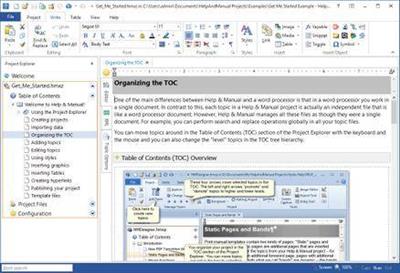
Help & Manual 7.4.0 Build 4603 | 170 Mb
Help And Manual makes producing help and documentation a pleasure. All the tools you need are at your fingertips in a single intuitive environment, and the program handles all the complex, technical aspects of the process for you. Instead of wasting countless hours "programming" your help you can focus all your energy on actually writing your documentation, so that all your working time is productive time.​

How Help & Manual works:
All the output formats supported by Help & Manual are generated from the same project. This means you only have to edit your help and documentation once. Forget about the nightmare of "converting" your documentation every time you change anything.
Generate all Windows help formats
You can output your projects to all standard Windows help formats (HTML Help, Winhelp and MS Help 2.0 / Visual Studio Help), and since Help & Manual is directly integrated with the Microsoft compilers for these formats all your output is 100% standard-compliant.
Help & Manual also generates Browser-based Help, PDF and Word RTF. In addition to this you can generate fully-formatted printed manuals directly from the same projects used for all the other formats.
The Browser-based Help output for web use includes a full menu structure that emulates the appearance and functionality of HTML Help and includes full-text search with highlighting for found words.
PDF output and printed manuals are fully customizable with the bundled Print Manual Designer program: You can include a table of contents and a keyword index, automatic page referrers for links and cross-references, customized page layouts, headers, footers, page numbering, covers, introductions and more.
All languages of this world
This world is a big place and localization becomes ever more important. Help & Manual lets you create documentation in up to 106 languages. It is one of the few help authoring tools that fully support Unicode and can handle languages like Japanese, Chinese, Korean and many others.
Help & Manual Professional offers dedicated support for translation via XML import and export.
Easy migration
One of the most critical tasks is to migrate existing documentation when you switch to another tool. And this has never been easier than now. Help & Manual imports regular HTML and text files, compiled HTML Help, Word files (RTF format), Winhelp source files and even decompiles HLP files.
To help new users migrate existing help projects, Help & Manual includes a dedicated import tool for RoboHelp® X5 projects.
Supported OS:
Windows 10, Windows 8, Windows 7, Windows Vista or Windows XP/SP3.
Hardware requirements:
2 GB RAM, up to 350 MB disk space, screen resolution of 1024x768 or higher.
Home Page -

Recommend Download Link Hight Speed | Please Say Thanks Keep Topic Live
 
1811051502490097.jpg

Engineering Drawing For Students
.MP4 | Video: h264, 1280x720 | Audio: AAC, 44.1 KHz, 2 Ch
Genre: eLearning | Language: English | Duration: 22 hours | Size: 23 GB​

Interpret-Imagine-Draw

What you'll learn

Pass the Engineering Drawing Exam
Pass the Engineering Graphics Exam
How to use Mini Drafter(Manual Drafting)
Imagine Isometric View from Orthographic Views and vice versa
Generate Front View Top View and Side View from Isometric View (3D to 2D views)
Projection Of Solids
Section Of Solids
Be able to imagine Solids in HP & VP
Use of 2H Pencil, H Pencil and HB Pencil.
Conics- Ellipse, Parabola, Hyperbola & Circle.
Special Curves - Involutes,Cycloid, EpiCycloid and HypoCycloid.
Auxillary View/True Shape
Generate 3D Views (Section 7- Isometric Views) ....For Artists and Painters

Requirements

You should be Enrolled in Engineering or Diploma school
You must have stationery such as Mini-drafter, pencils and erasers etc.
You should be able to use PC or Smart phone at beginners level.

Description

This course is designed to suit Engineering Student or Diploma Students whose curriculum includes Engineering Drawing or Engineering Graphics. This is probably the best course available on the whole web as every question is explained and drawn by the instructor himself. Yes, you got it right, you just need to follow the instructor and draw simultaneously with him. This means you will have no doubt whatsoever to draw Engineering Drawings.

Who is the target audience?

Engineering Students
Anyone who wish to learn Auto Cad, Solid Works and other Modelling Soft wares in the near future.
Diploma Students
Polytechnic Students

1811051502500100.jpg


Recommend Download Link Hight Speed | Please Say Thanks Keep Topic Live
 

1811261508430116.jpg

Business Intelligence BI using Microsoft Excel
.MP4 | Video: 1280x720, 30 fps(r) | Audio: AAC, 44100 Hz, 2ch | 2.43 GB
Duration: 5 hours | Genre: eLearning | Language: English​

Learn Sorting Algorithm, Filtering, Conditional Formatting, Data Charts in Excel, Pivot Table and Data table in details.
What you'll learn
Learn about Sorting Algorithm in Excel, Filtering, Conditional Formatting, Data Charts in Excel
Hands on with Pivot Tables, Data Tables in Excel
Requirements
Basic computer knowledge
Familiarity with the Microsoft Office work environment
You will need MS Excel 2013 in your PC
Description
Business intelligence (BI) is essentially the collection of tools and processes that are used to gather data and turn it into meaningful information that people can use to make better decisions. Using Excel, you can create powerful reports, scorecards, and dashboards. You can bring data into Excel, sort, and organize data, and use it to create reports and scorecards. You can also use powerful analytic capabilities in Excel to visualize and explore data.
This training will help you learn about Sorting Algorithm in Excel, Filtering, Conditional Formatting, Data Charts in Excel, Hands on with Pivot Tables, Data Tables in Excel.
The course is good for students, data analysts, financial analysts, business analysts and other working professionals. The shortcuts and process used in this course will minimize the time require to solve any problems in Excel.
Who is the target audience?
Students
Working Professionals
Data Analysts
Business Analysts


1811261508440097.jpg


Recommend Download Link Hight Speed | Please Say Thanks Keep Topic Live
 

1812081614030096.jpg

MP4 | Video: h264, 1280x720 | Audio: AAC, 48 KHz, 2 Ch
Genre: eLearning | Language: English | Duration: 2.5 hours | Size: 1.90 GB
Get started in the 3D world with Blender​

What you'll learn
You will become pretty comfortable with Blender. You will also be able to follow up other advanced tutorials with much more ease.
Requirements
One should be able to install Blender 2.7x on his own. Also, the recordings have been shot on a PC so if you are a MAC or linux user, you need to adjust the keys accordingly (eg- command instead of control).
Description
This is the age of information. There are a lot of videos online about learning the basics of Blender. But I discovered over the years that most of them preach about tips and tricks to make a very specific object or item. 3D modelling is a trial and error process. One should be aware of not just how to operate the software but also about how to approach an unknown situation. This is what I mean when I say "intuitiveness". One must experience different kind of challenges in order to develop that intuitiveness.
I used to learn about 3D modelling from books and though it took a long time to learn from them, I learnt that in the long term it was better than do it quickly videos. The differences was the richness of the content in books. Now in this course, I have tried to develop not just your 3D skills but also your ability to develop approaches for different kind of scenarios, which makes it a lot richer than the traditional set of how to videos.
In this course, we will go through
- Basic functions in Blender and the user interface
-The process of blocking everything with basic shapes.
-Then we will model different kind of meshes in edit mode.
- Then we will learn how to make different kind of materials and compare them with one another
- We will also learn how to map and mask different textures into one another
- We will learn the basics of using modifiers
-Then there is the final project in which all the skills learnt will be tested
- And ultimately there is the Ultimate beginners challenge that requires a lot of creative thinking to solve
So if you pass the ultimate challenge by yourself, you are already pretty good at this and you should continue in the field.
Nonetheless I hope you enjoy this course. I will keep uploading new videos as and when required.
Who is the target audience?
Anyone who is interested can take this course.

1812081614040095.jpg


Recommend Download Link Hight Speed | Please Say Thanks Keep Topic Live
 

1812101815120115.jpg

Microsoft AZ-101 Certification: Azure Integration and Security
MP4 | Video: AVC 1280x720 | Audio: AAC 44KHz 2ch | Duration: 3 Hours 43M | 813 MB
Genre: eLearning | Language: English

Microsoft has recently released the new Azure Administrator Certification which now requires you to pass the AZ-100 and AZ-101 exams. Following on from our successful AZ-100 course, we are pleased to release the AZ-101 Microsoft Azure Integration and Security course to help you continue your journey to certification. Be one of the first to pass the exam. During your journey, Skylines Academy will lead you through a series of sections, modules, and demos to prepare you for taking, and ultimately passing, the Microsoft Azure AZ-101 exam. This course curriculum follows the Microsoft's AZ-101 exam outline: Evaluate and Perform Server Migration to Azure Implement and Manage Application Services Implement Advanced Virtual Networking Secure Identities Lectures will educate you on the fundamental terms and principles of the Azure platform and demos will enable you with a hands-on experience using scenarios to empower you in the real world. This course will be continually updated with additional modules based on feedback from our students. Stay tuned as we will be posting updates in the coming months including the small study guides people loved from our highest rated 70-533 course, PowerShell reference, and more! Thanks for joining us!


1812101815150124.jpg


Recommend Download Link Hight Speed | Please Say Thanks Keep Topic Live
 
Zurück
Oben Unten