




Last updated 8/2020
MP4 | Video: h264, 1280x720 | Audio: AAC, 44.1 KHz
Language: English | Size: 779.21 MB | Duration: 0h 56m
The Complete Setup & Workflow to Prepare Art and Publish Your First Product
What you'll learn
The complete setup and workflow to prepare art and publish your first product
Use the easy design to print extension from Adobe
How to make money on selling with POD sites
How to do basic Adobe Photoshop functions
Requirements
Photoshop experience is an asset
No experience with the DTP software
Description
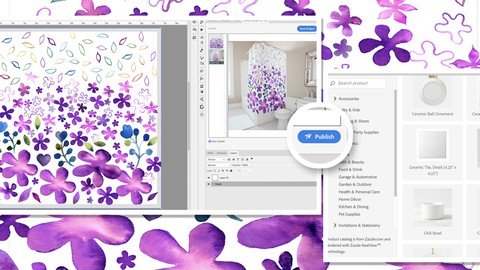
Hey there! Have you been trying to make ends meet with your art? Are you a maker, tired of dealing with the hassle of selling directly to public? Do you want to get out of the rat-race and create art you are passionate about? Are you worried about how to make a sustainable living? I'd like to suggest you consider adding POD sales as an alternate income source. My new course, Print-on-Demand for Artists - The Complete Setup & Workflow to Prepare Art and Publish Your First Product will help you do just that! Coined as "passive income", this can be a wonderful way of earning a regular income from work you have already done, or would rather be doing. Naturally, to make it a success of it, you will have to put plenty of effort in, especially at the beginning! It may seem like a daunting task, and the income won't happen over night, but I have a way to make it easier than ever! We will be using the new Adobe Extension, Design to Print."The Adobe Design to Print Extension is a new tool that enables designers to create artwork for printing on a multitude of actual products. available for free download on Adobe Exchange. A new palette enables the artist to select a "blank" product from a catalog (e.g., an article of clothing), and to preview how it will look when their design is printed on it. Familiar Photoshop tools, like placing images, brush strokes, and effects can be used to easily create a beautiful design while simultaneously viewing a visualization of its appearance when printed on the finished product. When ready, the design can be easily published!" - AdobeThis Design to Print Extension makes it much more convenient to keep up with listing your POD products because it is done right from within Photoshop. It's great to be able to earn regular money while you sleep, when you're on a holiday, or you are working on passion projects. The effort is all at the beginning, and the income arrives with just a little ongoing effort. This class is great for both established artists and those just starting out. In this course, Print-on-Demand for Artists, I'm sharing everything I've learned about using the extension. Design to Print is fully compatible with Zazzle, and everything can be done from within Photoshop. So, there is no need to switch back and forth between Photoshop and your browser. Once you post your product, it is fully available on the online marketplace. Additional print-on-demand services will offer compatibility with Design to Print in the future, so this is a great time to jump on board! You will be surprised how easy it is!In this class I will show you how you, as an artist, can add a new revenue stream from Print on Demand. I will share my personal experience, discuss the advantages and disadvantages and go into detail about preparing your art. We will be taking raw, watercolor painted motifs, eliminating the background, adjusting exposure levels and isolating and re-arranging the elements into a usable shower curtain (extra-large) layout. The beauty of creating the largest layout file is that it can be adapted infinitely for all the other shapes, proportions and sizes of POD products.As designers, we must channel our creative energies towards making a living. Ultimately, we want viewers (consumers) to be unconsciously persuaded into buying a product we create featuring our art. Many of us also create art for the simple satisfaction of bringing beauty into the world. And there is nothing quite as exciting as seeing our artwork in print, especially if it is on a physical object made purely for the enjoyment of the viewer. That is my motivation for bringing you this new course, Print-on-Demand for Artists. The Complete Setup & Workflow to Prepare Art and Publish Your First Product.As far as prerequisite skills, I would recommend some knowledge of Photoshop with the goal of wanting to learn additional techniques. In class, we'll talk about both design and technical aspects of creating compatible image files. I will demonstrate them at a reasonable pace so that it will be easy to follow along. This course is for all levels; I recommend being acquainted with Photoshop somewhat, and, also knowing the basic principles of creating images, but most steps are explained very thoroughly. I suggest pausing and repeating sections and possibly even slowing the speed in your browser when trying to work through any difficult parts. Adobe Photoshop is required for this class.The key concepts I will include:review of the complete Adobe Design to Print Extensionmethods to edit and deal with specific issues like cropping and other file considerationscreating a full layout with a DTP downloaded templateisolating motifs after touching up and eliminating backgroundsorganizational considerations like spreadsheets and master filesgood examples, reference and inspiration for reinforcing the goalThis course is packed with choice cuts of information for you no matter where you are in your career. Let's have you creating beautiful products this week, with this class. You can be benefitting from this practical knowledge in your design practice! Having products with your beautiful artwork is absolutely do-able with this small investment of time. Let's dig in!IntroIn this lesson, I will explain the goals for the class and I will share examples of my work. We will discuss the main techniques we will be using in this class.Lesson 1: Prep and Touchup of the Original Scanned ArtIn this lesson, we will go through the initial steps of preparing the watercolor art. We will eliminate the white background and adjust levels. We are preparing to separate items into individual layers. I will show you how to change the orientation of the document to make erasing and rubber stamping easier.Lesson 2: Separating Elements for the CompositionFor this lesson, we will go through the process of separating each element and roughly moving these elements into approximate positions. I show you levels adjustments on a much lighter motif and explain settings on the magic wand selection tool. We drag our separated elements onto the template document.Lesson 3: First Steps in Laying Out the CompositionMoving the elements around, we will finesse the layout. I will explain the use of the warp and puppet warp tools and will show you how to manipulate the elements further. I demonstrate ways to change duplicate motifs so copy is not apparent. I also explain design analysis of current shower curtain trends on the market to help you come up with ideasLesson 4: Fine Tuning the Motif Position and CompositionWe continue using the same techniques to perfect our layout and many considerations are explained. We will get close to the finished layout at this point. During the lesson, we use the warp and the puppet warp, as well as hue and saturation, to help add variety to copied motifs. I explain how to work with the layers. I also give you pointers on making more processing power available for the document in Photoshop.Lesson 5: Final Layout and PublishingHere's the part you have been waiting for: publishing! I will show you how the Design-to-Print extension works. Then we will be re-directed to the Zazzle Site where I will walk you through the listing.Lesson 6: A Final Look and Course Wrap-UpFor this lesson, I will introduce you to Adobe Exchange. We will discuss next steps and wrap-up. Thanks so much for being here! Hope to see you in many other classes!Concepts covered:Concepts covered include but are not limited to watercolor art, Photoshop image touch-up, Photoshop filters, keyboard shortcut reinforcement, erasing, Kyle's natural edge eraser, rubber stamping, document orientation, the Design-to-Print extension, creating layouts, shower curtain layout on Zazzle, levels control in Photoshop, magic wand selection tool, puppet warp, warp tool, moving, resizing, transform, the Zazzle marketplace, print-on-demand for artists, RedBubble, Society6 and much more!You will get.1 hour of direction from an instructor who has been in the graphic design business and education game for over 40 yearsawareness of multiple approaches to resolve each design challengehandouts explaining key conceptsa list of helpful online sites to further your education
Overview
Section 1: Introduction
Lecture 1 Prep and Touchup of the Original Scanned Art
Lecture 2 Separating Elements for the Composition
Lecture 3 First Steps in Laying Out the Composition
Lecture 4 Fine Tuning the Motif Position and Composition
Lecture 5 Final Layout and Publishing
Lecture 6 Final Look and Course Wrap-Up
Graphic designers and surface pattern designers looking for passive income streams,Artists looking to break into POD sales,Artists looking to learn faster and more efficient workflows for uploading to Zazzle website
Homepage
Recommend Download Link Hight Speed | Please Say Thanks Keep Topic Live
Links are Interchangeable - No Password - Single Extraction
