• Regeln für den Software-Bereich:


    Allgemeines:

    - In erster Linie sind unsere Boardregeln zu beachten, zu finden HIER.
    - Software zur Audiobearbeitung sollte ausschließlich im Unterforum "Audio" eingestellt werden.
    - Für Cracks, Keygens oder sonstige Freischaltungssoftware gibt es das Unterforum "Freischaltung".
    - Portable Software bitte im entsprechenden Unterforum "Portable Software" eintragen.
    - Diskussionen zur Installation und anderen Problemen mit der Software, bitte im enstprechenden Unterforum "Talk" führen.
    - Bei Unklarheiten und Fragen zu den Regeln bitte die Moderatoren kontaktieren.


    Angebot erstellen

    - Die Struktur des Threadtitels muss wie folgt umgesetzt werden: Herstellername - Softwarename - Versionsnummer
    - Unnötige Zusätze im Threadtitel wie "HOT", "NEW" oder Punkte zwischen den Wörtern sind nicht erlaubt.
    - Achtet darauf immer nur die Hauptversion und deren Updates in einem Thread zusammenfassen, konkretes Beispiel: SoftwareXY v3.12 gehört in den selben Thread mit SoftwareXY v3.13; SoftwareXY v.4.1 gehört in einen neuen eigenen Thread. Ausgenommen hiervon sind Sammelthreads und Dauerangebote.
    - Bei nicht bekannten Herstellern oder Angebote einer privaten Software, ist die Programmbezeichnung + Versionsnummer ausreichend.
    - Besondere Beachtung gilt für den ersten Beitrag eines Angebots. Dort muss eine kurze Beschreibung der Software in deutscher Sprache angegeben werden. Für offizielle Releases ist es Pflicht die NFO im Beitrag einzustellen(Spoiler, siehe nächster Punkt).
    - Weitere Informationen wie NFOs oder Changelogs, versteckt ihr bitte in einem Spoiler.


    Software Suche

    - Für Suchanfragen haben wir das Unterforum "Suche" erstellt.
    - Auch hier sollte vorher die Suchfunktion benutzt werden, um Doppelthreads vorzubeugen. Sollte es bereits eine Suchanfrage geben, könnt ihr den Thread gerne mit einem "Danke" pushen.


    Trojaner- und Virusalarm

    - Falls Euer Virenscanner bei einem Angebot Alarm schlägt, solltet ihr zunächst Ruhe bewahren. Viele Virenscanner erkennen Cracks/Keygens oft fälschlicherweise als Bedrohung.
    - Prüft die verdächtige Datei zuerst mit http://virustotal.com , sollte es sich hierbei wirklich um eine Bedrohung handeln, meldet den Beitrag und/oder wendet euch mit dem Bericht von VirusTotal.com an einen Moderator.


    Unerwünschte Angebote

    - Keylogger, Spionagetools, alles rund ums Thema Hacking/Cracking ist nicht erwünscht.
  • Bitte registriere dich zunächst um Beiträge zu verfassen und externe Links aufzurufen.

++ Premium IPTV ++ 7000 Live Sender ++ UHD Qualität ++ Mediathek mit 18.000 Inhalten ++


VenneTV


DxO FilmPack v8


DxO FilmPack 8.11.0.896 (x64) Multilingual


8d99e998290f650aa2c56a729fceec7a.avif


DxO FilmPack 8.11.0.896 (x64) Multilingual


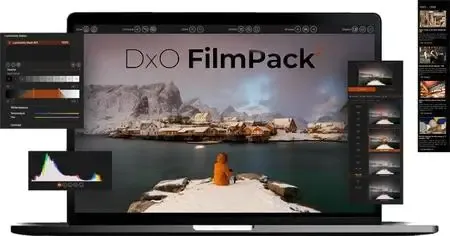
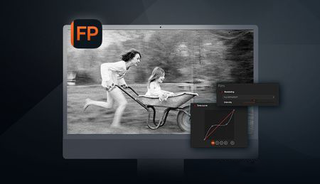
DxO FilmPack 8 bringt die Magie des analogen Films in Ihren digitalen Workflow und vereint zeitlose Looks mit moderner Präzision. Entdecken Sie legendäre Filmtypen, vielseitige Werkzeuge zur Farbkorrektur und kreative Effekte, die Ihren Fotos Charakter und Seele verleihen. Tauchen Sie ein in die Geschichte der Fotografie anhand klassischer Bilder und der Filme, die sie aufgenommen haben.


Sprache: Deutsch, Multi | Größe: 1.44 GB | Format: RAR, EXE | Plattform: Windows 10, 11 (64Bit)


Hoster:
RapidGator.net | NitroFlare.com | DDownload.com


DOWNLOAD Links:


​
 
26d157ec92aa381ffdfcf70d30c0bb2d.webp

Free Download DxO FilmPack 8.12.0.908 (x64) Multilingual | 1.44 GB
DxO FilmPack is a creative photo-editing application that brings the distinctive appearance of traditional film photography into modern digital workflows. It recreates the visual characteristics of classic color and black-and-white film stocks, allowing photographers to give digital images an authentic analog-inspired look.
Combining scientifically developed film renderings with flexible adjustment tools, the software offers a wide range of photographic styles, grain effects, textures, frames, and light leaks. Users can explore different periods in photographic history, customize individual film effects, and fine-tune image appearance without relying solely on fixed presets.​

Software Overview
DxO FilmPack provides an extensive collection of film-inspired rendering options designed to reproduce the tonal response, colors, and grain characteristics associated with traditional photographic materials. Its library includes 40 black-and-white film renderings and 49 color film renderings, giving photographers a broad selection of classic looks to apply to digital photographs.
The Time Machine feature offers a guided journey through photographic history, presenting styles and visual references from different eras. Beyond its preset collection, the application provides controls for film intensity, grain, exposure, highlights, midtones, shadows, color balance, split toning, and luminosity masks.
Key Features
  • Classic Film Renderings: Explore 40 black-and-white and 49 color film renderings recreated to reproduce the distinctive appearance of traditional film photography.
  • Analog-Inspired Presets: Apply digital simulations, cinematic styles, and creative presets to give photographs a distinctive visual character.
  • Time Machine: Discover photographic styles from different periods through a guided exploration of photography history.
  • Adjustable Film Intensity: Control the strength of a selected film rendering to achieve a more subtle or pronounced effect.
  • Film Grain Control: Customize grain characteristics to recreate the texture associated with different photographic film stocks.
  • Tonal Adjustments: Fine-tune exposure, highlights, midtones, and shadows to refine the overall appearance of an image.
  • Color Management: Adjust image color and create split-tone effects for more expressive photographic results.
  • Luminosity Masks: Apply targeted tonal adjustments using luminosity-based selections.
  • Creative Textures and Frames: Enhance images with photographic textures, decorative frames, and light-leak effects.
Why Choose DxO FilmPack
DxO FilmPack is designed for photographers who appreciate the character of analog photography but prefer the flexibility of a digital workflow. Its extensive film collection makes it possible to explore different photographic aesthetics, from classic monochrome treatments to distinctive color-film styles and cinematic looks.
The combination of carefully recreated film renderings and detailed adjustment controls offers more creative flexibility than applying a basic filter. Photographers can customize grain, tonal response, and color effects to develop a consistent visual style while retaining control over the final image.
System Requirements
  • Operating System: Microsoft Windows 10 version 20H2 or Windows 11 (64-bit).
  • Processor: Intel Core or AMD Ryzen processor with 4 cores.
  • Memory: 8 GB RAM.
  • Storage: 4 GB of available disk space.
  • Display: 1280 x 768 resolution.
Frequently Asked Questions
What is DxO FilmPack used for?
DxO FilmPack is used to apply film-inspired color, black-and-white, grain, and other analog-style effects to digital photographs.
How many film renderings are included?
The supplied feature information lists 40 black-and-white film renderings and 49 color film renderings.
Can I customize the appearance of a film effect?
Yes. You can adjust film intensity and grain, as well as refine exposure, highlights, midtones, shadows, and color.
What does the Time Machine feature do?
Time Machine guides users through different periods in photographic history, helping them explore the visual styles associated with various eras.
Does DxO FilmPack support creative effects beyond film simulations?
Yes. Its creative tools include cinematic styles, frames, textures, light leaks, split toning, and luminosity masks.
Home Page
Product Information
  • Software Name: DxO FilmPack
  • Version: 8.12.0.908
  • Architecture: x64
  • Languages: Multilingual
  • License type: Full Version
  • File Size: 1.44 GB

FileHost : RapidGator | FreeDL | DDownload | AlfaFile​
 

DxO FilmPack 8.12.0.908 (x64) Deutsch-Multilanguage

100682c0854ae840d55c239b46f2ca77.webp


DxO FilmPack 8.12.0.908 (x64) Deutsch-Multilanguage || 1.44 GB || Sprache: Deutsch-Multilanguage


Beschreibung:


Sprache: Deutsch und Multilanguage
File Size: 1.44 GB
Format: .Rar und .Exe
Plattform: Windows 11, 10 (64 Bit)
Passwort: Wird nicht benötigt
Hoster: nitroflare.com , ddownload.com , rapidgator.net

Mirrors sind untereinander kompatibel


​
 
DxO FilmPack 8.12.0.908 (x64) Multi-Deutsch


46418993hp.png


DxO FilmPack 8.12.0.908 (x64) Multi-Deutsch


.: Beschreibung :.

DxO FilmPack 8 ist die Software, die Ihre digitalen Bilder in die goldene Ära der Filmfotografie zurückversetzt.Als Hommage an die Dunkelkammer können Sie die Geschichte erkunden und sich von wunderschönen Darstellungen inspirieren lassen, die mit wissenschaftlicher Präzision authentisch nachgebildet wurden.Verfeinert und aktualisiert liefert das neue DxO FilmPack 7 40 Schwarzweiß- und 49 Farbfilme, originalgetreu nachgebildet Digitale Simulationen und Voreinstellungen, Filmstile, Frames,Time Machine führt Sie durch die gesamte Geschichte
Legen Sie die Intensität eines Filmmaterials fest
und wenden Sie Leuchtkraftmasken an
Entdecken Sie die Magie des Films
im digitalen Zeitalter neu.


.: Hoster :.
.: Rapidgator :. .: Ddownload :.
.: Größe :.
1.44 GB
.: Format :.
(RAR/EXE)
.: Sprache :.
Deutsch/Englisch/Multi
.: Plattform :.
Microsoft Windows 10/11 (64-Bit)


​
 
Zurück
Oben Unten