• Regeln für den Software-Bereich:


    Allgemeines:

    - In erster Linie sind unsere Boardregeln zu beachten, zu finden HIER.
    - Software zur Audiobearbeitung sollte ausschließlich im Unterforum "Audio" eingestellt werden.
    - Für Cracks, Keygens oder sonstige Freischaltungssoftware gibt es das Unterforum "Freischaltung".
    - Portable Software bitte im entsprechenden Unterforum "Portable Software" eintragen.
    - Diskussionen zur Installation und anderen Problemen mit der Software, bitte im enstprechenden Unterforum "Talk" führen.
    - Bei Unklarheiten und Fragen zu den Regeln bitte die Moderatoren kontaktieren.


    Angebot erstellen

    - Die Struktur des Threadtitels muss wie folgt umgesetzt werden: Herstellername - Softwarename - Versionsnummer
    - Unnötige Zusätze im Threadtitel wie "HOT", "NEW" oder Punkte zwischen den Wörtern sind nicht erlaubt.
    - Achtet darauf immer nur die Hauptversion und deren Updates in einem Thread zusammenfassen, konkretes Beispiel: SoftwareXY v3.12 gehört in den selben Thread mit SoftwareXY v3.13; SoftwareXY v.4.1 gehört in einen neuen eigenen Thread. Ausgenommen hiervon sind Sammelthreads und Dauerangebote.
    - Bei nicht bekannten Herstellern oder Angebote einer privaten Software, ist die Programmbezeichnung + Versionsnummer ausreichend.
    - Besondere Beachtung gilt für den ersten Beitrag eines Angebots. Dort muss eine kurze Beschreibung der Software in deutscher Sprache angegeben werden. Für offizielle Releases ist es Pflicht die NFO im Beitrag einzustellen(Spoiler, siehe nächster Punkt).
    - Weitere Informationen wie NFOs oder Changelogs, versteckt ihr bitte in einem Spoiler.


    Software Suche

    - Für Suchanfragen haben wir das Unterforum "Suche" erstellt.
    - Auch hier sollte vorher die Suchfunktion benutzt werden, um Doppelthreads vorzubeugen. Sollte es bereits eine Suchanfrage geben, könnt ihr den Thread gerne mit einem "Danke" pushen.


    Trojaner- und Virusalarm

    - Falls Euer Virenscanner bei einem Angebot Alarm schlägt, solltet ihr zunächst Ruhe bewahren. Viele Virenscanner erkennen Cracks/Keygens oft fälschlicherweise als Bedrohung.
    - Prüft die verdächtige Datei zuerst mit http://virustotal.com , sollte es sich hierbei wirklich um eine Bedrohung handeln, meldet den Beitrag und/oder wendet euch mit dem Bericht von VirusTotal.com an einen Moderator.


    Unerwünschte Angebote

    - Keylogger, Spionagetools, alles rund ums Thema Hacking/Cracking ist nicht erwünscht.
  • Bitte registriere dich zunächst um Beiträge zu verfassen und externe Links aufzurufen.

++ Premium IPTV ++ 7000 Live Sender ++ UHD Qualität ++ Mediathek mit 18.000 Inhalten ++


VenneTV


DeskSoft WindowManager v10

finding_nimo

MyBoerse.bz Pro Member

WindowManager v10.7 (Portable)


8797ba2ddd7bbf85e662zqfvo.jpeg


WindowManager v10.7 (Portable) | 991 KB | Language: English


Homepage:


Größe: 991 KB
Sprache: English
Format: .rar / .exe
Medizin: Present
Plattform: Windows 11/10/8.1/8/7/Vista/XP/Windows Server
Bit depth: 32bit 64bit


HOSTER:

Nitroflare.com

Rapidgator.net

Uploadgig.com


DOWNLOAD


​
 

WindowManager v10.9.1 (Portable)


6d2e9de425d00a725b5ewiccy.jpeg


WindowManager v10.9.1 (Portable) | 993 KB | Language: English


Homepage:


Größe: 993 KB
Sprache: English
Format: .rar / .exe
Medizin: Present
Plattform: Windows 11/10/8.1/8/7/Vista/XP/Server
Bit depth: 32bit 64bit


HOSTER:

Nitroflare.com

Rapidgator.net

Uploadgig.com


DOWNLOAD


​
 

WindowManager v10.10 (Portable)


ff1d6bb2898d9a334b2dm6fem.jpeg


WindowManager v10.10 (Portable) | 999 KB | Language: English


Homepage:


Größe: 999 KB
Sprache: English
Format: .rar / .exe
Medizin: Present
Plattform: Windows 11/10/8.1/8/7/Vista/XP/Server
Bit depth: 32bit 64bit


HOSTER:

Nitroflare.com

Rapidgator.net

Uploadgig.com


DOWNLOAD


​
 
722bc9b1d27858a5d7e6030451f68827.webp

Free Download WindowManager 10.27.4 | 1.3 MB

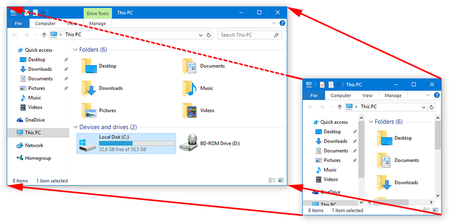
WindowManager is a Windows utility designed to improve desktop workflow by remembering and restoring the position and size of application windows. It ensures that programs, dialogs, and File Explorer windows open exactly where you want them, eliminating the need to repeatedly rearrange your workspace between sessions.

The software allows users to define custom rules for individual windows, including fixed positions and dimensions. It can also perform advanced actions when a window opens, such as sending keystrokes, entering text, clicking mouse buttons, launching additional programs, or minimizing windows to the system tray.​

Software Overview
WindowManager provides comprehensive control over how application windows behave on the Windows desktop. Users can configure individual rules to move, resize, activate, or close windows automatically, as well as create multiple profiles for different working environments.

It also supports multi-monitor setups and enhances the virtual desktop functionality available in Windows 10 and Windows 11. Features such as hotkey-based desktop switching and individual desktop icons help users organize their workspace more efficiently.

Key Features
  • Remember and automatically restore the position and size of program windows.
  • Support application windows, File Explorer windows, dialogs, and other window types.
  • Create custom rules for moving, resizing, activating, or closing windows.
  • Lock window positions and dimensions to keep applications in consistent locations.
  • Perform advanced actions, including typing text, sending keystrokes, and clicking mouse buttons.
  • Launch additional programs when specified windows are opened.
  • Minimize most windows to the system tray.
  • Support multi-monitor configurations.
  • Create and manage multiple workspace profiles.
  • Use a powerful trigger system for automatic profile switching.
  • Switch virtual desktops using hotkeys.
  • Assign individual desktop icons through enhanced virtual desktop support.
  • Configure hotkeys for convenient window management.
  • Provide a workspace-saving workflow, including support for Excel users.
  • Customize window handling rules and behavior.
  • Support silent installation and uninstallation for mass deployment.

Why Choose WindowManager?
WindowManager is useful for users who regularly work with multiple applications, monitors, or virtual desktops. By automatically restoring window layouts and applying custom rules, it reduces repetitive desktop organization tasks and helps maintain a consistent working environment.

System Requirements
  • Operating System: Windows Vista / 7 / 8 / 10 / 11
  • Windows Server
  • Architecture: 32-bit and 64-bit

Home Page

Product Information
Software Name: WindowManager
Version: 10.27.4
Interface Language: Not specified
License Type: Full Version
File Size: 1.3 MB
Visit All My News

FileHost : RapidGator | FreeDL | DDownload | AlfaFile​
 
Zurück
Oben Unten