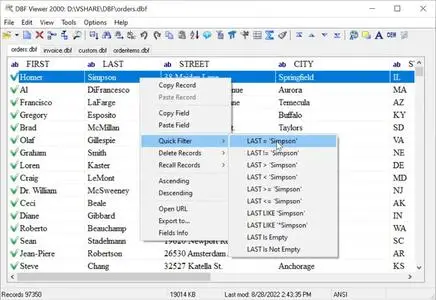
Free Download DBF Viewer 2000 v9.35 Multilingual | 4.8 Mb
DBF Viewer 2000 is a database utility for viewing, editing, and managing DBF files used by database formats such as dBase, FoxPro, Visual FoxPro, and Clipper. It provides access to both the contents and structure of DBF databases without requiring a separate database engine or management system.
The application combines record editing, data searching, duplicate removal, and data export with command-line automation. Its interface also allows users to inspect database fields and work with memo data stored in supported DBF formats.
Software Overview
DBF Viewer 2000 is designed for users who need to work directly with DBF database files. It supports several commonly used database formats, including dBase III, dBase IV, dBase Level 7, FoxPro, and Visual FoxPro.
The program provides tools for examining table structures, browsing records, editing data, and performing routine database maintenance. Its built-in processing engine is designed to handle operations such as searching, duplicate cleanup, and exporting without depending on external database drivers.
Command-line support makes it possible to automate repetitive tasks, including importing data, replacing values, exporting records, and cleaning up duplicate entries.
Key Features
- DBF File Viewer: Open and inspect DBF database files from supported database formats.
- Database Editing: View and modify database records through the application's editing interface.
- Multiple Format Support: Work with dBase, Visual dBase, FoxPro, Visual FoxPro, and Clipper DBF files.
- Table Structure Inspection: Examine field definitions and the structure of DBF databases.
- Memo Field Support: View and edit memo fields in dBase III, dBase IV, dBase Level 7, FoxPro, and Visual FoxPro formats.
- Data Search: Perform queries and locate information within database files.
- Duplicate Record Cleanup: Identify and remove duplicate records as part of database maintenance.
- Data Export: Export database information for use in other workflows.
- Command-Line Automation: Automate repeatable import, replacement, export, and cleanup operations.
- Independent Operation: Work with DBF files without installing a separate database engine, driver, or database management system.
Why Choose DBF Viewer 2000
DBF Viewer 2000 brings essential DBF database operations into a single lightweight application. It is useful for users who maintain legacy databases, inspect existing records, or need to make changes without setting up a complete database management environment.
Its support for multiple DBF variants, memo fields, and command-line operations makes it suitable for both interactive database editing and repeatable data-processing tasks.
System Requirements
- Operating System: Windows 2000, Windows XP, Windows 7, Windows 8, Windows 10, Windows 11, and Windows Server editions
Specific processor, memory, and storage requirements were not provided. Refer to the official website for additional compatibility details.
FAQ
What is DBF Viewer 2000 used for?
It is used to open, view, edit, search, and manage DBF database files.
Which DBF formats does the software support?
The supplied product information lists dBase III, dBase IV, dBase Level 7, FoxPro, Visual FoxPro, Visual dBase, and Clipper among its supported formats.
Can DBF Viewer 2000 edit memo fields?
Yes. It supports viewing and editing memo fields in several dBase and FoxPro database formats.
Does it support command-line automation?
Yes. Command-line operations can be used to automate tasks such as importing, replacing, exporting, and cleaning up duplicate records.
Do I need to install a database engine?
No separate database engine, driver, or database management system is required according to the supplied product description.
Home Page
Product Information
- Software Name: DBF Viewer 2000
- Version: 9.35
- Languages: Multilingual
- License type: Full Version
- File Size: 4.8 Mb
FileHost : RapidGator | FreeDL | DDownload | AlfaFile