Free Download CyberLink PowerDirector Ultimate 2027 v25.0.1104.0 (x64) Multilingual + Portable | 743/738 MB
CyberLink PowerDirector Ultimate is a comprehensive video editing application designed for content creators, video enthusiasts, and professional editors who want to produce polished videos with an efficient editing workflow. It combines creative editing tools, visual effects, audio controls, motion graphics, and AI-assisted features in one integrated environment.
The software provides tools for working with video layers, animated effects, green-screen footage, motion tracking, and color adjustments. Users can create engaging visual sequences, customize their projects with templates, and enhance footage using specialized editing functions for different types of content.
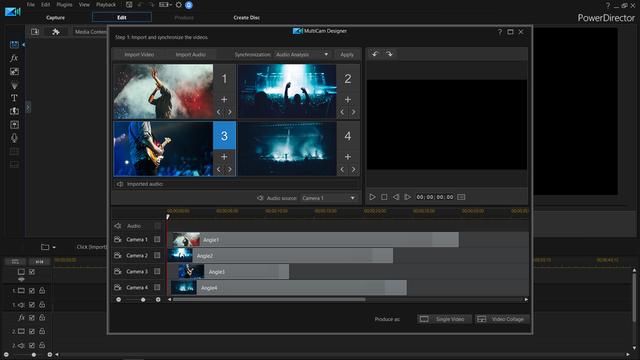
PowerDirector also includes features for action camera footage, multi-camera editing, voice-over recording, and background music adjustment. Its customizable workspace and workflow tools help users manage projects more efficiently, whether they are producing social media videos, tutorials, presentations, or more elaborate creative productions.
Software Overview
CyberLink PowerDirector Ultimate offers a versatile editing environment that supports both straightforward video production and more advanced creative projects. Its timeline-based workflow allows users to combine media, apply effects, animate elements, and refine individual scenes with precise editing controls.
Visual editing tools include masking and blending, keyframing, green-screen background removal, and motion tracking. Color matching and LUT support help establish a consistent visual style, while the Shape Designer provides additional options for creating customized graphic elements.
The application also provides practical tools for audio and project management. Users can record voice-overs directly into their projects, automatically adjust background music around narration, save pre-cut clips for reuse, and work with multiple projects through nested timelines.
Key Features
- Masking and Blending: Layer, shape, and blend visual elements to create customized scenes and artistic compositions.
- Keyframe Animation: Animate effects and visual elements with keyframe controls for smoother movement and dynamic sequences.
- Green Screen Editing: Remove selected backgrounds and create composite scenes using chroma-key techniques.
- Motion Tracking: Attach text and graphics to moving objects so that visual elements follow their movement throughout a clip.
- AI-Assisted Editing: Use AI-powered tools to simplify supported editing tasks and accelerate creative workflows.
- LUTs and Color Match: Apply color lookup tables and match colors to balance footage or establish a consistent visual appearance.
- Shape Designer: Create customized shapes with auto-fit text and keyframe controls.
- Smart Background Music: Automatically adjust background music to match the duration of video footage.
- Customizable Templates: Use video templates and creative resources to develop intros and other visual content.
- Action Camera Tools: Enhance action footage with video stabilization, lens correction, speed controls, zoom, and pan effects.
- Video Collage Designer: Combine multiple video clips into customized collage layouts.
- MultiCam Designer: Work with footage from multiple cameras using dedicated multi-camera editing tools.
- Customized Hotkeys: Configure keyboard shortcuts to navigate the timeline and access editing functions more efficiently.
- Flexible Workspace: Undock the Media Library and timeline to customize the editing interface.
- Nested Projects: Add and edit multiple projects within a single timeline workflow.
- Video Pre-cut: Save trimmed clips in the media library for convenient reuse in other parts of a project.
- Audio Ducking: Automatically reduce background audio volume when voice-over narration begins.
- Voice-over Recording: Record audio directly into a project for tutorials, commentary, podcasts, and other productions.
- Streaming and Recording: Create, record, and share video content using the integrated production tools.
Why Choose CyberLink PowerDirector Ultimate
CyberLink PowerDirector Ultimate combines creative editing capabilities with practical workflow tools, making it suitable for a wide range of video production requirements. Its combination of keyframe animation, motion tracking, masking, green-screen editing, and color correction gives users considerable flexibility when developing visual content.
The application is also designed to reduce repetitive editing work. Features such as customizable hotkeys, reusable pre-cut clips, nested projects, and automatic audio ducking help streamline common tasks and keep projects organized.
For creators working with action cameras, multiple video sources, or narration-based content, its dedicated editing and audio tools provide additional control without requiring separate applications for every production task.
System Requirements
Operating System
Microsoft Windows 11, 10 (64 bit OS only, Windows 11 Arm64 is supported)
Processor (CPU)
- Intel® Core™ i-series (6th generation) and above.
- Intel Haswell (4th generation) processor: Core i7-4770 (only Core and Xeon branded), and above required for AI features.
- AMD Ryzen-series and above
- AMD Phenom® II and above
- AMD A8-7670K and above, AMD Ryzen™ 3 1200 and above required for AI features.
- Qualcomm Snapdragon® 8cx Gen 3
- Qualcomm Snapdragon® X Elite
Graphics Processor (GPU)
- Standard Video: 128 MB VGA VRAM or higher.
- 360-Video: DirectX 11 compatible.
- AI Plugin: 2 GB VGA VRAM or higher.
- NVIDIA Audio/Video Denoise and Room Echo Removal: NVIDIA GeForce RTX 2060, NVIDIA Quadro RTX 3000, NVIDIA TITAN RTX, or higher.
Other Requirements
- Memory: 8GB required (16GB or above recommended).
- Hard Disk Space: 7GB
- Burning Device: Burning drive is required for disc burning purpose.
- Sound Card: Windows compatible sound card is required.
- Screen Resolution: 1024 x 768, 16-bit color or above.
Language Support
- English
- French
- German
- Italian
- Spanish (European)
- Chinese Simplified
- Chinese Traditional
- Japanese
- Korean
- Dutch
- Portuguese (Brazilian)
Frequently Asked Questions
What is CyberLink PowerDirector Ultimate used for?
It is used to edit and produce videos, combining footage, effects, animations, audio, and other visual elements into finished projects.
Does PowerDirector support green-screen editing?
Yes. Its green-screen tools allow users to remove backgrounds and create composite video scenes.
Can PowerDirector edit action camera footage?
Yes. Dedicated action camera tools include video stabilization, lens correction, speed controls, and zoom and pan effects.
Does the software support voice-over recording?
Yes. Users can record narration directly into their projects and use audio ducking to lower background music when narration begins.
Which operating systems are supported?
The supplied system requirements specify 64-bit Windows 10 and Windows 11, including Windows 11 Arm64 support.
Home Page
Product Information
- Software Name: CyberLink PowerDirector Ultimate
- Version: 2027 v25.0.1104.0
- Architecture: x64
- Languages: Multilingual
- License type: Full Version + Portable
- File Size: 743/738 MB
FileHost : RapidGator | FreeDL | DDownload | AlfaFile