



• Regeln für den Video-Bereich:

    In den Börsenbereich gehören nur Angebote die bereits den Allgemeinen Regeln entsprechen.

    Einteilung

    - Folgende Formate gehören in die angegeben Bereiche:
    - Filme: Encodierte Filme von BluRay, DVD, R5, TV, Screener sowie Telesyncs im Format DivX, XviD und x264.
    - DVD: Filme im Format DVD5, DVD9 und HD2DVD.
    - HD: Encodierte Filme mit der Auflösung 720p oder darüber von BluRay, DVD, R5, TV, Screener sowie Telesyncs im Format x264.
    - 3D: Encodierte Filme von BluRay, die in einem 3D Format vorliegen. Dies gilt auch für Dokus, Animation usw.
    - Serien: Cartoon/Zeichentrick, Anime, Tutorials, Dokumentationen, Konzerte/Musik, Sonstiges sind demnach in die entsprechenden Bereiche einzuordnen, auch wenn sie beispielsweise im High Definition-Format oder als DVD5/DVD9/HD2DVD vorliegen. Ausnahme 3D.
    - Bereich Englisch: Englische Releases gehören immer in diesen Bereich.
    - Bereich Talk: Der Bereich, in dem über die Releases diskutiert werden kann, darf, soll und erwünscht ist.


    Angebot/Beitrag erstellen

    - Ein Beitrag darf erst dann erstellt werden, wenn der Upload bei mindestens einem OCH komplett ist. Platzhalter sind untersagt.
    - Bei einem Scenerelease hat der Threadtitel ausschließlich aus dem originalen, unveränderten Releasenamen zu bestehen. Es dürfen keine Veränderungen wie z.B. Sterne, kleine Buchstaben o.ä. vorgenommen werden. Ausnahme Serienbörse:
    - Bei einem Sammelthread für eine Staffel entfällt aus dem Releasename natürlich der Name der Folge. Beispiel: Die Simpsons S21 German DVDRip XviD - ITG
    - Dementsprechend sind also u.a. verboten: Erweiterungen wie "Tipp", "empfehlenswert", "only", "reup", usw. / jegliche andere Zusatzinformation oder Ergänzung, welche nicht in obiger Beschreibung zu finden ist.

    Aufbau des Angebots und Threadtitel

    Der Titel nach folgendem Muster erstellt zu werden. <Name> [3D] [Staffel] [German] <Jahr> <Tonspur> [DL] [Auflösung] <Quelle> <Codec> - <Group>
    Beispiel: The Dark Knight German 2008 AC3 DVDRip XviD - iND
    Beispiel: The Dark Knight 2008 DTS DL BDRip x264 - iND
    Beispiel: The Dark Knight 2008 AC3 DL BDRip XviD - iND
    Beispiel: The Dark Knight German 2008 AC3 720p BluRay x264 iND
    Beispiel: The Dark Knight 2008 DTS DL 1080p BluRay x264 iND
    Beispiel: Die Simpsons S01 German AC3 DVDRip XviD iND
    Beispiel: Die Simpsons S20 German AC3 720p BluRay x264 iND
    Beispiel: Sword Art Online II Ger Sub 2014 AAC 1080p WEBRip x264 - peppermint
    Entsprechend sind also u.a. verboten: Sonderzeichen wie Klammern, Sterne, Ausrufezeichen, Unterstriche, Anführungszeichen / Erweiterungen wie "Tipp", "empfehlenswert", "only", "reup", usw. / jegliche andere Zusatzinformation oder Ergänzung, welche nicht in obiger Beschreibung zu finden ist
    Ausnahmen hiervon können in den Bereichen geregelt sein.

    Die Beiträge sollen wie folgt aufgebaut werden:
    Überschrift entspricht dem Threadtitel
    Cover
    kurze Inhaltsbeschreibung
    Format, Größe, Dauer sind gut lesbar für Downloader außerhalb des Spoilers zu vermerken
    Nfo sind immer Anzugeben und selbige immer im Spoiler in Textform.
    Sind keine Nfo vorhanden z.B. Eigenpublikationen, sind im Spoiler folgende Dateiinformationen zusätzlich anzugeben :
    Quelle
    Video (Auflösung und Bitrate)
    Ton (Sprache, Format und Bitrate der einzelnen Spuren)
    Untertitel (sofern vorhanden)
    Hosterangabe in Textform außerhalb eines Spoiler mit allen enthaltenen Hostern.
    Bei SD kann auf diese zusätzlichen Dateiinformationen verzichtet werden.

    Alle benötigten Passwörter sind, sofern vorhanden, in Textform im Angebot anzugeben.
    Spoiler im Spoiler mit Kommentaren :"Schon Bedankt?" sind unerwünscht.


    Releases

    - Sind Retail-Release verfügbar, sind alle anderen Variationen untersagt. Ausnahmen: Alle deutschen Retail-Release sind CUT, in diesem Fall sind dubbed UNCUT-Release zulässig.
    - Im Serien-Bereich gilt speziell: Wenn ein Retail vor Abschluss einer laufenden Staffel erscheint, darf diese Staffel noch zu Ende gebracht werden.62
    - Gleiche Releases sind unbedingt zusammenzufassen. Das bedeutet, es ist zwingend erforderlich, vor dem Erstellen eines Themas per Suchfunktion zu überprüfen, ob bereits ein Beitrag mit demselben Release besteht. Ist dies der Fall, ist der bereits vorhandene Beitrag zu verwenden.
    - P2P und Scene Releases dürfen nicht verändert oder gar unter einem iND Tag eingestellt werden.


    Support, Diskussionen und Suche

    - Supportanfragen sind entweder per PN oder im Bereich Talk zu stellen.
    - Diskussionen und Bewertungen sind im Talk Bereich zu führen. Fragen an die Uploader haben ausschließlich via PN zu erfolgen, und sind in den Angeboten untersagt.
    - Anfragen zu Upload-Wünschen sind nur im Bereich Suche Video erlaubt. Antworten dürfen nur auf Angebote von MyBoerse.bz verlinkt werden.


    Verbote

    - Untersagt sind mehrere Formate in einem einzigen Angebotsthread, wie beispielsweise das gleichzeitige Anbieten von DivX/XviD, 720p und 1080p in einem Thread. Pro Format, Release und Auflösung ist ein eigener Thread zu eröffnen.
    - Grundsätzlich ebenso verboten sind Dupes. Uploader haben sich an geeigneter Stelle darüber zu informieren, ob es sich bei einem Release um ein Dupe handelt.
    - Gefakte, nur teilweise lauffähige oder unvollständige Angebote sind untersagt. Dies gilt auch für eigene Publikationen, die augenscheinlich nicht selbst von z.B. einer DVD gerippt wurden. Laufende Serien, bei denen noch nicht alle Folgen verfügbar sind, dürfen erstellt und regelmäßig geupdatet werden.
    - Untersagt sind Angebote, welche nur und ausschließlich in einer anderen Sprache als deutsch oder englisch vorliegen. Ausnahmen sind VORHER mit den Moderatoren zu klären.


    Verstoß gegen die Regeln

    - Angebote oder Beiträge, die gegen die Forenregeln verstoßen, sind über den "Melden"-Button im Beitrag zu melden.
  • Bitte registriere dich zunächst um Beiträge zu verfassen und externe Links aufzurufen.

*** Bestes IPTV *** bester Preis *** gratis Test ***


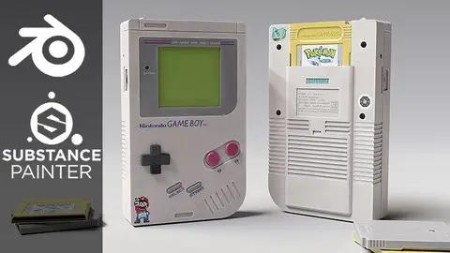
Creating A Nintendo Gameboy In Blender And Substance Painter

0daytutorial

MyBoerse.bz Pro Member
b996ef13216ac0934a6febf8a913ff36.jpg

Creating A Nintendo Gameboy In Blender And Substance Painter
Published 8/2023
MP4 | Video: h264, 1280x720 | Audio: AAC, 44.1 KHz
Language: English | Size: 4.05 GB | Duration: 5h 31m​

Create a Gameboy in Blender 3D and Substance Painter, Learn 3D modelling, 3D texturing in Blender and Substance Painter

What you'll learn

Learn to create Highly Realistic Models using Blender and Substance

Learn Poly Modelling in Blender

Learn to texture assets in Substance Painter

Learn to create a prop from Start to Finish

Learn to use Smart Materials and Masks in Substance Painter

Learn to work with Reference Images and use them to create 3D models from 2D images

Requirements

A computer and basic understanding of Blender and Substance Painter

Blender (Free)

Substance Painter (30 day trial or get the Student License version for Free)

Description

Hello everyone and welcome to this new course. In this course, we will go over the entire process of Creating a Nintendo Game-Boy using Blender and Substance Painter.What you will get:· 16 FHD videos with over 5+ hours of content· All the resources files required to complete the course including the Models, Substance Painter Files, Textures, Alphas etcWe will go over the complete pipeline of creating a high-quality realistic prop, starting with modelling the prop in blender, texturing in Substance Painter and finally lighting and rendering a portfolio piece in blender.This course will help you improve your 3D prop modelling and texturing skills massively as we go through each step together and learn many different techniques. After finishing the course, you would easily be able to create the renders shown in the trailer and create high quality props of your own.This course has over 5+ hours of content! (All the videos have audio commentary)We will go over every step in this course together and nothing will be skipped. The course does not have any kind of time-lapse so that you can follow every step easily.We will start by modelling the prop in Blender, and learn various modelling techniques and also learn a lot about different modifiers. After finishing the modelling, we will apply all the modifiers and UV unwrap our model for export.We will import our model into Substance Painter to start with the texturing process; we will start by baking the mesh maps for our model. We will learn to create high quality and realistic materials and the key features of Substance Painter like Smart Masks, generators, smart materials etc.After modelling and texturing our main model, we will also model and texture a Game-Boy Cartridge to enhance our renders and give them a bit more detail.At last, we will take our models back to Blender and render them. We will set up the material, lighting, and the camera and learn how to use HDRIs to light our scenes. We will finish the course by taking a portfolio ready render and a little bit of Photoshop editing.This course is for everyone who has a basic understanding of Blender and Substance Painter and wants to upgrade their skills.

Overview

Section 1: Creating the GameBoy

Lecture 1 Introduction

Lecture 2 Chapter - 1

Lecture 3 Chapter - 2

Lecture 4 Chapter - 3

Lecture 5 Chapter - 4

Lecture 6 Chapter - 5

Lecture 7 Chapter - 6

Lecture 8 Chapter - 7

Lecture 9 Chapter - 8

Lecture 10 Chapter - 9

Lecture 11 Chapter - 10

Lecture 12 Chapter - 11

Lecture 13 Chapter - 12

Lecture 14 Chapter - 13

Lecture 15 Chapter - 14

Lecture 16 Chapter - 15

Lecture 17 Chapter - 16

Any type of Blender/Substance user who wants to increase their skill level

W1YS1xUk_o.jpg


680236570_yxusj-x3678f5tu8md.jpg

Creating A Nintendo Gameboy In Blender And Substance Painter
Published 8/2023
MP4 | Video: h264, 1280x720 | Audio: AAC, 44.1 KHz
Language: English | Size: 4.05 GB | Duration: 5h 31m​

Create a Gameboy in Blender 3D and Substance Painter, Learn 3D modelling, 3D texturing in Blender and Substance Painter

What you'll learn

Learn to create Highly Realistic Models using Blender and Substance

Learn Poly Modelling in Blender

Learn to texture assets in Substance Painter

Learn to create a prop from Start to Finish

Learn to use Smart Materials and Masks in Substance Painter

Learn to work with Reference Images and use them to create 3D models from 2D images

Requirements

A computer and basic understanding of Blender and Substance Painter

Blender (Free)

Substance Painter (30 day trial or get the Student License version for Free)

Description

Hello everyone and welcome to this new course. In this course, we will go over the entire process of Creating a Nintendo Game-Boy using Blender and Substance Painter.What you will get:· 16 FHD videos with over 5+ hours of content· All the resources files required to complete the course including the Models, Substance Painter Files, Textures, Alphas etcWe will go over the complete pipeline of creating a high-quality realistic prop, starting with modelling the prop in blender, texturing in Substance Painter and finally lighting and rendering a portfolio piece in blender.This course will help you improve your 3D prop modelling and texturing skills massively as we go through each step together and learn many different techniques. After finishing the course, you would easily be able to create the renders shown in the trailer and create high quality props of your own.This course has over 5+ hours of content! (All the videos have audio commentary)We will go over every step in this course together and nothing will be skipped. The course does not have any kind of time-lapse so that you can follow every step easily.We will start by modelling the prop in Blender, and learn various modelling techniques and also learn a lot about different modifiers. After finishing the modelling, we will apply all the modifiers and UV unwrap our model for export.We will import our model into Substance Painter to start with the texturing process; we will start by baking the mesh maps for our model. We will learn to create high quality and realistic materials and the key features of Substance Painter like Smart Masks, generators, smart materials etc.After modelling and texturing our main model, we will also model and texture a Game-Boy Cartridge to enhance our renders and give them a bit more detail.At last, we will take our models back to Blender and render them. We will set up the material, lighting, and the camera and learn how to use HDRIs to light our scenes. We will finish the course by taking a portfolio ready render and a little bit of Photoshop editing.This course is for everyone who has a basic understanding of Blender and Substance Painter and wants to upgrade their skills.

Overview

Section 1: Creating the GameBoy

Lecture 1 Introduction

Lecture 2 Chapter - 1

Lecture 3 Chapter - 2

Lecture 4 Chapter - 3

Lecture 5 Chapter - 4

Lecture 6 Chapter - 5

Lecture 7 Chapter - 6

Lecture 8 Chapter - 7

Lecture 9 Chapter - 8

Lecture 10 Chapter - 9

Lecture 11 Chapter - 10

Lecture 12 Chapter - 11

Lecture 13 Chapter - 12

Lecture 14 Chapter - 13

Lecture 15 Chapter - 14

Lecture 16 Chapter - 15

Lecture 17 Chapter - 16

Any type of Blender/Substance user who wants to increase their skill level

680236593_yxusj-vwtx9s304p70.jpg

pIXIoZWW_o.jpg

 
Zurück
Oben Unten
