




• Regeln für den Audio-Bereich:

    Allgemeine Boardregeln: MyBoerse-bz-Regelwerk Regelwerk Audioboerse

    1. Das richtige Forum

    Wähle ein passendes Unterforum für dein Angebot

    2. Doppelte Threads vermeiden / Ein Thread pro Interpret


    Da es hier langsam ausartet mit gleichen Interpreten, aber verschiedenen Jahren, gilt ab sofort: Nur noch ein Thread pro Interpret, unabhängig von der Jahreszahl der verschiedenen Alben. Wünschenswert wäre es wenn ihr den Titel ab sofort so benennt: Interpret - Diskographie

    Um Doppelpost zu vermeiden, nutze vor dem Posten die Suchenfunktion. Gibt es schon einen passenden Thread, dann poste Dein Angebot dort hinein. Für einzelne Alben einer Sammlung bzw. Hörbuchreihen bitte in den passenden Sammelthreads posten.

    3. Der richtige Titel

    Gib dem Thread einen einfachen aber vernünftigen Titel, der zum Angebot passt. Um den Thread besser über die Suche zu finden, solltest du einen normalen Titel benutzen. Bei Threads in den Foren Musik, HQ Audio / Lossless und Soundtracks / OST immer das Jahr am Ende des Threadtitels in Klammern angeben, z.B.: Interpretname - Albumname (2016)

    4. Die richtigen Angaben

    Ein Thread/Thema in der Audio-Börse muss dem User Informationen über das Angebot geben können.

    Pflichtangaben:

    Bild des Uploads
    Genre
    Bitrate der Musik Datei: in Kbit/s
    Hoster
    Größe in MB oder GB
    Tracklist

    Optional: Angabe wenn Cover dabei sind.


    Sollte ein Angebot diese Pflichtangaben nicht beinhalten, wird der Verfasser darauf hingewiesen. Sollte dieses dann nicht geändert werden, werden die Beiträge gelöscht.

    (Sollte der Upload nicht als mp3 vorliegen, sondern als ogg/Bin/Cue o.Ä., dann ist dies auch eine Pflichtangabe)

    5. Defekte/nicht verfügbare Links und andere Probleme mit einem Upload

    Sollte ein Upload down sein, dann meldet es per PN dem Uploader. Gibt es zwei Threads zum gleichen Thema oder ein Upload im falschen Forum, dann meldet dies via "Beitrag melden" Funktion, diese befindet sich neben dem Bedanken-Button.

    6. Reupp- /Hosteranfragen
    Reuppanfragen oder auch Anfragen ob es bei einem anderen Hoster geuppt werden kann, bitte direkt per PN an den Uploader und nicht in den Thread.
  • Bitte registriere dich zunächst um Beiträge zu verfassen und externe Links aufzurufen.

++ Premium IPTV ++ 7000 Live Sender ++ UHD Qualität ++ Mediathek mit 18.000 Inhalten ++


VenneTV


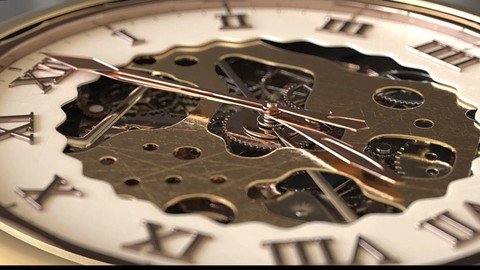
Create Realistic Mechanical Pocket Watch

Tutorials

MyBoerse.bz Pro Member
6e33e632d7256ad05df907156817a9f5.jpeg

Free Download Create Realistic Mechanical Pocket Watch
Published 9/2023
MP4 | Video: h264, 1280x720 | Audio: AAC, 44.1 KHz
Language: English | Size: 1.64 GB | Duration: 2h 12m
course for making Realistic Mechanical Pocket Watch

What you'll learn
We will learn how to model pocket watch like in the real live
We will learn how to animate pocket watch like in the real live
We will learn how to light the pocket watch like in the real live
We will learn how to use Xpresso
Requirements
be able to use c4d and octane
Description
in this course we will learn how to model and animate and render Realistic Mechanical Pocket Watch and we will learn some technic of modeling and lighting and we will be able to make realistic animation and render short high quality video and composite first chapter all about modeling and the second chapter will focus in animation by c4d also we will use octane render to get high quality video we will use after effect so as to composite the video .it will be long journey form modeling to the final render you need good computer and make sure you have good understanding of c4d and after effect we will start making the outer body of the watch.we will start blocking the inside part.We Will Start Creating Creating The inside gear.We Will Continue Creating The inside gear.We will create the upper part and the number.we will finish the chapter by Creating The Watch handschapter 2 We will put the different materials and we will made the gold materialschapter 3we will animate the watch by use c4d xpresso and will make the watch hands move in the end we will go to after effect to make the final video
Overview
Section 1: chapter 1
Lecture 1 modeling the outer body
Lecture 2 blocking the inside
Lecture 3 Creating The inside gear
Lecture 4 Creating The inside gear 2
Lecture 5 Creating The inside gear 3
Lecture 6 Creating The upper part and the number
Lecture 7 Creating The Watch hands
Section 2: chapter 2
Lecture 8 Textureing
Section 3: chapter 3
Lecture 9 Animating the clock part 01
Lecture 10 Animating the clock part 02
Lecture 11 Animating the clock part 03
Lecture 12 composting in after effect
intermediate student
Homepage


Recommend Download Link Hight Speed | Please Say Thanks Keep Topic Live
No Password - Links are Interchangeable

 

756307524_yxusj-z234fwk8e64n.jpg

Create Realistic Mechanical Pocket Watch
Published 9/2023
MP4 | Video: h264, 1280x720 | Audio: AAC, 44.1 KHz
Language: English | Size: 1.64 GB | Duration: 2h 12m​

What you'll learn

We will learn how to model pocket watch like in the real live

We will learn how to animate pocket watch like in the real live

We will learn how to light the pocket watch like in the real live

We will learn how to use Xpresso

Requirements

be able to use c4d and octane

Description

in this course we will learn how to model and animate and render Realistic Mechanical Pocket Watch and we will learn some technic of modeling and lighting and we will be able to make realistic animation and render short high quality video and composite first chapter all about modeling and the second chapter will focus in animation by c4d also we will use octane render to get high quality video we will use after effect so as to composite the video .it will be long journey form modeling to the final render you need good computer and make sure you have good understanding of c4d and after effect we will start making the outer body of the watch.we will start blocking the inside part.We Will Start Creating Creating The inside gear.We Will Continue Creating The inside gear.We will create the upper part and the number.we will finish the chapter by Creating The Watch handschapter 2 We will put the different materials and we will made the gold materialschapter 3we will animate the watch by use c4d xpresso and will make the watch hands move in the end we will go to after effect to make the final video

Overview

Section 1: chapter 1

Lecture 1 modeling the outer body

Lecture 2 blocking the inside

Lecture 3 Creating The inside gear

Lecture 4 Creating The inside gear 2

Lecture 5 Creating The inside gear 3

Lecture 6 Creating The upper part and the number

Lecture 7 Creating The Watch hands

Section 2: chapter 2

Lecture 8 Textureing

Section 3: chapter 3

Lecture 9 Animating the clock part 01

Lecture 10 Animating the clock part 02

Lecture 11 Animating the clock part 03

Lecture 12 composting in after effect

intermediate student

yxusj-7-Creating-The-Watch-hands.jpg

756307548_yxusj-f03e56m7le5s.jpg


f9e6df9447226d99b26eebeefe836903.jpg

Create Realistic Mechanical Pocket Watch
Published 9/2023
MP4 | Video: h264, 1280x720 | Audio: AAC, 44.1 KHz
Language: English | Size: 1.64 GB | Duration: 2h 12m​

What you'll learn

We will learn how to model pocket watch like in the real live

We will learn how to animate pocket watch like in the real live

We will learn how to light the pocket watch like in the real live

We will learn how to use Xpresso

Requirements

be able to use c4d and octane

Description

in this course we will learn how to model and animate and render Realistic Mechanical Pocket Watch and we will learn some technic of modeling and lighting and we will be able to make realistic animation and render short high quality video and composite first chapter all about modeling and the second chapter will focus in animation by c4d also we will use octane render to get high quality video we will use after effect so as to composite the video .it will be long journey form modeling to the final render you need good computer and make sure you have good understanding of c4d and after effect we will start making the outer body of the watch.we will start blocking the inside part.We Will Start Creating Creating The inside gear.We Will Continue Creating The inside gear.We will create the upper part and the number.we will finish the chapter by Creating The Watch handschapter 2 We will put the different materials and we will made the gold materialschapter 3we will animate the watch by use c4d xpresso and will make the watch hands move in the end we will go to after effect to make the final video

Overview

Section 1: chapter 1

Lecture 1 modeling the outer body

Lecture 2 blocking the inside

Lecture 3 Creating The inside gear

Lecture 4 Creating The inside gear 2

Lecture 5 Creating The inside gear 3

Lecture 6 Creating The upper part and the number

Lecture 7 Creating The Watch hands

Section 2: chapter 2

Lecture 8 Textureing

Section 3: chapter 3

Lecture 9 Animating the clock part 01

Lecture 10 Animating the clock part 02

Lecture 11 Animating the clock part 03

Lecture 12 composting in after effect

intermediate student

lN0rhGgH_o.jpg

 
Zurück
Oben Unten
