




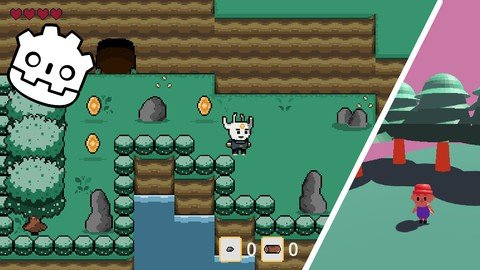
Free Download Create A 2D Rpg And A 3D Game In Godot 4.2
Published 2/2024
MP4 | Video: h264, 1920x1080 | Audio: AAC, 44.1 KHz
Language: English | Size: 6.31 GB | Duration: 12h 7m
A course for making a 2D RPG with resource gathering mechanic and an introductory course to 3D in Godot 4.2 and 4.1
What you'll learn
Learn the key concept of programming game in Godot 4
Create a 2D RPG protoype with resource gathering, crafting system and dialog manager
Having a good understanding of how 3D programming works in Godot 4
You will learn GDScript, which is the language of Godot
Requirements
No programming experience needed, although knowing some basics always help.
Description
In this course you will learn all the fundamentals of creating a 2D RPG similar to game like Zelda: a link to the past, Stardew Valley or Pokemon, from start to finish. I'll teach you the key concept of that genre of game, including:Finite State MachineUsing Blend treeLooting coin when hitting a chestUsing keys to open locked doorsCreating cavesCreating a UI system displaying the number of lifes and coinsCreating a system of resources gatheringCreating an inventoryCreating a crafting system to create a new weaponSwitching weapons by pressing a keyYou can check the curriculum to learn more about the content of the course.I'm focusing on making video that are straight to the point, giving you all the basics you need to understand key concept (while showing you how to use them) without overloading you.Being a big fan of the Zelda series, it is a big blast for me to be able to teach you how to make a game of that genre, which is known to be quite difficult, but so rewarding and satisfying to play! At the end of this course, you will have a working RPG game prototype that you'll be able to develop, you will have learn the key concept of programming that type of game and - if you are a completely new to programming - you will have learn all the key concept of programming.Then in the second part of this course you will learn how to create a simple 3D retro game. This is an introduction to 3D, by no mean a full blown course about how to create a full 3D game, but you will learn the following:How to import 3D assetsDealing with animationsCreating sword attackCreating enemy that can patrol, chase and attack the playerCreating state machine to handle complex behaviorCollecting coin and objectDisplay the number of life and coin collectedAnd way much more. To have an overview, check the curriculum to see everything we are going to do together.You don't need to have any prior experience, although a basic understanding of programming is a plus. I will teach you all the primary concept and explain you in details (without overloading you with no relevant concept) every line we are going to create for this game.If all of this sounds like fun to you, enroll in this course and I'll see you in the first lecture!
Overview
Section 1: 2D RPG - Creating the player
Lecture 1 Setup and creating the player
Lecture 2 Coding the player movement
Lecture 3 Creating the player animations
Lecture 4 Creating the animation tree
Lecture 5 Calling the animations through code
Lecture 6 Creating the sword animations and the sword hitbox
Lecture 7 Creating a finite state machine, creating input and calling our sword attack
Lecture 8 Create a crate to slash with the sword and setup collision layer and buses
Lecture 9 Creating the global data script and damage the player
Lecture 10 Create the GUI to display the number of life
Lecture 11 Introduction to shaders to damage the player
Lecture 12 Creating the death animation and calling it through code
Section 2: 2D RPG - Creating the world
Lecture 13 Create the tilemap for the world
Lecture 14 Creating an animated tilemap for the lake
Lecture 15 Bringing trees, plants and rocks to our background
Lecture 16 Create a house and an animated door
Lecture 17 Create a second house in a modular way
Lecture 18 Toggle the transparency of the house and the trees
Lecture 19 Create coins to collect and loot it from the crates
Lecture 20 creating a cave, the entry of the cave and changing levels
Lecture 21 Instantiating the player to the scene and creating checkpoints
Lecture 22 Open the door by pressing a button
Lecture 23 Creating a chest and keys system
Lecture 24 Opening the door with the key and fixing a bug
Lecture 25 Creating the interior of the house and getting inside
Lecture 26 Creating animated spikes to replace our killzone
Lecture 27 Create a coin counter to the GUI
Section 3: 2D RPG - Creating the resource gathering mechanic
Lecture 28 Creating the item scene to collect (wood and rock)
Lecture 29 Destroying rocks and trees and spawn our resources
Lecture 30 Create the inventory script and adding our resource to it
Lecture 31 Launch our resources in a random direction
Section 4: 2D RPG - Creating the inventory UI
Lecture 32 Create the scene for the UI & display the amount of items collected
Lecture 33 Control the visibility of our inventory UI with custom input
Section 5: 2D RPG - Crafting System
Lecture 34 Create the hammer scene
Lecture 35 Create the animations for the hammer
Lecture 36 Setting up the collision shape for the hammer
Lecture 37 Creating a statue that can craft new weapon if we have the right resources
Lecture 38 Detecting the player and crafting and instantiating the hammer scene
Lecture 39 Displaying the weapon in the gui and switching weapon with input + fixing bug
Section 6: 2D RPG - Dialog manager
Lecture 40 Fixing bug
Lecture 41 Creating the dialog scene and its script
Lecture 42 Create the dialog manager script and assign the dialog to the statue
Section 7: Introduction to 3D - Create the foundation of our game
Lecture 43 Setting up Godot, overview of the interface and importing our assets
Lecture 44 Creating our ground, camera and lighting environment
Lecture 45 Setting up the player scenes and animations
Lecture 46 Coding the player movement, animations, jump and rotations
Lecture 47 Rotating the camera around the player with the right joystick of the controller
Lecture 48 Rotating the camera around the player with the mouse
Lecture 49 Create a house and some trees
Lecture 50 Create coins to collect
Lecture 51 Create a script for the player data
Lecture 52 Calling our jump with a state machine
Lecture 53 Create our sword animation and collision
Lecture 54 Calling our sword animation into the code and creating input
Lecture 55 Creating a Game User Interface and displaying the number of coins and lifes
Lecture 56 Fixing the rotation of the player to the direction of the camera
Section 8: Introduction to 3D - Adding more element to our game
Lecture 57 Creating our enemy
Lecture 58 Coding the movement and animations of the enemy
Lecture 59 Making our enemy patrol randomly
Lecture 60 Making our enemy chasing and attacking the player
Lecture 61 Fixing the rotation of the enemy during the attack and coding & adding an input
Lecture 62 Killing the enemy
Lecture 63 Enemy killing the player and collision settings
Beginner and intermediate programmer interested in learning how to use Godot for creating 2D & 3D games
Homepage
Recommend Download Link Hight Speed | Please Say Thanks Keep Topic Live
No Password - Links are Interchangeable
