



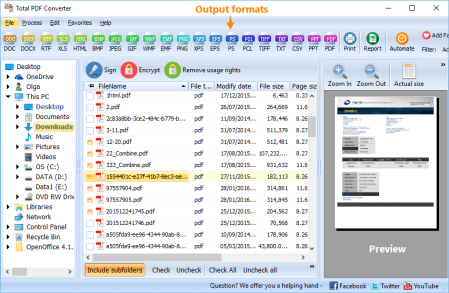
Coolutils Total PDF Converter v6.1.0.17 Multilingual
File size: 192.78 MB
Total PDF Converter converts PDF to DOC, RTF, TIFF, XLS, HTML, EPS, PS, TXT, CSV, PDF/A and images in batch.
Unlike other batch PDF converters, the Total PDF Converter is extremely user-friendly thanks to a well-planned interface. Additionally, registered users gain direct access to command line support for quiet automatic functioning on the back end. Total PDF Converter supports PDF, PS, EPS, PRN, XPS, OXPS files. It's not a simple PRN converter, it's the all-in-one solution. New formats are constantly being added.
Tell Total PDF Converter if you want to omit images from the source files. You can also get the new file with images only without text if you like.
Convert PDF to PDF/A in batch. Update thousands of files in one process.
Total PDF Converter can act as a PDF splitting utility and extract selected pages from a multi-page PDF. It can also split PDF by bookmarks or by blank pages.
Total PDF Converter will change the date of the file or keep the original stamps. Just check the appropriate checkbox.
Sign PDF documents with your digital signature during the file conversion process.
Combine several PDF files into one multi-page document with out powerful batch PDF converter.
Total PDF Converter can automatically rotate your documents.
PDF to Word converter supports both Doc and DOCX for your convenience.
Convert PDF to JPG? Customize the final image to your needs. Set the desired quality of the JPEG image to compromize the file size. The app also extracts selected pages and converts them to JPEG.
Convert PDF/PS/EPS/PRN files via our clear interface with lots of hints for bners.
The widest list of output file types: DOC, DOCX, RTF, XLS, HTML, BMP, JPEG, GIF, WMF, EMF, PNG, EPS, PS, TIFF, TXT, CSV, PDF/A and PDF!
Total PDF Converter can combine several PDF files into one TIFF image. Or place every page of a multi-page PDF into a new TIFF files.
Tune the output: set new mas in inches to your standards (ready for printing).
Each PDF file is displayed in Preview panel. You can zoom it in/out or view the document full-sized. Preview option makes it easy to find the necessary PDF file.
Add text or image watermarks to the header or the footer of the output file. It's perfect for stamping bates too!
Want more order? Add pagination (sequential numbering of folders is available).
Total PDF Converter can extract odd or even pages for you.
Unlike free PDF converters, our app processes thousands of documents keeping the folder stucture.
No matter what MS Office you have, our app can convert PDF to DOC and DocX.
We also offer PDF Converter SDK for Web\SQL server\ASP\.NET\C#. With ActiveX you can easily implement our PDF converter into your application and redistribute it to the end users.
Total PDF Converter has full command line support (get the ready-to-use command line from GUI).
Windows 2000/2003/Vista/7/8/10
Download Links
RapidGator
NitroFlare
